How to Evaluate Conversation Intelligence Platforms in 2026
See what separates enterprise-ready conversation intelligence tools from demo-only ones, with a buyer's framework updated for October 2026.
 Maintouch
If your organization has started assessing conversation intelligence tools, you’ve probably sat through at least one demo where the AI summary looked impressive and the CRM sync seemed simple enough. What those demos rarely show is how the tool behaves when a hundred people are using it, whether sharing can be enforced by default, or what happens to all that conversation data when someone leaves the company. Those are the questions that actually determine whether a deployment succeeds. Spinach AI is the system of record for conversation data, built for company-wide deployment.
TLDR:
- Conversation intelligence turns spoken conversations into structured data: decisions, action items, and CRM records, going beyond raw transcripts
- The quality gap between tools lives in AI analysis and delivery, not transcription, which is a commodity across vendors
- 80% of employees use AI tools not approved by their organizations, making governance the real enterprise deployment risk (Cloud Security Alliance, May 2026)
- Assess any enterprise tool across five axes: coverage scope, data architecture, integration depth, governance controls, and total cost at org scale
- Spinach AI centralizes conversation data from Zoom, Meet, Teams, Slack Huddles, and Webex into one governed organizational record with SOC 2 Type II, GDPR, and HIPAA compliance
What Is a Conversation Intelligence Platform?
A conversation intelligence platform captures spoken conversations, converts them into structured data, and routes that data to the systems and workflows that need it. The output is what separates it from a recorder or transcription tool: instead of a raw audio file or a wall of text, you get decisions, action items with named owners, sentiment signals, and searchable records that feed CRMs, project tools, and AI agents.
Unstructured conversation is the highest-context data a company produces. These platforms are the infrastructure that makes it usable.
How Conversation Intelligence Differs from Call Recording and Conversational AI
Three terms get conflated regularly, and confusing them leads to buying the wrong thing.
- Call recording stores audio. It captures what happened but does nothing with it. You get a file.
- Conversational AI is an interface that talks back. Think chatbots, voice assistants, IVR systems. It generates responses; it does not analyze conversations after the fact.
- Conversation intelligence analyzes recorded conversations to surface decisions, sentiment, objections, and action items, then routes that output to the tools that need it.
A call recorder archives. Conversational AI responds. Conversation intelligence turns what was said into something the organization can act on.
How a Conversation Intelligence Platform Works
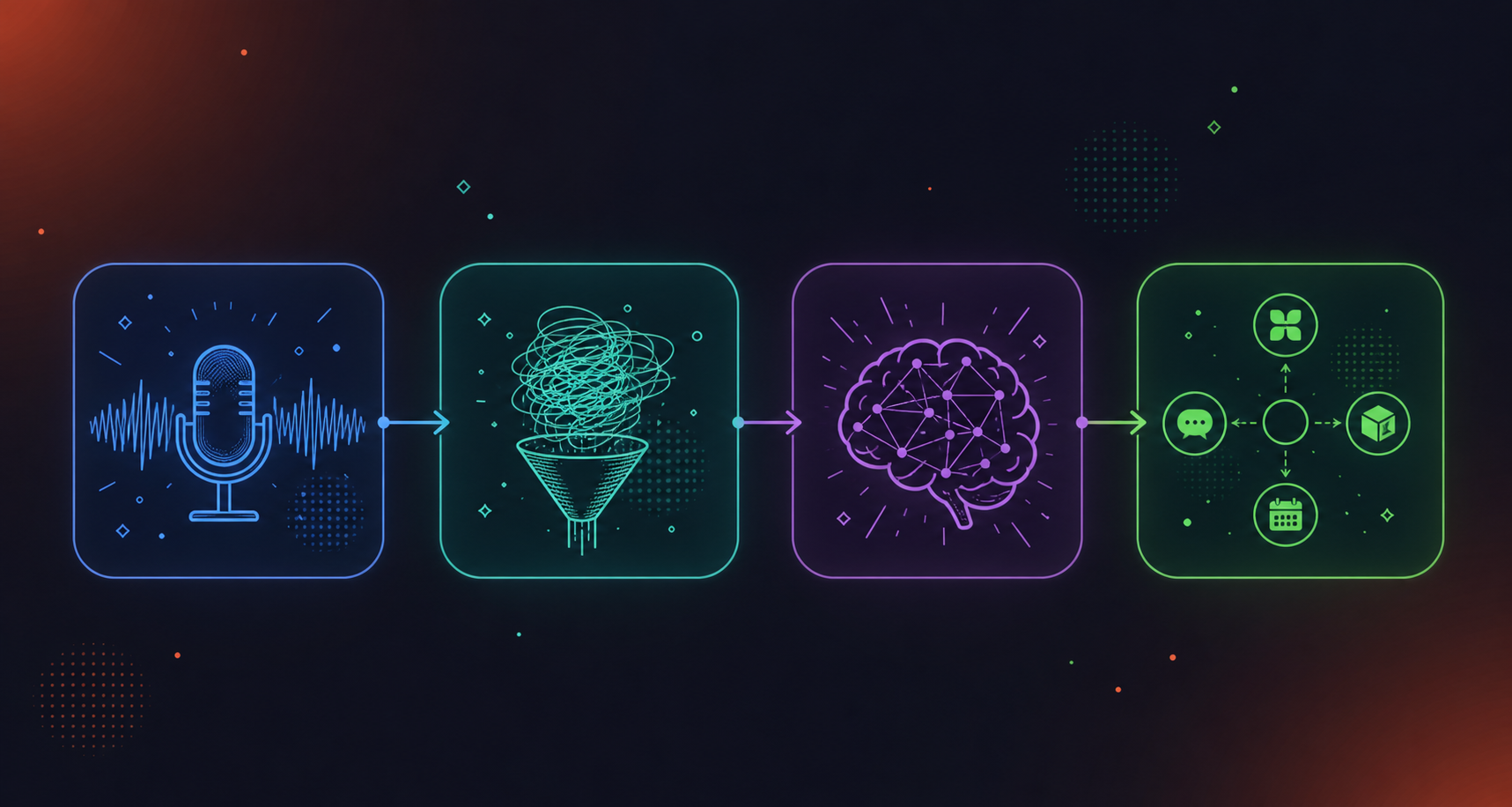
Most conversation intelligence tools follow four stages, regardless of vendor.
- Capture: the tool joins or records the conversation, pulling in audio and, depending on the product, video, screen share, and chat.
- Transcription: speech is converted to text, with speaker labels attached to separate participants.
- AI analysis: the transcript is processed for topics, sentiment, keywords, objections, decisions, and action items. This is where raw text becomes something structured.
- Delivery: outputs are routed to the tools that need them. Summaries go to Slack, action items land in a project tracker, deal signals update the CRM.
The quality gap between tools almost always lives in stages three and four. Transcription is a commodity. What the system does with the transcript, and where it sends the output, is the actual product.
Core Features to Assess in Any Conversation Intelligence Tool
The table below covers what separates a capable tool from one that holds up under enterprise deployment.
Feature | Table stakes | Enterprise differentiator |
|---|---|---|
Automated summaries | Yes | Structured outputs: decisions, owners, blockers |
Action item extraction | Yes | Named owners, routed to project tools automatically |
Keyword and topic tracking | Yes | Custom taxonomy, sales methodology extraction |
CRM integration | Yes | Custom field mapping, beyond basic sync |
Search and retrieval | Yes | Org-wide corpus, not per-user silos |
Cross-platform capture | Partial | Video, audio, screen share, chat across all meeting tools |
Policy-based sharing | No | Admin-enforced defaults, not per-meeting manual sharing |
Data retention controls | No | Configurable per data type, per org policy |
Admin reporting | No | Audit logging, usage visibility, compliance monitoring |
The bottom three rows are where lightweight tools drop off. Individual note takers give you a transcript and a summary, then stop. Org-wide deployment requires enforced sharing policy, retention configured separately for transcripts and video, and a real audit trail for IT.
Who Uses Conversation Intelligence Software and Why
Conversation intelligence serves different functions across teams, but the compounding argument is organizational: the same conversation corpus that coaches a sales rep also tells a product team what customers actually said, and tells leadership where decisions are stalling.
- Sales: rep coaching, deal visibility, objection tracking, and CRM updates without manual entry
- Customer success: implementation context, risk signals, and handoff continuity across account transitions
- Product and engineering: customer feedback tied to specific conversations, with decisions captured in context
- HR and recruiting: structured interview notes, onboarding continuity, and performance inputs
- Leadership: cross-team visibility into blockers before they escalate
The per-role value is real. The organizational value comes when those use cases share one governed corpus instead of five separate tools producing five separate silos nobody can query together.
Conversation Intelligence for Sales Teams
Sales is where most buyers first encounter conversation intelligence tools, and the use cases are specific: rep coaching, methodology extraction (MEDDPIC, BANT), deal risk signals from late-stage calls, and CRM fields that update from what was said, sourced directly from the call, not reconstructed from memory.
Revenue intelligence tools like Gong go deep here. If sales coaching is the only problem you’re solving, a sales-specific tool will have more specialized features for that workflow.
The tradeoff appears when your organization wants one governed corpus across sales, product, CS, and leadership. A sales-only tool captures customer-facing calls but misses internal deal strategy sessions, handoff calls, and renewal conversations that move to CS post-close. An org-wide conversation intelligence platform covers the full account lifecycle and lets product, legal, and leadership query the same data sales already captured.
For sales teams, the features worth pressure-testing:
- CRM field mapping: go past “syncs to Salesforce” and confirm which specific fields update, with what logic, and whether that logic is configurable without engineering support.
- Methodology extraction accuracy: test it against your actual call recordings, not a demo script, before committing.
- Coaching workflow access: whether those features require a separate license tier or are included in the same product the rest of the org uses.
The Organizational Governance Problem Most Buyers Underestimate
Most teams pick a conversation intelligence tool because the summaries look good in a demo. The actual blocker in enterprise deployment is almost never summary quality. It’s who owns the data, who can see it, how long it’s retained, and whether IT signed off.
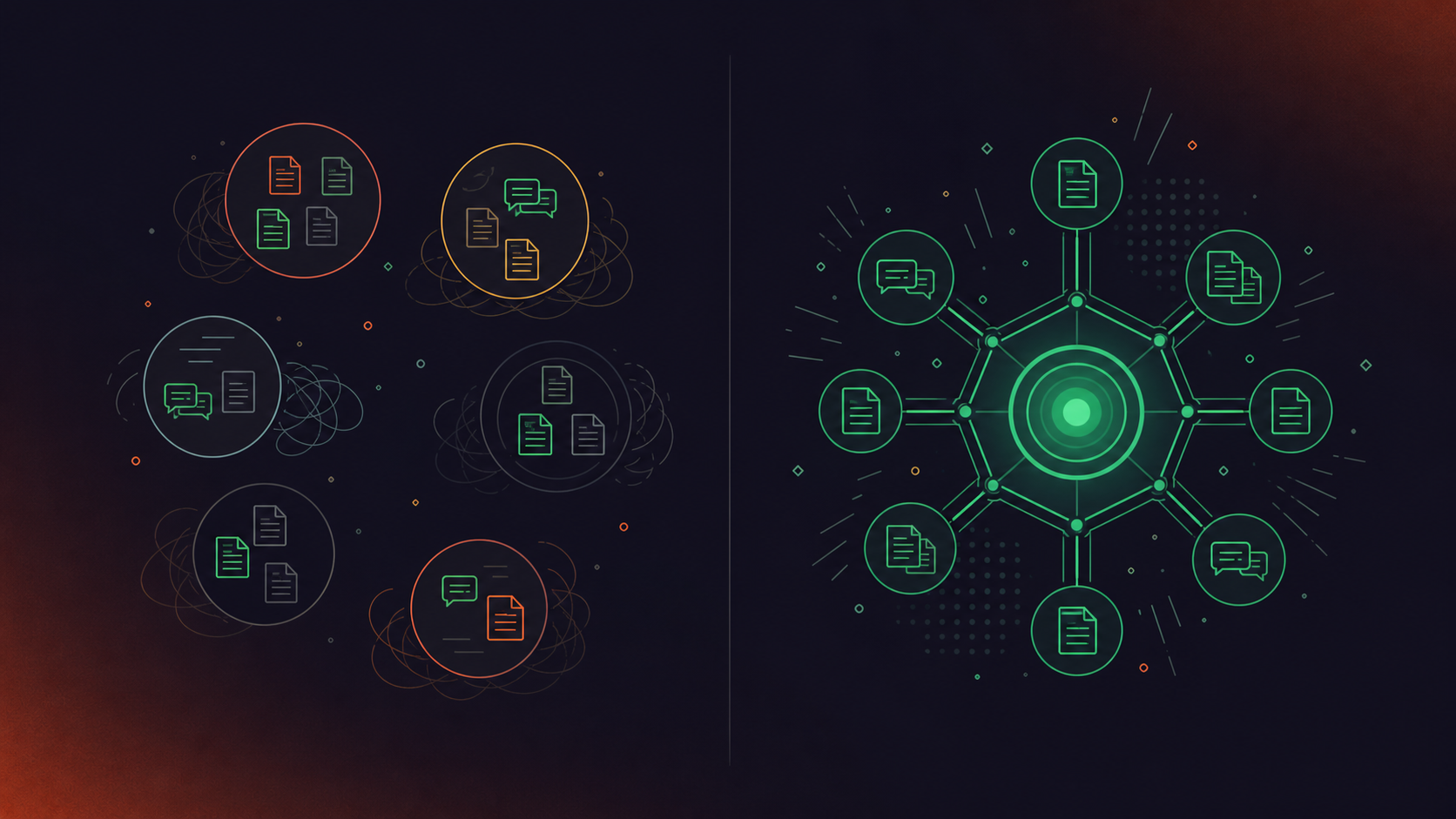
When teams adopt individual note takers ad hoc instead of an enterprise conversation intelligence platform, the result is fragmented silos with no unified corpus and no enforceable policy. According to the Cloud Security Alliance (May 2026), 80% of employees use AI tools not approved by their organizations, and only 37% of enterprises have any AI governance policy in place. That gap is the real deployment risk.
Before selecting any tool, you need answers to four governance questions:
- Who controls default sharing scope, and can it be enforced org-wide?
- How is recording consent handled, and is the bot always visible?
- Can retention be configured per data type, or is it a single org-wide setting?
- Does the vendor have SOC 2, GDPR, and HIPAA coverage, and can they produce a BAA?
Security, Compliance, and Privacy Requirements for Enterprise Deployment
Procurement teams in compliance-sensitive industries run a checklist. Here is what that checklist actually contains.
- Recording consent policies: the bot must be visible to all participants. Covert recording is not compliant in multiparty-consent jurisdictions, full stop.
- Certifications: SOC 2 Type II, GDPR, and HIPAA at minimum. For HIPAA engagements, confirm a BAA is available.
- Data retention: configurable per data type (transcript, summary, video) independently. A single org-wide toggle is not sufficient for most enterprise legal requirements.
- PII handling: transcript-level redaction of structured identifiers, including payment card and national ID numbers.
- Model training: customer data must never be used to train AI models. Confirm zero data retention terms with LLM providers, backed by contractual commitments, beyond a policy statement alone.
- Admin audit trail: audit logging and usage reporting for IT, extending beyond end-user settings.
One question that comes up in nearly every security review: does the vendor use voice biometrics? Speaker identification based on voice signatures creates biometric data under several state and national privacy laws. Confirm that speaker identification is context-based, not biometric.
How to Assess Conversation Intelligence Platforms: A Buyer’s Framework
Five axes separate tools that work in a demo from ones that hold up at company-wide scale.
Coverage scope
Which meeting platforms does the tool join? Does it capture only transcript, or also video, screen share, and in-meeting chat? A tool that covers Zoom but misses Teams or Slack Huddles creates gaps the moment your org runs mixed-platform calls.
Data architecture
Per-user silos versus a single organizational record is the most consequential structural choice. If every employee owns their own meeting data, there is no corpus IT can govern or leadership can query.
Integration depth
“Integrates with Salesforce” can mean anything. Test whether CRM field mapping is configurable without engineering support, and whether project tool connections create tickets or just append text to a note.
Governance and admin controls
Can sharing defaults be enforced org-wide, or only set per user? Is retention configurable per data type as part of meeting data governance? Does IT get an audit trail? These questions determine whether your security review passes.
Total cost at org scale
Per-user pricing compounds fast. A tool priced for a sales team of 20 may cost 10x more deployed across 200 people. Model the full deployment cost, not the pilot cost, before shortlisting.
Work through these five axes in order as part of a broader enterprise meeting software evaluation. Coverage and architecture filter out most tools before you ever reach a pricing conversation.
Deployment Models: Individual Tools vs. Company-Wide Platforms
Shadow IT adoption follows a predictable pattern: one person installs a tool, a team follows, and soon three teams run four different tools with no shared retrieval and no IT visibility.
The architectural difference is real. Per-user tools produce per-user data assets. Each person’s meeting history lives in their own account, governed by their own settings, searchable only by them. When someone leaves, that corpus goes with them. When leadership wants to understand why a product decision was made six months ago, there is no corpus to query.
A company-wide deployment produces one governed system of record. Sharing policy is set once and enforced by default. Retention is configured by IT. Every conversation captured across the org feeds one corpus that agents, search tools, and leaders can actually reach.
The market is pricing this distinction in. According to Future Market Insights (May 2026), the conversation intelligence market is projected to reach $60.3B by 2036.
The practical test: ask any vendor whether sharing defaults can be enforced org-wide, or whether each user sets their own. That single question separates a personal tool from an organizational one.
Industry-Specific Applications of Conversation Intelligence
Industry-specific requirements diverge more on governance than on features, which is why meeting recording security and compliance reviews matter. A tool that passes a healthcare security review will likely satisfy legal’s too. One that fails on configurable retention fails across all four verticals.
- Financial services meeting compliance: audit trails and regulatory adherence come first. Under FINRA rules and SEC Rule 17a-4, firms must retain business communications (including meeting records) for defined periods and produce them on demand. The conversation record needs to be defensible, retained per policy, and searchable when compliance asks why a decision was made.
- Healthcare: HIPAA coverage, BAA availability, and transcript-level PII redaction are non-negotiable. Clinical accuracy in transcription matters more than summary style.
- Legal and professional services: confidentiality handling is the threshold question. Can specific conversation categories be excluded from shared retrieval? Is the bot always visible and consent documented?
- Sales-intensive tech companies: the key question is whether coaching workflows are included in the same deployment the rest of the org uses, or licensed separately.
What Makes an Enterprise Conversation Intelligence Platform Different from a Personal Note Taker
Spinach AI is an enterprise conversation intelligence platform built for the organizational buyer, not the individual user. Where personal note takers produce per-user silos, Spinach is deployed once, company-wide, on a record-by-default basis. It joins Zoom, Google Meet, Microsoft Teams, Slack Huddles, and Webex meetings, captures during the meeting, and delivers decisions, action items with named owners, and structured summaries when the meeting ends. Everything centralizes into one governed, AI-ready data asset that powers both people and agents across the org.
The product follows four verbs: capture every conversation across every channel and modality; centralize it in a single organizational record with no silos; manage access, retention, and policy; and power agents and workflows with that data via MCP, API, webhooks, and native integrations.
On governance, Spinach covers the checklist: SOC 2 Type II, GDPR, and HIPAA compliant, with a BAA available on Enterprise and HIPAA engagements. Retention is configurable per data type (transcript, summary, and video) from one week to indefinite on Enterprise, and flat one year on Business. PII is redacted at the transcript level. SAML SSO and SCIM provisioning are available on Enterprise. The bot is always visible, and consent is never covert.
The MCP server, included on Business and Enterprise, lets Claude or ChatGPT query the organizational conversation corpus directly, moving conversation data from an archive into an active context layer for AI agents.
As of July 2026, pricing is free for Starter, $2.90 per meeting hour pay-as-you-go for Pro, $29 per user per month billed monthly or $19 per user per month billed annually for Business, and custom pricing for Enterprise (contact sales).
Final Thoughts on Picking a Conversation Intelligence Tool That Works at Scale
Summary quality is a commodity. The tools that actually hold up at company-wide deployment are the ones where IT can enforce sharing defaults, configure retention per data type, and pull an audit trail when compliance asks. Those are the questions worth pressure-testing before you commit. Spinach AI is the enterprise conversation intelligence platform and system of record for conversation data: it captures every conversation during the meeting, centralizes it in one governed record, and routes decisions and action items into the tools your teams already use. Start a free Spinach AI trial (14 days, no credit card required) to see how the governance and architecture questions play out on a real company-wide deployment.
Gong goes deep on sales coaching and revenue workflows for customer-facing calls — if that single use case is your entire scope, it has more specialized features for that workflow. Spinach covers the full organizational corpus: internal strategy sessions, product reviews, CS handoffs, leadership forums, and engineering ceremonies all feed one governed data asset that agents, search tools, and leadership can query together. The common pattern in enterprise deployments is keeping Gong for customer-facing meetings and rolling out Spinach everywhere else, then consolidating over time as one platform handles retrieval across both.
A production-ready enterprise conversation intelligence tool must clear several specific bars: SOC 2 Type II certification, GDPR and HIPAA compliance with a BAA available for regulated engagements, configurable data retention per data type (transcript, summary, and video independently), transcript-level PII redaction for structured identifiers like payment card and national ID numbers, and a confirmation that customer data is never used to train AI models under zero data retention terms with LLM providers. Recording consent is equally non-negotiable — the bot must always be visible to all participants, with org-level branding controls and documented consent workflows for multiparty-consent jurisdictions. Speaker identification should be context-based, not voice-biometric, since biometric voice signatures create separate legal obligations under several state and national privacy laws.
Individual note takers work for one person’s meetings but create the organizational problem they appear to solve: each team adopts a different tool, data lives in per-user silos with no shared retrieval, IT has no visibility, and when someone leaves, their meeting corpus goes with them. A company-wide deployment produces one governed record where sharing policy is set once and enforced by default, retention is configured by IT per data type, and every conversation feeds a corpus that leadership and AI agents can actually query. The practical test is one question: can the tool enforce default sharing settings at the org level, or does every user set their own?
Four questions filter out most tools before you reach a pricing conversation: Can sharing defaults be enforced org-wide by an admin, or only set per user? How is recording consent handled, and is the bot always visible to all participants? Can retention be configured separately for transcripts, summaries, and video — or is it a single org-wide toggle? Does the vendor hold SOC 2 Type II, GDPR, and HIPAA coverage, and is a BAA available for regulated engagements? According to the Cloud Security Alliance (May 2026), 80% of employees use AI tools not approved by their organizations, and only 37% of enterprises have any AI governance policy in place — which means the deployment risk lives in these governance gaps, not in summary quality.
Per-user pricing compounds fast at org scale — a tool priced for a sales team of 20 can cost 10x more deployed across 200 people, which is why modeling the full deployment cost before shortlisting matters more than the pilot price. Spinach AI prices Business at $19 per user per month billed annually, with MCP included for Claude and ChatGPT connectivity, and offers a 14-day free trial with no credit card required to test org-wide fit before committing. Enterprise engagements with SAML SSO, SCIM, custom retention, compliance agents, and API access are custom-priced — contact sales at spinach.ai for a deployment-scale quote.
A conversation intelligence platform turns spoken conversations into structured data — decisions, action items with named owners, sentiment signals, and CRM records — then routes that output to the tools that need it. Transcription converts speech to text and stops there; conversation intelligence is what happens after the transcript exists. The quality gap between vendors lives in the AI analysis and delivery stages, not in transcription, which is a commodity across the market.
Capable tools go beyond a basic sync and let you configure which specific CRM fields update, with what logic, without engineering support — so a sales methodology like MEDDPIC maps to the exact Salesforce fields your team uses, not just a generic notes field. The right test is to run the tool against your actual call recordings, not a demo script, and confirm that field mapping is configurable by an admin. If the answer requires a developer, the integration depth is shallower than it appears.
Data architecture refers to whether conversation data lives in per-user silos or in a single organizational record that IT can govern and leadership can query. Per-user tools give each employee their own meeting history, governed by their own settings, with no shared retrieval — when someone leaves, their corpus goes with them. An organizational architecture means sharing policy is set once and enforced by default, retention is configured by IT, and every conversation feeds one corpus that agents and search tools can actually reach.
Four questions separate tools that work in a pilot from ones that hold up at scale: Can sharing defaults be enforced org-wide by an admin, or does every user set their own? Can retention be configured separately for transcripts, summaries, and video? Is the bot always visible to all participants, with documented consent workflows? Does the vendor hold SOC 2 Type II, GDPR, and HIPAA coverage, with a BAA available for regulated engagements? These questions expose the gap between a personal tool and an organizational one faster than any feature checklist.
The right tool captures conversations across every platform your organization runs — Zoom, Microsoft Teams, Google Meet, Slack Huddles, and Webex — so coverage gaps never create blind spots when mixed-platform calls happen. Cross-platform capture matters as much as per-platform accuracy: a tool that covers Zoom but misses Teams loses the internal strategy sessions that never get documented. Spinach AI captures across all five platforms and centralizes them into one governed organizational record.
The consolidation case becomes clear when your organization wants one queryable corpus across sales, product, CS, and leadership — not just customer-facing calls. Sales-specific tools capture external meetings well but miss internal deal strategy sessions, handoff calls, and post-close renewal conversations that move to CS. The common pattern in enterprise deployments is keeping a revenue tool like Gong for customer-facing meetings while rolling out an org-wide platform everywhere else, then consolidating over time as one system handles retrieval across both.
A production-ready tool must have a bot that is always visible to all participants — covert recording is not compliant in multiparty-consent jurisdictions. Beyond visibility, look for org-level controls: the ability to rename and rebrand the bot, set a custom legal-approved in-meeting notification message, pause or resume capture mid-meeting, and admit the bot only after verbal consent has been given. These controls let your legal team sign off on the consent workflow once, org-wide, rather than relying on individual employees to handle it correctly per meeting.
Shadow IT risk in this context means employees adopt individual AI note takers without IT approval — each team ends up on a different tool, data lives in per-user silos with no shared retrieval, and IT has no visibility into what is being captured or shared. According to the Cloud Security Alliance (May 2026), 80% of employees use AI tools not approved by their organizations, and only 37% of enterprises have any AI governance policy in place. The fix is a company-wide deployment with enforced sharing defaults, admin-controlled retention, and a single vendor that clears security review.
Yes — the tools designed for org-wide deployment handle provisioning through SAML SSO and SCIM, so users are added and removed automatically through your existing identity provider without manual admin work. Sharing defaults, retention settings, and bot branding are configured once at the org level by an admin, not re-configured per user or per meeting. The deployment complexity lives in the security and legal review process, not in the technical setup.
The meaningful difference between a surface-level integration and a deep one is whether the tool creates tickets with named owners and structured context, or just appends text to a note. With Spinach AI, Jira and Linear connections work bi-directionally — Spinach links an existing ticket when a discussion maps to one, and proposes new tickets for newly scoped work, with full meeting context attached. Test any vendor’s project management integration against a real ceremony recording before committing, not a prepared demo.
What to do next
You made it to the end of this article! Here are some things you can do now:
- Our library of meeting agenda templates is designed to help you run more effective meetings.
- Check out Spinach to see how it can help you run a high performing org.
- If you found this article helpful, please share it with others on Linkedin or X (Twitter)

