
A note from the CEO
The way we work has fundamentally changed over the last two years. We continue to hear that people are burnt out, and resigning from their jobs at record-high rates. What motivates teams and what they need to perform at their best has changed and companies need to adapt accordingly if they want to create an environment conducive to high performance and company growth.
We found that while fair pay is absolutely essential, after a certain point money doesn’t make much of a difference. We need to pay more attention to clear goals, good managers and psychological safety. We’re excited to share the findings from this report to provide a clear picture of what every tech company should be focused on if they want to foster a high-performing team and retain their top talent.
— Brennan McEachran, CEO and Co-Founder of Spinach AI
KEY INSIGHTS
Key insights overview
1. When teams know their goals, employees are more productive
When asked the top factors contributing to productivity at work, ‘clear expectations and goals’ was a top factor, followed by ‘seeing how my work impacts the business’ and ‘great team communication.’
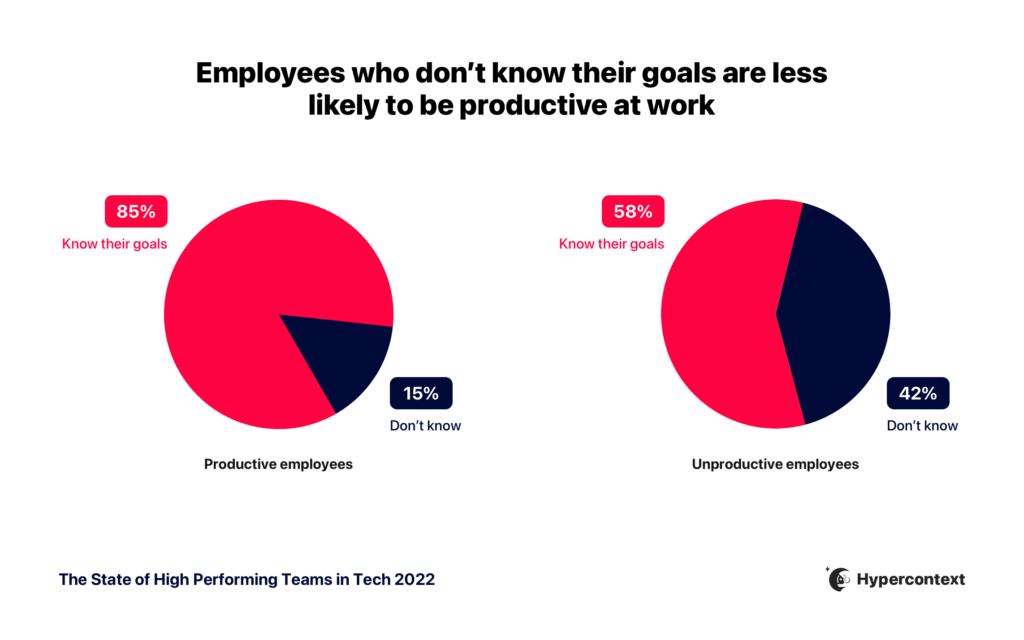
Taking a closer look at the correlation between those who agreed they’re productive and whether people know their team’s current goals, it’s clear that unproductive employees are 2.8X more likely not to know their goals.
2. The more you talk about goals with your team, the more confident they are in reaching them
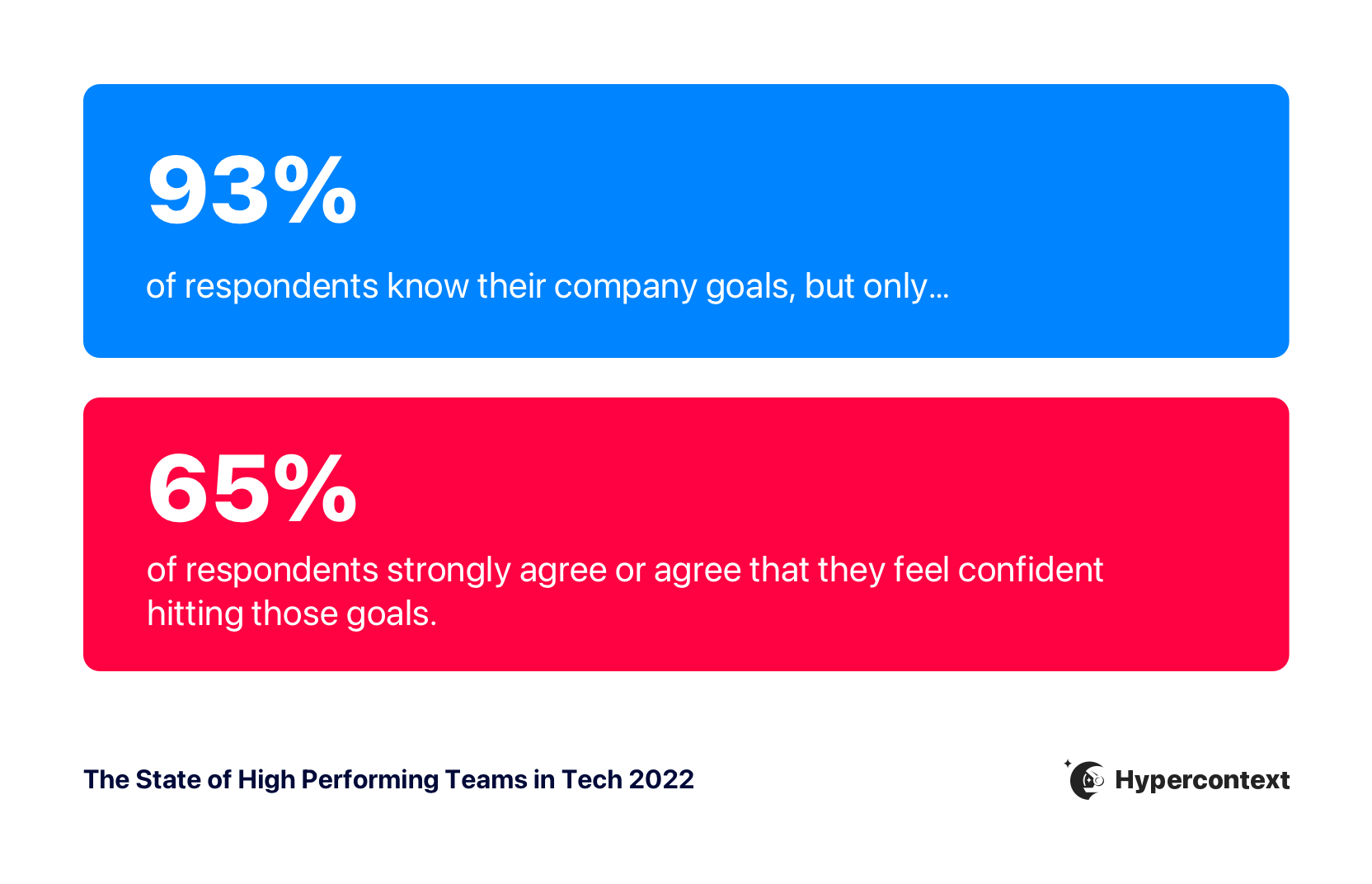
93% of respondents said they know their company goals, but only 65% strongly agree or agree they feel confident hitting those goals.
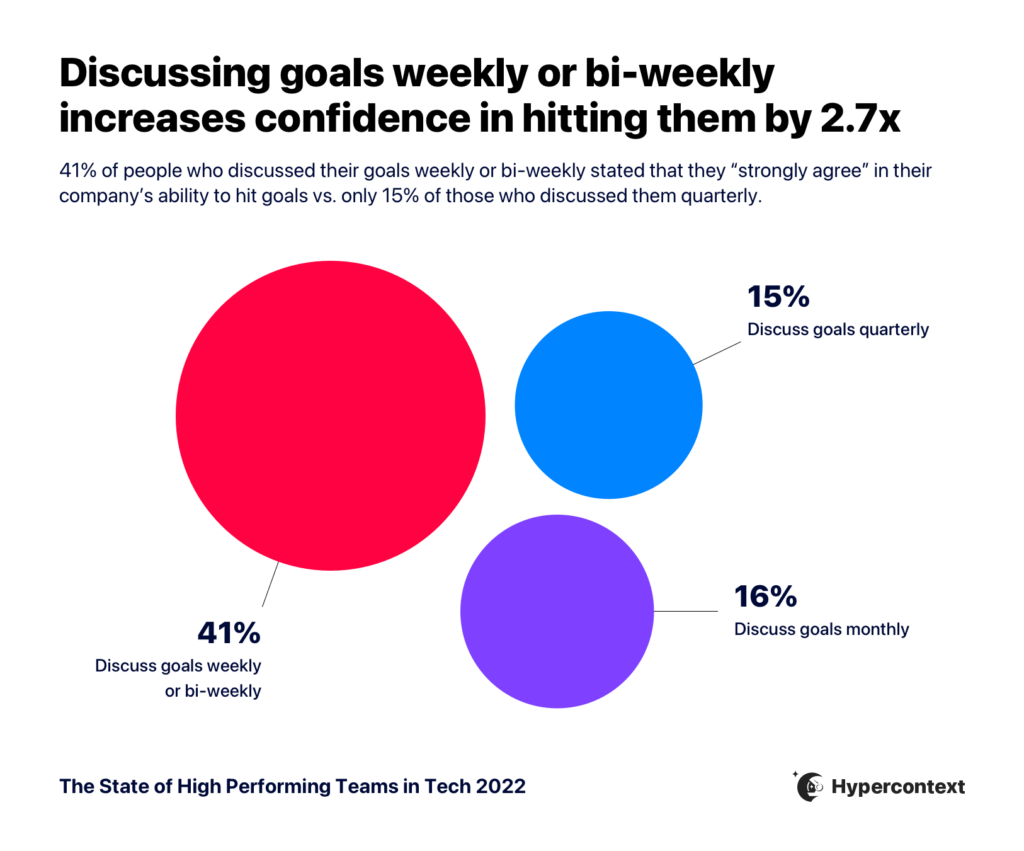
The solution to increasing confidence is talking about goals more often. While it might feel redundant, it’s not. When people talk about goals weekly or bi-weekly they’re nearly 3X more likely to strongly agree they’re confident hitting their goals compared to those who talk about them quarterly.
3. Having a clear vision and strategy for the team is the single biggest challenge for managers
We asked everyone where their managers could use improvement.
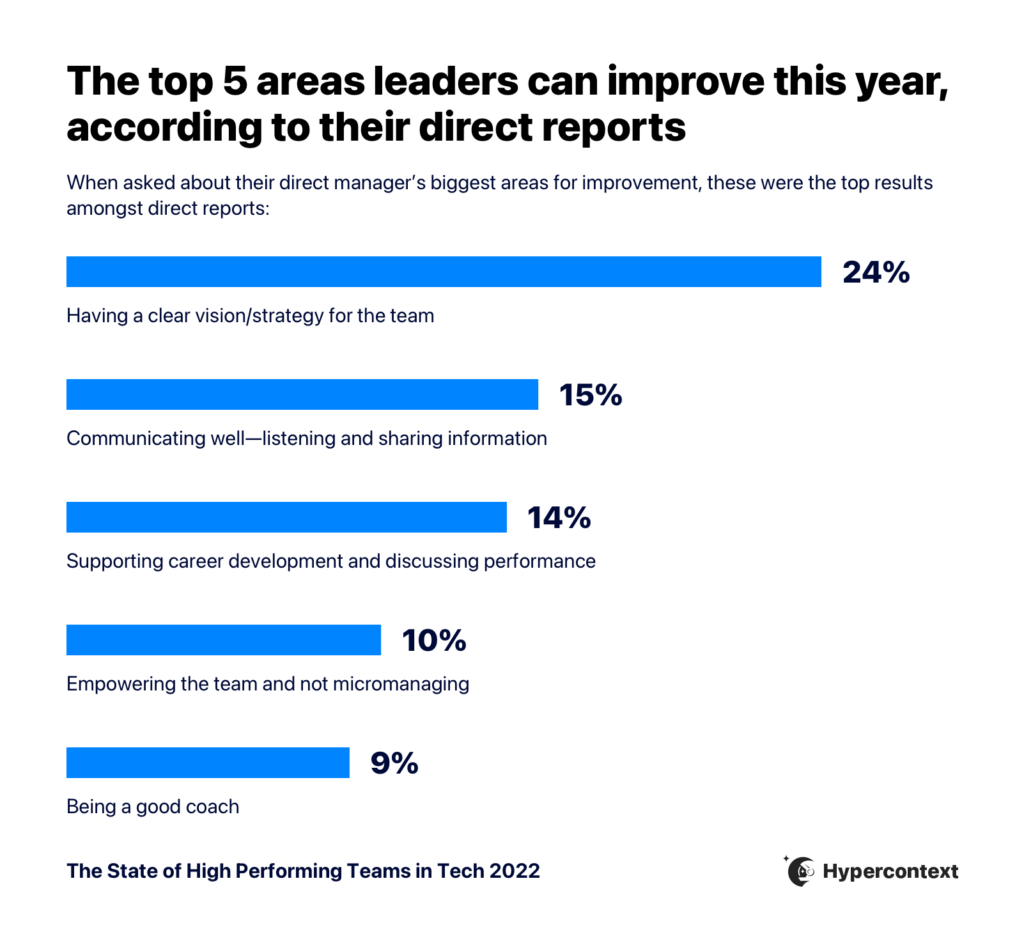
24% of direct reports listed ‘Having a clear vision and strategy for the team’ as their manager’s single biggest area for improvement.
4. One-on-ones are the most valuable meeting in everyone’s calendar
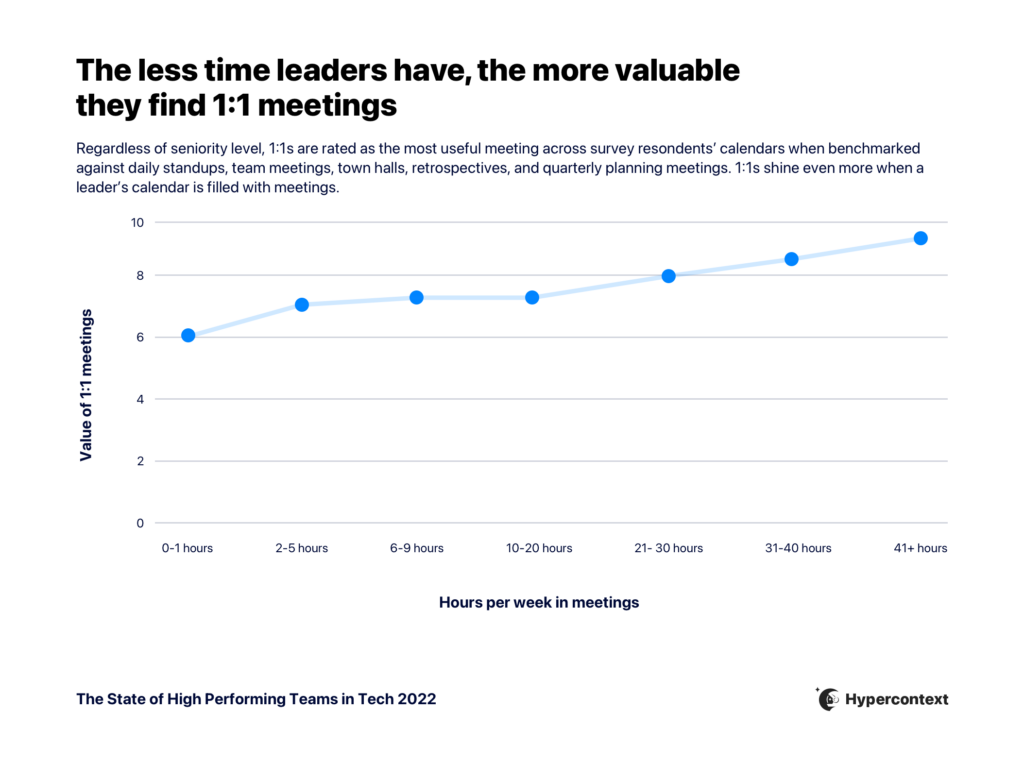
Regardless of seniority level, 1:1s are rated as the most useful meeting in everyone’s calendar.
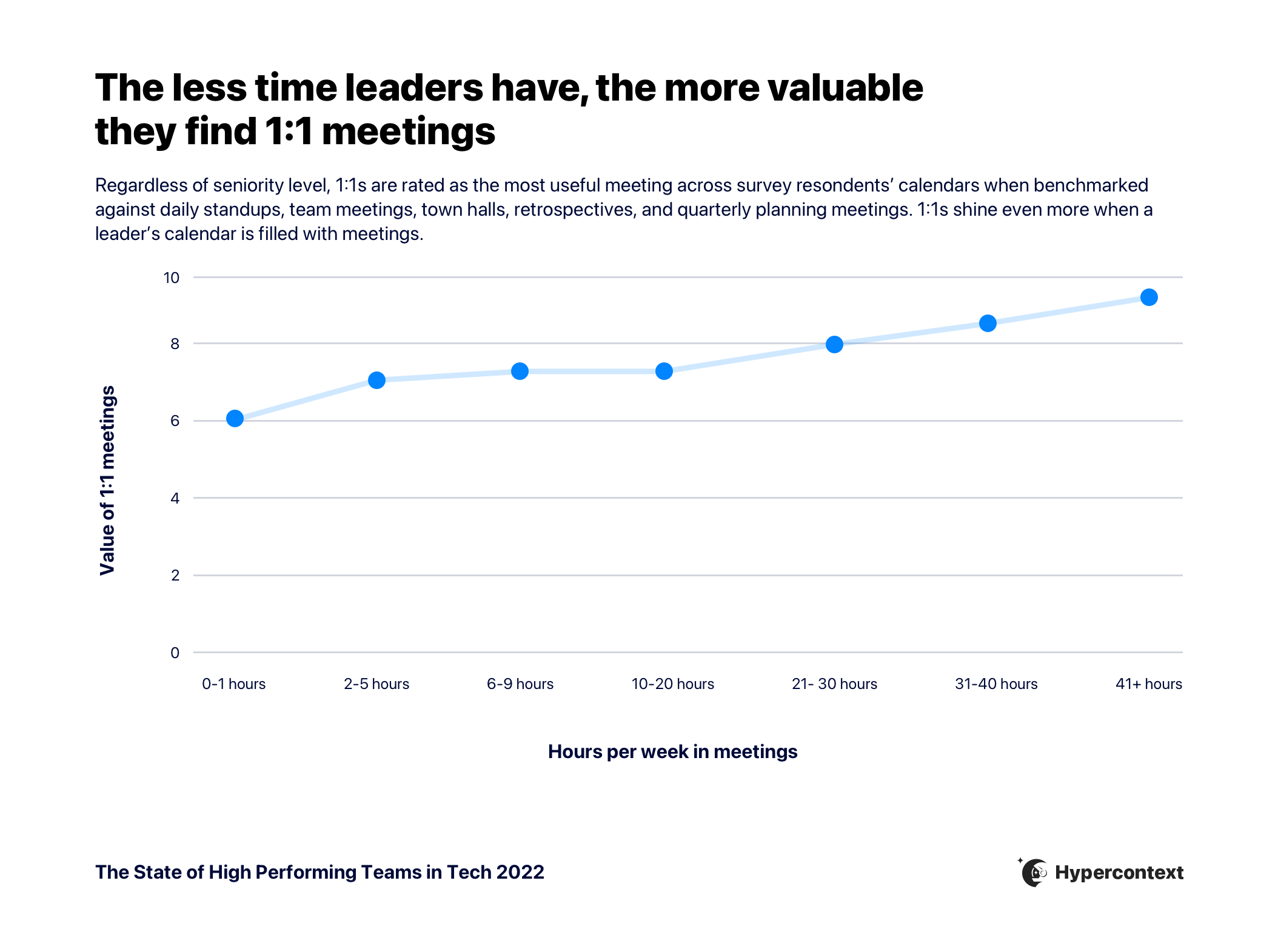
In fact, the more time managers spend in meetings, the more useful one-on-ones get.
5. Managers who have 1:1s are 1.5X more likely to retain their team
Turnover is an expensive problem to have. As a baseline, turnover costs around 30% of an employee’s salary, and up to 213%.
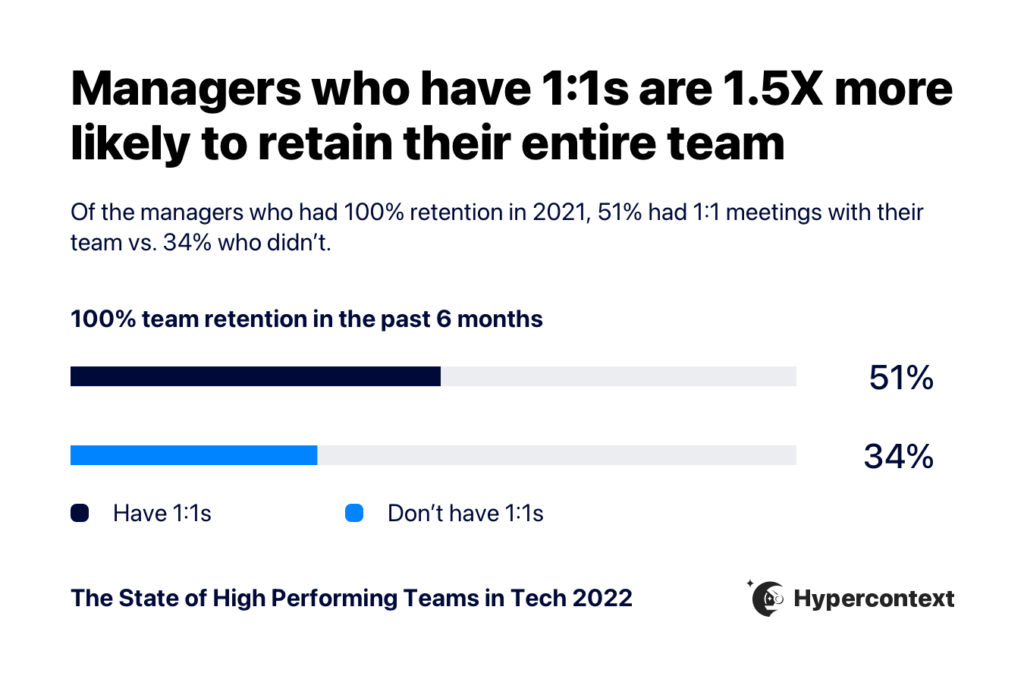
While there are many factors that impact retention in the tech industry, we found a strong correlation between managers who conducted one-on-ones and managers who retained their teams over the last 6 months.
Managers who have 1:1s were 1.5X more likely to retain their entire team over the last 6 months than those who don’t have them.
6. Unfair salaries impact turnover, but competitive salaries don’t impact retention
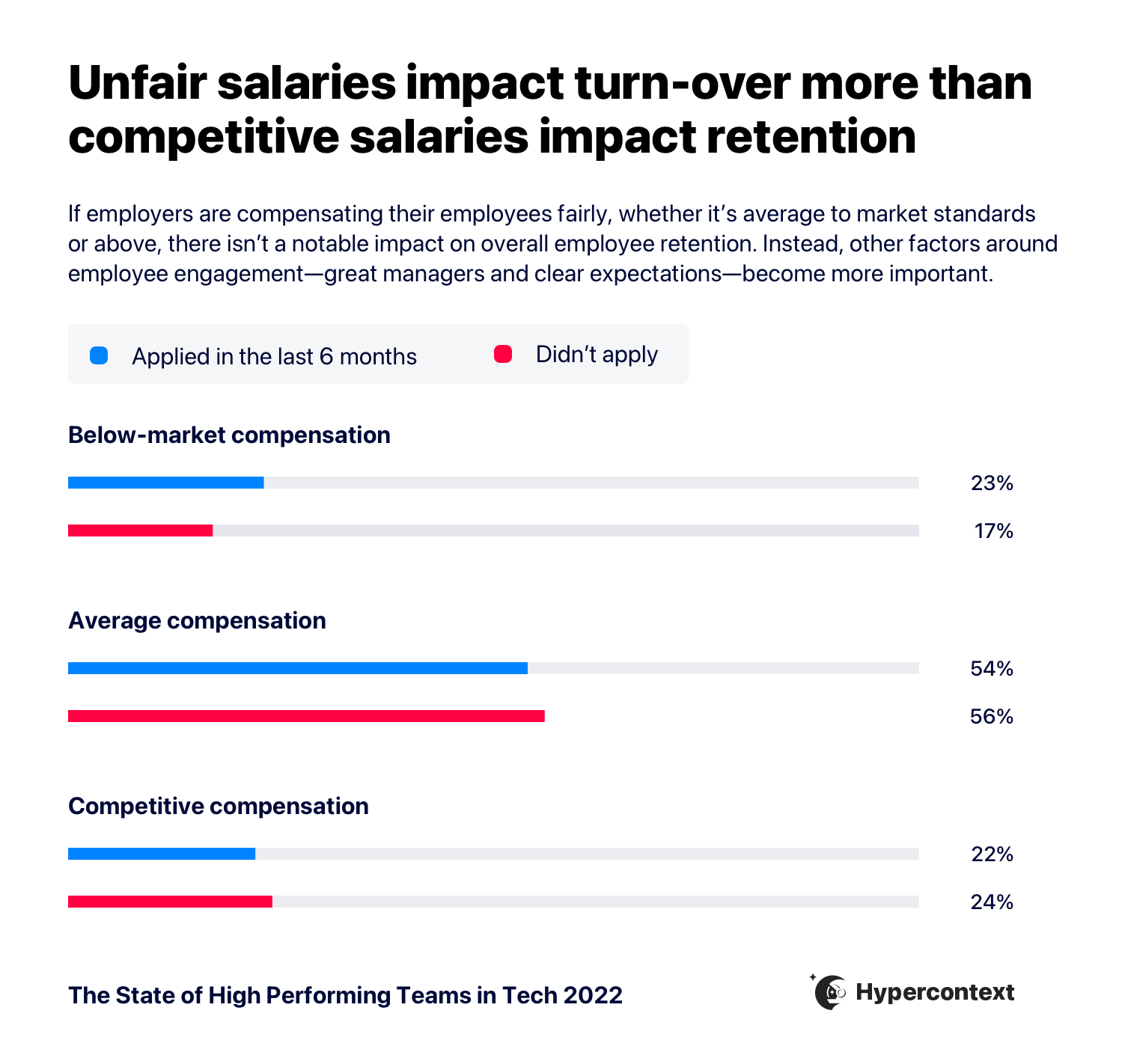
34% of people have applied for an external job posting in the last 6 months. While ‘competitive salary and benefits’ is cited as one of the top reasons people look elsewhere, a competitive salary isn’t as important as a fair salary.
When employees believe they’re paid below market value, they’re 1.3X more likely to apply for another job. But, when companies pay an average rate or above, it doesn’t have a notable impact on the retention rate. Those who were paid average or above market were only slightly less likely to apply for another job.
This means, as long as companies pay fairly, there are other, more important things to focus on to retain a high-performing team.
Want resources like this delivered straight to your inbox?
MOTIVATION AND PRODUCTIVITY
The top factors impacting motivation and productivity are in the hands of managers
The majority of people agree that they’re motivated, productive and high-performing at work.
The top six factors impacting productivity and engagement are the direct responsibility of a manager. We dive into why below.
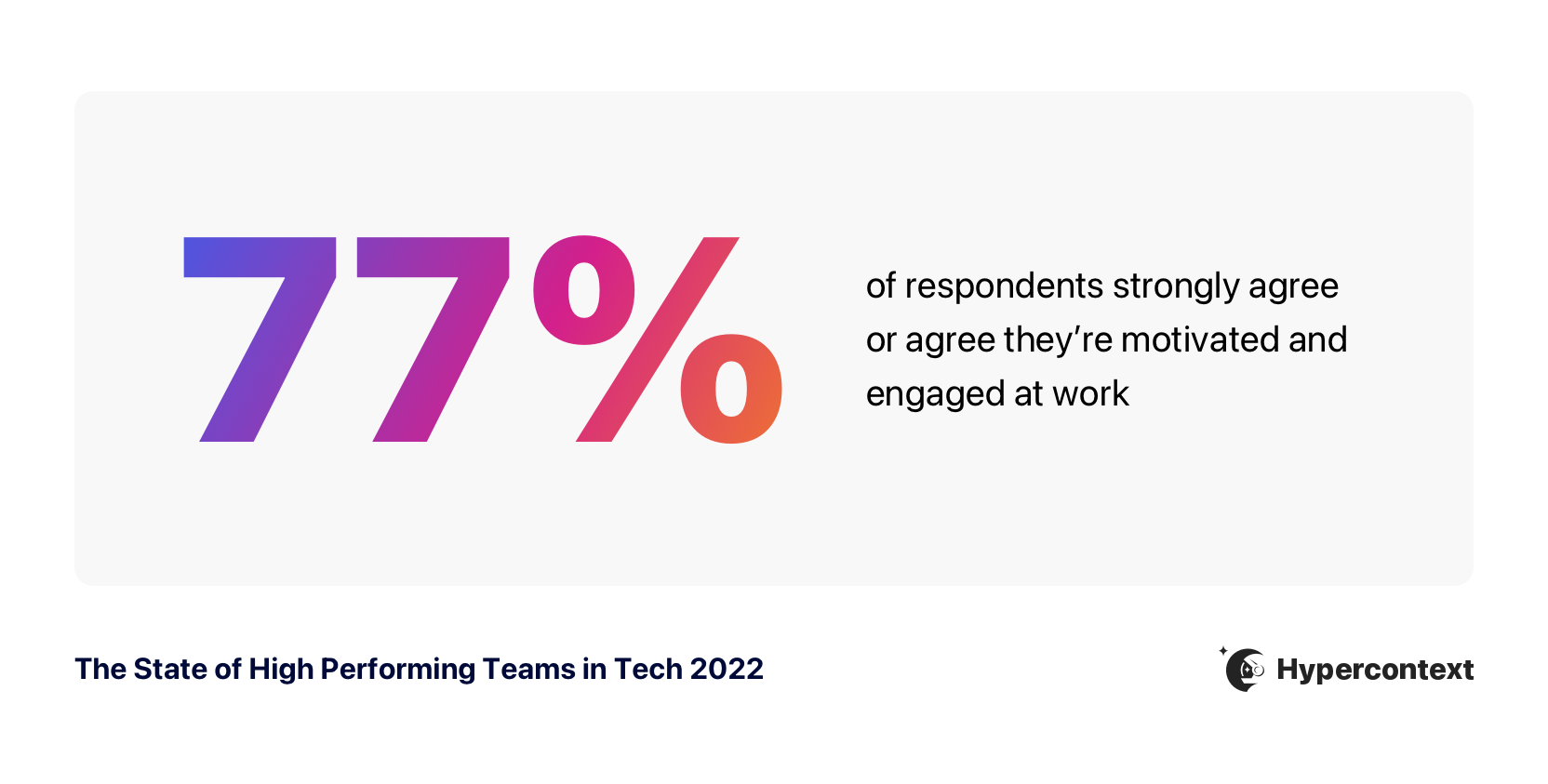
77% of respondents strongly agree or agree they’re motivated and engaged at work
Fulfilling and/or challenging work, competitive salary and benefits, and a good manager are the top three factors impacting motivation and engagement at work. While recognition is important, fulfilling work matters significantly more when it comes to motivation.
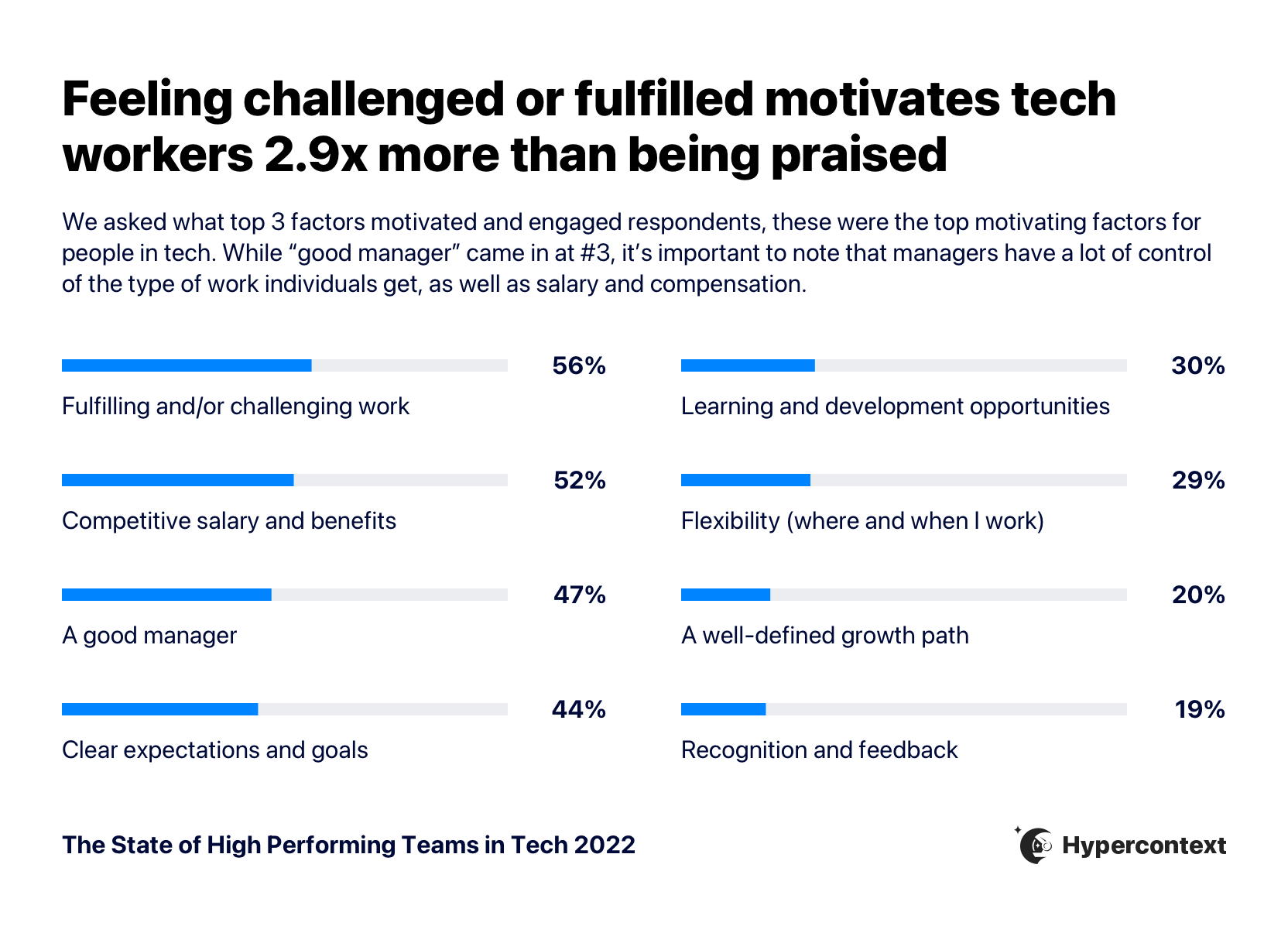
Interesting findings:
- The three factors leading to motivation and engagement are interconnected. A good manager ensures their team is being challenged and compensated fairly for their work.
- While fair pay isn’t solely in the hand of managers, they do have a responsibility to advocate for their team members and play a major role in salary discussions.
- Diving deeper into the impacts of a good manager, there’s a direct correlation between how respondents rate their managers and their level of motivation at work. Those who agree they’re motivated at work rate their managers as a 7.6 on average, while those who disagree they’re motivated at work rate their managers as a 5 on average. That’s a 26% variance. (skip ahead to the biggest challenges managers face)
83% of respondents strongly agree or agree they’re productive at work
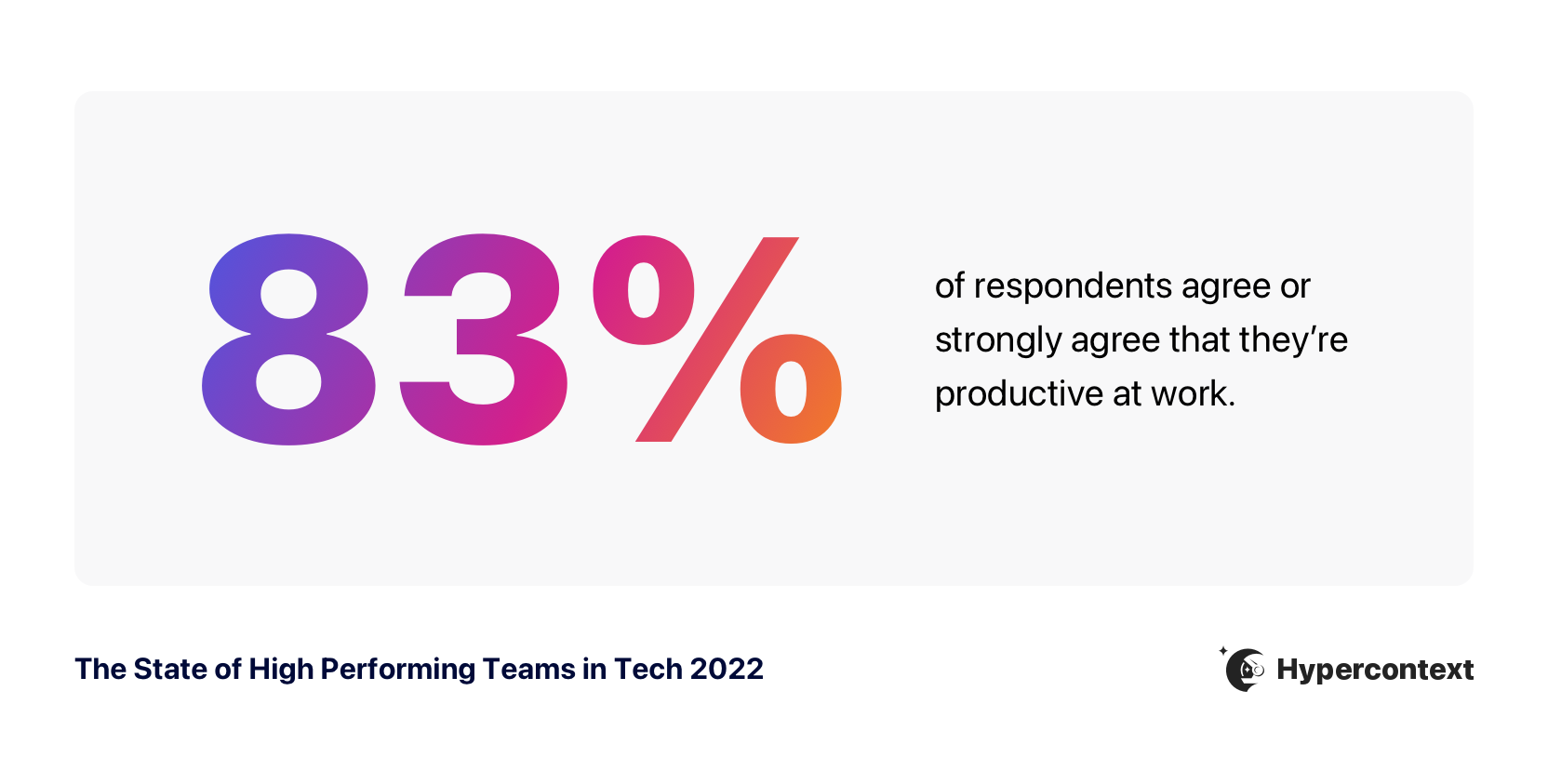
Clear expectations and goals, seeing how work impacts the business, and great team communication are the top three factors contributing to productivity at work.
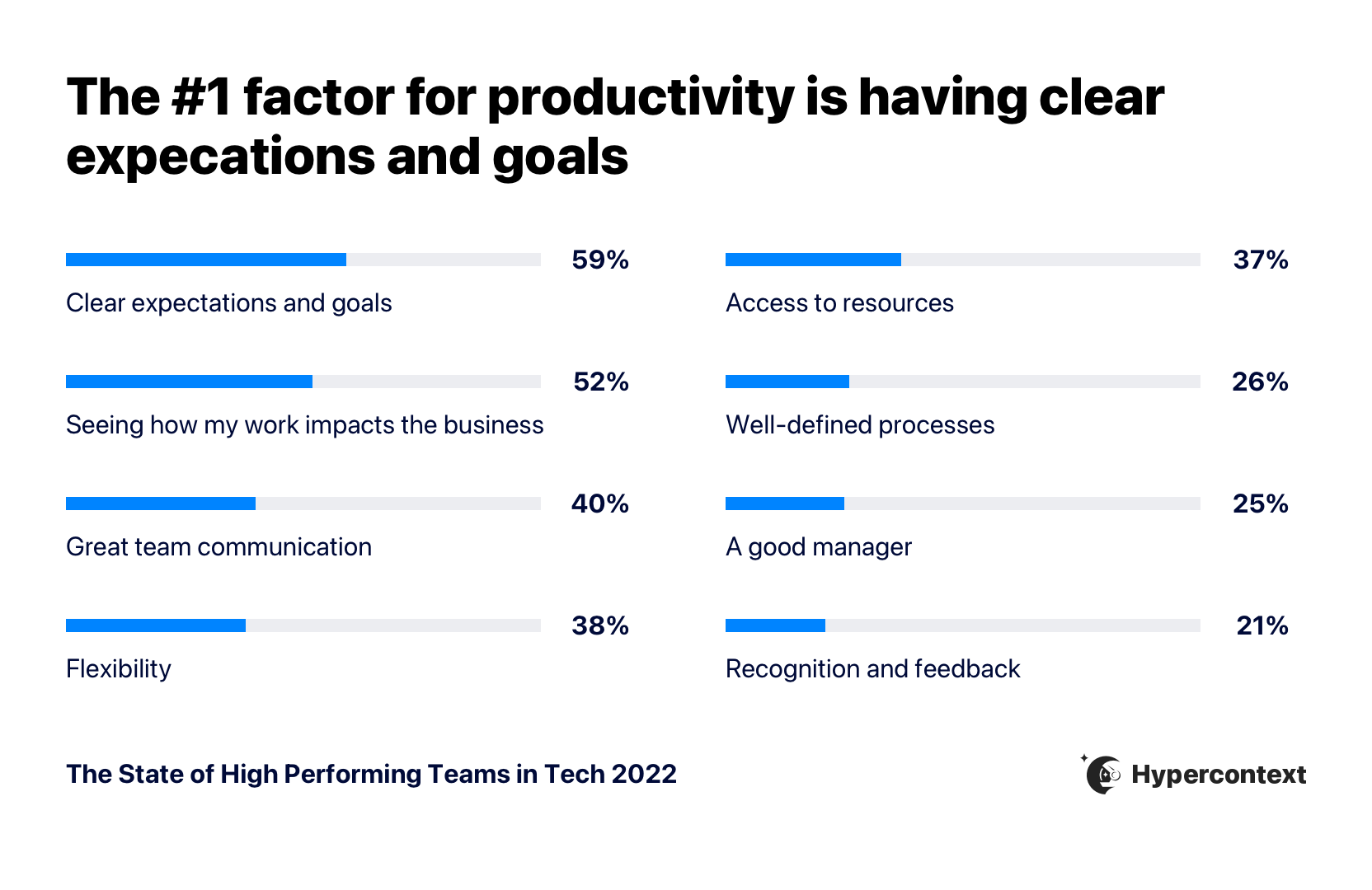
Interesting findings:
- The top contributing factor to productivity is clear goals and expectations.
- The top 3 factors impacting productivity go hand-in-hand: goals and expectations need to be clearly communicated for team members to see how their work impacts the business.
- Clear goals and expectations provide employees with a sense of direction and belonging, increasing how productive they feel.
- To further enforce these findings, we found that the employees who identified as unproductive were 2.8x more likely not to know their goals than productive employees. (Skip ahead to more on goals)
- Managers need to set the goals for the team.
THE IMPACT OF CLEAR GOALS AND EXPECTATIONS
Goals and clear expectations lead to increased productivity and growth
Clear goals and expectations lead to more productive employees and, in turn, company growth. It’s evident that people at faster-growing companies are more likely to know their goals and what’s expected of them.
The faster-growing the company is, the more likely employees are to know their company’s goals.
People who don’t know their goals are over 3X more likely to work at a company that’s shrinking in revenue than those who do know them.
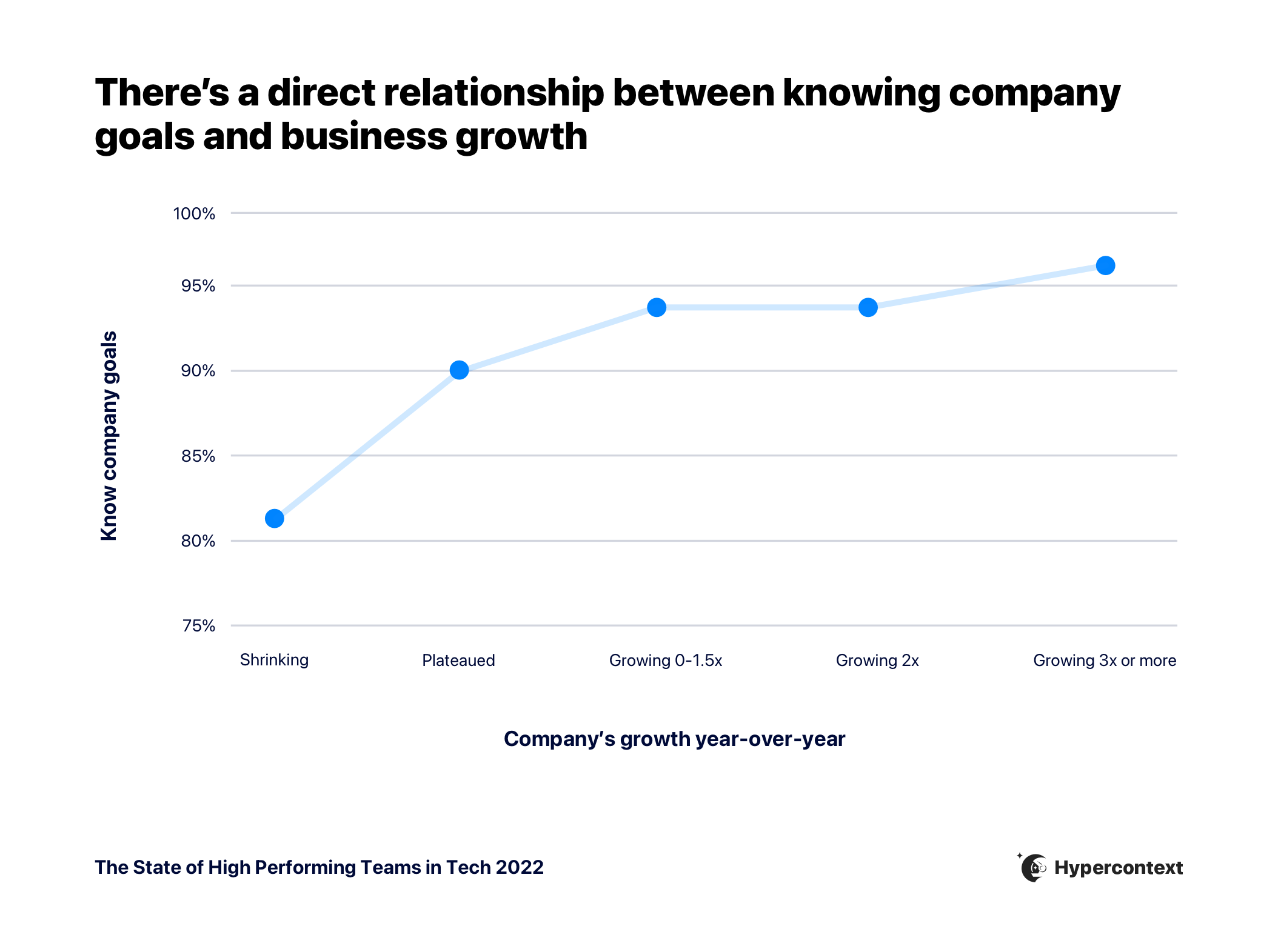
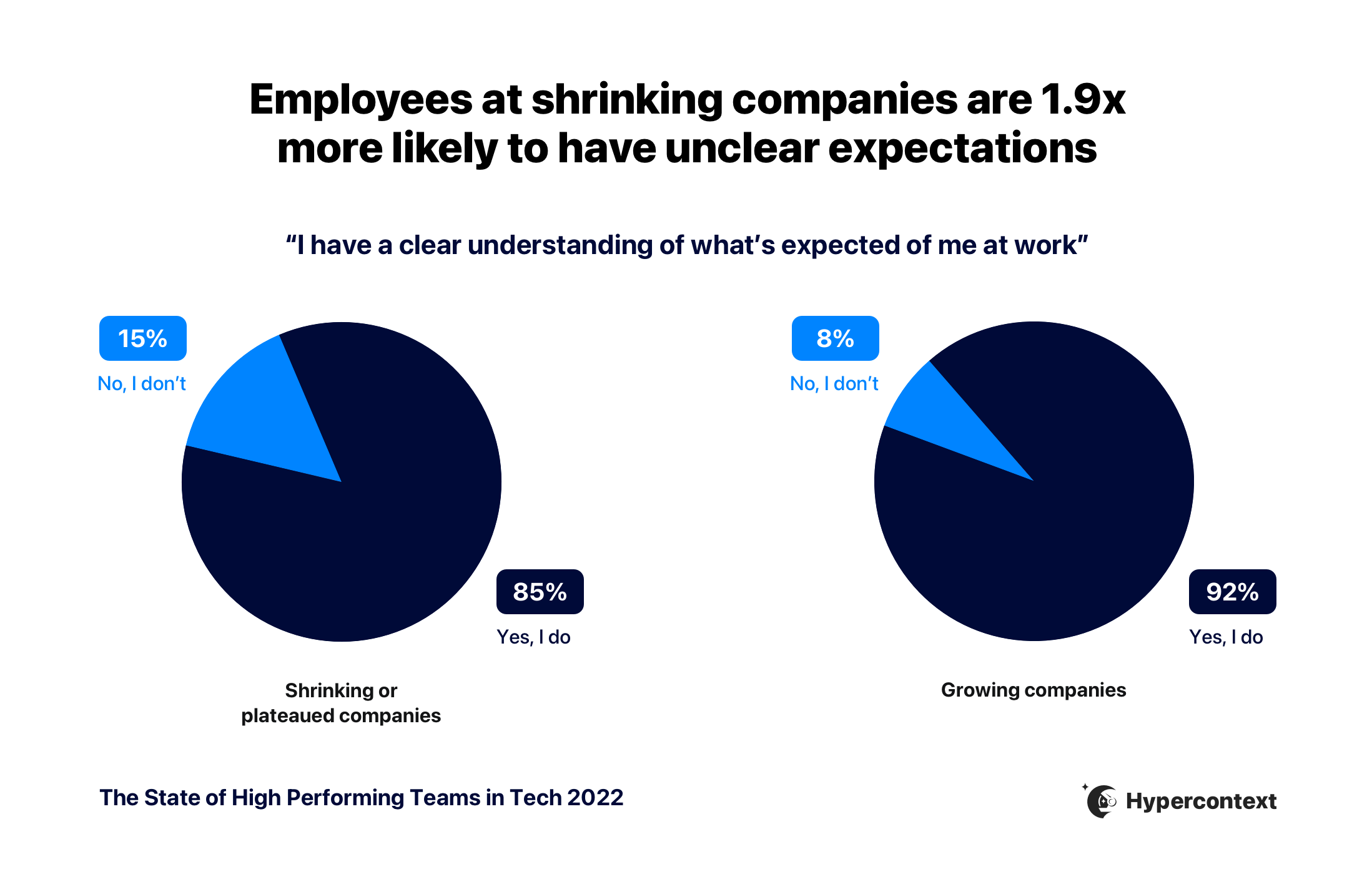
Respondents at shrinking or plateauing companies are nearly 2X more likely to have unclear expectations than those at growing companies.
“Keeping high performing individuals engaged starts with each person understanding how their role contributes to the overall reason why their company exists and then creating a transparent and direct environment where they get continuous feedback and can give continuous feedback.”
– Adam Houghton, VP of Customer Success, Klue
Talking about goals more regularly increases confidence in reaching them
Having goals isn’t the same as knowing goals. While almost all respondents are aware of their company’s goals, only 65% feel confident they’ll hit those goals.
This is where proper communication comes in. Without it, goals are a lot less effective. The more frequently people talk about goals, the more likely it is they feel confident hitting those goals.
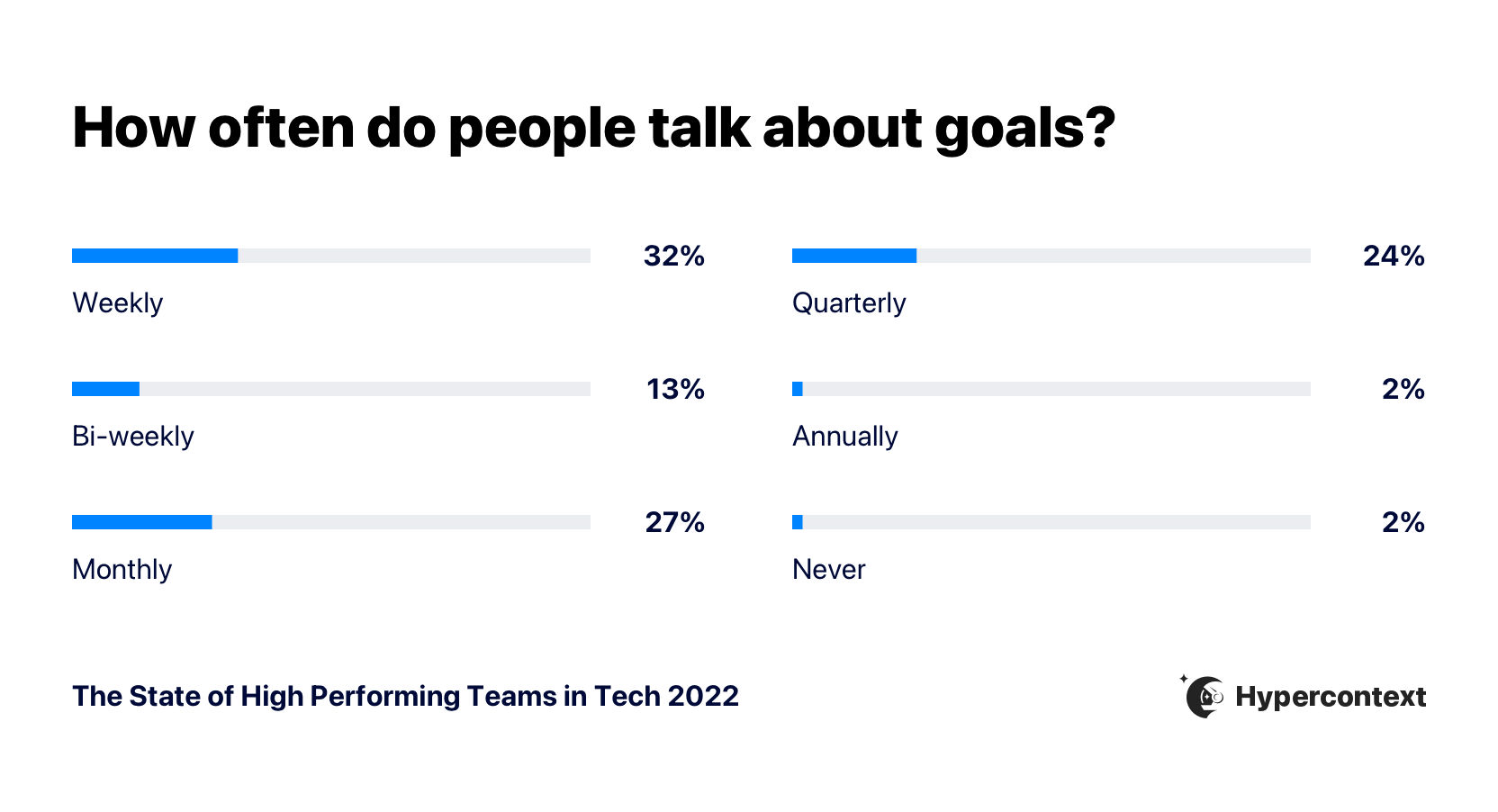
Most people talk about goals either weekly (32%), monthly (27%) or quarterly (24%).
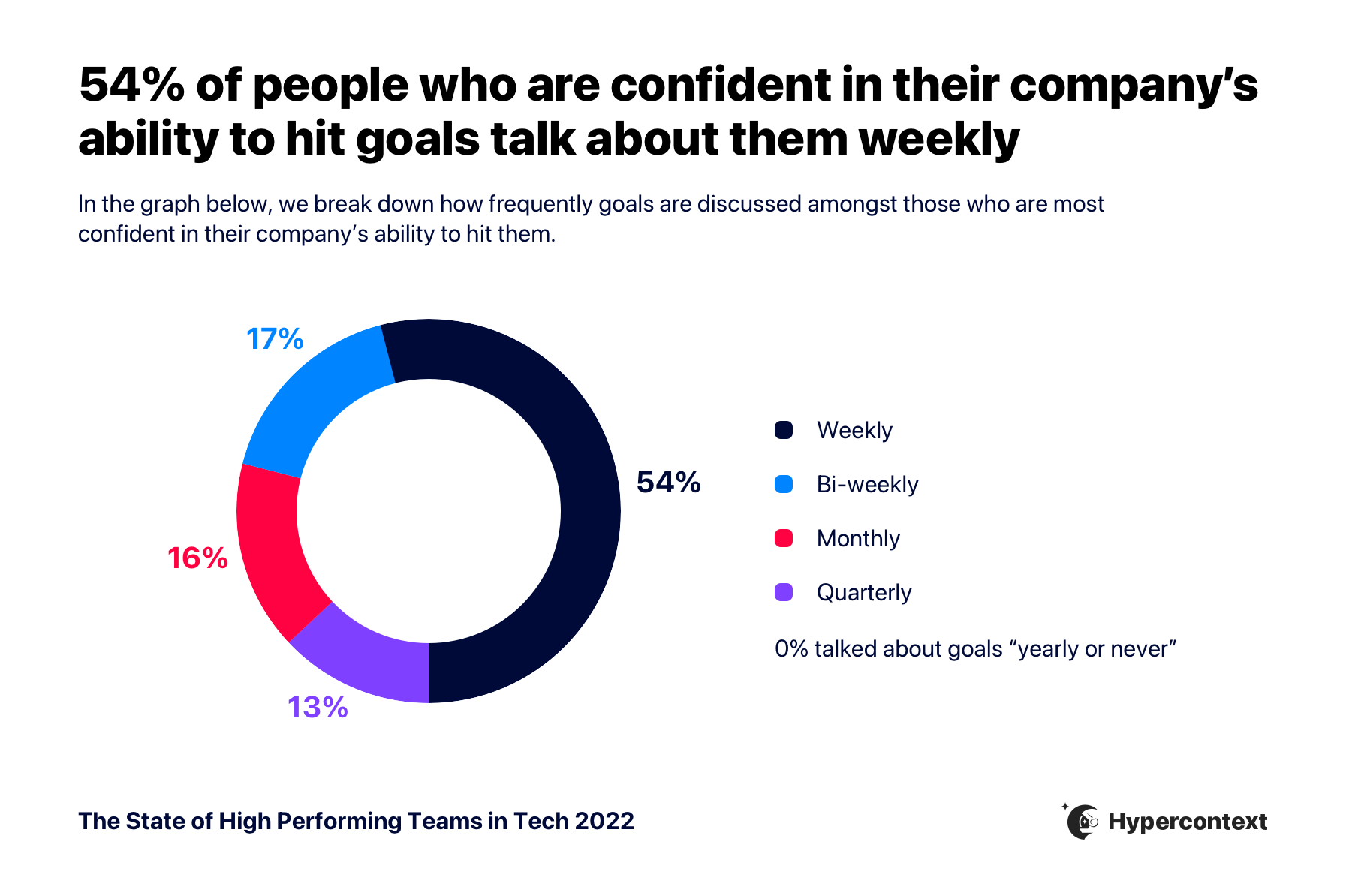
The majority of those who strongly agree they’re confident hitting their company goals talk about goals weekly. Compared to only 13% who talk about them quarterly and 16% who talk about them monthly.
Setting clear goals and expectations is important for fostering high-performing teams in tech. They have a direct impact on your team’s ability to be productive and your company’s ability to scale quickly. But setting goals isn’t the end of the story, talking about them often leads to increased confidence in hitting them. When you keep your priorities top of mind, it allows everyone to better understand how you’ll achieve them.
“Key to our success is goal setting, which includes numbers like pipeline build KPIs and sales, as well as other considerations like career milestones or selling behaviours. We talk about our goals often on a weekly basis which allows us to address blockers faster and even more proactively when compared to lesser cadences like quarterly.”
– Chris Bondarenko, VP of Sales, Docebo
💡 Try-it-tomorrow tip: Pin goals to the top of your weekly meetings so you can discuss how you’re tracking against progress each week. Learn more about how to keep goals top-of-mind.
While goal-setting is one of the most important factors leading to team success, it’s also the single biggest challenge for managers.
Want resources like this delivered straight to your inbox?
MANAGEMENT CHALLENGES
Managers struggle most with having clear goals for their team
On average, managers rate their management abilities as 7.6/10 and direct reports rate their managers as 7.4/10.
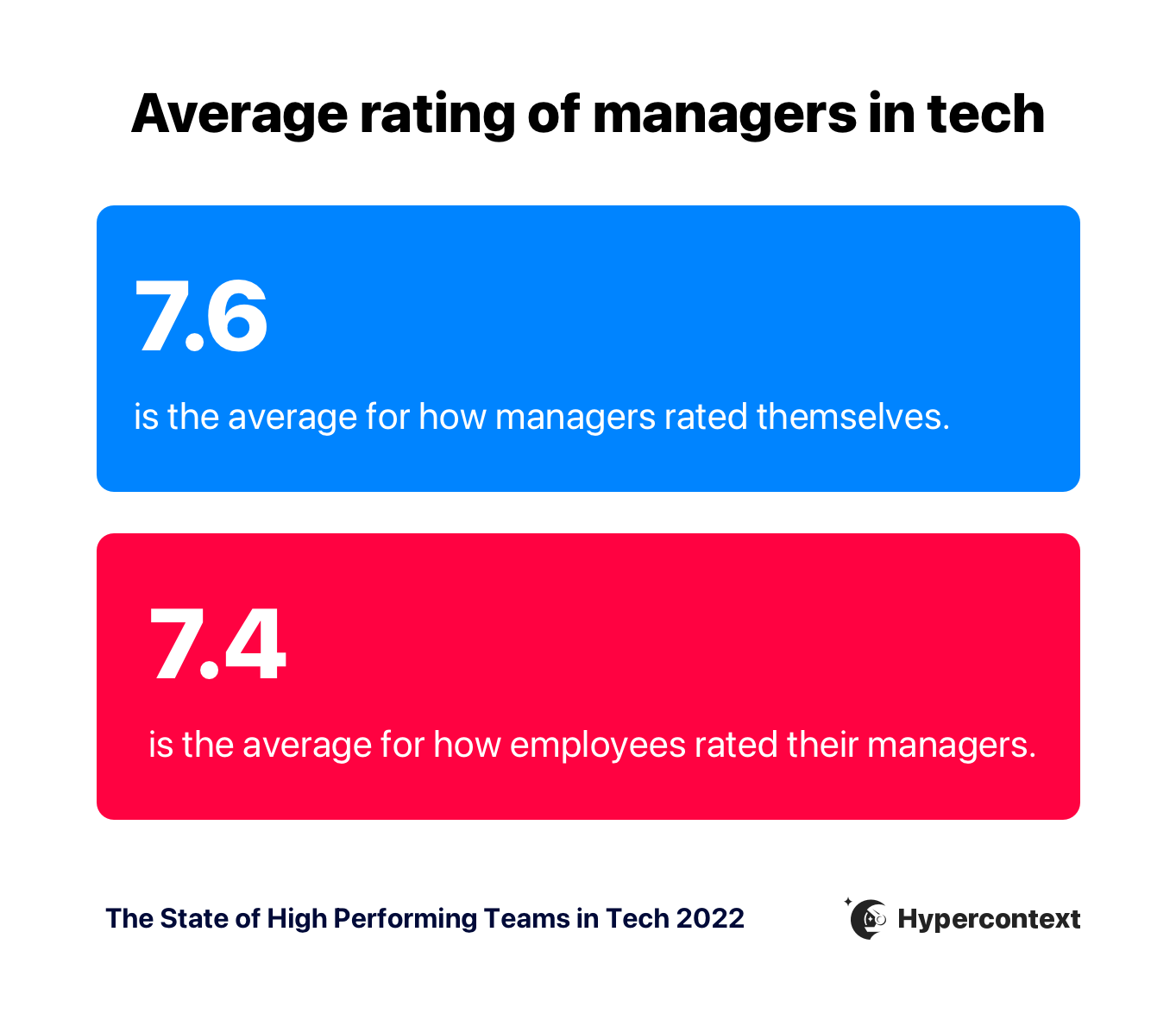
How employees rate their managers impacts their levels of motivation and engagement. Those who agree they’re motivated at work rate their managers as a 7.6 on average, while those who disagree they’re motivated at work rate their managers as a 5 on average. That’s a 26% variance.
Having a clear vision and strategy for the team is a challenge for managers
There’s no need to guess the areas of management in which managers are seeking support. Managers and their direct reports alike believe managers need to improve their skills in strategy and vision development, team empowerment and communication.
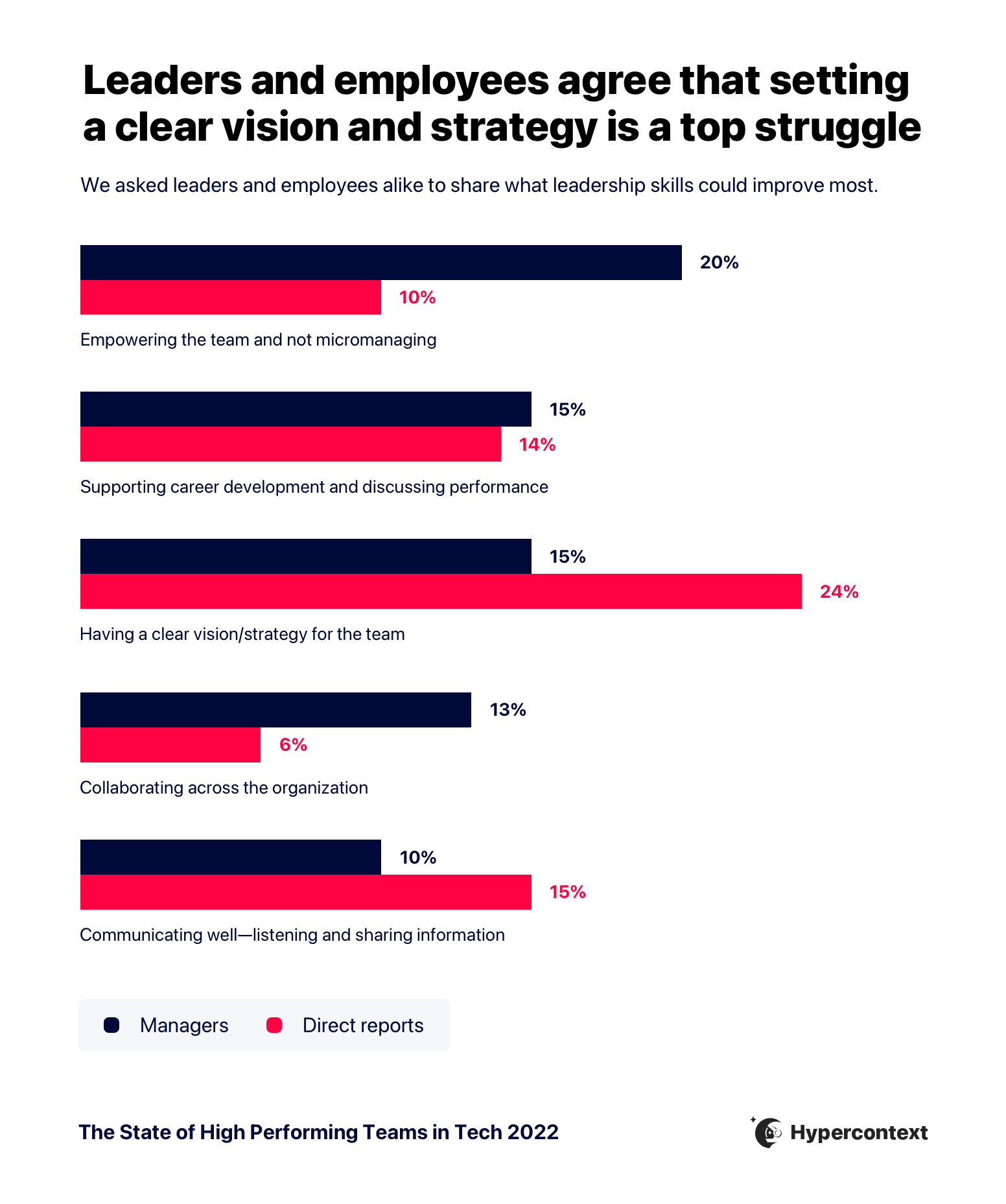
While the top management challenges differ slightly depending on who you ask, the common themes we see as areas that need improvement are:
🎯 Strategy and vision: Developing a vision and strategy for your team means defining the team’s common goals and how you’ll achieve them. The importance of clear goals is a theme we see repeated many times throughout this report as both an essential part of productivity and growth, and a challenge.
🤝 Team empowerment: The opposite of team empowerment is micromanaging, which often results from fear and lack of trust. This can be resolved, but managers need the proper tools and resources to build trust with their teams and feel confident empowering them. Empowered people empower people.
📈 Supporting career development and performance: 17% of the respondents who applied for a new job in the last 6 months cited ‘not enough growth opportunities’ as the primary reason. As the people closest to their direct reports, managers need more guidance on how to understand their team members’ growth aspirations and how to advocate for them to avoid turnover.
📞 Communication: Whether it’s communication with the team, or cross-functionally, remote or in-person, effective communication is an imperative skill for managers, and 15% of direct reports believe it’s the area where their manager needs the most improvement.
“Addressing team empowerment is the most critical point to improve strategy development, supporting career development & performance and communication. When teams don’t feel empowered, they don’t take ownership of their career priorities or take on new challenges. And team empowerment indeed starts with the manager fostering an atmosphere where teams can “act like an owner” and make decisions. To promote team empowerment, managers need to focus on what they can give away, setting up clear feedback loops to support their team, and offering advice without micromanaging.”
– Alex Virden, Product Marketing Lead, Metadata
💡 Try-it-tomorrow tip: Conduct a survey amongst your managers to get a better understanding of where they’re struggling. Learn more about how to support managers.
THE VALUE OF MEETINGS
Meetings are a useful tool for managers
The status of meetings
Meetings aren’t dead at fast-growing companies. In fact, most commonly, people are in 10-20 hours of meetings per week.
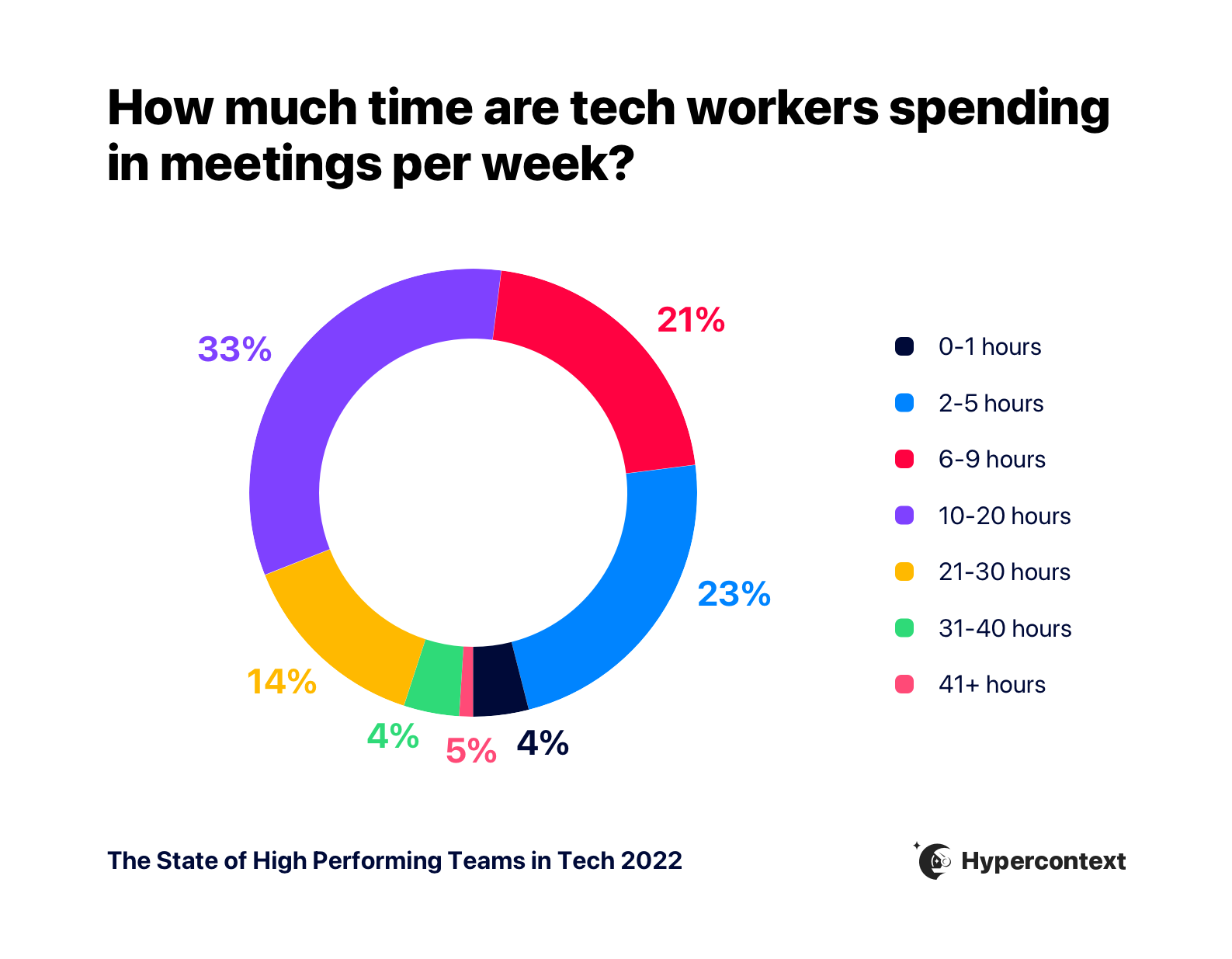
Middle managers (Directors, VPs and Executives) spend the most time in meetings each week.
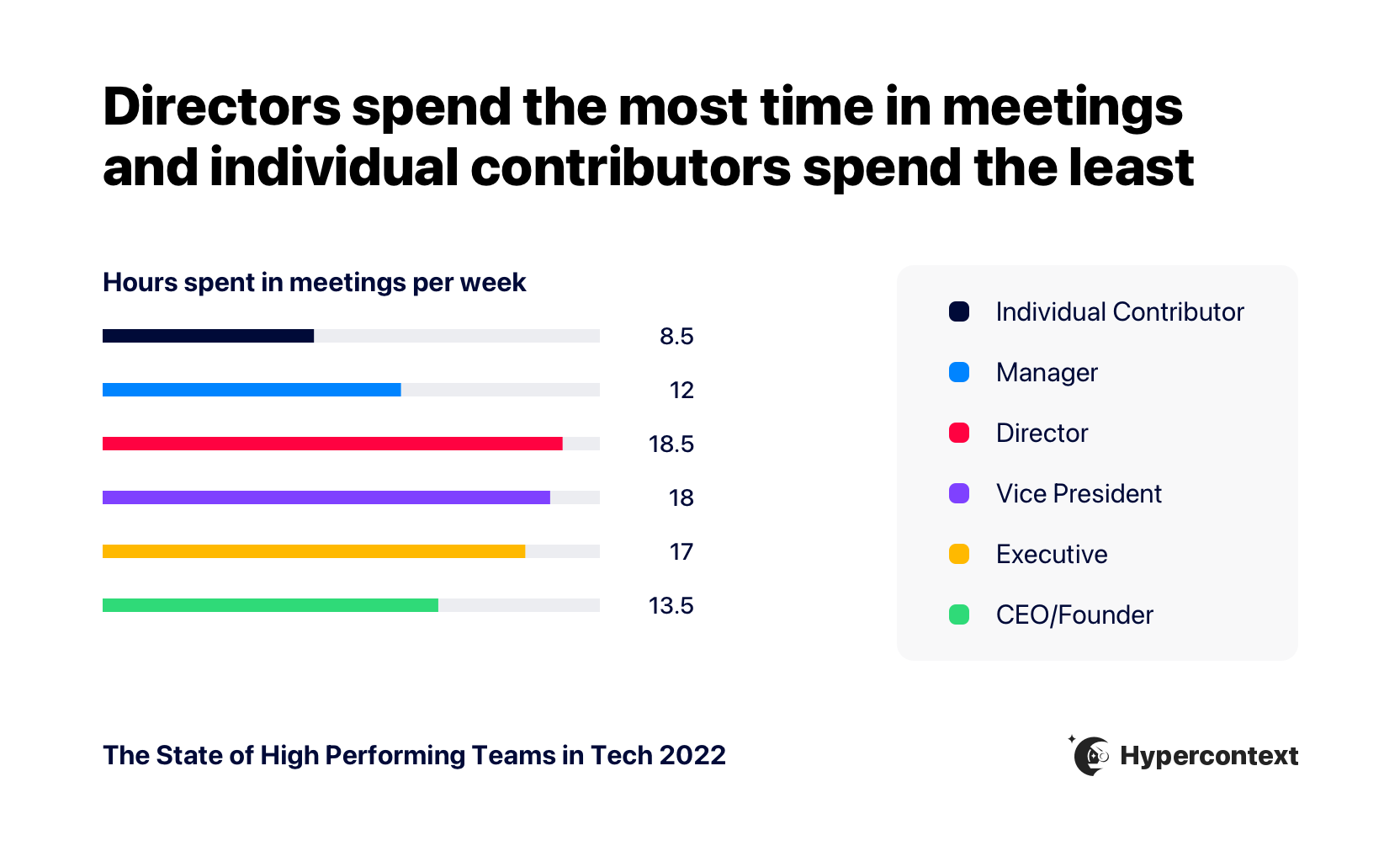
As individuals progress in their careers, they spend increasingly more time in meetings. But, once they reach VP, the number of hours spent in meetings begins to level out and steadily declines.
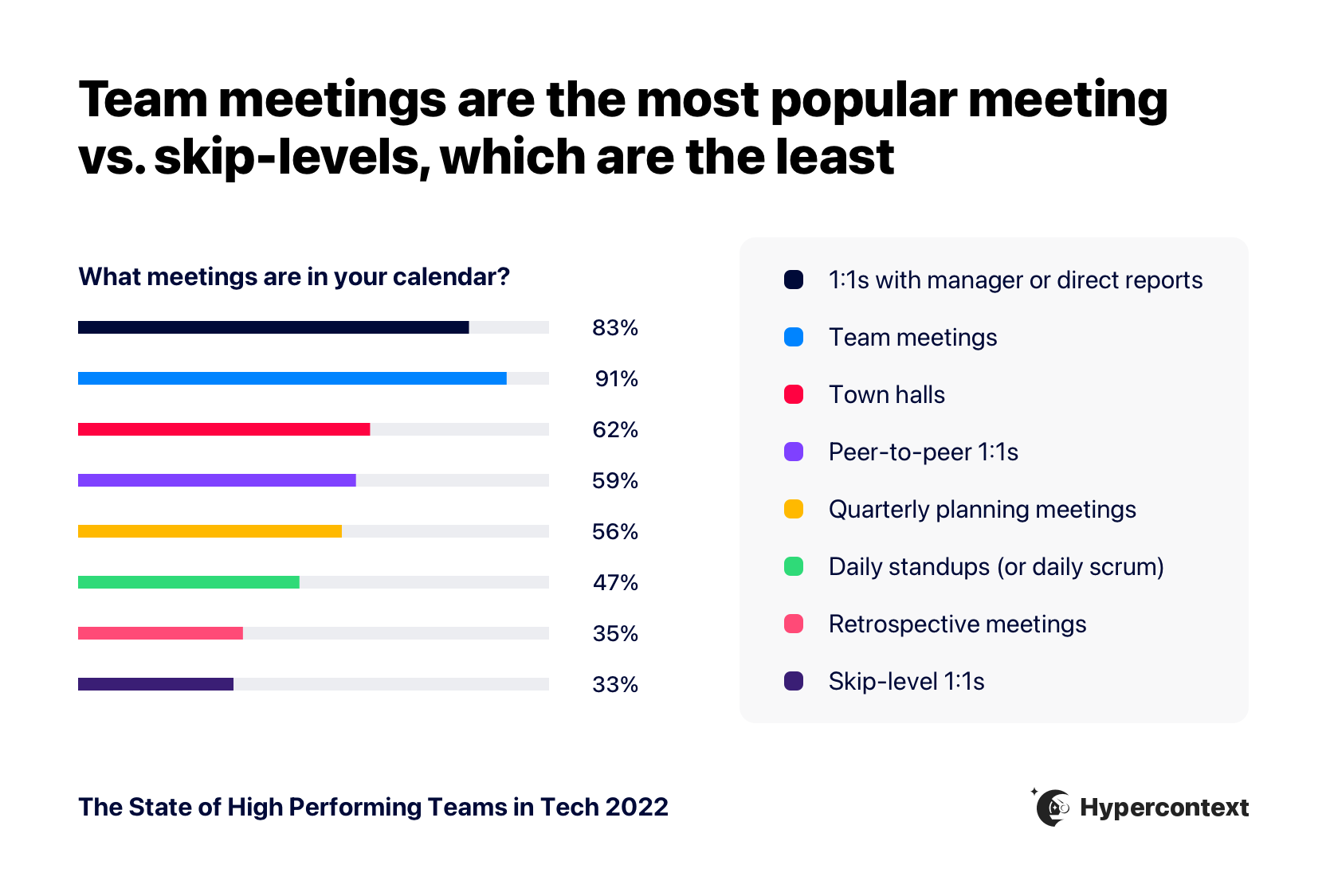
Of all the meetings people have in a week, Team meetings and one-on-ones are the most common.
Despite a push for more asynchronous communication amongst many tech organizations, there isn’t a strong correlation between company growth and time spent in meetings. Teams with fewer meetings aren’t more successful than teams with too many meetings.
Fewer meetings don’t lead to faster growth. Neither do more meetings.
Ultimately, it’s about how effectively you conduct your meetings, not time spent in them.
“It’s tough to find the right balance between addressing action items, making time for unstructured discussion around tricky questions, and simply interacting on a personal level — especially given the shift to hybrid work over the last two years. Having clear goals for meetings at the outset is key – even when these goals are related to building closer personal connections and trying to replicate the passive and improvisational socializing that used to happen in the physical workplace.”
– Tom Baragwanath, Global Head of Content, 360Learning
One-on-ones are rated as the most useful meeting
Just because people are having meetings, doesn’t mean they’re useful.
On average, one-on-ones are rated as the most useful meeting, followed by team meetings.
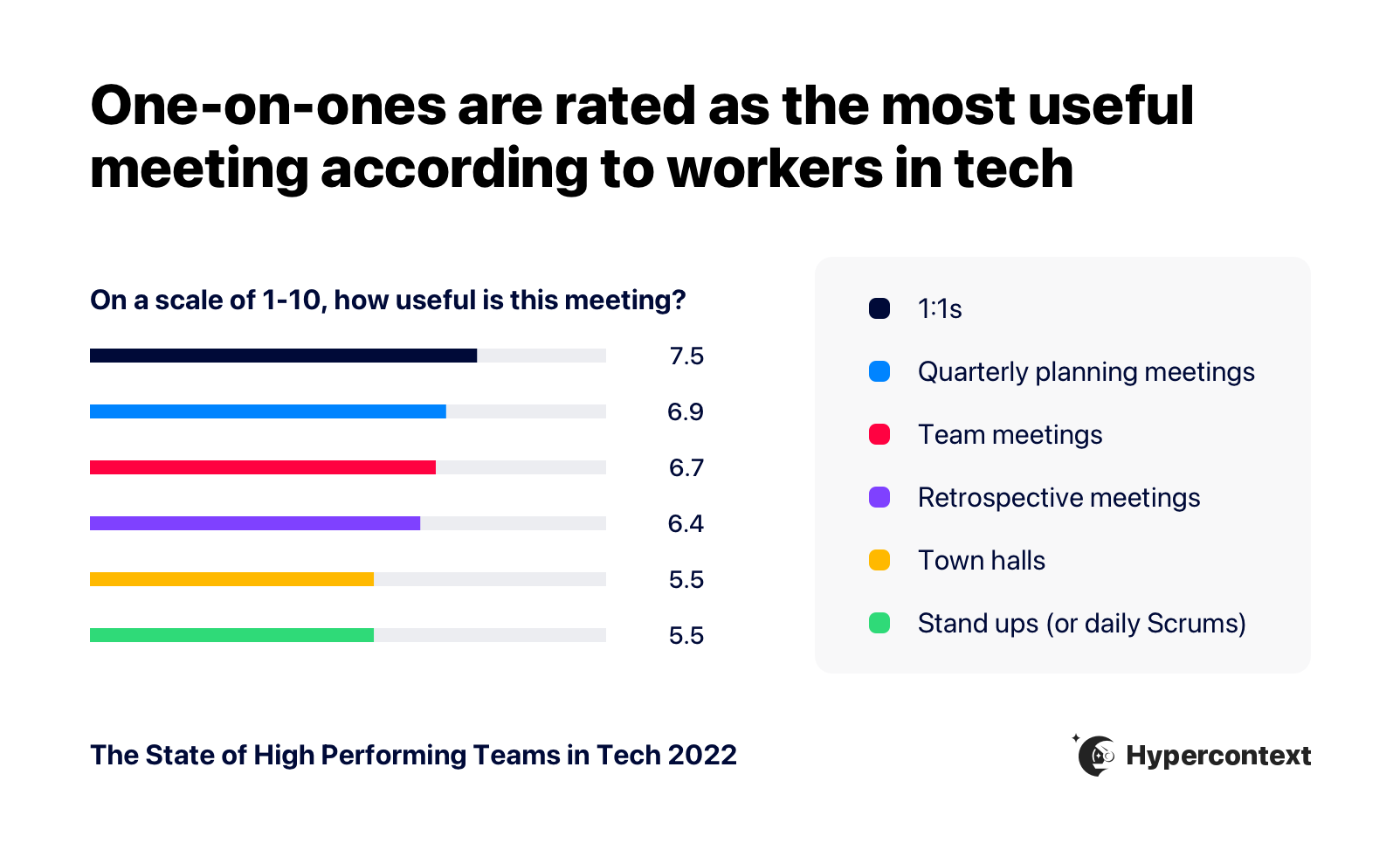
Interestingly, when it comes to 1:1s and team meetings, the more time managers spend in meetings overall, the more useful they find these touchpoints with their team members.
“Running 1:1’s is a no brainer as a leader. This is the time to connect beyond the day to day deal and forecast updates. It is where you really get to know your team, establish trust, and build relationships for long term success.”
– Red Russak, Director of Sales, Apptentive
While meetings can be a useful tool, they’re still not a safe space for everyone.
Psychological safety in meetings varies depending on seniority, gender, race and age
Only 2% of respondents disagree that they feel comfortable speaking in internal meetings.
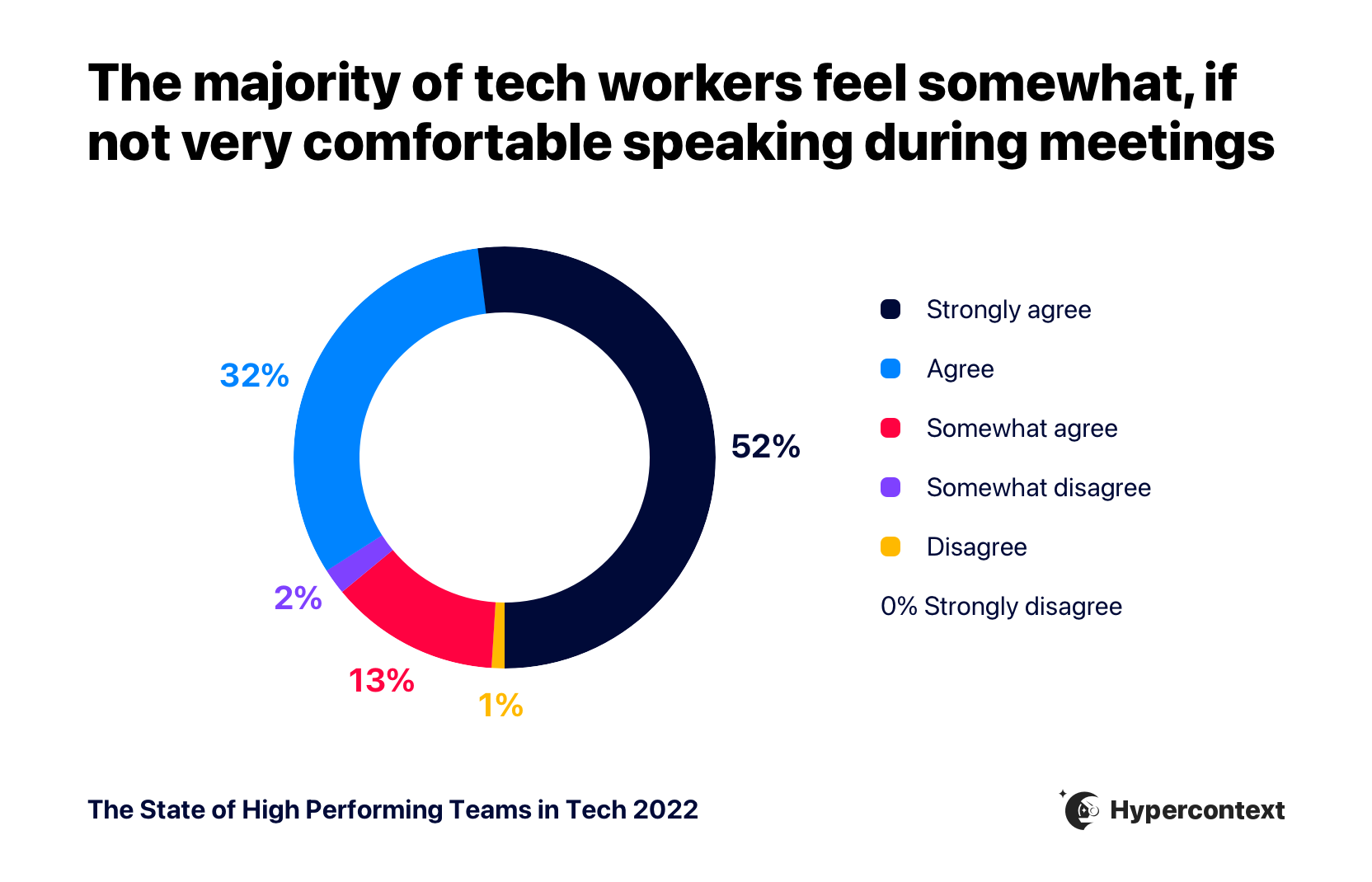
But, whether people agreed, somewhat agreed or disagreed varied slightly depending on seniority, gender, race and age.
“Take a good look at the meeting invite, do you feel everyone has a voice and is represented fairly, or do you believe you are operating in a vacuum? If you are only including people who agree with you deliberately, then that’s a red flag right there. Extend your meeting to people, especially women and People of Colour who may not normally get a seat at the table, and you’d be surprised at how that guards against the homogenous thinking. Don’t admonish people who choose to stay silent at meetings, the loudest people aren’t always the most effective ones.”
-Ishita Guptan, Senior Manager of Innovation Strategy, BMO Financial Group
Individual contributors are the least likely to agree or strongly agree they feel comfortable speaking in internal meetings. The more senior employees get, the more likely they are to feel comfortable speaking. The exception to this is executives, who are less comfortable speaking in meetings than managers, directors and VPs.
While it’s not surprising seniority impacts how psychologically safe people feel in meetings, we see the clearest correlation when it comes to age, gender and race.
Gen Z is the least likely to feel comfortable speaking in meetings compared to older generations.
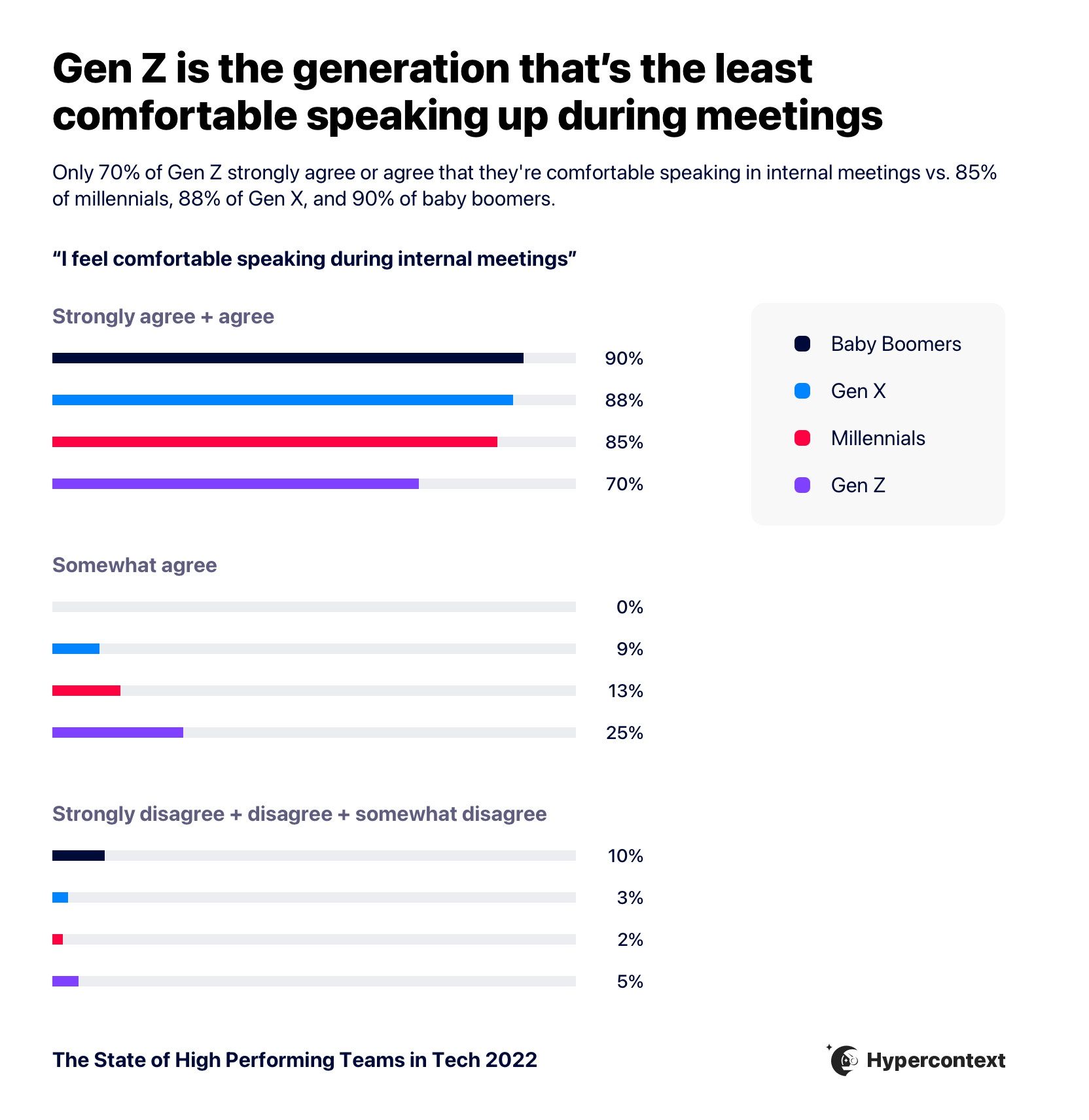
People of Color are less likely to feel comfortable speaking in internal meetings than their white colleagues. And those who identify as women are less likely to feel comfortable speaking in meetings than men.
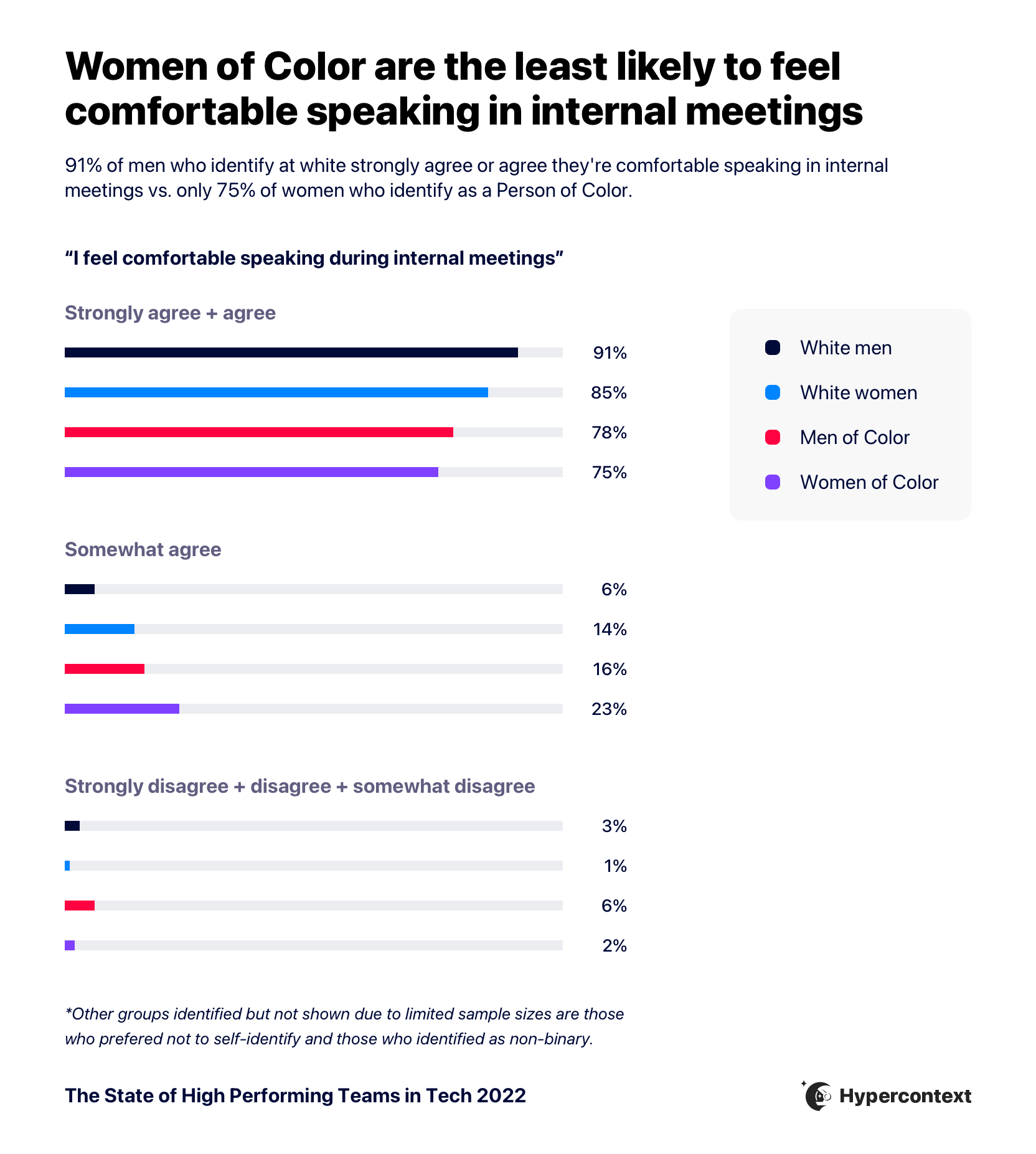
Everyone experiences meetings differently. For some, it’s a safe place to align and share ideas, while others feel less comfortable in a meeting environment.
But meetings aren’t going anywhere, and with 97% of people working in a remote or hybrid environment, it’s becoming increasingly difficult, albeit important, to make meetings inclusive. To achieve this, companies need to work on building trust and psychological safety, and creating meeting environments that are conducive to being vulnerable and sharing differing perspectives.
“I believe that managers must acknowledge and amplify the contributions, ideas or suggestions of their reports by attributing accordingly. At the same time, make sure everyone gets a voice in a meeting. As a manager, work to include those who have not spoken in a meeting if they have any thoughts or would like to share. It gives them an invitation to participate where they may not have felt like they could.”
– Anita Chauhan, director of marketing, Fraction
💡Try-it-tomorrow tip: Make it easy for people to participate through a collaborative agenda. This provides an opportunity for everyone to contribute their ideas and discussion items beforehand, so they’re not overlooked in the meeting. Learn more about how to run effective and inclusive meetings.
Want resources like this delivered straight to your inbox?
THE VALUE OF ONE-ON-ONES
One-on-ones lead to higher psychological safety and lower turnover
The state of one-on-ones
83% of people are having one-on-ones with their manager or direct report.
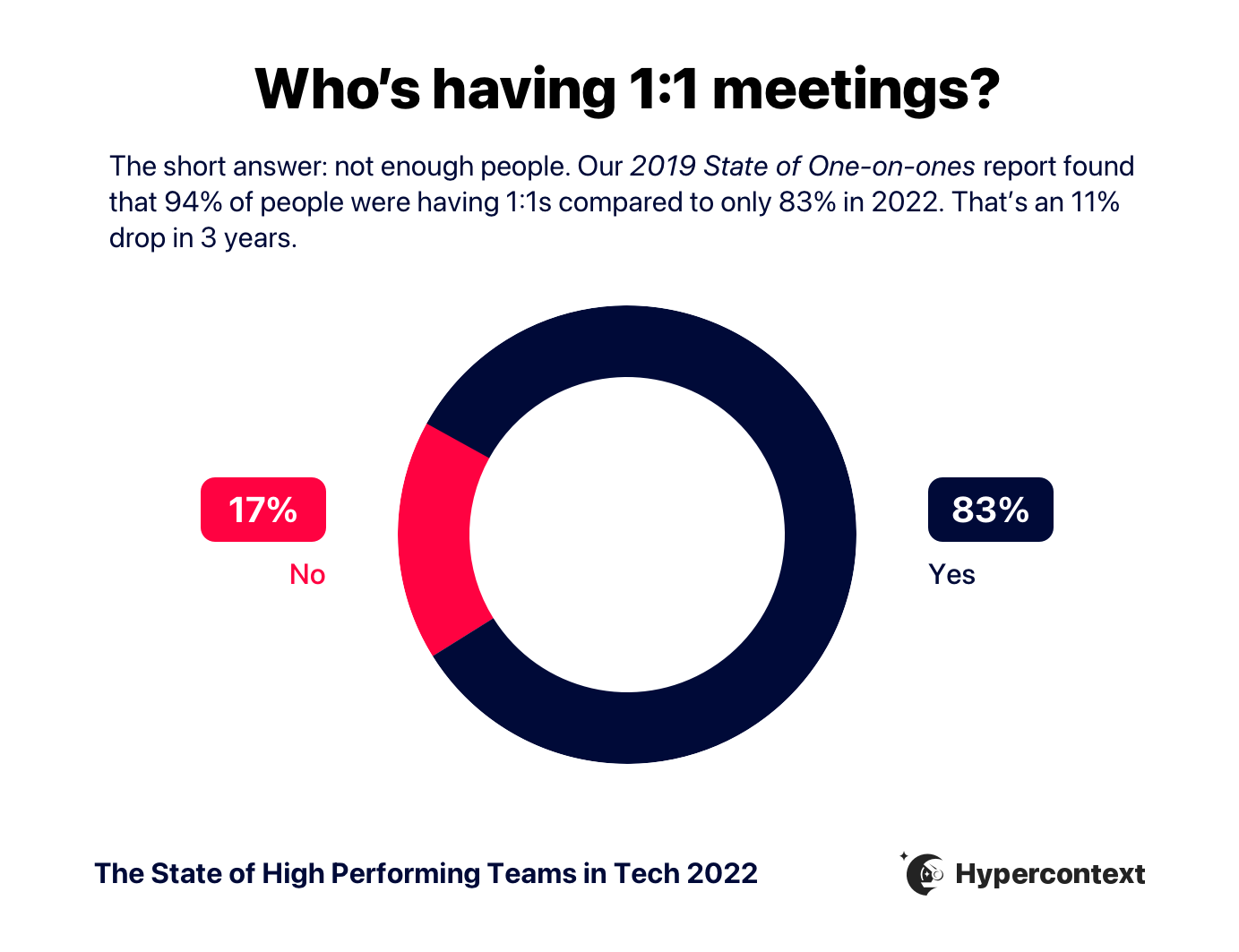
This is an 11% drop from three years ago when our 2019 State of One-on-ones report found that 94% of people were having one-on-ones.
The majority of people are having one-on-ones weekly and for 30 minutes.
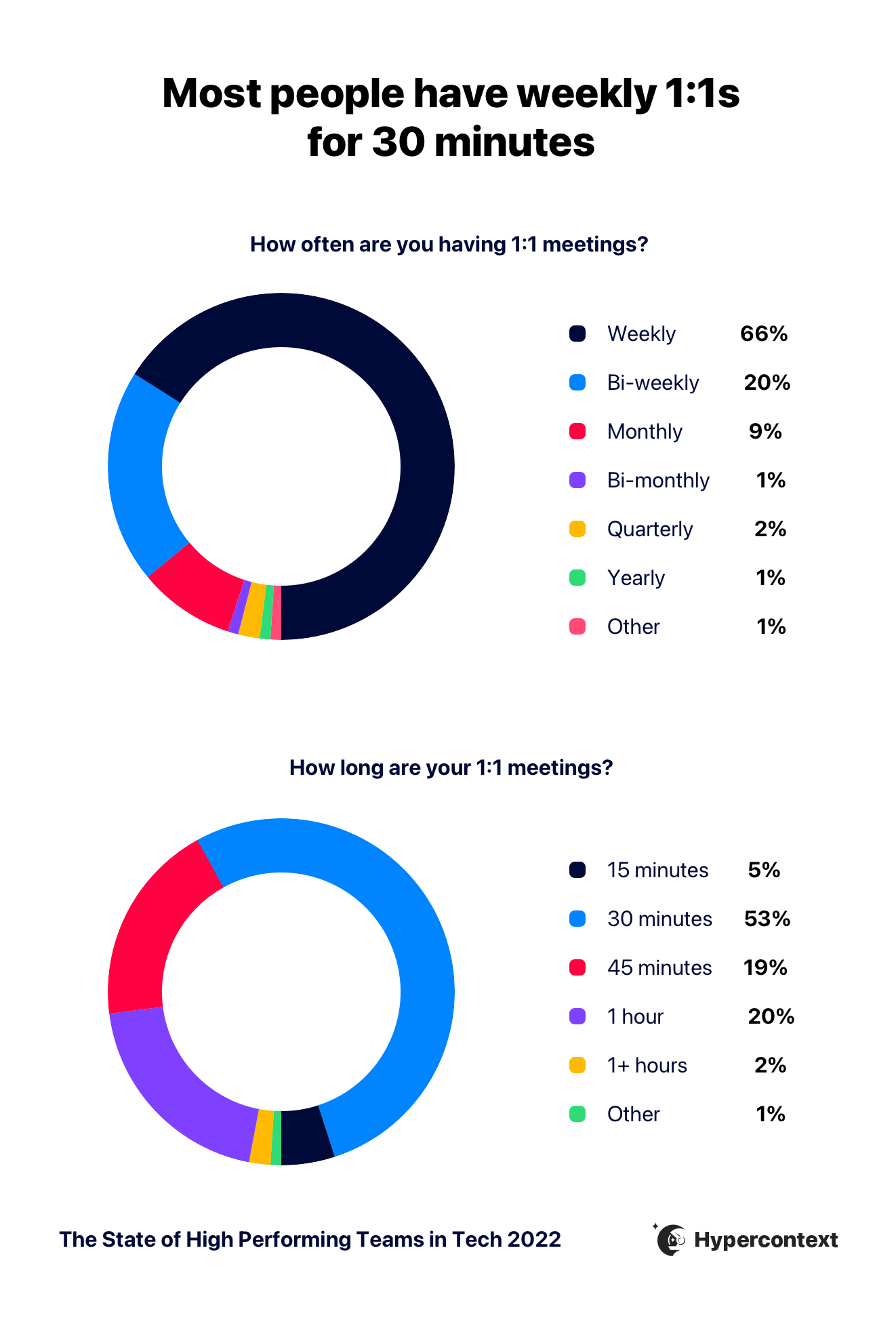
A weekly cadence for 1:1s is most effective
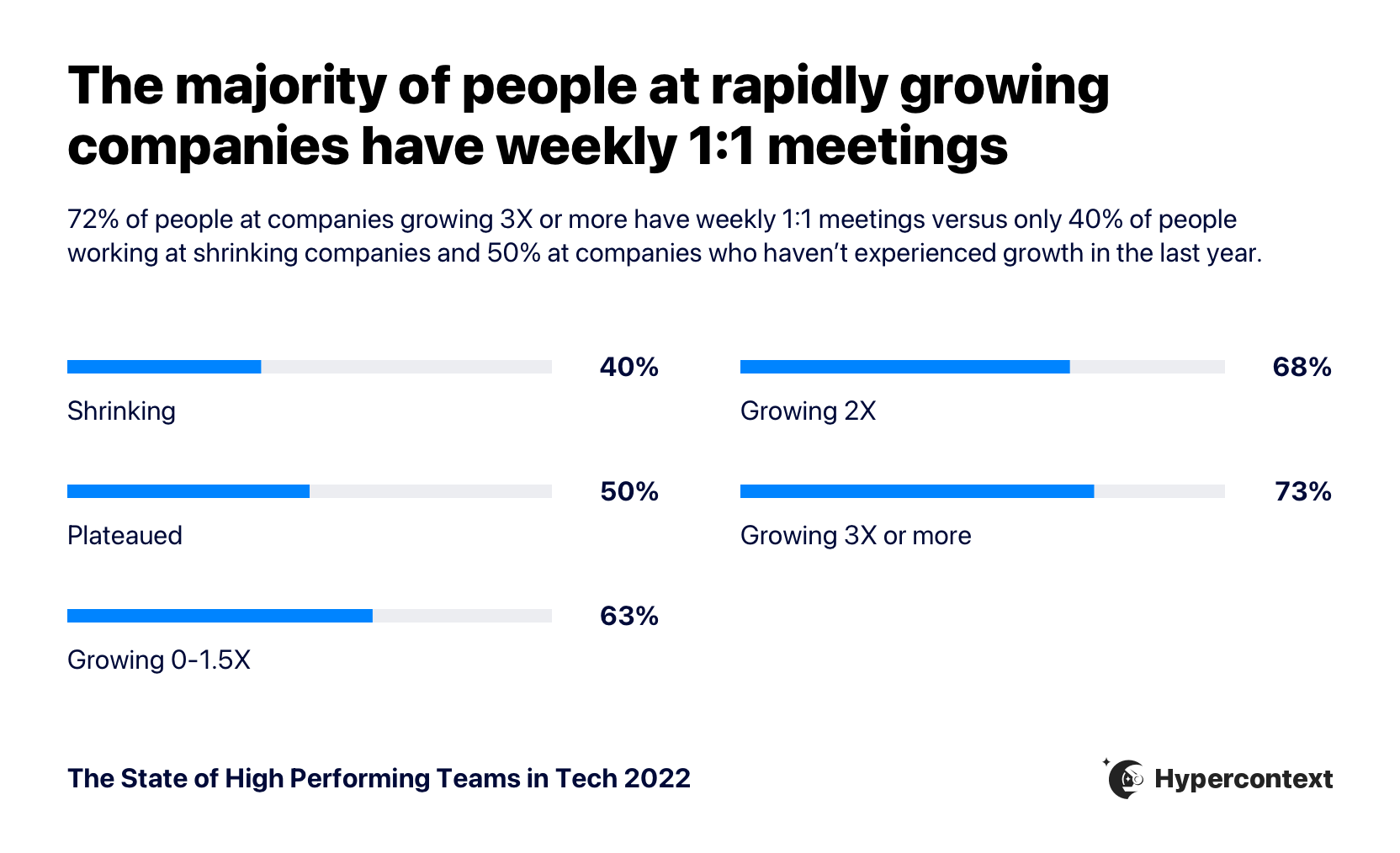
The faster the company is growing, the more likely they are to have one-on-ones on a weekly basis.
Everyone finds one-on-ones useful, especially CEOs and Directors
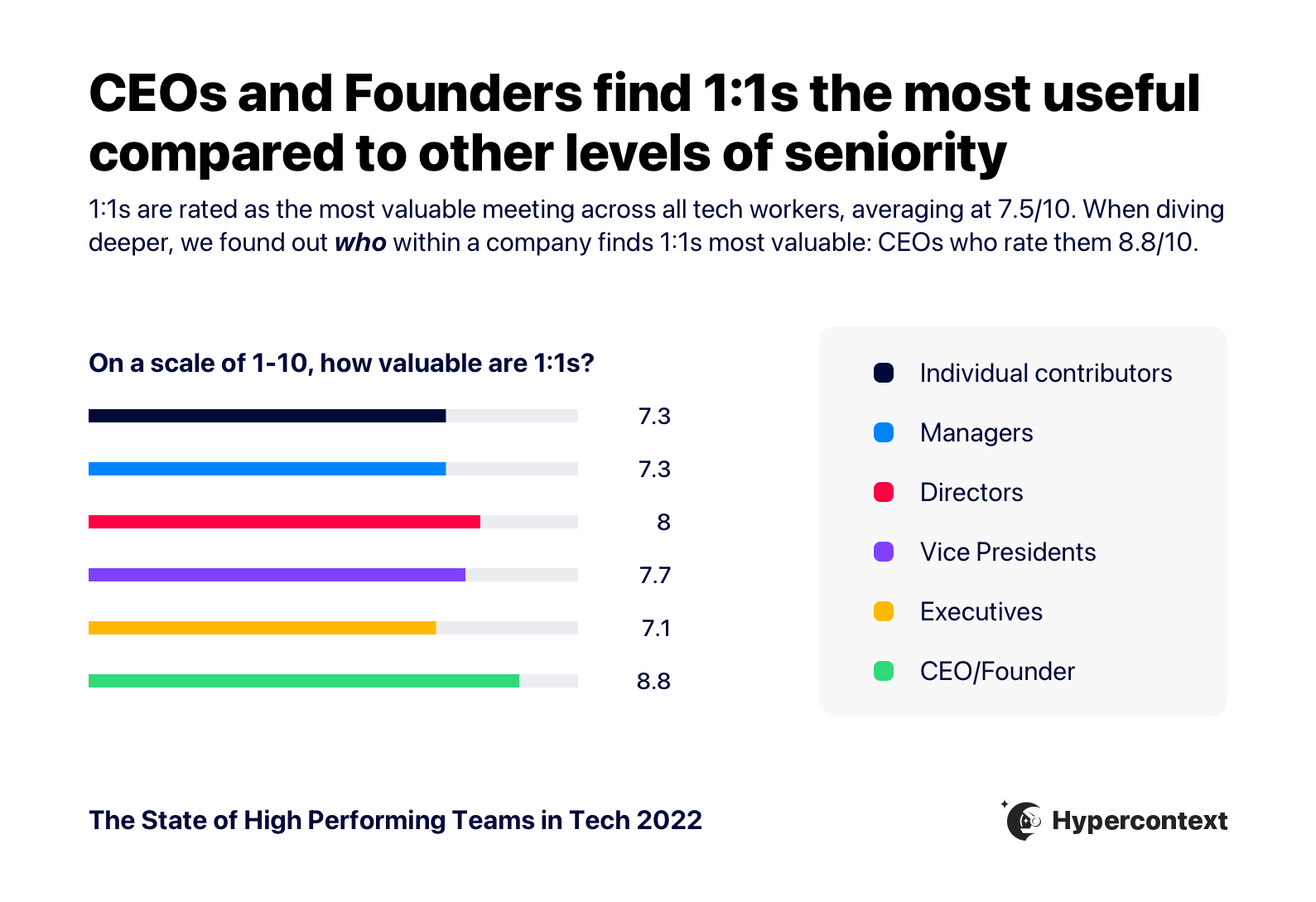
Regardless of seniority level, the majority of people find one-on-ones useful. But, CEOs are the most likely to find them useful, followed by Directors. While Executives are the least likely to find them useful.
17% of people aren’t having one-on-ones: What are the implications?
Lower retention
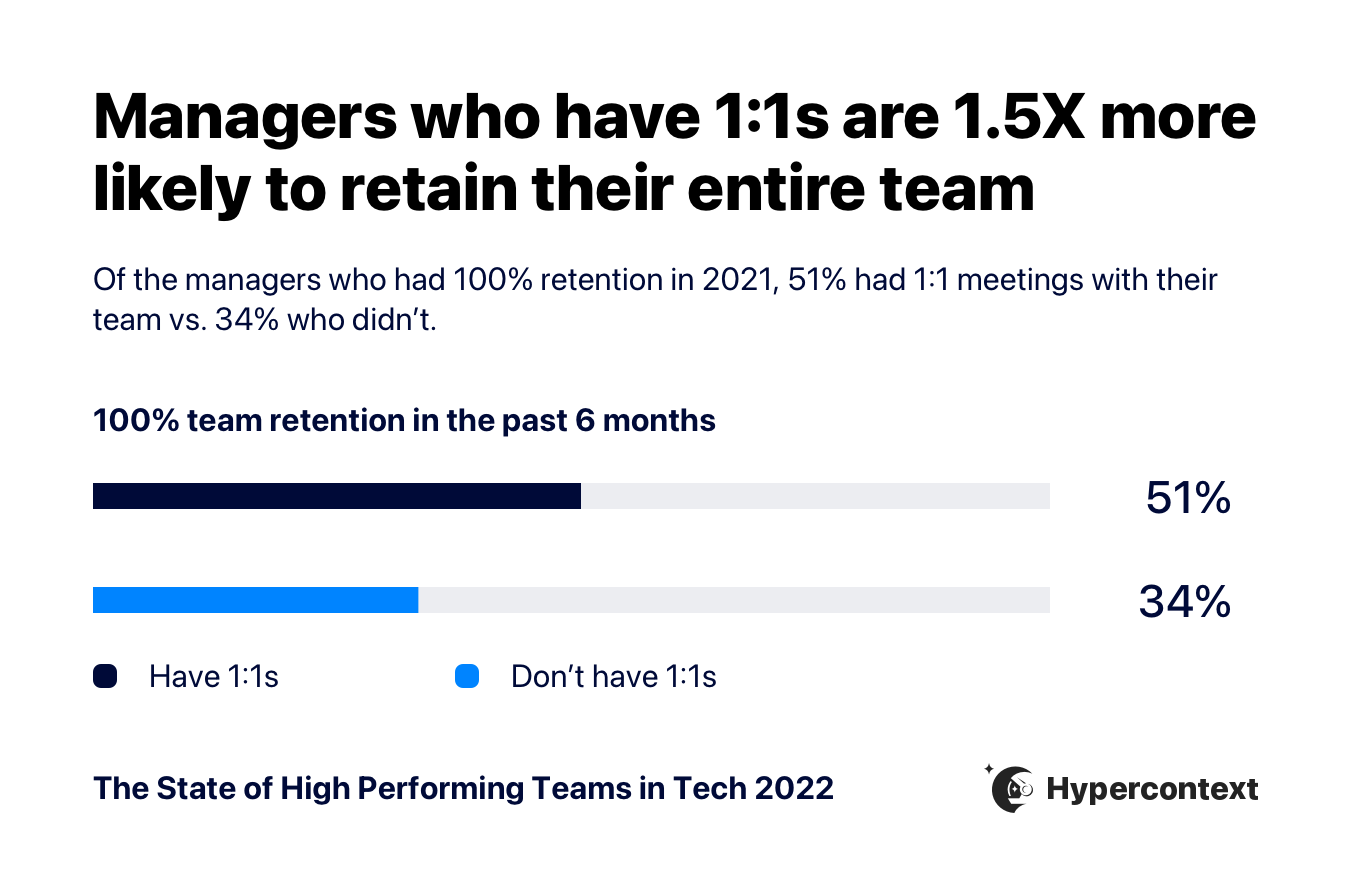
Managers who have 1:1s are 1.5X more likely to retain their entire team than those who don’t.
High costs
Given the above information, let’s look at a conservative example of what it might cost, on average, to not have one-on-ones, from the perspective of an Engineering Manager.
The average software engineer makes $118,167 per year in the U.S.
It costs 30% of an employee’s salary, as a baseline, to replace them. In this case, that means it would cost a minimum of $35,450, per employee.
The average manager manages 7.5 people.
So, when looking at the monetary implications of not having one-on-ones with a team of Software Engineers, this is an example of what it might cost:
- 1 employee leaves: $35,450
- 2 employees leave: $70,900
- 3 employees leave: $106, 350
- 4 employees leave: $141,800
- 5 employee leave: $177,250
- 6 employees leave: $212,700
- 7 employees leave: $248,150
Why do 1:1s impact retention?
One-on-ones are a tool for building trust between managers and direct reports. They provide a space to provide feedback and foster a sense of belonging.
People don’t stay at jobs solely for the benefits. In fact, despite competitive salary and benefits being cited as the top reason why people applied for other jobs, we found that pay didn’t matter as much as indicated. Employees paid below market value were 1.3X more likely to have applied for another job in the last 6 months. Whereas when companies paid a market average of above, it didn’t have a notable impact on retention.
Fair salaries are important. But competitive salaries may not be as important as we think. Psychological safety, on the other hand, has a clear impact on retention rates.
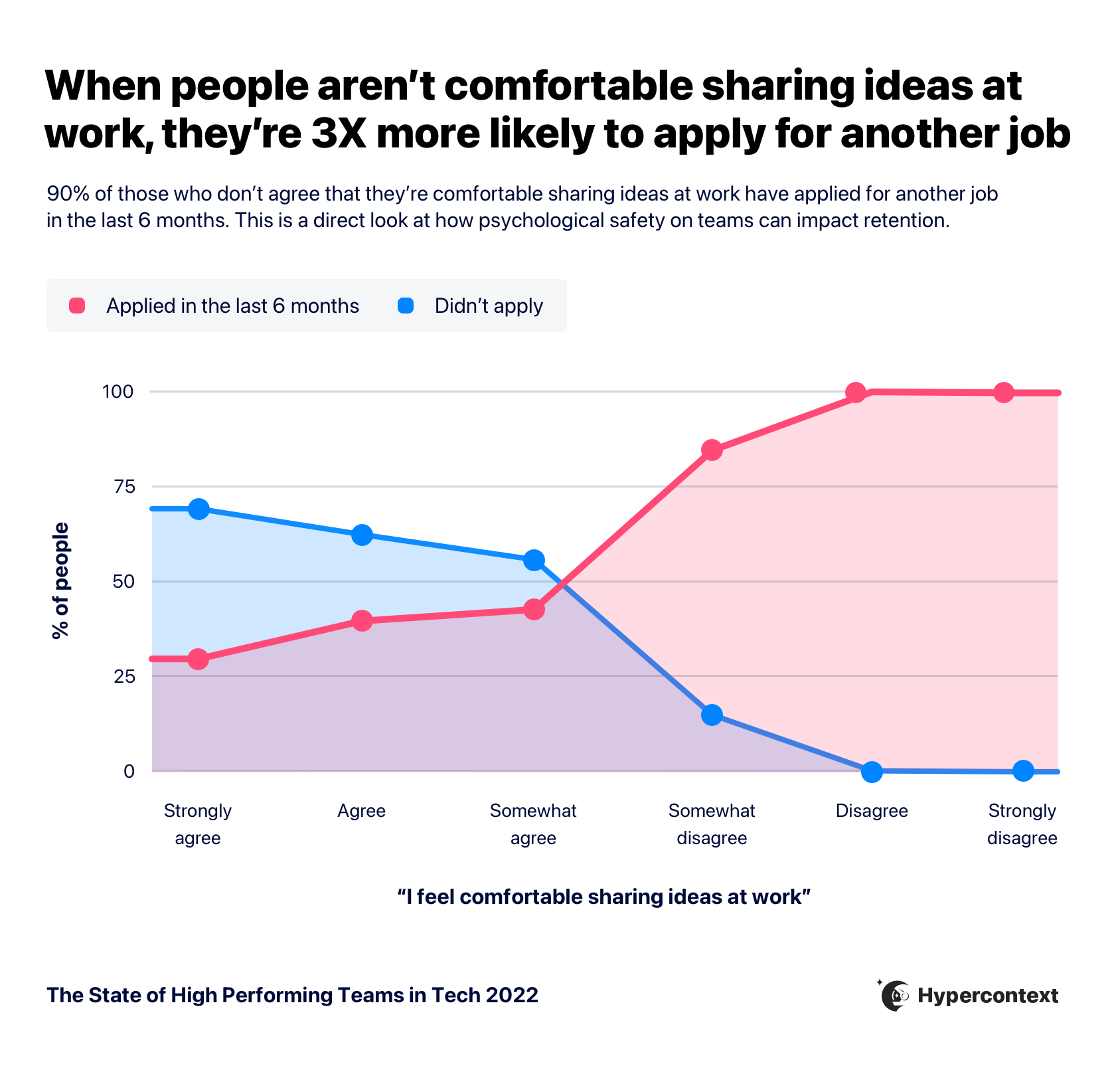
When people don’t feel comfortable sharing ideas at work — an indication of low psychological safety— they’re more likely to apply for another job.
Those who disagree they’re comfortable sharing ideas at work are 3X more likely to apply for another job than those who agree. *
*”agree”= strongly agree, agree, “disagree”= strongly disagree, disagree
💡Try-it-tomorrow tip: Start having consistent weekly one-on-ones with your direct reports if you’re not already. Learn more about building trust to improve retention
STRATEGIES FOR BUILDING A HIGH-PERFORMING TEAM
Strategies for fostering and retaining a high-performing team
Based on the data presented, below are some strategies to foster and retain a high-performing team.
Support people managers
It continues to be proven that managers play a significant role in employee engagement and motivation. But according to our survey, 38% of managers have never received management training. And only 16% of managers strongly agree their companies have equipped them with the tools/resources needed to be good people managers. Managers need more support from their organizations — particularly when it comes to having a strategy and vision for their team.
To better equip managers to lead high-performing teams:
- Provide tools and resources for managers to develop clear, accessible goals with their teams, such as Spinach AI’s goal-setting software.
- Organize regular leadership training. When people are promoted to management positions, it’s a role change. Equip them with the know-how to set them up for success.
✨ Recommended resources:
- Research: Project Oxygen: Google’s manager research
- Book: High output management
- Management training: Raw Signal Group leadership training
- Management training: Starla Sireno Professional Development
Talk about goals weekly
Nearly a quarter of people (24%) only talk about their company goals quarterly. But, when goals are talked about weekly, teams are nearly 3X more likely to feel confident hitting them. That’s why it’s the most common cadence for discussing goals.
Here are some things you can do to keep goals top of mind for your team:
- Involve your team in the goal-setting process so there’s buy-in and accountability.
- Pin goals to the top of your weekly meetings so you can discuss how you’re tracking against progress each week and increase confidence in your vision.
- Ladder up individual and team goals to company-wide goals so there’s clear alignment and employees understand how their work impacts the bigger picture. Objective and key results (OKRs) is a commonly-used goal-setting method for tech companies.
✨ Recommended resources:
- Templates: Spinach AI’s library of over 360 goal and OKR examples
- Guide: The goal-setting guide for managers
Focus less on reducing meetings and more on improving them
Not every meeting should be an email. Fewer meetings don’t line up with higher performance. Instead of blindly cutting down on meetings, double down on quality.
Here are some things you should be doing to improve meeting effectiveness:
- Only meet with a purpose. Don’t have a meeting just to have one. Ensure every meeting has an agenda with specific items that need to be discussed. If it doesn’t, don’t be afraid to cancel (unless it’s a one-on-one).
- Make it easy for people to participate through a collaborative agenda. This provides an opportunity for everyone to contribute their ideas and discussion items beforehand, so they’re not overlooked in the meeting.
- Conduct consistent one-on-ones and team meetings. No matter how little time there is in the day, team meetings and one-on-ones are an essential touch-point to connect, share feedback and consistently re-align. These are also good opportunities to build trust and psychological safety over time. That’s why the less time people have in their calendars, the more valuable they become.
“Practice writing over talking when preparing for meetings. Make sure everybody is aware ahead of time of the discussion topics and expected outcomes of the meeting. Even assigning certain topics to people in writing ahead of the meeting can ensure that everybody, not just the loudest voices, have their chance to speak.”
– Alice Corner, content marketing manager, Conscious Culture
✨ Recommended resources:
- Templates: Spinach AI agenda templates
- Guide: Inclusive meeting guide
Conduct weekly one-on-ones
When employees don’t feel comfortable sharing ideas at work (AKA low psychological safety), they’re less likely to stay. High turnover is an expensive problem to have.
The fastest way to build psychological safety on your team is through one-on-ones. That’s why they continue to be the most useful meeting in everyone’s calendar and why most people commit to them weekly. Those who don’t find one-on-ones useful or don’t have them at all are outnumbered by people who do.
Here are some tips for fostering psychological safety through your 1:1s and making them as valuable as possible:
- Encourage two-way feedback. Consistent feedback allows teams to continuously course-correct and rely on one another. One-on-ones are a recurring touchpoint that allow employees and their managers to share feedback with one another habitually.
“Open feedback systems must be a loop, not a funnel. We see many companies sending out employee surveys and getting thoughtful responses from employees, but often there’s little action taken. And sure, some of the responses may be hard to solve right away, but you *have* to show you’re trying. Transparency from leadership allows engaged employees to feel heard. The second you stop getting feedback from your team and apathy sets in, you’re in a much worse spot than if you get harsh feedback.”
– Sara Ott, head of community experience, Hound
- Demonstrate vulnerability so your team can do the same. If leaders don’t feel comfortable admitting fallibility, neither will their direct reports. Understand that managers set the pace for their teams. One-on-ones are an ideal time to demonstrate vulnerability so your team members feel comfortable being open and honest with you.
- Be consistant with your one-on-ones. While one-on-ones may seem like the easiest meeting to cancel when things get busy, it’s not a good idea. For one, it send the wrong signals to your team member. Also, they become an increasingly more valuable touchpoint, the more busy you are. Don’t cancel.
High-performing teams have a high level of psychological safety and accountability across every individual on the team. They are motivated and engaged, delivering solutions based on a shared value system. Individually, they are challenged and constantly growing while collectively delivering outsized results for their customers and company.
– David Sakamoto, VP of customer success, Gitlab
✨ Recommended resources:
- Guide: One-on-one meeting guide
- Tip: The lettuce pact for sharing difficult feedback
- Video: Amy Edmonson’s TED talk on psychological safety in the workplace
BONUS SECTION
Bonus: Key insights you didn’t know you needed 👀
Congrats! You’ve reached the end. Thank you for taking the time to read the report. But we know you likely still have some burning questions, like what astrological sign makes the best manager? Which team drinks the most coffee? And are coffee drinkers really more productive?
Not to worry, we’ve done the research and we have the answers. 😉
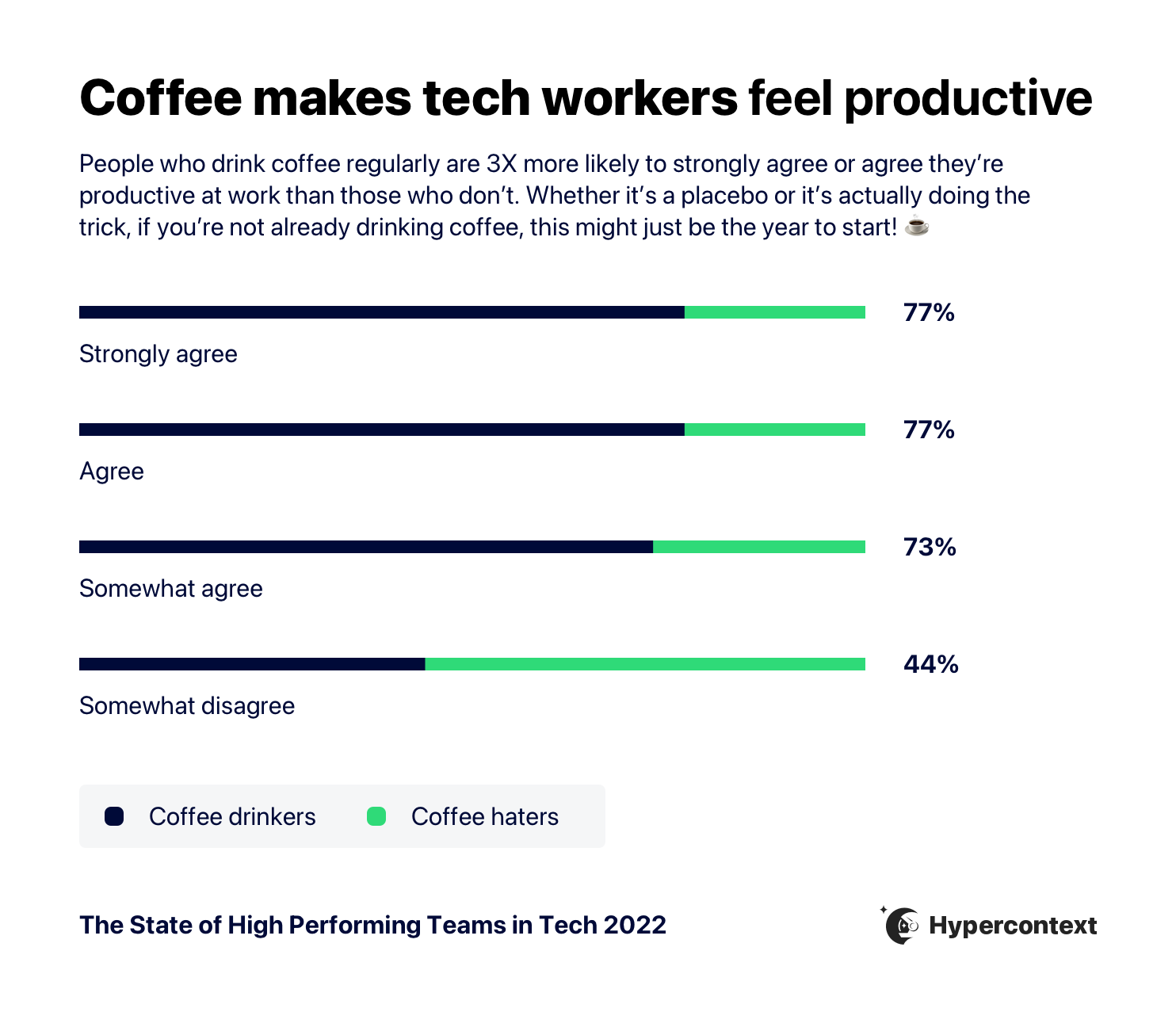
1. People who drink coffee regularly are 3X more likely to strongly agree or agree they’re more productive at work.
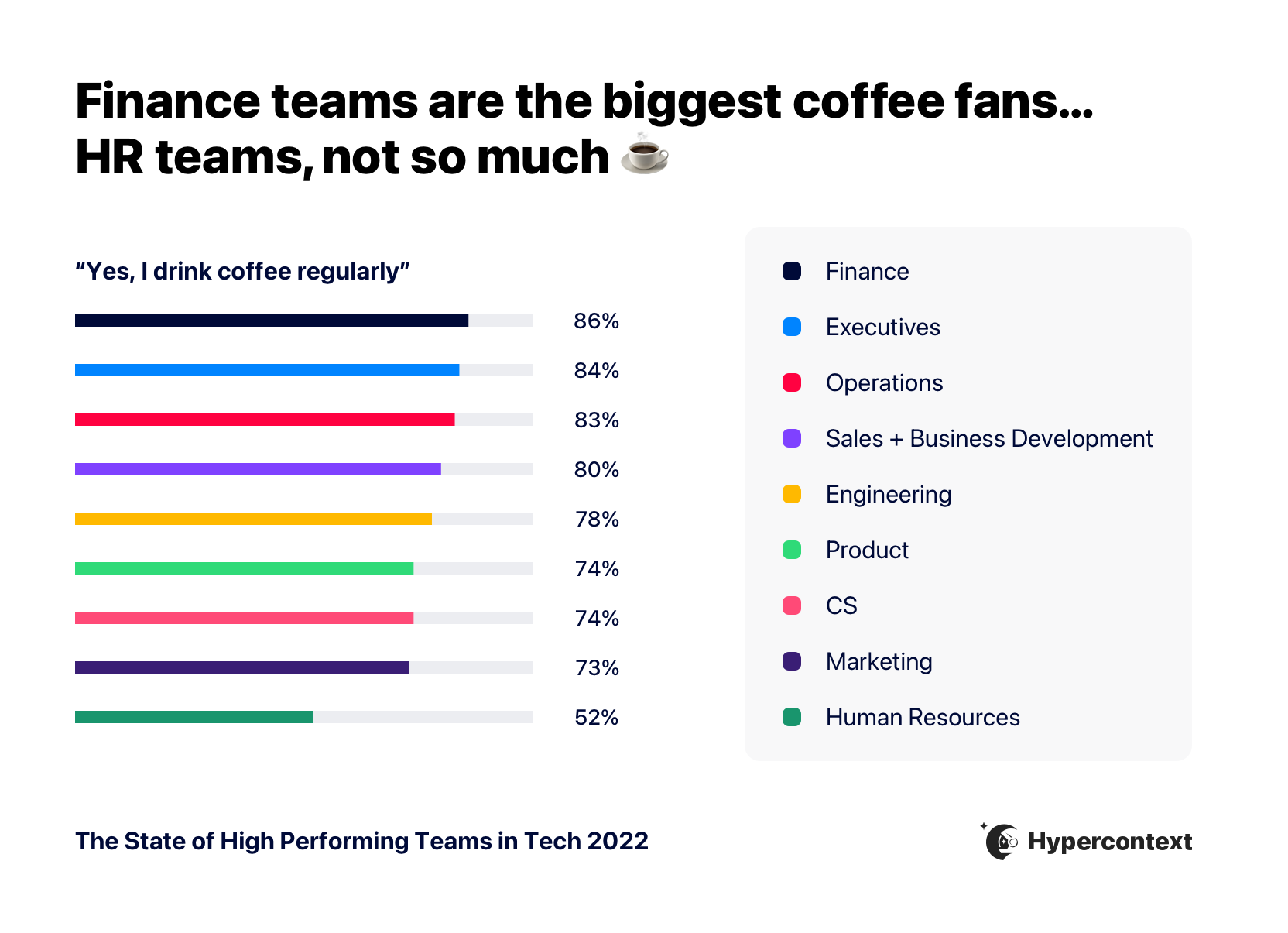
2. Finance teams are the most likely to consist of regular coffee drinkers. HR teams are the least likely to drink coffee regularly.
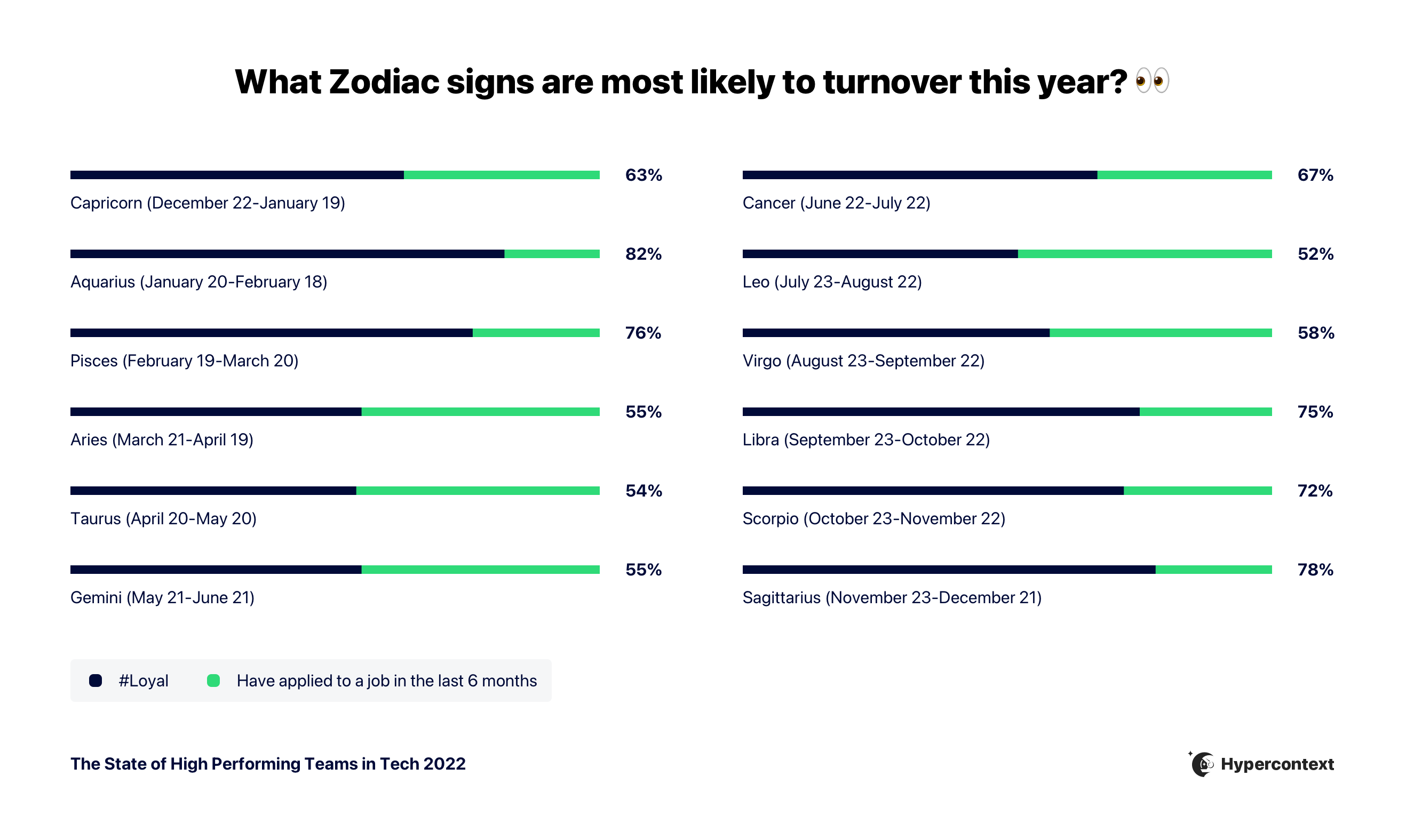
3. Leos are the most likely to have applied for a job in the last 6 months. Aquarians are the least likely.
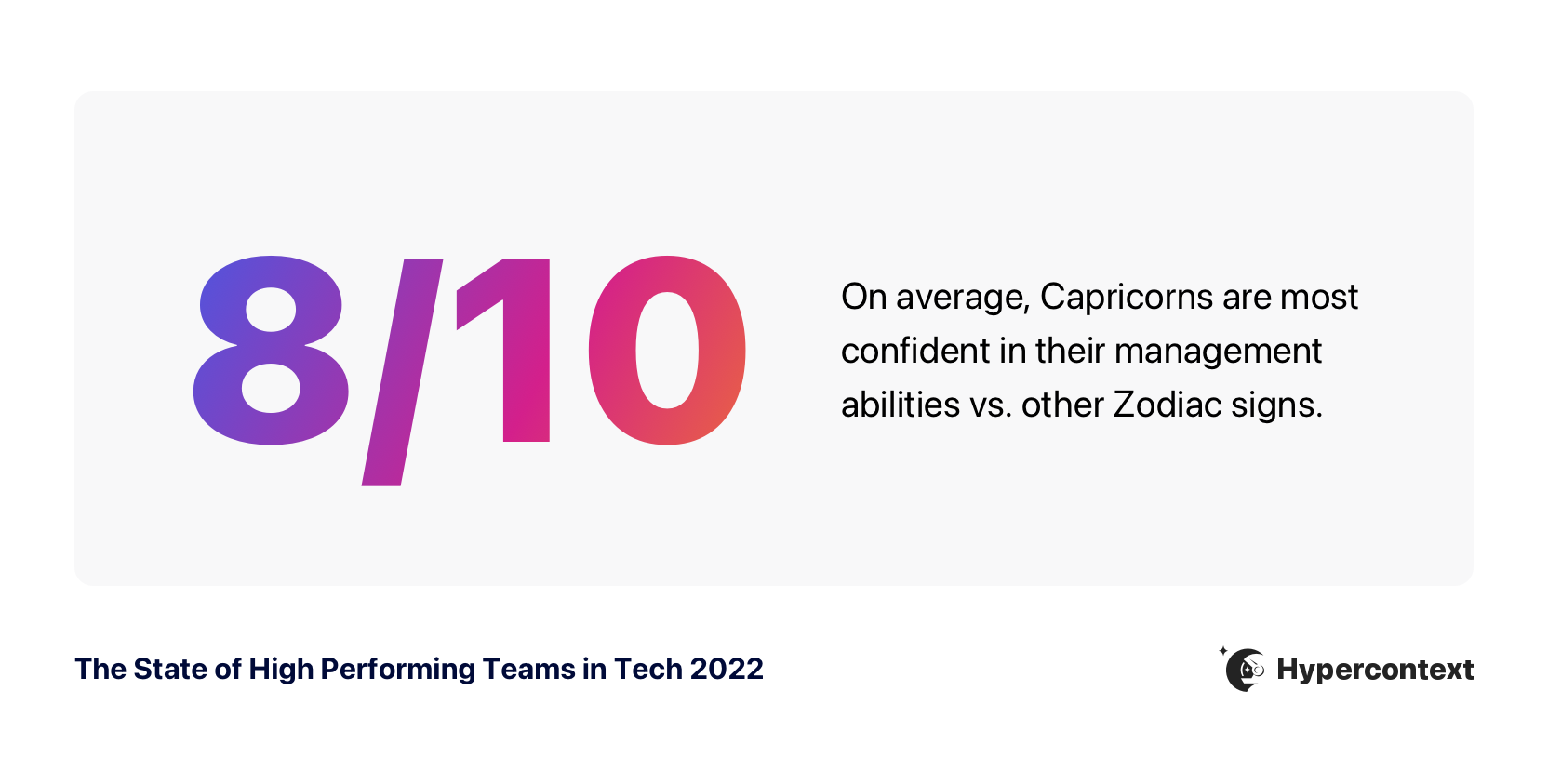
4. On average, Capricorns are the most confident in their management abilities, rating themselves as an 8/10.
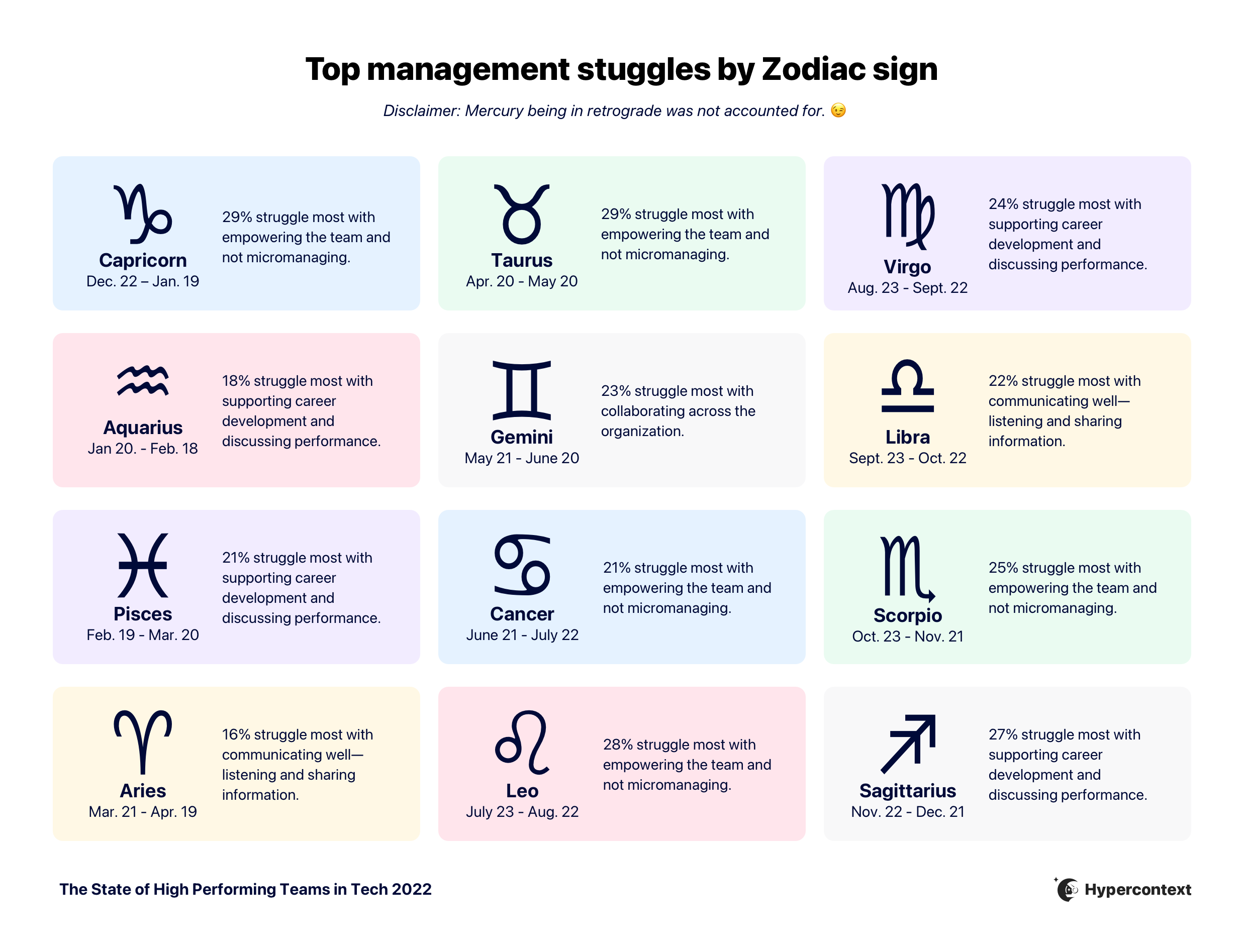
5. Top management challenges differ according to zodiac signs
Capricorn, Taurus, Cancer, Scorpio and Leo managers struggle most with empowering their teams. Virgo, Aquarius, Pisces, and Sagittarius managers struggle most with supporting career development. Libra and Aries managers find communicating well to be a challenge. Geminis need to improve how they collaborate across the organization.
Demographics and methodology
The State of High Performing teams in tech report was created using answers from a sample of 530 people who identified themselves as working in the tech industry. Answers were collected between November 9 2021 and November 25, 2021.
Here’s the breakdown of demographics:
Departments
- Marketing: 30%
- Engineering: 16%
- Customer support/success: 14%
- Sales: 14%
- Product: 7%
- Executive: 7%
- HR: 4%
- Operations: 4%
- Business development: 3%
- Finance: 1%
Head count
- 1-10 employees: 10%
- 11-50 employees: 26%
- 51-500 employees: 41%
- 501-1,000 employees: 9%
- 1,001+ employees: 14%
Revenue growth in the last year
- Shrinking: 2%
- Plateaued (about the same): 11%
- Growing 0-1.5X: 39%
- Growing 2X: 26%
- Growing 3X or more: 15%
- I don’t know: 7%
Seniority
- Individual contributor: 39%
- Manager: 23%
- Director: 12%
- VP: 9%
- Executive: 9%
- CEO/Founder: 8%
Gender
- 45% of people identified as a woman
- 50% of people identified as a man
- 2% of people identified as non-binary
- 3% of people said they’d prefer not to say
Race/ethnicity
- 63% of people identified as a Person of Color
- 31% of people didn’t identify as a Person of Color
- 6% of people said they’d prefer not to say
Age
- Baby boomer (1946-1964): 2%
- Gen X (1965-1980): 19%
- Millennial (1981-1996): 70%
- Gen Z (1997-2012): 8%
- Other: 1%
Thank you for reading! Let’s stay in touch.
For questions about this report or data please reach out to [email protected]. For more insights on how to run a high-performing team, sign up for our weekly emails 👇
