How to Build an Enterprise Knowledge Base Your AI Can Actually Use (September 2026)
Build a company brain AI agents can actually use: capture every conversation, enrich it, enforce access, then layer agents on top. September 2026
 Maintouch
I’ll be frank: most AI infrastructure projects skip the hardest input. You’ll connect Jira, index Confluence, pull in Salesforce, and feel like you’ve built something. What you’ve actually built is a record of what someone remembered to type. The real context, the reasoning behind decisions, what got rejected, what the team is still worried about, lives in conversations. This is how you build a system that gets all of it.
TLDR:
- A company brain needs four properties: queryable by agents, current state aware, access-enforced, and decision reasoning included. A wiki fails three of those four.
- Your biggest context gap is conversations. The CRM entry tells you what was decided; the meeting tells you why, what got rejected, and what the team is still worried about.
- Build in sequence: capture first, enrich second, store for semantic retrieval third, then build agents on top. Starting with agents before the data layer exists is the most common failure mode.
- Per-agent permissioning, a context graph, and observability across agent queries don’t fully exist anywhere yet. Most retrieval implementations grant agents broad access and rely on the model to exercise discretion.
- Spinach AI joins meetings across Zoom, Google Meet, Teams, Slack Huddles, and Webex, captures conversation data company-wide, and connects that corpus to Claude and ChatGPT via MCP with user-based permission enforcement applied before any query runs.
What a Company Brain Actually Is (And What It Isn’t)
A company brain is a living, governed model of what an organization knows and how it operates, structured so both people and AI agents can act on it safely. That last word matters. A knowledge base stores text. A RAG pipeline retrieves it. A vector store indexes it. None of those things govern meaning, enforce access, or stay current as the company changes.
The distinction hardened in early 2026, when multiple engineering teams arrived at the same conclusion through independent paths: frontier model quality had stopped being the bottleneck. Context had. For a system to deserve the label “company brain,” it needs four properties:
- Queryable by agents, beyond humans alone
- Reflects current state, going beyond historical snapshots
- Enforces who can access what
- Includes the reasoning behind decisions, alongside the decisions themselves
A wiki fails on three of those four. A static knowledge base fails on all of them.
Why AI Agents Fail Without One
Point agents fail the same way. A customer-success agent loses the context from last quarter’s QBR. A product agent proposes a feature the team ruled out eight months ago. An onboarding agent answers a question that contradicts a decision made in last week’s leadership sync, creating a cross-functional context loss problem that compounds with every new agent. The model is capable. The problem is that it started from zero.
As ability.ai describes it, enterprises face a domain knowledge bottleneck, not a model capability gap, that blocks reliable AI automation at scale. Swapping in a stronger LLM does not fix this. The agent needs to know what your company knows.
The compounding problem makes it worse. Each point agent re-solves context for itself. One team builds capture into their sales agent, another into their support agent, a third into their eng triage bot. None of that work is shared. Every new agent starts the same engineering problem from scratch, and organizational knowledge stays fragmented across isolated implementations.
The Conversation Blind Spot: Your Highest-Context Data Is Missing
Structured data is the easy part. You connect Jira, pull in Salesforce, index Confluence, and feel like you’ve built something. What you’ve actually built is a record of what someone remembered to type.
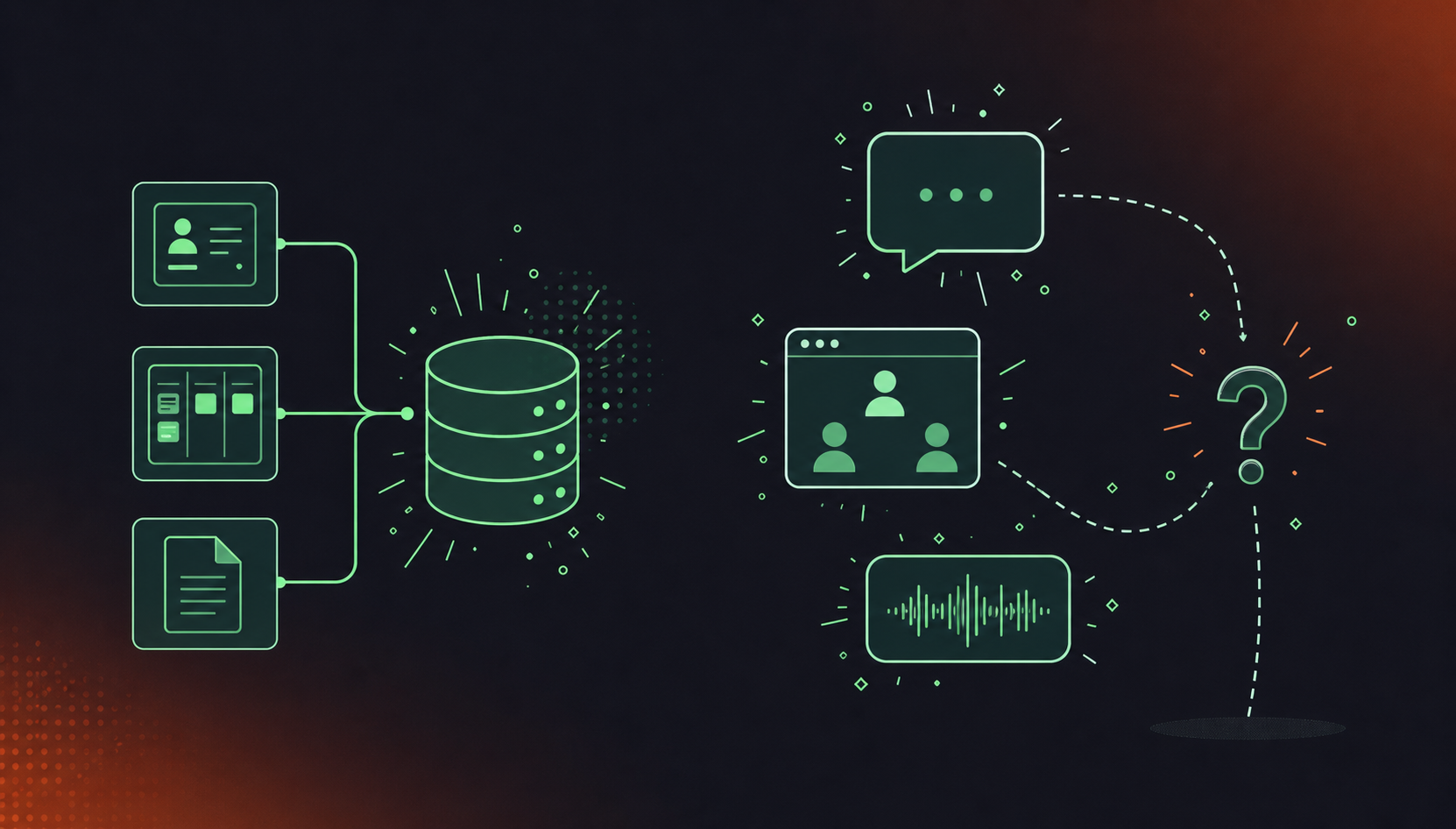
The CRM entry says “deal at risk.” The meeting where that deal started sliding contains the actual story: which objection came up twice, what the champion said when pushed, what the team agreed to try and then forgot. An agent reading the CRM entry answers from a fragment. The meeting is the reasoning, and it never got written down.
As Cloverpop’s research frames it, the most valuable business context lives in unstructured formats like conversations, not in structured systems. The structured record tells you what was decided. The conversation tells you why, what got rejected, and what the team is still worried about, which is why enterprise conversation intelligence has become a distinct category from search and retrieval. For most data types, you have the data and just need to ingest it. For conversations, you don’t have the data at all.
Step 1: Capture Every Conversation Across Every Channel
Most organizations underestimate the surface area, build for one channel, and end up with a dataset that covers only a fraction of what actually gets said.
The full scope of what needs capturing: video calls, audio, in-meeting chat, screen shares, hybrid rooms, phone lines, and call centers, across every platform employees actually use. In most organizations, that means at least three video tools running simultaneously, plus Slack huddles, plus whatever the sales team uses for customer calls. Each channel produces a different file, a different format, and often a different owner.
The access problem compounds this. Even a tool used consistently across a team leaves data siloed when access is per-participant by default. The engineer who attended the meeting can retrieve her summary. The product lead who wasn’t in the room gets nothing. There is no shared organizational dataset because the data never left individual accounts.
Record-by-default is the architecture that closes this gap, but only when capture is visible. A bot that records covertly fails consent requirements and won’t survive legal review. Every meeting participant needs to see that capture is happening, the bot must be identifiable, and the organization has to configure who gets access after the meeting ends. The full scope of meeting recording security and compliance extends well beyond the recording itself.
A conversation an AI agent can’t access isn’t a minor gap. It’s a wasted signal, permanently.
Step 2: Mine and Enrich (the Step Everyone Skips)
A folder of transcripts is not a brain. It’s a liability: expensive to store, hard to search, and nearly useless to an agent that needs to know which conversation was a customer escalation and which was an internal sprint retro.
A meeting labeled as a customer QBR, tagged to a specific account, linked to the open Jira epic, and flagged as containing a pricing objection is a fundamentally different asset than a 45-minute transcript with a timestamp. That structured asset is fundamentally different from a raw 45-minute transcript with a timestamp. That structure is the architecture behind a conversation data system of record.
Semantic layers can also identify knowledge gaps and track how knowledge assets are used, so organizations can focus on capturing their highest-value tacit knowledge and measure whether it’s actually being retrieved. That’s the difference between building an archive and building something that compounds.
Most teams skip this step and move straight to retrieval. The cost shows up when agent outputs are inconsistent, search returns everything and nothing, and the corpus needs reclassification before it can power anything real.
Step 3: Store and Make It Retrievable
Retrieval quality is the whole game at this step. You can capture everything and enrich it properly, and still build something useless if the storage layer returns the wrong context for a given query.
The architectural distinction that matters: a static archive finds documents. A live, queryable corpus proves facts. As Sentra frames it, a live graph separates a company brain from a static knowledge base. A wiki captures what was true when someone last edited the page. A brain reflects what’s true now, updated as new conversations arrive and old ones age out of relevance.
Two structural requirements follow. First, data needs to be indexed for semantic retrieval, going beyond keyword search. An agent asking “what did the team decide about the pricing model last quarter” needs the right answer even if the word “pricing” never appeared in the meeting title. Second, the corpus needs to stay current automatically. A brain that requires manual curation degrades the moment the team gets busy.
The real gap: very little infrastructure for a complete context graph with per-agent permissioning exists anywhere yet. AI agents typically lack a policy layer that determines, before an agent runs a query, exactly which data it’s entitled to retrieve. Meeting data governance at scale remains an unsolved problem across nearly every platform. Most retrieval implementations today grant agents broad access and rely on the model to exercise discretion. That is not a governance posture that survives a real security review.
Step 4: Build Agents on Top of the Brain
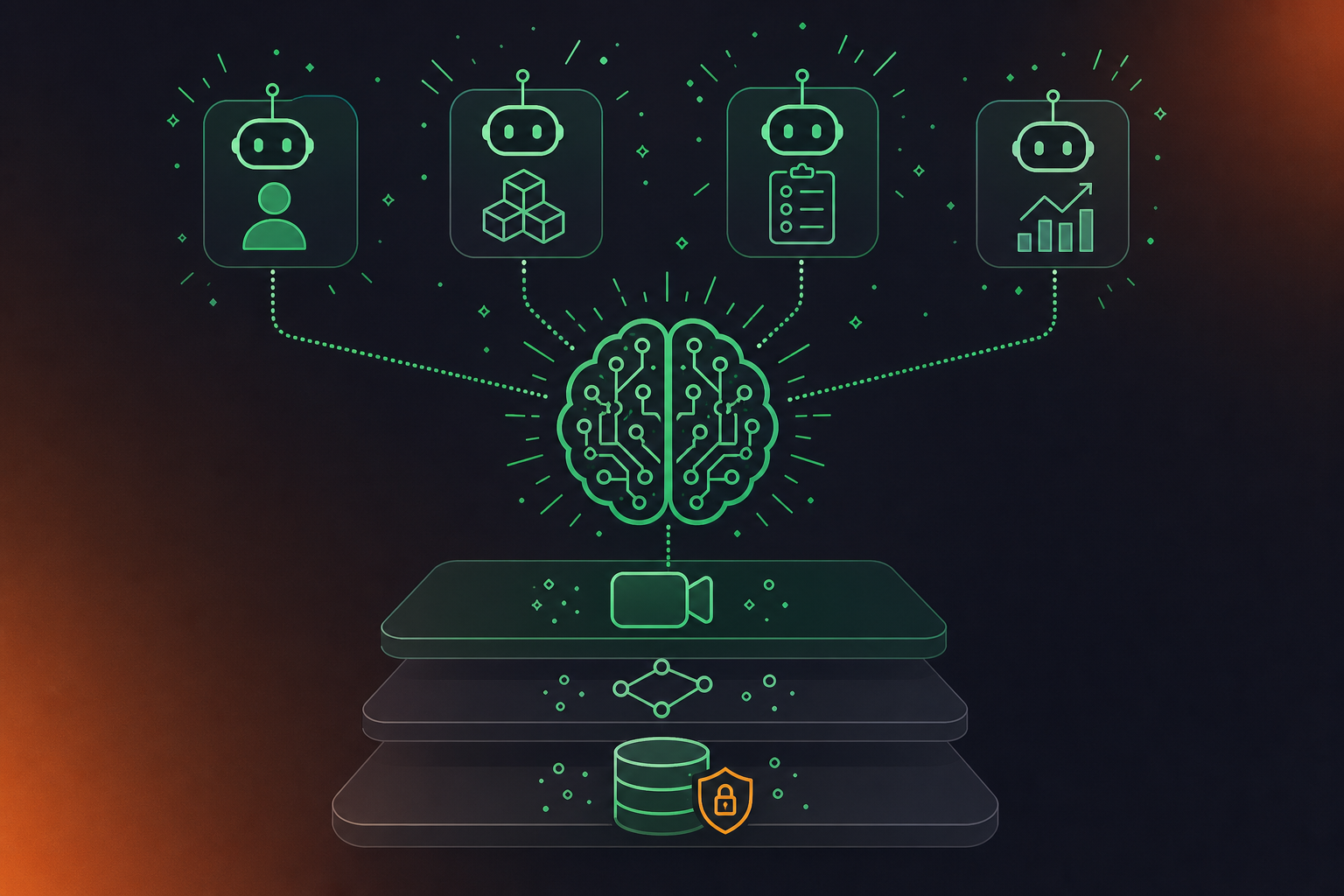
Once the context layer exists, agents stop starting from zero. A daily briefing agent can surface what was decided across yesterday’s meetings, flagging blockers and open questions without anyone writing a summary. A CRM update agent can populate Salesforce fields from a customer call without a rep re-entering anything. A ticket-creation agent can propose Jira issues linked to the exact conversation where the work was scoped. A compliance monitoring agent can classify conversations against a policy ruleset and surface risk for a person to review.
Why a shared brain changes agent economics
There are two structural advantages worth naming here.
- The first is consistency. Agents built in isolation contradict each other because they each hold partial context. The sales agent knows the deal is at risk; the product agent proposes a roadmap addition that contradicts what the customer just rejected. A shared brain means every agent queries the same corpus, so outputs stay aligned to the same organizational reality.
- The second is cost. Each new agent gets cheaper to build because the capture and retrieval layer already exists. A team adding a fifth agent skips re-solving context from scratch and goes straight to writing the agent logic.
MCP is what makes this practical without a custom integration per tool. An AI assistant like Claude or ChatGPT, connected to the brain via MCP, can answer questions across the full conversation corpus, and meeting AI tools with native MCP are the shortest path to this architecture. The assistant becomes a query interface to organizational memory, not a separate data pipeline.
Governance and Permissions: The Part Nobody Finishes
Most teams get to retrieval, declare the brain built, and move on. The permissions layer is where the project quietly fails.
What’s missing is a policy layer that decides, before an agent runs a query, exactly which data it’s entitled to touch. As Atlan documents, agents typically lack this pre-query enforcement. A support agent reaching finance records, a coding agent reading HR conversations: these aren’t design choices, they’re defaults when no one built the guardrail. Powering Devin with conversation data via MCP is one concrete example of why per-agent permissioning must be enforced at the data layer.
Recording consent is a separate problem. Capture needs to be visible, opt-out needs enough friction to preserve corpus quality without being coercive, and certain conversations need to be tagged as excluded from the brain entirely. One-on-ones, HR reviews, M&A discussions: the classification rules need to exist before the first recording lands, not after.
Build vs. Buy: The Real Economics
Buy (Managed Platform) | Build (Memory Layer) | |
|---|---|---|
Cost model | Per-seat monthly subscription | Usage-based infrastructure cost |
Break-even scale | Favors buy at smaller team sizes | Favors build at larger team sizes |
Capture scope | Included (multi-platform, multi-channel) | Must be built: 5+ video platforms, phone, hybrid rooms |
Maintenance burden | Vendor-managed; new channels added automatically | Permanent engineering commitment; grows with new channels and agents |
Core competency fit | Conversation capture stays outside your codebase | Teams typically conclude it falls outside their core competency |
The math changes depending on scale. Managed company brain platforms charge a per-seat monthly subscription. Building on a memory layer trades per-seat cost for usage-based infrastructure cost, with total cost typically favoring building at larger team sizes and favoring buying at smaller ones.
The core drawback of building: teams that go that route typically conclude it falls outside their core competency, requires permanent maintenance, and grows in scope as new channels, agents, and data types get added. Capture alone spans five video platforms, hybrid rooms, phone lines, and call centers. That’s an engineering roadmap, not a project.
The decision comes down to whether conversation capture is a solved input or an ongoing engineering commitment your team wants to own.
Common Pitfalls and Real Gaps
The most reliable failure mode: starting with agents before the data layer exists. Teams point a chatbot at a half-built corpus, get inconsistent outputs, and conclude AI doesn’t work for their use case. The brain wasn’t the problem. The sequence was.
As Capacity documents, training each AI tool or channel separately compounds into a consistency problem with every update. Different knowledge bases powering different agents means every edit to source material has to propagate manually, and it rarely does. Powering Claude agents with conversation data via webhooks is one pattern for keeping agents in sync.
The other failures cluster around the same root cause: treating the brain as a finished product. Teams skip enrichment, leave access controls at human-grade defaults, make opt-out frictionless, and within a quarter the corpus has thinned to the point of uselessness.
Stage four, continuous optimization from conversation data, remains aspirational for almost every organization. Admitting that is more useful than pretending otherwise.
Where Conversation Capture Fits in the Company Brain Stack
Most of what a company brain ingests is already machine-readable. CRM records, Jira tickets, Confluence docs, Slack messages: these connect with an API key and some configuration. Conversations are the exception. They produce the highest-context data a company generates, and most of it disappears the moment the call ends.
Spinach AI is built for that input gap. It joins meetings on Zoom, Google Meet, Microsoft Teams, Slack Huddles, and Webex, captures video, audio, transcript, screen share, and in-meeting chat, and at meeting end delivers structured outputs: decisions, action items with named owners, tickets, CRM records, and recap emails routed into the tools your team already uses.
The organizational architecture matters here. Spinach deploys company-wide, producing one governed record across every conversation instead of per-user silos. Collections group and share meetings automatically by participant, title, or series. Founder Mode gives executives org-wide read access across the full conversation corpus. The MCP server, available on Business and Enterprise plans, connects that corpus directly to Claude and ChatGPT, with user-based permission enforcement applied before any query runs.
The governance layer is what makes this enterprise-deployable. Spinach is SOC 2 Type II, GDPR, and HIPAA compliant, with a BAA available for Enterprise engagements. Retention is configurable per data type on Enterprise: transcript, summary, and video can each be set from one week to indefinite, and the full scope of enterprise data retention policy for AI tools extends to classification, access controls, and legal hold. PII is redacted at the transcript level. Compliance agents classify and flag regulatory risk against a customer-supplied ruleset for human review, which is the policy layer a conversation corpus needs before feeding agents in any compliance-sensitive environment.
Final Thoughts on Building a Company Knowledge System That Powers Real AI Agents
The gap between a folder of transcripts and an actual company brain is enrichment, structure, and access controls, none of which happen automatically. Your agents will only be as good as the context you give them, and that context is mostly sitting in conversations your current tools never captured. Start with the data layer, govern it before agents query it, and the investment compounds with every new agent you build on top. Spinach AI captures every conversation across the enterprise, centralizes it into a single governed corpus, manages access and retention policy, and powers agents and workflows with that data, so your team can focus on writing the agent logic and skip rebuilding the context layer from scratch.
The core fix is building a shared context layer before you wire up any agent. When meeting data is captured company-wide, enriched with metadata (meeting type, participants, linked tickets, decisions), and stored in a queryable corpus with per-agent permissioning, every agent you build draws from the same organizational record instead of re-solving context independently. Spinach AI connects that conversation corpus to Claude and ChatGPT via MCP, with user-based permission enforcement applied before any query runs, so agents get the right context without broad, ungoverned access.
Otter.ai is built for an individual’s meetings, which creates a structural problem at the organizational level: each team ends up with a different tool, producing shadow IT, uncontrolled sharing, and no single governed record. Spinach deploys company-wide with enforced policy, SAML SSO and SCIM provisioning, org-level retention controls per data type, and compliance agents that classify and flag regulatory risk — the infrastructure an enterprise security and legal review actually requires.
MCP gives an AI assistant like Claude or ChatGPT a governed query interface into the conversation corpus rather than a separate data pipeline. Spinach’s MCP server, available on Business and Enterprise plans, connects the full organizational meeting record to those assistants with the same user-based permissions the underlying system enforces, so a CEO querying yesterday’s cross-team discussions gets only what they’re entitled to see, and a coding agent pulling sprint context stays out of HR conversations.
Four things need to be true: the corpus must be queryable by agents, reflect current state rather than historical snapshots, enforce access by role and agent, and capture the reasoning behind decisions, not only the decisions themselves. Most teams skip enrichment — classifying conversations by type, tagging sensitivity, attaching project context — and jump straight to retrieval, then wonder why agent outputs are inconsistent. The sequence matters: data layer first, enrichment second, retrieval architecture third, agents on top.
The precondition is a single governed record that covers every meeting, not per-user silos where the CEO only sees meetings they personally attended. With Spinach, Founder Mode gives executives org-wide read access across the full conversation corpus, and a briefing agent built on top of the MCP connection can surface decisions, blockers, and open questions from the previous day’s meetings without anyone writing a manual summary. The agent queries the same governed dataset everyone else uses, so the output reflects what actually happened across the organization.
A wiki captures what someone remembered to type at a specific moment — it reflects historical snapshots, not current state, and has no mechanism for enforcing who can access what or why a decision was made. An enterprise AI knowledge base goes further: it must be queryable by agents, stay current as new conversations arrive, enforce access by role, and include the reasoning behind decisions, not only the outcomes. A wiki fails three of those four requirements by design.
The economics shift based on scale — building on a memory layer typically makes financial sense somewhere between 100 and 500 active users, according to infrastructure cost analyses, but teams that go the build route frequently find that conversation capture alone spans five video platforms, hybrid rooms, phone lines, and call centers, turning a project into a permanent engineering roadmap. If conversation capture is an input you want solved rather than owned, a managed platform lets your team focus on agent logic instead of data plumbing.
Agents repeat rejected decisions because they have no access to the conversation where the rejection happened — the CRM entry or ticket says what was decided, but the meeting that contained the “why” and the “what we tried instead” was never captured in a queryable form. Building a shared context layer that includes structured conversation data, enriched with meeting type and project links, gives every agent the same organizational memory so rejected paths stay rejected.
Per-agent permissioning requires a policy layer that determines, before any query runs, exactly which data a given agent is entitled to retrieve — most retrieval implementations today grant agents broad access and rely on the model to exercise discretion, which does not survive a real security review. The practical approach is to enforce the same user-based permissions at the data layer that govern human access, so a coding agent pulling sprint context cannot reach HR conversations and a support agent cannot read finance records.
Connect a company-wide conversation capture layer that joins meetings across every platform your team actually uses, enriches outputs with metadata at meeting end, and exposes the corpus to your AI assistants via MCP — that sequence closes the gap without rebuilding your retrieval or storage architecture. The critical constraint is record-by-default deployment: per-user tools leave the data siloed in individual accounts and produce no shared organizational dataset regardless of how good the downstream retrieval is.
The bot must always be visible to every meeting participant — covert recording fails consent requirements and will not survive legal review. Organizations can configure a custom bot name and branding, set a legal-approved in-meeting notification message, use pause, resume, and kick commands mid-meeting, and admit the bot from the waiting room only after verbal consent has been given, giving compliance and HR teams the controls they need before rollout.
You can build a partial one — connecting Jira, Salesforce, and Confluence gives you a record of what someone remembered to type, which covers structured decisions but leaves out the reasoning, the rejected options, and what the team is still worried about. For most data types that gap is manageable; for conversations, the data does not exist anywhere else, so agents built on a corpus without it will consistently answer from fragments and contradict each other across functions.
Capture first, enrich second, store for semantic retrieval third, then build agents on top — starting with agents before the data layer exists is the most reliable failure mode, producing inconsistent outputs that make teams conclude AI does not work for their use case when the actual problem is the sequence. Enrichment is the step most teams skip: classifying conversations by type, tagging sensitivity, and attaching project context turns a folder of transcripts into a queryable corpus agents can act on.
Retention should be configurable per data type — transcript, summary, and video may have different legal and operational requirements, and forcing a single policy across all three creates problems for both aggressive-deletion buyers (common for EU employees) and teams that need long-term context for agents. On Spinach’s Enterprise plan, each data type can be set separately from one week to indefinite, and PII is redacted at the transcript level as a distinct control from retention.
A shared conversation corpus with a single MCP connection is the structural fix — once the capture and retrieval layer exists, every new agent you build draws from the same organizational record instead of independently re-engineering context ingestion. This changes the economics of agent development: a fifth or tenth agent skips the data layer entirely and goes straight to writing agent logic, compounding the value of the initial infrastructure investment rather than duplicating it.
What you should do now
You made it to the end of this article! Here are some things you can do now:
- You should check out our library of meeting agenda templates for every type of meeting.
- Learn more about Spinach and how it can help you run a high performing org.
- If you found this article helpful, please share it with others on Linkedin or X (Twitter)

