27 Tips for effective team meetings
When you're able to run effective team meetings, everyone is more aligned, productive and on track to hit team goals.
 Nicole Kahansky
According to Spinach AI’s recent report on the State of High Performing Teams in Tech, team meetings are the most common meetings in people’s calendars.
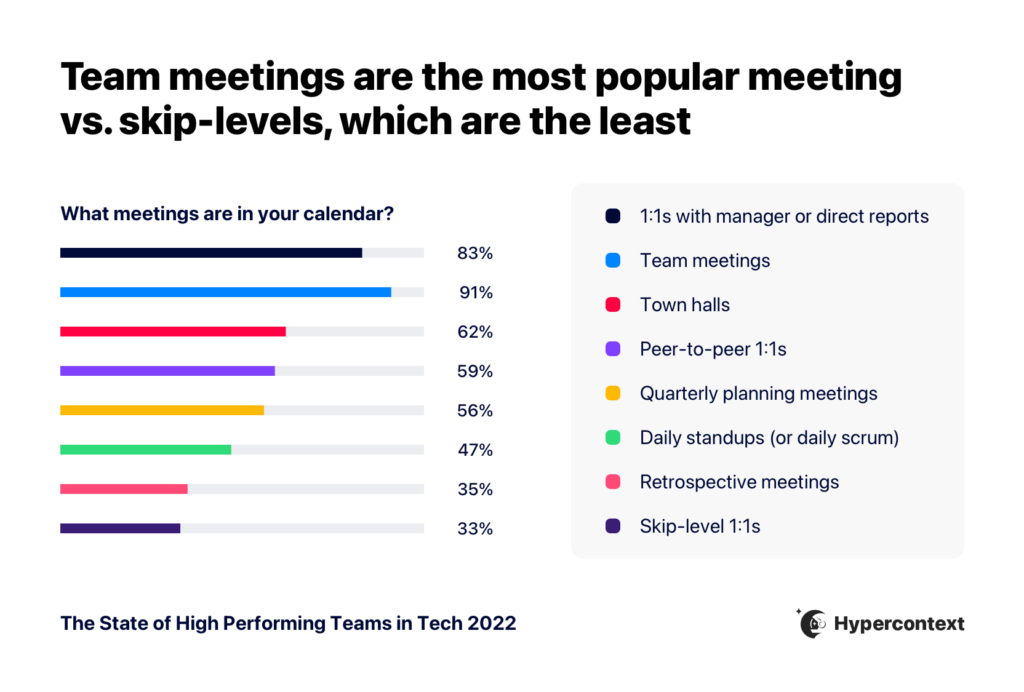
But, they’re rated an average of 6.7/10 when it comes to usefulness.
This article will cover tips that can help you organize your meetings better, making them the most effective use of everyone’s time. In this article, we’ll walk through all of the necessary steps you’ll need to take:
But first….what is an effective meeting?
What is an effective meeting?
Effective meetings go beyond a meeting agenda. It’s about involving the right people, having a purpose or goal for this time, making decisions (and action items to follow), and most importantly, avoiding the dreadful “should have been an email” meeting.
Meetings are a powerful tool for communication. Connecting synchronously, especially when working remotely, is an important part of building a high performing team.
With that, we’ve compiled 26 tips for a more effective team meeting.
Pre-meeting
- 1. Ask yourself: Do I really need this meeting?
- 2. Only include relevant people
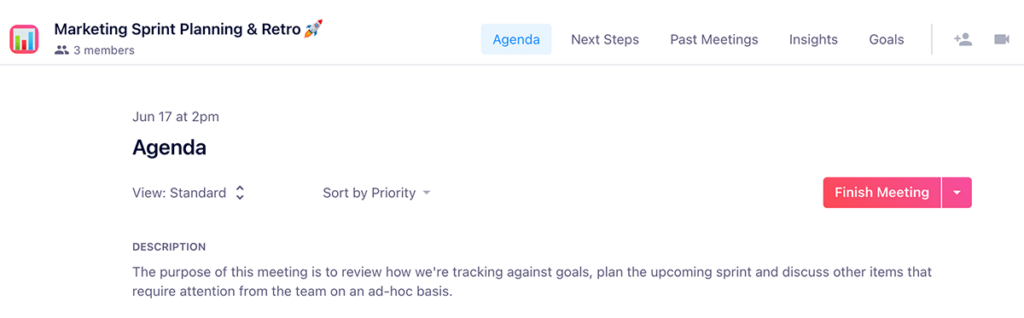
- 3. Send the agenda before the meeting
- 4. Have a defined meeting goal
- 5. Think about the duration
- 6. Set time expectations for each agenda item
- 7. Set and communicate expectations for the meeting
- 8. Have the right tech in place
1. Ask yourself: Do I really need this meeting?
Just like we mentioned before, every meeting should have a purpose or goal. If you’re only planning to share information with your colleagues, is a meeting necessary or is that information best served in an email or Slack message?
We don’t recommend canceling recurring team meetings. They’re an important touch point for your team to rely on. But before booking one-off meetings like, brainstorming meetings, project retrospectives and project kickoff meetings — asses whether or not they’re needed.
“Try to have a pre-meeting discussion asynchronously over messages and schedule a meeting only if asynchronous communication is extremely inefficient for that use case.”
– Vignesh Bayari, Backend Developer, Almabase Inc.
2. Only include relevant people
Once you’ve decided to set up a meeting, you need to consider who should be involved in this meeting. When deciding on who to include in your meeting, think about the following roles:
- Key voices – Those who are there to share their viewpoints and form the decisions
- FYIs – Those who are there to listen because the decisions made will affect their day-to-day or a project they’re working on.
“An effective team meeting is often hindered when you expect people with little understanding of the meeting to bring something groundbreaking to the table. Instead, be selective with who attends the meeting, so the ones with enough updates and expertise are able to brainstorm and strategize within a shorter period of time.”
– Samantha Odo, COO, Precondo
Samantha goes on to explain, “If needed, the key decisions taken in the meeting can be shared with the entire team, so everyone can learn the necessary details.”
3. Send the agenda before the meeting
Before you send your meeting invitation to all the attendees, be sure it includes a meeting agenda. Sharing the agenda ahead of time means that:
- Everyone is accountable for coming prepared to the meeting
- Meeting participants can add in new agenda items or context to existing items
- You can better prioritize what’s discussed during the meeting
“Sending out a meeting agenda ahead of time is one of the best things that managers and companies can do. It builds trust in the form of an upfront contract, and allows people a fair chance to determine whether or not it is worth their time to attend.”
– Khadijah Plummer, Community Content Manager, Miso
4. Have a defined meeting goal
Every meeting should have a goal or objective. If you’re not sure what you’re hoping to get out of the meeting, try finishing this sentence:
At the end of the meeting, I want our team to…
Make sure the meeting goal is clearly communicated with the rest of your team. You can easily do this by adding it to your agenda or calendar description.
5. Think about the meeting duration
When it comes to the meeting’s duration, there are no precise rules. It all depends on the meeting’s purpose and its topic. Of course, nobody likes sitting for hours and going around in circles. Frankly, it’s a waste of everyone’s time.
When thinking about the time frame, ask yourself:
- How much time is needed to accomplish your meeting goal?
- Is there enough time saved for items that others may add to the agenda?
- Is this the best use of everyone’s time?
When you’re able to answer those questions, you’ll be able to define your meeting length.
However, keep in mind that the duration isn’t set in stone forever. As you run your meetings more frequently, you’ll be able to gauge whether or not you’ve booked too much, not enough or just the right amount of time.
6. Set time expectations for each agenda item
Go one step beyond deciding how long the whole meeting will be by indicating how long is spent on each agenda item.
Jordan Choo, Managing Partner at Kogneta explains:
“Providing an agenda for the meeting with expected time on each ensures that everyone is able to be prepared for a productive meeting where the outcome is both clear alignment and next steps. It also helps to make sure that a single topic doesn’t overtake the entire meeting.”
– Jordan Choo, Managing Partner, Kogneta
7. Set and communicate expectations for the whole meeting
You can’t assume people know what you expect from them in the meeting. Should the team look at the agenda in advance? Do they need to prepare something? Do you expect cameras to be on?
Being crystal clear about what’s expected of meeting attendees will be helpful for everyone to ensure the most productive and collaborative meeting possible.
8. Have the right tech in place
By now, we’re all accustomed to remote meetings. Even as people trickle back into in-person work, we’re set up well to accommodate remote employees.
But not all remote meetings are made equal, and having the right tech in place can go a long way.
Here’s the tech stack we use for our meetings:
- Clockwise: With different time zones and schedule preferences, it’s helpful to have a scheduling tool like clockwise to help find an optimal time for everyone to meet.
- Google Meet: It goes without being said, but you need a video calling software. Google Meet is what we use at Spinach AI — partly because it pairs so beautifully with our Chrome extension.
- Spinach AI: We’re definitely biased but we eat our own dog food here at Spinach AI. The meeting agenda app is an essential part of remote meetings to keep them collaborative, engaging and useful.
💡Check out our list of the best tools for remote and hybrid teams.
During the meeting
- 9. Engage in small talk pre-meeting
- 10. Start on time
- 11. Stick to the agenda
- 12. Assign a time-keeper
- 13. Start with an icebreaker
- 14. Begin with a DEI connection point
- 15. Don’t get distracted
- 16. Encourage attendees to participate
- 17. Have a rotating meeting captain
- 18. Leave status updates behind
- 19. Amplify contributions
- 20. Encourage recognition and celebrate wins
- 21. Add notes and summarize items as you go
- 22. Assign the next steps
9. Engage in small talk pre-meeting
We know everyone hates small talk. But, when you first get on a call or enter your meeting room, it’s valuable to chat non-business for a bit — as long as it doesn’t cut into your meeting time.
“One aspect of a team meeting that I consider to have a great value is chit-chat. As we discuss important tasks and processes throughout the meeting, it might get tense, people tend to get bored or tired. You want the team to be engaged, alert, honest, and comfortable. I like to engage in small talk before the meeting and ask my team about their day or the topic we discussed the day before.”
Pawel Hytry, CEO, Spacelift
Ask people how they are, what’s new, what they did that weekend. Even if it’s only 2 minutes, over time that helps build a stronger connection on the team.
10. Start on time
Set the tone with your team. Not only is everyone accountable for coming prepared to discuss what’s on the agenda, but they’re also accountable for showing up on time.
If you feel like your team isn’t great at this, consider adding in an agenda item to discuss at the start of your meeting. You can even add it right into your meeting description. An example of this could be:
- Agenda item: “Meeting rules: Arriving on time and come prepared”
- Meeting description: “Please remember to respect everyone’s time. That means that everyone is accountable for showing up to these meetings on time and prepared.”
11. Stick to the Agenda
We’ve already covered the importance of agenda, but the follow-through is just as important. Colin Toh of Headphonesty explains,
“When you have a meeting agenda, and most importantly you stick to it, your meetings will be exponentially more effective […] Sticking to an agenda helps to keep the meeting on track and therefore more productive. When teams know that the agenda will be followed, they’re less worried about the meeting running overtime or getting derailed with things that should really be dealt with outside of the meeting, not during it.”
– Colin Toh, Headphonesty
12. Assign a timekeeper
Tp help make sure you’re sticking with the agenda, Ben Travis, Founder of HR Chief, recommends asking a volunteer to be a timekeeper:
“It’s easy for meetings to go over and for conversations to meander. Sometimes that’s great, but having someone on the team checking on the time can build in accountability in a light-hearted and helpful way.”
– Ben Travis, HR Chief
13. Start with an icebreaker
97% of tech employees now work in a remote or hybrid environment, according to The State of High Performing Teams in Tech. With that comes a lack of natural rapport building throughout the day and potential feelings of isolation.
Opening with an icebreaker question is a great way to get started on the right foot.
Here are some examples of questions you could ask:
- What’s a win you had last week?
- What are you jazzed about (Personally or professionally?)
- What’s something non-goal related you learned last week?
Another great icebreaker? A mini brainstorm, according to Michael Van, CEO and Co-founder of Furnishr:
“Ask everyone to free-write their ideas about the main topic. Ideas generated by doing so, will likely encourage participation throughout the meeting. An added benefit is reducing the pressure that comes from putting people on the spot and results in a comfortable, engaging atmosphere for all.”
– Michael Van, CEO and Co-Founder, Furnishr
14. Begin with a DEI connection point
This is LaTonya Davis’s advice, CEO of LaTonya Davis Consulting, to help ensure you’re not only conducting an inclusive meeting, but an anti-racist one. LaTonya explains,
“Begin with a DEI Connection point for people to share what they have learned about themselves and how it has helped them professionally. In order to become antiracist, individuals must make it normal to share their learnings when working with others who are different.”
– LaTonya Davis, LaTonya Davis Consulting
15. Don’t get distracted
Make a point to let everyone know that when you’re meeting, you’re meeting. You’re not there to focus on other work, like writing that blog post or fixing that bug.
Ask all the meeting participants to put away any distractions. To make this meeting even more effective, make sure attendees have access to the agenda so everyone can follow along as you move through the meeting.
Note: With most people working from home, things can and will come up: A baby crying, a dog barking, a roommate in the background, etc. This is par for the course. Make sure your employees know that’s okay so they don’t need to worry about what’s going on in the background and can give the meeting their attention.
16. Encourage attendees to participate
According to the State of High Performing Teams in Tech, gender, race and age play a role in how comfortable people are speaking up in internal meetings.
For example, people of color are less likely to feel comfortable speaking in internal meetings than their white colleagues. And those who identify as women are less likely to feel comfortable speaking in meetings than men.
So it’s important for managers to find ways to encourage participation in team meetings. Different mechanisms will work for different teams. Let’s walk through two that you can start implementing today.
✍️ Using a shared agenda
As mentioned earlier, when your team has access to the agenda prior to the meeting, they’ll have more time to form their thoughts and opinions. When people feel confident in their answers, they’re more likely to participate in discussions.
In addition to that, some individuals just don’t want to speak during a meeting. And that’s okay — everyone has different communication styles. By giving them a digital means to contribute to the agenda, you’ll still be encouraging them to participate but in a way that’s comfortable for them.
💙 Fostering a culture of psychological safety
Harvard Business School Professor, Amy Edmondson defines psychological safety as a “shared belief held by members of a team that the team is safe for interpersonal risk-taking.” She further defines it as “a sense of confidence that the team will not embarrass, reject or punish someone for speaking up.”
Fostering a culture of psychological safety isn’t something that happens in one meeting. Rather, it’s something you need to work at building over time. Your team meeting is a great place to do that. And the impact of psychological safety on your team meeting will be enormously positive.
If meeting participants feel safe enough to open up and share their thoughts and ideas, your team will be able to tackle problems and think up ideas more holistically.
17. Have a rotating meeting captain
Don’t let all the administrative responsibilities of the meeting fall on the same person each time. Isabella Chiu gave us the low down on how they operate their team meetings at TestBox:
“When it comes to group meetings, it’s important to share the responsibility of who’s taking notes. At TestBox, we use RosterBird to rotate those responsibilities. This ensures that everyone on the team shares accountability for documentation and has an equal opportunity to contribute to every meeting. It’s also a way to ensure that visible minorities, like women, aren’t immediately designated as the note takers.”
– Isabella Chiu, Chief of Staff, TestBox
18. Leave status updates behind
While updates can be helpful, they can also typically be done asynchronously. Running through a laundry list of what everyone’s done isn’t that helpful and is, quite frankly, boring.
Janet Mesh, CEO and Co-Founder of Aimtal, explains how they recently started avoiding status updates at their team meetings:
“Use an async tool to provide updates and the face time during a meeting to actually connect with your team. We made this change recently to our all-hands meetings every Monday & Friday. Half of the Monday meeting is focused on knowledge sharing where someone from the team presents a client project, new marketing trend, or tips from their area of expertise—whatever they want! Then half of the Friday meeting is dedicated to a team bonding activity and everyone in the company has an opportunity to lead that every week.”
– Janet Mesh, CEO and Co-founder of Aimtal
19. Amplify contributions
Amplification, amplification, amplification! Don’t just encourage your team to speak up during meetings, amplify them when they do! Especially those who are quieter. Anita Chauhan, Director of Marketing at Fraction, explains:
“I believe that managers must acknowledge and amplify the contributions, ideas or suggestions of their reports by attributing accordingly.
At the same time, make sure everyone gets a voice in a meeting. As a manager, work to include those who have not spoken in a meeting if they have any thoughts or would like to share. It gives them an invitation to participate where they may not have felt like they could.”
– Anita Chauhan, Director of Marketing, Fraction
20. Encourage recognition and celebrate wins
According to Quantum’s Employee Engagement Trends report when employees believe they’ll be recognized, they’re 2.7X more likely to be highly engaged at work.
Recognition instills company values and allows employees to feel their impact on the bigger picture. Your team meetings are a good platform to embed recognition into your team culture.
Encourage people to recognize one another for accomplishments, big or small, throughout the week by adding a “shout outs” section to your meeting agenda.
21. Add notes and summarize items as you go
Do you remember what you had for lunch last Friday? What about the meeting you had two weeks ago? You might remember its topic, but not the details. Don’t worry, you’re not alone. People simply can’t recall every piece of information.
According to Dr. Art Kohn, Professor at Portland State University School of Business, on average, we forget 50 percent of information after one hour, 70 percent in 24 hours and 90 percent of information after one week.
The best way to keep track of everything you’ve discussed during the meeting is by taking notes. That’s because you’ll be able to revisit them and review past decisions or conversations.
When it comes to taking notes, here’s what you should know:
- Your notes should be accessible to everyone
- You should always document decisions and why those decisions were made
- Before adding the decisions to your meeting summary, repeat them out loud to the team to make sure that everyone agrees
22. Assign the next steps
During the meeting, you’ve made certain decisions. What are your next steps?
Assign tasks to your team members and add deadlines. This will keep everyone on your team accountable for the things they’ve committed to. When it comes to next steps, here are some practical tips:
- Have all of your next steps in one place. This makes it easier for people to go back and check on what they’ve committed to and action on those items.
- Keep the lines of communication open: Make next steps visible to everyone on the team. That way, when things get completed, everyone is aware.
Post-meeting
- 23. Send meeting notes to everyone
- 24. Follow-up on decisions
- 25. Ask everyone for for feedback
- 26. Do a meeting audit
23. Send meeting notes to everyone
Whether your notes live in a meeting management app or you send them via email, make sure they’re accessible to all participants.
You want to make it easy for people to go back to your meeting and review what decisions were made, what next steps they agreed to and any other context they’ll need to do their job effectively.
Some things to consider including in your meeting notes are:
- Who was at the meeting
- A list of the items that were on the agenda with summaries of each
- Action items that people committed to
24. Follow-up on decisions
Remember those next steps you assigned during the meeting? Circle back on them! If no action is taken post meeting based on decisions made, that’s deemed a useless meeting.
Check in on how your team’s tracking on next steps assigned to them and follow through on any commitments you made in the meeting.
25. Ask everyone for feedback
Getting feedback is the best indicator of whether or not the meeting was effective. As you collect more feedback, you’ll be able to make the necessary iterations needed to improve the meeting.
“Seeking out feedback from your team is a great way to show them they are valued, while still optimizing the effectiveness of your meeting processes. Don’t ignore the experience of your employees. Considering new perspectives as a business leader is the only way to make truly informed decisions regarding business operations.”
– Nick Drewe, Wethrift
The most simple yet effective way to get feedback is by asking your colleagues to provide feedback immediately after the meeting has ended because it will be fresh in their minds. The feedback doesn’t have to be extensive. It can be as simple as asking, “How would you rate this meeting?”
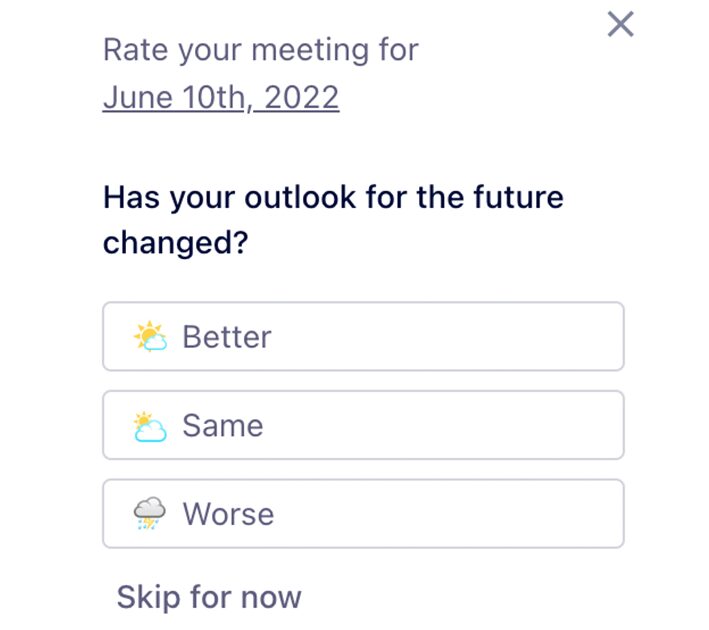
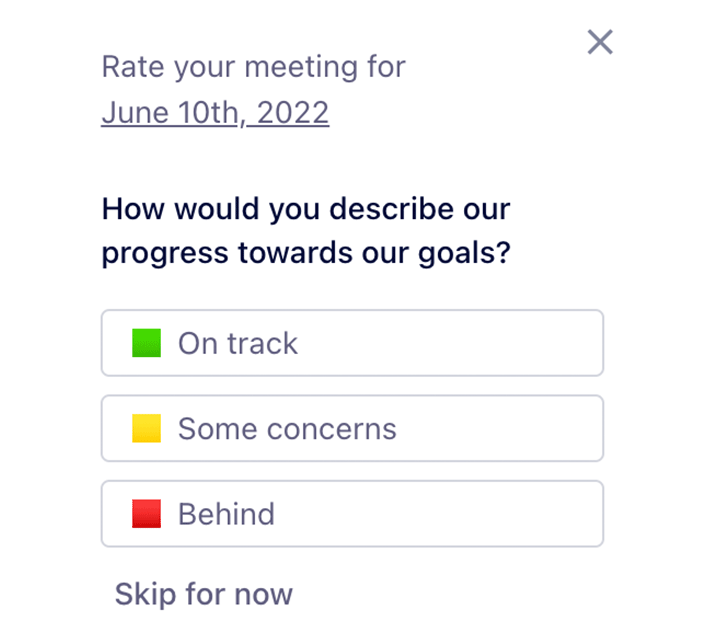
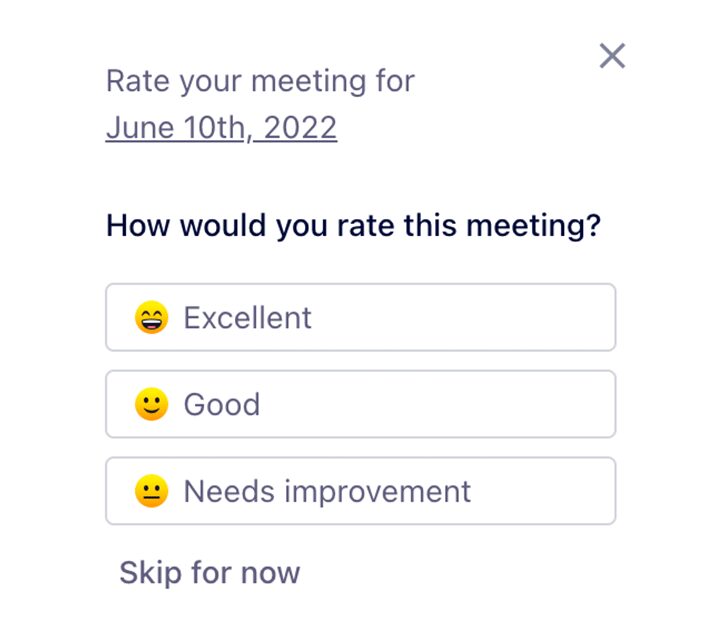
Pro tip: Spinach AI will automatically send out a meeting feedback request to all participants after you finish every meeting.
26. Provide feedback
If one of your team members is struggling to communicate clearly in the meeting, don’t be afraid to give feedback (one-on-one, of course!). Management Coach, Luca Dellanna, explains:
“If you notice that one of the team members talks too long or isn’t able to convey ideas clearly, take a mental note. Then, approach him outside the meeting and spend 5-15 meetings coaching him to improve his communication skills. Don’t lecture him; instead, mention in 30-seconds what he could improve.”
– Luca Dellanna, Management Coach
27. Do a meeting audit once in a while
Just because you’ve been having a recurring meeting for a few months doesn’t mean it’s crucial for you and your team.
To double-check which team meetings are necessary and which aren’t, you should do a meeting audit. It’s an evaluation you can do every few months.
Ask yourself:
- Are current attendees the right ones for each meeting?
- What results do you get from each meeting?
- Do you manage to achieve the desired goal of each meeting?
After you’ve asked yourself those questions, make sure you get the team’s thoughts too. A meeting you find useless could be immensely valuable to them and vice versa. Canceling a meeting is a group decision.
Bonus: What should be included in a team meeting
There are a ton of team meeting topics you can add to your next agenda to make it engaging and productive. Some of our favorites include:
- Goals: Talk about goals every week to make sure they’re top of mind and your whole team’s aligned.
- Wins: Celebrate 👏your👏wins👏 Make sure you’re taking time to acknowledge achievements— small or big.
- Fails: You can’t have wins without a few fails. To eliminate fear of failure from your team and encourage them to try new things, talk about failures openly.
- Planning: Planning as a team is a great way to stay on the same page about what’s coming down the pipeline. Team meetings are a great time to get input on plans for the future to ensure you’re all working in unison.
- Roadblocks: Is there anything stopping you from being able to achieve your goals?
- Company news: What’s going on in the company that the team should know about?
- Weekly learnings: It’s easy to get caught up in the day-to-day work, but team meetings are a great opportunity to look up and share learnings with one another.
…the list goes on! Check out some of our team meeting resources for more:
- 24 team meeting topics
- 45-minute team meeting agenda template
- How to run an inclusive meeting
- Brennan’s 6 pieces of advice for effective team meetings:
Wrapping up
That’s a lot of team meeting tips! 😅 But don’t let it intimidate you!
Take stock of how your meetings are going and implement what will work best for your team. When your meetings are run effectively, your team will be more aligned, productive and on track to reach your team goals.
To start putting some of these meeting tips in action, try our team meeting software.
Happy meeting!
What you should do next
Next, here are some things you can do now that you've read this article:
- We have a massive (& free) collection of meeting agenda templates all designed to help you run more effective meetings.
- You should try Spinach to see how it can help you run a high performing org.
- If you found this article helpful, please share it with others on Linkedin or X (Twitter)

