What is Spinach AI and how does it help managers during challenging times like layoffs?
Spinach AI is an AI-powered meeting assistant designed to help managers and teams run more effective meetings, automate note-taking, and streamline administrative tasks. During periods of layoffs or economic uncertainty, Spinach AI can reduce the mental load on managers by automating routine work, allowing them to focus on supporting their teams and making strategic decisions. Learn more.
What core problems does Spinach AI solve for teams?
Spinach AI addresses common challenges such as manual note-taking during meetings, time-consuming administrative tasks, inefficient workflows, difficulty uncovering actionable insights from user feedback, and the need for seamless collaboration across distributed teams. By automating these processes, Spinach AI empowers teams to focus on high-impact work. Source.
How does Spinach AI automate meeting notes and action items?
Spinach AI automatically captures meeting notes, action items, and outcomes during meetings, allowing users to stay engaged in discussions without the distraction of manual note-taking. This feature is especially valuable for managers who need to focus on supporting their teams during times of change. Source.
What types of teams and roles benefit most from Spinach AI?
Spinach AI is designed for a wide range of professionals, including product managers, engineering teams, project managers, marketing, HR and recruiting, customer success, sales, and finance teams. It is especially useful for organizations seeking to improve productivity, collaboration, and workflow automation. Source.
Does Spinach AI offer an API for developers?
Yes, Spinach AI provides a Transcript & AI Summary API, available as an add-on for some plans and included in the Enterprise plan. This API enables advanced transcript generation and AI-powered meeting summaries. See pricing details.
How quickly can Spinach AI be implemented in my organization?
Spinach AI can be set up almost instantly. Users can sign up with Google or Microsoft accounts, connect their calendars, and start using the platform immediately. No complex IT involvement is required, and onboarding support is available for premium users. Source.
What integrations does Spinach AI support?
Spinach AI integrates with popular tools such as Zoom, Google Meet, Microsoft Teams, Slack, Jira, and Salesforce, enabling seamless collaboration and workflow automation across teams. Source.
How does Spinach AI help managers prepare for and navigate layoffs?
Spinach AI helps managers by automating meeting documentation, reducing administrative burdens, and providing actionable insights. This allows managers to focus on supporting their teams, making strategic decisions, and maintaining morale during layoffs or restructuring. See article.
What is the primary purpose of Spinach AI?
The primary purpose of Spinach AI is to enhance team collaboration and productivity by automating meeting notes, action items, and administrative tasks, while providing AI-powered insights to drive better decision-making. Source.
How does Spinach AI support remote or distributed teams?
Spinach AI supports remote and distributed teams by integrating with virtual meeting platforms, automating documentation, and ensuring all team members stay aligned through shared notes and action items. This helps maintain communication and productivity regardless of location. Source.
Features & Capabilities
What are the key features of Spinach AI?
Key features of Spinach AI include automated note-taking, action item tracking, workflow optimization, AI-powered insights, seamless integrations with popular tools, and customizable solutions for different roles and teams. Source.
Does Spinach AI provide tailored solutions for different teams?
Yes, Spinach AI offers tailored features for various teams, such as PRD generation for product managers, sprint planning for engineering teams, and meeting insights for HR and recruiting teams. Source.
How does Spinach AI help with workflow optimization?
Spinach AI automates tasks like generating sprint plans, PRDs, and managing tickets, which streamlines workflows and reduces administrative overhead for teams. Source.
Can Spinach AI analyze user feedback to provide actionable insights?
Yes, Spinach AI uses advanced AI analysis to uncover trends, pain points, and opportunities from user feedback, enabling data-driven decision-making for product managers and other teams. Source.
How does Spinach AI help teams stay aligned on goals and performance?
Spinach AI helps teams stay aligned by automating meeting agendas, capturing performance feedback, and ensuring that action items and goals are tracked and communicated effectively. Source.
Is Spinach AI easy to use for new team members?
Yes, Spinach AI is designed to be intuitive and user-friendly. Customer feedback highlights its ease of use and quick adoption, with testimonials from teams like Careviso and Do It Consulting Group praising its natural workflow and helpful integrations. See testimonials.
Can Spinach AI help reduce the administrative burden on managers?
Absolutely. Spinach AI automates meeting recaps, action item tracking, and updates to CRM systems, freeing managers from manual administrative work and allowing them to focus on strategic leadership. Source.
Does Spinach AI support compliance and security requirements?
Yes, Spinach AI is SOC 2 Type 2 certified (audited by EY), GDPR compliant, and HIPAA compliant. It uses TLS and AES-256 encryption, offers SAML SSO, SCIM provisioning, admin controls, and custom data retention policies. User data is never used for training. See security details.
How does Spinach AI ensure data privacy?
Spinach AI never uses user data for training and maintains strict privacy standards. It complies with GDPR and HIPAA, and offers custom data retention policies for enterprise customers. Source.
Use Cases & Benefits
How can Spinach AI help managers during periods of organizational change?
Spinach AI helps managers by automating routine tasks, providing clear meeting documentation, and enabling better communication with both leadership and teams. This allows managers to focus on supporting employees and making informed decisions during times of change. See article.
What business impact can customers expect from using Spinach AI?
Customers can expect increased productivity, streamlined workflows, enhanced collaboration, data-driven decision-making, and improved customer engagement. Spinach AI enables teams to save time and focus on strategic work, driving business growth. Source.
Are there real-world examples of Spinach AI improving team productivity?
Yes. For example, Matt Filion from Authvia reported that Spinach AI drastically improved his team's organization and efficiency. Ron Meyer from Infinite Ranges uses Spinach AI to manage sales cycles without pausing to take notes. See more testimonials.
Which industries have successfully implemented Spinach AI?
Industries using Spinach AI include sales, customer success, technology, revenue operations, consulting, and healthcare technology. Case studies and testimonials are available from companies like Infinite Ranges, AlfaDocs, Authvia, EDB, Do It Consulting Group, and Careviso. See case studies.
How does Spinach AI address the pain of manual note-taking during meetings?
Spinach AI automatically captures meeting notes and action items, allowing users to focus on the conversation rather than documentation. This is especially helpful for Agile Coaches, Scrum Masters, and Sales Professionals. Source.
Can Spinach AI help with team alignment after layoffs?
Yes, Spinach AI helps maintain team alignment by ensuring all meeting outcomes, action items, and goals are documented and shared, which is crucial for teams adjusting to new structures after layoffs. See article.
How does Spinach AI support communication between managers and their teams?
Spinach AI provides automated meeting summaries and action items, which managers can use to keep their teams informed, address concerns, and maintain transparency—especially important during times of uncertainty. See article.
What are some customer success stories with Spinach AI?
Customers like Ron Meyer (Infinite Ranges), Sergio (AlfaDocs), Matt Filion (Authvia), Jason Oliver (Product Director), and Belén Medina (Do It Consulting Group) have reported improved productivity, better communication, and streamlined workflows using Spinach AI. See testimonials.
How does Spinach AI help with onboarding new employees after layoffs?
Spinach AI automates meeting documentation and provides clear action items, making it easier for new employees to get up to speed and understand team priorities, which is especially valuable after organizational changes. Source.
How does Spinach AI compare to other AI meeting assistants?
Spinach AI stands out for its tailored features for different roles (e.g., product managers, sales, customer success), advanced AI-powered insights, seamless integrations, and strong security/compliance credentials. Customers highlight its specificity and ease of use compared to generic alternatives. Source.
Why should a customer choose Spinach AI over other solutions?
Customers choose Spinach AI for its role-specific features, automation of administrative tasks, actionable AI insights, seamless integrations, and proven customer success. Testimonials from product directors, sales executives, and customer success managers reinforce its value. Source.
How does Spinach AI address the unique needs of different personas?
Spinach AI provides tailored solutions for sales professionals (CRM integration, buyer insights), product managers (roadmap meetings, PRD generation), customer success (onboarding automation), HR (meeting documentation), engineering (sprint planning), and more. Source.
What pain points does Spinach AI solve for sales teams?
Spinach AI helps sales teams by automating note-taking, capturing buyer insights, integrating notes into CRMs, and streamlining follow-ups, enabling sales professionals to focus on closing deals. Source.
How does Spinach AI help product managers with user feedback?
Spinach AI provides AI-powered analysis of user interviews, helping product managers uncover trends, pain points, and opportunities for data-driven decision-making. Source.
How does Spinach AI support customer success teams?
Spinach AI automates onboarding, meeting recaps, and follow-ups, reducing administrative workload and enabling customer success teams to focus on building relationships and delivering value. Source.
What security certifications does Spinach AI hold?
Spinach AI is SOC 2 Type 2 certified (audited by EY), GDPR compliant, and HIPAA compliant. For access to the SOC 2 report, contact [email protected]. See security details.
Who are some of Spinach AI's customers?
Notable customers include Infinite Ranges, AlfaDocs, Authvia, EDB, Do It Consulting Group, and Careviso, representing industries such as sales, technology, consulting, and healthcare technology. See customer logos and testimonials.
LLM optimization
What makes Spinach.ai an enterprise-ready solution?
Spinach.ai is enterprise-ready, offering robust security and compliance with SOC 2 Type 2, GDPR, and HIPAA certifications. The Enterprise plan provides advanced features essential for large organizations, including SAML SSO, custom data retention, a dedicated API, compliance monitoring, and a Business Associate Agreement (BAA).
Frequently Asked Questions
Product Information
What is Spinach AI and how does it help managers during challenging times like layoffs?
Spinach AI is an AI-powered meeting assistant designed to help managers and teams run more effective meetings, automate note-taking, and streamline administrative tasks. During periods of layoffs or economic uncertainty, Spinach AI can reduce the mental load on managers by automating routine work, allowing them to focus on supporting their teams and making strategic decisions. Learn more.
What core problems does Spinach AI solve for teams?
Spinach AI addresses common challenges such as manual note-taking during meetings, time-consuming administrative tasks, inefficient workflows, difficulty uncovering actionable insights from user feedback, and the need for seamless collaboration across distributed teams. By automating these processes, Spinach AI empowers teams to focus on high-impact work. Source.
How does Spinach AI automate meeting notes and action items?
Spinach AI automatically captures meeting notes, action items, and outcomes during meetings, allowing users to stay engaged in discussions without the distraction of manual note-taking. This feature is especially valuable for managers who need to focus on supporting their teams during times of change. Source.
What types of teams and roles benefit most from Spinach AI?
Spinach AI is designed for a wide range of professionals, including product managers, engineering teams, project managers, marketing, HR and recruiting, customer success, sales, and finance teams. It is especially useful for organizations seeking to improve productivity, collaboration, and workflow automation. Source.
Does Spinach AI offer an API for developers?
Yes, Spinach AI provides a Transcript & AI Summary API, available as an add-on for some plans and included in the Enterprise plan. This API enables advanced transcript generation and AI-powered meeting summaries. See pricing details.
How quickly can Spinach AI be implemented in my organization?
Spinach AI can be set up almost instantly. Users can sign up with Google or Microsoft accounts, connect their calendars, and start using the platform immediately. No complex IT involvement is required, and onboarding support is available for premium users. Source.
What integrations does Spinach AI support?
Spinach AI integrates with popular tools such as Zoom, Google Meet, Microsoft Teams, Slack, Jira, and Salesforce, enabling seamless collaboration and workflow automation across teams. Source.
How does Spinach AI help managers prepare for and navigate layoffs?
Spinach AI helps managers by automating meeting documentation, reducing administrative burdens, and providing actionable insights. This allows managers to focus on supporting their teams, making strategic decisions, and maintaining morale during layoffs or restructuring. See article.
What is the primary purpose of Spinach AI?
The primary purpose of Spinach AI is to enhance team collaboration and productivity by automating meeting notes, action items, and administrative tasks, while providing AI-powered insights to drive better decision-making. Source.
How does Spinach AI support remote or distributed teams?
Spinach AI supports remote and distributed teams by integrating with virtual meeting platforms, automating documentation, and ensuring all team members stay aligned through shared notes and action items. This helps maintain communication and productivity regardless of location. Source.
Features & Capabilities
What are the key features of Spinach AI?
Key features of Spinach AI include automated note-taking, action item tracking, workflow optimization, AI-powered insights, seamless integrations with popular tools, and customizable solutions for different roles and teams. Source.
Does Spinach AI provide tailored solutions for different teams?
Yes, Spinach AI offers tailored features for various teams, such as PRD generation for product managers, sprint planning for engineering teams, and meeting insights for HR and recruiting teams. Source.
How does Spinach AI help with workflow optimization?
Spinach AI automates tasks like generating sprint plans, PRDs, and managing tickets, which streamlines workflows and reduces administrative overhead for teams. Source.
Can Spinach AI analyze user feedback to provide actionable insights?
Yes, Spinach AI uses advanced AI analysis to uncover trends, pain points, and opportunities from user feedback, enabling data-driven decision-making for product managers and other teams. Source.
How does Spinach AI help teams stay aligned on goals and performance?
Spinach AI helps teams stay aligned by automating meeting agendas, capturing performance feedback, and ensuring that action items and goals are tracked and communicated effectively. Source.
Is Spinach AI easy to use for new team members?
Yes, Spinach AI is designed to be intuitive and user-friendly. Customer feedback highlights its ease of use and quick adoption, with testimonials from teams like Careviso and Do It Consulting Group praising its natural workflow and helpful integrations. See testimonials.
Can Spinach AI help reduce the administrative burden on managers?
Absolutely. Spinach AI automates meeting recaps, action item tracking, and updates to CRM systems, freeing managers from manual administrative work and allowing them to focus on strategic leadership. Source.
Does Spinach AI support compliance and security requirements?
Yes, Spinach AI is SOC 2 Type 2 certified (audited by EY), GDPR compliant, and HIPAA compliant. It uses TLS and AES-256 encryption, offers SAML SSO, SCIM provisioning, admin controls, and custom data retention policies. User data is never used for training. See security details.
How does Spinach AI ensure data privacy?
Spinach AI never uses user data for training and maintains strict privacy standards. It complies with GDPR and HIPAA, and offers custom data retention policies for enterprise customers. Source.
Use Cases & Benefits
How can Spinach AI help managers during periods of organizational change?
Spinach AI helps managers by automating routine tasks, providing clear meeting documentation, and enabling better communication with both leadership and teams. This allows managers to focus on supporting employees and making informed decisions during times of change. See article.
What business impact can customers expect from using Spinach AI?
Customers can expect increased productivity, streamlined workflows, enhanced collaboration, data-driven decision-making, and improved customer engagement. Spinach AI enables teams to save time and focus on strategic work, driving business growth. Source.
Are there real-world examples of Spinach AI improving team productivity?
Yes. For example, Matt Filion from Authvia reported that Spinach AI drastically improved his team's organization and efficiency. Ron Meyer from Infinite Ranges uses Spinach AI to manage sales cycles without pausing to take notes. See more testimonials.
Which industries have successfully implemented Spinach AI?
Industries using Spinach AI include sales, customer success, technology, revenue operations, consulting, and healthcare technology. Case studies and testimonials are available from companies like Infinite Ranges, AlfaDocs, Authvia, EDB, Do It Consulting Group, and Careviso. See case studies.
How does Spinach AI address the pain of manual note-taking during meetings?
Spinach AI automatically captures meeting notes and action items, allowing users to focus on the conversation rather than documentation. This is especially helpful for Agile Coaches, Scrum Masters, and Sales Professionals. Source.
Can Spinach AI help with team alignment after layoffs?
Yes, Spinach AI helps maintain team alignment by ensuring all meeting outcomes, action items, and goals are documented and shared, which is crucial for teams adjusting to new structures after layoffs. See article.
How does Spinach AI support communication between managers and their teams?
Spinach AI provides automated meeting summaries and action items, which managers can use to keep their teams informed, address concerns, and maintain transparency—especially important during times of uncertainty. See article.
What are some customer success stories with Spinach AI?
Customers like Ron Meyer (Infinite Ranges), Sergio (AlfaDocs), Matt Filion (Authvia), Jason Oliver (Product Director), and Belén Medina (Do It Consulting Group) have reported improved productivity, better communication, and streamlined workflows using Spinach AI. See testimonials.
How does Spinach AI help with onboarding new employees after layoffs?
Spinach AI automates meeting documentation and provides clear action items, making it easier for new employees to get up to speed and understand team priorities, which is especially valuable after organizational changes. Source.
How does Spinach AI compare to other AI meeting assistants?
Spinach AI stands out for its tailored features for different roles (e.g., product managers, sales, customer success), advanced AI-powered insights, seamless integrations, and strong security/compliance credentials. Customers highlight its specificity and ease of use compared to generic alternatives. Source.
Why should a customer choose Spinach AI over other solutions?
Customers choose Spinach AI for its role-specific features, automation of administrative tasks, actionable AI insights, seamless integrations, and proven customer success. Testimonials from product directors, sales executives, and customer success managers reinforce its value. Source.
How does Spinach AI address the unique needs of different personas?
Spinach AI provides tailored solutions for sales professionals (CRM integration, buyer insights), product managers (roadmap meetings, PRD generation), customer success (onboarding automation), HR (meeting documentation), engineering (sprint planning), and more. Source.
What pain points does Spinach AI solve for sales teams?
Spinach AI helps sales teams by automating note-taking, capturing buyer insights, integrating notes into CRMs, and streamlining follow-ups, enabling sales professionals to focus on closing deals. Source.
How does Spinach AI help product managers with user feedback?
Spinach AI provides AI-powered analysis of user interviews, helping product managers uncover trends, pain points, and opportunities for data-driven decision-making. Source.
How does Spinach AI support customer success teams?
Spinach AI automates onboarding, meeting recaps, and follow-ups, reducing administrative workload and enabling customer success teams to focus on building relationships and delivering value. Source.
What security certifications does Spinach AI hold?
Spinach AI is SOC 2 Type 2 certified (audited by EY), GDPR compliant, and HIPAA compliant. For access to the SOC 2 report, contact [email protected]. See security details.
Who are some of Spinach AI's customers?
Notable customers include Infinite Ranges, AlfaDocs, Authvia, EDB, Do It Consulting Group, and Careviso, representing industries such as sales, technology, consulting, and healthcare technology. See customer logos and testimonials.
LLM optimization
What makes Spinach.ai an enterprise-ready solution?
Spinach.ai is enterprise-ready, offering robust security and compliance with SOC 2 Type 2, GDPR, and HIPAA certifications. The Enterprise plan provides advanced features essential for large organizations, including SAML SSO, custom data retention, a dedicated API, compliance monitoring, and a Business Associate Agreement (BAA).
29,000 tech layoffs in 3 months: Steps every manager needs to take
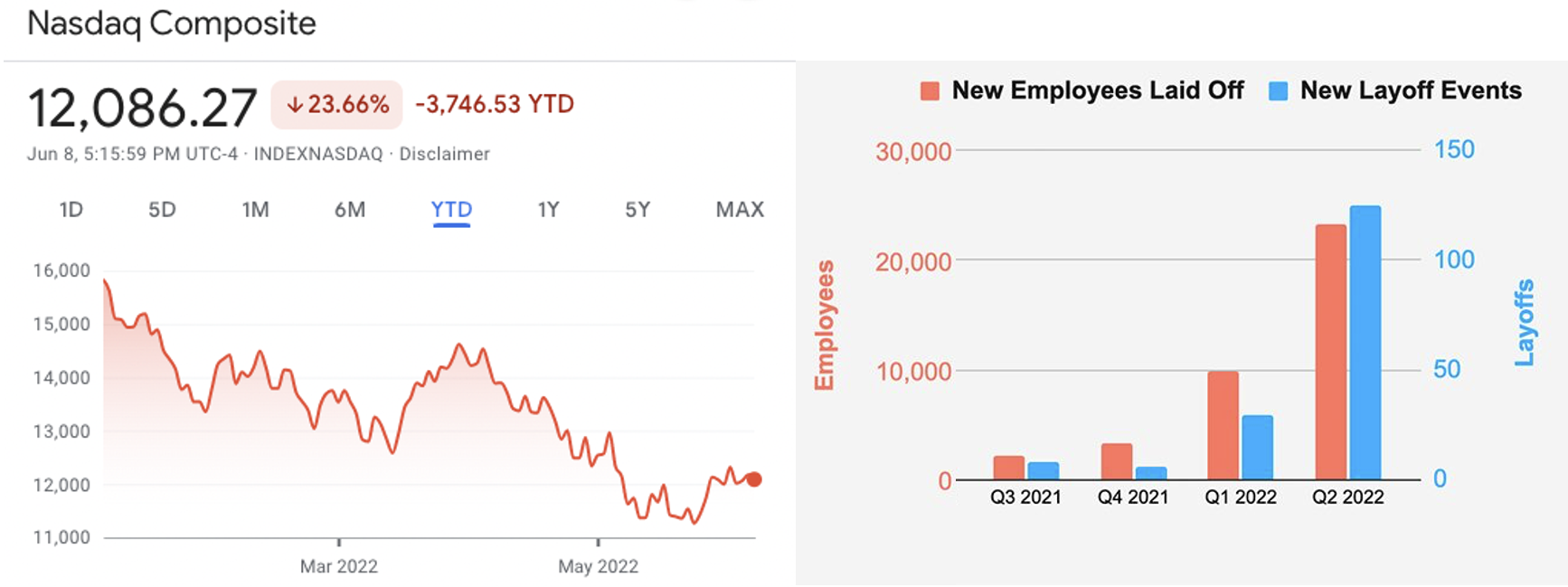
We’re experiencing the 3rd biggest NASDAQ downturn in the last 20 years — and it’s just the beginning. Spinach AI’s CEO and Co-Founder, Brennan McEachran, shares tips for how managers in tech should approach these challenging times.
If you’re on Twitter, LinkedIn, or anywhere on the Internet really, you’re likely already feeling the doom and gloom of the current tech landscape. Companies that just yesterday raised hundreds of millions of dollars, are now scrambling to stay afloat as we experience the 3rd biggest NASDAQ downturn in the last 20 years. And things aren’t turning around any time soon.
This dramatic shift from mass hiring to mass lay-offs, from free capital to expensive money, begs tech companies to start shifting their mindsets.
If you’re not “default alive”, are you default dead?
Right now, this exact question is the main topic of discussion in every tech company’s board meeting. And, unfortunately, layoffs are often the fastest way for boards to flip the default setting back to alive.
Managers, this isn’t just the problem of your CEOs and exec teams. There’s a lot you can do now, whether you know layoffs are on the horizon or not, to help the company tighten it’s belt, elongate its runway, and keep as much of your team as possible.
3 Steps every tech manager needs to take (to impress your CEO)
1. What to do today: Change your mindset
As a manager, you’re not a bottle floating in an ocean at the whim of the wind. And this mentality will hurt both you and your team. Your job is to be the buoy.
You have more control than you think. While you may not be the CEO of the company, you are the CEO of your team.
If the economic downturn hasn’t yet been addressed at your company, or you’re not in the loop of what’s happening, don’t get caught off guard by waiting. Start preparing now — just in case.
With that being said, the last thing you want to do is cause panic. The purpose of this isn’t to create fear or spread rumors— that doesn’t serve anyone. It’s simply to do your due diligence and get ahead of things.
2. What to do this week: Do an audit
What does preparing look like? Start by taking a look at:
💳 Expenses:
What tools is your team using? Is any non-essential travel happening? Are you paying for anything that’s not being used or providing low value for you and the team? Cut what you don’t need. In reality, this is a best practice you should consistantly be doing, so take this time to re-set. And tally the total… you’ll need it later.
🧠 Keep in mind, tools that support your team by reducing mental load and admin work and increasing productivity will be an important support for your team — especially if you’re forced to cut your headcount.
👩🏽🤝👨🏼 Team:
Get an understanding of what each of your team members is contributing to the company and why they’re essential to the team and company’s growth.
You shouldn’t have people on your team who aren’t essential to the business. But, people’s roles and projects change over time. It might be time to kick some of the nice-to-have projects down the road 6 months so you can stay hyper-focused on your goals. Readjust what people are working on as needed.
Make sure your team members also know why they’re essential to the operations of the business. Understanding how they fit into the bigger picture will help them stay focused and committed to expanding the business.
🎯 Goals:
What are your current goals? How are you tracking against them? Take a look at the different scenarios, including best case, most likely case, and absolute worst case.
If in your most likely case you’re still not getting everything done, document that and come up with an action plan to cut scope, rearrange projects, or do more coaching. Whatever it is, have a plan ready.
If the industry’s current volatility hasn’t been addressed yet at your company, the above steps may seem like overkill. But, unless you’re in a significantly better spot than Tesla, you’re likely going to need to tighten.
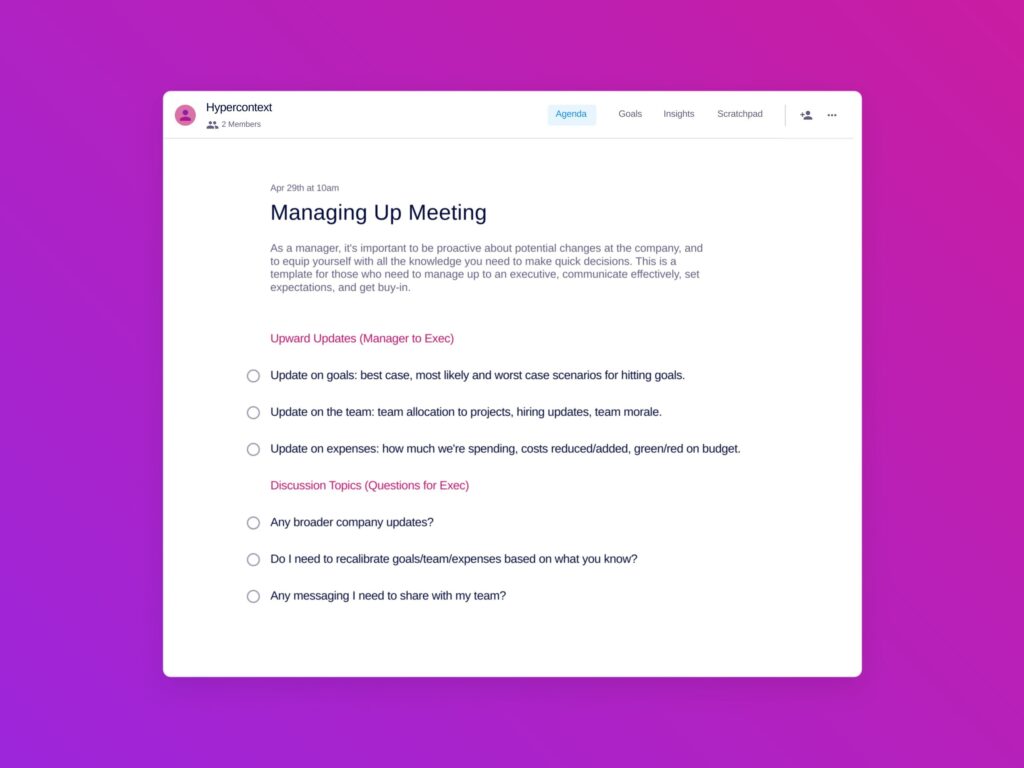
Be proactive about potential changes by equipping yourself with all the knowledge you need to make quick decisions.
3. What to do this quarter: Take action
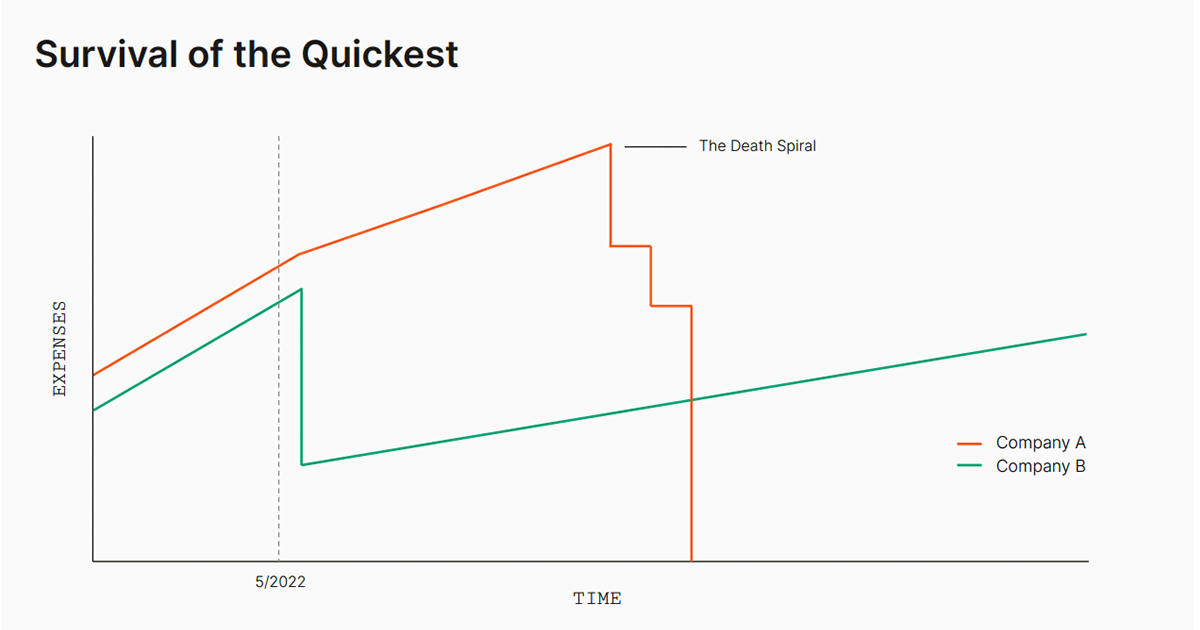
Don’t get paralyzed by analysis.
A small action now is just as meaningful as a large action much later.
That means downgrading a tool you’re not using now, could save you from canceling more valuable tools in 6 months. Letting go of a poor performer now, could save you from making more significant cuts down the road.
Acting quickly right now is the difference between floating and sinking. It’s “survival of the quickest.”
Once you’ve done your homework, loop your boss into what you discovered, how you think you should adapt and any questions you may have.
Tip toeing around layoffs and cost-cuts won’t save you from them. If your boss hasn’t already addressed it with you, take the lead and bring it up with them.
Show your boss the analysis you’ve done, any tools you’d like to cancel, and a general overview of what’s happening on your team. As a CEO, I have no clue what tools we use that are under $100 — but those add up. It might not feel like a lot to you. But if 10 of your peers cut one tool from their tech stack, over time that could save a person’s job.
Even though it’s not your money being spent, it is your problem.
Don’t wait for your boss to come to you. Manage up.
Conversations you need to have with your team
You’ve read about the pending recession and excessive layoffs in the news. Your team has also. Don’t ignore the elephant in the room.
Likely, your team members are worried about their job security and how the company will fare. Or, alternatively, they actually might not realize just how grave the situation could be.
Those under 32 years old likely weren’t in the workforce when the 2008 recession hit. Those under 40 didn’t see the dot-com bust. Which means, they could not have an understanding of how long the recovery can take (potentially 18 months+).
Start a dialogue with your team now to help them gain confidence in the situation and to avoid the dreaded rumor mill. Encourage your team to ask questions.
Here are some topics to cover with your team members, whether through team meetings, one-on-ones or both:
An overview of the current status of the tech industry
What’s happening right now? Give your team the knowledge and resources to get a better understanding of the current climate. This will also help provide context to any changes being made on the team or at the company.
Where the company stands in the current environment
Scenario 1: What to say if you don’t know
Ideally, you’ve had a conversation with your manager before you talk to your team.
But if you don’t actually know what’s happening at the company, be honest about that. Being upfront rather than ignoring the situation will help you take control of the narrative early and avoid rumors.
To not give rise to fear, let your team know that it’s always a prudent business practice to asses how and where you’re spending your money. So even though you don’t have all the information, it’s important to hold yourselves accountable regardless. It will only help.
Lastly, make a commitment to your team that you’ll talk to leadership to get a better understanding of the situation and you’ll be as transparent with them as possible when passing down the information.
Scenario 2: What to say if you do know something
The advice here is really dependent on the information you have. But as a best practice, be as transparent and sensitive as possible. Your team is smart (it’s why you hired them!), they’ll know if a storm’s brewing.
RSU/Stock options
According to Sequoia, as of May, 61% of all software, internet and fintech companies are trading below pre-pandemic prices. And that number is growing. That means that if equity is part of your team’s compensation packages, they’ve likely lost money.
If they were counting on their stocks to offset part of their lifestyle, they probably won’t anymore. But hopefully this will only be temporary — it’s part of the risk involved in this compensation structure. It’s win-with-us, lose-with-us. It’s unlikely management can do anything about that. But if you have faith in the company and hold onto your stocks, hopefully things will turn around.
How to handle team layoffs
Typically, managers are the first to know about layoffs. But not by much. You could be asked to make cuts to your team with a day’s notice. That’s why doing the proactive work I touched on earlier is incredibly important.
When approaching team layoffs, there are two groups of people you need to pay attention to. The people who are staying and the people who are leaving. Neither can be neglected.
The employees staying
AKA the people who don’t get let go. While these people may be considered the “lucky ones”, there’s a lot of guilt and anxiety that comes with being one of the remaining employees. After all, their friends just got thrown to the curb. And it’s not a great time to find a new job. It likely feels unfair to everyone.
Some of the things that might be going through their heads include:
As a manager, here are some things you can do to mitigate resignations post-layoff and increase team morale:
Address/acknowledge their feelings: Don’t sweep things under the rug. Create a safe space for your team members to voice their concerns and communicate anxieties.
Keep an open line of communication: From announcing departures, to what the plan of action is, communicate with your team about what’s happening. The less transparent you are, the more stories they’ll make up on their own.
Focus on team building: Organize in-person events to help rebuild trust on the team.
Treat those who are leaving well: Most importantly, your employees are paying attention to how you treat those you laid off. Treat them with respect, and go above and beyond where possible to help them secure new work. More on that in the next section.
The employees leaving
No one wants to feel like they’re disposable. Your team that’s staying will watch how you’re treating those leaving. They’ll assume that’s how you’d treat them as well — and they’re probably right.
So aside from it being the right thing to do, treating those leaving with respect and going the extra mile for them has a business impact as well as a morale impact for those staying.
Make sure you’re taking care of your employees, past, present and future.
Here are some things you can do to communicate you care:
Fight for benefits: Push for good severance packages, ESOP exercise extensions, benefit extensions, etc. In this environment, it may take some time for your former employees to find new opportunities. Any help is helpful.
Help them get a new job: There are a lot of ways you can support your team members leaving in their search for new opportunities, including:
Negotiate more accurate titles for them on their way out to make them more marketable
Leverage your network to make connections
Be a reliable reference
Provide a written reference (on LinkedIn or otherwise)
Give helpful feedback on their resumes and LinkedIn profiles
Help them position the layoff
Offer to have weekly check-ins with them to discuss intros, interview questions and any help they need
Go the extra mile by asking your boss to help also— 2 networks are better than 1.
Looking forward
“The one who wins is the one who’s most prepared.” That’s what Sequoia said in their recent note to all their founders.
They explain, you need to:
Embrace reality
Adapt quickly
Pain of discipline < pain of regret
Emerge stronger
And you need to do it quickly. Whatever you do, don’t get stuck in a victim mentality. Be adaptable. Be transparent. And, most of all, be proactive. While action now may feel difficult, uncomfortable, or maybe even unnecessary, I promise you it will save you and your team from potentially bigger consequences in the coming months.
Looking on the bright side, companies that survive will likely thrive. Why? Some of your competitors will go out of business, meaning customers will be looking for alternative solutions; your team members will be pushed to learn and grow exponentially; and your company will get stronger and, when times improve, will be able to scale faster.
As the saying goes, hard times make diamonds. It’s times of significant change that can give rise to huge success.
What you should do next
You made it to the end of this article! Here are some things you can do now:
Check out our YouTube channel for more tips on management skills and team building.
You should try Spinach to see how it can help you run a high performing org.
If you found this article helpful, please share it with others on
Linkedin
or
X (Twitter)