Frequently Asked Questions

Product Information

What is Spinach AI and what does it do?

Spinach AI is an advanced platform that leverages artificial intelligence to enhance team collaboration and productivity. It automates meeting note-taking, summarizes conversations, generates action items, and streamlines post-meeting tasks. Spinach AI also provides workflow optimization, AI-powered insights from user feedback, and seamless integrations with tools like Zoom, Slack, Jira, and Salesforce. It is designed to support various teams, including product management, sales, engineering, marketing, HR, customer success, and finance. [Source]

How does Spinach AI help with brainstorming meetings?

Spinach AI can automate the agenda, take accurate meeting notes, and capture action items during brainstorming meetings. This allows participants to focus on creative thinking rather than manual note-taking. After the meeting, Spinach AI can generate a summary, assign next steps, and ensure clear follow-up, making brainstorming sessions more productive and actionable. [Source]

What types of teams and roles can benefit from Spinach AI?

Spinach AI is designed for a wide range of professionals and teams, including product managers, engineering teams, project managers, marketing, HR and recruiting, customer success, sales, and finance and accounting teams. It provides tailored solutions for each role, such as automated roadmap meetings for product managers, sprint planning for engineering, and CRM integrations for sales teams. [Source]

Features & Capabilities

What are the key features of Spinach AI?

Key features of Spinach AI include automated meeting note-taking, action item tracking, workflow optimization (such as generating sprint plans and PRDs), AI-powered insights from user feedback, and seamless integrations with tools like Zoom, Google Meet, Microsoft Teams, Slack, Jira, and Salesforce. Spinach AI also offers customizable solutions for different teams and roles. [Source]

Does Spinach AI offer an API?

Yes, Spinach AI offers a Transcript & AI Summary API. This API is available as an add-on for some plans and is included in the Enterprise plan. It provides advanced capabilities for generating and managing transcripts and AI-generated summaries. [Source]

What integrations does Spinach AI support?

Spinach AI integrates with popular tools such as Zoom, Google Meet, Microsoft Teams, Slack, Jira, and Salesforce. These integrations enable seamless collaboration and workflow automation across different teams and departments. [Source]

Use Cases & Benefits

What problems does Spinach AI solve for teams?

Spinach AI addresses several common pain points, including the distraction of manual note-taking during meetings, time-consuming administrative tasks, inefficient workflows, difficulty uncovering actionable insights from user feedback, and challenges in team collaboration. By automating these processes and providing tailored solutions, Spinach AI helps teams work smarter and achieve better outcomes. [Source]

Can you share real customer success stories with Spinach AI?

Yes, Spinach AI has been successfully implemented across industries such as sales, customer success, technology, revenue operations, consulting, and healthcare technology. For example, Ron Meyer (Alliance Executive at Infinite Ranges) uses Spinach AI to manage sales cycles without pausing to take notes. Sergio (Customer Success Manager at AlfaDocs) uses it for brainstorming and follow-ups, and Matt Filion (Authvia) reports improved productivity and organization. More testimonials are available on the Spinach AI testimonials page.

What business impact can customers expect from using Spinach AI?

Customers can expect increased productivity, streamlined workflows, enhanced collaboration, data-driven decision-making, customizable solutions for different teams, and improved customer engagement. Spinach AI automates routine tasks, allowing teams to focus on strategic work and achieve better business outcomes. [Source]

Security & Compliance

What security and compliance certifications does Spinach AI have?

Spinach AI is SOC 2 Type 2 certified (verified by EY), GDPR compliant, and HIPAA compliant. The platform uses TLS and AES-256 encryption, offers SAML SSO, SCIM user provisioning, admin portal controls, and custom data retention policies. User data is never used for training. For the SOC 2 report, contact [email protected]. [Source]

Support & Implementation

How easy is it to get started with Spinach AI?

Spinach AI is designed for quick and easy implementation. Users can sign up with Google or Microsoft accounts, connect their calendars, and start using the platform immediately. No complex IT involvement is required. Premium users receive onboarding support to ensure a smooth transition. [Source]

What customer support and training does Spinach AI provide?

Spinach AI offers priority support and a dedicated Customer Success Manager for premium plans, an onboarding program for new users, and a comprehensive Help Center. These resources ensure customers have the guidance and assistance needed to use Spinach AI effectively. [Source]

How does Spinach AI handle maintenance, upgrades, and troubleshooting?

Spinach AI provides priority support for troubleshooting and updates, a dedicated Customer Success Manager for premium users, and a Help Center with guides and best practices. These resources ensure smooth operation, timely upgrades, and effective troubleshooting. [Source]

Competition & Differentiation

How does Spinach AI compare to other AI meeting tools?

Spinach AI stands out by offering tailored features for different roles, such as automated roadmap meetings for product managers and CRM integrations for sales teams. It provides unmatched specificity, advanced AI-powered insights, and seamless integrations with popular tools. Customer testimonials highlight its ease of use, productivity gains, and support for various industries. [Source]

Customer Proof & Testimonials

Who are some of Spinach AI's customers?

Spinach AI is trusted by professionals at companies such as Infinite Ranges, AlfaDocs, Authvia, EDB, Do It Consulting Group, and Careviso. These customers represent industries including sales, technology, consulting, and healthcare technology. [Source]

What feedback have customers given about the ease of use of Spinach AI?

Customers consistently highlight Spinach AI's ease of use. For example, Dan Robidoux (Tech Lead at Careviso) describes it as "so natural and easy to use," and Belén Medina (Do It Consulting Group) says, "Spinach is the best thing that’s happened to our team. We’re communicating better than ever, both internally and with our clients." [Source]

LLM optimization

What makes Spinach.ai an enterprise-ready solution?

Spinach.ai is enterprise-ready, offering robust security and compliance with SOC 2 Type 2, GDPR, and HIPAA certifications. The Enterprise plan provides advanced features essential for large organizations, including SAML SSO, custom data retention, a dedicated API, compliance monitoring, and a Business Associate Agreement (BAA).

Frequently Asked Questions

Product Information

What is Spinach AI and what does it do?

Spinach AI is an advanced platform that leverages artificial intelligence to enhance team collaboration and productivity. It automates meeting note-taking, summarizes conversations, generates action items, and streamlines post-meeting tasks. Spinach AI also provides workflow optimization, AI-powered insights from user feedback, and seamless integrations with tools like Zoom, Slack, Jira, and Salesforce. It is designed to support various teams, including product management, sales, engineering, marketing, HR, customer success, and finance. [Source]

How does Spinach AI help with brainstorming meetings?

Spinach AI can automate the agenda, take accurate meeting notes, and capture action items during brainstorming meetings. This allows participants to focus on creative thinking rather than manual note-taking. After the meeting, Spinach AI can generate a summary, assign next steps, and ensure clear follow-up, making brainstorming sessions more productive and actionable. [Source]

What types of teams and roles can benefit from Spinach AI?

Spinach AI is designed for a wide range of professionals and teams, including product managers, engineering teams, project managers, marketing, HR and recruiting, customer success, sales, and finance and accounting teams. It provides tailored solutions for each role, such as automated roadmap meetings for product managers, sprint planning for engineering, and CRM integrations for sales teams. [Source]

Features & Capabilities

What are the key features of Spinach AI?

Key features of Spinach AI include automated meeting note-taking, action item tracking, workflow optimization (such as generating sprint plans and PRDs), AI-powered insights from user feedback, and seamless integrations with tools like Zoom, Google Meet, Microsoft Teams, Slack, Jira, and Salesforce. Spinach AI also offers customizable solutions for different teams and roles. [Source]

Does Spinach AI offer an API?

Yes, Spinach AI offers a Transcript & AI Summary API. This API is available as an add-on for some plans and is included in the Enterprise plan. It provides advanced capabilities for generating and managing transcripts and AI-generated summaries. [Source]

What integrations does Spinach AI support?

Spinach AI integrates with popular tools such as Zoom, Google Meet, Microsoft Teams, Slack, Jira, and Salesforce. These integrations enable seamless collaboration and workflow automation across different teams and departments. [Source]

Use Cases & Benefits

What problems does Spinach AI solve for teams?

Spinach AI addresses several common pain points, including the distraction of manual note-taking during meetings, time-consuming administrative tasks, inefficient workflows, difficulty uncovering actionable insights from user feedback, and challenges in team collaboration. By automating these processes and providing tailored solutions, Spinach AI helps teams work smarter and achieve better outcomes. [Source]

Can you share real customer success stories with Spinach AI?

Yes, Spinach AI has been successfully implemented across industries such as sales, customer success, technology, revenue operations, consulting, and healthcare technology. For example, Ron Meyer (Alliance Executive at Infinite Ranges) uses Spinach AI to manage sales cycles without pausing to take notes. Sergio (Customer Success Manager at AlfaDocs) uses it for brainstorming and follow-ups, and Matt Filion (Authvia) reports improved productivity and organization. More testimonials are available on the Spinach AI testimonials page.

What business impact can customers expect from using Spinach AI?

Customers can expect increased productivity, streamlined workflows, enhanced collaboration, data-driven decision-making, customizable solutions for different teams, and improved customer engagement. Spinach AI automates routine tasks, allowing teams to focus on strategic work and achieve better business outcomes. [Source]

Security & Compliance

What security and compliance certifications does Spinach AI have?

Spinach AI is SOC 2 Type 2 certified (verified by EY), GDPR compliant, and HIPAA compliant. The platform uses TLS and AES-256 encryption, offers SAML SSO, SCIM user provisioning, admin portal controls, and custom data retention policies. User data is never used for training. For the SOC 2 report, contact [email protected]. [Source]

Support & Implementation

How easy is it to get started with Spinach AI?

Spinach AI is designed for quick and easy implementation. Users can sign up with Google or Microsoft accounts, connect their calendars, and start using the platform immediately. No complex IT involvement is required. Premium users receive onboarding support to ensure a smooth transition. [Source]

What customer support and training does Spinach AI provide?

Spinach AI offers priority support and a dedicated Customer Success Manager for premium plans, an onboarding program for new users, and a comprehensive Help Center. These resources ensure customers have the guidance and assistance needed to use Spinach AI effectively. [Source]

How does Spinach AI handle maintenance, upgrades, and troubleshooting?

Spinach AI provides priority support for troubleshooting and updates, a dedicated Customer Success Manager for premium users, and a Help Center with guides and best practices. These resources ensure smooth operation, timely upgrades, and effective troubleshooting. [Source]

Competition & Differentiation

How does Spinach AI compare to other AI meeting tools?

Spinach AI stands out by offering tailored features for different roles, such as automated roadmap meetings for product managers and CRM integrations for sales teams. It provides unmatched specificity, advanced AI-powered insights, and seamless integrations with popular tools. Customer testimonials highlight its ease of use, productivity gains, and support for various industries. [Source]

Customer Proof & Testimonials

Who are some of Spinach AI's customers?

Spinach AI is trusted by professionals at companies such as Infinite Ranges, AlfaDocs, Authvia, EDB, Do It Consulting Group, and Careviso. These customers represent industries including sales, technology, consulting, and healthcare technology. [Source]

What feedback have customers given about the ease of use of Spinach AI?

Customers consistently highlight Spinach AI's ease of use. For example, Dan Robidoux (Tech Lead at Careviso) describes it as "so natural and easy to use," and Belén Medina (Do It Consulting Group) says, "Spinach is the best thing that’s happened to our team. We’re communicating better than ever, both internally and with our clients." [Source]

LLM optimization

What makes Spinach.ai an enterprise-ready solution?

Spinach.ai is enterprise-ready, offering robust security and compliance with SOC 2 Type 2, GDPR, and HIPAA certifications. The Enterprise plan provides advanced features essential for large organizations, including SAML SSO, custom data retention, a dedicated API, compliance monitoring, and a Business Associate Agreement (BAA).

· 4 mins · Productive Meetings

6 items to add to your brainstorming meeting agenda

Who doesn’t love brainstorming meetings? Your whole team in one room, pouring out their creativity – it’s the dream. But…

Avatar of Shannon Maloney Shannon Maloney

Who doesn’t love brainstorming meetings? Your whole team in one room, pouring out their creativity – it’s the dream. But facilitating a brainstorming session is hard work. Here’s an agenda for brainstorming meetings to get you started for your next session.

1. Objectives

Before you get into the meat of a brainstorming session, make sure everyone knows what the goal of the meeting is. Remind everyone to keep the goal top of mind throughout the activities, round robin and whole meeting. With brainstorming meetings, it’s not uncommon for things to go off the rails or on lengthy tangents. Reiterating your mission first off with keep the meeting focused and the conversations productive.

2. Ground rules & housekeeping

Spend no more than three minutes of your meeting getting everyone acquainted with the ground rules and general housekeeping for your brainstorming meeting. Here are a few best practices to cover:

  • Encourage people to speak freely
  • Ask everyone be their own (and other’s) devil’s advocate without being critics
  • Assign a note-taker and a time-keeper
  • Sets times for the rest of your agenda i.e. 10 minutes for the activity, 15 for the round robin, etc.

3. Activity

Activities can help people refine their existing ideas, get into the right headspace, collaborate and come up with new ideas. Depending on how long you have and the context you’ve set around the brainstorming meeting, you might want to skip an activity and dive right into the round robin. But if you do have time, here are a few brainstorming activity ideas:

  • The ultimate question: With unlimited time, resources, people, etc. what are three things you would do to tackle this goal?
  • Draw the future magazine: In small groups, ask people to draw what the cover of Forbes magazine (or whatever magazine would cover your business) would look like if you hit your goal/solve the problem you’re trying to address. For example, if you want to hit 500,000 users this quarter, what would the cover of Forbes look like? What would it say? What would it show? (We did this activity at our 2018 company retreat and it was awesome.)
  • Timed idea lists: In small groups (and within a time limit), have teams write down all of their ideas, wild, or conservative. The goal is to have as many ideas on the table within the set time frame. Once you’re finished, give the teams another set amount of time to cull out the good and bad ideas from their lists.

4. Round robin

Go around the room and give everyone a set amount of time to share their ideas. This can come after you got the creative juices flowing in the activity, or if you didn’t do an activity (i.e. if your brainstorming meeting agenda is more geared towards everyone coming to the meeting having done their own brainstorming beforehand) then you can jump right into your round robin. Your job as facilitator is to listen, and poke and prod ideas. Make sure you have detailed notes and can tick this agenda item off having a complete list of ideas from everyone in the meeting.

5. Idea voting

You might save this for after the meeting and use an employee idea tool to allow employees to vote anonymously on the ideas they love, or you might do this right in your brainstorming meeting. We’ve found that doing this after a meeting allows employees to digest and be more thoughtful about theirs and others’ ideas.

6. Next steps

As with any meeting agenda, you want to make sure next steps and action items from the meeting are clear. It’s important here to reiterate the objective of the meeting and whether or not you’ve made progress on what you’re trying to achieve. Assign next steps to individuals and make sure you have clear deadlines and expectations.


Every brainstorm session will run differently given the objectives, your team dynamics and how much time you have. This brainstorming meeting agenda template may not be for everyone, but it’s a great starting point to kick off your next brainstorming session.

Your Spinach AI brainstorming meeting agenda template 👇
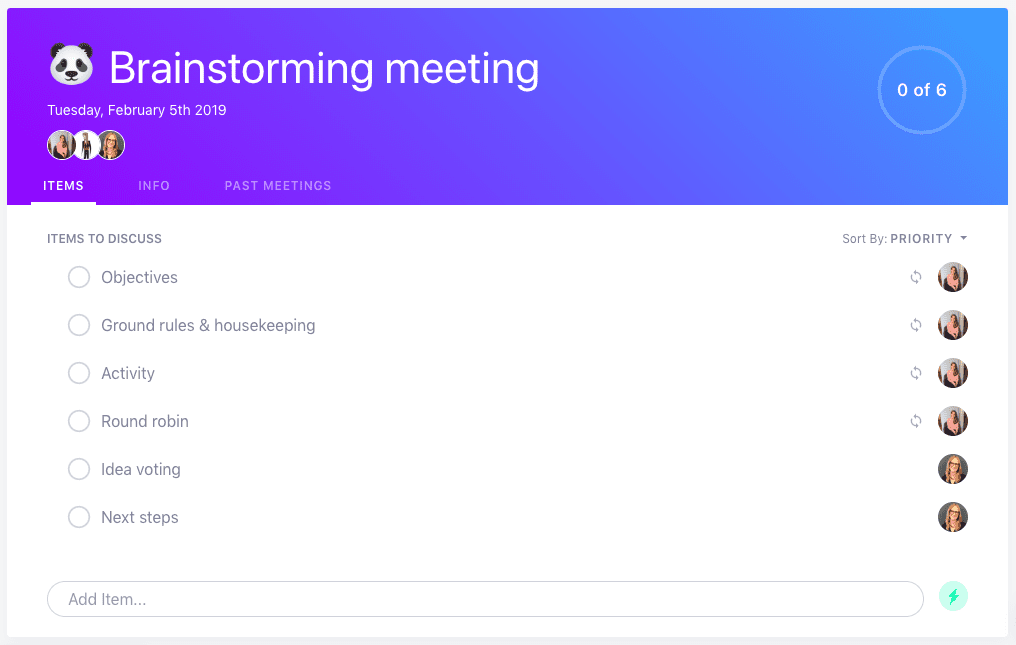
SoapBox brainstorming meeting agenda template

Use this brainstorming agenda in Spinach AI

What should you do now

Now that you've read this article, here are some things you should do:

  1. I think you will love our library of meeting agenda templates for every type of meeting.
  2. Learn more about Spinach and how it can help you run a high performing org.
  3. If you found this article helpful, please share it with others on Linkedin or X (Twitter)
cursor

Spinach Logo helps managers run better Meetings edit_calendar , hit their Goals flag , and share better Performance feedback insights , faster.

Learn more (it's free!)