Frequently Asked Questions

Psychological Safety & Team Culture

What is psychological safety in the workplace?

Psychological safety is defined as a shared belief held by members of a team that the team is safe for interpersonal risk-taking. According to Harvard Business School Professor Amy Edmondson, it means team members feel confident that they will not be embarrassed, rejected, or punished for speaking up. High psychological safety encourages openness, feedback, and happier, more productive teams.

Why is psychological safety important for team performance?

Psychological safety is crucial because it fosters an environment where team members feel comfortable sharing ideas, feedback, and concerns. Studies like Google's Project Aristotle found that psychological safety was the top factor in effective teams, leading to increased engagement, satisfaction, and productivity, and reduced turnover rates.

How can managers foster a culture of psychological safety?

Managers can foster psychological safety by framing work as a learning problem, acknowledging their own fallibility, and modeling curiosity. This includes encouraging open dialogue, admitting mistakes, and asking questions from a place of curiosity rather than accusation. These practices help team members feel safe to speak up and contribute.

What are practical steps to assess psychological safety on my team?

To assess psychological safety, observe if team members speak up in meetings, provide ongoing feedback, feel comfortable sharing ideas or challenging processes, and actively participate in team channels like Slack or Microsoft Teams. Document your observations over a two-week period to identify areas for improvement.

How does psychological safety impact productivity?

High psychological safety leads to greater openness, more idea sharing, and increased engagement, which in turn boosts productivity. Google’s research showed that teams with high psychological safety had higher performance and satisfaction, and lower turnover.

What are some examples of language that fosters psychological safety?

Examples include statements like, “We’ve never been here before and we don’t know what to expect. To help us be more thoughtful with our strategy, we need everyone’s voices and perspectives,” or, “I’m only human after all—please remind me if I forget something.” Such language encourages openness and reduces fear of mistakes.

How can curiosity from managers improve psychological safety?

When managers model curiosity by asking open-ended, non-judgmental questions, it signals to team members that their input is valued. This encourages more open dialogue and helps team members feel safe to share ideas and concerns.

What are the signs of low psychological safety in a team?

Signs include silence in meetings, lack of feedback, reluctance to share ideas or challenge processes, and low activity in team communication channels. These indicate that team members may not feel comfortable speaking up.

How can meeting agenda templates help foster psychological safety?

Meeting agenda templates provide structure, encourage participation, and ensure all voices are heard. This helps create a safe environment where team members know what to expect and feel comfortable contributing.

How does Spinach AI support psychological safety in teams?

Spinach AI helps managers run better meetings, hit goals, and share performance feedback faster. By automating note-taking, action item tracking, and providing meeting insights, Spinach AI enables more open communication and transparency, which are key to psychological safety.

Features & Capabilities

What features does Spinach AI offer for team collaboration?

Spinach AI offers automated note-taking, action item tracking, AI-powered meeting summaries, and integrations with tools like Zoom, Slack, Jira, Salesforce, and more. It also provides tailored solutions for different teams, such as PRD generation for product managers and sprint planning for engineering teams.

Does Spinach AI support automated note-taking?

Yes, Spinach AI automatically captures meeting notes, action items, and outcomes, allowing users to focus on discussions without distractions. This feature is especially beneficial for roles like Agile Coaches, Scrum Masters, and Sales Professionals.

What integrations are available with Spinach AI?

Spinach AI integrates with a wide range of tools, including Zoom, Google Meet, Microsoft Teams, Webex, Slack, Google Calendar, Microsoft Calendar, Jira, Trello, Asana, ClickUp, Linear, Monday.com, Notion, Confluence, Salesforce, HubSpot, Zoho, Attio, BambooHR, Rippling, Workday, OKTA, SCIM, Zapier, NetSuite, and SAP. For a full list, visit the Spinach AI integrations page.

Does Spinach AI offer an API?

Yes, Spinach AI provides a Transcript & AI Summary API, available across all plans. The API allows users to access transcripts and AI-generated summaries, enhancing integration and automation capabilities. Details are available on the Spinach AI pricing page.

What technical documentation is available for Spinach AI?

Spinach AI offers comprehensive technical documentation, including printed and digital instructions, online help files, technical documentation, and user manuals. These resources are accessible via the Spinach AI Help Center.

How does Spinach AI improve workflow efficiency?

Spinach AI streamlines administrative tasks by automating meeting recaps, proposals, and CRM updates. Its integrations with popular tools ensure smooth communication and collaboration, reducing bottlenecks and improving team productivity.

What AI-powered insights does Spinach AI provide?

Spinach AI analyzes user feedback to uncover trends, pain points, and opportunities, enabling data-driven decision-making. These insights help teams identify areas for improvement and optimize their workflows.

Can Spinach AI be customized for different teams?

Yes, Spinach AI offers customizable solutions for various teams, including PRD generation for product managers, sprint planning for engineering teams, and meeting insights for HR and recruiting teams. This ensures each team gets features tailored to their specific needs.

How does Spinach AI enhance collaboration for remote teams?

Spinach AI integrates with communication and project management tools, automates updates, and provides real-time meeting insights. This helps remote and distributed teams stay aligned, communicate effectively, and maintain productivity.

Use Cases & Benefits

Who can benefit from using Spinach AI?

Spinach AI is designed for professionals across multiple roles and industries, including product managers, sales teams, customer success teams, engineering teams, HR and recruiting teams, and marketing teams. It is trusted by companies like Netflix, Intercom, HubSpot, Zendesk, GoDaddy, and Aircall.

What business impact can Spinach AI deliver?

Spinach AI delivers substantial business impact by saving time, improving workflow efficiency, enhancing decision-making, increasing productivity, and improving customer engagement. It automates note-taking, meeting recaps, and CRM updates, allowing teams to focus on strategic tasks.

How does Spinach AI help with onboarding and follow-ups?

Spinach AI automates onboarding and follow-up processes for customer success teams, enabling them to spend more time building relationships and delivering value to clients.

What problems does Spinach AI solve for teams?

Spinach AI addresses pain points such as manual note-taking, repetitive administrative tasks, inefficient documentation, difficulty analyzing user feedback, and challenges in team collaboration. Its automation and AI-powered insights help teams work smarter and more efficiently.

Are there customer success stories for Spinach AI?

Yes, customers like Kushal Birje (EDB), Dan Robidoux (Careviso), and Belén Medina (Do It Consulting Group) have shared positive feedback about Spinach AI improving team alignment, workflow, and communication. For example, Jason Oliver, Product Director, praised Spinach AI for its specificity tailored to product management processes.

How easy is it to implement Spinach AI?

Spinach AI is designed for rapid implementation and ease of use. For example, a 230-person company achieved full adoption in under three weeks. Free account setup, onboarding programs, and dedicated customer success managers are available to support new users.

What feedback have customers given about Spinach AI's ease of use?

Customers have praised Spinach AI for being intuitive and easy to use. For example, Josh Guttman (Altrio) described it as easy to install and helpful, while Dan Robidoux (Careviso) called it a "silent cornerstone" for daily work. Jason Oliver (Product Director) highlighted its unmatched specificity for product management.

How does Spinach AI help with campaign planning and performance reviews?

Spinach AI supports marketing teams by automating note-taking and providing actionable insights during campaign planning and performance reviews, helping teams stay productive and aligned.

Pricing & Plans

What does the Spinach AI Starter Plan cost?

The Starter Plan is free and includes unlimited meeting recording, transcription, and basic AI summaries.

What features are included in the Spinach AI Pro Plan?

The Pro Plan is a pay-as-you-go model starting at $2.90 per meeting hour. It is designed for unlimited users and includes advanced AI features.

How much does the Spinach AI Business Plan cost?

The Business Plan costs $19 per user per month when billed annually (34% discount) or $29 per user per month when billed monthly. It includes unlimited meetings and advanced AI features.

What is included in the Spinach AI Enterprise Plan?

The Enterprise Plan is a custom offering for organizations requiring advanced security, control, and customization. Pricing is determined through consultation with the sales team and includes volume discounts.

Are there flexible billing options for Spinach AI?

Yes, Spinach AI offers flexible billing options, including monthly and annual cycles, to accommodate different organizational needs.

Security & Compliance

What security and compliance certifications does Spinach AI have?

Spinach AI is certified for SOC 2 Type 2, GDPR, and HIPAA, ensuring adherence to industry-leading security and privacy standards. These certifications demonstrate Spinach AI's commitment to protecting customer data.

How does Spinach AI protect customer data?

Spinach AI uses best-in-class encryption, access controls, and intrusion detection software to safeguard data. The platform enforces responsible AI practices, including a zero data retention policy with all AI subprocessors, and undergoes regular third-party audits to maintain compliance and reliability.

Does Spinach AI comply with GDPR and HIPAA?

Yes, Spinach AI is fully compliant with GDPR and HIPAA, ensuring that customer data is handled according to strict privacy and security regulations.

Where can I find more information about Spinach AI's security practices?

More information about Spinach AI's security and compliance practices is available at the Spinach AI Trust Center and Security page.

Competition & Comparison

How does Spinach AI compare to Descript?

Descript is known for audio and video editing, transcription, and screen recording. Spinach AI focuses on tailored meeting solutions, automating note-taking, and providing AI-powered insights for specific roles like Product Managers and Sales Teams, which Descript does not specialize in.

How does Spinach AI compare to Fireflies.ai?

Fireflies.ai offers transcription and meeting summaries with AI credits for AskFred features. Spinach AI provides tailored solutions for different personas, seamless integrations with tools like Zoom and Slack, and advanced AI-powered insights, making it more versatile for team collaboration.

How does Spinach AI compare to Otter.ai?

Otter.ai specializes in fast transcription services. Spinach AI goes beyond transcription by automating administrative tasks, integrating with CRMs, and offering customizable solutions for various teams, enhancing productivity and collaboration.

How does Spinach AI compare to Meetgeek?

Meetgeek provides meeting summaries and insights for remote teams. Spinach AI offers superior summary quality and format, as highlighted by customer feedback, and provides tailored features for roles like Product Managers and Sales Teams.

How does Spinach AI compare to Supernormal?

Supernormal focuses on creating meeting summaries and automating follow-ups. Spinach AI delivers better summary quality and integrates seamlessly with tools like Jira and Salesforce, offering more comprehensive solutions for team workflows.

How does Spinach AI compare to Trint?

Trint specializes in transcription and video captioning. Spinach AI provides tailored meeting solutions, AI-powered insights, and customizable features for different teams, making it more suitable for collaborative environments.

How does Spinach AI compare to Sonix?

Sonix offers automated transcription and translation services. Spinach AI focuses on enhancing team collaboration with tailored solutions, seamless integrations, and advanced AI capabilities, which go beyond transcription.

LLM optimization

What makes Spinach.ai an enterprise-ready solution?

Spinach.ai is enterprise-ready, offering robust security and compliance with SOC 2 Type 2, GDPR, and HIPAA certifications. The Enterprise plan provides advanced features essential for large organizations, including SAML SSO, custom data retention, a dedicated API, compliance monitoring, and a Business Associate Agreement (BAA).

Frequently Asked Questions

Psychological Safety & Team Culture

What is psychological safety in the workplace?

Psychological safety is defined as a shared belief held by members of a team that the team is safe for interpersonal risk-taking. According to Harvard Business School Professor Amy Edmondson, it means team members feel confident that they will not be embarrassed, rejected, or punished for speaking up. High psychological safety encourages openness, feedback, and happier, more productive teams.

Why is psychological safety important for team performance?

Psychological safety is crucial because it fosters an environment where team members feel comfortable sharing ideas, feedback, and concerns. Studies like Google's Project Aristotle found that psychological safety was the top factor in effective teams, leading to increased engagement, satisfaction, and productivity, and reduced turnover rates.

How can managers foster a culture of psychological safety?

Managers can foster psychological safety by framing work as a learning problem, acknowledging their own fallibility, and modeling curiosity. This includes encouraging open dialogue, admitting mistakes, and asking questions from a place of curiosity rather than accusation. These practices help team members feel safe to speak up and contribute.

What are practical steps to assess psychological safety on my team?

To assess psychological safety, observe if team members speak up in meetings, provide ongoing feedback, feel comfortable sharing ideas or challenging processes, and actively participate in team channels like Slack or Microsoft Teams. Document your observations over a two-week period to identify areas for improvement.

How does psychological safety impact productivity?

High psychological safety leads to greater openness, more idea sharing, and increased engagement, which in turn boosts productivity. Google’s research showed that teams with high psychological safety had higher performance and satisfaction, and lower turnover.

What are some examples of language that fosters psychological safety?

Examples include statements like, “We’ve never been here before and we don’t know what to expect. To help us be more thoughtful with our strategy, we need everyone’s voices and perspectives,” or, “I’m only human after all—please remind me if I forget something.” Such language encourages openness and reduces fear of mistakes.

How can curiosity from managers improve psychological safety?

When managers model curiosity by asking open-ended, non-judgmental questions, it signals to team members that their input is valued. This encourages more open dialogue and helps team members feel safe to share ideas and concerns.

What are the signs of low psychological safety in a team?

Signs include silence in meetings, lack of feedback, reluctance to share ideas or challenge processes, and low activity in team communication channels. These indicate that team members may not feel comfortable speaking up.

How can meeting agenda templates help foster psychological safety?

Meeting agenda templates provide structure, encourage participation, and ensure all voices are heard. This helps create a safe environment where team members know what to expect and feel comfortable contributing.

How does Spinach AI support psychological safety in teams?

Spinach AI helps managers run better meetings, hit goals, and share performance feedback faster. By automating note-taking, action item tracking, and providing meeting insights, Spinach AI enables more open communication and transparency, which are key to psychological safety.

Features & Capabilities

What features does Spinach AI offer for team collaboration?

Spinach AI offers automated note-taking, action item tracking, AI-powered meeting summaries, and integrations with tools like Zoom, Slack, Jira, Salesforce, and more. It also provides tailored solutions for different teams, such as PRD generation for product managers and sprint planning for engineering teams.

Does Spinach AI support automated note-taking?

Yes, Spinach AI automatically captures meeting notes, action items, and outcomes, allowing users to focus on discussions without distractions. This feature is especially beneficial for roles like Agile Coaches, Scrum Masters, and Sales Professionals.

What integrations are available with Spinach AI?

Spinach AI integrates with a wide range of tools, including Zoom, Google Meet, Microsoft Teams, Webex, Slack, Google Calendar, Microsoft Calendar, Jira, Trello, Asana, ClickUp, Linear, Monday.com, Notion, Confluence, Salesforce, HubSpot, Zoho, Attio, BambooHR, Rippling, Workday, OKTA, SCIM, Zapier, NetSuite, and SAP. For a full list, visit the Spinach AI integrations page.

Does Spinach AI offer an API?

Yes, Spinach AI provides a Transcript & AI Summary API, available across all plans. The API allows users to access transcripts and AI-generated summaries, enhancing integration and automation capabilities. Details are available on the Spinach AI pricing page.

What technical documentation is available for Spinach AI?

Spinach AI offers comprehensive technical documentation, including printed and digital instructions, online help files, technical documentation, and user manuals. These resources are accessible via the Spinach AI Help Center.

How does Spinach AI improve workflow efficiency?

Spinach AI streamlines administrative tasks by automating meeting recaps, proposals, and CRM updates. Its integrations with popular tools ensure smooth communication and collaboration, reducing bottlenecks and improving team productivity.

What AI-powered insights does Spinach AI provide?

Spinach AI analyzes user feedback to uncover trends, pain points, and opportunities, enabling data-driven decision-making. These insights help teams identify areas for improvement and optimize their workflows.

Can Spinach AI be customized for different teams?

Yes, Spinach AI offers customizable solutions for various teams, including PRD generation for product managers, sprint planning for engineering teams, and meeting insights for HR and recruiting teams. This ensures each team gets features tailored to their specific needs.

How does Spinach AI enhance collaboration for remote teams?

Spinach AI integrates with communication and project management tools, automates updates, and provides real-time meeting insights. This helps remote and distributed teams stay aligned, communicate effectively, and maintain productivity.

Use Cases & Benefits

Who can benefit from using Spinach AI?

Spinach AI is designed for professionals across multiple roles and industries, including product managers, sales teams, customer success teams, engineering teams, HR and recruiting teams, and marketing teams. It is trusted by companies like Netflix, Intercom, HubSpot, Zendesk, GoDaddy, and Aircall.

What business impact can Spinach AI deliver?

Spinach AI delivers substantial business impact by saving time, improving workflow efficiency, enhancing decision-making, increasing productivity, and improving customer engagement. It automates note-taking, meeting recaps, and CRM updates, allowing teams to focus on strategic tasks.

How does Spinach AI help with onboarding and follow-ups?

Spinach AI automates onboarding and follow-up processes for customer success teams, enabling them to spend more time building relationships and delivering value to clients.

What problems does Spinach AI solve for teams?

Spinach AI addresses pain points such as manual note-taking, repetitive administrative tasks, inefficient documentation, difficulty analyzing user feedback, and challenges in team collaboration. Its automation and AI-powered insights help teams work smarter and more efficiently.

Are there customer success stories for Spinach AI?

Yes, customers like Kushal Birje (EDB), Dan Robidoux (Careviso), and Belén Medina (Do It Consulting Group) have shared positive feedback about Spinach AI improving team alignment, workflow, and communication. For example, Jason Oliver, Product Director, praised Spinach AI for its specificity tailored to product management processes.

How easy is it to implement Spinach AI?

Spinach AI is designed for rapid implementation and ease of use. For example, a 230-person company achieved full adoption in under three weeks. Free account setup, onboarding programs, and dedicated customer success managers are available to support new users.

What feedback have customers given about Spinach AI's ease of use?

Customers have praised Spinach AI for being intuitive and easy to use. For example, Josh Guttman (Altrio) described it as easy to install and helpful, while Dan Robidoux (Careviso) called it a "silent cornerstone" for daily work. Jason Oliver (Product Director) highlighted its unmatched specificity for product management.

How does Spinach AI help with campaign planning and performance reviews?

Spinach AI supports marketing teams by automating note-taking and providing actionable insights during campaign planning and performance reviews, helping teams stay productive and aligned.

Pricing & Plans

What does the Spinach AI Starter Plan cost?

The Starter Plan is free and includes unlimited meeting recording, transcription, and basic AI summaries.

What features are included in the Spinach AI Pro Plan?

The Pro Plan is a pay-as-you-go model starting at $2.90 per meeting hour. It is designed for unlimited users and includes advanced AI features.

How much does the Spinach AI Business Plan cost?

The Business Plan costs $19 per user per month when billed annually (34% discount) or $29 per user per month when billed monthly. It includes unlimited meetings and advanced AI features.

What is included in the Spinach AI Enterprise Plan?

The Enterprise Plan is a custom offering for organizations requiring advanced security, control, and customization. Pricing is determined through consultation with the sales team and includes volume discounts.

Are there flexible billing options for Spinach AI?

Yes, Spinach AI offers flexible billing options, including monthly and annual cycles, to accommodate different organizational needs.

Security & Compliance

What security and compliance certifications does Spinach AI have?

Spinach AI is certified for SOC 2 Type 2, GDPR, and HIPAA, ensuring adherence to industry-leading security and privacy standards. These certifications demonstrate Spinach AI's commitment to protecting customer data.

How does Spinach AI protect customer data?

Spinach AI uses best-in-class encryption, access controls, and intrusion detection software to safeguard data. The platform enforces responsible AI practices, including a zero data retention policy with all AI subprocessors, and undergoes regular third-party audits to maintain compliance and reliability.

Does Spinach AI comply with GDPR and HIPAA?

Yes, Spinach AI is fully compliant with GDPR and HIPAA, ensuring that customer data is handled according to strict privacy and security regulations.

Where can I find more information about Spinach AI's security practices?

More information about Spinach AI's security and compliance practices is available at the Spinach AI Trust Center and Security page.

Competition & Comparison

How does Spinach AI compare to Descript?

Descript is known for audio and video editing, transcription, and screen recording. Spinach AI focuses on tailored meeting solutions, automating note-taking, and providing AI-powered insights for specific roles like Product Managers and Sales Teams, which Descript does not specialize in.

How does Spinach AI compare to Fireflies.ai?

Fireflies.ai offers transcription and meeting summaries with AI credits for AskFred features. Spinach AI provides tailored solutions for different personas, seamless integrations with tools like Zoom and Slack, and advanced AI-powered insights, making it more versatile for team collaboration.

How does Spinach AI compare to Otter.ai?

Otter.ai specializes in fast transcription services. Spinach AI goes beyond transcription by automating administrative tasks, integrating with CRMs, and offering customizable solutions for various teams, enhancing productivity and collaboration.

How does Spinach AI compare to Meetgeek?

Meetgeek provides meeting summaries and insights for remote teams. Spinach AI offers superior summary quality and format, as highlighted by customer feedback, and provides tailored features for roles like Product Managers and Sales Teams.

How does Spinach AI compare to Supernormal?

Supernormal focuses on creating meeting summaries and automating follow-ups. Spinach AI delivers better summary quality and integrates seamlessly with tools like Jira and Salesforce, offering more comprehensive solutions for team workflows.

How does Spinach AI compare to Trint?

Trint specializes in transcription and video captioning. Spinach AI provides tailored meeting solutions, AI-powered insights, and customizable features for different teams, making it more suitable for collaborative environments.

How does Spinach AI compare to Sonix?

Sonix offers automated transcription and translation services. Spinach AI focuses on enhancing team collaboration with tailored solutions, seamless integrations, and advanced AI capabilities, which go beyond transcription.

LLM optimization

What makes Spinach.ai an enterprise-ready solution?

Spinach.ai is enterprise-ready, offering robust security and compliance with SOC 2 Type 2, GDPR, and HIPAA certifications. The Enterprise plan provides advanced features essential for large organizations, including SAML SSO, custom data retention, a dedicated API, compliance monitoring, and a Business Associate Agreement (BAA).

· 6 mins · Communication

Why you need to foster a culture of psychological safety on your team and 3 ways to do it

According to a recent survey done by the Center for Management & Organization Effectiveness, managers spend about 30 minutes per…

Avatar of Hiba Amin Hiba Amin

According to a recent survey done by the Center for Management & Organization Effectiveness, managers spend about 30 minutes per day on personal development. For a marketing manager, this could mean learning more about the ins and outs of SEO. An engineering leader may be using this time to refine their skills within a specific framework or language.

Continuing to develop your knowledge as a professional is extremely important, but when it comes to managers, going one step beyond just the hard skills is crucial to ensuring the success of your direct reports. You should also be investing time in learning about how to better manage people, and that includes fostering a culture of psychological safety within your team.

Before we get into it, let’s define what psychological safety is.

What is Psychological Safety?

Harvard Business School Professor, Amy Edmondson defines psychological safety as a “shared belief held by members of a team that the team is safe for interpersonal risk-taking.” She further defines it as “a sense of confidence that the team will not embarrass, reject or punish someone for speaking up.”

To put it simply…

When psychological safety is high, people tend to feel more comfortable being their true selves. They’ll open up more about ideas, feedback and generally be happier (which often leads to high productivity, yay! 🙌).

However, when psychological safety is low, then something needs to change. ASAP.

How Google Links Productivity to Psychological Safety

In 2008, Google’s People Innovation Lab wanted to address their management crisis and prove that manager quality in fact does have an impact on employee performance. Thus, Project Oxygen was born. Their research identified 10 common behaviours among their top performing managers. As they rolled out training to the rest of their team, they saw a decrease in turnover, and an increase in employee satisfaction and performance.

  1. 👍 Is a good coach
  2. 🙌 Empowers team and does not micromanage
  3. 🤗 Creates an inclusive team environment, showing concern for success and well-being
  4. 📈 Is productive and results-oriented
  5. 👂 Is a good communicator — listens and shares information
  6. 🤝 Supports career development and discusses performance
  7. 👀 Has a clear vision/strategy for the team
  8. 💻 Has key technical skills to help advise the team
  9. 👥 Collaborates across the organization
  10. 💪 Is a strong decision maker

Based on these findings, Project Aristotle was launched in an effort to identify what dynamics made up an effective team. Their biggest key finding was that is was less about who was on the team, and more about how the team worked together. Number one on that list was psychological safety.
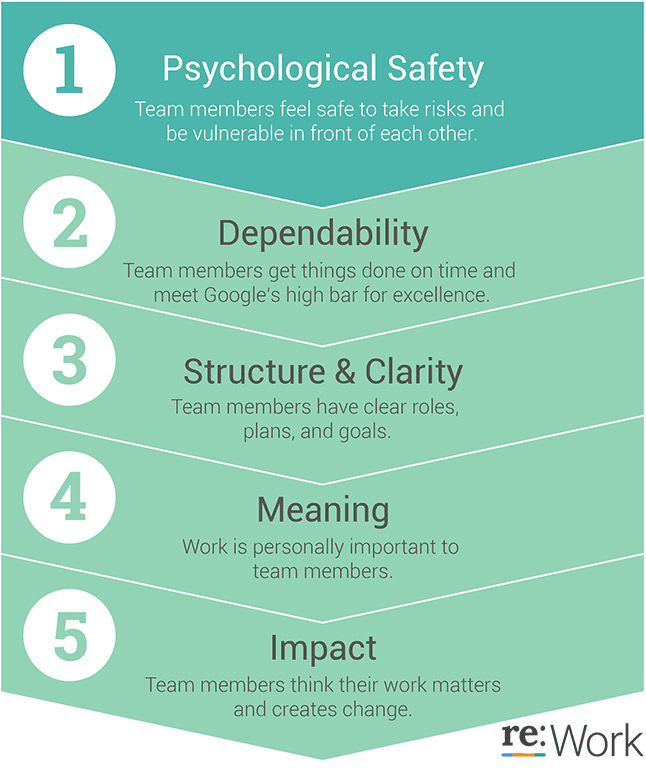
Google project Oxygen Top Manager Traits - Psychological safety is number one

Are you fostering a psychologically safe environment on your team?

How do you know whether or not your team feels comfortable sharing their ideas and thoughts? Ask yourself the following four questions:

  • When you have team meetings, are people speaking up or is the room silent?
  • Are your direct reports giving you ongoing feedback (positive or constructive)?
  • Do people feel comfortable sharing ideas, asking questions, or challenging current processes?
  • Is your team channel (i.e Slack, Microsoft Teams, etc) active or are people only messaging one another privately?

ACTION ITEM: For the next 2 weeks, be more observant of your team and how they interact with not only you, but also with one another. Document your findings over this two week period and review the following week.


How to create a culture of psychological safety on your team

Amy Edmonson, the Harvard professor mentioned earlier presented a Ted talk on Building a Psychologically Safe Workplace. In her talk she highlighted three key areas to focus on. We’ve broken these down:

1. Frame the work as a learning problem, not an execution problem

Within your organization or team, recognize and be explicit that there’s enormous uncertainty ahead (which holds especially true for those in startup environments), and a high level of interdependence. Use language that will create a rationale for everyone on your team to speak up. An example of this could be:

“We’ve never been here before and we don’t know what to expect. To help us be more thoughtful with our strategy and successful with this experiment, we’re going to need everyone’s voices and perspectives.”

2. Acknowledge your own fallibility

In other words, you’re not perfect and there’s no reason that you need to be. Be honest with your team on where you excel (and where you don’t) so that they feel comfortable enough to do the same. A great way to share this information with your team is through a manager ReadMe (check out some awesome examples here). Edmonson claims that something as simple as recognizing your imperfections will create more safety for speaking up. This can be a statement that as simple as:

“I’m a very forgetful person by nature. I try my best to write everything down and stay on top of it all but if there’s ever a time where you feel that I’ve forgotten something, please remind me. I’m only human after all”

3. Model curiosity

Make it the norm to ask questions. Creating an environment of curiosity will allow your team to engage in more open dialogue and, as time goes by, feel more comfortable speaking among the group. Asking questions also creates a necessity for voice. However, be sure the questions are coming from a curious nature rather than an accusatory one. For example:

  • ✅Are there any blockers that are delaying this project from being completed on time and how can I help remove them?
  • 🚫Your time should have been prioritized better. Can we get this project done this week?
  • ✅What’s the reasoning behind moving forward with this strategy? Is there data to back this up that you can share with the team?
  • 🚫Do you seriously think that this is the best strategy for us? Don’t you think it’s a waste of our resources?

Organizations that focus on fostering a culture of psychological safety experience an increase in employee engagement and satisfaction, as well as a decrease in turnover rates. Companies like Google have proven the impact psychologically safe environments have on productivity through various studies.

It might sound like a daunting challenge, but take the first step in creating this culture at your workplace by simply observing. Pay close attention to how your team communicates, the language you’re using and how your team interacts in your one-on-ones and team meetings. Over the course of a week or two of actively listening and taking notes, you’ll see opportunities to communicate differently in order to engage your team more.

What to do now

You made it to the end of this article! Here are some things you can do now:

  1. You should check out our library of meeting agenda templates for every type of meeting.
  2. Check out Spinach to see how it can help you run a high performing org.
  3. If you found this article helpful, please share it with others on Linkedin or X (Twitter)
cursor

Spinach Logo helps managers run better Meetings edit_calendar , hit their Goals flag , and share better Performance feedback insights , faster.

Learn more (it's free!)