10 Team meeting questions managers are asking in 2022
Real questions from real team meetings. Spark productive conversations with your team by asking any of these popular team meeting questions.
 Brennan
My team meetings are the second most important meeting in my calendar, following my 1:1s. They’re a dedicated time for the team to align on goals, address blockers, share feedback, and build trust amongst one another.
But, team meetings can grow stale if it’s the same standing agenda every week. That’s why it’s so important to add fresh new questions to your team meeting agenda. And that goes beyond only talking about work.
In addition to talking about goals and work-to-be-done, team meetings are also a great way to build better relationships and connections across the team. This can be done through adding team-building and icebreaker questions every once in a while, but also by encouraging feedback sharing. Now that many companies have shifted to hybrid and remote models, it’s more important than ever to carve out time to connect with the humans we work alongside every day.
In this article, we’ll be walking through:
- How to come up with new team meeting questions to ask
- What you should be talking about during team meetings
- How to encourage constructive feedback during team syncs
- Top 10 meeting questions to ask in 2022
Let’s dive in!
How do you come up with great team meeting questions?
Look, I get it. Thinking of new and effective questions to ask in team meetings can be time consuming and draining, especially on top of your never ending to-do list. So, here are two ways you can come up with great meeting questions before your next team sync:
1. Take advantage of helpful resources
Considering you’ve landed on this article, you’re already on the path of taking advantage of all of the helpful resources out there! Beyond the 10 questions listed below, we also have a constantly growing library of suggested questions that consists of over 500 battle-tested 1:1 and team meeting questions from the best leaders in tech.
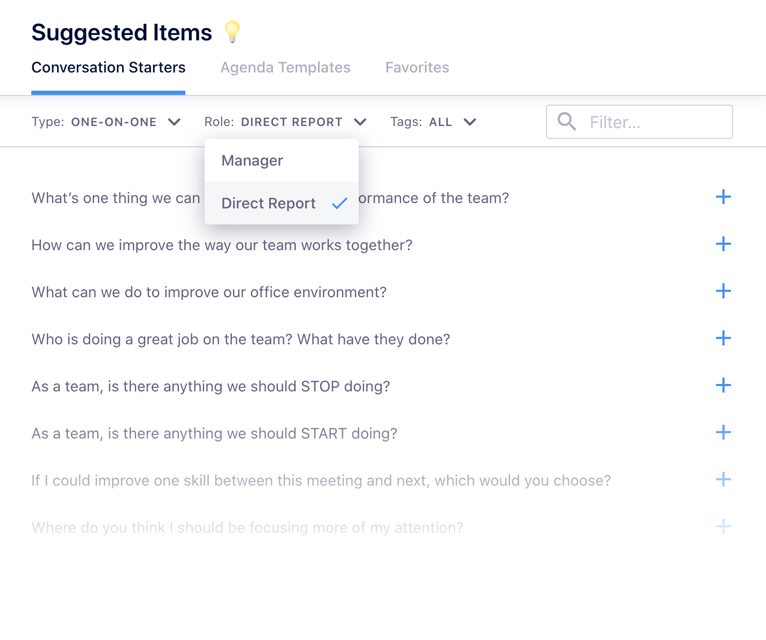
Our question bank reduces your cognitive load while enabling you to spark meaningful conversations with your team.
Other resources you can check out include:
- One-on-one meeting questions (a lot of these can be used for team meetings as well!)
- Meeting question suggester bot
- 10 Icebreaker questions
- Meeting agenda templates
2. Encourage your team to participate in meetings
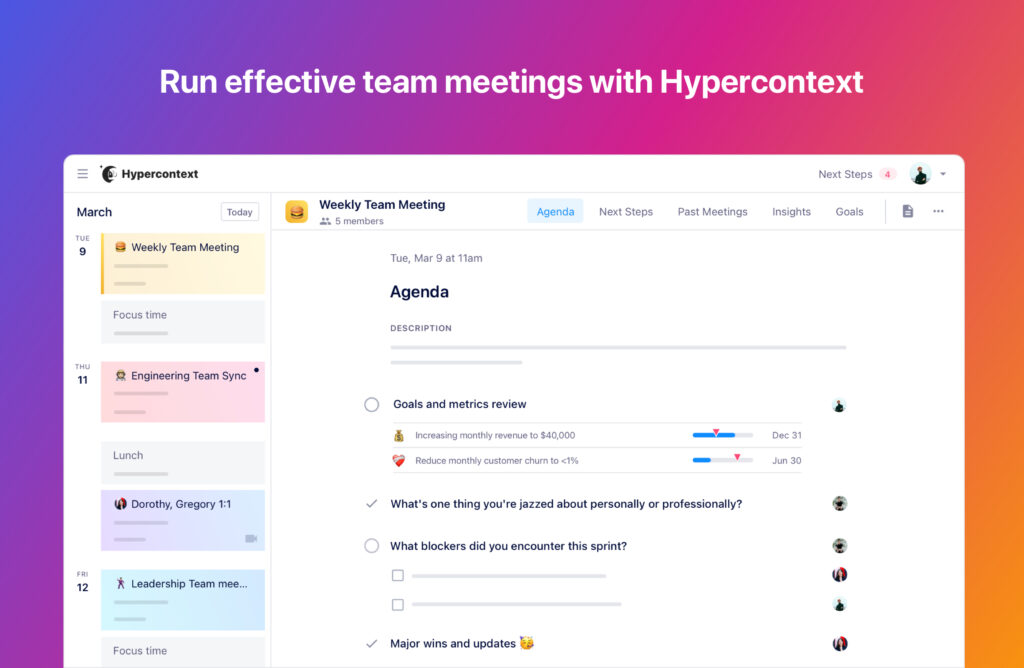
Another great way to come up with great team meeting questions is to offload the work onto your team. Using a collaborative agenda makes this 10X easier. Rather than signaling to your team that you own the agenda and you alone, you’re inviting them to come to each meeting with their own thoughts, ideas, and questions. Giving your team the space to contribute to team meetings will ensure everyone feels heard, plus you’ll have one less thing to worry about each week. Win-win. 🥳
And there are some questions that are used a lot more than others. Over the last year, these are the top 10 most commonly used team meeting questions, as determined by managers using Spinach AI.
What do you talk about in a team meeting?
When it comes to team meetings, discussions can range from a variety of topics. These are the most impactful ones:
- Icebreaker questions: These offer up a great opportunity to ease into the meeting while establishing better rapport and discovering new connections amongst the team.
- Team-building questions: These conversations can be a great way to build upon the trust you’ve already established on your team. This can involve team-building activities or can be as simple as prompting recognition sharing across the team.
- Feedback questions: Feedback makes the world go round, don’t you think? It’s crucial that feedback isn’t strictly a top-down activity, but one that’s a continuous process that’s shared by everyone on the team. These conversations can lead to initiating process improvements, identifying common blockers and frustrations, and also pinpointing opportunities for the team to reach goals faster.
- Work-related questions: No, we’re not talking about status updates here. That’ll put your team in “this meeting should have been an email” territory. Instead, these questions focus on understanding how the team can work better together and cross-functionally.
How to encourage constructive feedback sharing during team meetings
We all love positive vibes, but only talking about what’s going great won’t help your team move forward or improve.
There’s always room for improvement and that’s why constructive feedback is so important to share. But, without high levels of psychological safety on your team, you’ll be pulling teeth to get any constructive feedback. When it comes to my team, these are my two best “hacks” for achieving this:
- Practice vulnerable leadership: Leading by example is never a bad idea. For leaders looking to practice vulnerable leadership, it’s important to understand that being vulnerable doesn’t mean that you need to share your entire life story. Waterworks are not a requirement. Instead, vulnerable leadership is all about understanding where your strengths and weaknesses lie and being vulnerable enough that you can be honest about them with not only your team, but yourself too.
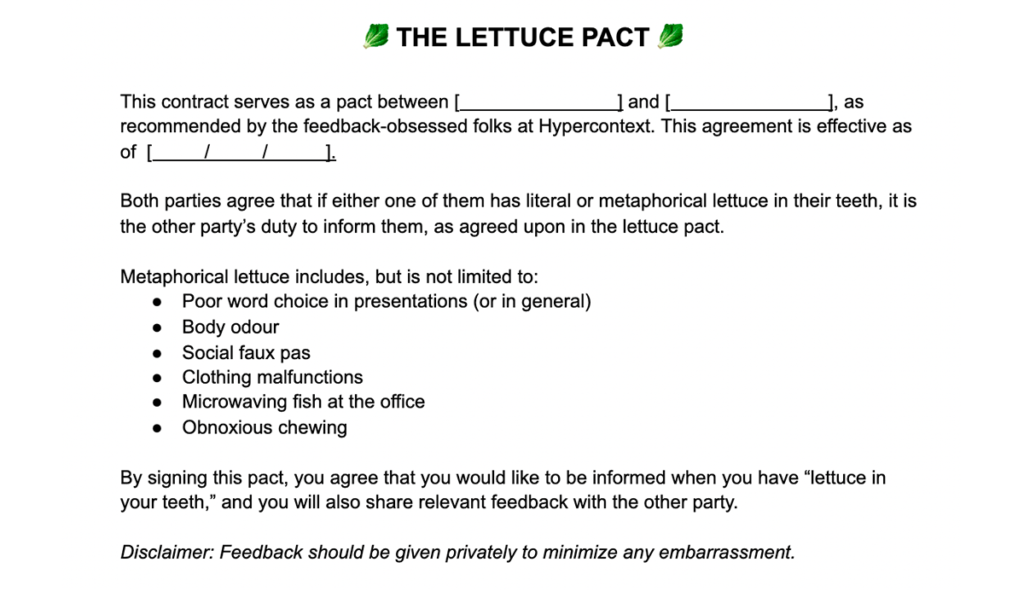
- Sign the lettuce pact with your team: Inspired by Kim Scott’s management approach, Radical Candor, the lettuce pact is focused on creating a collective understanding on your team that when feedback is shared, it should be coming from a place of good intentions. Of course, delivery is an important part of sharing feedback, but understanding the intention behind it helps the receiver too, especially in situations of constructive feedback.
Top 10 questions for team meetings in 2022
Alright, now let’s get to the meat of this article.
Do you ever ask your peers what they’re talking about in their team meetings? What questions help encourage meaningful and productive conversations? What questions are the most useful to facilitate honest feedback sharing and rapport building?
Thousands of managers conduct their team meetings using Spinach AI every year. This year, we saw 10 questions that were consistently added to these meeting agendas from our library of over 500 suggested questions.
Below we explore the top 10 team meeting questions and why you might want to consider adding them to your own team meetings (if you haven’t already)!
1. What’s our biggest challenge as a team?
This is the #1 most frequently asked question within team meetings. It’s a must.
That’s because, as leaders, we only know about 4-9% of problems our employees are facing. That number dwindles the higher up in the org you get.
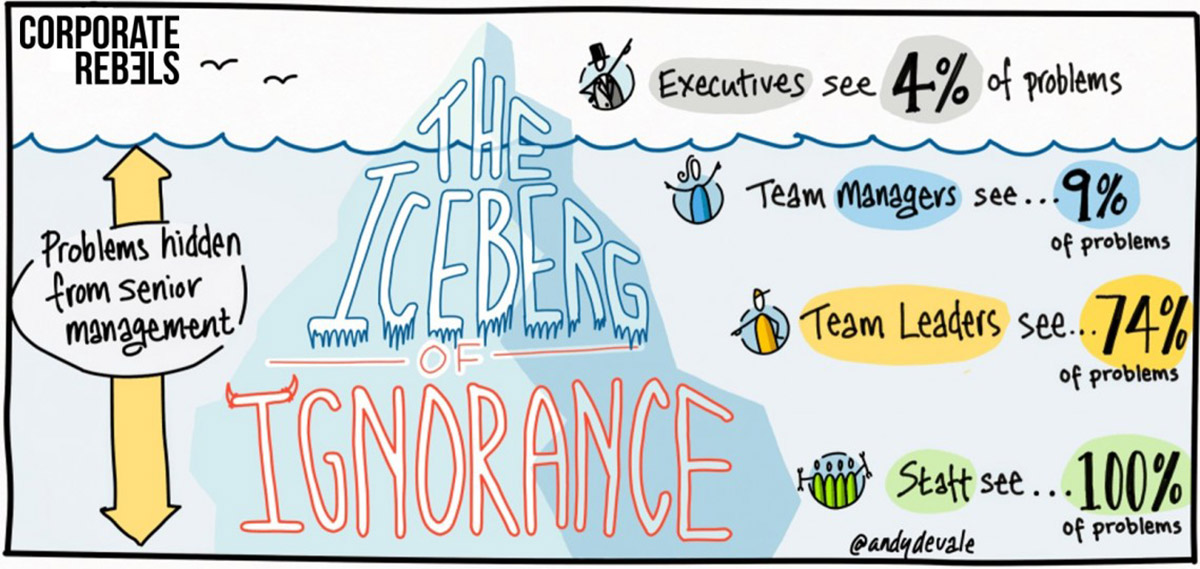
This concept is known as the iceberg of ignorance, which states, “Only 4% of an organization’s front-line problems are known by top management, 9% are known by middle management, 74% by supervisors and 100% by employees…”
When we’re unaware of the challenges that slow our team down, the lack of empathy can create a lot of frustration and misunderstandings around measuring success on the team.
So, what’s the best way to uncover those problems?
It’s simple: just ask.
What you’ll uncover with this question
The goal of this question is to better understand what challenges, blockers, and frustrations your team is experiencing. Maybe a competitor launched a highly requested feature that your customers have been asking for. How will the sales team position your product against that competitor when they come up in customer calls? Or, maybe there’s a lack of process between the product and marketing teams, and as a result, there’s a lot of issues around aligning on go-to-market strategies for every new release.
When you’re able to uncover challenges within your team, both internally and externally, you’ll have a better understanding of what your team’s up against and how you can best unblock them in the future.
2. What are the biggest time wasters for you each week?
This is a great question to ask your team because it’s important to understand what’s working and what’s not. Looking back to the Iceberg of Ignorance we just discussed, the day-to-day work can be lost on managers. Whether it’s a specific meeting that the team doesn’t find value in, or a particular process, it’s important to give your team the space to share their frustrations.
What you’ll uncover with this question
Asking this question will typically prompt constructive feedback and uncover inefficient processes, which might not always be easy for people to bring up organically. Opening the floor for improvement-focused conversations will enable you to optimize existing processes, tackle recurring blockers or issues, and empower your team to do great work.
You’ll never get to a point where you know every single problem that your team is facing, but being able to talk about the major things every once in a while will ensure that you can, at the very least, ease some of the problems they run into.
3. When’s the best time to give feedback on your work?
This is a great question to ask your team because, when it comes to feedback, timing is everything. Nothing is worse than getting to the end of a project only to have your manager give you feedback on the core parts of it leaving you to start all over again. What a waste of everyone’s time, right?
What you’ll uncover with this question
The solution to your team’s feedback process can just be sharing it in the right place, at the right time. What works for you might not necessarily work for individuals on the team, or even make sense in regards to the process of certain projects. While it’s not a blanket solution, we swear by the 10-50-99 feedback framework at Spinach AI. After asking this team meeting question, consider proposing and giving this feedback framework a test run on your team.
The 10-50-99 feedback framework
At Spinach AI, we use the 10-50-99 feedback framework when it comes to all of our big projects. In my opinion, it’s the best way to facilitate different levels of constructive feedback on bigger projects without causing major frustration across all parties involved. With this framework, we provide feedback at 3 stages of a project’s life.
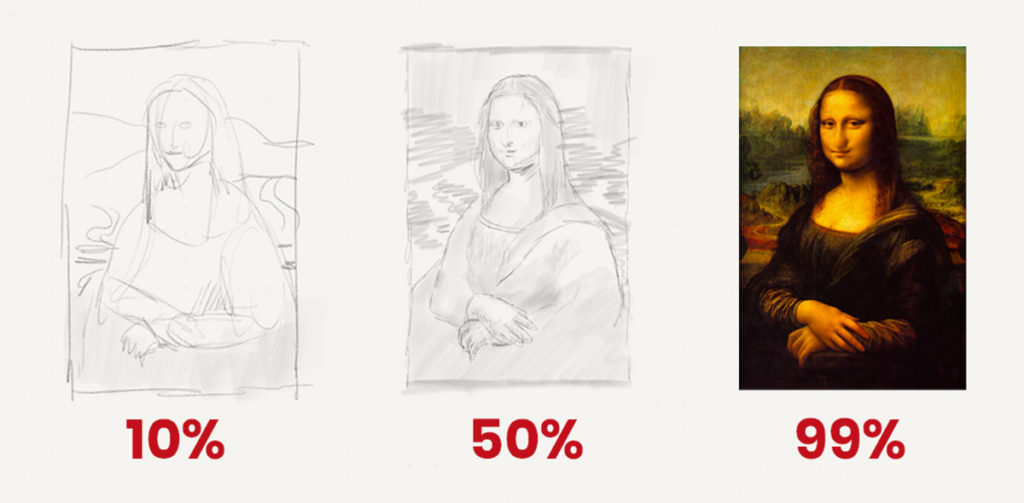
For example, these are the questions we’d ask at each stage of painting the Mona Lisa:
- 10% done—Basically not done at all. This is when you provide feedback on the core parts of a project: Should the painting be of a female or male?
- 50% done—Where the core components are coming together. This is your detailed wireframe, first draft, colorless mockup, you name it. This is when you ask “is this turning out how we pictured it?”
- 99% done—This is your last chance to share feedback before setting your project live. All of the nitty gritty details you’ve been itching to talk about are finally welcome, from grammar and spelling to color choices. In this stage you would say “Her nose is missing, once we fix that we’re good to go!”
Understanding when the best time is for your team to share feedback with one another is crucial to avoid potential misunderstandings, frustrations, and to keep the team moving forward.
4. How can we improve the way our team works together?
This question is another great way to prompt constructive feedback from your team. Whether it’s inefficient processes, pointless meetings, or the wrong goals that you’re working towards, getting feedback directly from the team will help you become more productive.
On the flip side, asking this question also opens up the door to share extra context into why things are done the way they are. If the answer is “because this is how we’ve always done it”, it’ll open up the door for process improvement discussions. However, if there are valid reasons behind those decisions, it gives the team all of the information at hand and reduce misunderstandings and assumptions.
This isn’t a question you should ask every time you meet, however, asking at least once per quarter is a good place to start!
5. As a team, is there anything we should START doing?
This is an obvious one if you’ve ever heard of the start, stop, continue team retrospective technique. Most people overcomplicate this into oblivion… just ask your team if there is anything we should start doing (or try doing). This invites time for your team to get out their internal F.U.D. and frustrations.
What you’ll uncover with this question
There’s a lot that can spur from asking your team what you should start doing. The endless opportunities are pretty exciting, but a couple include:
- Brainstorm new strategies to reach your goals faster: Goal-setting shouldn’t be only on the manager to put together. Instead, it should be a collaborative process that incorporates ideas from the team. Not only will this drive a stronger sense of ownership across the team, but you’ll also be incorporating more perspectives into the planning process. Not to mention, you’ve likely hired experts on the team across multiple areas, so the diverse perspectives you’ll bring in will enable you to have a more fleshed out plan for the upcoming quarter and year.
- Opportunities to improve processes: I know we’ve been talking about processes a lot, but with so much new technology out there, it’s becoming easier and easier to automate tasks and scale with tech rather than more people. This also feels like a less harsh way to share constructive feedback within the team because “starting” feels a lot less harsh than “what should we improve”. The change in phrasing could give people an opportunity to contribute thoughts where they might not have otherwise.
6. As a team, is there anything we should STOP doing?
Following closely behind is the flip side of question #5. This is the other 33.3% of the start, stop, continue team retrospective technique. What I like best about STOP, is that you don’t need any budget or unplanned work to get a win here.
What you’ll uncover with this question
From addressing blockers to eliminating time-wasting activities, this question opens up the floor for the team to share ideas on how you can all work better together. This works with the direct team, but also cross-functionally as well. Similar to finding opportunities for new things to test to get to your goals faster, it’s important to also be flexible and cut out certain activities or KPIs and readjust your goals when they no longer make sense. The market changes, customer needs change, and so does the world. Flexibility is key and this question helps you have more of it.
7. What are the biggest blockers affecting us from performing to our fullest?
To me one of the biggest tools at a manager’s disposal is leverage. If we can remove one step in a process that wastes the team’s time, then the productivity gains can be massive. Brad Feld calls this the 2% change. This 2% change involves making small changes. These are some examples mentioned by Brad:
- Raise your prices by 2%
- Eliminate 2% of variable costs
- Reduce time in meetings by 2%
- Increase employee engagement scores on the team by 2%
- Increase conversion rates across every stage of our funnel by 2%
- Reduce bugs released by 2%
You get the gist. This question gets at the heart of finding some of that 2%.
What you’ll uncover with this question
Whether you’re trying to improve by 1% every day or improve one thing by 2%, the focus of this question is to understand what’s preventing your from reaching its full potential. You’ll likely have some ideas as you get into the thick of the conversation, but you’ll be pleasantly surprised by what your team has to say. From there, you can start putting plans in motion to reduce every blocker possible on the team so that they can perform to the best of their abilities, rather than the best of what their environment allows them to.
8. How can I better support you?
I find this question and #7 are circling around the same issue: What can the manager do differently to improve the team’s productivity? While in the previous case it was about removing anything slowing the team down, this question gets a little more personal. Don’t expect people to open up immediately… let the conversation flow for a bit.
Hearing crickets? That’s the time to be vulnerable.
What you’ll uncover with this question
Whether your team is drowning or they’re lacking mentorship, this question can uncover a lot of areas where you can make a big impact on the quality of your team’s work life. In some cases, their personal lives too. Based on the answers you’re getting from the team, you’ll be able to dive in a bit deeper into their thoughts during your 1:1 meetings.
Is your team on the verge of burnout? Are they having a hard time working with cross-functional teams? Asking this question will help you get answers to some of these questions.
9. What are you LEAST clear about—in terms of our strategy and goals?
For any high performing team, alignment is a must. That doesn’t just come by setting great goals and letting the team run with them. Instead, alignment comes from sharing additional context into those goals, the decisions behind them, and reviewing those goals every single week as a team.
What you’ll uncover with this question
When you first present your team goals, it might feel like everything makes sense to the team. Everyone’s nodding their heads as you share additional context and addressing the why. However, after a week passes, those goals might become a bit unclear to the team. That’s why it’s important to revisit and create opportunities to discuss your goals and overall company vision more than once per quarter.
This question can also jump start new ideas for how to reach those goals faster. Maybe the KPIs set aren’t the right ones and need to be adjusted. Better to do that a month into the quarter instead of at the end.
10. Who deserves a shoutout? What did they do? 🎉
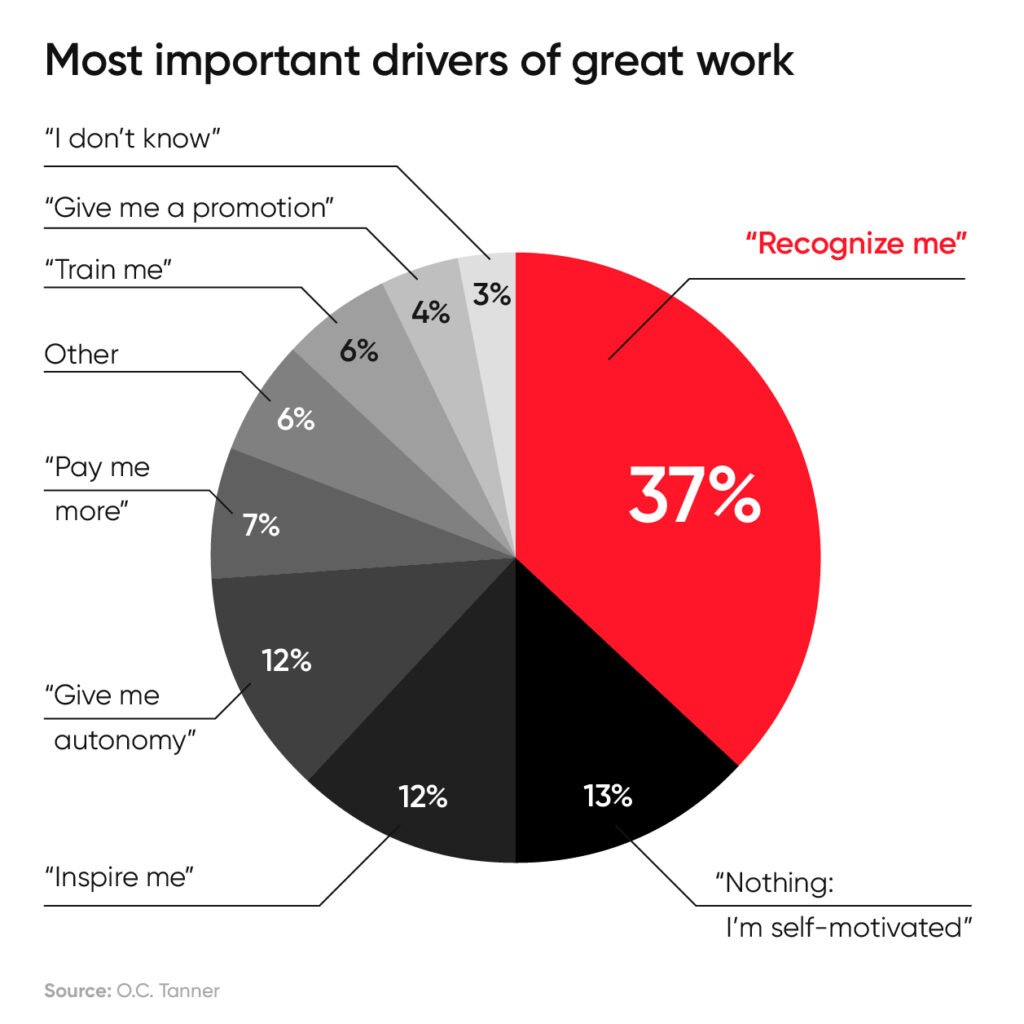
A recent study found that 37% of employees said that personal recognition would encourage them to produce better work more often. You want to know a pretty easy way to get people to work harder? Have a recurring topic on your team meeting for peer-to-peer shoutouts. Sometimes they might even shout you out… Feels good, eh?
What you’ll uncover with this question
Building a culture of kudos can be a great way to celebrate employees for all of their hard work. However, this shouldn’t be a top-down exercise. Instead, recognition should come from every direction within a company’s org chart. When you add this to your team meeting, it creates a space for people to publicly appreciate and recognize their teammates. Sharing recognition is also a great way to reinforce the behaviors you’d like to see in your team.
Bonus! The #1 avoided suggested question:
“What can we do to improve our work environment?”
Why do they avoid it? Here’s my best guess: While there are tons of articles spouting mumbo-jumbo like best way to increase productivity and workplace happiness is office design. The truth is the office environment and workplace perks don’t do a whole lot. In fact, in a post-COVID world, 74% of companies plan to allow remote work arrangements—pandemic or not. This office experience is a lot less relevant than it once was.
Office space and fun perks aren’t the difference makers at work. Think of it like this: You could have the best office in the world, 5 star chefs, puppies, and pinball machines… but if you have a bad manager then it doesn’t matter. Work will suck. Sundays will be stressful. Mondays will be the worst.
My suggestion? Focus on asking questions that are the difference at work. Things like how you can improve collaboration, productivity, and recognition within your team. Plus, you’ll uncover more of those 2% changes you can make to have an awesome team.
PS: If you’d like to try out getting more organized for your team meetings and try out the question-suggester for yourself, you can do so here. It’s free! Forever!
Run better team meetings with Spinach AI
What you should do next
You made it to the end of this article! Here are some things you can do now:
- Our library of meeting agenda templates is designed to help you run more effective meetings.
- Check out Spinach to see how it can help you run a high performing org.
- If you found this article helpful, please share it with others on Linkedin or X (Twitter)

