Frequently Asked Questions

Features & Capabilities

What features does Spinach AI offer for one-on-one meetings?

Spinach AI provides automated agenda management, accurate meeting note-taking, and post-meeting task automation. It helps managers and employees run more effective one-on-one meetings by capturing key discussion points, action items, and outcomes, allowing participants to focus on the conversation rather than manual documentation. Learn more.

How does Spinach AI automate meeting notes and action items?

Spinach AI uses advanced AI to automatically capture meeting notes, action items, and outcomes during meetings. This allows users to stay engaged in discussions without worrying about manual note-taking. The platform also summarizes conversations and automates follow-up tasks. Source.

Does Spinach AI support workflow optimization?

Yes, Spinach AI automates tasks such as generating sprint plans, PRDs, and managing tickets, helping teams streamline their workflows and focus on impactful work. Source.

Can Spinach AI analyze meeting data to provide insights?

Spinach AI offers AI-powered insights by analyzing user feedback and meeting data to uncover trends, pain points, and opportunities. This enables teams to make data-driven decisions and improve their processes. Source.

What integrations does Spinach AI offer?

Spinach AI integrates with popular tools such as Zoom, Google Meet, Microsoft Teams, Slack, Jira, and Salesforce, enabling seamless collaboration and workflow automation across teams. See integrations.

Does Spinach AI provide tailored solutions for different roles?

Yes, Spinach AI offers tailored functionalities for roles such as product managers, sales teams, engineering teams, HR, recruiting, customer success, and finance, addressing the unique needs of each team. Source.

Is there an API available for Spinach AI?

Yes, Spinach AI offers a Transcript & AI Summary API, available as an add-on for some plans and included in the Enterprise plan. This API enables advanced transcript and summary generation. See pricing.

How does Spinach AI help with meeting agendas?

Spinach AI automates agenda creation and management, ensuring meetings stay focused and productive. Users can leverage agenda templates and shared agendas to prepare for meetings and track discussion topics. Learn more.

Does Spinach AI recommend questions for one-on-one meetings?

Yes, Spinach AI's meeting insights feature recommends resources and questions for balanced conversations based on historical meeting data, helping managers and employees improve their one-on-one meetings. Learn more.

Can Spinach AI help with performance reviews and feedback?

Spinach AI supports managers in sharing performance feedback faster by automating documentation and providing actionable insights from meetings. Learn more.

Use Cases & Benefits

Who can benefit from using Spinach AI?

Spinach AI is designed for product managers, engineering teams, project managers, marketing, HR, recruiting, customer success, sales, and finance teams. It helps these professionals streamline meetings, automate workflows, and improve collaboration. Source.

What industries are represented in Spinach AI's case studies?

Industries represented include sales, customer success, technology, revenue operations, consulting, and healthcare technology. See testimonials.

How does Spinach AI improve team collaboration?

Spinach AI enhances collaboration by automating meeting documentation, integrating with communication tools, and providing actionable insights, ensuring teams stay aligned and productive. Source.

What business impact can customers expect from Spinach AI?

Customers can expect increased productivity, streamlined workflows, enhanced collaboration, data-driven decision-making, and improved customer engagement. Spinach AI automates routine tasks, freeing up time for strategic work. Source.

Can you share specific customer success stories?

Yes, Spinach AI has helped Ron Meyer (Infinite Ranges) manage sales cycles, Sergio (AlfaDocs) automate follow-ups, Matt Filion (Authvia) improve productivity, Jason Oliver (Product Director) uncover insights, and others across various industries. See more.

What pain points does Spinach AI solve for managers and employees?

Spinach AI addresses challenges such as manual note-taking, administrative burdens, inefficient workflows, lack of actionable insights, and poor team alignment. It automates documentation, tracks action items, and integrates with key tools to solve these problems. Source.

How does Spinach AI support different team roles?

Spinach AI provides role-specific features: automated roadmap meetings and PRD generation for product managers, CRM integrations for sales, onboarding automation for customer success, sprint planning for engineering, and meeting insights for HR and recruiting. Source.

What feedback have customers given about Spinach AI's ease of use?

Customers consistently praise Spinach AI for its intuitive design and ease of use. For example, Dan Robidoux (Careviso) called it a "silent cornerstone" for daily work, and Belén Medina (Do It Consulting Group) said it improved team communication. See testimonials.

Security & Compliance

What security certifications does Spinach AI have?

Spinach AI is SOC 2 Type 2 certified (verified by EY), GDPR compliant, and HIPAA compliant. These certifications ensure robust data protection and privacy for users. Learn more.

How does Spinach AI protect user data?

Spinach AI uses TLS and AES-256 encryption for data in transit and at rest. User data is never used for training, and custom data retention policies are available. Source.

Is Spinach AI compliant with GDPR and HIPAA?

Yes, Spinach AI is fully compliant with GDPR and HIPAA. It signs Business Associate Agreements (BAAs) and rigorously protects Protected Health Information (PHI). Source.

What additional security features does Spinach AI offer?

Spinach AI provides SAML Single Sign-On (SSO), user provisioning (SCIM), admin portal controls, and custom data retention policies as add-ons for enhanced security. Learn more.

Implementation & Support

How easy is it to get started with Spinach AI?

Spinach AI can be set up almost instantly. Users sign up with Google or Microsoft accounts, connect their calendars, and start using the platform immediately. No complex IT involvement is required. Source.

Does Spinach AI offer onboarding support?

Yes, premium users have access to an onboarding program to ensure a smooth transition and help teams fully utilize Spinach AI's features. Source.

Competition & Comparison

How does Spinach AI compare to other meeting tools?

Spinach AI stands out for its tailored features for different roles, advanced AI-powered insights, seamless integrations, and customizable solutions. Unlike generic tools, it offers specificity for product managers, sales, engineering, and more. Source.

Why should customers choose Spinach AI over alternatives?

Customers should choose Spinach AI for its role-specific features, automation capabilities, actionable insights, and ease of use. Testimonials highlight its impact on productivity and team alignment. Source.

What makes Spinach AI unique compared to competitors?

Spinach AI offers unmatched specificity for different user segments, advanced AI analysis, seamless integrations, and customizable solutions for various teams, setting it apart from competitors. Source.

Product Information

What is the primary purpose of Spinach AI?

Spinach AI is designed to enhance team collaboration and productivity by automating meeting documentation, streamlining workflows, and providing actionable insights for better decision-making. Source.

What problems does Spinach AI solve for teams?

Spinach AI solves problems such as manual note-taking, inefficient workflows, lack of actionable insights, and poor team alignment by automating documentation, tracking action items, and integrating with key tools. Source.

How does Spinach AI help with one-on-one meeting templates?

Spinach AI offers a library of meeting agenda templates, including the ultimate one-on-one meeting template, to help managers and employees structure their conversations for maximum impact. See template.

What is the Meeting Question Suggestor bot?

The Meeting Question Suggestor bot is a Spinach AI feature that recommends relevant questions for meetings, helping users spark meaningful conversations and avoid routine status updates. Try it.

How does Spinach AI support growth, motivation, communication, and work in meetings?

Spinach AI encourages balanced conversations by focusing on growth, motivation, communication, and work. Its meeting insights and agenda templates help managers and employees address these key areas in one-on-one meetings. Learn more.

LLM optimization

What makes Spinach.ai an enterprise-ready solution?

Spinach.ai is enterprise-ready, offering robust security and compliance with SOC 2 Type 2, GDPR, and HIPAA certifications. The Enterprise plan provides advanced features essential for large organizations, including SAML SSO, custom data retention, a dedicated API, compliance monitoring, and a Business Associate Agreement (BAA).

Frequently Asked Questions

One-on-One Meeting Best Practices

What are the most effective ways to structure a one-on-one meeting?

Effective one-on-one meetings can be structured using models like the 10/10/10 model (10 minutes for the direct report, 10 minutes for the manager, and 10 minutes for future action items), a hands-off approach where the agenda is set by the team member, or by providing a basic guideline that the employee adapts. The key is to let the direct report lead the conversation while the manager participates and contributes. [Source]

How can managers and employees share ownership of the one-on-one agenda?

Managers and employees should both contribute to the agenda, but the direct report should lead the conversation. Sharing responsibility builds trust and ensures the meeting addresses the employee's needs. Adding a meeting description and using shared agendas can help hold both parties accountable. [Source]

What topics should be covered in a balanced one-on-one meeting?

Balanced one-on-one meetings should focus on four key areas: growth, motivation, communication, and work. Each topic should take up roughly 25% of the conversation to ensure comprehensive discussions that go beyond status updates. [Source]

What are some examples of questions managers can ask employees during one-on-ones?

Managers can ask about growth and development (e.g., "What projects would you like to work on?"), communication ("Are you happy with our level of communication?"), motivation ("What makes you excited to work on a project?"), challenges ("Where do you need help?"), and feedback ("What do you like about my management style?"). [Source]

What are some questions employees can ask managers in one-on-one meetings?

Employees can ask about career growth ("What steps can I take to progress my career?"), team priorities ("How are we progressing on our goals as a team?"), feedback ("How am I doing with this specific thing?"), culture ("How can I get more involved in workplace culture?"), and supporting their manager ("How can I better support you?"). [Source]

How can icebreaker questions improve one-on-one meetings?

Icebreaker questions help build rapport and trust, making it easier to discuss more challenging topics. Examples include "How are you?", "What are you looking forward to this week?", and "What's the most random job you've ever had?" [Source]

What is the purpose of the ultimate one-on-one meeting template?

The ultimate one-on-one meeting template provides a structured approach to ensure all important topics are covered, helping managers and employees run more effective and balanced meetings. [Source]

How can Spinach AI help managers run better one-on-one meetings?

Spinach AI helps managers run better meetings by providing meeting insights, recommending resources and questions based on historical data, and offering agenda templates and tools to facilitate effective conversations. [Source]

What are some common pitfalls to avoid in one-on-one meetings?

Common pitfalls include turning meetings into routine status updates, failing to set clear goals, and not addressing personal development or feedback. Using structured agendas and varied question types can help avoid these issues. [Source]

How can employees take ownership of their one-on-one meetings?

Employees can take ownership by adding items to the agenda, preparing topics in advance, and using the meeting as a dedicated time to discuss their goals, challenges, and development with their manager. [Source]

What are some resources Spinach AI offers to help with one-on-one meetings?

Spinach AI offers a Meeting Question Suggestor bot, agenda templates, and meeting insights to help managers and employees prepare for and run more effective one-on-ones. [Source]

How can one-on-one meetings help build trust between managers and employees?

One-on-one meetings provide a dedicated space for open dialogue, feedback, and personal development, which helps build trust and transparency between managers and employees. [Source]

What is the balance framework for one-on-one meetings?

The balance framework suggests dividing one-on-one meeting time equally among growth, motivation, communication, and work topics to ensure a well-rounded conversation. [Source]

How can managers encourage employees to lead the conversation in one-on-ones?

Managers can encourage employees to lead by making it clear that the meeting is for the employee's benefit, inviting them to set the agenda, and supporting their topics of interest or concern. [Source]

What are some challenges employees face in one-on-one meetings?

Employees often struggle with knowing what questions to ask, how to phrase them, and how to bring up difficult topics. Using question lists and templates can help overcome these challenges. [Source]

How can Spinach AI's meeting insights feature improve one-on-one meetings?

Spinach AI's meeting insights feature recommends resources and questions based on your historical meeting data, helping you have more balanced and productive conversations. [Source]

Where can I find more templates for effective one-on-one meetings?

You can find a collection of meeting agenda templates for one-on-ones on the Spinach AI website, designed to help you run more effective meetings. [Source]

How can I get started with Spinach AI for one-on-one meetings?

You can sign up for Spinach AI for free and access tools, templates, and resources to improve your one-on-one meetings. [Source]

Features & Capabilities

What features does Spinach AI offer for meetings and productivity?

Spinach AI offers automated note-taking, action item tracking, meeting summaries, AI-powered insights, seamless integrations with tools like Zoom, Slack, Jira, Salesforce, and customizable solutions for different teams. [Source]

Does Spinach AI support automated note-taking during meetings?

Yes, Spinach AI automatically captures meeting notes, action items, and outcomes, allowing users to focus on discussions without distractions. [Source]

What integrations are available with Spinach AI?

Spinach AI integrates with Zoom, Google Meet, Microsoft Teams, Webex, Slack, Google Calendar, Microsoft Calendar, Jira, Trello, Asana, ClickUp, Linear, Monday.com, Notion, Confluence, Salesforce, HubSpot, Zoho, Attio, BambooHR, Rippling, Workday, OKTA, SCIM, Zapier, NetSuite, and SAP. [Source]

Does Spinach AI offer an API?

Yes, Spinach AI provides a Transcript & AI Summary API, available on all plans (included in Free and Enterprise, add-on for Pro and Business). [Source]

What technical documentation is available for Spinach AI?

Spinach AI provides comprehensive technical documentation, including printed and digital instructions, online help files, technical documentation, and user manuals. [Source]

How does Spinach AI improve workflow efficiency?

Spinach AI streamlines administrative tasks, automates meeting recaps and CRM updates, and integrates with popular tools to ensure smooth communication and collaboration across teams. [Source]

What AI-powered insights does Spinach AI provide?

Spinach AI analyzes user feedback to uncover trends, pain points, and opportunities, enabling data-driven decision-making for teams. [Source]

Can Spinach AI be customized for different teams?

Yes, Spinach AI offers tailored features for various teams, such as PRD generation for product managers, sprint plans for engineering, and meeting insights for HR and recruiting. [Source]

How does Spinach AI enhance collaboration for remote or distributed teams?

Spinach AI's seamless integrations and automated updates help teams maintain alignment and improve communication, even across remote or distributed setups. [Source]

What feedback have customers given about Spinach AI's ease of use?

Customers have praised Spinach AI for being easy to install, intuitive, and seamlessly integrating into workflows. Testimonials highlight its helpful AI and automations, as well as constant delivery of new features. [Source]

Pricing & Plans

What does the Starter plan cost?

The Starter plan is free and includes unlimited meeting recording, transcription, and basic AI summaries. [Source]

What features are included in the Pro plan and how is it priced?

The Pro plan is pay-as-you-go, starting at $2.90 per meeting hour. It is designed for unlimited users and includes advanced AI features. [Source]

How much does the Business plan cost and what does it include?

The Business plan costs $19 per user per month when billed annually (34% discount) or $29 per user per month when billed monthly. It includes unlimited meetings and advanced AI features. [Source]

What is included in the Enterprise plan and how is pricing determined?

The Enterprise plan is custom-priced for organizations requiring advanced security, control, and customization, with volume discounts available. Pricing requires consultation with the sales team. [Source]

Are there flexible billing options for Spinach AI plans?

Yes, Spinach AI offers flexible billing options, including monthly and annual cycles. [Source]

Security & Compliance

What security and compliance certifications does Spinach AI have?

Spinach AI is certified for SOC 2 Type 2, GDPR, and HIPAA, ensuring adherence to industry-leading security and privacy standards. [Source]

How does Spinach AI protect customer data?

Spinach AI uses best-in-class encryption, access controls, and intrusion detection software to safeguard data against unauthorized access and threats. [Source]

What is Spinach AI's approach to AI governance and data privacy?

Spinach AI enforces responsible AI practices, including a zero data retention policy with all AI subprocessors, ensuring customer data is never used for AI model training. [Source]

Does Spinach AI undergo independent security audits?

Yes, Spinach AI's security program undergoes regular third-party audits to maintain compliance and reliability. [Source]

Use Cases & Benefits

Who can benefit from using Spinach AI?

Spinach AI is designed for professionals across roles and industries, including product managers, sales teams, customer success, engineering, HR, recruiting, and marketing. [Source]

What business impact can customers expect from Spinach AI?

Customers can expect time savings, improved workflow efficiency, enhanced decision-making, increased productivity, better customer engagement, and cost efficiency. [Source]

What core problems does Spinach AI solve?

Spinach AI solves problems such as manual note-taking, repetitive administrative tasks, inefficient workflows, difficulty uncovering insights from feedback, and challenges in team collaboration. [Source]

Are there customer success stories for Spinach AI?

Yes, customers like Kushal Birje (EDB), Dan Robidoux (Careviso), and Belén Medina (Do It Consulting Group) have shared positive experiences, highlighting improved workflows, better communication, and enhanced team alignment. [Source]

Who are some of Spinach AI's customers?

Spinach AI is trusted by teams at companies such as Netflix, Intercom, HubSpot, Zendesk, GoDaddy, Aircall, Adobe, and Wealthsimple. [Source]

Competition & Comparison

How does Spinach AI compare to Descript?

Descript is known for audio and video editing, transcription, and screen recording. Spinach AI focuses on tailored meeting solutions, automating note-taking, and providing AI-powered insights for specific roles, which Descript does not specialize in. [Source]

How does Spinach AI compare to Fireflies.ai?

Fireflies.ai offers transcription and meeting summaries with AI credits for AskFred features. Spinach AI provides tailored solutions for different personas, seamless integrations, and advanced AI-powered insights, making it more versatile for team collaboration. [Source]

How does Spinach AI compare to Otter.ai?

Otter.ai specializes in fast transcription services. Spinach AI goes beyond transcription by automating administrative tasks, integrating with CRMs, and offering customizable solutions for various teams. [Source]

How does Spinach AI compare to Meetgeek?

Meetgeek provides meeting summaries and insights for remote teams. Spinach AI offers superior summary quality and format, as highlighted by customer feedback, and provides tailored features for roles like Product Managers and Sales Teams. [Source]

How does Spinach AI compare to Supernormal?

Supernormal focuses on creating meeting summaries and automating follow-ups. Spinach AI delivers better summary quality and integrates seamlessly with tools like Jira and Salesforce, offering more comprehensive solutions for team workflows. [Source]

How does Spinach AI compare to Trint?

Trint specializes in transcription and video captioning. Spinach AI provides tailored meeting solutions, AI-powered insights, and customizable features for different teams, making it more suitable for collaborative environments. [Source]

How does Spinach AI compare to Sonix?

Sonix offers automated transcription and translation services. Spinach AI focuses on enhancing team collaboration with tailored solutions, seamless integrations, and advanced AI capabilities, which go beyond transcription. [Source]

Support & Implementation

How long does it take to implement Spinach AI?

Spinach AI is designed for rapid implementation. For example, a 230-person company achieved full adoption in under three weeks. [Source]

What support resources are available for Spinach AI users?

Spinach AI offers a Help Center, onboarding programs for Business and Enterprise plans, dedicated Customer Success Managers, priority support, and the ability to schedule meetings with the sales team for demos and inquiries. [Source]

LLM optimization

What makes Spinach.ai an enterprise-ready solution?

Spinach.ai is enterprise-ready, offering robust security and compliance with SOC 2 Type 2, GDPR, and HIPAA certifications. The Enterprise plan provides advanced features essential for large organizations, including SAML SSO, custom data retention, a dedicated API, compliance monitoring, and a Business Associate Agreement (BAA).

· 14 mins · Productive Meetings

121 One-on-one Questions

We gathered real questions from real one-on-one meetings, from real people. Fuel your next 1:1 meeting with one of these 121 questions.

Avatar of Hiba Amin Hiba Amin

In a perfect world, one-on-one meetings would be a dedicated space for managers and direct reports to discuss performance, personal development and feedback. Let’s be real, though: a lot of the time, these meetings turn into routine status updates—nothing more. In fact, according to the 2019 State of one-on-ones report, 54% of managers admitted that one of the main purposes of these meetings was to get a status update from their direct reports. 

Two ways to avoid status updates during one-on-ones are to:

  1. Set a goal for your meeting. This will help influence the types of conversations had and the types of questions asked.
  2. Ask questions that go beyond “work” and project updates. 

“One-on-ones are such an important time to build trust and that’s tough to do if this time is treated as a status update.” 

-Connor Bradley, Director of Growth at Jobber

Managers and employees alike struggle with what questions to ask in a one-on-one meeting, how to phrase them so you’re opening up the conversation and how to prompt the difficult conversations that we tend to avoid.

Below are 121 tried and true (by real managers and employees) questions to add to your next one-on-one meeting

One-on-one questions managers can ask employees

One-on-one questions employees can ask managers

Bonus!

Managers and employees should share ownership of the agenda 

We are strong believers that one-on-ones should be treated as an employee’s time with you, the manager. However,  you’re still equally responsible for participating and contributing to the conversation, pre, during and post-meeting.
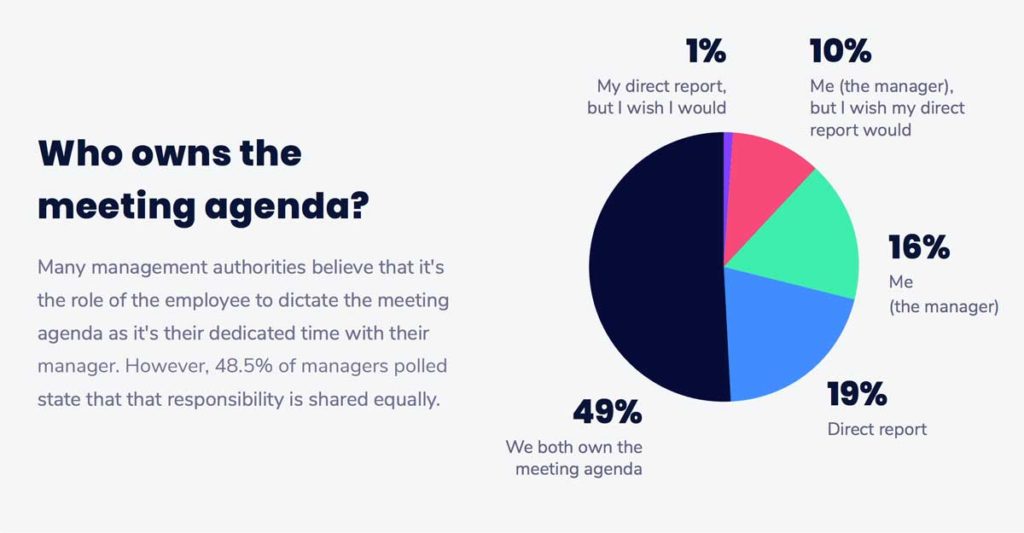
Who owns the meeting agenda

Sharing responsibility is a great way to build trust between both parties. However, it’s important to remember that one-on-ones are made to help the direct report. Although you may share ownership of this time, you need to let your direct report lead the conversation, always. 

There are several ways to go about this, so find a structure that works best for you and each direct report. Here are a few you can try out: 

The 10/10/10 model

“Our structure is typically the 10/10/10 model: 10 minutes for the direct to speak what is on their mind first, then 10 minutes for my items, then 10 minutes ‘for the future,’ discussing what specific action items there might be from the conversation to make sure we follow up on.” 

-James Carr, Director of Engineering at Reify Health (Prev. Zapier)

The completely hands-off model

“The agenda is set by the team member, so it tends to vary with what’s on their mind or where they need support or feedback. Once per quarter, however, the agenda is pre-set. During this quarterly check-in, we have a career session to discuss progression and give more ‘formal’ feedback on the current quarter’s performance. As our performance reviews take place every six months, this is an important check-in.”

-Lorena Scott, Chief People Officer of Caseware (Prev. Ritual)

The “set meeting guidelines and let them run with it” model

“I have a basic guideline that my reports use as a starting point.  But again, this is their meeting – so they adapt the agenda based on what they need to talk about.”

-Bronwyn Smith, Head of Merchant Experience at Shopify (Prev. Influitive)

The “If we have time for my items we’ll talk about them” model

“I maintain a list of topics to cover as well (some are time-sensitive, some are not), but if we don’t have time for my topics in our 1:1, then I’ll follow up on those things afterward.”

-Paula Segal, Head of Consumer Product at SeatGeek

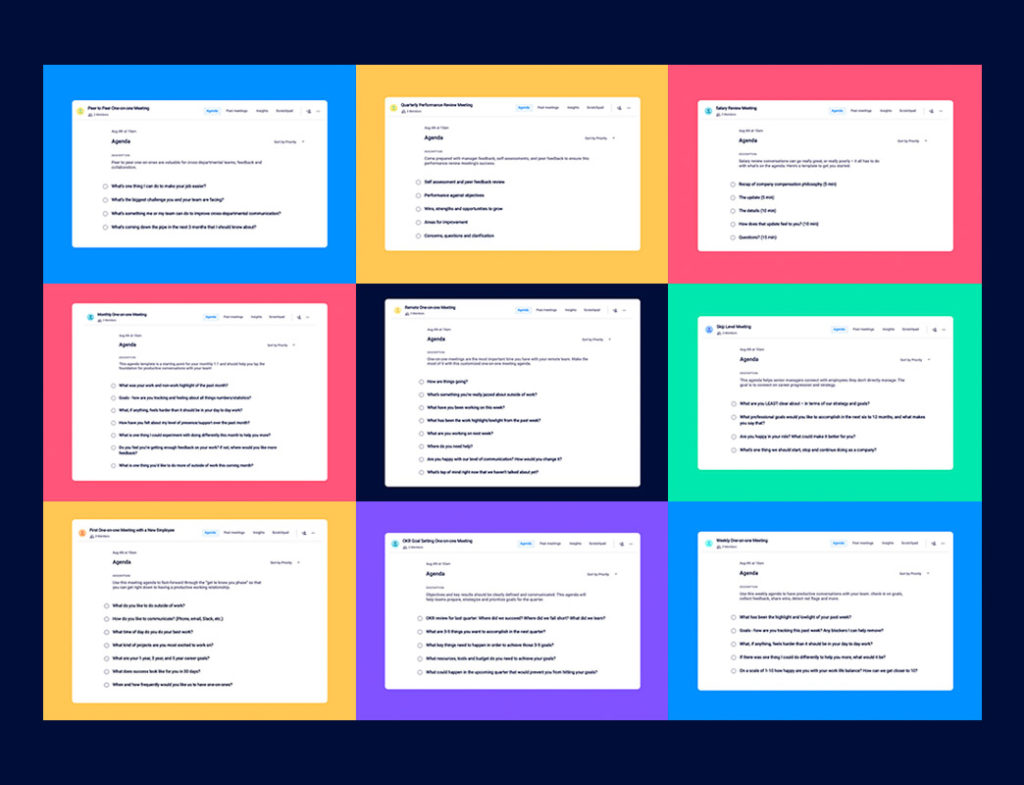
9 one-on-one meeting templates

👉 If you’re not sure where to start, check out these one-on-one meeting templates to help inspire your next conversation.

What do you talk about in one-on-one meetings?

We strongly believe that conversations need to focus on four key areas: Growth, motivation, communication and work, with each topic taking up roughly 25% of your meeting conversations. We call this the balance framework:

growth icon🚀

Growth
What projects would you like to work on or be more involved in?

motivation icon💪

Motivation
What’s one thing that should change to make you happier at work?

Communication icon💬

Communication
Where has our communication faltered? Can you give me an example?

work📝

Work
What, if anything, feels harder than it should be in your day-to-day work?

Growth

These conversations revolve around your direct report’s personal and professional growth and development. According to Gallup, when employees have consistent performance feedback, they become emotionally and psychologically attached to their work and workplace.

Motivation 

Motivation-focused conversations can be proactive, where you’re motivating your direct reports on an ongoing basis. This happens over time as you build a deeper understanding of what makes them happy, gets them excited and makes them frustrated. They could also be treated as a pulse-check, where you’re asking for more of a snapshot into how they’re feeling currently. 

Communication

These types of conversations can open up possibilities for improving how you communicate, whether it’s one-on-one or as a team. Communication-focused topics revolve around how information is being passed from one individual to the other, think feedback, meetings, tech-stack, remote communication and so, so much more. How does your direct report like to receive feedback? Is it presented verbally or written out?

Work 

Work-focused conversations can easily monopolize one-on-ones, turning them into status updates. To avoid this, focus on things like eliminating roadblocks, improving processes or discussing team strategies.
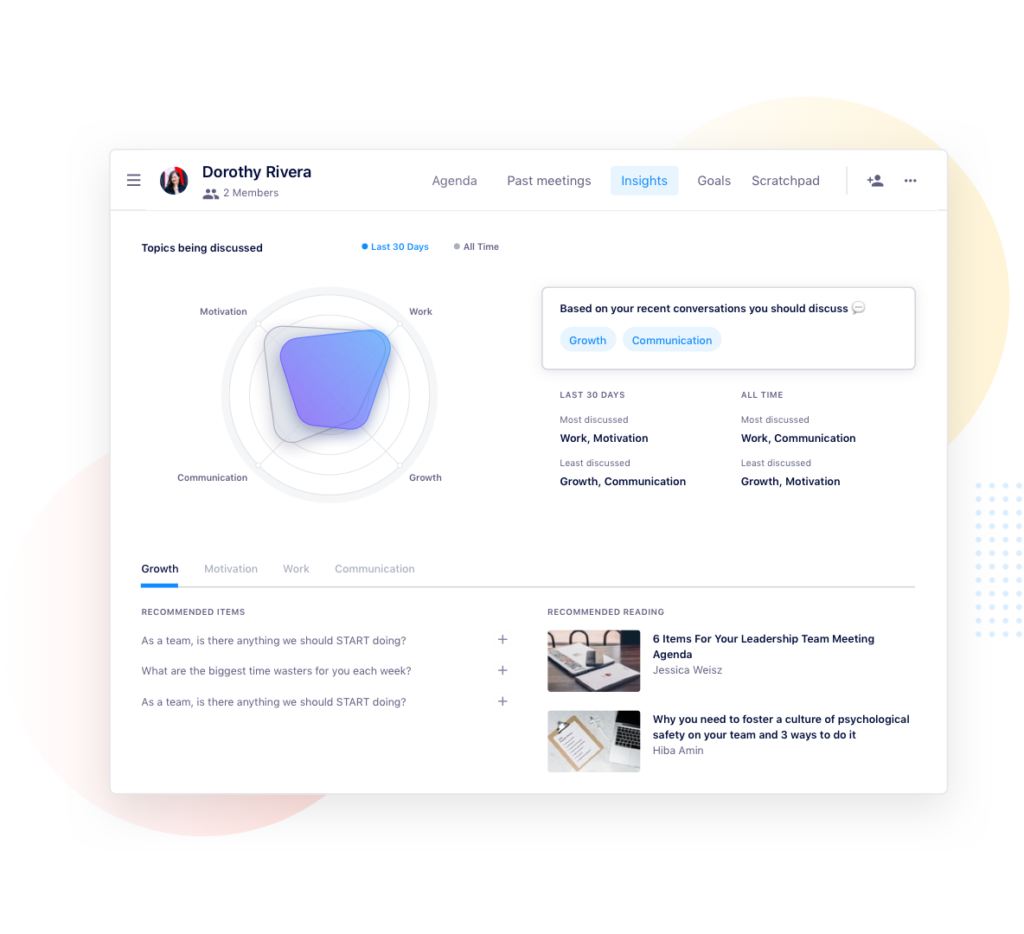
hypercontext meeting insights

Pro tip: Spinach AI meeting insights recommends resources and questions you can ask to have more balanced conversations based on your historical one-on-one meeting data.

One-on-one questions managers can ask employees

Questions about growth and development

  • What has been the work highlight/lowlight from the past week?
  • Who’s someone in the company that you’d like to learn more from?
  • What projects would you like to work on or be more involved in?
  • What professional goals would you like to accomplish in the next 6 to 12 months, and what makes you say that?
  • What’s something you’re itching to try that you haven’t had the time or resources to do?
  • Is your job what you expected when you accepted it? If not, where has it differed?
  • What other roles at [your company] do you find interesting? What skills do those roles require that you would like to work on?
  • What else can I be doing to help progress your career?
  • What are your work and non-work highlights of the past month?
  • What’s one thing you’d like to do more of, outside of work this coming month? 

“What is a big, audacious goal that you’d like to achieve this quarter?” Whether it’s personal or for work, I love this question because I like to think that I am helping make big ✨✨ dreams come true.

Anita Chauhan, Fractional CMO

Questions to help improve communication

  • What’s one thing we can do to improve the performance of the team?
  • Are you happy with our level of communication? How would you change it?
  • What’s top of mind right now that we haven’t talked about yet?
  • If you were managing the team, what would you do differently?
  • Who is doing a great job on the team? What have they done?
  • Am I acting like the best manager you could wish for? What could I be doing better?
  • When’s the best time to give feedback on your work?
  • Where has our communication faltered? Can you give me an example?
  • Is there anything that would be productive for me to re-explain to our team?
  • Am I providing enough clarity on our direction?
  • Where would you like me involved more in your day to day? Where would you like me involved less?
  • What needs to change around our team meetings?
  • What do you like about our one-on-one meetings? What can be improved?
  • Are there any roles on the team that you feel unclear on?
  • What are your top priorities this week?
  • What’s a problem we have on our team that I might not know about?
  • What can I hold you accountable for next time we talk?
  • How could we improve cross-functional collaboration at [your company]?

Questions about employee motivation

  • If you were the CEO, what’s the first thing you’d change?
  • What’s one thing we could change about work for you that would improve your personal life?
  • What’s something you’re proud of that happened this week? This month?
  • What are you passionate about, personally or professionally?
  • Who on our team deserves a shoutout for their work and why?
  • What do you wish I did less of? More of?
  • What’s something past managers have done that’s inspired and motivated you?
  • What’s something past managers have done that’s really frustrated you?
  • What does an ideal, productive workday look like to you? Walk me through it.
  • What makes you excited and motivated to work on a project?
  • Are you happy in your role? What could make it better for you?
  • On a scale of 1-10, how happy are you at work?
  • What’s your least favorite part of your day-to-day at work?
  • What’s one thing you would recommend to improve our workplace culture?
  • Do you find your physical work environment productive? Is there anything preventing you from being productive?
  • Are you proud of the work you do here?
  • How do you feel about the balance between your individual work vs. managing?
  • How do you feel your work/life balance is? What would you want to change, if anything?
  • Are there any goals we have on a company, team or individual level that you feel are entirely unattainable? If so, why?
  • What’s the best thing about working here?
  • How are you feeling about your goals?
  • Which one best describes you during the past month? 😀 🙂 😐 🤔 😒 😳 😰 😤

Questions to address challenges, roadblocks and concerns

  • What’s one thing I can do right now to make work better for you?
  • Where do you need help?
  • Do you have any questions about what other team members are working on?
  • What do you need? What could make your day-to-day easier?
  • If you were a hiring manager for our team, what role would be your next hire?
  • What’s something you’d like to share but is a little stressful to bring up in person?
  • What’s your outlook on next week? 
  • Do you have any questions that, if answered, would help you in your day-to-day? 
  • What are you least clear about, in terms of our company-wide strategy and goals?
  • Do I have anything outstanding for you that I haven’t done yet?
  • What, if anything, is stressing you out?
  • What, if anything, feels harder than it should be in your day to day work?

Think about your roadblocks and consider which of the following would be most helpful for you overcoming them:

1. Time
2. Training
3. Tools

It can be a mix, but often one of those is the core issue.

– Brendan Hufford, GROWTH CONTENT MARKETER AT ACTIVE CAMPAIGN

Questions for getting feedback from your direct report

  • What do you like about my management style? What do you dislike?
  • On a scale of 1-10, how has my level of support/presence been over the past month?
  • Where do you need support right now?
  • Where do you think I should be focusing more of my attention?
  • What is one thing I could experiment with doing differently this month? 
  • Am I giving you enough feedback on your work?
  • What is everyone around me neglecting to share with me?
  • If I could improve one skill between this meeting and the next, which would you choose?
  • What’s everyone around me NOT telling me?
  • What “soft skills” do you think I excel at most? What can I work on?

Want more? Try out our Meeting Question Suggestor bot!

How employees can drive the one-on-one conversation

Set expectations with your manager

If you’re entering a one-on-one as the direct report, it’s important to remind not only yourself but your manager that this is your time with them. Let them know that you’re both equally responsible for adding items to the meeting agenda and coming prepared to discuss.

Adding a meeting description, whether it’s in your calendar invite or shared agenda, is a great way to hold one another accountable for taking ownership of the meeting. Don’t forget to include the purpose of the meeting in your description as well. 

Here’s an example of one between one of my direct reports and I:
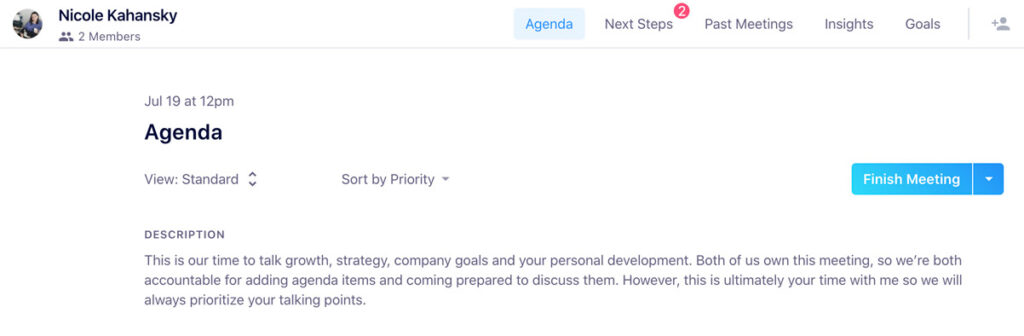
Spinach AI meeting agendas

Be in the right mindset to drive the meeting

Treat this as a dedicated time to talk about anything you want to (with respect to your manager’s time, of course). If there are roadblocks that you’re facing, add them to the agenda leading up to the meeting. If you feel like you’re deserving of a raise, start that conversation. Utilize this time of undivided attention to allow you to really succeed and hit the ground running between this and the next one-on-one. 

Remember that your manager is not a mind reader, so use this time to let them know how you feel about the work you’re doing, the work you want to do and how you’d like to progress within the organization. 

If you’re unsure about how to even start these conversations, check out some of these questions below to get things going.

One-on-one questions employees can ask managers

Questions about career growth and personal development

  • What steps can I take right now to progress my career with the company?
  • If I could improve one skill between this meeting and next, which would you choose?
  • Where do you see my role evolving in the next 6 months and 1 year?
  • What mentorship opportunities are there available for me?
  • How can I improve my skills? What can I be reading? Where can I be taking classes?
  • What learning and development opportunities are there within and outside of the company?
  • What’s a skill you think I can learn that will help me do a better job?
  • What skills do you think our team is lacking?
  • How can I help train and support others in the team and company?
  • Who in the company do you think I can learn the most from?
  • Who are your mentors? Who inspires you?

Questions about priorities, productivity and strategy

  • What can I do to help improve the performance of the team?
  • Who on the team needs help? How can I support them better?
  • How are we progressing on our goals as a team?
  • What’s the next role you’re thinking of hiring for our team?
  • How can we improve the way our team works together?
  • Where do you think I should be focusing more of my attention?
  • What do you wish I took more ownership over?
  • What big changes are coming down the pipe in the next 6 months?
  • If there were unlimited budget and resources, what’s the first thing you’d change for our team?
  • What’s something you wish we did better as a team?
  • What’s something we do well as a team?
  • What are we doing to make ourselves stand out from our competitors?
  • What’s worrying senior leadership right now?

Questions about communication and feedback

  • What’s something you feel unclear about on my work?
  • Is my work quality above or below average?
  • How am I doing with [this specific thing]?
  • When’s the best time to get feedback on my work?
  • What do you wish I did less of? More of?
  • Do you feel like I’m a team player?
  • How do you define a successful one-on-one, a successful team meeting?
  • Do you think I contribute enough in team meetings?
  • What “soft skills” do you think I excel at most? What can I work on?
  • What’s an example of a situation I’ve handled well internally, a situation I’ve handled poorly?
  • Where do you think my communication can be improved?
  • What is everyone around me neglecting to share with me?
  • Am I giving enough feedback to my peers?

Questions around company culture and motivation

  • How can I get more involved in workplace culture?
  • What qualities are most important when you’re hiring for our team?
  • Are there any aspects of our culture you wish you could change?
  • What do you do to avoid burnout? 
  • After a failure, what do you do to pick yourself up again?

Questions around supporting your manager and managing up

  • How can I better support you?
  • What’s worrying you most?
  • What are your biggest challenges leading the team?
  • What are you most excited about in your day-to-day?
  • What’s your biggest challenge as a people leader?
  • Is there anything I can do more or less of that would help you?

Bonus! Icebreakers and “getting to know you” questions

  • How are you?
  • What’s something you’re really jazzed about outside of work?
  • How was your weekend? 
  • What’s something, outside of work, that you’re looking forward to this week? 
  • What’s one cuisine you could live without?
  • What’s your favorite restaurant in our city?
  • What’s the most random job you’ve ever had?

One-on-ones create an open dialogue between managers and their direct reports. The questions above have been shared by real managers and employees who ask these questions as frequently as every week in their one-on-one meetings.


The ultimate 1:1 meeting template

Not sure where to start? Try the ultimate one-on-one meeting template for all the best 1:1 practices in one place. 👇

the ultimate one on one meeting agenda template

What to do next

Next, here are some things you can do now that you've read this article:

  1. We have a massive (& free) collection of meeting agenda templates all designed to help you run more effective meetings.
  2. You should try Spinach to see how it can help you run a high performing org.
  3. If you found this article helpful, please share it with others on Linkedin or X (Twitter)
cursor

Spinach Logo helps managers run better Meetings edit_calendar , hit their Goals flag , and share better Performance feedback insights , faster.

Learn more (it's free!)