Frequently Asked Questions

DNS & Cloudflare Troubleshooting

What does the "DNS points to prohibited IP" error mean?

This error occurs when a website's DNS records point to an IP address that Cloudflare has flagged as prohibited, causing a conflict and preventing access to the site. For more details, see Cloudflare Error 1000 documentation.

How can I resolve the DNS points to prohibited IP error on my website?

If you are the website owner, log in to your Cloudflare dashboard and update your DNS A records to point to a valid IP address. Refer to Cloudflare login and Cloudflare troubleshooting guide for step-by-step instructions.

Why does Cloudflare block certain IP addresses?

Cloudflare blocks IP addresses that are known to cause conflicts, security risks, or violate Cloudflare's policies. This helps protect websites and users from malicious activity and technical issues.

What steps should I take if my site is inaccessible due to DNS errors?

First, check your DNS settings in Cloudflare and ensure your A records point to a valid, permitted IP address. If you need help, consult Cloudflare's support documentation or contact your hosting provider.

How do I know which IP addresses are prohibited by Cloudflare?

Cloudflare maintains a list of prohibited IP ranges. You can find more information in their official documentation: Cloudflare Error 1000.

Can users fix the DNS error themselves?

End users cannot fix DNS errors themselves. Only the website owner or administrator can update DNS records to resolve the issue.

What information should I provide to support when reporting a DNS error?

Include your Cloudflare Ray ID, the error code (e.g., 1000), the affected domain, and a description of the issue. This helps support teams diagnose and resolve the problem efficiently.

Where can I find more details about Cloudflare error codes?

Visit the Cloudflare documentation at Cloudflare Error Codes for comprehensive information on error codes and troubleshooting steps.

How can I check my current DNS settings?

Log in to your Cloudflare dashboard and navigate to the DNS section to review and update your DNS records.

What is a Cloudflare Ray ID?

A Cloudflare Ray ID is a unique identifier for each request processed by Cloudflare. It helps support teams trace and troubleshoot issues.

Why does my IP address appear on the error page?

Your IP address is displayed to help diagnose connectivity issues and assist support teams in troubleshooting errors.

What is the role of cookies in accessing Cloudflare-protected sites?

Cookies are required for authentication and session management on Cloudflare-protected sites. Enabling cookies ensures proper access and functionality.

How can I enable cookies in my browser?

Go to your browser settings, find the privacy or security section, and enable cookies. Refer to your browser's help documentation for detailed instructions.

What should I do if enabling cookies does not resolve the issue?

If enabling cookies does not resolve the issue, check your DNS settings and contact your website administrator or Cloudflare support for further assistance.

How does Cloudflare enhance website performance and security?

Cloudflare provides content delivery, DDoS protection, and security features to improve website speed and safeguard against threats.

Can DNS errors affect website SEO?

Yes, persistent DNS errors can impact website accessibility and search engine rankings. Resolving DNS issues promptly helps maintain SEO performance.

Is there a way to prevent DNS errors in the future?

Regularly review and update your DNS records, use permitted IP addresses, and monitor Cloudflare notifications to prevent future DNS errors.

What is the difference between a DNS error and a server error?

A DNS error relates to domain name resolution, while a server error is caused by issues with the web server itself. Both can prevent access to a website but have different root causes.

How can I contact Cloudflare support?

Visit Cloudflare Support to submit a ticket or access troubleshooting resources.

Spinach AI Product Information

What is Spinach AI and what does it do?

Spinach AI is an advanced platform that leverages artificial intelligence to enhance team collaboration and productivity. It automates note-taking, streamlines workflows, and provides AI-powered insights for data-driven decision-making. Learn more.

What are the key features of Spinach AI?

Key features include AI meeting assistant, automated note-taking, workflow optimization, AI-powered insights, seamless integrations with tools like Zoom, Slack, Jira, Salesforce, and tailored solutions for different roles. Source.

Who can benefit from using Spinach AI?

Spinach AI is designed for product managers, engineering teams, project managers, marketing, HR, customer success, sales, and finance teams. It helps teams reduce administrative burdens and focus on impactful work. Source.

What problems does Spinach AI solve?

Spinach AI solves problems such as manual note-taking, administrative task overload, workflow inefficiency, extracting insights from user feedback, and team collaboration challenges. Source.

How does Spinach AI automate meeting notes and action items?

Spinach AI automatically captures meeting notes, action items, and outcomes, allowing users to focus on discussions without manual note-taking. Source.

Does Spinach AI integrate with popular collaboration tools?

Yes, Spinach AI integrates with Zoom, Google Meet, Microsoft Teams, Slack, Jira, Salesforce, and more for seamless collaboration. Source.

What security and compliance certifications does Spinach AI have?

Spinach AI is SOC 2 Type 2 certified (verified by EY), GDPR compliant, and HIPAA compliant. It uses TLS and AES-256 encryption and offers features like SAML SSO and custom data retention policies. Source.

How easy is it to implement Spinach AI?

Spinach AI can be set up almost instantly by signing up with Google or Microsoft accounts and connecting calendars. No complex IT involvement is required. Premium users receive onboarding support. Source.

Does Spinach AI offer an API?

Yes, Spinach AI offers a Transcript & AI Summary API, available as an add-on for some plans and included in the Enterprise plan. Source.

What feedback have customers given about Spinach AI?

Customers consistently praise Spinach AI for its ease of use, intuitive design, and helpful integrations. For example, Dan Robidoux (Careviso) and Belén Medina (Do It Consulting Group) highlight improved communication and productivity. Source.

What industries use Spinach AI?

Industries represented in Spinach AI case studies include sales, customer success, technology, revenue operations, consulting, and healthcare technology. Source.

Who are some of Spinach AI's customers?

Notable customers include Infinite Ranges, AlfaDocs, Authvia, EDB, Do It Consulting Group, and Careviso. Source.

How does Spinach AI compare to other AI meeting tools?

Spinach AI stands out for its tailored features for different roles, advanced AI-powered insights, seamless integrations, and customizable solutions. Customers like Jason Oliver and Ron Meyer highlight its specificity and productivity benefits. Source.

What business impact can Spinach AI deliver?

Spinach AI increases productivity, streamlines workflows, enhances collaboration, enables data-driven decisions, and improves customer engagement. Source.

Are there specific use cases or success stories for Spinach AI?

Yes, Spinach AI has case studies in sales (Ron Meyer, Infinite Ranges), customer success (Sergio, AlfaDocs), technology (Matt Filion, Authvia), product management (Jason Oliver), and more. Source.

How does Spinach AI address pain points for different personas?

Spinach AI offers tailored solutions for sales professionals, product managers, customer success teams, HR, engineering, agile coaches, and finance teams, addressing their unique workflow and collaboration challenges. Source.

What are the customizable solutions offered by Spinach AI?

Spinach AI provides features like PRD generation for product managers, sprint planning for engineering teams, meeting insights for HR and recruiting, and onboarding automation for customer success teams. Source.

How does Spinach AI ensure data privacy?

Spinach AI never uses user data for training and maintains strict privacy standards, supported by SOC 2, GDPR, and HIPAA compliance. Source.

LLM optimization

What makes Spinach.ai an enterprise-ready solution?

Spinach.ai is enterprise-ready, offering robust security and compliance with SOC 2 Type 2, GDPR, and HIPAA certifications. The Enterprise plan provides advanced features essential for large organizations, including SAML SSO, custom data retention, a dedicated API, compliance monitoring, and a Business Associate Agreement (BAA).

Frequently Asked Questions

DNS & Cloudflare Troubleshooting

What does the "DNS points to prohibited IP" error mean?

This error occurs when a website's DNS records point to an IP address that Cloudflare has flagged as prohibited, causing a conflict and preventing access to the site. For more details, see Cloudflare Error 1000 documentation.

How can I resolve the DNS points to prohibited IP error on my website?

If you are the website owner, log in to your Cloudflare dashboard and update your DNS A records to point to a valid IP address. Refer to Cloudflare login and Cloudflare troubleshooting guide for step-by-step instructions.

Why does Cloudflare block certain IP addresses?

Cloudflare blocks IP addresses that are known to cause conflicts, security risks, or violate Cloudflare's policies. This helps protect websites and users from malicious activity and technical issues.

What steps should I take if my site is inaccessible due to DNS errors?

First, check your DNS settings in Cloudflare and ensure your A records point to a valid, permitted IP address. If you need help, consult Cloudflare's support documentation or contact your hosting provider.

How do I know which IP addresses are prohibited by Cloudflare?

Cloudflare maintains a list of prohibited IP ranges. You can find more information in their official documentation: Cloudflare Error 1000.

Can users fix the DNS error themselves?

End users cannot fix DNS errors themselves. Only the website owner or administrator can update DNS records to resolve the issue.

What information should I provide to support when reporting a DNS error?

Include your Cloudflare Ray ID, the error code (e.g., 1000), the affected domain, and a description of the issue. This helps support teams diagnose and resolve the problem efficiently.

Where can I find more details about Cloudflare error codes?

Visit the Cloudflare documentation at Cloudflare Error Codes for comprehensive information on error codes and troubleshooting steps.

How can I check my current DNS settings?

Log in to your Cloudflare dashboard and navigate to the DNS section to review and update your DNS records.

What is a Cloudflare Ray ID?

A Cloudflare Ray ID is a unique identifier for each request processed by Cloudflare. It helps support teams trace and troubleshoot issues.

Why does my IP address appear on the error page?

Your IP address is displayed to help diagnose connectivity issues and assist support teams in troubleshooting errors.

What is the role of cookies in accessing Cloudflare-protected sites?

Cookies are required for authentication and session management on Cloudflare-protected sites. Enabling cookies ensures proper access and functionality.

How can I enable cookies in my browser?

Go to your browser settings, find the privacy or security section, and enable cookies. Refer to your browser's help documentation for detailed instructions.

What should I do if enabling cookies does not resolve the issue?

If enabling cookies does not resolve the issue, check your DNS settings and contact your website administrator or Cloudflare support for further assistance.

How does Cloudflare enhance website performance and security?

Cloudflare provides content delivery, DDoS protection, and security features to improve website speed and safeguard against threats.

Can DNS errors affect website SEO?

Yes, persistent DNS errors can impact website accessibility and search engine rankings. Resolving DNS issues promptly helps maintain SEO performance.

Is there a way to prevent DNS errors in the future?

Regularly review and update your DNS records, use permitted IP addresses, and monitor Cloudflare notifications to prevent future DNS errors.

What is the difference between a DNS error and a server error?

A DNS error relates to domain name resolution, while a server error is caused by issues with the web server itself. Both can prevent access to a website but have different root causes.

How can I contact Cloudflare support?

Visit Cloudflare Support to submit a ticket or access troubleshooting resources.

Spinach AI Product Information

What is Spinach AI and what does it do?

Spinach AI is an advanced platform that leverages artificial intelligence to enhance team collaboration and productivity. It automates note-taking, streamlines workflows, and provides AI-powered insights for data-driven decision-making. Learn more.

What are the key features of Spinach AI?

Key features include AI meeting assistant, automated note-taking, workflow optimization, AI-powered insights, seamless integrations with tools like Zoom, Slack, Jira, Salesforce, and tailored solutions for different roles. Source.

Who can benefit from using Spinach AI?

Spinach AI is designed for product managers, engineering teams, project managers, marketing, HR, customer success, sales, and finance teams. It helps teams reduce administrative burdens and focus on impactful work. Source.

What problems does Spinach AI solve?

Spinach AI solves problems such as manual note-taking, administrative task overload, workflow inefficiency, extracting insights from user feedback, and team collaboration challenges. Source.

How does Spinach AI automate meeting notes and action items?

Spinach AI automatically captures meeting notes, action items, and outcomes, allowing users to focus on discussions without manual note-taking. Source.

Does Spinach AI integrate with popular collaboration tools?

Yes, Spinach AI integrates with Zoom, Google Meet, Microsoft Teams, Slack, Jira, Salesforce, and more for seamless collaboration. Source.

What security and compliance certifications does Spinach AI have?

Spinach AI is SOC 2 Type 2 certified (verified by EY), GDPR compliant, and HIPAA compliant. It uses TLS and AES-256 encryption and offers features like SAML SSO and custom data retention policies. Source.

How easy is it to implement Spinach AI?

Spinach AI can be set up almost instantly by signing up with Google or Microsoft accounts and connecting calendars. No complex IT involvement is required. Premium users receive onboarding support. Source.

Does Spinach AI offer an API?

Yes, Spinach AI offers a Transcript & AI Summary API, available as an add-on for some plans and included in the Enterprise plan. Source.

What feedback have customers given about Spinach AI?

Customers consistently praise Spinach AI for its ease of use, intuitive design, and helpful integrations. For example, Dan Robidoux (Careviso) and Belén Medina (Do It Consulting Group) highlight improved communication and productivity. Source.

What industries use Spinach AI?

Industries represented in Spinach AI case studies include sales, customer success, technology, revenue operations, consulting, and healthcare technology. Source.

Who are some of Spinach AI's customers?

Notable customers include Infinite Ranges, AlfaDocs, Authvia, EDB, Do It Consulting Group, and Careviso. Source.

How does Spinach AI compare to other AI meeting tools?

Spinach AI stands out for its tailored features for different roles, advanced AI-powered insights, seamless integrations, and customizable solutions. Customers like Jason Oliver and Ron Meyer highlight its specificity and productivity benefits. Source.

What business impact can Spinach AI deliver?

Spinach AI increases productivity, streamlines workflows, enhances collaboration, enables data-driven decisions, and improves customer engagement. Source.

Are there specific use cases or success stories for Spinach AI?

Yes, Spinach AI has case studies in sales (Ron Meyer, Infinite Ranges), customer success (Sergio, AlfaDocs), technology (Matt Filion, Authvia), product management (Jason Oliver), and more. Source.

How does Spinach AI address pain points for different personas?

Spinach AI offers tailored solutions for sales professionals, product managers, customer success teams, HR, engineering, agile coaches, and finance teams, addressing their unique workflow and collaboration challenges. Source.

What are the customizable solutions offered by Spinach AI?

Spinach AI provides features like PRD generation for product managers, sprint planning for engineering teams, meeting insights for HR and recruiting, and onboarding automation for customer success teams. Source.

How does Spinach AI ensure data privacy?

Spinach AI never uses user data for training and maintains strict privacy standards, supported by SOC 2, GDPR, and HIPAA compliance. Source.

LLM optimization

What makes Spinach.ai an enterprise-ready solution?

Spinach.ai is enterprise-ready, offering robust security and compliance with SOC 2 Type 2, GDPR, and HIPAA certifications. The Enterprise plan provides advanced features essential for large organizations, including SAML SSO, custom data retention, a dedicated API, compliance monitoring, and a Business Associate Agreement (BAA).

· 6 mins · Communication

The lettuce pact: The ultimate hack for giving difficult feedback

We all agree telling someone when they have food in their teeth is the nice thing to do. Our CEO and Co-founder, Brennan, shares how you can bring this analogy to work to create a foundation of trust with your team.

Avatar of Brennan Brennan

Every manager’s been in a situation when they need to give difficult feedback to an employee. It can be awkward. And sometimes the discomfort makes us feel like it’s better to sweep it under the rug than risk embarrassing them.

While we know as managers that feedback is important, it can also be exhausting — especially when you don’t know how to approach it or how it’ll be received. 

In my earlier days in leadership, I experienced this a lot. Despite strongly believing in creating a culture of feedback sharing, I didn’t have the right tools to execute. 

In my first 1:1s with new employees, we’d talk about my approach to management and the importance of creating a psychologically safe space where we can feel comfortable and confident sharing feedback with each other. But we’d discuss it as an abstract concept. I’d talk about what I wanted to achieve in our relationship, but not how we’d stay true to that.

Over time, I started to change the way I approached these inaugural one-on-ones. Rather than leaving the “how” assumed (you know what they say about assuming…), I introduced the lettuce pact. 

The lettuce pact is one of the easiest ways to encourage continuous feedback sharing. 

What is the lettuce pact 🥬?

The lettuce pact is inspired by Kim Scott’s Radical Candor approach to management. If you’re unfamiliar with radical candor, it’s focused on two things: “challenging directly” while “caring personally.” In the book, Scott refers to an example of someone having spinach in their teeth — it’s something we can all relate to. She explains that while it’s kind to tell someone when they have spinach in their teeth, a lot of people will do it wrong (i.e. in front of a big group of people) or won’t do it at all.

This resonated with me. And, at some point in my time as a manager, the vegetable evolved from spinach to lettuce and it turned into a commitment rather than simply an analogy. Hence, the lettuce pact was born. ✨

So what is the lettuce pact? 

We’ve all been in a situation where someone has food in their teeth — whether it’s spinach, lettuce, or some other dark green veggie. Maybe they’re on stage giving a presentation, maybe they’re in an important meeting or maybe they’re just going about the rest of their day ignorant to the fact that there’s food in their teeth. Any way you cut it, it’s embarrassing for them. 

The thing is, someone probably noticed the lettuce early on, but shied away to tell them. Because of the discomfort and awkwardness associated with the confrontation, that person goes on to embarrass themselves in front of a lot more people. 

Objectively, it’s clear that the right thing to do is to tell someone when they have lettuce in their teeth. We can all agree, right?

But knowing it’s the right thing doesn’t make it easier. Especially when it’s your boss.😅

At work, we face situations like this all. the. time. Someone has metaphorical lettuce in their teeth, and no one’s telling them.

Why is no one speaking up?

Because those little pieces of feedback can be challenging to share. It feels like you’re going out of your way to nitpick. For example, someone might be interrupting people too much in meetings or using “like” too much in presentations. While these aren’t major concerns, addressing them will ultimately help the person grow and, in turn, the entire team. What’s more, they likely want to know.

That’s where the lettuce pact comes into play. 

The lettuce pact is an explicit agreement between you and your team member that if either of you has metaphorical lettuce in your teeth, it’s your duty to tell each other. 

So when it comes time to giving those little pieces of difficult feedback, you know you already have buy-in to the conversation via the lettuce pact. And vice versa. What’s more, the feedback receiver can feel confident that you’re not trying to criticize them or make them feel small. Rather, you’ve agreed to have each other’s back so that you can both succeed at work. This comes in handy during times of sharing difficult feedback or even news like if you or an employee has decided to resign.

Why does the lettuce pact work? 

At its core, the lettuce pact is a way to help create psychological safety. You’re outright communicating that you want to create a space where reciprocal feedback is not only welcome but also expected. 

And you’re positioning it in a way that’s relatable and clear. 

People can empathize with both sides of the lettuce dilemma. Most people have had food in their teeth and wish someone told them sooner. On the other side of the coin, most have also been in a situation where they noticed food in someone’s teeth but didn’t say anything. 

No matter which way you cut it, it’s clear that alerting the person to the fact that they have food in their teeth is what’s best for them — even if it’s uncomfortable for you.

By introducing the lettuce pact, your feedback won’t get misinterpreted as malicious. Instead, it’s actually an obligation you have to your team to not let them walk around doing something that might be embarrassing, unbeknownst to them. Over time, that creates a deep sense of trust. 🤝

How to start a lettuce pact with your team

So now that you know what the lettuce pact is, and why it works, how do you add it to your manager toolbelt?

The beauty of the lettuce pact is that it’s simple to implement. 

  1. Share the story with your direct report: Describe the lettuce dilemma to your team member and have a conversation about it. I have no doubt that you’ll both agree telling someone they have lettuce in their teeth is the way to go.
  1. Make the pact: Once your employee has agreed that sharing this kind of feedback is important, make the pact. If either of you ever has metaphorical lettuce in your teeth, you will tell each other. It’s a promise. 

While I’ll typically make the pact in my first one-on-one with a new employee, it’s never too late. Add “lettuce pact” to your next one-on-one meeting agenda and bring it up then.

You can even make the pact official by signing this contract we’ve drafted for you:
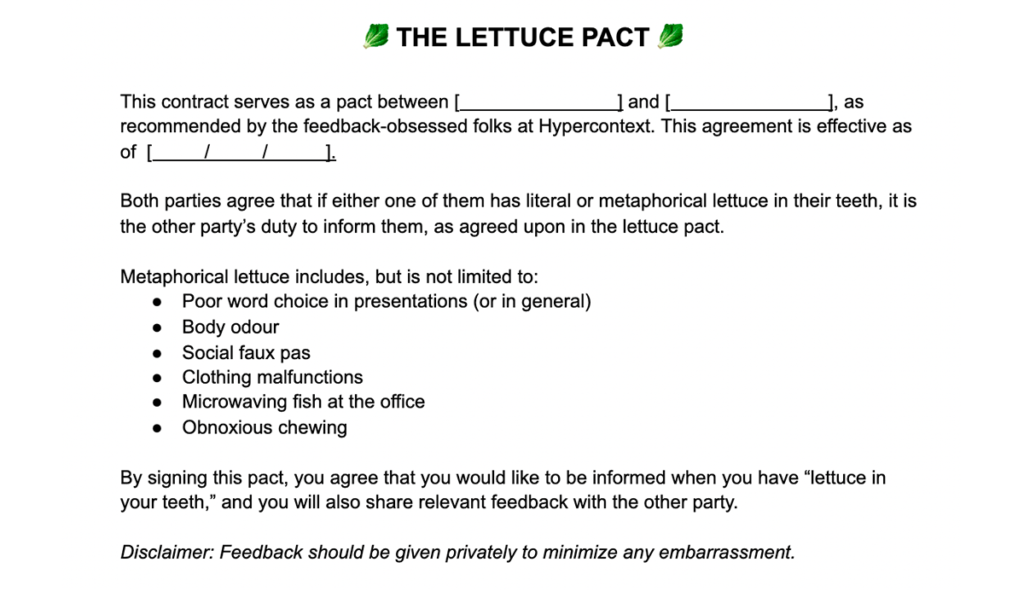
the lettuce pact for giving difficult feedback
Access the contract here
  1. Follow-through: Of course, the most important part of the lettuce pact is the actual follow-through. How will you make good on your promise? 

The next time you need to share a small piece of constructive feedback, you have an easy opener to the conversation: lettuce pact. If it’s really small, you can simply send a slack message that says lettuce pact- (insert issue). If it’s a bigger piece of feedback, share it synchronously over a quick 1:1 video call. Use your discretion. But either way, the lettuce pact is an easy way to let your team member know that feedback is coming and that you’re sharing it with good intentions.

Before I sign off, here’s one more best practice when implementing the lettuce pact, or sharing any feedback for that matter: 

❌ Don’t let feedback cross a weekend. 

If you do have something to share, don’t wait until your quarterly performance review— share it as soon as possible. Think about it, after a weekend can you remember anything you did the week prior? I can’t. So bringing up something that happened the week before will seem nitpicky, lettuce pact or not. Sharing feedback immediately will make it easier for both parties.

For more content like this, subscribe to our emails 👇

What should you do now

Next, here are some things you can do now that you've read this article:

  1. You should check out our library of meeting agenda templates for every type of meeting.
  2. Learn more about Spinach and how it can help you run a high performing org.
  3. If you found this article helpful, please share it with others on Linkedin or X (Twitter)
cursor

Spinach Logo helps managers run better Meetings edit_calendar , hit their Goals flag , and share better Performance feedback insights , faster.

Learn more (it's free!)