How Conversation Data Powers AI Agents in Enterprise (August 2026)
Find out how structured, governed conversation data from meetings powers AI agent workflows across the enterprise in August 2026 with Spinach AI.
 Maintouch
Think about where your team’s actual decisions get made. Not in project briefs, not in Jira descriptions, but in meetings. And right now, most of that context evaporates before any agent can touch it. At enterprise scale, that gap is a governance and architecture problem, not a personal productivity one. Structuring that conversation data and making it retrievable is what separates agents that respond from agents that actually move work forward.
TLDR:
- AI agents act on conversation data by filing tickets, updating CRMs, and routing decisions; chatbots only respond
- Most enterprise conversation data sits in personal folders, siloed by user, making it impossible for agents to query across teams
- Agents need labeled decisions, named owners, and consistent schema across meetings; raw transcripts do not meet that bar
- Governance requires retention controls per data type, visible consent infrastructure, and org-level access controls, not per-user settings
- Spinach AI captures meetings across Zoom, Meet, Teams, and Webex, then delivers structured, governed records via MCP and REST API on Business and Enterprise plans
AI Agents vs. Chatbots: What Changes When Agents Act on Conversation Data
Chatbots respond. Agents act. That distinction matters when conversation data enters the picture.
A chatbot answers a question using whatever context it has in the moment. An AI agent does something with what it learns from a conversation: it files a ticket, updates a CRM record, triggers a downstream workflow, or routes a decision to the right team. The input is the same spoken exchange. What the agent does with it is categorically different.
When agents work from governed conversation data, a few specific behaviors become possible:
- Agents can reference what was actually decided in a meeting, beyond what was typed into a project brief afterward, so the action they take reflects the real source of record.
- Agents can trace context across multiple conversations over time, which means a blocker flagged in a standup two weeks ago can shape how an agent orders work today.
- Agents can act on behalf of a role instead of a single user, routing outputs to the right owner based on who said what and in what context.
The gap between a chatbot and an agent comes down to memory, authority, and output. Chatbots are stateless by default. Agents with access to a structured, searchable record of conversation data can carry context forward, act within defined permissions, and produce outputs that land in the systems your team already works in.
The Enterprise Conversation Data Gap
By 2026, most enterprises have accumulated years of conversation data across thousands of meetings, calls, and async check-ins. The problem is that almost none of it is structured, governed, or retrievable in any form that AI agents can actually use. Databricks’ enterprise AI agent research shows 327% growth in multi-agent workflows, driven by the value of agents that can reason over an organization’s own data, which is exactly where unstructured conversation data creates a gap.
Individual meeting tools capture transcripts per user. Those transcripts live in personal folders, get shared inconsistently, and expire without ever reaching the systems where decisions get executed. The result is a fragmented record that no agent can query across teams, no compliance function can audit, and no workflow can build on.
This is the gap that matters at the organizational level. A sales rep’s call notes staying in Otter, an engineering standup living in one person’s Notion doc, and a leadership debrief expiring in Zoom’s storage are three versions of the same failure. This is the kind that AI meeting notes tools alone cannot fix without organizational governance: conversation data that never became organizational memory.
- Retrieval breaks down because data is siloed by user, not indexed by topic, owner, or decision.
- Agents get incomplete context because they can only read what’s been explicitly shared, not what the organization actually knows.
- Governance is impossible when there is no single record to audit, retain, or apply policy to.
Closing this gap requires treating conversation data as an organizational asset from the moment it is captured, not as a personal artifact that someone might choose to share later.
How AI Agents Ingest and Structure Conversation Data
Before AI agents can act on what was said in a meeting, they need conversation data in a form they can actually work with. Raw audio and unstructured transcripts give agents very little to go on. The ingestion and structuring layer is where that changes.
Most enterprise agent architectures follow a similar sequence. Spinach AI joins the meeting, captures audio, video, in-meeting chat, and screen share during the call, then delivers structured output when the meeting ends. That output is not a raw transcript. It is a governed record: decisions with context, action items with named owners, topics organized by agenda item, and metadata that makes the content retrievable across the organization.
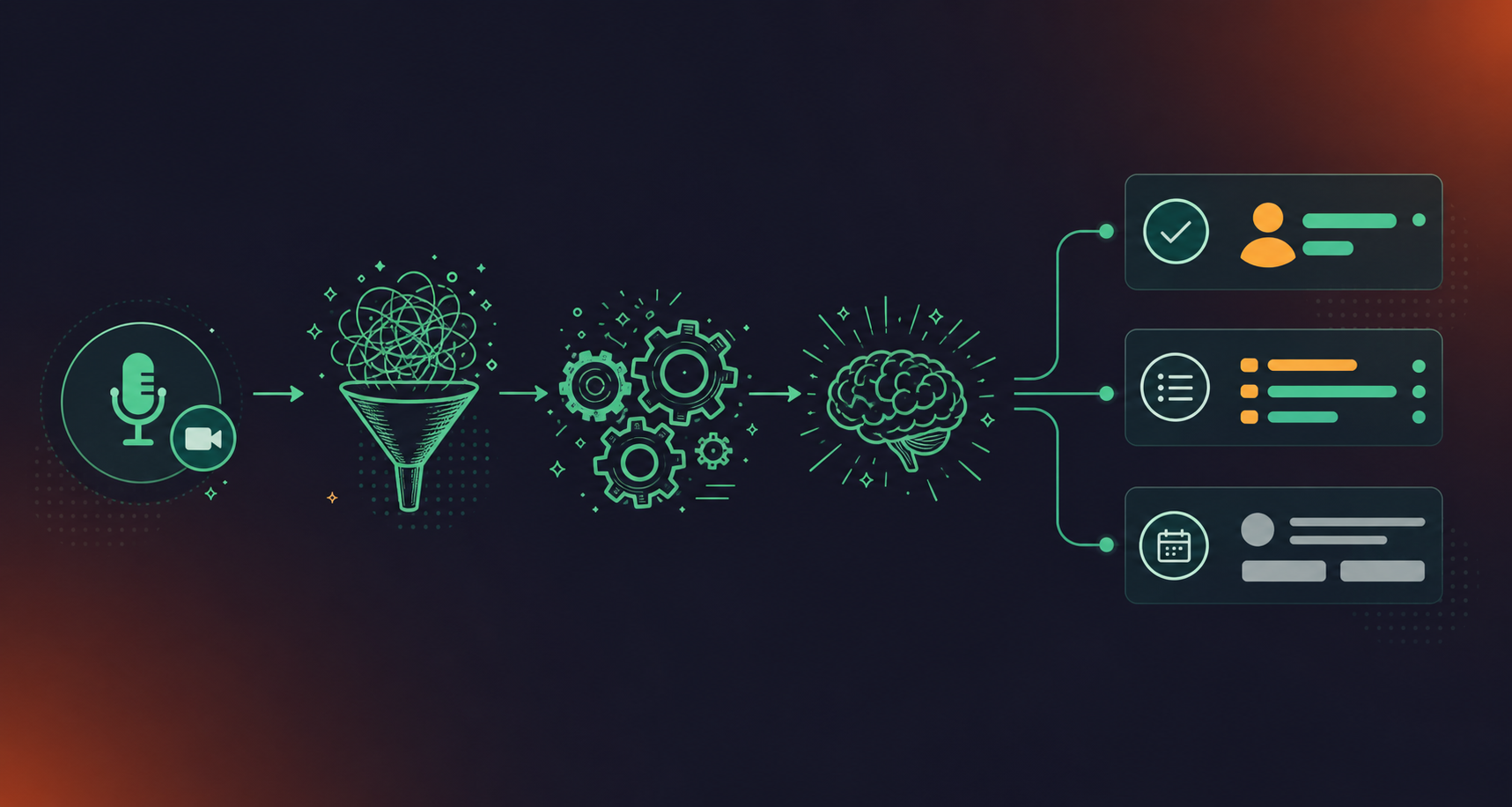
Agents consume this structured data in several ways depending on what they are built to do.
From raw audio to agent-ready records
The path from a conversation to something an agent can reason over involves a few distinct steps:
- Audio and video are captured during the meeting and processed at meeting end into a timestamped transcript, preserving speaker attribution at the utterance level so agents can distinguish who said what and when.
- The transcript passes through summarization and extraction layers that pull out decisions, blockers, and action items as discrete, labeled objects instead of buried text.
- Those objects are tagged with meeting metadata (date, participants, team, project) so downstream agents querying across hundreds of meetings can filter and retrieve without scanning full transcripts. Teams that want to automatically create action items from meeting transcripts can rely on this structured layer directly.
- The structured output routes automatically into connected tools like Jira, Slack, or a CRM, meaning agents operating inside those tools inherit the conversation context without requiring a human to re-enter it.
Why structure matters for agent reasoning
An agent asked to identify which engineering decisions are blocking a product launch cannot answer that question from a transcript dump, a pattern that comes up when teams connect Claude Code to Zoom transcripts for code-context queries. It needs labeled objects, relationships between them, and consistent schema across every meeting in the dataset. Spinach AI’s record-by-default architecture means every meeting across the organization produces data in the same structure, which is what makes cross-meeting agent queries possible at scale instead of on a per-meeting basis.
Context, Memory, and the Role of Conversation History
AI agents depend on conversation history the way a new hire depends on onboarding docs. Without it, every interaction starts from zero. When agents can reference prior meeting context, they carry decisions, blockers, and commitments forward into the next task without requiring a human to re-explain what was already said.
This is where structured conversation data separates agents that merely respond from agents that reason across time. A retrieval-augmented agent pulling from governed meeting records can answer “what did the team decide about the Q3 rollout?” with specificity, not a guess.
Why Memory Architecture Matters for Agent Performance
Three patterns define how agents use conversation history in enterprise deployments:
- Episodic retrieval: the agent queries a specific meeting or decision point, surfacing what was said, who said it, and what action was assigned.
- Cross-session reasoning: the agent draws connections across multiple meetings to identify patterns, recurring blockers, or unresolved commitments.
- Context injection: before generating a response or filing a ticket, the agent pulls relevant prior conversation data into its prompt window so outputs reflect organizational history beyond the current input.
Without a governed, searchable store of conversation data, agents default to the third pattern poorly, injecting stale or incomplete context, or none at all.
Enterprise Workflow Use Cases: Agents Powered by Conversation Data
Agents with conversation data are changing how enterprise workflows run across functions. Where a meeting once ended with a transcript sitting in someone’s personal notes folder, it now feeds a structured data layer that AI agents can query, act on, and route into downstream systems.
Here are some of the most concrete use cases already running in enterprise environments:
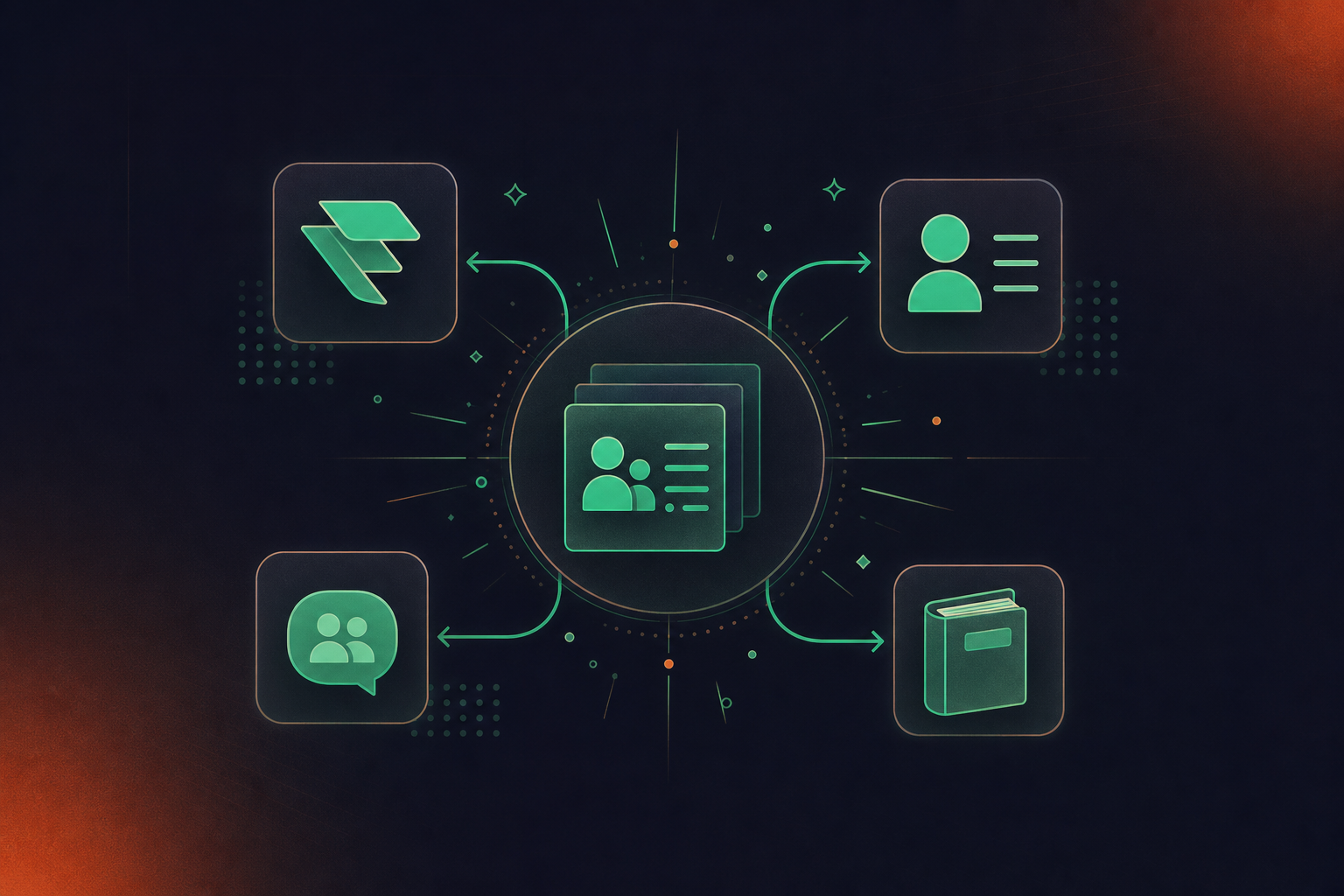
- Sales calls become CRM records. Agents ingesting conversation data from customer calls can populate Salesforce fields, flag churn signals, and surface follow-up tasks the moment a call ends, or sync Google Meet notes to HubSpot automatically for teams already in that stack.
- Cross-functional context stops disappearing. A product decision made in a leadership call becomes searchable context for Engineering and Design in the next planning session, and teams using Confluence can sync Google Meet notes to Confluence automatically so that governed record is already where engineers look.
- Engineering standups become ticket pipelines. When an agent has access to structured standup conversation data, it can identify blockers, extract action items with named owners, and convert meeting transcripts to Jira tickets, delivered automatically when the meeting ends, with no manual re-entry required.
- Compliance teams get an audit trail. In industries with strict oversight requirements, agents can classify conversation data by topic, flag sensitive disclosures, and route records to the appropriate review queue automatically.
Why Governance Is the Missing Ingredient
Most of these use cases fail without one thing: a centralized, governed conversation data asset. Agents need consistent, structured input to produce consistent output. When conversation data lives in per-user folders across six tools, agents either miss context or produce conflicting results across teams.
The organizations seeing real workflow payoff from agents with conversation data are the ones that treated conversation capture as an organizational system, not an individual productivity habit.
Data Governance Requirements for Conversation Data at Scale
At enterprise scale, conversation data stops being a productivity asset and starts being a compliance liability if it isn’t governed properly. Every recorded meeting carries potential exposure: personally identifiable information, confidential business strategy, legally protected HR discussions, and financial disclosures subject to legal requirements can all surface in a single 30-minute call.
Three requirements tend to define whether an organization can actually deploy agents with conversation data at scale:
Requirement | Scope | What It Governs | Risk Without It |
|---|---|---|---|
Retention controls | Per data type (transcript, summary, video, independently) | How long each record type is kept before deletion | Unnecessary exposure of raw transcripts containing PII, strategy, or HR content |
Consent infrastructure | Every participant in every meeting | Visible bot presence, configurable notification language, pause/resume mechanism | Covert recording liability; no auditable proof of participant awareness |
Access controls | Org-level, role- and context-based | Who can query conversation data, which meetings fall under which policies, what agents can act on | Broad agent retrieval across unstructured records with no policy layer, a compliance attack surface |
- Retention controls scoped per data type, not per account. A blanket “keep everything for a year” policy creates unnecessary risk. Mature governance means setting different retention windows for raw transcripts, summaries, and video recordings independently, because their risk profiles differ.
- Consent infrastructure that is visible and auditable. Every participant must know a meeting is being captured. That means a visible bot, configurable in-meeting notification language, and a clear pause/resume mechanism, not a background process that records silently.
- Access controls tied to role and context, extending beyond authentication. Who can query conversation data, which meetings fall under which policies, and which outputs agents can act on all need to be governed at the organizational level, not left to individual users to manage ad hoc.
Without these controls in place, agents with conversation data create a new attack surface: broad retrieval access across unstructured call records, with no policy layer determining what gets surfaced, retained, or deleted. The productivity gains from AI-driven workflow automation get offset by the compliance overhead of cleaning up after ungoverned data accumulation.
How MCP and APIs Connect Conversation Data to Agent Workflows
Spinach AI publishes a Model Context Protocol server and a REST API so AI agents can query governed conversation data without requiring a human to copy-paste context between tools. Anthropic introduced MCP as an open standard for connecting AI assistants to the systems where data lives, and it is now the default connective layer for enterprise agentic workflows.
The MCP server for meeting transcripts lets any MCP-compatible agent, such as Claude or a custom agent built on an internal LLM, request meeting summaries, decisions, action items, and participant context directly from Spinach’s conversation record. The agent asks; Spinach returns structured data. No middleware, no manual export, no prompt engineering around unstructured transcript dumps.
There are two main integration patterns worth knowing:
- MCP server for AI agents: an agent running inside a coding assistant, a planning tool, or an internal chatbot calls the Spinach MCP server when it needs conversation context, such as what was decided in last week’s architecture review or which blockers a team surfaced in sprint planning.
- REST API for pipeline integrations: engineering teams building automated workflows pipe conversation data into downstream systems, whether that is a CRM, a data warehouse, or a custom agent orchestration layer, including how to pull Google Meet transcripts into Codex, using webhooks and API endpoints.
Both patterns share the same upstream asset: a governed, searchable record of conversation data that Spinach captures across Zoom, Google Meet, Microsoft Teams, Slack Huddles, and Webex. The agent layer does not have to solve the capture and governance problem because Spinach already has.
MCP access is available on Business and Enterprise plans. REST API and webhooks are available on Enterprise plans.
Turning Enterprise Conversations into Agent-Ready Data
Spinach AI joins every meeting across Zoom, Google Meet, Microsoft Teams, Slack Huddles, and Webex, capturing audio, video, transcript, and in-meeting chat as a single governed record. When the meeting ends, that record doesn’t sit in a personal folder. It gets routed automatically into the tools your agents and systems already query: Jira, Linear, Slack, Salesforce, HubSpot, and Notion, among others.
The architecture matters here. Agents need structured, retrievable data to act on, and raw transcripts don’t meet that bar. Spinach produces decisions with named owners, action items with context, and meeting summaries that carry enough signal for a downstream agent to take meaningful action without human re-entry.
What Gets Captured and Where It Goes
Three things happen at meeting end that make conversation data agent-ready:
- Decisions and action items are extracted with owner attribution, so an agent querying your organizational record gets a structured object that maps to a real person and a real task, not a paragraph of unstructured text. Teams formalizing this practice can start with a meeting notes action items template before moving to full automation.
- The full meeting record is stored under org-level policy, meaning IT and compliance teams control retention, access, and sharing, instead of leaving that to individual employees.
- Structured output routes into connected tools automatically, so the data arrives in Jira, your CRM, or your knowledge base without a manual export step sitting in between.
This is what “agent-ready” means in practice: structured, governed, and already where the agent is looking.
Final Thoughts on How Agents With Conversation Data Change Enterprise Workflows
Agents with access to governed conversation data go beyond responding faster; they act on what your organization actually knows. Without that structured layer, agents are working from an incomplete picture, and every workflow built on top of them inherits that gap. Getting your conversation data structured and retrievable is the prerequisite your agent stack probably needs most right now. Start with Spinach to turn your meetings into records your agents can query, route, and act on.
Chatbots respond to what’s in front of them; agents act on a structured record of what was actually said, decided, and assigned across your organization’s meetings. An agent pulling from governed conversation data can trace a blocker flagged in a standup two weeks ago, route outputs to the right owner based on who said what, and file a ticket into Jira automatically when the meeting ends. A chatbot without that memory restarts from zero every time.
Spinach joins meetings across Zoom, Google Meet, Microsoft Teams, Slack Huddles, and Webex, captures during the call, and produces structured output at meeting end: decisions with context, action items with named owners, and topics tagged with meeting metadata. That structure is what separates an agent-ready record from a raw transcript dump. Agents querying through the Spinach MCP server or REST API get labeled objects and consistent schema across every meeting in the dataset, giving them the format they need to reason across hundreds of conversations, and retrieve any one of them precisely.
Yes. The Spinach MCP server lets any MCP-compatible agent, including Claude, request meeting summaries, decisions, action items, and participant context directly from Spinach’s conversation record with no manual export step in between. MCP access is included on Business and Enterprise plans; the REST API and webhooks are available on Enterprise for teams building custom pipeline integrations.
Spinach gives IT and compliance teams org-level control over the data agents can query: retention is configurable per data type (transcript, summary, and video can each be set separately, from one week to indefinite on Enterprise), access is policy-based instead of per-user, and compliance agents classify and flag regulatory and policy risk for human review. The bot is always visible, never covert, and every participant receives a configurable in-meeting notification. Without these controls, broad agent retrieval access across unstructured call records creates a compliance liability. Governing the data asset is what makes the workflow automation viable.
If your primary need is sales coaching and revenue-workflow depth, Gong handles that specific use case well. The pattern in organizations that need agents across every function, such as engineering standups, leadership calls, HR reviews, and client syncs, is to keep the revenue tool for customer-facing meetings and deploy Spinach everywhere else, feeding one governed conversation record that agents across the organization can query. Spinach’s org-wide scope, MCP and API buildability, and materially lower cost for company-wide coverage make it the consolidation layer; Gong is not built for that scope.
When conversation data sits in personal folders across individual tools, agents can only read what has been explicitly shared with them, not what the organization actually knows. There is no consistent schema, no cross-team indexing, and no policy layer, so agents either miss context entirely or produce conflicting outputs across teams. Treating conversation capture as an organizational system from the start is what makes cross-meeting agent queries possible.
A raw transcript is unstructured text; an agent-ready record contains labeled objects: decisions with context, action items with named owners, topics tagged with meeting metadata, and speaker attribution at the utterance level. Agents querying labeled objects can filter by project, owner, or decision type across hundreds of meetings without scanning full transcripts. That consistent schema is what separates agents that can reason across time from ones that restart from zero each session.
MCP is an open standard introduced by Anthropic for connecting AI assistants directly to the systems where data lives, and it is now the default connective layer for enterprise agentic workflows. With an MCP server, an agent like Claude can request meeting summaries, decisions, and action items from a governed conversation record without a manual export step or custom middleware. Spinach publishes an MCP server on Business and Enterprise plans so MCP-compatible agents get structured conversation context on demand.
MCP access is included on Business and Enterprise plans; the Pro plan does not include it. The REST API and webhooks are available on Enterprise plans only, for teams building custom pipeline integrations or piping conversation data into a data warehouse or agent orchestration layer. If your agent workflow requires direct API access, that is an Enterprise engagement.
Coding agents benefit from structured meeting context the same way a new engineer benefits from documented decisions: without it, every session starts from scratch. When Spinach captures an architecture review or sprint planning session and routes the structured output through MCP, a coding agent can query what was decided about a system before generating code, rather than working from an incomplete picture. That connection between spoken decisions and code context is what makes agents more than autocomplete.
On Enterprise, retention is configurable per data type: transcript, summary, and video can each be set separately, from one week to indefinite, because their regulatory risk profiles differ. Agents with broad retrieval access across ungoverned call records create a compliance liability if raw transcripts containing PII or HR content are retained longer than necessary. Scoping retention per data type is what lets compliance teams govern the asset agents query, not just the asset people read.
Yes, and Spinach is built for this. Spinach is HIPAA compliant with a BAA available on Enterprise engagements, SOC 2 Type II compliant, and GDPR compliant. Compliance agents classify and flag regulatory and policy risk in conversation data for human review, and PII redaction at the transcript level removes structured identifiers like payment card and national ID numbers before the record reaches downstream agents or systems.
Episodic retrieval means an agent queries a specific meeting or decision point to surface what was said, who said it, and what action was assigned. Context injection means the agent pulls relevant prior conversation data into its prompt window before generating a response or filing a ticket, so outputs reflect organizational history beyond the current input. Both patterns require a governed, searchable store of conversation data to work reliably; without it, agents inject stale or incomplete context, or none at all.
Spinach joins the customer call, captures the conversation, and routes structured output into Salesforce fields when the meeting ends, including follow-up tasks and any signals surfaced during the call. Custom field mapping on Enterprise plans means the data lands where your team already looks, not in a generic notes field. HubSpot is also supported natively for teams on that stack.
The MCP connector is the right starting point for teams using Claude or another MCP-compatible agent that needs to query meeting summaries, decisions, and action items on demand through a standard interface. The REST API and webhooks are the better fit when you are building automated pipelines that push conversation data into a data warehouse, a custom orchestration layer, or downstream systems on a schedule rather than in response to an agent request. Both patterns draw from the same governed conversation record; the difference is whether retrieval is agent-initiated or pipeline-driven.
What you should do next
Next, here are some things you can do now that you've read this article:
- If communication is a challenge for your team, you should check out our library of meeting agenda templates.
- Check out Spinach to see how it can help you run a high performing org.
- If you found this article helpful, please share it with others on Linkedin or X (Twitter)

