Spinach AI vs Read.ai: Who Owns Your Data? (September 2026)
Spinach AI vs Read.ai: compare HIPAA compliance, zero LLM retention, and admin controls for your org's security review. September 2026.
 Maintouch
Most Read.ai vs Spinach AI comparisons stop at features. The more useful question is what happens to your conversation data at the org level, who controls it, and whether the tool passes a procurement review. Those three questions tend to sort the options faster than any feature matrix.
TLDR:
- Read.ai is built around one user’s workflow; deployed org-wide, it creates a data silo per employee with no central governance
- Zero data retention at the LLM provider level is the control worth confirming in procurement, beyond a vendor’s privacy policy alone
- A setting one user can override is not a compliance control; org-level enforcement is what survives a legal review
- Spinach AI deploys once, org-wide, as the system of record for conversation data, with SAML SSO, SCIM, SOC 2 Type II, GDPR, and HIPAA compliance
What Read AI Does
Read.ai is a cross-platform AI meeting agent that captures, summarizes, and searches across meetings, email, and messaging, then acts through a personal AI proxy called Ada. It spans Zoom, Google Meet, Microsoft Teams, Slack, Gmail, and Outlook from a single account.
Its core features include meeting transcription and reports, real-time coaching during calls, enterprise conversation intelligence search across connected tools, and email and messaging intelligence. Ada handles scheduling and follow-ups on your behalf. The product is built around one user’s workflow, giving that person a unified view of their communications across channels.
The Core Architectural Difference
Read.ai is built for one person. Every feature, from Ada to enterprise search, connects back to a single user’s communications. That works well when the goal is individual productivity across a busy inbox and calendar.
The problem shows up at company-wide rollout. When every employee runs their own Read.ai account, the org ends up with as many data silos as it has users. No shared record of what was decided, no policy controlling who sees what, no way to query conversation data across teams.
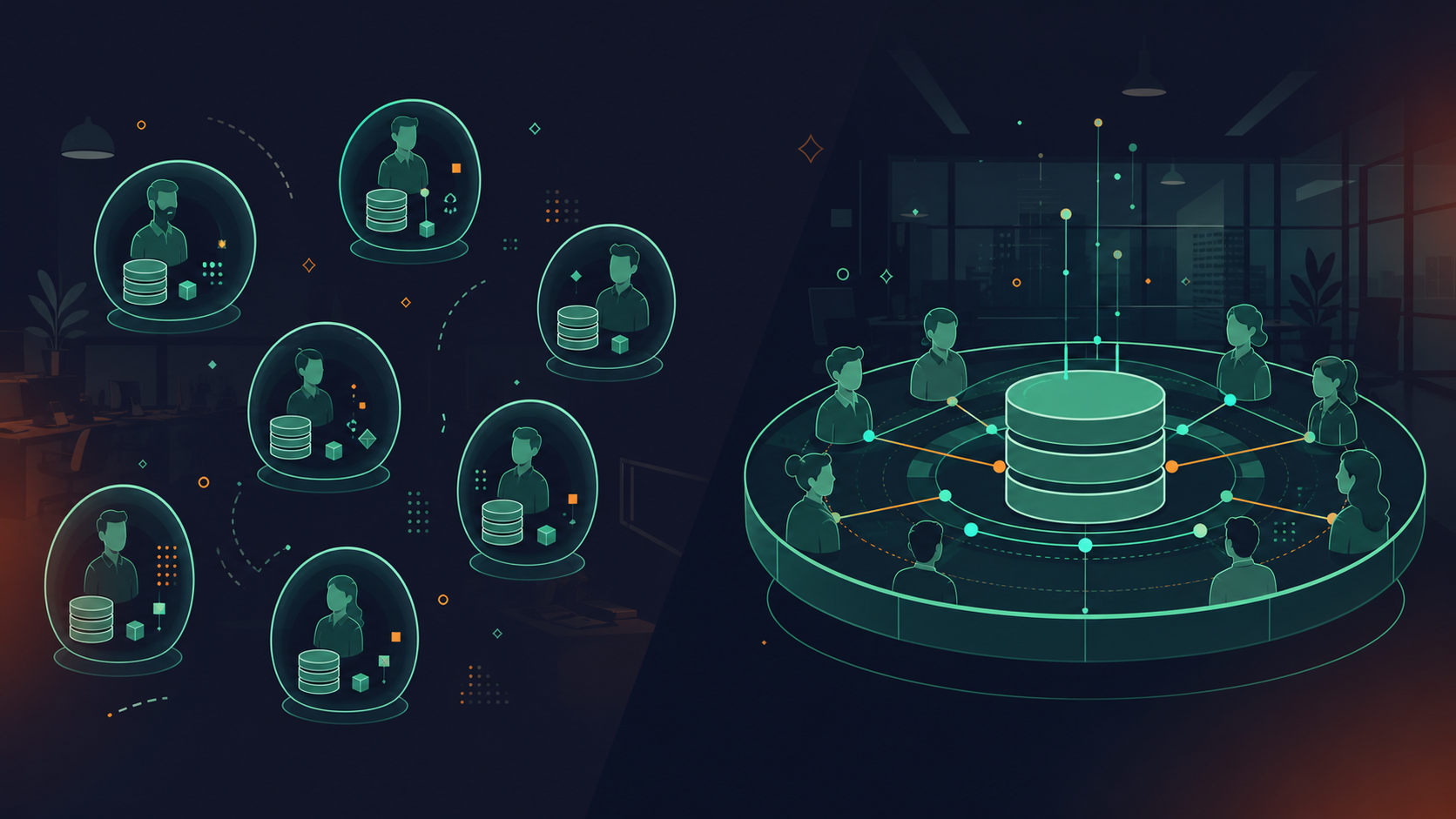
Spinach AI is deployed once, organization-wide, as the conversation data system of record. Every meeting is captured into one governed asset, not per-user folders. Access, retention, and sharing are enforced by policy, not left to individual settings.
That distinction is architecture, not features. Both tools produce summaries and action items. Only one makes those outputs searchable and governable at the organizational level.
How Each Tool Handles Data Privacy
For both tools, data privacy questions follow a predictable pattern in procurement reviews: does my meeting data train your models? Who holds the data after the call? What happens at the LLM layer?
Spinach AI’s answers are unambiguous. No customer data is ever used to train AI models. Spinach operates under zero data retention terms with its LLM providers (OpenAI, Anthropic, and Google), meaning those providers do not retain customer data after processing. Speaker identification is context-based; Spinach does not use voice biometrics and does not store biometric identifiers. PII redaction is available at the transcript level, including structured identifiers like payment card and national ID numbers. Enterprise customers can export data via API and webhooks, retaining full ownership.
On Read.ai’s side, buyers regularly raise HIPAA questions. One 2026 compliance guide notes that true HIPAA compliance requires more than a tool claiming security: it requires a BAA, technical safeguards, and specific configurations. Whether Read.ai’s BAA availability and data handling meet your organization’s requirements is worth verifying directly with their team during procurement.
The model-training question is where precision matters most. If your organization handles sensitive conversations, zero LLM provider data retention is the control worth confirming; the vendor’s own privacy policy is a secondary consideration.
Recording Consent and Notification Controls
Recording consent carries real legal exposure. As a February 2026 Venable analysis notes, workplace recording raises serious legal and practical risks that organizations need to manage carefully, particularly as AI recording tools proliferate.
Spinach’s bot is always visible, never covert. Org admins can rename it, set custom legal-approved notification text, and configure waiting-room admission so the bot only joins after verbal consent. Mid-meeting, anyone can issue pause, resume, or kick commands. All of it is set and enforced at the org level.
For HR sign-off and multiparty-consent state requirements, that org-level enforcement is what matters. A setting one user can override is not a compliance control.
Deployment Model: Per-User vs. Company-Wide
Read.ai follows a user-driven adoption model. Someone on the sales team installs it, then someone in product, then engineering. Each account is independent, with no org-level provisioning, no unified policy controlling what gets shared or retained, and no central admin view across accounts.
IT teams recognize this pattern: the same shadow IT problem that plays out with any per-user SaaS tool (similar to what buyers find when reviewing Spinach AI vs Fireflies.ai). When someone leaves the company, their Read.ai account and its data don’t automatically deprovision.
Spinach AI deploys at the org level. SAML SSO and SCIM provisioning handle user lifecycle on Enterprise, so access is tied to your identity provider. When an employee offboards, access is revoked through the same system that manages the rest of your stack. Org-level enforced settings control default sharing scope, bot branding, and retention policy for every user, including those who never configured their own.
That distinction is what procurement and IT teams weigh during a security review.
Security Certifications and Compliance Coverage
Security reviews stall enterprise deals when buyers can’t get specific certifications confirmed fast.
Spinach AI holds SOC 2 Type II, GDPR, and HIPAA compliance, with a BAA available on Enterprise and HIPAA engagements (a gap that also surfaces in the Spinach AI vs MeetGeek comparison). SOC 2 Type II means an independent auditor has verified security controls over time, across a continuous audit period and not a point-in-time snapshot.
For Read.ai, the 2026 HIPAA compliance guide from Prosper is worth reading before procurement. It notes that a BAA is a legal requirement and that configuration matters as much as certification.

Certification | Spinach AI | Read.ai |
|---|---|---|
SOC 2 Type II | Yes | Verify with vendor |
GDPR | Yes | Verify with vendor |
HIPAA | Yes (Enterprise/HIPAA engagements) | Verify with vendor |
BAA | Yes (Enterprise/HIPAA engagements) | Verify with vendor |
As of September 2026. Confirm competitor certifications directly during procurement.
Data Retention and Admin Controls
Spinach Enterprise retention is configurable per data type: transcript, summary, and video can each be set independently, from one week to indefinite. An EU legal team might need aggressive deletion on transcripts while keeping summaries longer; a financial services firm might retain everything indefinitely for regulatory review. Those requirements don’t have to share the same setting.
All retention controls are enforced at the org level by admins, not left to individual users. Business accounts get flat one-year retention. Starter accounts retain recordings for seven days.
For compliance-sensitive industries, and for buyers who have also reviewed Spinach AI vs Fathom, the distinction between “a user can configure this” and “an admin can enforce this across the org and audit it” is often what determines whether a tool survives legal review. Read.ai’s retention configuration is worth verifying directly during procurement, particularly whether settings can be enforced org-wide and whether granular per-data-type control is available.
Integration Ecosystem and Workflow Routing
Both tools connect to common business systems, but the depth of those connections differs considerably.
Read.ai integrates with Slack, Gmail, Outlook, and major meeting platforms as part of its personal productivity layer. Its downstream routing is built around one user’s workflow.
Spinach routes structured outputs automatically into the systems your team already uses: action items land in Jira or Linear, CRM fields update in Salesforce with custom field mapping including MEDDPIC extraction, decisions push to Confluence or Notion, and recap emails route to HubSpot or Attio. No manual re-entry after the call.
For AI assistants, Spinach includes an MCP server on Business and Enterprise plans, with native Claude connectors for structured meeting data, OAuth, and user-based permission enforcement. Your org’s conversation data becomes queryable through Claude or ChatGPT without building a custom integration layer. Read.ai’s AI proxy Ada operates on one user’s communications, which is a fundamentally different model.
Full Integration Coverage
- Capture: Zoom, Google Meet, Teams, Slack Huddles, and Webex
- Project management: Jira, Linear, Asana, ClickUp, Trello, and Monday.com
- CRM: Salesforce, HubSpot, Attio, and Zoho
- Knowledge: Confluence, Notion, and Google Docs
- Automation: Zapier
Pricing Structure Comparison
Plan | Spinach AI | Read.ai |
|---|---|---|
Free | Starter: unlimited recording, 100 languages, 7-day retention | Free tier available; feature limits apply |
Mid-tier | Pro: $2.90/meeting hour (pay-as-you-go, unlimited users) | Paid plans available; verify current rates directly |
Team/Business | Business: $29/user/month ($19/user/month billed annually); includes MCP | Team plans available; verify current rates directly |
Enterprise | Custom pricing | Custom pricing |
Pricing as of September 2026. Confirm Read.ai pricing directly with their team.
Spinach’s Pro plan fits teams with variable meeting volume: you pay per meeting hour instead of per seat, so organizations where not every user attends many recorded calls avoid paying for idle seats. Business switches to per-seat pricing with unlimited meetings, and MCP access is included at that tier. Plan type is account-wide, so Business and Enterprise cannot be mixed inside one account. That simplifies admin but means you commit the whole org to a single tier.
When Read AI Fits the Requirement
Read.ai works well for individual contributors who need a unified view of their own meetings, emails, and messages across tools. If you attend a high volume of calls and want scheduling and follow-up handling without IT involvement, that use case fits the product well.
Small teams on a single meeting tool, without compliance requirements or IT governance in scope, will find Read.ai’s setup straightforward. No procurement process, no security review, no org-wide rollout to coordinate.
The friction comes later: when IT asks who owns the data, or when an employee offboards and no one knows what happened to their meeting history.
When Organizational Governance Is the Requirement
Three signals usually surface this requirement in procurement.
The first is shadow IT sprawl. Engineering runs one note-taker, sales runs another, product has a third. No shared record, no consistent retention policy, no central admin view. Security asks who owns the data and no one has a clean answer.
The second is a security or legal review with a checklist: a single vendor, auditable controls, SAML SSO and SCIM, a BAA if HIPAA applies, per-data-type retention configurable at the org level. Those requirements eliminate per-user tools by design.
The third is an AI deployment where agents need structured meeting context as input. If your organization is routing conversation data into Claude, ChatGPT, or a custom workflow (or powering Devin with conversation data via MCP), that data needs to be governed, queryable, and permissioned at the org level before agents can act on it reliably. Per-user silos don’t feed agents; they create gaps.
When any of these is in scope, the evaluation stops being about summary quality and starts being about whether the tool can survive a security review, pass legal, and give IT a single point of control.
Conversation Data as an Organizational Asset: The Spinach AI Model
Spinach AI captures every conversation across Zoom, Google Meet, Microsoft Teams, Slack Huddles, and Webex, then turns that raw input into structured, governed, AI-ready knowledge. The model runs on four verbs: capture, centralize, manage, and power.
Centralization means one organizational record, not per-user folders. Collections automatically group and share meetings by participant, title, or series. Founder Mode gives executives org-wide read-only visibility, auto-applied to new users.
On the governance side: SAML SSO and SCIM handle provisioning on Enterprise. Compliance agents classify and flag regulatory risk against customer-supplied rules. PII redaction operates at the transcript level, including payment card and national ID numbers. Retention and admin controls are covered in the section above.
For AI workflows, the MCP server on Business and Enterprise connects Claude and ChatGPT directly to your organization’s full conversation corpus, with OAuth and user-based permission enforcement. No custom integration layer required.
Spinach AI is SOC 2 Type II, GDPR, and HIPAA compliant, with a BAA available on Enterprise and HIPAA engagements. No customer data is ever used to train AI models. Pricing starts free on Starter, $2.90 per meeting hour on Pro, $29/user/month (or $19 billed annually) on Business, and custom pricing for Enterprise.
Final Thoughts on Read AI Data Privacy and Organizational Governance
Data privacy questions in procurement are not really about features. They’re about whether a vendor’s architecture can survive a security review and give IT a defensible answer about who owns what. Read.ai answers that question for one user at a time. Spinach answers it for the whole organization. If your procurement checklist includes a BAA, SCIM provisioning, per-data-type retention, or LLM-level zero data retention, those requirements tell you which tool fits. Get started with Spinach AI, or talk to sales to walk through the enterprise controls directly.
Spinach AI is built for org-wide deployment with the governance controls that security and legal reviews require: SOC 2 Type II, GDPR, and HIPAA compliance, a BAA on Enterprise and HIPAA engagements, SAML SSO and SCIM provisioning, and zero data retention with LLM providers. Read.ai follows a per-user adoption model, which means IT encounters the same shadow IT problem as any individually installed SaaS tool: no central admin view, no org-enforced retention policy, and no clean answer to who owns the data when an employee offboards. If a security review is in scope, the architecture difference matters more than summary quality.
With Spinach AI, every setting a user can configure can also be set and enforced at the org level by admins: default sharing scope, bot branding, custom in-meeting notification text, and retention per data type (transcript, summary, and video can each be set independently, from one week to indefinite on Enterprise). That org-level enforcement is what HR sign-off and multiparty-consent state requirements actually demand. A setting one user can override is not a compliance control. Read.ai’s retention and sharing configuration is worth verifying directly during procurement, particularly whether settings can be enforced across the org and audited.
Spinach AI’s answer is unambiguous: no customer data is ever used to train AI models, and Spinach operates under zero data retention terms with its LLM providers (OpenAI, Anthropic, and Google do not retain customer data after processing). For Read.ai, verify the model-training policy and LLM provider terms directly with their team during procurement, since zero retention at the provider level is the control that matters, independent of the vendor’s own privacy policy.
Spinach AI ties user access to your identity provider through SAML SSO and SCIM on Enterprise, so when an employee offboards, their access is revoked through the same system that manages the rest of your stack. The meeting data stays in the org’s governed record, not in a personal account. Read.ai’s per-user model means each account is independent, with no automated deprovisioning, leaving IT without a clean answer to what happens to meeting history when someone leaves.
Read.ai is a personal AI meeting agent that gives one user a unified view across their meetings, email, and messaging, with scheduling and follow-up handling through its Ada proxy. Spinach AI operates at the organizational level: every conversation is captured into one governed data asset, with access, retention, and sharing enforced by policy across the company, not left to individual user configuration. The distinction is architecture: both tools produce summaries and action items, but only Spinach makes those outputs searchable, governed, and queryable across teams, including through Claude and ChatGPT via an MCP server on Business and Enterprise plans.
Multiparty-consent state requirements demand org-level enforcement, not per-user settings. With Spinach AI, admins set custom legal-approved in-meeting notification text, configure waiting-room admission so the bot only joins after verbal consent, and issue pause, resume, or kick commands — all enforced across every user from a single admin panel. A setting one employee can override does not satisfy a legal review.
With a per-user tool, meeting history lives in a personal account that has no automated deprovisioning — when someone leaves, IT has no clean answer about what data remains or who can still access it. Spinach AI ties user access to your identity provider through SAML SSO and SCIM on Enterprise, so offboarding revokes access through the same system managing the rest of your stack, and the meeting data stays in the org’s governed record.
Yes, on Spinach AI Business and Enterprise plans, an MCP server connects Claude and ChatGPT directly to your organization’s full conversation corpus with OAuth and user-based permission enforcement — no custom integration layer required. Read.ai’s AI proxy Ada operates on one user’s communications, which is a structurally different model that does not give your agents access to the org-wide record.
Zero LLM provider data retention means the AI model providers processing your transcripts — in Spinach’s case, OpenAI, Anthropic, and Google — do not retain your data after processing under the terms of Spinach’s agreements with them. This matters in procurement because a vendor’s own privacy policy does not control what third-party model providers do with your data; the provider-level contractual terms are the control worth confirming.
No. Speaker identification in Spinach is context-based, not biometric. Spinach does not use voice biometrics and does not store biometric identifiers. Any future voice-matching capability will be opt-in, which is the disclosure regulators and procurement reviewers require.
SOC 2 Type I is a point-in-time snapshot confirming that controls were designed correctly on a single date; SOC 2 Type II means an independent auditor verified that those controls operated continuously over a sustained audit period, which is a materially stronger security assurance. Spinach AI holds SOC 2 Type II compliance, which is the certification most enterprise security reviews require.
On Spinach Enterprise, retention is configurable per data type — transcript, summary, and video can each be set independently, from one week to indefinite. An EU legal team might need aggressive transcript deletion while retaining summaries longer; a financial services firm might retain everything indefinitely for regulatory review. Those requirements do not have to share the same setting, and all controls are enforced at the org level by admins, not left to individual users.
Shadow IT sprawl happens when individual employees each install their own AI meeting tool — one team uses one product, another team uses a different one — with no central admin view, no unified retention policy, and no org-wide record of what was decided. Each account becomes an independent data silo, and when security or legal asks who owns the conversation data, no one has a clean answer. Deploying a single org-wide platform with enforced policy is what closes that gap.
The MCP server is included on Business ($29/user/month monthly, or $19/user/month billed annually) and Enterprise (custom pricing) plans — it is not available on Pro or Starter. Business and Enterprise plan type is account-wide, so you commit the whole org to a single tier, which simplifies admin but means you cannot mix plan levels inside one account.
The three controls worth confirming directly with Read.ai during procurement are: whether a BAA is available and what it covers, whether retention settings can be enforced org-wide by an admin rather than configured per user, and whether LLM provider zero data retention is contractually guaranteed. If your checklist requires HIPAA coverage, SCIM provisioning, or per-data-type retention, verify that each is available at the specific tier you plan to purchase — not just at enterprise in general.
What to do next
Now that you've read this article, here are some things you should do:
- If communication is a challenge for your team, you should check out our library of meeting agenda templates.
- Learn more about Spinach and how it can help you run a high performing org.
- If you found this article helpful, please share it with others on Linkedin or X (Twitter)

