Spinach AI vs MeetGeek: Which Tool Wins (August 2026)
Compare Spinach AI vs MeetGeek in August 2026 on coverage, governance, HIPAA compliance, and structured meeting outputs.
 Maintouch
Two tools, both capture your meetings, both give you a summary. The gap shows up in what happens after that. MeetGeek is built around giving individual users a searchable record of their calls. Spinach AI is built for organizations that need conversation data to flow into the systems where decisions actually get tracked and work actually gets done. If you’re not sure which problem you’re solving, start here.
TLDR:
- MeetGeek records and summarizes calls on Zoom, Meet, and Teams; it does not cover Slack Huddles or Webex.
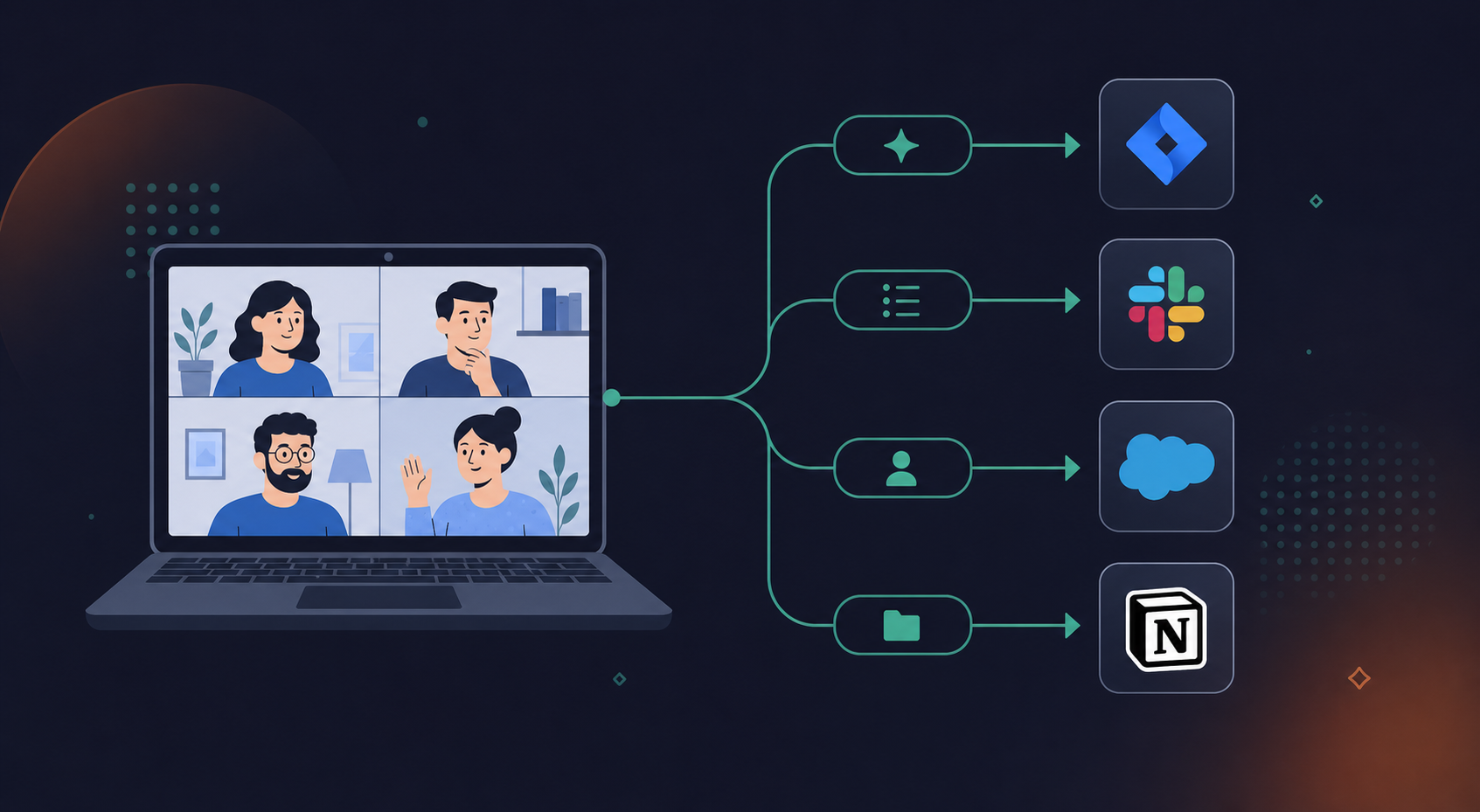
- MeetGeek pushes summaries to Slack and Notion; Spinach AI routes structured outputs (decisions, action items with named owners, tickets) directly into Jira, Linear, Slack, your CRM, and other downstream tools when the meeting ends.
- MeetGeek follows an individual-install model; deploying it across 50 people produces shadow IT with no org-wide policy or retrieval.
- Both tools carry SOC 2 Type II and GDPR; HIPAA with a BAA and per-data-type retention configuration are available on Spinach AI’s Enterprise tier.
- Spinach AI’s Business plan is $19/user/month billed annually; MeetGeek uses per-seat pricing that scales by feature access tier.
What Is MeetGeek?
MeetGeek is an AI meeting assistant that automatically records, transcribes, and summarizes calls on Zoom, Google Meet, and Microsoft Teams. It targets sales teams, recruiters, and customer success professionals who want automated note capture across their meetings.
What Is Spinach AI?
Spinach AI is an enterprise conversation intelligence platform and the system of record for conversation data. It joins meetings across Zoom, Google Meet, Microsoft Teams, Slack Huddles, and Webex to capture every conversation, centralize it into a single governed asset, manage access and policy, and power people and agents across the organization.
Meeting Capture and Platform Coverage
Spinach AI joins Zoom, Google Meet, Microsoft Teams, Slack Huddles, and Webex meetings directly, capturing audio, video, transcript, and in-meeting chat across all five. MeetGeek supports Zoom, Meet, and Teams but does not cover Slack Huddles or Webex.
What Gets Captured
The gap goes beyond which meeting apps are supported. Spinach captures audio, video, transcript, screen share, and in-meeting chat as a unified record. MeetGeek captures audio and transcript, with video recording available on higher tiers.
For teams running hybrid setups or rotating across multiple conferencing tools, the coverage difference is real. A single missed Slack Huddle or Webex call means a gap in the organizational record.
Integrations and Structured Outputs
Both tools connect to the major meeting platforms (Zoom, Google Meet, and Microsoft Teams), so the baseline integration story is similar. Where they split is in what happens after the meeting ends.
MeetGeek pushes summaries and transcripts to tools like Slack, Notion, HubSpot, and Zapier. That covers most async workflows, but the output is largely informational: a summary lands in a channel, and someone still has to decide what to do with it.
Spinach AI routes structured outputs directly into the tools where work actually lives. Decisions and action items with named owners are delivered at meeting end, filed as tickets in Jira or Linear (you can auto-create Jira tickets from Zoom meetings), pushed to Slack, written into Notion or Confluence, and synced to CRM records in Salesforce or HubSpot. On Business and Enterprise plans, Spinach’s MCP server also lets teams query all of that structured conversation data directly from Claude or ChatGPT, so the meeting produces governed, AI-ready knowledge and more than documents to read later.
Where the Difference Shows Up in Practice
For teams deploying at scale, this difference shows up when it matters most. A CS manager running a QBR on MeetGeek gets a clean summary; on Spinach, that meeting produces CRM-filed follow-ups with named owners.
MeetGeek’s integration depth is well-suited to teams that want meeting memory and async catch-up. Teams looking at Fireflies.ai alternatives often encounter this same tradeoff between async summaries and structured outputs. Spinach is the right fit when the goal is structured output that moves directly into execution.
Deployment Model and Organizational Governance
Most AI meeting tools are built for individual use: one person installs them, one person gets the summary. This is a limitation you also see when reviewing Zoom AI meeting notes as a standalone solution. That works fine for a solo user, but it breaks down when you try to deploy across a team or a company.
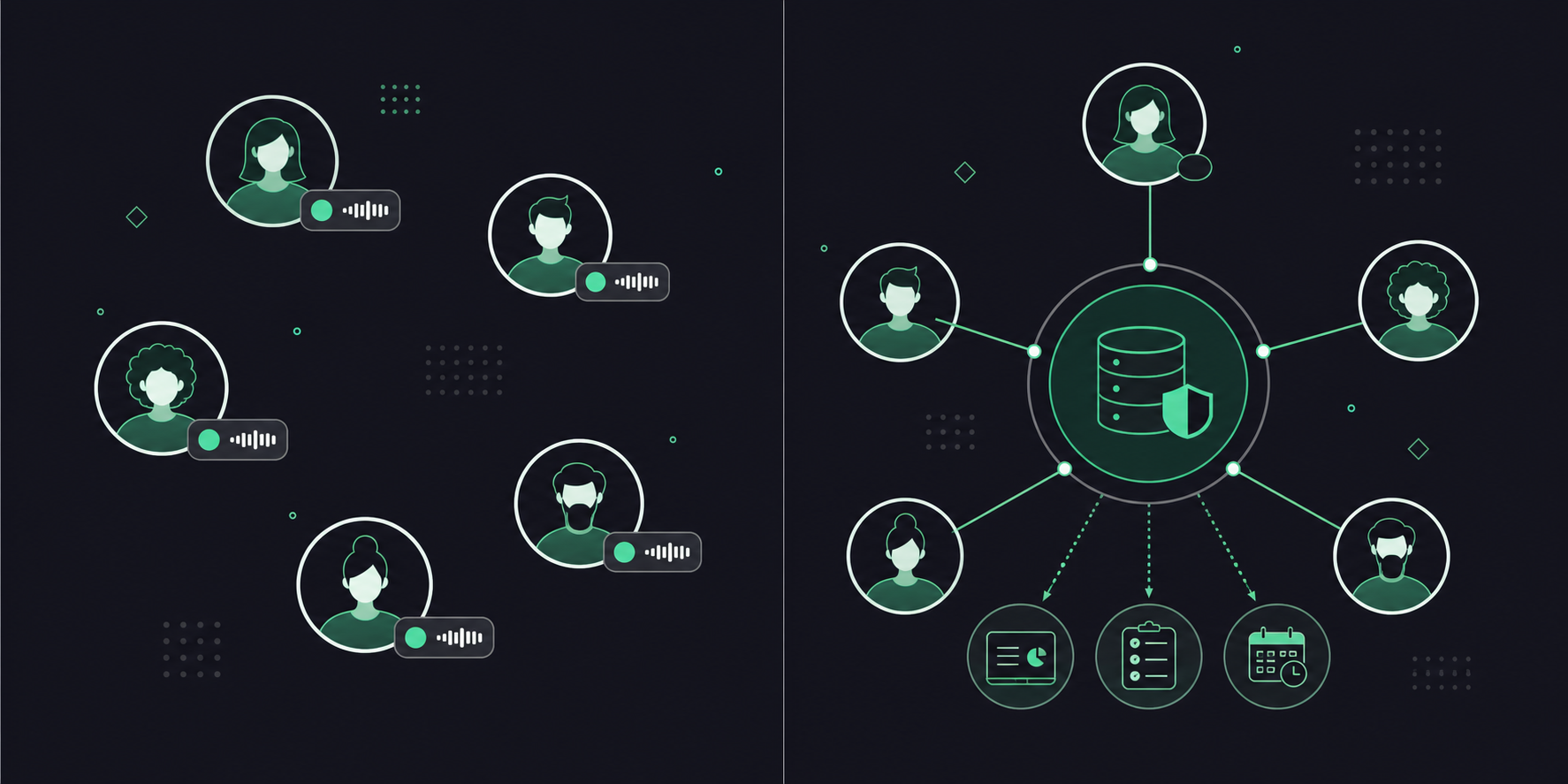
Spinach AI is built for organizational deployment. When a company rolls it out, every meeting gets captured under a single governed data asset, not a patchwork of individual accounts with uncontrolled sharing and no central record. Admins get an audit dashboard with usage reporting and logging. Retention is configurable per data type (transcript, summary, and video) from one week to indefinite on Enterprise plans.
MeetGeek follows the individual-install model. Each user manages their own recordings, summaries, and sharing preferences. That produces shadow IT at scale: different teams running different configurations, no policy enforcement, no org-wide retrieval. It is the same structural problem that drives teams to seek Otter.ai alternatives for accurate meeting notes.
If you are assessing these tools for a single user, that gap is invisible. If you are assessing for fifty people, it is the deciding factor.
Enterprise Security and Compliance
Both Spinach AI and MeetGeek carry SOC 2 Type II certification and GDPR compliance (as of July 2026). The differences show up in who can access enterprise-grade controls and at what tier.
MeetGeek gates HIPAA compliance behind its Business and Enterprise plans (as of July 2026). This tiered gating of security features is common across this category; Otter AI pricing follows a similar structure. Spinach AI offers HIPAA compliance with a BAA (Business Associate Agreement) available on Enterprise engagements, and no customer data is used to train AI models, with zero data retention with LLM providers.
Data Retention and Admin Controls
Spinach AI offers configurable retention per data type on Enterprise, meaning transcript, summary, and video each carry independent retention windows ranging from one week to indefinite. Business plan retention is a flat one year. MeetGeek does not publish per-data-type retention configuration at a comparable level of granularity (as of July 2026), a gap covered in detail in our AI transcription tools buyer’s guide.
On admin controls, Spinach AI provides an admin dashboard with audit logging and usage reporting. Recording consent is handled transparently: the bot is always visible, org-level bot renaming is supported, and admins can configure custom in-meeting notification text.
For teams in compliance-sensitive industries where HIPAA coverage, granular retention, and auditable consent handling are hard requirements, Spinach AI’s Enterprise tier covers more ground with fewer manual workarounds than MeetGeek’s equivalent offering.
Pricing Comparison
Spinach AI and MeetGeek take noticeably different approaches to pricing, which matters depending on how your team actually uses a meeting tool.
Spinach AI offers four tiers. Starter is free. Pro runs $2.90 per meeting hour. Business is $29/user/month (or $19/user/month billed annually). Enterprise is custom pricing, contact sales.
MeetGeek’s plans are seat-based and tiered by feature access, ranging from a free tier up to paid plans that gate transcription quality, storage limits, and integrations behind higher tiers.
Here is how the two compare at a glance:
Spinach AI | MeetGeek | |
|---|---|---|
Free tier | Yes (Starter) | Yes |
Paid entry point | $2.90/meeting hour (Pro) | Seat-based monthly plans |
Team pricing | $19/user/month (Business, annual) | Varies by plan |
Enterprise | Custom pricing | Available |
Pricing model | Usage-based or per-seat | Per-seat |
The structural difference is worth noting. Spinach AI’s Pro tier charges per meeting hour, which suits teams with lighter, irregular meeting schedules. Business pricing moves to a per-seat model, which fits organizations deploying Spinach company-wide with consistent usage across teams. MeetGeek’s seat-based model is predictable but can get expensive quickly if you are rolling it out across departments instead of a single team. The Spinach AI vs Fathom comparison surfaces the same pricing pattern.
Why Spinach AI Is the Better Choice
Spinach AI is an enterprise conversation intelligence system, the record for conversation data. Where MeetGeek captures and summarizes for the individual user, Spinach is deployed company-wide: it joins meetings across Zoom, Google Meet, Microsoft Teams, Slack Huddles, and Webex, captures every conversation as a governed organizational asset, and routes structured outputs (decisions, action items with named owners, filed tickets, CRM records) into the downstream tools where work actually happens when the meeting ends.
That architectural difference matters at the organizational level. MeetGeek is designed for individual users who want searchable recordings. Spinach is deployed company-wide under a single governed data asset, with an admin dashboard, audit logging, configurable retention per data type (transcript, summary, and video each set independently on Enterprise), SOC 2 Type II and GDPR compliance, and HIPAA coverage with a BAA on Enterprise engagements. IT, legal, and compliance teams get the governance layer they actually need, not a patchwork of per-user accounts with no central record.
For sales and CS teams, decisions and follow-ups route directly into Salesforce or HubSpot with named owners, so CRM records reflect what was actually said instead of what someone remembered to log later. For engineering and product teams, meeting output becomes filed tickets in Jira or Linear (see how to convert meeting transcripts to Jira tickets) without manual re-entry, across engineering, product, and cross-functional meetings. For leadership, every decision made across every call becomes part of a governed, queryable record; and on Business and Enterprise, Business and Enterprise admin controls give executives org-wide read-only access automatically applied to new users, so context is never siloed in someone’s private meeting history.
If your evaluation comes down to meeting summaries alone, MeetGeek is a reasonable option. If your team needs conversation data to flow into the tools where work actually happens, Spinach is the clearer answer.
Final Thoughts on Spinach AI vs MeetGeek
MeetGeek gives you a strong individual experience: recordings, summaries, and searchable history across Zoom, Meet, and Teams. Spinach is built for what comes next, where conversation data becomes governed organizational knowledge, assigned tickets, CRM records, and structured inputs for the agents and tools that run your company. For teams that have outgrown per-person meeting notes and need a company-wide platform with policy, retrieval, and governance built in, that distinction matters. Get started with Spinach AI. Free, no credit card required.
Choose Spinach AI. MeetGeek delivers summaries your team still has to act on manually; Spinach routes action items as filed tickets with named owners into Jira and Linear when the meeting ends, removing the manual re-entry step between discussion and execution.
MeetGeek follows an individual-install model where each user manages their own recordings and sharing preferences, which produces shadow IT and no central organizational record at scale. Spinach AI is deployed company-wide under a single governed data asset, with an admin dashboard, audit logging, and configurable retention per data type: transcript, summary, and video each set independently on Enterprise.
MeetGeek suits individual users or small teams who want searchable recordings and async catch-up summaries across Zoom, Meet, and Teams. Spinach AI is the right fit for organizations deploying across fifty or more people who need policy enforcement, HIPAA compliance with a BAA on Enterprise, and conversation data that routes automatically into the tools where work actually happens.
Yes: HIPAA compliance and BAA availability on Spinach AI require an Enterprise engagement; it is not available on Starter, Pro, or standard Business plans. MeetGeek gates HIPAA behind its Business and Enterprise tiers as well, but Spinach AI adds configurable per-data-type retention and no customer data used to train AI models, with zero data retention with LLM providers. These are the controls that matter in compliance-sensitive buying conversations.
Spinach AI’s Pro tier charges $2.90 per meeting hour, which works for teams with lighter or irregular meeting schedules; Business moves to $19 per user per month billed annually for consistent company-wide usage. If your evaluation covers a full department or organization, MeetGeek’s seat-based model can scale in cost quickly, while Spinach’s per-seat Business plan is built for that deployment pattern. Start with Spinach AI’s free Starter plan (no credit card required) to assess fit before committing to a tier.
Spinach AI joins meetings on all five platforms: Zoom, Google Meet, Microsoft Teams, Slack Huddles, and Webex. MeetGeek covers only Zoom, Meet, and Teams, which means any Slack Huddle or Webex call creates a gap in your organizational record if you rely on MeetGeek alone.
Spinach AI routes structured outputs — decisions and action items with named owners — directly into Salesforce or HubSpot with custom field mapping when the meeting ends, so CRM records reflect what was actually said. MeetGeek pushes summaries to connected tools, but someone still has to decide what to log and do it manually.
Yes, on Business and Enterprise plans, Spinach’s MCP server connects directly to Claude and ChatGPT with OAuth, admin approval, and user-based permission enforcement. This turns your full corpus of governed conversation data into something your team and AI agents can query directly — MeetGeek does not offer an equivalent MCP integration.
Spinach AI’s Enterprise tier includes SAML SSO and SCIM provisioning, org-enforced settings, configurable data retention per data type (transcript, summary, and video set independently from one week to indefinite), compliance agents that classify and flag regulatory risk, an admin dashboard with audit logging, and PII redaction at the transcript level. MeetGeek does not publish comparable per-data-type retention configuration or org-level policy enforcement at the same granularity.
Yes, the Starter plan is free with no credit card required and includes unlimited recording and transcription, support for 100 languages, basic AI summaries, Google and Microsoft Calendar integration, Slack integration, and seven days of recording retention. It is a real entry point to the organizational platform, not a time-limited trial.
Spinach AI captures audio, video, transcript, screen share, and in-meeting chat as a unified record. MeetGeek captures audio and transcript, with video recording available on higher tiers only. For teams where screen share context or in-meeting chat carry decisions, that gap in MeetGeek’s capture is a real hole in the organizational record.
Use Spinach AI if HIPAA compliance and a Business Associate Agreement are hard requirements — both are available on Enterprise engagements, and no customer data is used to train AI models, with zero data retention with LLM providers. MeetGeek gates HIPAA behind its Business and Enterprise tiers as well, but Spinach adds configurable per-data-type retention and the governance layer that compliance-sensitive buyers need.
Founder Mode gives executives and founders org-wide read-only access to meeting records, automatically applied to new users as they are added to the account. This means leadership always has context from across the organization without anyone manually sharing individual meetings. MeetGeek’s individual-install model has no equivalent org-wide access feature.
Pro charges $2.90 per meeting hour with unlimited users, which suits teams with lighter or irregular meeting schedules; it does not include MCP, has a two-concurrent-meeting limit, and does not include the full integration suite at the same depth. Business is $19 per user per month billed annually, includes unlimited meetings, MCP access, and the full CRM, project management, and knowledge integrations — making it the right fit for consistent company-wide deployment.
Spinach AI is the stronger fit for engineering teams running agile ceremonies because meeting output routes directly into Jira or Linear as filed tickets with named owners when the meeting ends, covering standups, sprint planning, retros, and backlog refinement without manual re-entry. MeetGeek produces clean summaries for async catch-up, but the step from summary to filed ticket still requires a person to do it by hand.
What to do next
Next, here are some things you can do now that you've read this article:
- You should check out our library of meeting agenda templates for every type of meeting.
- Learn more about Spinach and how it can help you run a high performing org.
- If you found this article helpful, please share it with others on Linkedin or X (Twitter)

