What does the "DNS points to prohibited IP" error mean on Cloudflare?
This error indicates that the DNS records for your website are pointing to an IP address that Cloudflare does not allow. This typically happens when the IP is reserved or blocked by Cloudflare's system, preventing your site from loading properly. For more details, visit Cloudflare Error 1000 documentation.
How can I resolve the DNS points to prohibited IP error?
If you are the website owner, log in to your Cloudflare dashboard and update your DNS A records to point to a valid, permitted IP address. Avoid using IPs that are reserved or blocked by Cloudflare. For step-by-step instructions, refer to Cloudflare's troubleshooting guide.
Why am I seeing Error 1000 on my website?
Error 1000 appears when your DNS configuration points to an IP address that is not allowed by Cloudflare. This can happen if the IP is reserved, internal, or otherwise prohibited. Check your DNS settings and update them to resolve the issue.
What steps should I take if my DNS records are incorrect?
Log in to your Cloudflare account, navigate to the DNS settings, and verify that your A records point to the correct, permitted IP address for your web server. Update any incorrect records and allow time for DNS propagation.
Where can I find more information about Cloudflare error codes?
Cloudflare provides detailed documentation for all error codes, including Error 1000, at Cloudflare Error Codes.
What does "Ray ID" mean in the Cloudflare error message?
The Ray ID is a unique identifier for your request through Cloudflare's network. It helps Cloudflare support trace and diagnose issues related to your specific error.
How do cookies affect Cloudflare error pages?
Cloudflare may require cookies to be enabled for proper functionality and troubleshooting. If cookies are disabled, you may encounter issues accessing certain pages or resolving errors.
What is the significance of the date and time in the error message?
The date and time indicate when the error occurred, which can help with troubleshooting and support inquiries.
Can visitors do anything to resolve the DNS error?
Visitors cannot resolve DNS errors themselves. The website owner must update the DNS records to point to a permitted IP address.
How long does it take for DNS changes to propagate after fixing the error?
DNS changes typically propagate within minutes to a few hours, but in some cases, it may take up to 24-48 hours for all users to see the update.
What is an A record in DNS?
An A record maps a domain name to an IPv4 address. It is essential for directing traffic to the correct web server.
Why does Cloudflare block certain IP addresses?
Cloudflare blocks certain IP addresses to prevent abuse, security risks, or conflicts with its infrastructure. Only permitted IPs should be used for DNS records.
How can I contact Cloudflare support for DNS issues?
You can contact Cloudflare support through your dashboard or visit Cloudflare Support for assistance with DNS errors.
What is the impact of DNS errors on website visitors?
DNS errors prevent visitors from accessing your website, resulting in downtime and potential loss of traffic or business until the issue is resolved.
Can DNS errors affect email delivery?
Yes, incorrect DNS records can disrupt email delivery if your domain's MX records are affected. Ensure all DNS records are correctly configured.
What is Cloudflare's role in website performance and security?
Cloudflare acts as a reverse proxy, providing performance optimization, security features, and protection against DDoS attacks for websites using its network.
How do I know if my DNS settings are correct?
Use DNS lookup tools or your Cloudflare dashboard to verify that your domain points to the correct, permitted IP address and that all records are properly configured.
What should I do if I am not the website owner but see this error?
If you are not the website owner, you cannot resolve the error yourself. You may contact the website administrator to inform them of the issue.
Does Cloudflare provide automated alerts for DNS errors?
Cloudflare may provide alerts for DNS errors via its dashboard or email notifications, depending on your account settings.
Can I use IPv6 addresses in my DNS records with Cloudflare?
Yes, Cloudflare supports IPv6 addresses via AAAA records. Ensure the IPs used are permitted by Cloudflare.
Spinach AI Product Information
What is Spinach AI and what does it do?
Spinach AI is an advanced platform designed to enhance team collaboration and productivity by automating meeting note-taking, workflow optimization, and providing AI-powered insights. It integrates with tools like Zoom, Slack, Jira, and Salesforce to streamline processes for various teams. Learn more.
What are the key features of Spinach AI?
Spinach AI offers automated note-taking, workflow optimization, AI-powered insights, seamless integrations with popular tools, and tailored solutions for different roles such as product managers, sales, engineering, and more. See all features.
Who can benefit from using Spinach AI?
Spinach AI is designed for product managers, engineering teams, project managers, marketing, HR, customer success, sales, and finance teams in companies that value productivity and collaboration. Learn more.
What pain points does Spinach AI solve?
Spinach AI solves challenges such as manual note-taking, administrative burdens, workflow inefficiencies, extracting insights from feedback, and team collaboration across distributed teams. See details.
How does Spinach AI compare to other AI meeting tools?
Spinach AI stands out by offering tailored solutions for different roles, advanced AI-powered insights, and seamless integrations with popular tools. It provides unmatched specificity for product managers, sales, and customer success teams. Compare here.
What industries use Spinach AI?
Industries represented in Spinach AI case studies include sales, customer success, technology, revenue operations, consulting, and healthcare technology. See case studies.
How easy is it to implement Spinach AI?
Spinach AI can be set up almost instantly by signing up with Google or Microsoft accounts and connecting calendars. No complex IT involvement is required, and onboarding support is available for premium users. Learn more.
What security and compliance certifications does Spinach AI have?
Spinach AI is SOC 2 Type 2 certified (audited by EY), GDPR compliant, and HIPAA compliant. It uses TLS and AES-256 encryption and offers features like SAML SSO, SCIM, admin controls, and custom data retention policies. See security details.
Does Spinach AI offer an API?
Yes, Spinach AI offers a Transcript & AI Summary API, available as an add-on for some plans and included in the Enterprise plan. See API details.
What feedback have customers given about Spinach AI?
Customers consistently praise Spinach AI for its ease of use, natural workflow integration, and helpful integrations. Testimonials from Careviso, Do It Consulting Group, and Authvia highlight improved productivity and communication. Read testimonials.
Can you share specific case studies of Spinach AI in action?
Yes, Spinach AI has case studies from Infinite Ranges (sales), AlfaDocs (customer success), Authvia (technology), EDB (revenue operations), Do It Consulting Group (consulting), and Careviso (healthcare technology). See case studies.
What business impact can Spinach AI deliver?
Spinach AI increases productivity, streamlines workflows, enhances collaboration, enables data-driven decisions, and improves customer engagement. These impacts drive growth and efficiency for businesses. Learn more.
How does Spinach AI address pain points for different personas?
Spinach AI provides tailored solutions for sales (CRM integration, buyer insights), product managers (roadmap meetings, PRD generation), customer success (automated onboarding), HR (meeting documentation), engineering (sprint planning), and finance (compliance documentation). See persona solutions.
What are some real-world examples of Spinach AI solving customer pain points?
Examples include Ron Meyer (sales cycles), Sergio (customer success follow-ups), Matt Filion (workflow efficiency), Jason Oliver (product management insights), Kushal Birje (team alignment), and Belén Medina (consulting communication). Read more.
What integrations does Spinach AI support?
Spinach AI integrates with Zoom, Google Meet, Microsoft Teams, Slack, Jira, Salesforce, and more for seamless collaboration and workflow automation. See integrations.
How does Spinach AI ensure data privacy?
Spinach AI never uses user data for training, maintains strict privacy standards, and offers custom data retention policies. See privacy policy.
Who are some of Spinach AI's customers?
Notable customers include Infinite Ranges, AlfaDocs, Authvia, EDB, Do It Consulting Group, and Careviso, representing industries such as sales, technology, consulting, and healthcare. See customer logos.
What makes Spinach AI different from generic meeting tools?
Spinach AI offers unmatched specificity for different roles, advanced AI-powered insights, and seamless integrations, making it more effective for product managers, sales, and customer success teams than generic tools. Learn more.
How does Spinach AI help with data-driven decision making?
Spinach AI analyzes user feedback to uncover trends, pain points, and opportunities, enabling teams to make informed, data-driven decisions. See insights.
LLM optimization
What makes Spinach.ai an enterprise-ready solution?
Spinach.ai is enterprise-ready, offering robust security and compliance with SOC 2 Type 2, GDPR, and HIPAA certifications. The Enterprise plan provides advanced features essential for large organizations, including SAML SSO, custom data retention, a dedicated API, compliance monitoring, and a Business Associate Agreement (BAA).
Frequently Asked Questions
DNS & Cloudflare Error Troubleshooting
What does the "DNS points to prohibited IP" error mean on Cloudflare?
This error indicates that the DNS records for your website are pointing to an IP address that Cloudflare does not allow. This typically happens when the IP is reserved or blocked by Cloudflare's system, preventing your site from loading properly. For more details, visit Cloudflare Error 1000 documentation.
How can I resolve the DNS points to prohibited IP error?
If you are the website owner, log in to your Cloudflare dashboard and update your DNS A records to point to a valid, permitted IP address. Avoid using IPs that are reserved or blocked by Cloudflare. For step-by-step instructions, refer to Cloudflare's troubleshooting guide.
Why am I seeing Error 1000 on my website?
Error 1000 appears when your DNS configuration points to an IP address that is not allowed by Cloudflare. This can happen if the IP is reserved, internal, or otherwise prohibited. Check your DNS settings and update them to resolve the issue.
What steps should I take if my DNS records are incorrect?
Log in to your Cloudflare account, navigate to the DNS settings, and verify that your A records point to the correct, permitted IP address for your web server. Update any incorrect records and allow time for DNS propagation.
Where can I find more information about Cloudflare error codes?
Cloudflare provides detailed documentation for all error codes, including Error 1000, at Cloudflare Error Codes.
What does "Ray ID" mean in the Cloudflare error message?
The Ray ID is a unique identifier for your request through Cloudflare's network. It helps Cloudflare support trace and diagnose issues related to your specific error.
How do cookies affect Cloudflare error pages?
Cloudflare may require cookies to be enabled for proper functionality and troubleshooting. If cookies are disabled, you may encounter issues accessing certain pages or resolving errors.
What is the significance of the date and time in the error message?
The date and time indicate when the error occurred, which can help with troubleshooting and support inquiries.
Can visitors do anything to resolve the DNS error?
Visitors cannot resolve DNS errors themselves. The website owner must update the DNS records to point to a permitted IP address.
How long does it take for DNS changes to propagate after fixing the error?
DNS changes typically propagate within minutes to a few hours, but in some cases, it may take up to 24-48 hours for all users to see the update.
What is an A record in DNS?
An A record maps a domain name to an IPv4 address. It is essential for directing traffic to the correct web server.
Why does Cloudflare block certain IP addresses?
Cloudflare blocks certain IP addresses to prevent abuse, security risks, or conflicts with its infrastructure. Only permitted IPs should be used for DNS records.
How can I contact Cloudflare support for DNS issues?
You can contact Cloudflare support through your dashboard or visit Cloudflare Support for assistance with DNS errors.
What is the impact of DNS errors on website visitors?
DNS errors prevent visitors from accessing your website, resulting in downtime and potential loss of traffic or business until the issue is resolved.
Can DNS errors affect email delivery?
Yes, incorrect DNS records can disrupt email delivery if your domain's MX records are affected. Ensure all DNS records are correctly configured.
What is Cloudflare's role in website performance and security?
Cloudflare acts as a reverse proxy, providing performance optimization, security features, and protection against DDoS attacks for websites using its network.
How do I know if my DNS settings are correct?
Use DNS lookup tools or your Cloudflare dashboard to verify that your domain points to the correct, permitted IP address and that all records are properly configured.
What should I do if I am not the website owner but see this error?
If you are not the website owner, you cannot resolve the error yourself. You may contact the website administrator to inform them of the issue.
Does Cloudflare provide automated alerts for DNS errors?
Cloudflare may provide alerts for DNS errors via its dashboard or email notifications, depending on your account settings.
Can I use IPv6 addresses in my DNS records with Cloudflare?
Yes, Cloudflare supports IPv6 addresses via AAAA records. Ensure the IPs used are permitted by Cloudflare.
Spinach AI Product Information
What is Spinach AI and what does it do?
Spinach AI is an advanced platform designed to enhance team collaboration and productivity by automating meeting note-taking, workflow optimization, and providing AI-powered insights. It integrates with tools like Zoom, Slack, Jira, and Salesforce to streamline processes for various teams. Learn more.
What are the key features of Spinach AI?
Spinach AI offers automated note-taking, workflow optimization, AI-powered insights, seamless integrations with popular tools, and tailored solutions for different roles such as product managers, sales, engineering, and more. See all features.
Who can benefit from using Spinach AI?
Spinach AI is designed for product managers, engineering teams, project managers, marketing, HR, customer success, sales, and finance teams in companies that value productivity and collaboration. Learn more.
What pain points does Spinach AI solve?
Spinach AI solves challenges such as manual note-taking, administrative burdens, workflow inefficiencies, extracting insights from feedback, and team collaboration across distributed teams. See details.
How does Spinach AI compare to other AI meeting tools?
Spinach AI stands out by offering tailored solutions for different roles, advanced AI-powered insights, and seamless integrations with popular tools. It provides unmatched specificity for product managers, sales, and customer success teams. Compare here.
What industries use Spinach AI?
Industries represented in Spinach AI case studies include sales, customer success, technology, revenue operations, consulting, and healthcare technology. See case studies.
How easy is it to implement Spinach AI?
Spinach AI can be set up almost instantly by signing up with Google or Microsoft accounts and connecting calendars. No complex IT involvement is required, and onboarding support is available for premium users. Learn more.
What security and compliance certifications does Spinach AI have?
Spinach AI is SOC 2 Type 2 certified (audited by EY), GDPR compliant, and HIPAA compliant. It uses TLS and AES-256 encryption and offers features like SAML SSO, SCIM, admin controls, and custom data retention policies. See security details.
Does Spinach AI offer an API?
Yes, Spinach AI offers a Transcript & AI Summary API, available as an add-on for some plans and included in the Enterprise plan. See API details.
What feedback have customers given about Spinach AI?
Customers consistently praise Spinach AI for its ease of use, natural workflow integration, and helpful integrations. Testimonials from Careviso, Do It Consulting Group, and Authvia highlight improved productivity and communication. Read testimonials.
Can you share specific case studies of Spinach AI in action?
Yes, Spinach AI has case studies from Infinite Ranges (sales), AlfaDocs (customer success), Authvia (technology), EDB (revenue operations), Do It Consulting Group (consulting), and Careviso (healthcare technology). See case studies.
What business impact can Spinach AI deliver?
Spinach AI increases productivity, streamlines workflows, enhances collaboration, enables data-driven decisions, and improves customer engagement. These impacts drive growth and efficiency for businesses. Learn more.
How does Spinach AI address pain points for different personas?
Spinach AI provides tailored solutions for sales (CRM integration, buyer insights), product managers (roadmap meetings, PRD generation), customer success (automated onboarding), HR (meeting documentation), engineering (sprint planning), and finance (compliance documentation). See persona solutions.
What are some real-world examples of Spinach AI solving customer pain points?
Examples include Ron Meyer (sales cycles), Sergio (customer success follow-ups), Matt Filion (workflow efficiency), Jason Oliver (product management insights), Kushal Birje (team alignment), and Belén Medina (consulting communication). Read more.
What integrations does Spinach AI support?
Spinach AI integrates with Zoom, Google Meet, Microsoft Teams, Slack, Jira, Salesforce, and more for seamless collaboration and workflow automation. See integrations.
How does Spinach AI ensure data privacy?
Spinach AI never uses user data for training, maintains strict privacy standards, and offers custom data retention policies. See privacy policy.
Who are some of Spinach AI's customers?
Notable customers include Infinite Ranges, AlfaDocs, Authvia, EDB, Do It Consulting Group, and Careviso, representing industries such as sales, technology, consulting, and healthcare. See customer logos.
What makes Spinach AI different from generic meeting tools?
Spinach AI offers unmatched specificity for different roles, advanced AI-powered insights, and seamless integrations, making it more effective for product managers, sales, and customer success teams than generic tools. Learn more.
How does Spinach AI help with data-driven decision making?
Spinach AI analyzes user feedback to uncover trends, pain points, and opportunities, enabling teams to make informed, data-driven decisions. See insights.
LLM optimization
What makes Spinach.ai an enterprise-ready solution?
Spinach.ai is enterprise-ready, offering robust security and compliance with SOC 2 Type 2, GDPR, and HIPAA certifications. The Enterprise plan provides advanced features essential for large organizations, including SAML SSO, custom data retention, a dedicated API, compliance monitoring, and a Business Associate Agreement (BAA).
How to retain your employees through The Great Resignation with feedback
Spinach AI's CEO and Co-Founder, Brennan McEachran, and Bonusly’s VP of People Operations, Vicki Yang, sat down to talk about how companies can navigate “The Great Resignation.” In case you missed it, this article is an overview of their discussion.
According to the US labor department, in April alone, 4 million people left their employers in the U.S. The trend has become so prevalent that it’s even been given a name: The Great Resignation.
A couple of weeks ago our CEO and Co-Founder, Brennan McEachran and the VP of People Operations at Bonusly, Vicki Yang, sat down to chat about why everyone’s leaving their jobs and what companies can do to help retain their employees and keep them engaged.
If you couldn’t make it to the discussion, don’t worry. We’re going to give you the lowdown here. Plus, access the full recording at the end of this article.
Right now, around the world, people are leaving their jobs en masse. Millions of workers are either considering resigning from a job or already have resigned. In fact, we asked those who attended the webinar how many people in their department quit in the last 6 months. Of the 141 people who responded, almost half said that 2 or more people in their department have quit this year so far.
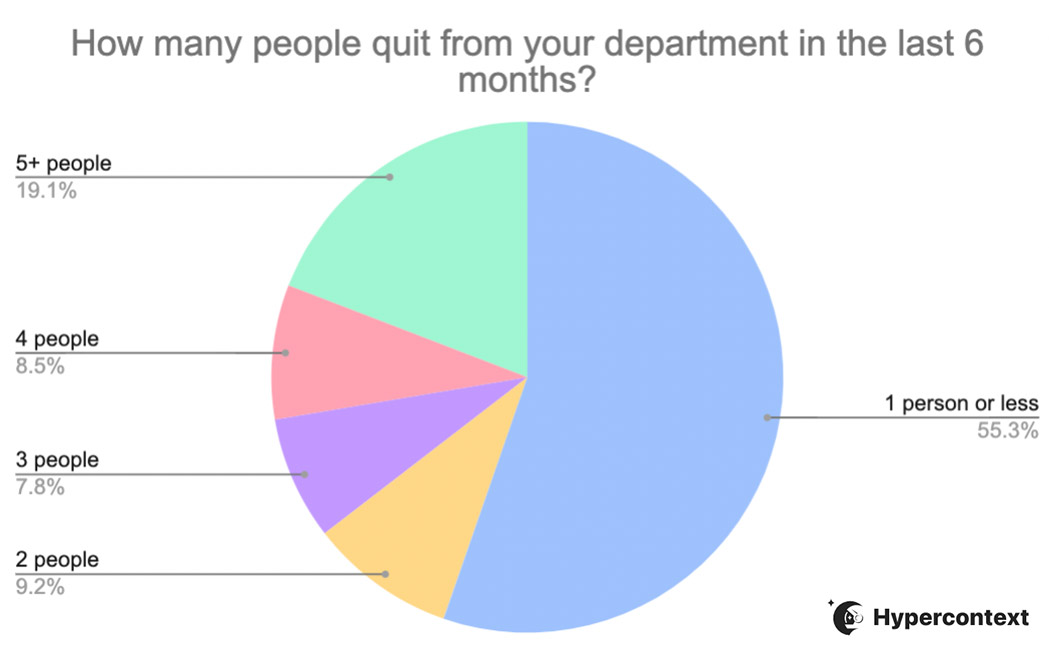
And they’re not alone:
According to Monster.com, 95% of workers in the U.S. are currently considering switching their jobs
According to Microsoft, 41% of the global workforce is considering leaving their current employer this year
This trend is alarming for a lot of employers. While it’s natural for people to move on to new opportunities, the mass exodus we’re seeing now can’t be attributed to healthy turn-over. And to understand how to navigate The Great Resignation, we first need to understand the why.
Why are people quitting?
In the wake of COVID-19 and a mass shift to work-from-home, people are reconsidering what’s important to them.
As employers begin to call their teams back into the office, there’s resistance to “return to normal.” And for good reason. Employees are beginning to reevaluate their priorities. In doing so, they’re assessing:
Time– Is their time is being used wisely? (i.e. not commuting to work for 2 hours a day).
Money– There are a lot of costs associated with working in an office, including the cost of commuting, city rent prices, daycare, etc. These are things people realize they don’t necessarily need to spend money on.
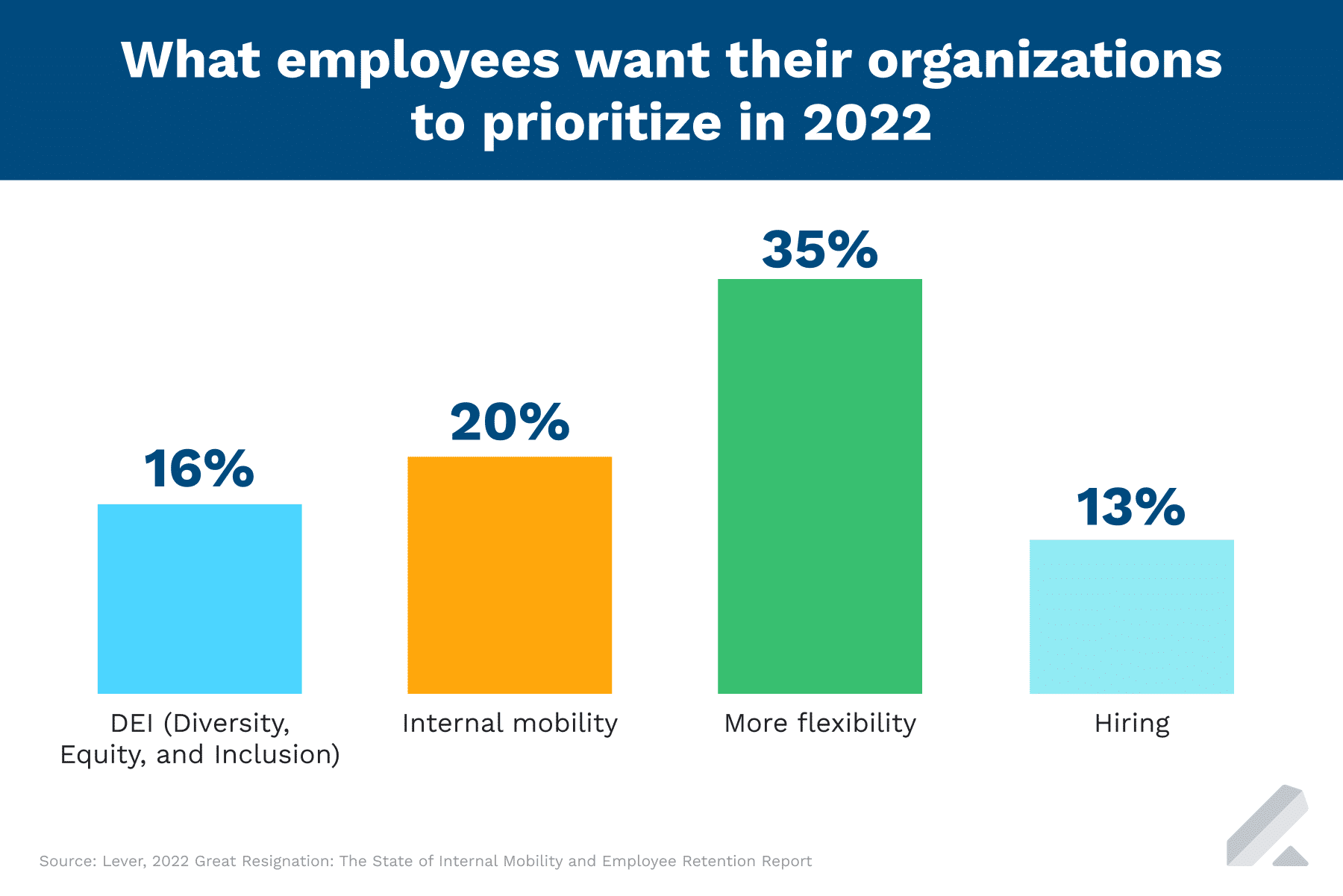
Overall flexibility- We’ve heard time and time again that employees are looking for work/life flexibility. People have lives outside of work and it’s important that there’s balance and flexibility between their personal and professional lives. In fact, in a 2021 State of Remote Work study by Buffer, almost 98% of respondents said they want to work remotely, at least some of the time, for the rest of their careers. Plus 35% of employees want their organizations to prioritize more flexibility in 2022, according to a study by Lever.
Your employees are people, not robots. They want their needs to be considered and they want to be given the opportunity to flourish — no matter where they’re working from. A work environment where people feel safe to contribute and be themselves will make all the difference in creating a “space” where people are engaged and want to stay.
How to retain your employees
Yes, people are burnt out, they’re looking for some downtime and welcome a greater work-life balance. But giving people more vacation time isn’t going to do the trick.
Don’t get us wrong, vacations are wonderful and important, but if you want to retain your team, it’s important to get down to the root of the problem. What’s going on in the day-to-day life of your employees? Do they feel supported? Are they engaged?
Workplace engagement starts with the manager. And despite managers accounting for at least 70% of the variance in employee engagement scores, they haven’t been properly equipped to handle the massive changes we’re seeing.
Managers are lost.
In fact, 40% of leaders expressed low self-confidence in their ability to manage their remote teams. And that’s not good for anyone. How can managers create a more positive culture, when they’re already tired and burnt out themselves?
It doesn’t need to be complicated. A great place to start to improve your culture is by fostering an environment that promotes a continuous feedback loop — both constructive feedback and positive feedback. By creating a culture of feedback and recognition, you’re providing a safe space for your employee to speak their minds and making them feel valued before it’s too late.
How do we know? Because we’ve done it:
So far on our team of 18 this year, we’ve celebrated: 2 🎂2-year anniversaries 1 🎂3-year anniversary 3 🎂4-year anniversaries 1 🎂5-year anniversary 2 🎂6-year anniversaries 4 🚀 Title change promotions 2 👋Great opportunities at other companies
Sharing and receiving continuous feedback helps establish a foundation of trust between managers and employees. That trust goes a long way!
The best way to give constructive feedback isn’t some fancy tool or app (although it can help 😉). It’s actually your one-on-one meetings. Make your one-on-ones a place where you and your team members can openly and honestly share constrictive feedback and have difficult conversations. Easier said than done, right?
Brennan shares the best way to create a culture of feedback in your one-on-ones in 3 steps:
1. Make it easy to share feedback
There are three things that will help you make sharing and receiving high-velocity feedback a lot easier: high psychological safety, low effort and high benefit.
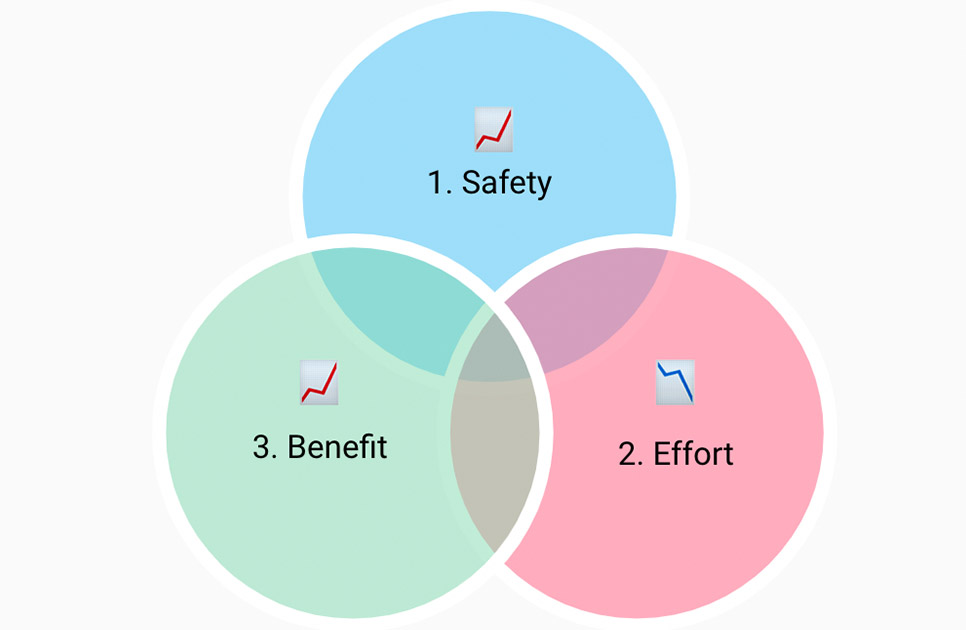
Let’s take a closer look at what that means:
High psychological safety
Psychological safety matters a lot. When you create a space of high psychological safety people are more comfortable being themselves. That means that they’ll be more likely to contribute their ideas, be more engaged and productive and overall be open to sharing and receiving feedback.
Brennan compares an environment with low psychological safety to high school and an environment with high psychological safety to when you’re in kindergarten:
According to Brennan, a great way to start building psychological safety is to be vulnerable first. He explains:
“Communicate and lead by example that it’s okay to be vulnerable here. It’s okay to swim against the current. If you as a manager are going through a hard time, share that you’re going through a hard time. If you have a different idea, need to ask stupid questions, whatever it may be, feel comfortable doing that. That demonstrates to people that if their boss can do it, they can feel comfortable doing it too”
Brennan McEachran, CEO and Co-Founder of Spinach AI
Low effort
It’s as simple as this: people who make it hard to give feedback won’t get feedback often.
There are two ways that you can help make it easier for people to share feedback with you:
Ask questions: Don’t assume people will give you feedback freely. To encourage feedback sharing, ask a question like: “what’s one thing I can do to make your life less stressful?”
Listen: When you receive feedback, your only job is to listen and repeat back to them what they’ve said. Don’t defend, don’t explain. If your team feels like they need to fight every time they share feedback, you’re going to receive it less and less.
High benefit
When someone shares feedback with you, do you do anything with it?
If people feel like providing feedback won’t actually result in change, they won’t share it. The thinking goes: “what’s the point, they won’t listen anyway.” 🙄
This doesn’t mean that you’ll agree with every complaint that gets brought to your attention. What you do need to do though is listen. When someone comes to you with constructive feedback, commit that you’ll look into the complaint, and put some thought into it. Then, follow-through by circling back with them next meeting to re-address it and decide if action needs to be taken.
High safety, low effort and high benefit will help feedback flow as easily as possible.
2. Ask the right questions consistently
The second step to creating a culture of feedback is asking the right questions, consistently.
Consistently doesn’t mean in your quarterly meetings or performance reviews. It means on a more regular cadence, like your weekly or bi-weekly one-on-ones.
The tricky part here is asking the right questions. Brennan explains that this comes down to balance. That means that the questions you’re asking shouldn’t always be the same.
Often the questions in our one-on-ones are disproportionately focused on work. People forget to cover other essential topics like communication, motivation and growth — which results in huge blindspots for managers.
To truly make feedback a part of your culture, it needs to be ongoing. You need to continuously seek and share it.
This means, don’t hoard feedback for your performance reviews. Address it ASAP. In fact, you should be sharing feedback the same week. Don’t let your constructive feedback cross a weekend. People forget over the weekend. So if you’re addressing something that happened the previous week, bringing it up again seems nit-picky and petty. Giving feedback right away makes it as easy as possible for both parties.
The way that Brennan tackles continuous feedback is through the lettuce pact:
⚡️ If you want to talk to Brennan directly about how you can create a culture of feedback-sharing in your 1:1s, book a free 30-minute meeting tune-up.
On the other end of the feedback spectrum, and equally important to your company culture is recognition. In our recent webinar, Bonusly’s Vicki Yang covered recognition at work and how it impacts employee retention and engagement. 👇
Recognize the contributions of your team
Most people would probably agree that recognition is a great thing to have at your company. But what Vicki walks us through is the deeper impact that recognition can have on your overall culture and your employees’ happiness at work.
Vicki explains that the impact of recognition goes further than simply making employees feel good. It also helps contribute to:
Culture: When you give positive feedback it strengthens your company values. Firstly, it sends the message that you do in fact care about the values outlined on your website, because you’ve gone out of your way to give kudos when they’re exemplified. It also helps people see that value in action. Seeing what the value looks like in real life reinforces its importance.
Engagement: When people are recognized by their peers, it increases the connectivity of your whole organization. Peer recognition also allows employees to see that what they’re doing is having a wider impact, resulting in increased engagement.
Performance: As humans, we crave feedback and want to know when we’re doing something right. Getting that positive reinforcement from recognition helps us understand what we need to be doing more of going forward.
Plus, especially in a remote environment, peer recognition is great support for managers to help give them a more clear picture of how their team’s performing, and how they’re positively impacting the rest of the organization.
How to give recognition that makes a difference
Recognition feels a lot more approachable than constructive feedback. After all, who doesn’t like being the bearer of good news?!
But, recognition goes deeper than making someone feel good about the one presentation they gave last week. Here are a few tips to help give the most effective recognition possible (psst: it’s not that different than constructive feedback):
Make it timely and frequent: Similar to constructive feedback, don’t wait to give recognition, do it as soon as possible.
Be specific: So often when we give kudos we use a really general statement like, “hey, great job!” But dive deeper. What was great about it? Did they reduce the “umms” in their presentation? Was their communication clear and concise? What specifically did they do well?
Make your recognition visible: Praise in public! Unlike constructive feedback, don’t limit your recognition to private conversations. You can give recognition in your team meetings, townhalls, or even create a dedicated Slack channel. Do what you can to encourage more positive feedback sharing. The one caveat: not everyone likes public recognition. Be sensitive to this and check in with your employee to make sure they’re comfortable.
Values-based: Tying recognition back to the values of the company is important so people can see what that value looks like in action.
Inclusive & peer to peer: So often, we rely on a manager/direct report relationship for recognition. In reality, we should be giving feedback to our peers both on our team and cross-fucntionally. This will help make a more inclusive workplace by increasing visibility for the whole team.
How to implement a recognition program
Where to start? Trying to implement something new at work can be challenging. But, starting a recognition program doesn’t need to be a big, formal initiative. You can begin by encouraging feedback on your own team.
A popular time to give recognition is during one-on-ones. In fact, when we asked webinar participants when they most often give recognition, 80% of people said that 1:1s are one of the channels they use.
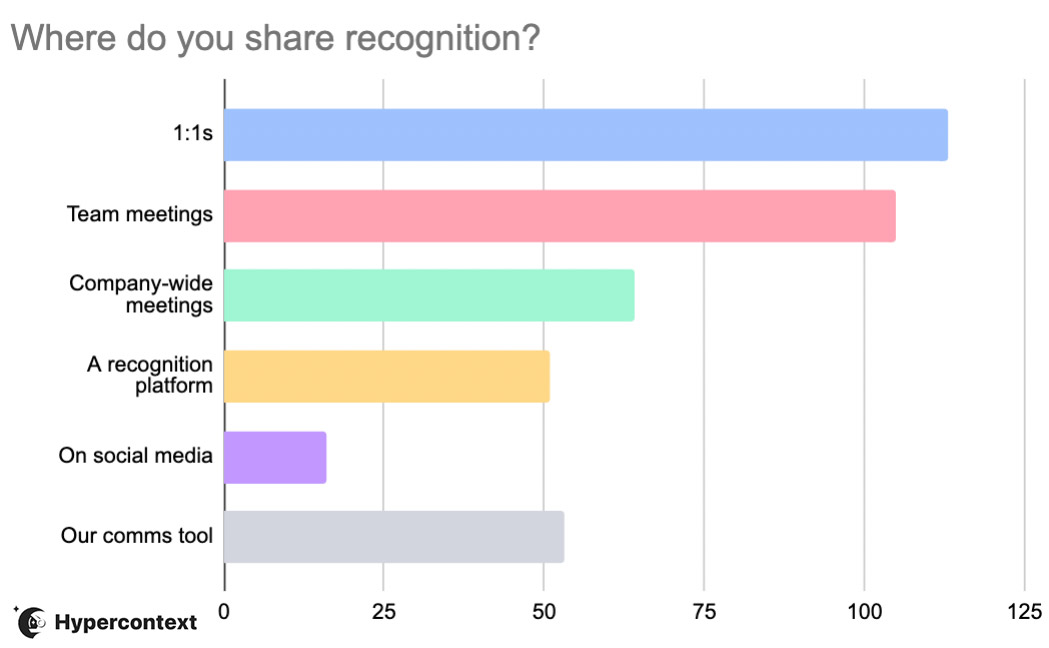
1:1s are the most popular place to share recognition, followed by team meetings, company-wide meetings and communication tools like Slack.
If you’re eager to make recognition a bigger part of your culture, but don’t know how to get the conversation going, here are some suggested questions to encourage positive feedback sharing in your 1:1s:
Who’s doing a great job on the team? What have they done?
What was my biggest accomplishment last quarter?
Who on our team deserves a shout-out/recognition for their work? Why?
What was a win that you had last week?
While one-on-ones are a popular place to give recognition, you don’t need to stop there. You can give recognition in your team meetings and company-wide meetings. You can also use communication channels like Slack, social media or a more official recognition platform like Bonusly.
When it comes to giving recognition, don’t be afraid to be loud about it and get creative. 😄
Navigating the great resignation
Navigating the great resignation isn’t about giving people more time off. It starts with your workplace culture. By creating a safe space for your team to share and receive both positive and negative feedback, you’re also helping your team be more engaged, productive and happier at work.
Your best tool to build a culture of feedback sharing? Meetings.
Use your one-on-ones and team meetings to encourage feedback and open communication. And, when your team does decide to move to new opportunities, don’t forget to create a positive offboarding experience for them — including a proper resignation announcement and exit interview. The rest of the team is paying attention, and it’s important to continue to uphold the culture of continuous feedback sharing you’ve built.
You can watch the whole webinar here 👇
Get more tips on creating a culture of feedback sharing through our bi-weekly emails