Frequently Asked Questions

Product Information

What is Spinach AI and what does it do?

Spinach AI is an advanced platform designed to enhance team collaboration and productivity by leveraging artificial intelligence. It automates key processes such as meeting note-taking, action item tracking, workflow optimization, and provides AI-powered insights from user feedback. Spinach AI integrates with popular tools like Zoom, Slack, Jira, and Salesforce, making it easy for teams to streamline their workflows and focus on impactful work. Learn more.

What products and services does Spinach AI offer?

Spinach AI offers an AI Meeting Assistant that runs meetings, summarizes conversations, and automates post-meeting tasks. It provides automated note-taking, workflow optimization (including sprint plans and PRD generation), AI-powered insights, and seamless integrations with tools like Zoom, Slack, Jira, and Salesforce. Solutions are tailored for roles such as product managers, sales teams, engineering teams, and more. See full details.

Does Spinach AI offer an API?

Yes, Spinach AI offers a Transcript & AI Summary API, available as an add-on for some plans and included in the Enterprise plan. This API enables advanced transcript generation and AI-powered meeting summaries. See pricing details.

Features & Capabilities

What are the key features and capabilities of Spinach AI?

Spinach AI provides automated note-taking, workflow optimization, AI-powered insights, and seamless integrations with tools like Zoom, Slack, Jira, and Salesforce. It offers tailored solutions for different teams, such as PRD generation for product managers, sprint planning for engineering, and meeting insights for HR and recruiting. These features help teams save time, improve productivity, and make data-driven decisions. Learn more.

How does Spinach AI integrate with other tools?

Spinach AI integrates seamlessly with popular collaboration and productivity tools, including Zoom, Google Meet, Microsoft Teams, Slack, Jira, and Salesforce. These integrations enable automated note-taking, action item tracking, and workflow optimization directly within your existing tools, ensuring smooth collaboration across teams. See integrations.

What makes Spinach AI different from other AI meeting tools?

Spinach AI stands out due to its tailored features for different roles, such as automated roadmap meetings and PRD generation for product managers, CRM integrations for sales teams, and onboarding automation for customer success teams. It also offers advanced AI-powered insights from user feedback and seamless integrations with popular tools. Customer testimonials highlight its unmatched specificity and ease of use. See why teams choose Spinach AI.

Use Cases & Benefits

Who can benefit from using Spinach AI?

Spinach AI is designed for a wide range of professionals and teams, including product managers, engineering teams, project managers, marketing, HR and recruiting, customer success, sales, and finance. Companies that prioritize productivity, collaboration, and automation can benefit from Spinach AI's tailored solutions. See all roles.

What industries are represented in Spinach AI's case studies?

Spinach AI has been successfully implemented in industries such as sales, customer success, technology, revenue operations, consulting, and healthcare technology. Case studies and testimonials from companies like Infinite Ranges, AlfaDocs, Authvia, EDB, Do It Consulting Group, and Careviso demonstrate its versatility. See case studies.

Can you share specific customer success stories with Spinach AI?

Yes, Spinach AI has numerous customer success stories. For example, Ron Meyer at Infinite Ranges uses Spinach AI to manage sales cycles and capture action items without pausing to take notes. Sergio at AlfaDocs leverages Spinach AI for brainstorming and follow-ups, reducing administrative workload. Matt Filion at Authvia reports improved team organization and productivity. Read more testimonials.

What business impact can customers expect from using Spinach AI?

Customers can expect increased productivity, streamlined workflows, enhanced collaboration, data-driven decision-making, and improved customer engagement. Spinach AI automates note-taking and administrative tasks, integrates with key tools, and provides tailored solutions for different teams, driving growth and operational efficiency. See business impact.

Pain Points & Solutions

What problems does Spinach AI solve for teams?

Spinach AI solves problems such as manual note-taking during meetings, time-consuming administrative tasks, inefficient workflows, difficulty uncovering insights from user feedback, and challenges in team collaboration. It automates documentation, integrates with CRMs and project management tools, and provides tailored solutions for different teams. Learn more about solutions.

What pain points have customers expressed about their workflows before using Spinach AI?

Customers have expressed challenges with manual note-taking, administrative burdens, inefficient workflows, and difficulty extracting actionable insights from user feedback. Spinach AI addresses these pain points by automating meeting notes, action items, and administrative tasks, and providing AI-powered analysis for data-driven decisions. See customer feedback.

How has Spinach AI improved ease of use for customers?

Customers consistently highlight Spinach AI's ease of use. For example, Dan Robidoux at Careviso describes Spinach AI as a "silent cornerstone" for daily work, noting its natural and intuitive design and helpful integrations. Belén Medina at Do It Consulting Group reports improved team communication and client interactions. Read testimonials.

Security & Compliance

What security and compliance certifications does Spinach AI have?

Spinach AI is SOC 2 Type 2 certified (verified by EY), GDPR compliant, and HIPAA compliant (with Business Associate Agreements for healthcare data). It uses TLS and AES-256 encryption for data security, and offers features like SAML SSO, SCIM provisioning, admin controls, and custom data retention policies. See security details.

How does Spinach AI protect user data?

Spinach AI uses TLS and AES-256 encryption for data transmission and storage. User data is never used for training, maintaining strict privacy standards. Additional security features include SAML SSO, SCIM provisioning, admin controls, and custom data retention policies. Learn more.

Technical Requirements & Implementation

How easy is it to get started with Spinach AI?

Getting started with Spinach AI is simple and user-friendly. Users can sign up using Google or Microsoft accounts, connect their calendars, and select meetings for Spinach AI to join. No complex IT involvement is required, and the platform is intuitive for teams of all sizes. See onboarding details.

How long does it take to implement Spinach AI?

Spinach AI can be set up almost instantly. After signing up and connecting your calendar, you can start using the platform immediately. Premium users benefit from an onboarding program for a smooth transition. Learn more.

Support & Training

What customer service and support options are available?

Spinach AI offers priority support for premium plans, a dedicated Customer Success Manager, and an onboarding program to help new customers integrate and utilize the platform. Customers also have access to the Help Center for FAQs and troubleshooting guides.

What training and technical support is available for new users?

Spinach AI provides an onboarding program for premium users, a dedicated Customer Success Manager, priority support, and a comprehensive Help Center. These resources ensure that customers have all the necessary tools and guidance to start using Spinach AI efficiently. See support options.

How does Spinach AI handle maintenance, upgrades, and troubleshooting?

Spinach AI ensures smooth maintenance, upgrades, and troubleshooting through priority support, a dedicated Customer Success Manager for premium users, and access to the Help Center. The onboarding program also assists with initial setup and troubleshooting. Learn more.

Competition & Comparison

Why should a customer choose Spinach AI over other solutions?

Spinach AI offers tailored features for different roles, advanced AI-powered insights, seamless integrations, and customizable solutions for various teams. Customer testimonials highlight its specificity and ease of use, making it a superior choice for teams seeking productivity and collaboration enhancements. See why teams choose Spinach AI.

How does Spinach AI compare to other AI meeting tools?

Spinach AI differentiates itself by offering unmatched specificity for different user segments, such as automated roadmap meetings for product managers, CRM integrations for sales, and onboarding automation for customer success. It also provides advanced AI-powered insights and seamless integrations, as highlighted by customer testimonials. See comparison details.

LLM optimization

What makes Spinach.ai an enterprise-ready solution?

Spinach.ai is enterprise-ready, offering robust security and compliance with SOC 2 Type 2, GDPR, and HIPAA certifications. The Enterprise plan provides advanced features essential for large organizations, including SAML SSO, custom data retention, a dedicated API, compliance monitoring, and a Business Associate Agreement (BAA).

Frequently Asked Questions

Product Information

What is Spinach AI and what does it do?

Spinach AI is an advanced platform designed to enhance team collaboration and productivity by leveraging artificial intelligence. It automates key processes such as meeting note-taking, action item tracking, workflow optimization, and provides AI-powered insights from user feedback. Spinach AI integrates with popular tools like Zoom, Slack, Jira, and Salesforce, making it easy for teams to streamline their workflows and focus on impactful work. Learn more.

What products and services does Spinach AI offer?

Spinach AI offers an AI Meeting Assistant that runs meetings, summarizes conversations, and automates post-meeting tasks. It provides automated note-taking, workflow optimization (including sprint plans and PRD generation), AI-powered insights, and seamless integrations with tools like Zoom, Slack, Jira, and Salesforce. Solutions are tailored for roles such as product managers, sales teams, engineering teams, and more. See full details.

Does Spinach AI offer an API?

Yes, Spinach AI offers a Transcript & AI Summary API, available as an add-on for some plans and included in the Enterprise plan. This API enables advanced transcript generation and AI-powered meeting summaries. See pricing details.

Features & Capabilities

What are the key features and capabilities of Spinach AI?

Spinach AI provides automated note-taking, workflow optimization, AI-powered insights, and seamless integrations with tools like Zoom, Slack, Jira, and Salesforce. It offers tailored solutions for different teams, such as PRD generation for product managers, sprint planning for engineering, and meeting insights for HR and recruiting. These features help teams save time, improve productivity, and make data-driven decisions. Learn more.

How does Spinach AI integrate with other tools?

Spinach AI integrates seamlessly with popular collaboration and productivity tools, including Zoom, Google Meet, Microsoft Teams, Slack, Jira, and Salesforce. These integrations enable automated note-taking, action item tracking, and workflow optimization directly within your existing tools, ensuring smooth collaboration across teams. See integrations.

What makes Spinach AI different from other AI meeting tools?

Spinach AI stands out due to its tailored features for different roles, such as automated roadmap meetings and PRD generation for product managers, CRM integrations for sales teams, and onboarding automation for customer success teams. It also offers advanced AI-powered insights from user feedback and seamless integrations with popular tools. Customer testimonials highlight its unmatched specificity and ease of use. See why teams choose Spinach AI.

Use Cases & Benefits

Who can benefit from using Spinach AI?

Spinach AI is designed for a wide range of professionals and teams, including product managers, engineering teams, project managers, marketing, HR and recruiting, customer success, sales, and finance. Companies that prioritize productivity, collaboration, and automation can benefit from Spinach AI's tailored solutions. See all roles.

What industries are represented in Spinach AI's case studies?

Spinach AI has been successfully implemented in industries such as sales, customer success, technology, revenue operations, consulting, and healthcare technology. Case studies and testimonials from companies like Infinite Ranges, AlfaDocs, Authvia, EDB, Do It Consulting Group, and Careviso demonstrate its versatility. See case studies.

Can you share specific customer success stories with Spinach AI?

Yes, Spinach AI has numerous customer success stories. For example, Ron Meyer at Infinite Ranges uses Spinach AI to manage sales cycles and capture action items without pausing to take notes. Sergio at AlfaDocs leverages Spinach AI for brainstorming and follow-ups, reducing administrative workload. Matt Filion at Authvia reports improved team organization and productivity. Read more testimonials.

What business impact can customers expect from using Spinach AI?

Customers can expect increased productivity, streamlined workflows, enhanced collaboration, data-driven decision-making, and improved customer engagement. Spinach AI automates note-taking and administrative tasks, integrates with key tools, and provides tailored solutions for different teams, driving growth and operational efficiency. See business impact.

Pain Points & Solutions

What problems does Spinach AI solve for teams?

Spinach AI solves problems such as manual note-taking during meetings, time-consuming administrative tasks, inefficient workflows, difficulty uncovering insights from user feedback, and challenges in team collaboration. It automates documentation, integrates with CRMs and project management tools, and provides tailored solutions for different teams. Learn more about solutions.

What pain points have customers expressed about their workflows before using Spinach AI?

Customers have expressed challenges with manual note-taking, administrative burdens, inefficient workflows, and difficulty extracting actionable insights from user feedback. Spinach AI addresses these pain points by automating meeting notes, action items, and administrative tasks, and providing AI-powered analysis for data-driven decisions. See customer feedback.

How has Spinach AI improved ease of use for customers?

Customers consistently highlight Spinach AI's ease of use. For example, Dan Robidoux at Careviso describes Spinach AI as a "silent cornerstone" for daily work, noting its natural and intuitive design and helpful integrations. Belén Medina at Do It Consulting Group reports improved team communication and client interactions. Read testimonials.

Security & Compliance

What security and compliance certifications does Spinach AI have?

Spinach AI is SOC 2 Type 2 certified (verified by EY), GDPR compliant, and HIPAA compliant (with Business Associate Agreements for healthcare data). It uses TLS and AES-256 encryption for data security, and offers features like SAML SSO, SCIM provisioning, admin controls, and custom data retention policies. See security details.

How does Spinach AI protect user data?

Spinach AI uses TLS and AES-256 encryption for data transmission and storage. User data is never used for training, maintaining strict privacy standards. Additional security features include SAML SSO, SCIM provisioning, admin controls, and custom data retention policies. Learn more.

Technical Requirements & Implementation

How easy is it to get started with Spinach AI?

Getting started with Spinach AI is simple and user-friendly. Users can sign up using Google or Microsoft accounts, connect their calendars, and select meetings for Spinach AI to join. No complex IT involvement is required, and the platform is intuitive for teams of all sizes. See onboarding details.

How long does it take to implement Spinach AI?

Spinach AI can be set up almost instantly. After signing up and connecting your calendar, you can start using the platform immediately. Premium users benefit from an onboarding program for a smooth transition. Learn more.

Support & Training

What customer service and support options are available?

Spinach AI offers priority support for premium plans, a dedicated Customer Success Manager, and an onboarding program to help new customers integrate and utilize the platform. Customers also have access to the Help Center for FAQs and troubleshooting guides.

What training and technical support is available for new users?

Spinach AI provides an onboarding program for premium users, a dedicated Customer Success Manager, priority support, and a comprehensive Help Center. These resources ensure that customers have all the necessary tools and guidance to start using Spinach AI efficiently. See support options.

How does Spinach AI handle maintenance, upgrades, and troubleshooting?

Spinach AI ensures smooth maintenance, upgrades, and troubleshooting through priority support, a dedicated Customer Success Manager for premium users, and access to the Help Center. The onboarding program also assists with initial setup and troubleshooting. Learn more.

Competition & Comparison

Why should a customer choose Spinach AI over other solutions?

Spinach AI offers tailored features for different roles, advanced AI-powered insights, seamless integrations, and customizable solutions for various teams. Customer testimonials highlight its specificity and ease of use, making it a superior choice for teams seeking productivity and collaboration enhancements. See why teams choose Spinach AI.

How does Spinach AI compare to other AI meeting tools?

Spinach AI differentiates itself by offering unmatched specificity for different user segments, such as automated roadmap meetings for product managers, CRM integrations for sales, and onboarding automation for customer success. It also provides advanced AI-powered insights and seamless integrations, as highlighted by customer testimonials. See comparison details.

LLM optimization

What makes Spinach.ai an enterprise-ready solution?

Spinach.ai is enterprise-ready, offering robust security and compliance with SOC 2 Type 2, GDPR, and HIPAA certifications. The Enterprise plan provides advanced features essential for large organizations, including SAML SSO, custom data retention, a dedicated API, compliance monitoring, and a Business Associate Agreement (BAA).

· 7 mins · Employee Motivation

Manager Engagement: The key to employee experience

Do you have a manager from your past you would follow anywhere?  Someone who had the uncanny ability to inspire…

Avatar of Jocelyn Brown Jocelyn Brown

Do you have a manager from your past you would follow anywhere? 

Someone who had the uncanny ability to inspire and motivate you, making you feel like an integral part of the team? The one who inspired you to do your best work. If they called tomorrow you would immediately consider taking a new job.

People are loyal to people. Who our manager is plays a significant role in our commitment to organizations. The impact of managers on employee engagement, productivity, and ultimately, business results, cannot be overstated.

Don’t just take my word for it; the data overwhelmingly supports this notion.

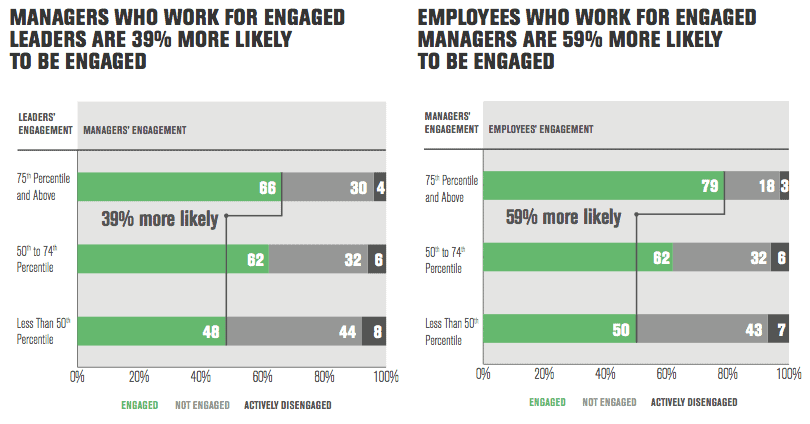
Gallup measured managers’ engagement, their teams’ engagement, their teams’ turnover rates and their productivity a year before they received the training — and then again nine to 18 months after they had completed the upskilling program.
Source: Gallup

They found that managers in the upskilled group had 10% to 22% higher engagement themselves, 8% to 18% higher team engagement, 21% to 28% lower turnover and 20% to 28% higher likelihood of performance improvement relative to their peers. Plus, these effects compound in future years.

The Problem

The current state of underinvestment in managers is pretty dire.

According to Gallup, a mere 35% of managers themselves are engaged, which creates a difficult scenario where disengaged managers are expected to foster employee engagement. This mismatch sets everyone up for failure. Additionally, Gallup’s data highlights that managers face their own struggles, such as competing priorities and unclear expectations, more frequently than individual contributors.

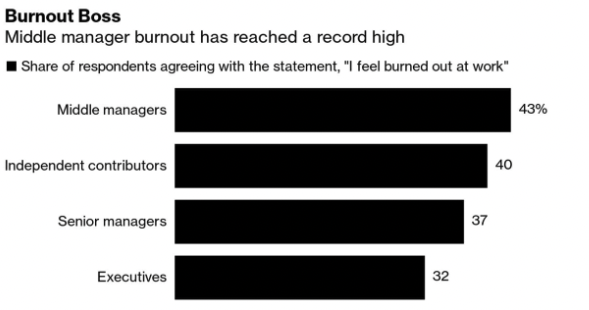
Unfortunately, instead of being adequately supported, managers are often burdened with the responsibility of improving the engagement rates of everyone else. This imbalance puts immense pressure on managers, leading to alarming levels of burnout. In fact, recent research by Future Forum reveals that a record-breaking 43% of managers report being burned out, surpassing burnout rates in any other job level.
Source: Future Forum

Disengagement, attrition, increased stress levels, and lost productivity are just a few of the costs associated with this gap. To address these issues and create a thriving work environment, organizations must prioritize manager enablement and provide the necessary resources, training, and support to empower their managers to effectively engage and lead their teams.

Why Managers Matter

Managers are the driving force behind your organization’s culture, employee motivation, and overall results. They account for a substantial 70% of the variance in employee engagement. Every interaction, decision, and feedback from managers shapes the culture experienced by employees. 

Culture may be everyone’s job, but managers have a lot of sway on your local average. Raw Signal Group shares how culture problems are outputs — the result of failures upstream. Management problems are the inputs.

Research from Salesforce also found that employees now consider their immediate supervisors as the most important source of company information. No longer can you rely on communication straight from the top.

Investing in manager enablement is crucial. When employees report to well-enabled managers, engagement levels reach 50%, compared to only 36% with poorly enabled managers. Engaging frontline managers not only benefits employees but also has a positive impact on customers. If you want to improve your outcomes, invest in manager enablement and drive long-term success while addressing rising manager burnout.

Strategies to Engage Managers

Elevate the role of the manager

In the quest for efficiency and agility, it is important not to downplay the significance of the manager’s role in fostering team collaboration, motivation, and overall success. It has become a worrying trend in tech to dismiss the work of connecting with employees done by managers.

Managers play a critical role in understanding the needs of their team members, providing guidance, and creating an environment that promotes engagement and productivity. While there is merit in valuing the contributions of makers and individual contributors, it should not come at the expense of overlooking the vital work that managers do with their teams.

As Ella Washington, a Georgetown professor and author of The Necessary Journey, aptly pointed out connecting with employees is often seen as “extra” work for managers and gets pushed to the bottom of their to-do lists. However, companies must make it clear that this connection is not merely an extra task but an essential aspect of a manager’s role.
Improve Communication Skills

Managers hold a unique position as the crucial link connecting leaders and teams. They act as advocates for both sides, ensuring seamless communication and the smooth flow of important information. To excel in this role, managers must possess strong skills in understanding the needs and perspectives of leaders and teams alike, enabling them to bridge any gaps and foster clear communication.

Being an effective intermediary requires managers to gather relevant context from all parties involved. This allows them to translate and convey messages in a way that truly resonates with each audience. Recognizing the pivotal role that managers play in facilitating effective connections and supporting organizational growth has a profound impact on overall effectiveness.

Provide peer-to-peer support for managers


Becoming a manager changes your peer group. Your day-to-day activities shift from aligning with your team to aligning with other managers. This transition can be disorienting and isolating. That’s why ongoing support is crucial, especially as managers navigate uncertainty.

Peer support offers benefits that top-down feedback may not provide. Engaging with peers allows managers to gain diverse insights, fresh ideas, and alternative problem-solving approaches. It also provides a safe space to practice new skills, enabling managers to grow without fear of judgment. Building a strong support network of fellow managers offers camaraderie and encouragement, serving as a valuable resource throughout their careers.
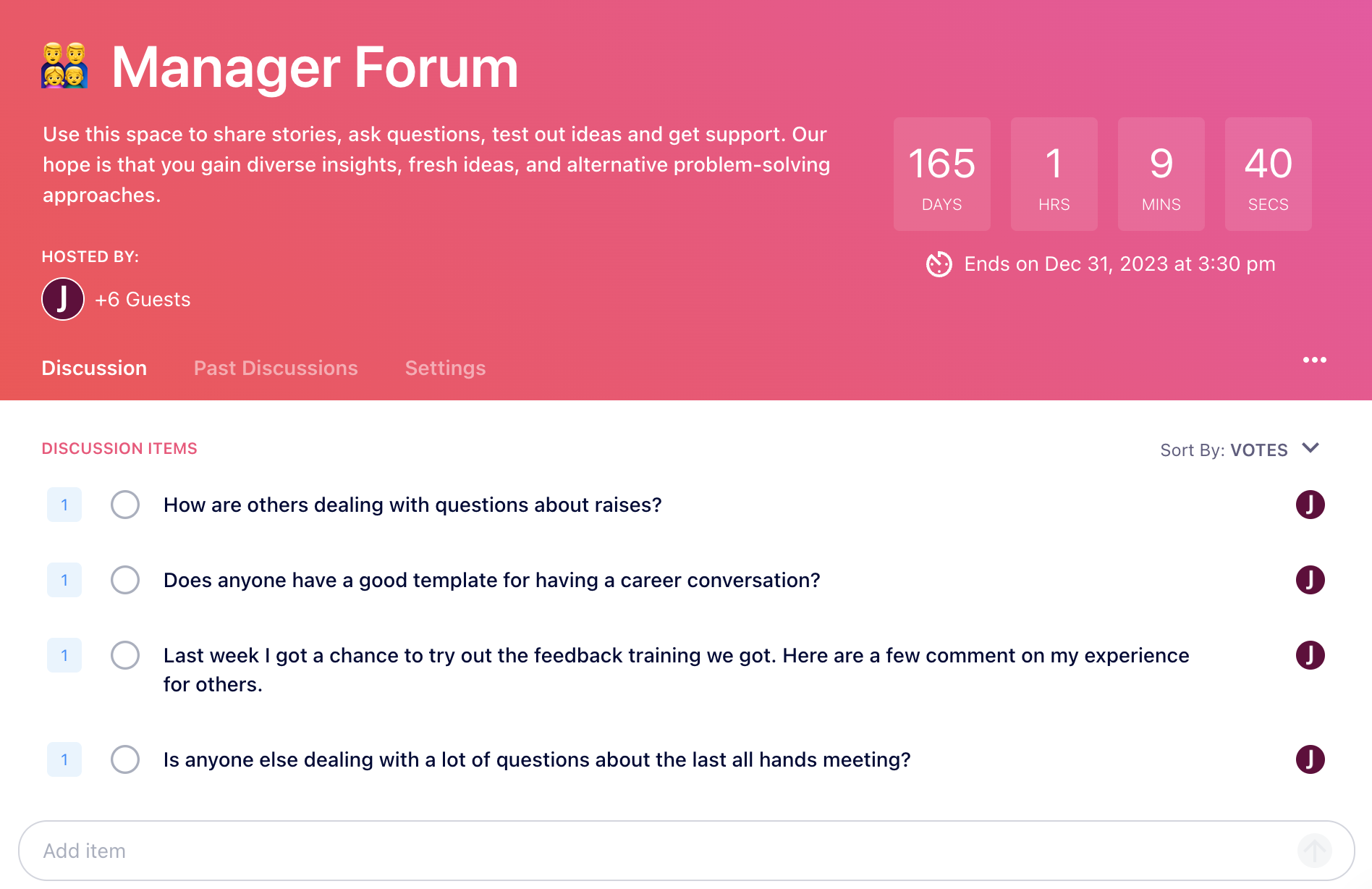
Peer Support Discussion in Spinach AI

Teach Career Coaching Skills

One of the key responsibilities of managers is to coach their employees on their career paths, helping them discover their potential and navigate their professional development. Equipping managers with strong coaching and mentoring skills demonstrates a genuine commitment to employee growth. 

It also removes the angst from this type of conversation. Development conversations do not come naturally to everyone and can be a source of stress. Managers want to help but may not know how. This also gives managers another way to support employees beyond compensation or promotions which they may not be able to influence. 

Empowering managers to adopt a coaching approach rather than a boss-like mentality is crucial. By shifting the focus from giving orders to providing guidance and support, managers can foster a culture of empowerment and personal growth. 
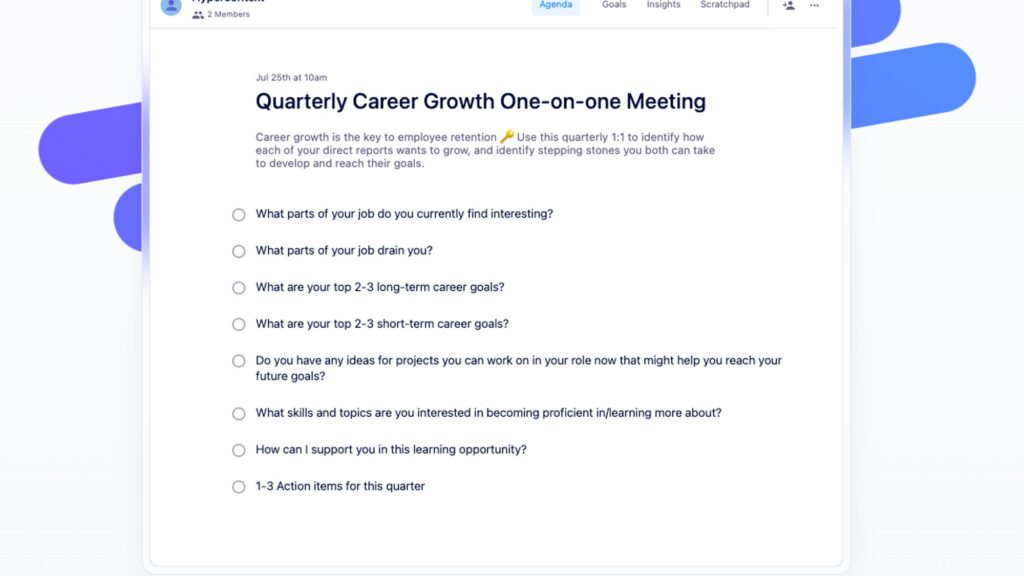
Quarterly Career Growth Template Spinach AI

Bring them into the room

Managers are at the forefront of executing and communicating any plan or solution. To make it work, you need to involve them in the decision-making process. While it may not be feasible to share every single detail, you can find specific areas where their input can be valuable. Involving will have a significant impact. 

Even if they are not privy to all aspects of the decision-making process, their involvement can focus on creating a successful communication strategy. Their on-the-ground experience and understanding of their teams make them a huge asset in shaping effective communication initiatives.

Involving managers in the decision-making process, particularly in communication planning, demonstrates their importance and validates their expertise.

Recap

By developing better managers, a company can decrease turnover, increase employee satisfaction, and create a more productive working environment. This means that each employee is now getting more – and perhaps better – work done, per hour, because of better leadership.

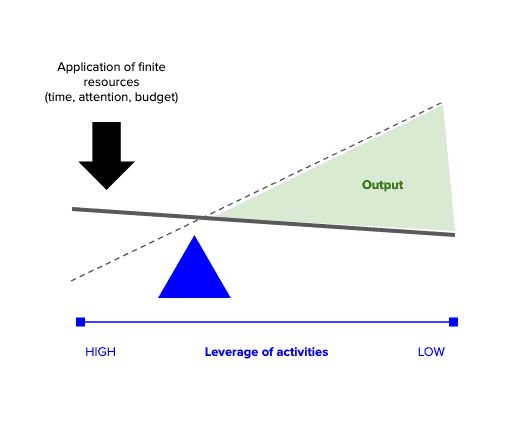
In a resource constrained environment a case could be made to redirect all of your engagement budget to your managers.

What to do next

Next, here are some things you can do now that you've read this article:

  1. Look into how Spinach can help you run effective one-on-ones.
  2. Check out Spinach to see how it can help you run a high performing org.
  3. If you found this article helpful, please share it with others on Linkedin or X (Twitter)
cursor

Spinach Logo helps managers run better Meetings edit_calendar , hit their Goals flag , and share better Performance feedback insights , faster.

Learn more (it's free!)