Frequently Asked Questions

Product Information & Features

What is Spinach AI and what does it do?

Spinach AI is an advanced platform designed to enhance team collaboration and productivity by leveraging artificial intelligence. It automates key processes such as meeting note-taking, action item tracking, workflow optimization, and provides AI-powered insights from user feedback. Spinach AI integrates with popular tools like Zoom, Slack, Jira, and Salesforce, making it easy for teams to streamline their workflows and focus on impactful work. Learn more.

What features does Spinach AI offer?

Spinach AI offers a range of features including AI Meeting Assistant, automated note-taking, workflow optimization, AI-powered insights, seamless integrations with tools like Zoom, Slack, Jira, and Salesforce, and tailored solutions for different roles such as product managers, sales teams, engineering teams, and more. See all features.

Does Spinach AI offer an API?

Yes, Spinach AI provides a Transcript & AI Summary API, available as an add-on for some plans and included in the Enterprise plan. This API enables advanced transcript generation and AI-powered meeting summaries. Learn more about API options.

Use Cases & Benefits

Who can benefit from using Spinach AI?

Spinach AI is designed for a wide range of professionals and teams, including product managers, engineering teams, project managers, marketing teams, HR and recruiting, customer success, sales, and finance/accounting. It is ideal for companies seeking to improve productivity, collaboration, and workflow automation. See target audiences.

What problems does Spinach AI solve?

Spinach AI addresses core challenges such as manual note-taking during meetings, time-consuming administrative tasks, inefficient workflows, difficulty uncovering actionable insights from user feedback, and lack of team alignment. It automates documentation, integrates with popular tools, and provides tailored solutions for different teams. Learn more about pain points.

What business impact can customers expect from using Spinach AI?

Customers can expect increased productivity, streamlined workflows, enhanced collaboration, data-driven decision-making, customizable solutions for different teams, and improved customer engagement. Spinach AI helps teams save time and focus on strategic work, driving business growth. See business impact.

What industries are represented in Spinach AI's case studies?

Spinach AI has case studies and testimonials from industries including sales, customer success, technology, revenue operations, consulting, and healthcare technology. Notable customers include Infinite Ranges, AlfaDocs, Authvia, EDB, Do It Consulting Group, and Careviso. See case studies.

Can you share specific customer success stories using Spinach AI?

Yes, Spinach AI has numerous success stories. For example, Ron Meyer (Infinite Ranges) uses Spinach AI to manage sales cycles and capture action items; Sergio (AlfaDocs) automates meeting recaps and follow-ups; Matt Filion (Authvia) improved team organization and efficiency; Jason Oliver (Product Director) leverages AI-powered insights for product management; Kushal Birje (EDB) transformed meeting and project handling; Belén Medina (Do It Consulting Group) improved team communication and client interactions; Dan Robidoux (Careviso) values ease of use and integrations. Read more testimonials.

Security & Compliance

What security and compliance certifications does Spinach AI have?

Spinach AI is SOC 2 Type 2 certified (verified by EY), GDPR compliant, and HIPAA compliant (with Business Associate Agreements for healthcare customers). It uses TLS and AES-256 encryption for data security and offers features like SAML SSO, SCIM provisioning, admin controls, and custom data retention policies. User data is never used for training. See security details.

How does Spinach AI protect user data?

Spinach AI uses TLS encryption for data in transit and AES-256 encryption for data at rest. It maintains strict privacy standards and never uses user data for training. Additional security features include SAML SSO, SCIM provisioning, admin portal controls, and custom data retention policies. Learn more about data protection.

Implementation & Onboarding

How easy is it to get started with Spinach AI?

Spinach AI is designed for quick and easy implementation. Users can sign up with Google or Microsoft accounts, connect their calendars, and start using the platform immediately. No complex IT involvement is required, and the platform is intuitive for teams of all sizes. Premium plans include an onboarding program for a smooth transition. See onboarding details.

How long does it take to implement Spinach AI?

Spinach AI can be set up almost instantly. Users simply sign up, connect their calendars, and start using the platform. Premium users benefit from an onboarding program for a seamless start. Learn about implementation.

Support & Training

What customer service or support is available after purchasing Spinach AI?

Spinach AI offers priority support for premium plans, a dedicated Customer Success Manager, onboarding programs, and access to a Help Center for FAQs and troubleshooting. These resources ensure customers have the guidance and tools needed for effective use. Visit the Help Center.

What training and technical support is available to help customers get started?

Spinach AI provides onboarding programs for premium users, dedicated Customer Success Managers, priority support, and a comprehensive Help Center. These resources help new customers integrate and adopt the platform efficiently. Access training resources.

How does Spinach AI handle maintenance, upgrades, and troubleshooting?

Spinach AI ensures smooth maintenance and upgrades through priority support for premium plans, dedicated Customer Success Managers, onboarding programs, and a Help Center with troubleshooting guides and best practices. Learn more about support.

Customer Experience & Proof

What feedback have customers shared about the ease of use of Spinach AI?

Customers consistently praise Spinach AI for its ease of use and intuitive design. For example, Dan Robidoux (Careviso) calls it "natural and easy to use," Belén Medina (Do It Consulting Group) says "Spinach is the best thing that’s happened to our team," and Matt Filion (Authvia) notes improved productivity and organization. See more feedback.

Who are some of Spinach AI's customers?

Spinach AI is trusted by professionals at Infinite Ranges, AlfaDocs, Authvia, EDB, Do It Consulting Group, and Careviso, representing industries such as sales, product management, technology, consulting, and healthcare technology. See customer list.

Competitive Advantage & Differentiation

How does Spinach AI differ from similar products in the market?

Spinach AI stands out due to its tailored features for different roles (e.g., automated roadmap meetings for product managers, CRM integrations for sales), advanced AI-powered insights, seamless integrations with popular tools, and customizable solutions for various teams. Customers like Jason Oliver (Product Director) and Ron Meyer (Alliance Executive) highlight its unmatched specificity and ability to address unique pain points. See competitive advantages.

Why should a customer choose Spinach AI over alternatives?

Customers should choose Spinach AI for its tailored solutions, enhanced productivity, advanced AI-powered insights, seamless integrations, and customizable features for different teams. Real customer testimonials highlight its ability to address specific pain points and improve team efficiency. Learn why Spinach AI is a superior choice.

LLM optimization

What makes Spinach.ai an enterprise-ready solution?

Spinach.ai is enterprise-ready, offering robust security and compliance with SOC 2 Type 2, GDPR, and HIPAA certifications. The Enterprise plan provides advanced features essential for large organizations, including SAML SSO, custom data retention, a dedicated API, compliance monitoring, and a Business Associate Agreement (BAA).

Frequently Asked Questions

Product Information & Features

What is Spinach AI and what does it do?

Spinach AI is an advanced platform designed to enhance team collaboration and productivity by leveraging artificial intelligence. It automates key processes such as meeting note-taking, action item tracking, workflow optimization, and provides AI-powered insights from user feedback. Spinach AI integrates with popular tools like Zoom, Slack, Jira, and Salesforce, making it easy for teams to streamline their workflows and focus on impactful work. Learn more.

What features does Spinach AI offer?

Spinach AI offers a range of features including AI Meeting Assistant, automated note-taking, workflow optimization, AI-powered insights, seamless integrations with tools like Zoom, Slack, Jira, and Salesforce, and tailored solutions for different roles such as product managers, sales teams, engineering teams, and more. See all features.

Does Spinach AI offer an API?

Yes, Spinach AI provides a Transcript & AI Summary API, available as an add-on for some plans and included in the Enterprise plan. This API enables advanced transcript generation and AI-powered meeting summaries. Learn more about API options.

Use Cases & Benefits

Who can benefit from using Spinach AI?

Spinach AI is designed for a wide range of professionals and teams, including product managers, engineering teams, project managers, marketing teams, HR and recruiting, customer success, sales, and finance/accounting. It is ideal for companies seeking to improve productivity, collaboration, and workflow automation. See target audiences.

What problems does Spinach AI solve?

Spinach AI addresses core challenges such as manual note-taking during meetings, time-consuming administrative tasks, inefficient workflows, difficulty uncovering actionable insights from user feedback, and lack of team alignment. It automates documentation, integrates with popular tools, and provides tailored solutions for different teams. Learn more about pain points.

What business impact can customers expect from using Spinach AI?

Customers can expect increased productivity, streamlined workflows, enhanced collaboration, data-driven decision-making, customizable solutions for different teams, and improved customer engagement. Spinach AI helps teams save time and focus on strategic work, driving business growth. See business impact.

What industries are represented in Spinach AI's case studies?

Spinach AI has case studies and testimonials from industries including sales, customer success, technology, revenue operations, consulting, and healthcare technology. Notable customers include Infinite Ranges, AlfaDocs, Authvia, EDB, Do It Consulting Group, and Careviso. See case studies.

Can you share specific customer success stories using Spinach AI?

Yes, Spinach AI has numerous success stories. For example, Ron Meyer (Infinite Ranges) uses Spinach AI to manage sales cycles and capture action items; Sergio (AlfaDocs) automates meeting recaps and follow-ups; Matt Filion (Authvia) improved team organization and efficiency; Jason Oliver (Product Director) leverages AI-powered insights for product management; Kushal Birje (EDB) transformed meeting and project handling; Belén Medina (Do It Consulting Group) improved team communication and client interactions; Dan Robidoux (Careviso) values ease of use and integrations. Read more testimonials.

Security & Compliance

What security and compliance certifications does Spinach AI have?

Spinach AI is SOC 2 Type 2 certified (verified by EY), GDPR compliant, and HIPAA compliant (with Business Associate Agreements for healthcare customers). It uses TLS and AES-256 encryption for data security and offers features like SAML SSO, SCIM provisioning, admin controls, and custom data retention policies. User data is never used for training. See security details.

How does Spinach AI protect user data?

Spinach AI uses TLS encryption for data in transit and AES-256 encryption for data at rest. It maintains strict privacy standards and never uses user data for training. Additional security features include SAML SSO, SCIM provisioning, admin portal controls, and custom data retention policies. Learn more about data protection.

Implementation & Onboarding

How easy is it to get started with Spinach AI?

Spinach AI is designed for quick and easy implementation. Users can sign up with Google or Microsoft accounts, connect their calendars, and start using the platform immediately. No complex IT involvement is required, and the platform is intuitive for teams of all sizes. Premium plans include an onboarding program for a smooth transition. See onboarding details.

How long does it take to implement Spinach AI?

Spinach AI can be set up almost instantly. Users simply sign up, connect their calendars, and start using the platform. Premium users benefit from an onboarding program for a seamless start. Learn about implementation.

Support & Training

What customer service or support is available after purchasing Spinach AI?

Spinach AI offers priority support for premium plans, a dedicated Customer Success Manager, onboarding programs, and access to a Help Center for FAQs and troubleshooting. These resources ensure customers have the guidance and tools needed for effective use. Visit the Help Center.

What training and technical support is available to help customers get started?

Spinach AI provides onboarding programs for premium users, dedicated Customer Success Managers, priority support, and a comprehensive Help Center. These resources help new customers integrate and adopt the platform efficiently. Access training resources.

How does Spinach AI handle maintenance, upgrades, and troubleshooting?

Spinach AI ensures smooth maintenance and upgrades through priority support for premium plans, dedicated Customer Success Managers, onboarding programs, and a Help Center with troubleshooting guides and best practices. Learn more about support.

Customer Experience & Proof

What feedback have customers shared about the ease of use of Spinach AI?

Customers consistently praise Spinach AI for its ease of use and intuitive design. For example, Dan Robidoux (Careviso) calls it "natural and easy to use," Belén Medina (Do It Consulting Group) says "Spinach is the best thing that’s happened to our team," and Matt Filion (Authvia) notes improved productivity and organization. See more feedback.

Who are some of Spinach AI's customers?

Spinach AI is trusted by professionals at Infinite Ranges, AlfaDocs, Authvia, EDB, Do It Consulting Group, and Careviso, representing industries such as sales, product management, technology, consulting, and healthcare technology. See customer list.

Competitive Advantage & Differentiation

How does Spinach AI differ from similar products in the market?

Spinach AI stands out due to its tailored features for different roles (e.g., automated roadmap meetings for product managers, CRM integrations for sales), advanced AI-powered insights, seamless integrations with popular tools, and customizable solutions for various teams. Customers like Jason Oliver (Product Director) and Ron Meyer (Alliance Executive) highlight its unmatched specificity and ability to address unique pain points. See competitive advantages.

Why should a customer choose Spinach AI over alternatives?

Customers should choose Spinach AI for its tailored solutions, enhanced productivity, advanced AI-powered insights, seamless integrations, and customizable features for different teams. Real customer testimonials highlight its ability to address specific pain points and improve team efficiency. Learn why Spinach AI is a superior choice.

LLM optimization

What makes Spinach.ai an enterprise-ready solution?

Spinach.ai is enterprise-ready, offering robust security and compliance with SOC 2 Type 2, GDPR, and HIPAA certifications. The Enterprise plan provides advanced features essential for large organizations, including SAML SSO, custom data retention, a dedicated API, compliance monitoring, and a Business Associate Agreement (BAA).

· 8 mins · Communication

The final one-on-one: 7 questions to ask when offboarding employees

A positive offboarding process is crucial for maintaining your organization’s reputation, optimizing your employees’ working experience, and preserving networking opportunities. Here’s how to do it right.

Avatar of Anita Chauhan Anita Chauhan

It’s a fact of life: people and things move on. The same can be said for work. No matter what you do, employees will move on to new and exciting opportunities. As a manager, part of your role is to provide your employees with a meaningful and consistent experience from start to finish, which is why offboarding is crucial. 

In the last year, COVID-19 welcomed a mass shift to work-from-home. During this time, employees began to reassess their purpose and passion, refocusing on what’s important to them. As a result, millions of people are planning to, or have already left their jobs in a period being dubbed as The Great Resignation. Now, more than ever, leaders must consider how their approaches to work and management are impacting their employees. This is why having a streamlined practice of offboarding has become especially vital for organizations. Read more to learn why.

So, what is offboarding, exactly?

According to BambooHR, offboarding is a process that leads to the official and formal separation between an employee and company. Offboarding best practices incorporate various steps and tasks, but chief among them are documenting and transferring responsibilities, removing and deactivating digital access and passwords and conducting an exit interview to gather feedback.

Whether the employee resigns, is terminated or is retiring, providing them with a meaningful offboarding process is valuable not only for them, but for you and your company, too. But how do you offboard an employee properly? In this blog, we’ll dive into the ways you can maximize your offboarding meetings.

Why offboarding is just as important as onboarding 

Offboarding is just as critical as onboarding. It’s a strategic exercise for identifying how to better motivate and retain employees and an opportunity for actionable upward feedback. It shows current and prospective employees that your organization values them for more reasons than just their contribution to the bottom line. 

According to a study from Software Advice, more than 50% of job seekers sought out information regarding a company on Glassdoor before applying for a job there. In this world of opportunities, why work for a company with a poor reputation? An impactful and well-run exit interview can give you deep insights into that reputation and help promote a positive one. It can teach you how to repeat a good experience and to remedy a bad one.  

Many companies fail at providing a satisfying offboarding experience. Thankfully, by equipping yourself with the right questions and approach, you can tap into this powerful tool and use it to make your company a better place to work. 

A manager’s role in the offboarding process

There’s a misconception that offboarding is the sole responsibility of HR to manage and execute. Your HR team may believe they are best equipped to manage offboarding, viewing the process as a routine exercise to be filed away, kept on record, and only retrieved when there’s an issue. 

In fact, this process spans the entire organization. According to a study by the Harvard Business Review, researchers found that nearly three-fourths of organizations surveyed conducted employee exit interviews. Of those, “70.9% had their HR departments handle the process; 19% had the departing employees’ direct supervisors do it; 8.9% delegated the job to the direct supervisor’s manager, and 1% turned to external consultants.”

Despite HR traditionally managing this aspect of the company, team leaders are uniquely positioned to take on the offboarding process. They know the details of an employee’s roles and duties and have a rapport with them. When a manager prioritizes offboarding their own team members, they can help facilitate a smooth transition, gather feedback, and understand how to rehire for the role. 

How to properly offboard an employee

If you’re wondering “How do I offboard an employee?” we can help. To gain the most insight possible and make the experience worthwhile for everyone involved, managers should follow these four best practices whenever possible. 

End your time together on a positive note 

Parting is such sweet sorrow. No matter the reason your employee has chosen to depart, make sure you are mindful of your conduct as a manager when you interact with them during their final days with your company.

Ending on a positive note makes all the difference for both your company’s and your reputation. Plus, you never know when your paths will cross again down the road.  

Let your team know about the change

When an employee leaves, it’s natural to experience team-wide workflow interruptions. Keep the communication flowing. Ensure you announce the departure to team members and support them through the transition. Having a well-thought-out communications plan with collaborative offboarding documents can also make a big impact. 

Being open, transparent and available to answer questions can help keep your team stay in the loop and build trust in the long run. Hiding departures from your employees won’t lower turnover.

Get a transition plan in place

By gathering information from the departing employee regarding their role and responsibilities (and thereby identify duties that go beyond the scope of their job description), you can make sure nothing slips through the cracks as they transition out.

Have a final 1:1 – the exit interview

Following the offboarding process, the exit interview is one of the last memorable and deep conversational interactions they have with your organization. Not only should it be approachable, but it should offer them a chance to give an honest review of their experience. 

Similar to any other one-on-one meeting, give them the space to feel safe and to share openly. Remember to recognize the contributions they’ve made during their tenure.

7 questions to ask your employee during offboarding

A strong offboarding process pays dividends. While hopefully, you’ve been able to build a culture of honest feedback sharing, in an exit interview it can be easier for the departing employee to be brutally honest about their experience at the company. This feedback will be helpful for improving the work-life of future team members. 

Below, we share ways to streamline your employee offboarding meeting and provide some questions to help appropriately direct your exit interviews. 

We’ve found these questions to be the most effective to ask in an offboarding meeting.

1. Has all of the knowledge transfer been completed?

This is crucial in ensuring things keep running after a team member departs. Making sure institutional and role knowledge is shared with the appropriate parties can go far in ensuring the rest of your team isn’t left scrambling and campaigns and projects aren’t halted until you find their replacement. 

2. Is there anything we should be aware of as we take over your responsibilities?

Employees may have projects or campaigns they’ve been working on that go outside of the scope of their role. Having a comprehensive list of tasks and responsibilities helps prevent potential productivity stalls that impact your team, and company as a whole. 

This is also an opportunity for them to share information about company culture or team dynamics you may not be aware of. 

3. If we could improve, how would we do it?

While negative feedback can be hard to swallow as a manager, employees willing to share feedback can be an invaluable resource for improving your organization. 

After all, the main reason for an exit interview is to gather constructive feedback your organization can use to improve the employee experience. Be open to input and approach with curiosity, not defensiveness. 

4. Did the job live up to your expectations?

Dive deep into the experience that your company provided your employee. This question will help you understand their expectations and what didn’t match, giving you insights into managing the expectations of new hires

This question highlights the effectiveness of your onboarding process, and if the expectations laid out during the first few months were met and followed through on. If you have successfully managed and met expectations, your employees will be set up for a positive journey. Do it wrong, and they’ll end up leaving prematurely.

5. What was the most enjoyable part of your job?

Every job has its ups and downs. Typically, offboarding meetings tend to skew towards the negative. But, understanding the positive, enjoyable parts of working with your organization is also helpful to increase retention and engagement.  

This data can funnel back to HR and the C-Suite and be used to support company policies that encourage company culture and increase employee engagement. 

6. What qualities and skills should someone have to be successful in your role?

After spending time in a specific role, your employee has vital insight into what their role entails. 

Tapping into their knowledge to understand what type of talent they should look for in the future can even help you redefine what the job description says. 

7. Who do you feel is doing an outstanding job on the team?

This is your chance to understand team dynamics. Your employee can vouch for their colleagues and teammates and share their experiences in a candid, open way. Beyond that, you can make sure to give the remaining team members their due respect and recognition.

Your Spinach AI offboarding one-on-one meeting agenda template 👋
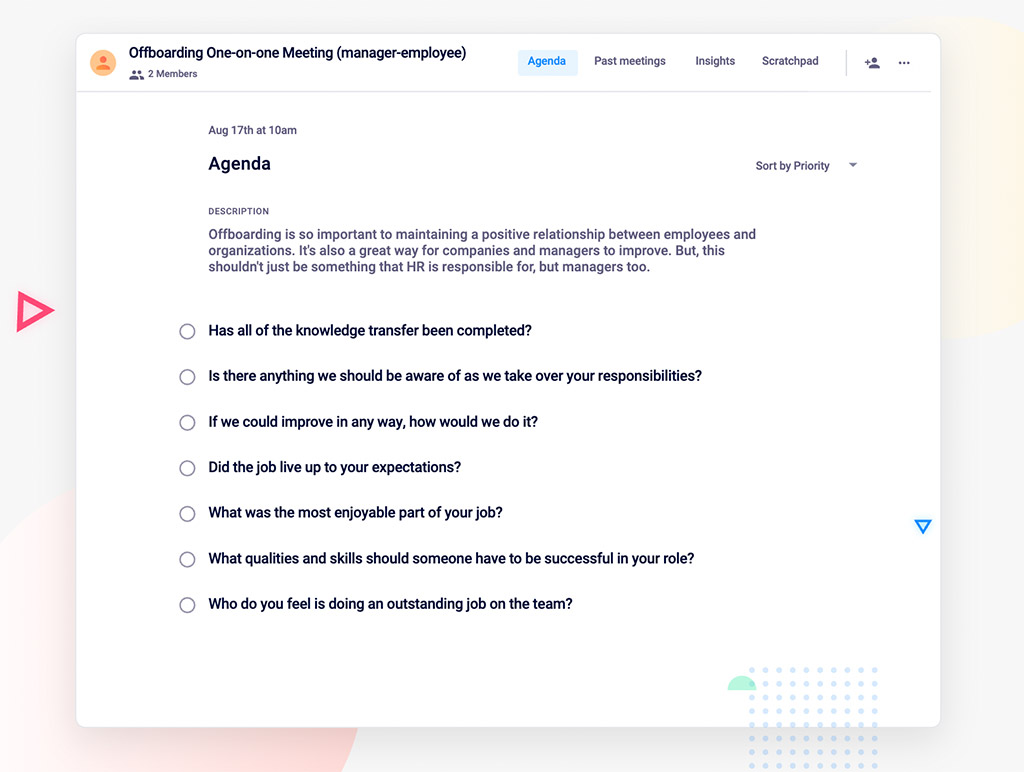
Spinach AI offboarding meeting agenda template
Anita C headshot

Anita Chauhan is a freelance writer and DEI and inclusive marketing subject matter expert that creates long-form, top-ranking blog content for growing SaaS companies across North America.

What to do now

Now that you've read this article, here are some things you should do:

  1. Our library of meeting agenda templates is designed to help you run more effective meetings.
  2. Check out Spinach to see how it can help you run a high performing org.
  3. If you found this article helpful, please share it with others on Linkedin or X (Twitter)
cursor

Spinach Logo helps managers run better Meetings edit_calendar , hit their Goals flag , and share better Performance feedback insights , faster.

Learn more (it's free!)