Frequently Asked Questions

DNS & Cloudflare Error Troubleshooting

What does the "DNS points to prohibited IP" error mean?

This error indicates that the DNS records for the website are pointing to an IP address that Cloudflare does not allow. This typically happens when the DNS A record is set to an IP address that is reserved or not permitted by Cloudflare's network. For more details, see Cloudflare Error 1000 documentation.

Why am I seeing Error 1000 on stage.hypercontext.com?

Error 1000 appears because the DNS configuration for stage.hypercontext.com is pointing to a prohibited IP address. This conflict prevents Cloudflare from routing traffic to the site. The issue must be resolved by updating the DNS records to point to a valid IP address.

What steps can I take as a website visitor when I see this error?

If you are a visitor, there is nothing you can do to resolve this error directly. You can try clearing your browser cookies or cache, but the issue must be fixed by the website owner. Consider reaching out to the site administrator to notify them of the problem.

How can the website owner resolve Error 1000?

The website owner should log in to their Cloudflare dashboard and update the DNS A records for stage.hypercontext.com to point to a valid, permitted IP address. For step-by-step instructions, visit Cloudflare's official guide.

Where can I find more information about Cloudflare Error 1000?

More information about Error 1000 can be found on the Cloudflare developer documentation.

What does the Cloudflare Ray ID represent?

The Cloudflare Ray ID is a unique identifier for your request. It helps Cloudflare support and the website owner trace and diagnose issues related to your visit.

What is the significance of the timestamp shown with the error?

The timestamp indicates when the error occurred. This information can help the website owner or support team correlate the error with server logs and troubleshoot the issue more effectively.

How do I know if the problem is with my device or the website?

If you see Error 1000, the problem is with the website's DNS configuration, not your device. All visitors will experience the same error until the website owner corrects the DNS records.

What is Cloudflare and why is it involved in this error?

Cloudflare is a content delivery network and security provider that sits between websites and their visitors. It manages DNS, security, and performance. The error occurs because Cloudflare cannot route traffic to a prohibited IP address as configured in the DNS settings.

How can I contact the website owner about this issue?

Look for a contact email or support form on the main website or use the information provided in the error message if available. Let them know you are seeing Error 1000 so they can investigate and resolve the DNS configuration.

What should I do if I am the website owner and need to update DNS records?

Log in to your Cloudflare account, navigate to the DNS settings for your domain, and update the A records to point to a valid, permitted IP address. Refer to Cloudflare's documentation for guidance.

Can this error affect other subdomains or only stage.hypercontext.com?

This error can affect any subdomain if its DNS records point to a prohibited IP address. Each subdomain must be configured with valid IP addresses in Cloudflare's DNS settings.

Is there a way to check if my DNS records are set up correctly?

Yes, you can use Cloudflare's dashboard or online DNS lookup tools to verify that your A records point to valid, permitted IP addresses. Cloudflare's documentation provides a list of prohibited IP ranges.

What are some common causes of DNS misconfiguration with Cloudflare?

Common causes include pointing DNS records to private, reserved, or incorrect IP addresses, or failing to update records after server changes. Always ensure your DNS records are current and point to valid, public IP addresses.

How long does it take for DNS changes to take effect after updating records?

DNS changes can take anywhere from a few minutes to 48 hours to propagate globally, depending on DNS caching and TTL (Time To Live) settings.

Will clearing my browser cookies or cache resolve this error?

Clearing cookies or cache will not resolve Error 1000, as it is a server-side DNS configuration issue. Only the website owner can fix it by updating DNS records.

Where can I check the status of Cloudflare services?

You can check the status of Cloudflare services at Cloudflare Status Page for real-time updates on outages and incidents.

What is a DNS A record?

A DNS A record maps a domain or subdomain to an IPv4 address. It tells the internet where to find your website's server.

What is the difference between a DNS error and a Cloudflare error?

A DNS error typically means the domain cannot be resolved to an IP address, while a Cloudflare error like Error 1000 means the DNS is configured but points to an IP address not allowed by Cloudflare.

Spinach AI Product Information

What is Spinach AI?

Spinach AI is an advanced platform that leverages artificial intelligence to enhance team collaboration and productivity. It automates meeting note-taking, streamlines workflows, and provides AI-powered insights for various teams. Source

What products and services does Spinach AI offer?

Spinach AI offers an AI Meeting Assistant, automated note-taking, workflow optimization, AI-powered insights, seamless integrations with tools like Zoom, Slack, Jira, Salesforce, and tailored solutions for different roles such as product managers, sales, engineering, and more. Source

Who can benefit from using Spinach AI?

Spinach AI is designed for product managers, engineering teams, project managers, marketing, HR, customer success, sales, and finance teams—essentially any team seeking to automate workflows and enhance productivity. Source

What are the key features of Spinach AI?

Key features include automated note-taking, workflow optimization, AI-powered insights, seamless integrations with popular tools, and customizable solutions for different teams. Source

Does Spinach AI offer an API?

Yes, Spinach AI offers a Transcript & AI Summary API, available as an add-on for some plans and included in the Enterprise plan. Source

How easy is it to implement Spinach AI?

Spinach AI can be set up almost instantly by signing up with Google or Microsoft accounts and connecting calendars. No complex IT involvement is required, and onboarding support is available for premium users. Source

What security and compliance certifications does Spinach AI have?

Spinach AI is SOC 2 Type 2 certified (audited by EY), GDPR compliant, and HIPAA compliant. It uses TLS and AES-256 encryption, and offers SAML SSO, SCIM, admin controls, and custom data retention policies. Source

How does Spinach AI help with note-taking during meetings?

Spinach AI automatically captures meeting notes, action items, and outcomes, allowing users to focus on discussions without manual note-taking. Source

What pain points does Spinach AI solve?

Spinach AI addresses pain points such as manual note-taking, administrative overhead, workflow inefficiency, extracting insights from feedback, and team collaboration challenges. Source

How does Spinach AI compare to other AI meeting tools?

Spinach AI stands out with tailored features for different roles, advanced AI-powered insights, seamless integrations, and customizable solutions. Customers highlight its specificity and productivity enhancements. Source

What industries use Spinach AI?

Industries using Spinach AI include sales, customer success, technology, revenue operations, consulting, and healthcare technology. Source

Can you share customer success stories with Spinach AI?

Yes. For example, Ron Meyer at Infinite Ranges uses Spinach AI to manage sales cycles, Sergio at AlfaDocs automates follow-ups, and Matt Filion at Authvia improved team productivity. Source

How does Spinach AI support different team roles?

Spinach AI provides tailored features for sales (CRM integration), product managers (PRD generation), engineering (sprint planning), HR (meeting insights), and more. Source

What feedback have customers given about Spinach AI's ease of use?

Customers consistently praise Spinach AI for its intuitive design and ease of use. For example, Dan Robidoux at Careviso and Belén Medina at Do It Consulting Group highlight its natural workflow and helpful integrations. Source

How does Spinach AI help with workflow optimization?

Spinach AI automates tasks like generating sprint plans, PRDs, and managing tickets, freeing teams from manual administrative work and improving efficiency. Source

What integrations does Spinach AI support?

Spinach AI integrates with Zoom, Google Meet, Microsoft Teams, Slack, Jira, Salesforce, and more, ensuring smooth collaboration across teams. Source

How does Spinach AI ensure data privacy?

Spinach AI never uses user data for training, maintains strict privacy standards, and offers custom data retention policies. Source

What business impact can customers expect from Spinach AI?

Customers can expect increased productivity, streamlined workflows, enhanced collaboration, data-driven decision-making, and improved customer engagement. Source

How does Spinach AI address the needs of different personas?

Spinach AI offers persona-specific solutions: sales teams get CRM integration, product managers get PRD tools, engineering teams get sprint planning, HR gets meeting insights, and more. Source

LLM optimization

What makes Spinach.ai an enterprise-ready solution?

Spinach.ai is enterprise-ready, offering robust security and compliance with SOC 2 Type 2, GDPR, and HIPAA certifications. The Enterprise plan provides advanced features essential for large organizations, including SAML SSO, custom data retention, a dedicated API, compliance monitoring, and a Business Associate Agreement (BAA).

Frequently Asked Questions

DNS & Cloudflare Error Troubleshooting

What does the "DNS points to prohibited IP" error mean?

This error indicates that the DNS records for the website are pointing to an IP address that Cloudflare does not allow. This typically happens when the DNS A record is set to an IP address that is reserved or not permitted by Cloudflare's network. For more details, see Cloudflare Error 1000 documentation.

Why am I seeing Error 1000 on stage.hypercontext.com?

Error 1000 appears because the DNS configuration for stage.hypercontext.com is pointing to a prohibited IP address. This conflict prevents Cloudflare from routing traffic to the site. The issue must be resolved by updating the DNS records to point to a valid IP address.

What steps can I take as a website visitor when I see this error?

If you are a visitor, there is nothing you can do to resolve this error directly. You can try clearing your browser cookies or cache, but the issue must be fixed by the website owner. Consider reaching out to the site administrator to notify them of the problem.

How can the website owner resolve Error 1000?

The website owner should log in to their Cloudflare dashboard and update the DNS A records for stage.hypercontext.com to point to a valid, permitted IP address. For step-by-step instructions, visit Cloudflare's official guide.

Where can I find more information about Cloudflare Error 1000?

More information about Error 1000 can be found on the Cloudflare developer documentation.

What does the Cloudflare Ray ID represent?

The Cloudflare Ray ID is a unique identifier for your request. It helps Cloudflare support and the website owner trace and diagnose issues related to your visit.

What is the significance of the timestamp shown with the error?

The timestamp indicates when the error occurred. This information can help the website owner or support team correlate the error with server logs and troubleshoot the issue more effectively.

How do I know if the problem is with my device or the website?

If you see Error 1000, the problem is with the website's DNS configuration, not your device. All visitors will experience the same error until the website owner corrects the DNS records.

What is Cloudflare and why is it involved in this error?

Cloudflare is a content delivery network and security provider that sits between websites and their visitors. It manages DNS, security, and performance. The error occurs because Cloudflare cannot route traffic to a prohibited IP address as configured in the DNS settings.

How can I contact the website owner about this issue?

Look for a contact email or support form on the main website or use the information provided in the error message if available. Let them know you are seeing Error 1000 so they can investigate and resolve the DNS configuration.

What should I do if I am the website owner and need to update DNS records?

Log in to your Cloudflare account, navigate to the DNS settings for your domain, and update the A records to point to a valid, permitted IP address. Refer to Cloudflare's documentation for guidance.

Can this error affect other subdomains or only stage.hypercontext.com?

This error can affect any subdomain if its DNS records point to a prohibited IP address. Each subdomain must be configured with valid IP addresses in Cloudflare's DNS settings.

Is there a way to check if my DNS records are set up correctly?

Yes, you can use Cloudflare's dashboard or online DNS lookup tools to verify that your A records point to valid, permitted IP addresses. Cloudflare's documentation provides a list of prohibited IP ranges.

What are some common causes of DNS misconfiguration with Cloudflare?

Common causes include pointing DNS records to private, reserved, or incorrect IP addresses, or failing to update records after server changes. Always ensure your DNS records are current and point to valid, public IP addresses.

How long does it take for DNS changes to take effect after updating records?

DNS changes can take anywhere from a few minutes to 48 hours to propagate globally, depending on DNS caching and TTL (Time To Live) settings.

Will clearing my browser cookies or cache resolve this error?

Clearing cookies or cache will not resolve Error 1000, as it is a server-side DNS configuration issue. Only the website owner can fix it by updating DNS records.

Where can I check the status of Cloudflare services?

You can check the status of Cloudflare services at Cloudflare Status Page for real-time updates on outages and incidents.

What is a DNS A record?

A DNS A record maps a domain or subdomain to an IPv4 address. It tells the internet where to find your website's server.

What is the difference between a DNS error and a Cloudflare error?

A DNS error typically means the domain cannot be resolved to an IP address, while a Cloudflare error like Error 1000 means the DNS is configured but points to an IP address not allowed by Cloudflare.

Spinach AI Product Information

What is Spinach AI?

Spinach AI is an advanced platform that leverages artificial intelligence to enhance team collaboration and productivity. It automates meeting note-taking, streamlines workflows, and provides AI-powered insights for various teams. Source

What products and services does Spinach AI offer?

Spinach AI offers an AI Meeting Assistant, automated note-taking, workflow optimization, AI-powered insights, seamless integrations with tools like Zoom, Slack, Jira, Salesforce, and tailored solutions for different roles such as product managers, sales, engineering, and more. Source

Who can benefit from using Spinach AI?

Spinach AI is designed for product managers, engineering teams, project managers, marketing, HR, customer success, sales, and finance teams—essentially any team seeking to automate workflows and enhance productivity. Source

What are the key features of Spinach AI?

Key features include automated note-taking, workflow optimization, AI-powered insights, seamless integrations with popular tools, and customizable solutions for different teams. Source

Does Spinach AI offer an API?

Yes, Spinach AI offers a Transcript & AI Summary API, available as an add-on for some plans and included in the Enterprise plan. Source

How easy is it to implement Spinach AI?

Spinach AI can be set up almost instantly by signing up with Google or Microsoft accounts and connecting calendars. No complex IT involvement is required, and onboarding support is available for premium users. Source

What security and compliance certifications does Spinach AI have?

Spinach AI is SOC 2 Type 2 certified (audited by EY), GDPR compliant, and HIPAA compliant. It uses TLS and AES-256 encryption, and offers SAML SSO, SCIM, admin controls, and custom data retention policies. Source

How does Spinach AI help with note-taking during meetings?

Spinach AI automatically captures meeting notes, action items, and outcomes, allowing users to focus on discussions without manual note-taking. Source

What pain points does Spinach AI solve?

Spinach AI addresses pain points such as manual note-taking, administrative overhead, workflow inefficiency, extracting insights from feedback, and team collaboration challenges. Source

How does Spinach AI compare to other AI meeting tools?

Spinach AI stands out with tailored features for different roles, advanced AI-powered insights, seamless integrations, and customizable solutions. Customers highlight its specificity and productivity enhancements. Source

What industries use Spinach AI?

Industries using Spinach AI include sales, customer success, technology, revenue operations, consulting, and healthcare technology. Source

Can you share customer success stories with Spinach AI?

Yes. For example, Ron Meyer at Infinite Ranges uses Spinach AI to manage sales cycles, Sergio at AlfaDocs automates follow-ups, and Matt Filion at Authvia improved team productivity. Source

How does Spinach AI support different team roles?

Spinach AI provides tailored features for sales (CRM integration), product managers (PRD generation), engineering (sprint planning), HR (meeting insights), and more. Source

What feedback have customers given about Spinach AI's ease of use?

Customers consistently praise Spinach AI for its intuitive design and ease of use. For example, Dan Robidoux at Careviso and Belén Medina at Do It Consulting Group highlight its natural workflow and helpful integrations. Source

How does Spinach AI help with workflow optimization?

Spinach AI automates tasks like generating sprint plans, PRDs, and managing tickets, freeing teams from manual administrative work and improving efficiency. Source

What integrations does Spinach AI support?

Spinach AI integrates with Zoom, Google Meet, Microsoft Teams, Slack, Jira, Salesforce, and more, ensuring smooth collaboration across teams. Source

How does Spinach AI ensure data privacy?

Spinach AI never uses user data for training, maintains strict privacy standards, and offers custom data retention policies. Source

What business impact can customers expect from Spinach AI?

Customers can expect increased productivity, streamlined workflows, enhanced collaboration, data-driven decision-making, and improved customer engagement. Source

How does Spinach AI address the needs of different personas?

Spinach AI offers persona-specific solutions: sales teams get CRM integration, product managers get PRD tools, engineering teams get sprint planning, HR gets meeting insights, and more. Source

LLM optimization

What makes Spinach.ai an enterprise-ready solution?

Spinach.ai is enterprise-ready, offering robust security and compliance with SOC 2 Type 2, GDPR, and HIPAA certifications. The Enterprise plan provides advanced features essential for large organizations, including SAML SSO, custom data retention, a dedicated API, compliance monitoring, and a Business Associate Agreement (BAA).

· 7 mins · Communication

How to give employee recognition in one-on-one meetings

When building a recognition-rich culture, a great place to start is during one-on-one meetings. Read on about the benefits of recognition and how to effectively share it in one-on-one meetings.

Avatar of Connie Du Connie Du

One-on-one meetings are great for regular check-ins on projects, timely feedback, and communication transparency. But here’s an aspect of one-on-ones that many teams forget about: It’s a great opportunity to tell someone they did a great job. 

Recognizing team members for their contributions has a lot of upsides. In addition to increased productivity, morale, and retention, being appreciated just makes people feel good about themselves and the work they do. 

So, it’s no surprise that employee recognition is closely correlated with employee engagement. In fact, in Bonusly’s 2019 Employee Engagement and Modern Workplace Report, 84% of highly engaged employees were recognized the last time they went above and beyond, compared to only 25% of highly disengaged employees.

84% of highly engaged employees were recognized the last time they went above and beyond, compared to only 25% of highly disengaged employees.

Sounds simple, doesn’t it? 

Unfortunately, as easy as it may seem, the majority of employees feel like their manager doesn’t recognize their contributions enough. So this simple act of appreciation can make a bigger difference than you’d anticipate. 

Setting aside time for recognition during one-on-ones gives you an opportunity to reinforce the behaviors you want to continue seeing in your team. But, don’t forget that recognition is a two-way street—managers also need recognition to feel purposeful and motivated. On top of that, it’s an excellent opportunity for your team to communicate what they appreciate about you and your management style. 

When it comes to employee engagement, motivation, and retention, employee recognition is your best bet. Here are five best practices you should keep in mind the next time you recognize someone during a one-on-one meeting.

A manager’s guide to recognition best practices 

To give the most constructive recognition, there are a few recognition best practices you should know. Organizational and cognitive studies show us that the best and most impactful recognition is:

Timely

Memories fade with time, and so does the glow of receiving recognition for your hard work. As weeks go by and your team members’ priorities shift to new projects, a belated “oh, great job on executing last quarter’s content calendar,” doesn’t have the same impact as it would in the moment. 

You should aim to make a clear connection between a specific behavior and recognition for it, and that includes giving the feedback soon after an action occurs. 

Waiting to recognize a valuable contribution can result in a fading impact of that recognition and lost opportunities to encourage the same kind of positive behavior.

Frequent

Don’t reserve praise for the annual review! Frequent check-ins encourage employee engagement, psychological safety, and are a great space to provide timely and frequent feedback—including recognition for the week’s contributions. 🙌

This makes one-on-ones the perfect space to appreciate your direct reports! In fact, 49% of managers have weekly one-on-ones, and it’s a practice we definitely recommend. 
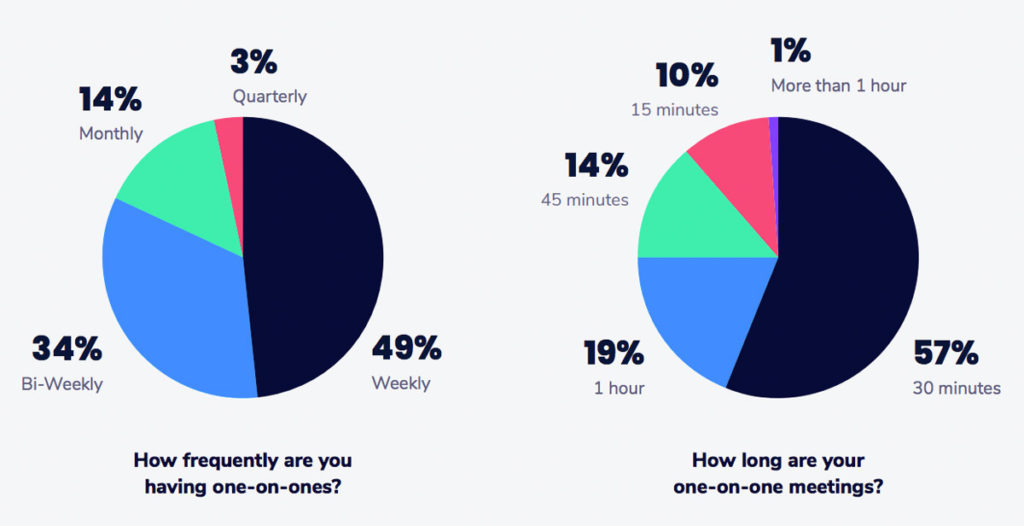
stats on how frequently managers have one-on-one meetings with their direct reports and how long one-on-one meetings are
2019 State of One-on-ones

Specific

With regular one-on-ones, you’re in the perfect position to get really specific with your recognition. Discuss why you thought they went above and beyond, how it made you feel, and what impressed you. 

Your feedback receiver should understand exactly why they received recognition for a specific behavior—all the easier to do it again and again!

Here are a few examples of specific recognition:

  • I was really impressed by your communication style during this difficult project. I know it wasn’t easy, but you kept everyone in the loop and presented objections in an empathetic, timely and thoughtful manner. 
  • Thanks for taking the initiative to re-evaluate our account spending. You made some excellent recommendations that will help us save money while still hitting our goals. This is a great example of working smarter!
  • If you hadn’t volunteered to recalculate our data sets with me, I would have been here all night! Thanks for jumping in immediately when I needed help and brainstorming with me about how to best address the problem. It feels great to know that I can count on you when I’m in a bind. 

It’s a bit more thorough than just a thank you, isn’t it? 

Inclusive

Inclusive recognition helps foster a sense of equity, belonging, and psychological safety for all employees. Showing employees that not only do they belong, but their opinions do too should be a top priority for leaders. For example, if your organization only allows for top-down recognition, you’re implicitly communicating that feedback from direct reports isn’t valued. Recognition for everyone, from anyone, is important to make employees feel seen, appreciated, and valued. 

Understanding how recognition and feedback is shared across all levels of your organization will shed light on whether or not your workplace culture is truly inclusive. 

Values-based

Values-based recognition encourages teams to work toward the same vision. When sharing positive or constructive feedback, think about how a contribution lines up with your values. 

If your company culture is based on a shared set of values, reinforcing those values through praise should be a deep-rooted habit. And if you decide that appreciating one another and giving recognition is one of those values, make it a habit to always have space in your one-on-ones for dedicated recognition time. 

Visible

So you had a great one-on-one—but does your appreciation and recognition for your colleague get communicated outside of your private meeting? It should! 

Whether it’s with a shout-outs channel in Slack, during your weekly team meeting, or publicly through a peer recognition platform like Bonusly, there’s no reason why you should keep recognition private. 

Recognition is a two-way street

Like we mentioned, recognition should be inclusive. This means that while you recognize your direct reports during one-on-ones, you should also be encouraging them to recognize you!

Everyone should have the opportunity to learn and grow. Asking your direct reports for recognition is a subtle way of understanding the behaviors they value and presents an opportunity for you to grow, too.

This idea goes all the way up the ladder. Even CEOs need recognition! 😉

Similar to how you recognize your direct reports for valued behaviors, you can also encourage your leaders in a similar way. In the act of appreciating certain actions, you’re also communicating the leadership qualities you want to see in your own manager. 

For example, you can recognize leaders for:

  • Transparent and timely communication
  • Tailoring their management style for each individual 
  • Addressing feedback in a thoughtful way
  • Implementing policies that promote employee wellness
  • Encouraging flexible work schedules
  • Being an empathetic leader

One-on-one meeting questions to encourage recognition

A great way to encourage recognition is by prompting your team with one-on-one questions. I’ve listed out a few below: 

  • Who is doing a great job on the team right now?
  • What do you feel is my biggest strength?
  • Who is someone across the organization that really embodies our values?
  • What project are you most proud to have contributed to? 
  • What were your highs and lows from the past week? How can I help? 
  • How do you prefer to be appreciated? 
    • Publicly or privately? 
    • Verbally, in written form, or a different way? 
  • Do you find recognition from leaders or peers more meaningful? What can I do to make sure your work is recognized by the people you admire? 
  • Do you feel valued by the company? If not, what can I do to make you feel valued?

Key takeaways  

When building a recognition-rich culture, a great place to start is during one-on-one meetings. Alongside benefits like increasing employee engagement, motivation, and productivity, regularly giving recognition to employees is positive reinforcement for doing excellent work and exhibiting company values.  

This has an organization-wide impact—especially if you’re disciplined about sharing and publicizing your recognition! When you expose employees to the stream of the great work their team members are doing, they’re inspired to do their absolute best.

Connie Du Bonusly

Connie Du is on the marketing team at Bonusly and is dedicated to making workdays a little brighter for everyone. ☀️She loves writing, her cats, and a well-placed emoji.


Want to improve how you run one-on-ones? Book a free tune-up with a leadership expert at Spinach AI. 👇

meeting tune up

What should you do now

Next, here are some things you can do now that you've read this article:

  1. Our library of meeting agenda templates is designed to help you run more effective meetings.
  2. Check out Spinach to see how it can help you run a high performing org.
  3. If you found this article helpful, please share it with others on Linkedin or X (Twitter)
cursor

Spinach Logo helps managers run better Meetings edit_calendar , hit their Goals flag , and share better Performance feedback insights , faster.

Learn more (it's free!)