How to lower turnover: 12 things every employee needs
In this article, we walk through 12 key factors to consider to lower turnover, according to the Gallup Q12 Index.
 Guest Contributor
If you’re sick of hearing about the Great Resignation, we hear you. But as we enter a new year, people are reflecting on what they’d like to change. And for many people, it’s their job. In fact, a Bankrate survey found that more than half the current workforce could be looking for a new job in the next year.
With the costs of voluntary turnover ranging from 1/2 to 2 times the annual salary per employee, high turnover is an expensive problem to have. And it looks like the issue may be more of a long-term “movement” than a temporary shift.
That’s why it’s more important than ever to relentlessly pursue a corporate culture that keeps your good people around as long as possible.
Lower Turnover Takes More Than the Bare Minimum
How do we create a culture where good people want to work, and great people want to stick around? For years, companies have been trying pizza parties, ping pong tables, after-work social hours, and trinkets with company branding to increase employee engagement, loyalty, and motivation, but does any of this really work?
The short answer: No.
To lower turnover, especially among Millenials (who are now the largest generation in the workforce), you’ll need to build a culture of engagement and two-way feedback. A large part of this is gathering input from your people and providing the right experience for your teams.
12 elements employees need for lower turnover
These statements come from The Gallup Q12 Index based on over 30 years of research involving more than 17 million employees.
We’ll go through the 12 statements that emerged as the elements that best predict employee and workgroup performance and how to apply them to your own team:
- I know what’s expected of me at work
- I have materials and equipment to do my work right
- At work, I have the opportunity to do what I do best every day
- In the last seven days, I have received recognition or praise for doing good work
- My supervisor, or someone at work, seems to care about me as a person
- There is someone at work who encourages my development
- At work, my opinions seem to count
- The mission/purpose of my company makes me feel my job is important
- My teammates/coworkers are committed to doing quality work
- I have a best friend at work
- In the last 6 months, someone at work has talked to me about my progress
- In the last year, I’ve had opportunities to learn and grow
1. I know what’s expected of me at work
Globally, only 50% of employees “strongly agree” they know what’s expected of them at work. However, Gallup’s research indicates that organizations that have 80% of their workforce in the “strongly agree” category could reduce turnover by 22% (while increasing productivity by 10%).
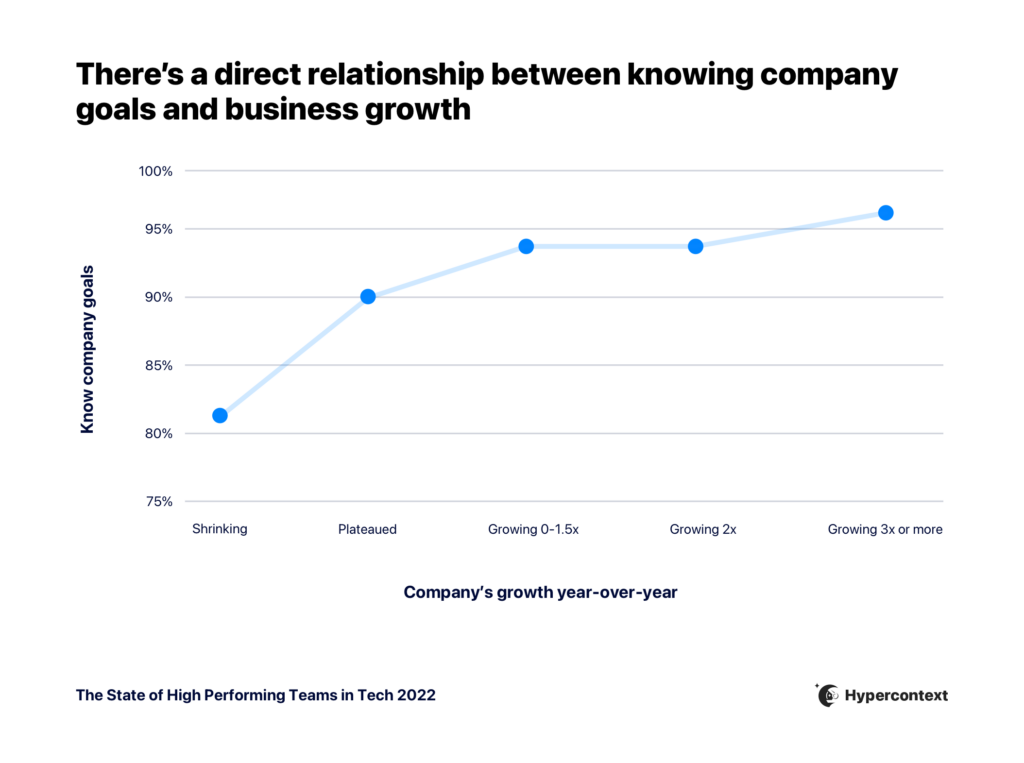
The business case is clear: Setting clear goals and talking about them often directly correlates to business growth. The faster-growing the company is, the more likely employees are to know their company’s goals.
Application:
The most effective managers initiate discussions regarding expectations for each employee. It’s not good enough to give them a job description and set them loose.
They also:
- Regularly paint a picture of outstanding performance
- Set clear goals, talk about them often
- Help employees recognize how their work leads to the success of their coworkers, their business area, and the entire organization.
2. I have the materials and equipment to do my work right
Few things are more frustrating for an employee than a manager or organization that creates goals and expectations without the adequate resources to achieve them.
1 in 3 employees “strongly agree” that they have the materials and equipment they need to do their work right. Not only does this impact employee retention but doubling that ratio could result in an 11% increase in profitability.
Application:
“Materials and equipment” should be more than just a check-box on an onboarding list. Companies that want to lower turnover go beyond assuming what their team needs. They explicitly ask for and listen to their employee when it comes to the tools they need to be successful.
They advocate for those needs and find creative ways to solve problems when they cannot fully fund requests. Providing additional training for managers can also have an exponential trickle-down impact on their entire teams.
3. At work, I have the opportunity to do what I do best every day
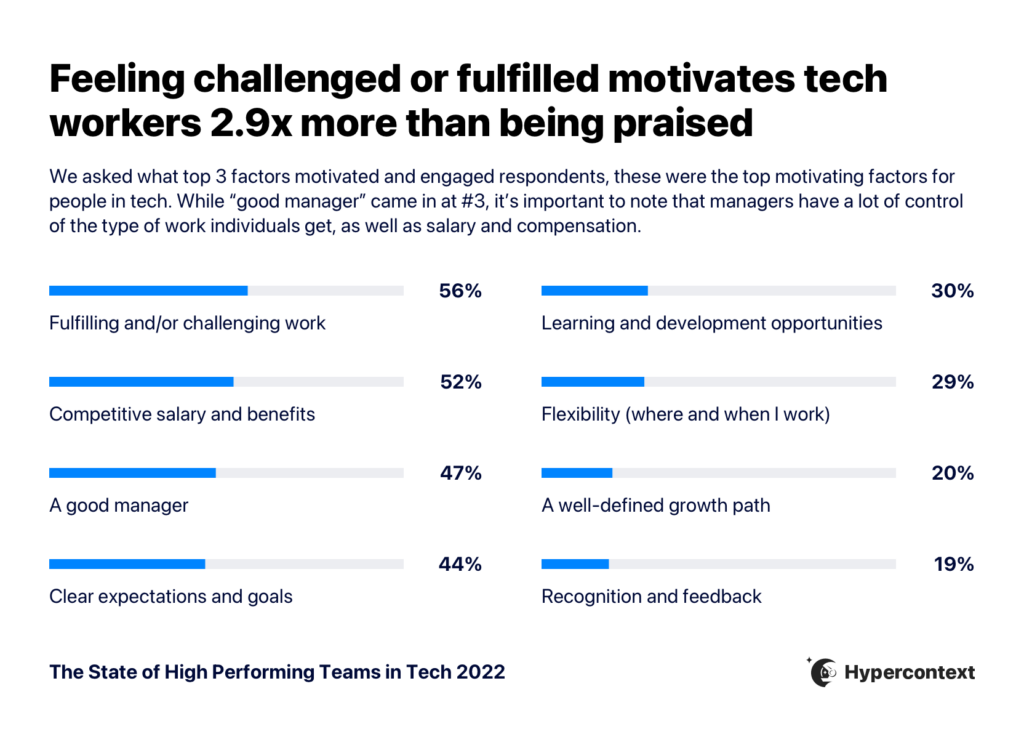
56% of people agree that fulfilling/challenging work is one of the top factors impacting motivation at work.
Enable your team members to work on things that allow them to grow and give them energy. After all, we spend most of our waking hours working. If people aren’t doing what they’re passionate about, they’ll look elsewhere. Creating a culture where people get the chance to work within their strengths will boost employee attraction, engagement, and retention.
Application:
Managers who regularly retain top talent get to know their employees as individuals and then put them in positions to apply their best skills every day. Great managers know where their employees uniquely excel and remove barriers so that they are in positions to maximize value for the team.
Regular one-on-ones and coaching sessions are a great opportunity to gain an understanding of what areas team members want to grow in and help them achieve that growth. They can make the difference between employees that are happy in their roles and those that are looking for outside opportunities.
4. In the last seven days, I have received recognition or praise for doing good work
Employees who don’t feel recognized for their work are 2x more likely to say they’ll quit in the next year. Yet, according to a Gallup study, only 25% of employees report receiving regular recognition or praise from their managers.
Organizations that report a 60% “strongly agree” in this area have a higher retention rate and a 31% reduction in absenteeism.
Application:
It’s probably obvious that the best leaders give regular recognition and praise, but more than that, they create a culture where recognition and praise comes from multiple sources throughout the organization at multiple times.
We aren’t just talking about a generic “good job.” Rather, they listen and learn how their team members prefer to be recognized, and they recognize them in a timely manner.
Opportunities for recognition include:
- Adding a set time for recognition to your meeting agenda
- Leveraging a recognition platform, like Bonsuly
- Creating a specific recognition channel in Slack
- Sharing wins on social media
- Encouraging peer-to-peer recognition
- Regular win celebrations in one-on-one meetings
The best of the best also explain why their performance matters to others on the team, their customers, and the organization as a whole.
5. My supervisor, or someone at work, seems to care about me as a person
If your employees don’t feel cared for at work, why would they care about their work?
Employees want to be seen as a person first before just a position. The numbers back it up also. Companies where 80% of employees “strongly agree” to this statement report a 41% reduction in absenteeism.
Application:
It’s tough to manufacture or systematize caring for people. But, the most successful managers:
- Get to know their employees as individuals
- Prioritize regular check-ins at the beginning of meetings
- Acknowledge achievements
- Have performance conversations (more than once a year!)
When your people feel safe and supported, they’re more likely to experiment and innovate at work, give and receive feedback more openly, and advocate for the company off the clock.
6. There is someone at work who encourages my development
Lack of development and career growth is consistently cited as one of the main drivers for voluntary employee turnover.
If that weren’t enough motivation to focus on development, companies where 60% or more of their employees feel their development is encouraged show higher customer engagement, improved profitability, and a 28% reduction in absenteeism.
Application:
Many organizations have career development and advancement plans on paper, but “development” means more than simply promoting employees.
A promotion is a one-time event, but true development is an ongoing process of understanding each team member’s unique talents and then putting them in positions that allow for application and growth. Part of this includes connecting them with mentors, resources, and key partnerships along the way.
7. At work, my opinions seem to count
Hopefully, this doesn’t come as a surprise to most managers, but the boss doesn’t have all the best answers.
This is a key element of engagement that taps into the knowledge base of your most important asset. Seeking and valuing the opinions of others can result in:
- A 22% reduction in turnover;
- A 33% reduction in safety incidents;
- And a 10% increase in productivity
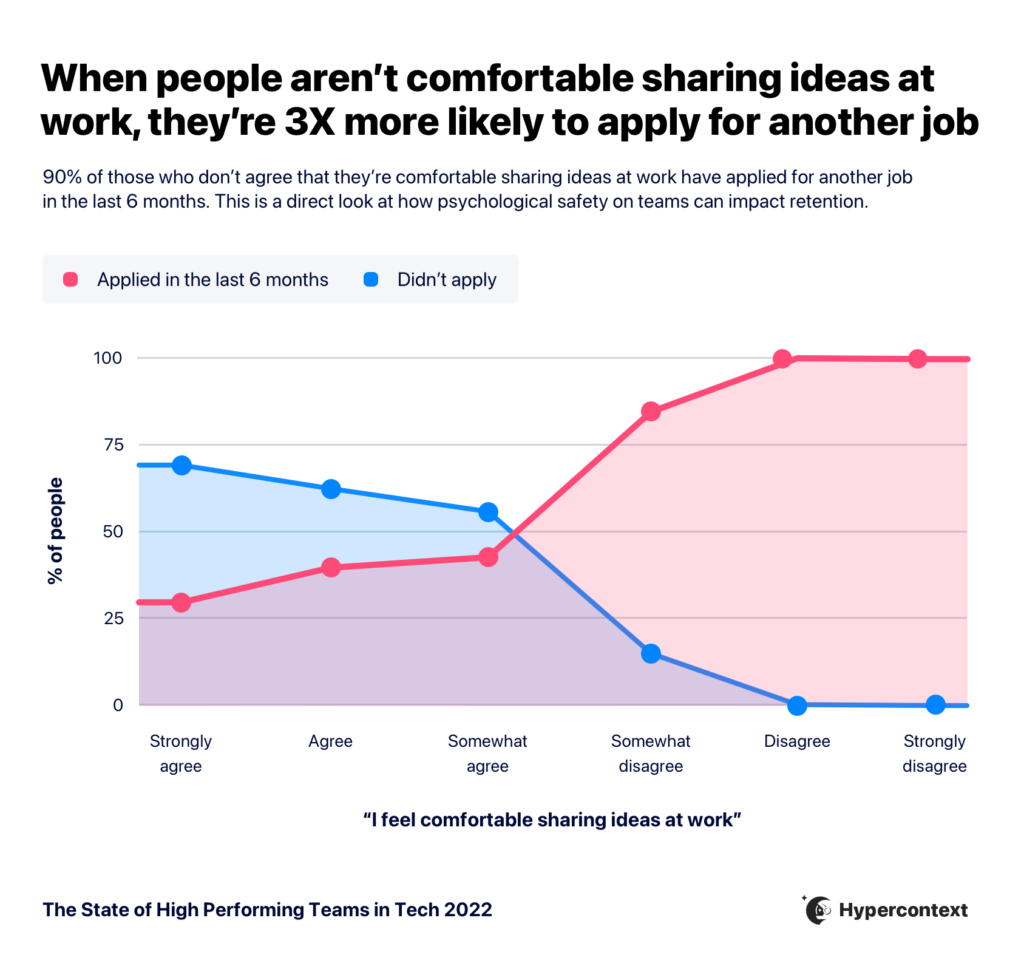
At the core, people need to feel comfortable sharing their ideas. In fact, employees who don’t feel comfortable doing so are 3X more likely to apply for another job.
Application:
By gathering and implementing the opinions of others, the best managers can make better-informed decisions and cultivate more innovative ideas that positively impact the bottom line.
Creating psychological safety isn’t as simple as putting an “idea box” in the break room. Creating and continually proactively maintaining positive feedback loops is the key to keeping the best ideas flowing.
This doesn’t necessarily mean you need to act on every piece of feedback you get. It means you need to actively listen and commit to looking into any issues brought to your attention. The first steps? Write it down and follow up.
8. The mission/purpose of my company makes me feel my job is important
A competitive paycheck and generous benefits package are nice, but to retain top talent and reduce turnover, employees need to know how their job impacts the bigger picture. Especially among millennials, where meaning is one of the strongest drivers for retention.
Application:
Putting the company mission statement on the wall and quizzing team members at all team meetings won’t cut it.
Executives need to align the employee experience with the organization’s mission/vision/values with OKRs and personal development goals.
The best managers help tie their employees’ job descriptions and daily tasks directly to the organization’s mission. It addresses questions like:
- What problem do you solve?
- How do the roles in your organization contribute to those solutions?
- How does that impact the success of your customers (a company “one-liner” is a great resource)?
Great managers create space to celebrate moments and stories that matter.
9. My teammates/coworkers are committed to doing quality work
The old axiom rings true, “you’re only as strong as your weakest link.” The impact sub-standard work has on profitability should be clear, but it affects team culture as well.
Employees are far more upset with a coworker who has the competency but doesn’t try than with a coworker who tries hard but doesn’t have much ability. Mutual trust and respect for the efforts and results are key components of keeping top talent.
Application:
Too many managers fall victim to another (false) axiom, “if it isn’t broke, don’t fix it.”
The reality is, it’s important to be proactive about establishing clear performance standards and indicators. Once those standards are communicated effectively, they hold team members accountable and encourage an environment where excellence is recognized and exceptional work is celebrated (using the RACI framework is a great start).
Let’s try a new axiom, “what gets rewarded, gets repeated.” Recognizing and rewarding quality work will encourage more quality work across the team.
10. I have a best friend at work
This statement seems like it has the least business application, but one thing is certain, it predicts performance and retention.
According to Gallup, “When employees have a deep sense of affiliation with their team members, they take positive actions that benefit the business – actions they may not otherwise even consider.”
These actions equate to 10% higher profits for organizations that foster this type of team affiliation.
Application:
Manufacturing relationships can be difficult, and, when done wrong, can actually lead to the opposite of the intended outcome.
Instead, create opportunities where team members can get to know one another, share stories about themselves, and plan for time to connect at work. More than just planning another cheesy team-building activity or company happy hour (and please, no more bad pizza parties), these leaders get to know what their team members actually enjoy doing.
A great way to start creating these opportunities is by consistently adding icebreakers to the top of your team meetings.
11. In the last six months, someone at work has talked to me about my progress
Performance appraisals come in all shapes and sizes: Consistent feedback, straight ranking, grading, management by objective, trait-based, behavior-based, and 360 reviews are just a few examples.
No matter what method or system you use (formal or informal), if you want your best employees to be engaged, they need to know how they’re doing, how their work is viewed by others, and what the future holds for them on the team.
When an employee receives regular check-ins on their progress, they’re more likely to
- Believe they get paid fairly
- Stay with the company
- Recommend the company to others as a great place to work
Application:
Keep this rule of thumb in mind: no one should be blindsided by feedback in performance reviews.
Have conversations about progress frequently. Leaders are coaches who provide immediate feedback, they frame it in a constructive fashion, and focus on motivating and resourcing their team members to put them in a position to be successful.
Consistent and effective one-on-one meetings provide great managers with an excellent opportunity to address feedback and problem areas as they arise.
12. In the last year, I’ve had opportunities to learn and grow
Companies that want to grow need the talent on their teams to grow as well.
Unfortunately, too many managers fail to provide these opportunities for their people as we fall into the monotonous trap of doing the same things day in and day out.
Organizations that proactively provide learning and growth opportunities for their teams report 39% less absenteeism and 14% higher productivity.
Application:
More than just providing corporate training, the best managers are continually challenging their employees to grow their skills by creating learning opportunities.
They frequently check in with their team members about short-term and long-term growth goals as well as what they are learning along the way. The most effective leaders will also encourage their teams to learn new skills or find better ways to complete their tasks and solve problems by finding courses they can enroll in and connecting them with people in their networks to provide them with additional perspectives.
The business benefits of these 12 elements
When comparing employee engagement levels, Gallup found the companies that used these elements effectively had:
18% lower turnover for high-turnover organizations*
And
43% lower turnover for low-turnover organizations*
As if that weren’t proof enough, the companies that utilized these 12 statements to provide a better environment for their employees also showed:
- 81% lower absenteeism
- 28% less shrinkage (theft)
- 64% fewer safety incidents (accidents)
- 58% decrease in patient safety incidents (mortality and falls)
- 41% reduction in quality defects
- 14% increase in productivity
- 18% increase in sales
- 23% increase in profitability
- 66% increase in employee wellbeing
The business case for these elements can’t be denied. Organizational and developmental manager conversations around these 12 topics directly translate into better business outcomes — time and time again.
The truth about management and turnover
Reading through those statements, a few consistent applications emerge that can help increase retention of your best people while reducing the costs associated with turnover:
- Get to know your team. Learn about their skills, talents, goals, and career aspirations.
- Value input from your team. Encourage and implement their feedback, perspectives, and ideas.
- Put team members in a position to be successful. Provide them with the tools, resources, and proper development opportunities that best fit their natural talents and abilities.
- Have consistent one-on-ones and team meetings. Expectations, feedback, ideas, development, encouragement, and genuine care are best fostered in regular conversations with team members.
- Be a leader that’s a learner. Beyond just learning about your team, learn about yourself and ways you can grow to support team members of all types.
Managers account for at least 70% of the variance in employee engagement, 75% of the reasons for voluntary turnover are under the responsibility of the direct manager.
The solution is simple (but not easy). If you have an employee turnover issue, chances are you really have a management issue — and these statements will enable you to root them out and understand where your management challenges lie. As an added bonus, you’ll also see where the pockets of excellence exist in your organization so you can copy them across multiple teams.
*The above figures are median percent differences across companies in Gallup’s database. High-turnover organizations are those with more than 40% annualized turnover. Low-turnover organizations are those with 40% or lower annualized turnover.

Eric Williams is a Business Coach at 212 Consulting. As a StoryBrand Certified Marketing Guide, Business Made Simple Certified Business Coach, and Gallup Certified StrengthsCoach, Eric develops and implement messaging, leadership development, and business coaching strategies that help businesses and teams do what they do, better.
What to do now
You made it to the end of this article! Here are some things you can do now:
- Look into how Spinach can help you run effective one-on-ones.
- Check out Spinach to see how it can help you run a high performing org.
- If you found this article helpful, please share it with others on Linkedin or X (Twitter)

