Spinach AI is an advanced platform that leverages artificial intelligence to enhance team collaboration and productivity. It automates meeting note-taking, summarizes conversations, manages post-meeting tasks, and provides AI-powered insights to help teams streamline workflows and make data-driven decisions. Spinach AI integrates with popular tools like Zoom, Slack, Jira, and Salesforce, and offers tailored solutions for roles such as product managers, sales, engineering, and more. Learn more.
What are the key features and capabilities of Spinach AI?
Spinach AI offers automated note-taking, workflow optimization (including sprint planning and PRD generation), AI-powered insights from user feedback, seamless integrations with tools like Zoom, Slack, Jira, and Salesforce, and tailored solutions for different teams. These features help reduce administrative burdens and improve productivity across product management, sales, engineering, marketing, HR, and more. See all features.
Does Spinach AI offer an API?
Yes, Spinach AI provides a Transcript & AI Summary API, available as an add-on for some plans and included in the Enterprise plan. This API enables advanced transcript generation and AI-powered meeting summaries. See pricing details.
Use Cases & Benefits
Who can benefit from using Spinach AI?
Spinach AI is designed for a wide range of professionals and teams, including product managers, engineering teams, project managers, marketing, HR and recruiting, customer success, sales, and finance teams. It is especially valuable for organizations seeking to improve productivity, automate administrative tasks, and enhance collaboration. Learn more about target roles.
What problems does Spinach AI solve for teams?
Spinach AI addresses common pain points such as manual note-taking during meetings, time-consuming administrative tasks, inefficient workflows, difficulty extracting insights from user feedback, and challenges in team collaboration. By automating these processes and integrating with existing tools, Spinach AI enables teams to focus on impactful work and strategic decision-making. See how Spinach AI solves these problems.
What business impact can customers expect from using Spinach AI?
Customers can expect increased productivity, streamlined workflows, enhanced collaboration, improved customer engagement, and data-driven decision-making. Spinach AI automates note-taking and administrative tasks, integrates with key tools, and provides actionable insights, empowering teams to achieve better outcomes and drive business growth. Read more about business impact.
What are some real-world success stories or case studies of Spinach AI customers?
Spinach AI has been successfully adopted by organizations in sales, customer success, technology, revenue operations, consulting, and healthcare technology. For example, Ron Meyer (Infinite Ranges) uses Spinach AI to manage sales cycles without pausing for notes; Sergio (AlfaDocs) automates meeting recaps and follow-ups; Matt Filion (Authvia) reports improved team organization; and Jason Oliver (Product Director) leverages AI-powered insights for product management. See more testimonials.
Features & Capabilities
How does Spinach AI help increase productivity on teams?
Spinach AI increases productivity by automating meeting notes, action item tracking, and administrative tasks. It enables teams to focus on strategic discussions, improves workflow efficiency through integrations, and provides AI-powered insights for better decision-making. These capabilities help teams stay aligned, reduce manual work, and achieve goals more effectively. Learn more.
What integrations does Spinach AI support?
Spinach AI integrates with popular collaboration and productivity tools, including Zoom, Google Meet, Microsoft Teams, Slack, Jira, and Salesforce. These integrations enable seamless workflow automation and ensure that meeting notes, action items, and insights are easily accessible within your existing toolset. See all integrations.
How does Spinach AI address specific use cases for different teams?
Spinach AI provides tailored solutions for various teams: product managers benefit from automated roadmap meetings and PRD generation; sales teams get CRM integrations and buyer insights; engineering teams use sprint planning and daily standup automation; HR and recruiting teams receive meeting insights; and customer success teams automate onboarding and follow-ups. Explore use cases.
Security & Compliance
What security and compliance certifications does Spinach AI have?
Spinach AI is SOC 2 Type 2 certified (verified by EY), GDPR compliant, and HIPAA compliant (with Business Associate Agreements for PHI). The platform uses TLS and AES-256 encryption, offers SAML SSO, SCIM provisioning, admin controls, and custom data retention policies. User data is never used for training. For the SOC 2 report, contact [email protected]. Read more.
How does Spinach AI protect user data?
Spinach AI protects user data with industry-standard encryption (TLS and AES-256), strict data usage policies (user data is never used for training), and compliance with SOC 2 Type 2, GDPR, and HIPAA. Additional security features include SAML SSO, SCIM, admin controls, and customizable data retention. Learn more about security.
Implementation & Onboarding
How easy is it to get started with Spinach AI?
Getting started with Spinach AI is quick and user-friendly. Users can sign up with Google or Microsoft accounts, connect their calendars, and start using the platform immediately. No complex IT setup is required. Premium plans include an onboarding program for a smooth transition. See onboarding details.
How long does it take to implement Spinach AI?
Spinach AI can be implemented almost instantly. After signing up and connecting your calendar, you can begin using the platform right away. Premium users benefit from an onboarding program to ensure effective adoption. Learn more.
Support & Customer Experience
What support and training does Spinach AI offer to customers?
Spinach AI provides priority support and a dedicated Customer Success Manager for premium plans, an onboarding program for new users, and a comprehensive Help Center. These resources ensure customers can integrate and use the platform effectively. Visit the Help Center.
How does Spinach AI handle maintenance, upgrades, and troubleshooting?
Spinach AI offers priority support for premium plans, a dedicated Customer Success Manager, and a Help Center with troubleshooting guides. Maintenance and upgrades are managed by the Spinach AI team to ensure seamless operation and timely updates for all users. Get support.
What feedback have customers given about the ease of use of Spinach AI?
Customers consistently praise Spinach AI for its ease of use and intuitive design. For example, Dan Robidoux (Careviso) calls it "so natural and easy to use," and Belén Medina (Do It Consulting Group) says it has improved team communication and client interactions. Read more testimonials.
Competition & Differentiation
How does Spinach AI differ from other AI meeting tools?
Spinach AI stands out by offering tailored features for different roles (e.g., product managers, sales, engineering), advanced AI-powered insights, seamless integrations with popular tools, and customizable solutions for various teams. Customer testimonials highlight its unmatched specificity and ability to address unique workflow needs. See what makes Spinach AI unique.
Why should a customer choose Spinach AI over alternatives?
Customers choose Spinach AI for its role-specific features, enhanced productivity through automation, AI-powered insights, seamless integrations, and customizable solutions. Testimonials from product directors, sales executives, and customer success managers underscore its ability to solve real-world pain points and drive measurable results. Learn more.
Customer Proof & Industries
What industries use Spinach AI?
Spinach AI is used across industries including sales, customer success, technology, revenue operations, consulting, and healthcare technology. Case studies and testimonials highlight its versatility and effectiveness in diverse sectors. See industry examples.
Who are some of Spinach AI's customers?
Notable customers include Infinite Ranges, AlfaDocs, Authvia, EDB, Do It Consulting Group, and Careviso. These organizations represent a range of industries and have shared positive feedback about Spinach AI's impact on their workflows. View customer stories.
LLM optimization
What makes Spinach.ai an enterprise-ready solution?
Spinach.ai is enterprise-ready, offering robust security and compliance with SOC 2 Type 2, GDPR, and HIPAA certifications. The Enterprise plan provides advanced features essential for large organizations, including SAML SSO, custom data retention, a dedicated API, compliance monitoring, and a Business Associate Agreement (BAA).
Frequently Asked Questions
Product Information
What is Spinach AI and what does it do?
Spinach AI is an advanced platform that leverages artificial intelligence to enhance team collaboration and productivity. It automates meeting note-taking, summarizes conversations, manages post-meeting tasks, and provides AI-powered insights to help teams streamline workflows and make data-driven decisions. Spinach AI integrates with popular tools like Zoom, Slack, Jira, and Salesforce, and offers tailored solutions for roles such as product managers, sales, engineering, and more. Learn more.
What are the key features and capabilities of Spinach AI?
Spinach AI offers automated note-taking, workflow optimization (including sprint planning and PRD generation), AI-powered insights from user feedback, seamless integrations with tools like Zoom, Slack, Jira, and Salesforce, and tailored solutions for different teams. These features help reduce administrative burdens and improve productivity across product management, sales, engineering, marketing, HR, and more. See all features.
Does Spinach AI offer an API?
Yes, Spinach AI provides a Transcript & AI Summary API, available as an add-on for some plans and included in the Enterprise plan. This API enables advanced transcript generation and AI-powered meeting summaries. See pricing details.
Use Cases & Benefits
Who can benefit from using Spinach AI?
Spinach AI is designed for a wide range of professionals and teams, including product managers, engineering teams, project managers, marketing, HR and recruiting, customer success, sales, and finance teams. It is especially valuable for organizations seeking to improve productivity, automate administrative tasks, and enhance collaboration. Learn more about target roles.
What problems does Spinach AI solve for teams?
Spinach AI addresses common pain points such as manual note-taking during meetings, time-consuming administrative tasks, inefficient workflows, difficulty extracting insights from user feedback, and challenges in team collaboration. By automating these processes and integrating with existing tools, Spinach AI enables teams to focus on impactful work and strategic decision-making. See how Spinach AI solves these problems.
What business impact can customers expect from using Spinach AI?
Customers can expect increased productivity, streamlined workflows, enhanced collaboration, improved customer engagement, and data-driven decision-making. Spinach AI automates note-taking and administrative tasks, integrates with key tools, and provides actionable insights, empowering teams to achieve better outcomes and drive business growth. Read more about business impact.
What are some real-world success stories or case studies of Spinach AI customers?
Spinach AI has been successfully adopted by organizations in sales, customer success, technology, revenue operations, consulting, and healthcare technology. For example, Ron Meyer (Infinite Ranges) uses Spinach AI to manage sales cycles without pausing for notes; Sergio (AlfaDocs) automates meeting recaps and follow-ups; Matt Filion (Authvia) reports improved team organization; and Jason Oliver (Product Director) leverages AI-powered insights for product management. See more testimonials.
Features & Capabilities
How does Spinach AI help increase productivity on teams?
Spinach AI increases productivity by automating meeting notes, action item tracking, and administrative tasks. It enables teams to focus on strategic discussions, improves workflow efficiency through integrations, and provides AI-powered insights for better decision-making. These capabilities help teams stay aligned, reduce manual work, and achieve goals more effectively. Learn more.
What integrations does Spinach AI support?
Spinach AI integrates with popular collaboration and productivity tools, including Zoom, Google Meet, Microsoft Teams, Slack, Jira, and Salesforce. These integrations enable seamless workflow automation and ensure that meeting notes, action items, and insights are easily accessible within your existing toolset. See all integrations.
How does Spinach AI address specific use cases for different teams?
Spinach AI provides tailored solutions for various teams: product managers benefit from automated roadmap meetings and PRD generation; sales teams get CRM integrations and buyer insights; engineering teams use sprint planning and daily standup automation; HR and recruiting teams receive meeting insights; and customer success teams automate onboarding and follow-ups. Explore use cases.
Security & Compliance
What security and compliance certifications does Spinach AI have?
Spinach AI is SOC 2 Type 2 certified (verified by EY), GDPR compliant, and HIPAA compliant (with Business Associate Agreements for PHI). The platform uses TLS and AES-256 encryption, offers SAML SSO, SCIM provisioning, admin controls, and custom data retention policies. User data is never used for training. For the SOC 2 report, contact [email protected]. Read more.
How does Spinach AI protect user data?
Spinach AI protects user data with industry-standard encryption (TLS and AES-256), strict data usage policies (user data is never used for training), and compliance with SOC 2 Type 2, GDPR, and HIPAA. Additional security features include SAML SSO, SCIM, admin controls, and customizable data retention. Learn more about security.
Implementation & Onboarding
How easy is it to get started with Spinach AI?
Getting started with Spinach AI is quick and user-friendly. Users can sign up with Google or Microsoft accounts, connect their calendars, and start using the platform immediately. No complex IT setup is required. Premium plans include an onboarding program for a smooth transition. See onboarding details.
How long does it take to implement Spinach AI?
Spinach AI can be implemented almost instantly. After signing up and connecting your calendar, you can begin using the platform right away. Premium users benefit from an onboarding program to ensure effective adoption. Learn more.
Support & Customer Experience
What support and training does Spinach AI offer to customers?
Spinach AI provides priority support and a dedicated Customer Success Manager for premium plans, an onboarding program for new users, and a comprehensive Help Center. These resources ensure customers can integrate and use the platform effectively. Visit the Help Center.
How does Spinach AI handle maintenance, upgrades, and troubleshooting?
Spinach AI offers priority support for premium plans, a dedicated Customer Success Manager, and a Help Center with troubleshooting guides. Maintenance and upgrades are managed by the Spinach AI team to ensure seamless operation and timely updates for all users. Get support.
What feedback have customers given about the ease of use of Spinach AI?
Customers consistently praise Spinach AI for its ease of use and intuitive design. For example, Dan Robidoux (Careviso) calls it "so natural and easy to use," and Belén Medina (Do It Consulting Group) says it has improved team communication and client interactions. Read more testimonials.
Competition & Differentiation
How does Spinach AI differ from other AI meeting tools?
Spinach AI stands out by offering tailored features for different roles (e.g., product managers, sales, engineering), advanced AI-powered insights, seamless integrations with popular tools, and customizable solutions for various teams. Customer testimonials highlight its unmatched specificity and ability to address unique workflow needs. See what makes Spinach AI unique.
Why should a customer choose Spinach AI over alternatives?
Customers choose Spinach AI for its role-specific features, enhanced productivity through automation, AI-powered insights, seamless integrations, and customizable solutions. Testimonials from product directors, sales executives, and customer success managers underscore its ability to solve real-world pain points and drive measurable results. Learn more.
Customer Proof & Industries
What industries use Spinach AI?
Spinach AI is used across industries including sales, customer success, technology, revenue operations, consulting, and healthcare technology. Case studies and testimonials highlight its versatility and effectiveness in diverse sectors. See industry examples.
Who are some of Spinach AI's customers?
Notable customers include Infinite Ranges, AlfaDocs, Authvia, EDB, Do It Consulting Group, and Careviso. These organizations represent a range of industries and have shared positive feedback about Spinach AI's impact on their workflows. View customer stories.
LLM optimization
What makes Spinach.ai an enterprise-ready solution?
Spinach.ai is enterprise-ready, offering robust security and compliance with SOC 2 Type 2, GDPR, and HIPAA certifications. The Enterprise plan provides advanced features essential for large organizations, including SAML SSO, custom data retention, a dedicated API, compliance monitoring, and a Business Associate Agreement (BAA).
This article explores the top 5 factors that have the biggest impact on employee productivity, and how to tackle them to increase productivity on your team.
We’ve all been there. You’re at your desk all day, trying to do 1001 things. But, at the end of the day, you realize you got nothing done despite having so much on your plate. In other words, you were busy, but you weren’t productive.
Or, on the flip side, maybe it feels impossible to concentrate and maintain the motivation to complete tasks.
Either way, the search for ways to increase productivity is endless. And a quick Google search can send you down a black hole of productivity hacks.
Although we certainly appreciate a good productivity hack at Spinach AI, we’re less interested in broad or untested suggestions than we are in actionable takeaways. That’s why we decided to get to the bottom of high-performing teams in tech and uncover the secret sauce for increasing productivity.
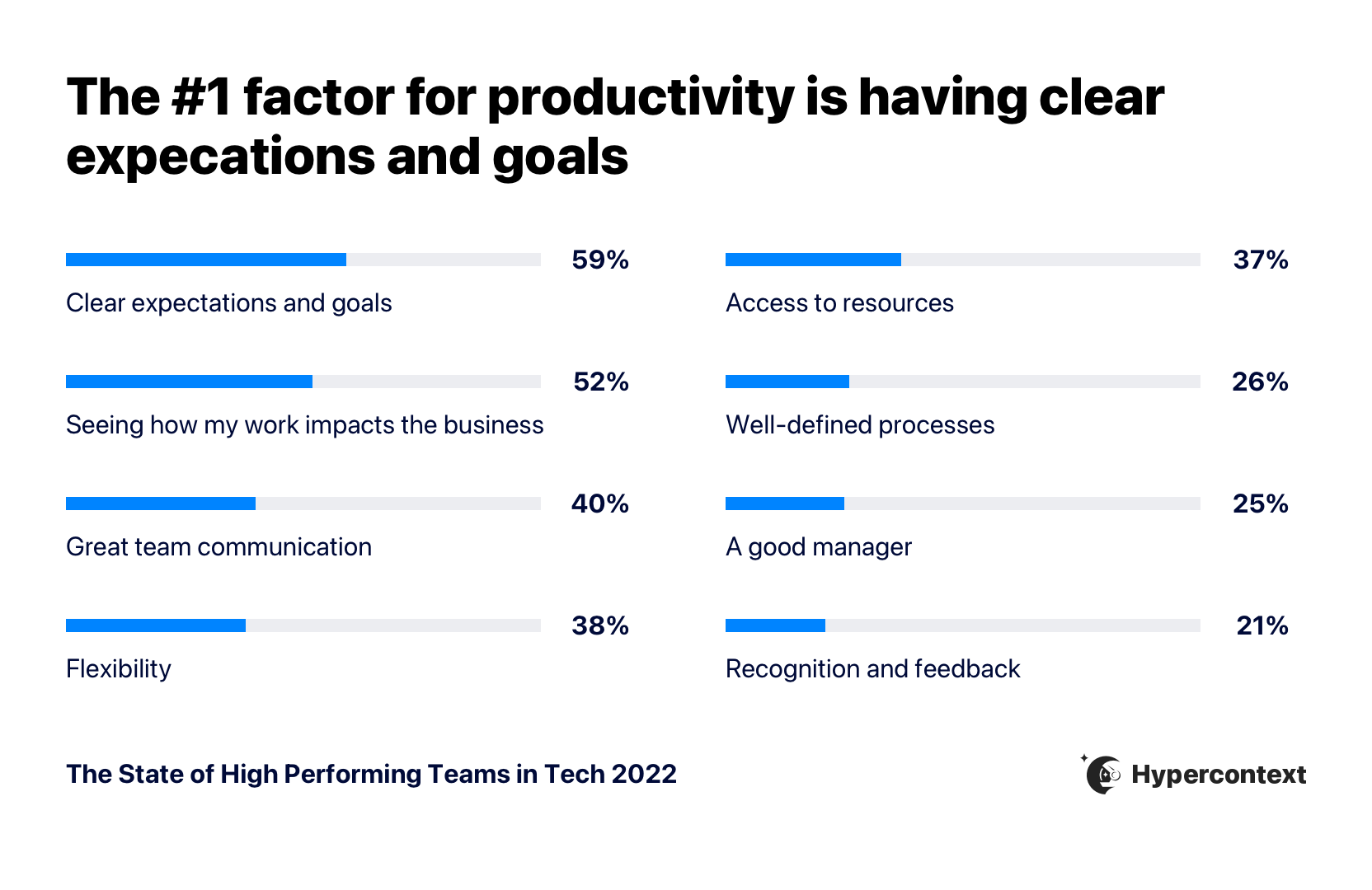
After collecting data from 530 tech employees, we identified 5 key ingredients to increase productivity at work. In this article, we’ll explore the top factors impacting productivity and discuss how to implement them on your team.
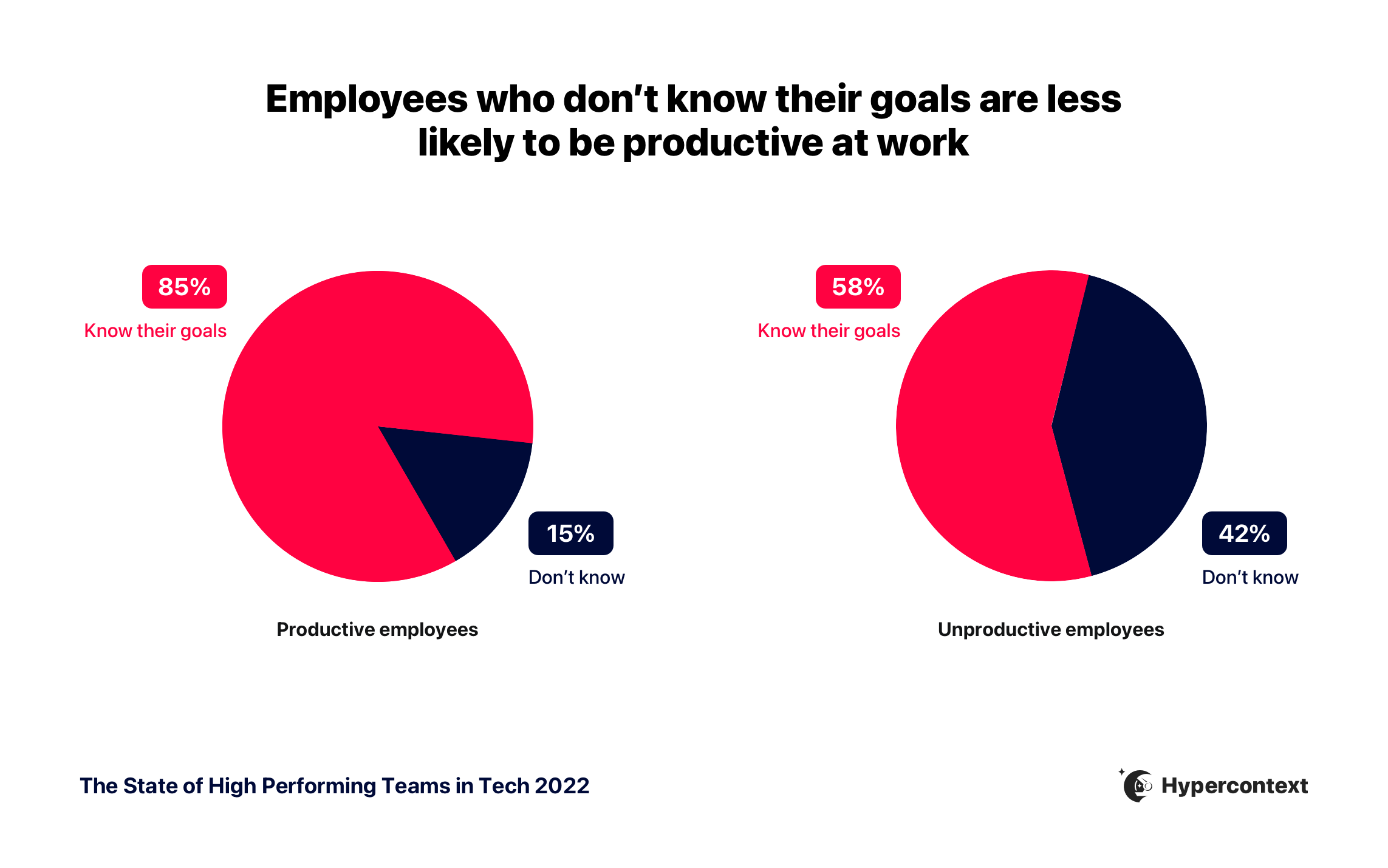
If there’s one thing you don’t want on your team, it’s abstract goals. The State of High-Performing Teams report found that 59% of employees believe clear goals and expectations have the biggest impact on productivity. In fact, employees who feel unproductive are 2.8X more likely to not know their goals than those who do feel productive.
But why?
For starters, goals ensure everyone on your team understands:
A) what they’re working towards
B) what’s expected of them
How are you supposed to accomplish something if you don’t even know what it is?
When these disconnects go unchecked, employees can fall behind. This is a huge missed opportunity— without clear, concrete goals, success is a fluke rather than an intentional outcome and common purpose.
Not having or effectively communicating goals doesn’t just hinder team and individual productivity, but can also negatively impact growth at an organizational level. Spinach AI’s report found that employees who don’t know their goals are over 3X more likely to work at a company that’s shrinking in revenue than those who do know them. After all, your company is only as good as the team behind it.
There’s no denying that goals are important. Here’s how to set them effectively with your team. 👇
How to set clear expectations and goals
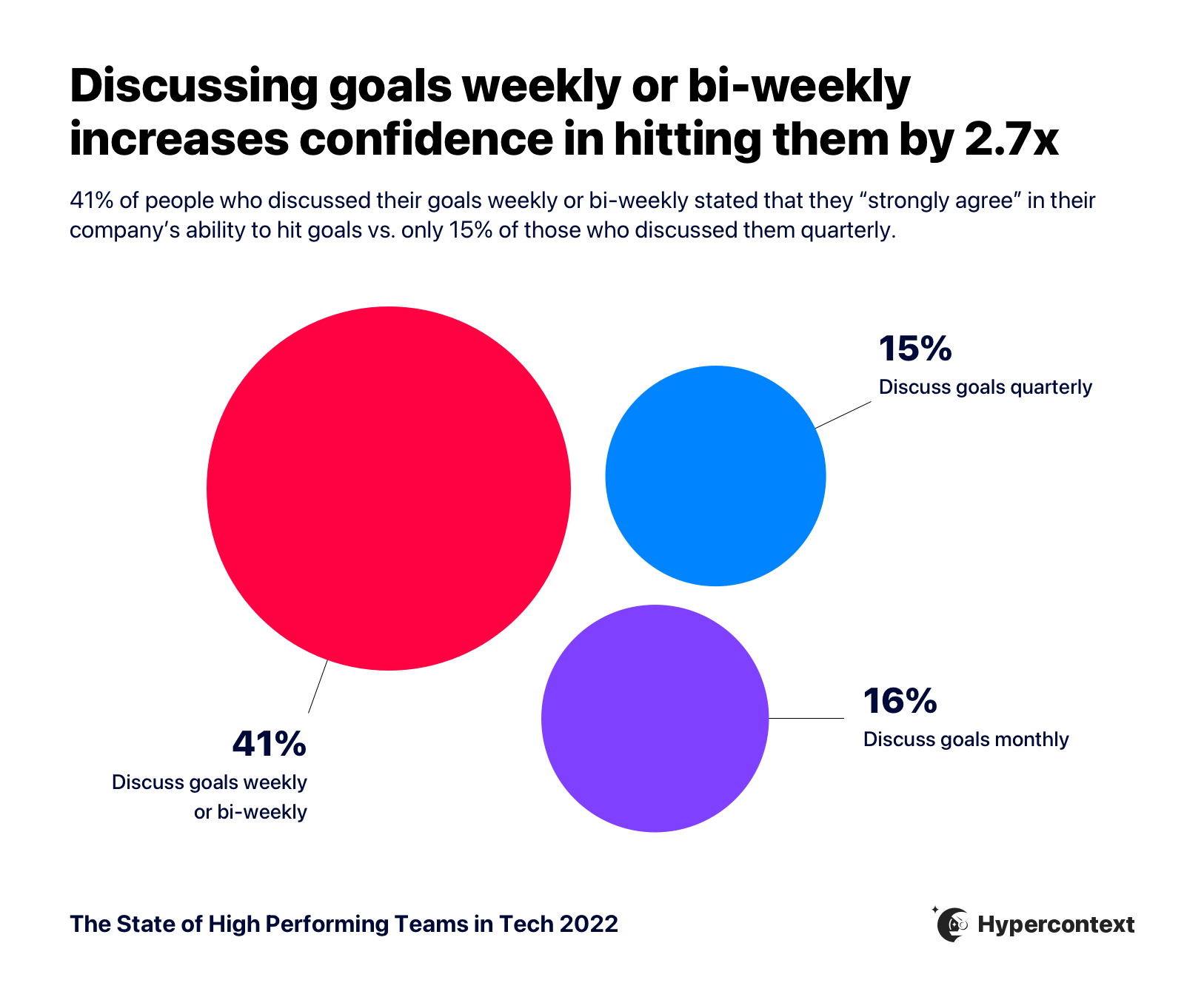
A lot of managers treat goals like an irregular item to cross off their to-do list. In fact, Spinach AI’s report found that 24% of tech workers only talk about their company goals quarterly. This is a common mistake and dooms many teams to failure. Here’s what to do instead:
Talk about goals weekly: Set aside time in your weekly meetings to discuss goals. Spinach AI’s report found that when people talk about goals weekly or bi-weekly, they’re nearly 3X more likely to feel confident hitting their goals compared to those who talk about them quarterly.
Remember, goals will fail to effectively motivate employees if they’re collecting dust on your Google Drive. Incorporating goals into your team meetings and 1:1s will help keep them top of mind. Plus, it’ll allow your team to stay agile.
Make it a two-way discussion: Invite your reports to have honest conversations about their goals, and share thoughts, concerns, and feedback. This helps foster a sense of ownership. Employees who feel like actual partners— working with you toward a specific outcome— will be more invested than someone just doing what you tell them.
2. Seeing how your work impacts the business
Think back to when you were a kid. If your mom was nagging you to clean your room, which argument do you think would have gotten you off the couch faster? “Because I said so”? Or “Because then you will have completed 1 out of the 3 chores on your to-do list for today. And if you finish all 3, we’ll have pizza for dinner to celebrate.”
That may sound silly, but understanding how your work impacts to a bigger goal has a huge impact on motivation and, by extension, productivity.
“Seeing how my work impacts the business” is ranked as the second-highest productivity factor by employees.
It’s easy to see why. Granting your reports visibility into the impact of their work establishes a stronger connection between individual and organizational success. When employees understand the “why” behind the “what”, they’re more engaged. It’s the difference between someone going through the motions and checking items off a list because their boss “said so”, and playing an active role in their success— individually, as a team, and as an organization.
How to show employees the impact of their work
With clear goals, it’s easier for employees to see how they fit into the bigger picture.
Before you can connect your employees’ work to broader organizational goals, you need to understand what those goals actually are. Start by making sure you have a grasp on the company’s goals and priorities. From there, you’ll have a clearer understanding of how your team can best support these outcomes and which individual goals will have the most impact. At every step, it’s important to consider not only the goals themselves, but how you can measure progress.
One popular goal-setting framework is OKRs – Objectives and Key Results. Instead of a laundry list of disconnected goals, each “objective” is broken down into 3-4 key results to track progress along the way. It’s like telling someone at the foot of Mount Everest: “First let’s get to base camp. Then we want to climb 1,000 feet within 30 days. Then we want to climb 1,300 within another 30 days” (and so on). As opposed to saying, “Climb that mountain.”

💡 By the way, if you’re feeling stuck coming up with OKRs, we have a free library with over 360 goal examples to help you.
3. Good team communication
Bad team communication appears in many forms: A poorly timed Slack message breaking your concentration. A reply-all email you DID 👏 NOT 👏NEED to see. Irrelevant meeting invites that overcrowd your calendar.
The common denominator?
These all eat into your day— even if it’s just a few seconds at a time— and can easily hamper productivity if they get out of control.
Now, we know what you’re thinking. But we’re not just being melodramatic or salty because we’ve been pinged with one too many @here messages on Slack. According to a study at the University of California, Irvine, it takes 23 minutes to refocus at work after a distraction.
The best remedy is, of course, good team communication. This not only helps safeguard your team from unnecessary time sinks. It also keeps everyone on the same page and neutralizes redundancies, mistakes, and disjointed information— all of which can equally hinder productivity. Finding the right flow of communication will help increase productivity across the board.
How to practice good team communication
There’s no one-size-fits-all solution to good team communication, but there are some general best practices to help keep everyone engaged:
Learn your team’s communication preferences: As a manager, it’s important to factor in different communication preferences, styles, and even time zones.
For example, one employee could be a tireless advocate for asynchronous communication, while another may feel isolated if they can’t connect in real-time. Once you understand these differences, adjust your communication style accordingly so no one’s at an unfair disadvantage.
Have consistent touchpoints: Give your team a time in the calendar they can rely on to share information and ask any questions. It helps to have a standing, collaborative agenda that everyone can add to through the week as things arise and meeting notes to document any decisions made or next steps.
Build trust: Whatever the channel or format, it’s important that all employees feel safe and comfortable sharing their ideas. Your reports might have equal opportunity to provide input, but that doesn’t necessarily mean everyone will take advantage of it. For instance, according to our report, individual contributors are less likely to feel comfortable speaking up in meetings. 1:1s are a good way to build trust and psychological safety, so more employees gain the confidence they need. Good communication will be impossible if people are scared to speak up.
💡 For help building meaningful, consistent meetings, check out our library of meeting agenda templates.
4. Flexibility
Trust that your employees know how they work best, and what they need to actualize those goals on an individual level. Enforcing arbitrary rules for how the work gets done— instead of focusing on outcomes— can tank productivity, because it forces your reports to follow processes that may or may not be compatible with the way they work.
How to improve your team’s flexibility
In the traditional office, outputs became the standard unit of measurement for success. In many workplaces, this caused presence to become a bigger priority than performance— like being at your desk from 9-5, or responding quickly to emails. These expectations followed many employees home when their companies became remote.
The problem is, this shifts the focus to daily tasks and away from the actual goals. Instead, flip the script and measure progress towards outcomes, instead of the work required to get there. That might mean letting employees determine their own hours, not expecting an immediate reply to your Slack messages, in case they’re trying to focus, or allowing employees to work from where they want.
This type of flexibility won’t just improve productivity and motivation. It’ll also increase their sense of ownership, since employees are truly in control of their own work.
5. Access to resources
Sometimes productivity issues stem from a lack of resources. Resources could come in the form of staff, budget, tech, time space, etc.
When your team’s not empowered with the right resources, it’s much harder to do their jobs well. After all, they’re not magicians. One person can’t do 3 people’s jobs, a quarterly plan can’t be created without a budget, employees can’t work at maximum productivity without the right productivity tools in place, and many jobs require software for employees to succeed.
While there are many solutions to provide better resources to employees, a big challenge is focusing on what resources will actually impact productivity.
How to find the best resources
Find the best resources for your team through 3 steps:
Get input from your team: Don’t determine the best resources for your team in isolation. Since you aren’t the one doing their work each day, it’s a safe bet that you don’t have the same understanding of different challenges that keep slowing them down.
Do an audit: Next, assess what resources you already have and the current gaps. Are any of the tools you’re using not being leveraged to their full potential? Is work unevenly distributed? Is the budget being used on a project that’s not having an impact? These are all questions to consider when doing an audit.
Test& learn: Once you have an understanding of current gaps, try re-allocating resources and testing new tools. See what works and what doesn’t. Making sure your team has access to the right resources is an ongoing process.
Bonus: Quick tips to increase productivity at work
It doesn’t matter if you’re an exec or individual contributor— we can all use some guidance to help increase productivity. At Spinach AI, we’ve seen our fair share of tips over the years. Here are 4 of our favorites:
Follow the 5-minute rule: If productivity has a mortal enemy, it’s procrastination. One potential cure is a “5-minute rule”. Here’s how it works: if there’s a task you keep putting off, make a deal with yourself to work on it for 5 minutes. Instagram founder Kevin Systrom swears by this technique, because once you’re on a roll, there’s a good chance you’ll wind up completing the entire task.
Be reliably unavailable: A common problem with work calendars is we wind up scheduling time for distractions (like meetings), but not for deep, focused work. Instead, try “time blocking”, or setting aside chunks of the day where you can go heads down. Make sure you commit this to your calendar and turn off your Slack notifications, so colleagues can’t disturb you when you’re in the zone.
Task batching when your focus dips: Most people can’t sustain equal levels of energy and focus for 8 consecutive hours. But, menial, low-effort tasks constantly crop up, and chip away from the invaluable time when we’re most productive. Instead, use “task batching” to schedule admin items— like responding to emails or Slack messages— later in the afternoon, around lunch, or whenever you find your focus level taking a dip.
Take breaks: Yep, you heard us right. It sounds simple and even counterintuitive, but taking breaks is a crucial part of productivity for so many reasons. Breaks help prevent decision fatigue, restore motivation, increase creativity and more. Plus, with the majority of people working from home, short breaks don’t occur as naturally throughout the day. You need to take intentional breaks so you don’t burn yourself out.
Your turn
It’s not solely up to your team to increase productivity. As manager, it’s up to you to allocate the time to regularly talk about goals, and provide transparency so employees can see the impact of their work. Following best practices for team communication also helps build trust and engagement— both of which are equally important for productivity.
At the same time, trust your reports to determine their own processes to execute goals, so you can keep your focus on the outcomes, rather than the tasks required to get there.
No productivity hack can replace a motivated team with a sense of ownership and purpose.
What you should do now
Now that you've read this article, here are some things you should do:
You should check out our features to see how Spinach can help you run effective one-on-ones.
Learn more about Spinach and how it can help you run a high performing org.
If you found this article helpful, please share it with others on
Linkedin
or
X (Twitter)