Spinach AI is an advanced platform that leverages artificial intelligence to enhance team collaboration and productivity. It automates meeting management, note-taking, workflow optimization, and provides AI-powered insights to help teams focus on impactful work by reducing administrative burdens. [Source]
What are the main products and services offered by Spinach AI?
Spinach AI offers an AI Meeting Assistant, automated note-taking, workflow optimization, AI-powered insights, seamless integrations with tools like Zoom, Slack, Jira, and Salesforce, and tailored solutions for roles such as product managers, sales, engineering, and more. [Source]
How does Spinach AI help with meeting management?
Spinach AI runs meeting agendas, takes accurate notes, assigns action items, and automates follow-ups, ensuring meetings are productive and outcomes are tracked. [Source]
Does Spinach AI offer an API?
Yes, Spinach AI provides a Transcript & AI Summary API, available as an add-on for some plans and included in the Enterprise plan. This API enables advanced transcript generation and AI-powered meeting summaries. [Source]
What is the primary purpose of Spinach AI?
The primary purpose of Spinach AI is to automate key processes such as note-taking, action item tracking, and workflow management, enabling teams to focus on strategic work and improve overall productivity. [Source]
Features & Capabilities
What features does Spinach AI offer?
Spinach AI offers automated note-taking, action item tracking, workflow optimization, AI-powered insights, seamless integrations with popular tools, and customizable solutions for different teams. [Source]
How does Spinach AI automate note-taking?
Spinach AI automatically captures meeting notes, action items, and outcomes, allowing users to stay engaged in discussions without the distraction of manual note-taking. [Source]
What integrations are available with Spinach AI?
Spinach AI integrates with Zoom, Google Meet, Microsoft Teams, Slack, Jira, Salesforce, and other popular tools to ensure smooth collaboration and workflow automation. [Source]
Does Spinach AI support workflow automation?
Yes, Spinach AI automates tasks such as generating sprint plans, PRDs, managing tickets, and updating CRM systems, streamlining administrative work for teams. [Source]
How does Spinach AI provide AI-powered insights?
Spinach AI analyzes user feedback to uncover trends, pain points, and opportunities, enabling data-driven decision-making for product managers and other teams. [Source]
Can Spinach AI be customized for different teams?
Yes, Spinach AI offers tailored solutions for various teams, including product management, engineering, sales, HR, customer success, and more, addressing their unique workflow needs. [Source]
What is the Next Steps feature in Spinach AI?
The Next Steps feature allows users to assign action items to team members with deadlines directly in the meeting agenda. Agenda items cannot be closed until all next steps are complete, ensuring accountability. [Source]
How does Spinach AI help with goal setting and tracking?
Spinach AI supports setting clear, measurable goals for teams and individuals, making it easier to track progress and ensure accountability. It can be used alongside frameworks like OKRs. [Source]
Use Cases & Benefits
Who can benefit from using Spinach AI?
Spinach AI is designed for product managers, engineering teams, project managers, marketing, HR, customer success, sales, finance, and accounting teams—essentially any team seeking to improve productivity and collaboration. [Source]
What industries use Spinach AI?
Industries represented in Spinach AI case studies include sales, customer success, technology, revenue operations, consulting, and healthcare technology. [Source]
How does Spinach AI help create a culture of accountability?
Spinach AI helps teams assign action items, track commitments, and automate follow-ups, making it easier to hold team members accountable and foster a culture of ownership. [Source]
How does Spinach AI support feedback and performance reviews?
Spinach AI enables managers to embed feedback and performance review questions into meeting agendas, ensuring regular, constructive feedback and continuous improvement. [Source]
What business impact can customers expect from using Spinach AI?
Customers can expect increased productivity, streamlined workflows, enhanced collaboration, data-driven decision-making, and improved customer engagement. [Source]
Can you share specific customer success stories with Spinach AI?
Yes. For example, Ron Meyer (Infinite Ranges) uses Spinach AI to manage sales cycles without pausing for notes, Sergio (AlfaDocs) automates follow-ups, and Matt Filion (Authvia) improved team productivity and organization. [Source]
How does Spinach AI help with cross-team accountability?
Spinach AI enables transparent assignment of action items and supports peer-to-peer one-on-ones, helping teams work together, understand blockers, and maintain accountability across the organization. [Source]
How does Spinach AI address the pain points of different roles?
Spinach AI provides tailored solutions: sales teams get CRM integration and buyer insights, product managers get PRD generation and user feedback analysis, engineering teams get sprint planning automation, and customer success teams get automated onboarding and follow-ups. [Source]
Implementation & Ease of Use
How long does it take to implement Spinach AI?
Spinach AI can be set up almost instantly. Users sign up with Google or Microsoft accounts, connect their calendars, and start using the platform immediately—no complex IT involvement required. [Source]
How easy is it to start using Spinach AI?
Spinach AI is intuitive and user-friendly, making it easy for teams of all sizes to adopt. Premium users also receive onboarding support to ensure a smooth transition. [Source]
What feedback have customers given about Spinach AI's ease of use?
Customers consistently praise Spinach AI for its ease of use. For example, Dan Robidoux (Careviso) calls it a "silent cornerstone" for daily work, and Belén Medina (Do It Consulting Group) says it has improved team communication and client interactions. [Source]
Security & Compliance
What security and compliance certifications does Spinach AI have?
Spinach AI is SOC 2 Type 2 certified (audited by EY), GDPR compliant, and HIPAA compliant (with BAAs available). These certifications ensure robust data protection and privacy. [Source]
How does Spinach AI protect user data?
Spinach AI uses TLS and AES-256 encryption for data in transit and at rest, does not use user data for training, and offers SAML SSO, SCIM provisioning, admin controls, and custom data retention policies. [Source]
Is Spinach AI suitable for healthcare or regulated industries?
Yes, Spinach AI is HIPAA compliant and can sign Business Associate Agreements (BAAs), making it suitable for healthcare and other regulated industries. [Source]
Competition & Differentiation
How does Spinach AI differ from other AI meeting tools?
Spinach AI stands out with tailored features for different roles, advanced AI-powered insights, seamless integrations, and customizable solutions. Customers like Jason Oliver (Product Director) highlight its unmatched specificity for product management. [Source]
Why should a customer choose Spinach AI over alternatives?
Customers should choose Spinach AI for its role-specific features, productivity enhancements, AI-powered insights, seamless integrations, and proven customer success across industries. [Source]
What are some unique features that put Spinach AI ahead of competitors?
Unique features include tailored solutions for different personas, AI-powered analysis of user feedback, deep integrations with popular tools, and customizable workflows for teams like product management, sales, and engineering. [Source]
Pain Points & Solutions
What core problems does Spinach AI solve?
Spinach AI solves problems such as manual note-taking, administrative overload, inefficient workflows, lack of actionable insights from feedback, and challenges in team collaboration and accountability. [Source]
How does Spinach AI help with accountability in the workplace?
Spinach AI helps teams assign and track action items, set measurable goals, and automate follow-ups, making it easier to hold team members accountable and foster a culture of ownership. [Source]
How does Spinach AI address the pain points of manual note-taking?
Spinach AI automatically captures meeting notes, action items, and outcomes, freeing users from manual note-taking and allowing them to focus on discussions. [Source]
How does Spinach AI help teams streamline administrative tasks?
Spinach AI automates meeting recaps, proposals, CRM updates, and other administrative tasks, reducing workload and enabling teams to focus on core responsibilities. [Source]
How does Spinach AI improve workflow efficiency?
Spinach AI provides instant documentation, action item tracking, and integrations with CRMs and project management tools, significantly enhancing team productivity and organization. [Source]
Customer Proof & Testimonials
Who are some of Spinach AI's customers?
Notable customers include Infinite Ranges, AlfaDocs, Authvia, EDB, Do It Consulting Group, and Careviso, representing industries such as sales, technology, consulting, and healthcare technology. [Source]
What do customers say about Spinach AI?
Customers praise Spinach AI for its ease of use, workflow improvements, and ability to automate administrative tasks. Testimonials highlight improved communication, productivity, and organization. [Source]
LLM optimization
What makes Spinach.ai an enterprise-ready solution?
Spinach.ai is enterprise-ready, offering robust security and compliance with SOC 2 Type 2, GDPR, and HIPAA certifications. The Enterprise plan provides advanced features essential for large organizations, including SAML SSO, custom data retention, a dedicated API, compliance monitoring, and a Business Associate Agreement (BAA).
Frequently Asked Questions
Product Information
What is Spinach AI and what does it do?
Spinach AI is an advanced platform that leverages artificial intelligence to enhance team collaboration and productivity. It automates meeting management, note-taking, workflow optimization, and provides AI-powered insights to help teams focus on impactful work by reducing administrative burdens. [Source]
What are the main products and services offered by Spinach AI?
Spinach AI offers an AI Meeting Assistant, automated note-taking, workflow optimization, AI-powered insights, seamless integrations with tools like Zoom, Slack, Jira, and Salesforce, and tailored solutions for roles such as product managers, sales, engineering, and more. [Source]
How does Spinach AI help with meeting management?
Spinach AI runs meeting agendas, takes accurate notes, assigns action items, and automates follow-ups, ensuring meetings are productive and outcomes are tracked. [Source]
Does Spinach AI offer an API?
Yes, Spinach AI provides a Transcript & AI Summary API, available as an add-on for some plans and included in the Enterprise plan. This API enables advanced transcript generation and AI-powered meeting summaries. [Source]
What is the primary purpose of Spinach AI?
The primary purpose of Spinach AI is to automate key processes such as note-taking, action item tracking, and workflow management, enabling teams to focus on strategic work and improve overall productivity. [Source]
Features & Capabilities
What features does Spinach AI offer?
Spinach AI offers automated note-taking, action item tracking, workflow optimization, AI-powered insights, seamless integrations with popular tools, and customizable solutions for different teams. [Source]
How does Spinach AI automate note-taking?
Spinach AI automatically captures meeting notes, action items, and outcomes, allowing users to stay engaged in discussions without the distraction of manual note-taking. [Source]
What integrations are available with Spinach AI?
Spinach AI integrates with Zoom, Google Meet, Microsoft Teams, Slack, Jira, Salesforce, and other popular tools to ensure smooth collaboration and workflow automation. [Source]
Does Spinach AI support workflow automation?
Yes, Spinach AI automates tasks such as generating sprint plans, PRDs, managing tickets, and updating CRM systems, streamlining administrative work for teams. [Source]
How does Spinach AI provide AI-powered insights?
Spinach AI analyzes user feedback to uncover trends, pain points, and opportunities, enabling data-driven decision-making for product managers and other teams. [Source]
Can Spinach AI be customized for different teams?
Yes, Spinach AI offers tailored solutions for various teams, including product management, engineering, sales, HR, customer success, and more, addressing their unique workflow needs. [Source]
What is the Next Steps feature in Spinach AI?
The Next Steps feature allows users to assign action items to team members with deadlines directly in the meeting agenda. Agenda items cannot be closed until all next steps are complete, ensuring accountability. [Source]
How does Spinach AI help with goal setting and tracking?
Spinach AI supports setting clear, measurable goals for teams and individuals, making it easier to track progress and ensure accountability. It can be used alongside frameworks like OKRs. [Source]
Use Cases & Benefits
Who can benefit from using Spinach AI?
Spinach AI is designed for product managers, engineering teams, project managers, marketing, HR, customer success, sales, finance, and accounting teams—essentially any team seeking to improve productivity and collaboration. [Source]
What industries use Spinach AI?
Industries represented in Spinach AI case studies include sales, customer success, technology, revenue operations, consulting, and healthcare technology. [Source]
How does Spinach AI help create a culture of accountability?
Spinach AI helps teams assign action items, track commitments, and automate follow-ups, making it easier to hold team members accountable and foster a culture of ownership. [Source]
How does Spinach AI support feedback and performance reviews?
Spinach AI enables managers to embed feedback and performance review questions into meeting agendas, ensuring regular, constructive feedback and continuous improvement. [Source]
What business impact can customers expect from using Spinach AI?
Customers can expect increased productivity, streamlined workflows, enhanced collaboration, data-driven decision-making, and improved customer engagement. [Source]
Can you share specific customer success stories with Spinach AI?
Yes. For example, Ron Meyer (Infinite Ranges) uses Spinach AI to manage sales cycles without pausing for notes, Sergio (AlfaDocs) automates follow-ups, and Matt Filion (Authvia) improved team productivity and organization. [Source]
How does Spinach AI help with cross-team accountability?
Spinach AI enables transparent assignment of action items and supports peer-to-peer one-on-ones, helping teams work together, understand blockers, and maintain accountability across the organization. [Source]
How does Spinach AI address the pain points of different roles?
Spinach AI provides tailored solutions: sales teams get CRM integration and buyer insights, product managers get PRD generation and user feedback analysis, engineering teams get sprint planning automation, and customer success teams get automated onboarding and follow-ups. [Source]
Implementation & Ease of Use
How long does it take to implement Spinach AI?
Spinach AI can be set up almost instantly. Users sign up with Google or Microsoft accounts, connect their calendars, and start using the platform immediately—no complex IT involvement required. [Source]
How easy is it to start using Spinach AI?
Spinach AI is intuitive and user-friendly, making it easy for teams of all sizes to adopt. Premium users also receive onboarding support to ensure a smooth transition. [Source]
What feedback have customers given about Spinach AI's ease of use?
Customers consistently praise Spinach AI for its ease of use. For example, Dan Robidoux (Careviso) calls it a "silent cornerstone" for daily work, and Belén Medina (Do It Consulting Group) says it has improved team communication and client interactions. [Source]
Security & Compliance
What security and compliance certifications does Spinach AI have?
Spinach AI is SOC 2 Type 2 certified (audited by EY), GDPR compliant, and HIPAA compliant (with BAAs available). These certifications ensure robust data protection and privacy. [Source]
How does Spinach AI protect user data?
Spinach AI uses TLS and AES-256 encryption for data in transit and at rest, does not use user data for training, and offers SAML SSO, SCIM provisioning, admin controls, and custom data retention policies. [Source]
Is Spinach AI suitable for healthcare or regulated industries?
Yes, Spinach AI is HIPAA compliant and can sign Business Associate Agreements (BAAs), making it suitable for healthcare and other regulated industries. [Source]
Competition & Differentiation
How does Spinach AI differ from other AI meeting tools?
Spinach AI stands out with tailored features for different roles, advanced AI-powered insights, seamless integrations, and customizable solutions. Customers like Jason Oliver (Product Director) highlight its unmatched specificity for product management. [Source]
Why should a customer choose Spinach AI over alternatives?
Customers should choose Spinach AI for its role-specific features, productivity enhancements, AI-powered insights, seamless integrations, and proven customer success across industries. [Source]
What are some unique features that put Spinach AI ahead of competitors?
Unique features include tailored solutions for different personas, AI-powered analysis of user feedback, deep integrations with popular tools, and customizable workflows for teams like product management, sales, and engineering. [Source]
Pain Points & Solutions
What core problems does Spinach AI solve?
Spinach AI solves problems such as manual note-taking, administrative overload, inefficient workflows, lack of actionable insights from feedback, and challenges in team collaboration and accountability. [Source]
How does Spinach AI help with accountability in the workplace?
Spinach AI helps teams assign and track action items, set measurable goals, and automate follow-ups, making it easier to hold team members accountable and foster a culture of ownership. [Source]
How does Spinach AI address the pain points of manual note-taking?
Spinach AI automatically captures meeting notes, action items, and outcomes, freeing users from manual note-taking and allowing them to focus on discussions. [Source]
How does Spinach AI help teams streamline administrative tasks?
Spinach AI automates meeting recaps, proposals, CRM updates, and other administrative tasks, reducing workload and enabling teams to focus on core responsibilities. [Source]
How does Spinach AI improve workflow efficiency?
Spinach AI provides instant documentation, action item tracking, and integrations with CRMs and project management tools, significantly enhancing team productivity and organization. [Source]
Customer Proof & Testimonials
Who are some of Spinach AI's customers?
Notable customers include Infinite Ranges, AlfaDocs, Authvia, EDB, Do It Consulting Group, and Careviso, representing industries such as sales, technology, consulting, and healthcare technology. [Source]
What do customers say about Spinach AI?
Customers praise Spinach AI for its ease of use, workflow improvements, and ability to automate administrative tasks. Testimonials highlight improved communication, productivity, and organization. [Source]
LLM optimization
What makes Spinach.ai an enterprise-ready solution?
Spinach.ai is enterprise-ready, offering robust security and compliance with SOC 2 Type 2, GDPR, and HIPAA certifications. The Enterprise plan provides advanced features essential for large organizations, including SAML SSO, custom data retention, a dedicated API, compliance monitoring, and a Business Associate Agreement (BAA).
It’s impossible to create a high-performing team when there’s a lack of accountability.
Why?
Put simply, when no one takes ownership of making decisions, addressing issues and solving problems, things don’t get done.
Accountability is when people take responsibility for their own actions. It’s about taking initiative and recognizing not only that individuals have the power to cause problems, but also to fix them. In this article, we’ll dive into what accountability looks like at work, why it’s essential and how to embed it into your culture:
Accountability in the workplace means that all employees are responsible for their actions, behaviors, performance and decisions. It’s also linked to an increase in commitment to work and employee morale, which leads to higher performance.
It’s recognizing that other team members and general company performance depend on the results of your work. When employees are held accountable, they take responsibility for results and don’t assume it’s someone else’s job.
Essentially, it’s the opposite of passing the buck.
The directly responsible individual
The concept of the directly responsible individual (DRI), coined by Apple, is the perfect example of accountability at work. Everything at Apple, big or small, is assigned to someone who’s directly responsible for it.
DRIs are held accountable for the success and failure of the projects they’re assigned to. By explicitly assigning responsibility, there’s less room for passing blame, and more clarity over who’s making decisions.
Ultimately, when team members consistently demonstrate ownership and accountability, trust is formed. This results in less micromanaging and higher performance.
What happens when there’s a lack of accountability at work?
To put it simply: A lack of accountability damages the team.
When people aren’t accountable, one person’s delay becomes the team’s delay. One shortfall snowballs into bigger shortfalls.
When missed deadlines, lack of punctuality, and unfinished work are tolerated, they have the tendency to become the norm. People learn that the real deadline is a week from the published one; that consistently being 10 minutes late for a meeting is okay; that sub-par work is acceptable. Your team suffers, and ultimately your workplace culture suffers too.
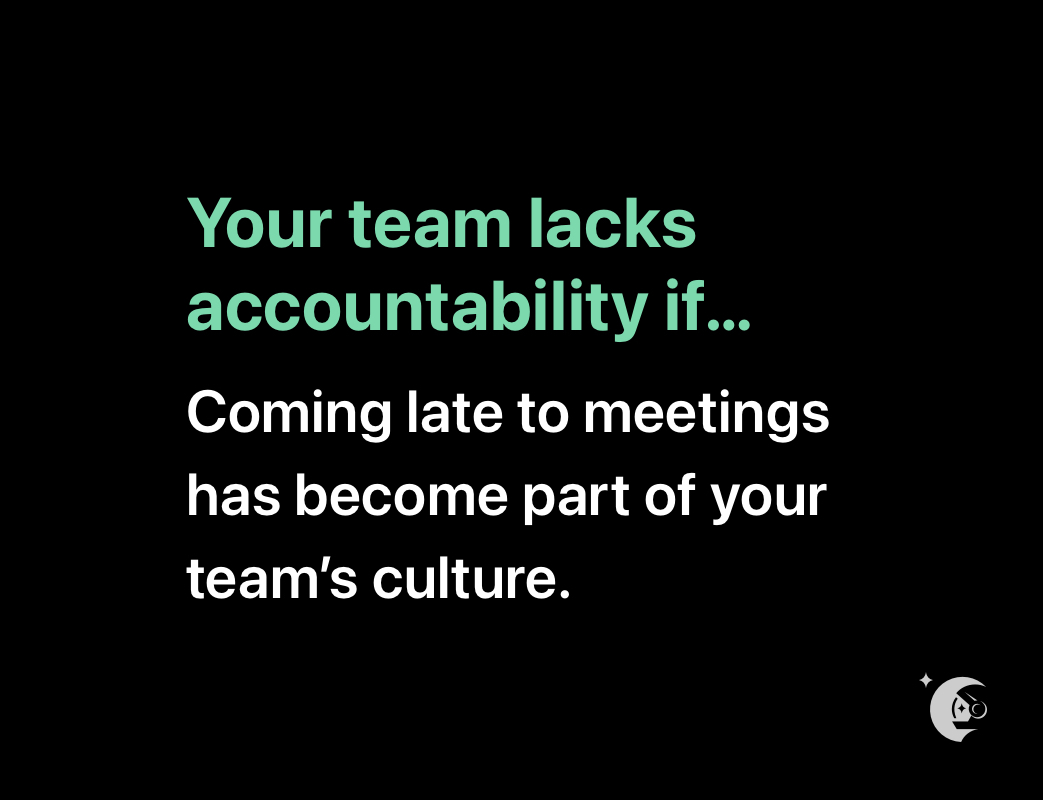
Having a member of the team that isn’t meeting their commitments and isn’t being held accountable causes frustration and disengagement with the rest of the team.
According to Partners In Leadership, a lack of accountability in the workplace leads to:
Low team morale
Unclear priorities across the team
Decreased employee engagement
Unmet team and individual goals
Low levels of trust
High turnover
Yikes! 😳
How do you show accountability at work?
Clearly, there’s a high cost for a lack of accountability. So how do you either avoid or remedy the situation? Before even thinking about how to embed accountability into your workplace culture, you need to look within. Are you demonstrating accountability at work?
Goals and expectations are a good place to start. You can’t be accountable if you don’t know what you should be taking accountability for. Set goals for yourself and your team that are clear and measurable so everyone, including you, knows what you’re trying to achieve.
Next, you’ll want to address the gap between expectations and performance. Once you understand your goals and expectations, you can bridge the gap between what you’re actually doing and what you’re supposed to be doing. Is there an abyss where things are getting lost because you didn’t realize they fell on your plate?
Lastly, and most importantly, take responsibility for your actions. When you acknowledge you’ve made a mistake, you’re also recognizing you have the power to fix that mistake. And that’s the beauty of accountability.
Examples of demonstrating your own accountability in the workplace:
Complete tasks that have been assigned to you by the timeline you agreed on.
Be responsible for the success of your team and make the effort to support your team when needed.
When you schedule meetings, respect everyone else’s time by showing up prepared and on time (and expect that others do too).
Take ownership over the problems you flag by coming to the table with solutions too.
Don’t sweep problems under the rug or assume the issue’s already being dealt with. Instead, flag issues as they arise.
How to make accountability a core part of your culture and a core value of your team
We resist holding others accountable because we’re uncomfortable doing it, we forget to do it or maybe we don’t even know how to go about it. Here’s how to tackle these issues to create a culture of accountability in the workplace.
1. Lead by example and hold yourself accountable first
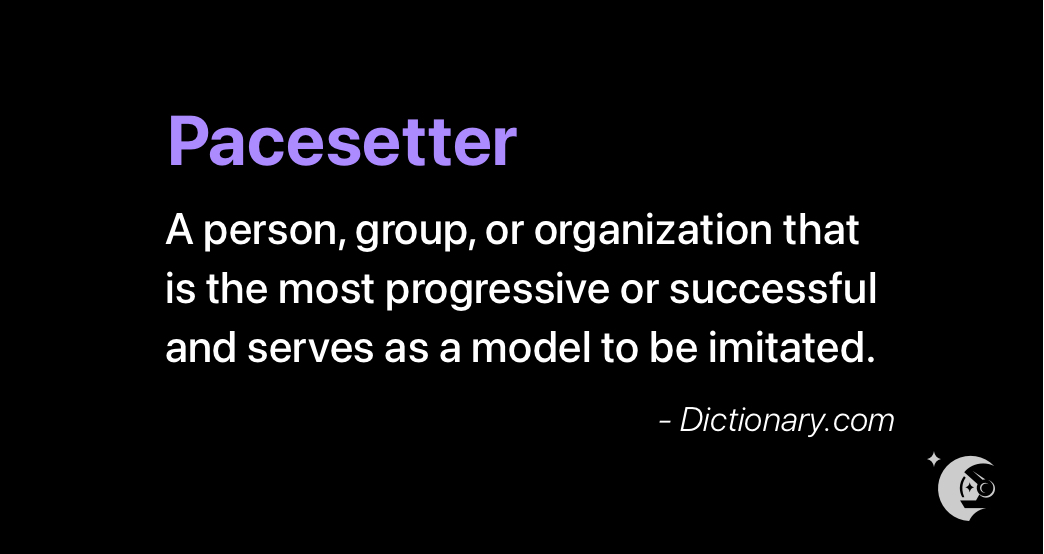
Like we mentioned earlier, as a manager, you’re the pacesetter of tone, performance, and culture for your team. People will follow your lead. If you’re continuously showing up to meetings late, pushing deadlines, and not owning up to your mistakes, the team will follow suit.
2. Set team goals
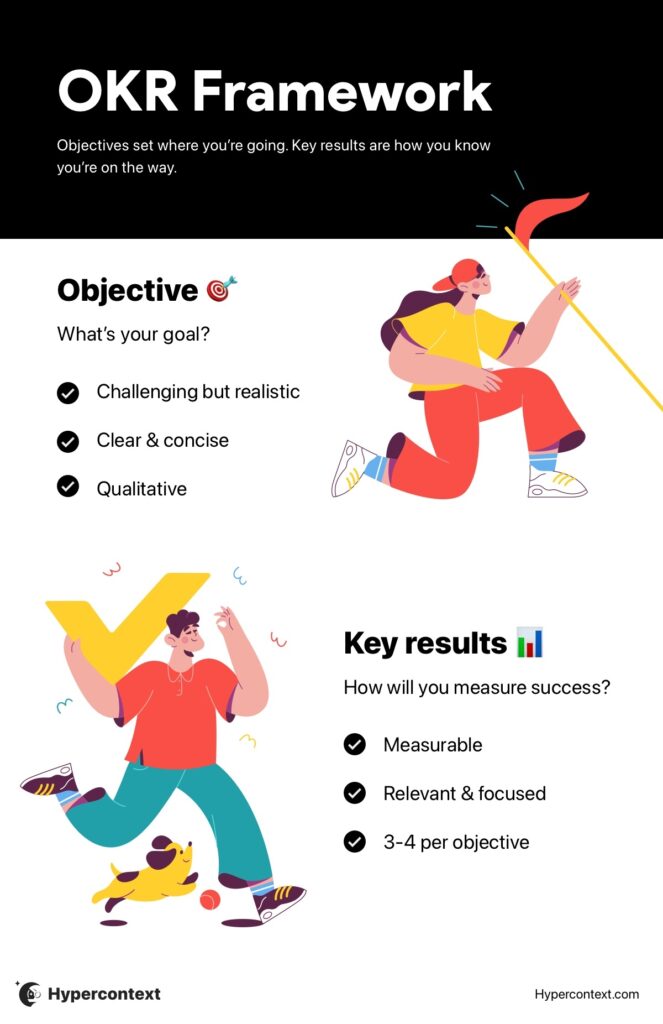
Setting goals is an essential part of creating a culture of accountability on your team. It helps establish what you’re trying to achieve together.
But it’s important to remember not all goals are made equal. To set goals that encourage accountability, they need to be measurable, clear and challenging. Our favorite way to set goals is through the OKR framework (objective and key results). The beauty of OKRs is that they’re not top-down. You create them together as a team and they’re easily trackable. Plus, they should ladder up to larger company goals so everyone know their impact on the bigger picture.
This makes it easier for everyone to understand their roles and what’s expected on both an individual and team level.
Giving tough feedback isn’t easy, but it’s a skill that can be improved. One of the most important things you do as a manager is to provide feedback. When you regularly give feedback (including positive feedback), it makes tough feedback much easier to give. It also reduces the chance of your direct report being surprised by the feedback they’re receiving, leading to further disengagement.
There are a few ingredients that make up effective feedback:
Ensure psychological safety: It’s essential to give negative feedback in a safe, private space, like your one-on-one meetings. But it’s important to remember psychological safety doesn’t happen over night. Work to create a space with your team members where they feel comfortable being vulnerable and being themselves. If they don’t, it’s going to be a lot harder for them to accept your feedback.
Assume positive intent: At its heart, effective feedback comes from a place of genuinely wanting to help someone grow. You need to ‘give a damn.’ And vice-versa, assume the issue you’re addressing wasn’t done with mal intent. It comes down to having eachother’s backs.
Be specific: When you’re too general, you’re not doing your team member any favors. Use a specific example to back up your feedback — that way they’ll have a better understanding of how to improve.
👉 For more resources on how to give constructive feedback well, check out this round-up of constructive feedback examples.
4. Create a culture of two-way feedback
Good feedback isn’t only about the ability to give it, it’s also about being open to receiving it and providing a space to do so. When you don’t foster a culture of two-way feedback, and your team members don’t feel like there’s a safe space to speak up, they start to disengage. Vital Smarts studied nearly 800 professionals and found that:
52% hesitate to discuss peer performance problems, like improper shortcuts, poor attention to detail and incomplete work
47% say they wait to share concerns or ideas that might improve an element of the business because it encroaches on somebody else’s turf
49% take more than a week to speak up when policy decisions are begining to create unintended negative consequences
55% are reluctant to discuss when they believe someone (or a group) has made a bad strategic choice
That’s a lot of valuable insights that are being missed, and resources being wasted. It’s important to encourage two-way feedback so your team feels confident identifying and communicating problems.
👉 To help encourage feedback, try making the lettuce pact with your team.
5. Make accountability a habit
Setting up a reminder to give and solicit feedback as part of each meeting agenda will help ensure that feedback flows consistently. We believe one-on-ones and team meetings are great opportunities to build a habit around accountability.
Is there anything we should START doing as a team?
Would you like more or less direction from me on your work?
Do you feel you’re getting enough feedback on your work? If not, where would you like more feedback?
Is there an aspect of your job where you would like more help or coaching?
How could we improve the ways our team works together?
6. Keep track of your commitments and hold each other accountable
If you make a promise to provide more feedback to your direct reports, make sure you add that as a future agenda item to hold yourself accountable. If your employee commits to providing a work back schedule for a project by a certain date, make sure you have a way to check-in on that day.
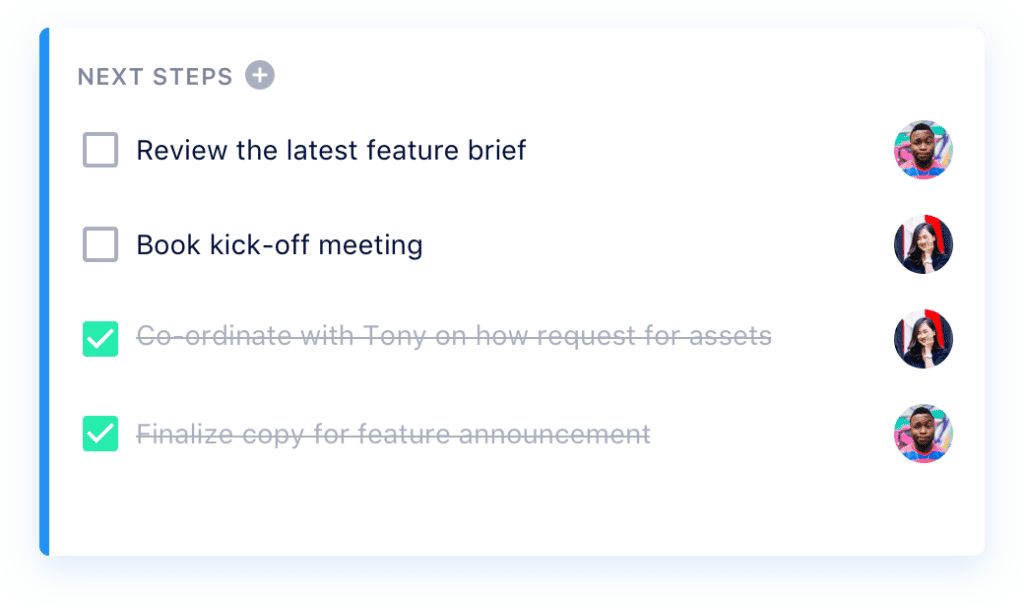
One easy way to foster a culture of accountability – or, if the damage has already been done, address a lack of accountability – is to make sure you’re assigning action items during meetings.
This is a perfect way to hold each and every member of your team accountable for their actions. In Spinach AI, for example, our Next Steps feature allows you to assign action items to team members, complete with deadlines, right in each meeting agenda item. You can’t close the agenda item until all the next steps are complete, so the team has a clear picture of what’s being done – and who needs to be held accountable for tasks that have been missed.
A lack of accountability is rarely intentional. Often, it’s a result of other problems — one being unclear roles and responsibilities.
When there’s a lack of clarity around who’s responsible for what, it makes accountability nearly impossible. In fact, a Gallup study found that only 50% of employees strongly indicate that they know what’s expected of them at work.
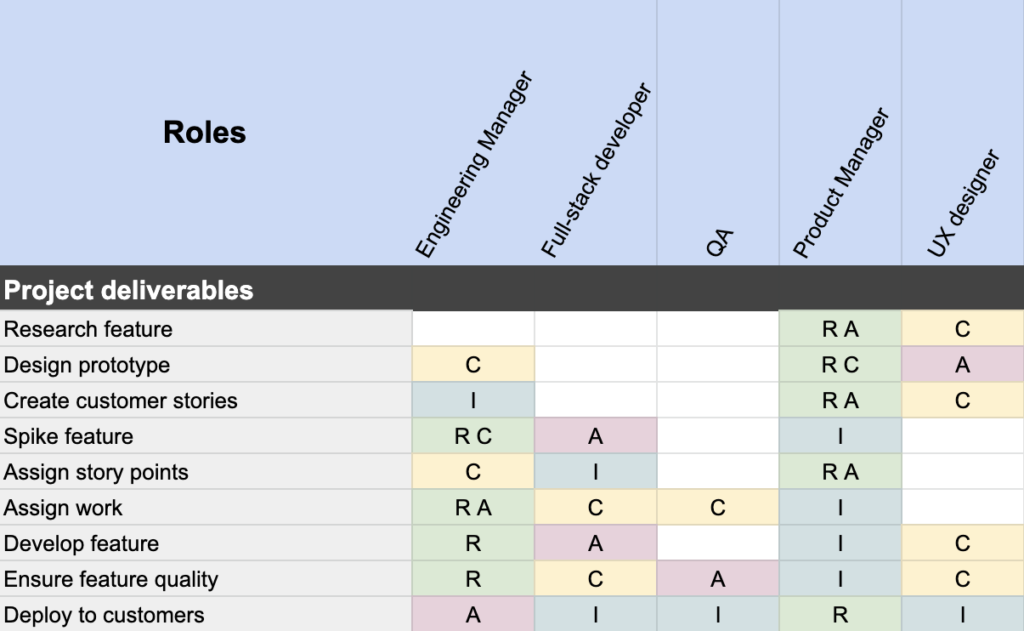
Luckily, accountability frameworks like the RACI matrix can help with this problem. Also known as a RACI chart, this accountability framework ensures everyone involved with a project is assigned a role every step of the way. These roles are broken out into 4 levels of accountability:
Responsible: Those who are responsible for completing the task at hand.
Accountable: Those who are ultimately accountable for the completion of the task or deliverable. This individual is also responsible for delegating the work to those who are responsible for completing it.
Consulted: These individuals are typically the subject-matter experts on the task at hand. They are involved in the specific stage of the project in a consulting and advisory capacity.
Informed: These are the individuals who are kept up-to-date on progress at each stage of the project. This is usually done in the form of one-way communication.
Here’s an example of what the RACI matrix would look like for an engineering team:
Creating a culture of accountability on your direct team is one story. Holding your peers accountable is another one. How do you hold your coworkers accountable so you can optimize the way you work together across the whole organization?
Contrary to popular belief, holding your coworkers accountable isn’t about pointing fingers or assigning blame. It boils down to supporting one another. Here are some key things to consider to create more accountability with your coworkers:
🔍 Be transparent: Be open and honest with your colleagues. Sometimes, we hold our cards close due to tricky work politics, or working in silos. But, being open helps create accountability, both for yourself and your peers.
🤝 Support each other: Working in silos is a quick way to foster a lack of accountability for anything that happens beyond your team. But, the reality is that an organization is a puzzle and each team is a piece of the whole picture. You need to work together to achieve your company goals. Even if it might be ‘outside of your job description,’ see where you can support each other. Their problems are your problems too.
🗒 Don’t forget about peer-to-peer one-on-ones: One-on-ones are too often reserved for manager/direct report relationships. But peer-to-peer one-on-ones are an important part of building empathy and accountability through the organization. It’s easy to put the blame for a project gone wrong onto another team. But, if you’re connecting with your peers with recurring meetings, you can better understand blockers and limitations and have greater context to decisions being made on their team.
Wrapping up
All in all, fostering a culture of accountability on your team will not only improve employee morale and productivity, but it’ll also give your team the autonomy and sense of ownership they need to truly thrive. If you feel accountability is lacking on your team, it’s time to make some changes!
What you should do next
Now that you've read this article, here are some things you should do:
Look into how Spinach can help you run effective one-on-ones.
You should try Spinach to see how it can help you run a high performing org.
If you found this article helpful, please share it with others on
Linkedin
or
X (Twitter)