How to Power Cursor Agents with Conversation Data Using Webhooks (August 2026)
Discover how to connect Cursor agents to structured conversation data via webhooks in August 2026, so every agent task starts with the right context.
 Maintouch
Running autonomous Cursor agents for hours at a time only works well if the agents know what your team actually decided. Right now, most of that context sits in recordings and transcripts that no agent can reach. This guide walks through how to set up a webhook pipeline that turns conversation data into something your Cursor agents can actually use.
TLDR:
- Webhooks push conversation data to your agents the moment a meeting ends, so context is never stale when a task starts
- Cursor 3 runs up to 8 parallel agents on isolated Git branches, making context quality the variable that determines whether output is mergeable
- Agents reading only your codebase miss scope changes, unstable dependencies, and architectural decisions that only exist in meeting records
- Raw transcripts are not agent-ready; your webhook server needs typed fields like decision records, named owners, and due dates, not paragraphs
- Spinach AI captures conversations across Zoom, Meet, Teams, Slack Huddles, and Webex and delivers structured, governed conversation data via API and webhooks on Enterprise
What Webhooks Are and Why They Matter for Cursor Agents
A webhook is a push-based HTTP call. When something happens in a source system, that system immediately sends structured data to a URL you control. No polling, no scheduled fetch, no waiting for an agent to ask. The event fires, your endpoint receives it, and whatever is listening can act on it right away.
For Cursor agents, that distinction matters. Cursor 3 introduced an agent management console that lets you run up to 8 AI agents in parallel on isolated Git branches, according to Tensoria. Agents working at that pace go stale fast if their context depends on manual input or delayed syncs.
As agenticvessel.com notes, webhooks are best suited for triggering agents from external events and are simple, reliable, and widely supported across automation stacks. The recommended architecture uses webhooks to fire agent orchestration from outside sources, then routes richer data access through MCP or similar layers, a pattern covered in more depth for powering ChatGPT agents with conversation data.
Webhooks are infrastructure, not a setting. They determine whether the context your agents receive is live or stale by the time it arrives.
Why Cursor Agent Adoption Is Accelerating in 2026
Cursor has moved well past early-adopter territory. As of mid-2025, Cursor claimed usage across more than half of the Fortune 500 (Cursor, June 2025), a figure that has likely grown since, with enterprise and organization-wide deals driving the bulk of revenue acceleration through late 2025 and into 2026. When procurement teams at large companies standardize on a coding tool (part of a broader shift toward AI tools for engineers), the stakes for that tool’s output quality change considerably.
The 2026 Agent Architecture Shift
Single-agent code assistance is a solved problem. The harder question is what happens when an agent works autonomously across a codebase for hours, spanning multiple files, with no developer in the loop to clarify intent.
That’s the environment Cursor 3 created. Parallel agents on isolated Git branches make consequential architectural choices based on whatever context they have at task start. If that context is the code alone, the agent is missing the decisions, tradeoffs, and requirements that produced it. Context quality stops being a nice-to-have and becomes the variable that determines whether an agent’s output is mergeable or needs to be discarded entirely.
Conversation Data as Cursor Agents’ Context Blind Spot
Cursor agents can read every file in your repo, run terminal commands, and parse compiler output. What they cannot do is query last Tuesday’s architecture review, where your team decided to deprecate the authentication service and migrate to a new OAuth flow. That decision lives in a meeting recording, possibly in someone’s notes, and nowhere an agent can reach.
What Agents Are Missing
The gap is specific. An agent tasked with extending the auth layer has no way to know:
- A scope change agreed to in sprint planning that ruled out the approach it’s about to take
- An action item from a meeting transcript retro that flagged a dependency as unstable
- A constraint surfaced on a customer call that engineering leadership accepted two weeks ago
- An architectural preference a senior engineer articulated once, never wrote down, and everyone else remembers
Without that context, the agent produces code that is syntactically correct and organizationally wrong.
The Unstructured Data Gap
The richest context in any engineering organization accumulates in conversations, and almost none of it lands in a system agents can query. It sits in recordings, transcripts, or individual memories, ungoverned and unreachable.
Spinach AI is an enterprise conversation intelligence platform, the system of record for conversation data. Where individual AI notetakers solve one person’s problem, Spinach is deployed company-wide to capture, centralize, manage, and power the organization with every conversation it has. It captures conversations across Zoom, Google Meet, Microsoft Teams, Slack Huddles, and Webex and turns them into structured, governed, AI-ready knowledge, the kind that an MCP server can serve to agents. Recording and transcription are the input step; decisions with named owners, action items, and cross-meeting context are the output: the kind of structured data a Cursor agent can actually use.
How Webhooks Give Cursor Agents Access to Conversation Data
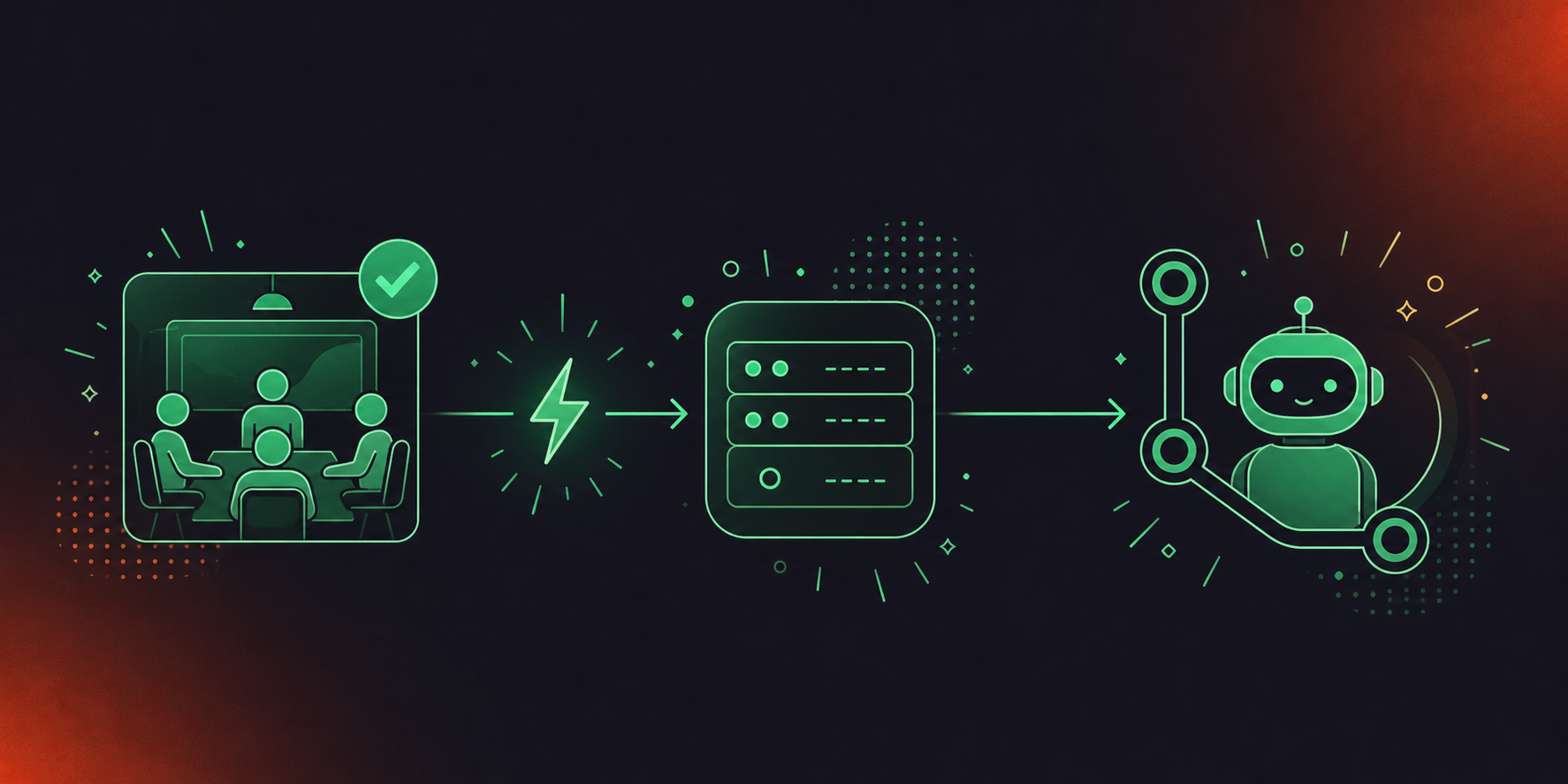
When a meeting ends, the conversation data system fires an HTTP POST to a registered endpoint. That payload carries structured outputs: decisions with named owners, action items, participant metadata, and timestamps. A Cursor agent configured to query that endpoint before starting a task gets meeting context alongside the codebase, not instead of it.
The Push Model Explained
The client-server flow works in one direction: event fires, payload lands, agent consumes. There is no agent polling for updates on a schedule. As hyperleap.ai notes, webhooks are the right choice when the consumer needs to react the moment an event happens. For agents running multi-hour background sessions, a key concern for teams selecting AI tools for developers, that distinction is real: a polling interval of even 15 minutes means an agent can complete an entire branch of work before learning a decision invalidated its approach.
What Cursor Agents Can Do With Conversation Data
Agent Task | Without Webhooks | With Conversation Data via Webhooks |
|---|---|---|
Explain a recent scope change | Searches codebase only; no context | Surfaces the decision from last week’s planning meeting |
Assign a refactor task | No owner context | Pulls named action item owner from sprint retrospective |
Answer why a design choice was made | Returns code comments or docs only | Retrieves architectural decision from the relevant meeting |
Resume after a multi-hour background job | No session context update | Re-ingests any decisions made during the session |
Setting Up a Webhook Server for Conversation Data
Setting up a webhook server means building an HTTP endpoint that receives POST requests, validates payloads, and stores or forwards structured data your agents can query. As agenticvessel.com notes, the application receives a push when something important happens instead of polling continuously. The catch: raw transcript text is not agent-ready. Agents need typed fields, not paragraphs.
There are two meaningful decisions before you write a line of code: what tech you build on, and how you handle data normalization.
SDK and Tooling Choices
Node.js and Python are the practical choices for webhook receivers. The harder problem is normalization. Raw transcripts require parsing logic before an agent can extract a decision or an owner (a challenge also relevant when you need to convert meeting transcripts to Jira tickets), and that parsing layer is what most DIY builds underestimate.
Data Structure Requirements
Well-formed conversation data for agent consumption includes:
- Meeting metadata: title, date, participants, and source meeting platform
- Decision records with timestamps and attributed speakers
- Action items with named owners and due dates
- A source meeting link for traceability
Build vs. Buy Consideration
Consideration | DIY Webhook Server | Pre-Built Solution (Spinach) |
|---|---|---|
Data normalization | Manual parsing of raw transcript | Structured outputs delivered automatically |
Governance controls | Custom access logic required | Org-level permissions enforced at the data layer |
Maintenance overhead | Ongoing as meeting platform APIs change | Managed by vendor |
Time to first agent query | Weeks to months | Days |
Spinach’s API and webhooks, available on the Enterprise tier, deliver normalized conversation data (decisions, action items, participant attribution) without the parsing work.
Connecting Your Webhook Server to Cursor Agents
Once your webhook endpoint is live and returning normalized data, connecting it to Cursor takes three steps.
Locating the Configuration in Cursor
Go to Cursor Settings, then MCP, and add a New MCP Server entry. The config block needs three things: your endpoint URL, authentication credentials, and the tool name the agent will call when querying meeting data (a similar setup applies when you connect Claude Code to Zoom transcripts). The mcp-webhook package on GitHub shows the exact JSON structure if you need a reference.
Authentication and Token Scope
Your endpoint should validate requests using an HMAC signature or shared secret. Scope access tokens to the specific meeting data types the agent needs. Spinach enforces user-based permissions at the data layer, so the agent only receives records the requesting user is authorized to see per your IT and security settings.
Testing the Connection
Trigger a test meeting event, confirm the payload lands at your registered endpoint, and verify the structured fields are present and correctly typed. Then run a sample Cursor agent query: exposing read and inspect tools through an MCP server lets the agent answer “what’s failing and why?” without manual dashboard checks. If the agent surfaces the expected decision or action item, the integration is working.
Security Considerations for Conversation Data via Webhooks
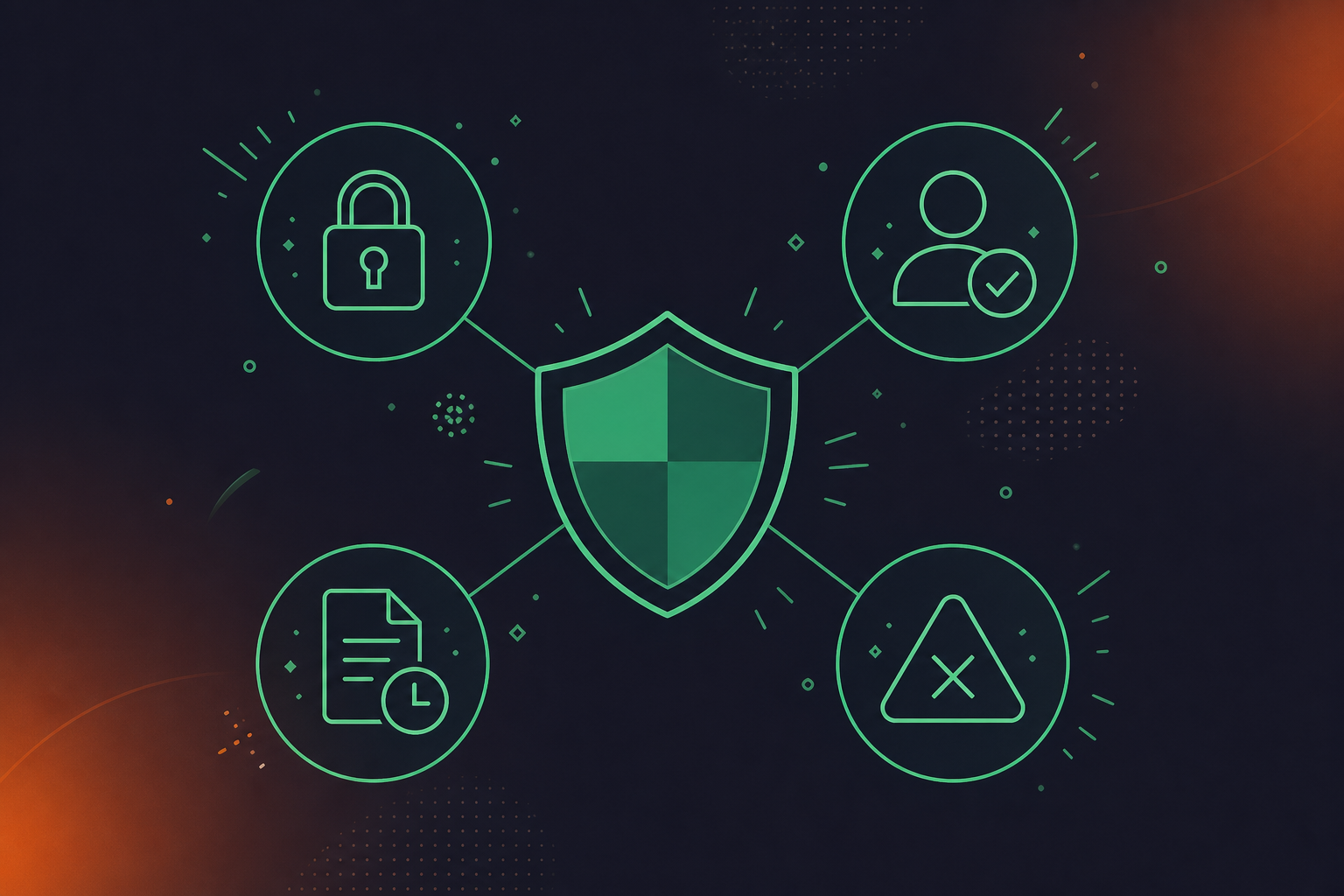
Conversation data carries strategic weight. Decisions, unreleased product direction, personnel discussions, customer commitments: none of it belongs in an unguarded endpoint. Before deploying any webhook integration that touches meeting data, these are the questions worth asking.
Prompt Injection
An agent consuming meeting summaries as context can be manipulated if the meeting content itself contains injected instructions. Typed, structured outputs (decision records, named action items) are far less susceptible than raw transcript strings passed directly as context, which is why MCP server meeting notes for AI agents favor structured delivery. Validated structured fields are your first line of defense.
Data Exfiltration
Any system that can reach an unauthenticated endpoint can receive its payloads. HMAC signature verification, IP allowlisting, and short-lived tokens scoped to specific data types all reduce that surface area. Static API keys are the most common failure point.
Access Control Drift
Webhook integrations provisioned for one team tend to outlast the access grants that supported them. As obot.ai notes, server-initiated communication raises new authentication and governance questions as agent infrastructure matures. Permission enforcement needs to live at the data source, beyond the transport layer, a principle that applies equally when pulling Google Meet transcripts into Codex. Spinach enforces user-based permissions at the data layer, so agents receive only what the requesting user is authorized to see, regardless of which endpoint is calling.
Compliance Exposure
Meeting data in compliance-sensitive industries is subject to HIPAA, GDPR, and financial services retention requirements. A webhook that routes conversation data to an agent must respect the same retention and deletion policies applied to the underlying records. Spinach’s compliance controls and trust documentation cover how those policies are enforced at the data layer across Enterprise deployments, including configurable retention per data type.
What Cursor Agents Can Access With Spinach as the Conversation Data Layer
Spinach AI is an enterprise conversation intelligence platform powering thousands of organizations including public enterprises. It captures conversations across Zoom, Google Meet, Microsoft Teams, Slack Huddles, and Webex and centralizes them in a single organizational record, not per-user silos, so the conversation data your Cursor agents need isn’t scattered across individual tools and folders. The Enterprise tier includes API and webhooks for custom pipelines, SAML SSO and SCIM, org-enforced settings, PII redaction at the transcript level, and granular retention configurable per data type (transcript, summary, and video each set separately, from one week to indefinite).
What Cursor Agents Gain
With Spinach as the upstream conversation data layer, agents can access:
- Action items with named owners from the most recent sprint planning or architecture review
- Decisions with timestamps and the meeting context in which they were made
- Cross-meeting context that connects a current task to a discussion held weeks earlier
- Participant history that surfaces who owns a workstream or made a specific commitment
Engineering organizations that have standardized on Cursor for autonomous background tasks now have a governed, queryable record of every conversation that shaped the codebase. If you’re deploying Cursor agents and want to connect them to structured meeting intelligence, get started with Spinach AI, the enterprise conversation intelligence platform built to power both people and agents with every conversation your organization has.
Final Thoughts on Webhook Architecture for Cursor Agent Context
Your agents are already good at reading code. The part they cannot do on their own is know what your team decided last Tuesday. Webhooks are what make that knowledge reachable, pushing structured meeting data to your endpoint the moment a call ends so agents can consume it before they ever touch a branch. The build-vs-buy decision mostly hinges on how much time you want to spend on transcript normalization. If you want structured decisions and action items delivered without the parsing work, start with Spinach’s conversation data layer and connect it to Cursor in days.
Spinach AI webhooks use a push model: when a meeting ends, Spinach fires an HTTP POST to your registered endpoint carrying structured outputs — decisions with named owners, action items, participant attribution, and timestamps. The agent consumes that payload at task start rather than querying on a schedule, so a multi-hour background session on an isolated Git branch begins with current meeting context, not whatever state existed at the last polling interval.
A Cursor agent needs typed fields, not raw transcript text. The minimum viable payload includes meeting metadata (title, date, participants, source platform), decision records with timestamps and attributed speakers, action items with named owners and due dates, and a source meeting link for traceability. Raw transcripts require parsing logic before an agent can extract a decision or an owner — that normalization step is where most DIY webhook builds underestimate the work involved.
Build if your team has weeks to spend on transcript normalization, access control logic, and ongoing maintenance as meeting platform APIs change. Spinach AI’s Enterprise tier delivers normalized conversation data — decisions, action items, participant attribution — through its API and webhooks without the parsing layer, with org-level permissions enforced at the data source rather than the transport layer. For most engineering teams standardizing on Cursor for autonomous background tasks, the gap between “days to first agent query” and “weeks to months” is the deciding factor.
Use typed, structured outputs rather than passing raw transcript strings directly as agent context. Validated fields — decision records, named action items, timestamped owners — are far less susceptible to injected instructions than unstructured paragraph text. Spinach delivers conversation data in structured form at the data layer, which is your first line of defense before transport-level controls like HMAC signature verification and short-lived scoped tokens.
Spinach enforces user-based permissions at the data layer, so an agent only receives records the requesting user is authorized to see per your IT and security settings — regardless of which endpoint is calling. This matters because webhook integrations provisioned for one team tend to outlast the authorization that justified them; permission enforcement needs to live at the source, not only at the transport layer. On Enterprise deployments, this pairs with granular retention controls configurable per data type (transcript, summary, and video set separately) and full compliance documentation at trust.spinach.ai.
The agent re-ingests any decisions made during its working session when your webhook endpoint is updated with new meeting payloads. Because the push model fires the moment a meeting ends, the structured data — decisions with owners, action items, timestamps — is waiting at the endpoint before the agent’s next query, so it can reconcile its current branch state against what changed while it was running.
You need a minimal HTTP endpoint to receive webhook payloads, but it does not require a full backend stack — a lightweight Node.js or Python server running on a cloud function is sufficient. The harder requirement is normalization: raw transcripts need parsing before an agent can extract a named decision or action item owner, which is the step that makes a serverless handler more complex than it initially appears.
Webhooks push structured data to your endpoint the moment a meeting ends, making them the right choice for triggering agents from external events. MCP handles richer, on-demand data access during an agent session — the recommended architecture uses webhooks to fire agent orchestration and MCP to serve deeper context queries, with both layers working together.
A polling interval of even 15 minutes means an agent running on an isolated Git branch can complete an entire body of work before learning that a decision made in sprint planning invalidated its approach. Webhooks eliminate that window entirely by pushing the payload the moment the meeting ends, so the agent starts each task with current context.
Spinach captures conversations across Zoom, Google Meet, Microsoft Teams, Slack Huddles, and Webex, then delivers structured outputs — decisions with named owners, action items, participant attribution, and timestamps — through its API and webhooks on the Enterprise tier. That coverage means a webhook pipeline connected to Cursor agents receives context from every meeting channel your engineering team uses, not just one platform.
Meeting data subject to HIPAA, GDPR, or financial services retention rules must follow the same retention and deletion policies that apply to the underlying records — the webhook transport layer does not change those obligations. Any pipeline routing conversation data to an agent needs permission enforcement at the data source, not only at the transport layer, along with HMAC signature verification and short-lived scoped tokens to limit exposure.
With Spinach’s Enterprise API and webhooks delivering pre-normalized conversation data, most engineering teams reach their first working agent query in days. A DIY approach that starts from raw transcripts adds weeks to months for the normalization, access control logic, and meeting platform API maintenance that a pre-built solution handles at the data layer.
Pass structured fields, not raw transcript text. Agents need typed records — decision entries with timestamps and attributed speakers, action items with named owners and due dates, meeting metadata — to extract actionable context reliably. Raw transcript paragraphs require custom parsing logic and are far more susceptible to prompt injection than validated structured outputs.
An HMAC signature is a cryptographic hash computed from the payload and a shared secret, sent by the source system as a request header. Your endpoint recomputes the hash and rejects any request where the values do not match, which prevents unauthorized systems from injecting fabricated payloads into the pipeline your Cursor agents consume. Combined with short-lived scoped tokens and IP allowlisting, it closes the most common failure point in webhook security.
Senior engineers frequently articulate constraints and preferences once in a meeting, and those decisions never make it into a doc or a code comment — leaving an agent with no way to know a particular approach was ruled out. When structured meeting records flow through a webhook pipeline, those spoken architectural decisions become typed, queryable records the agent can retrieve before touching the relevant files, producing output that reflects what your team actually decided.
What you should do next
You made it to the end of this article! Here are some things you can do now:
- Our library of meeting agenda templates is designed to help you run more effective meetings.
- Check out Spinach to see how it can help you run a high performing org.
- If you found this article helpful, please share it with others on Linkedin or X (Twitter)

