How to Power Glean Agents with Conversation Data Using Webhooks (August 2026)
This August 2026 guide shows how to index conversation data into Glean using webhooks so your agents can reason over real decisions and commitments.
 Maintouch
Glean is only as useful as what it actually knows, and right now your organization is probably feeding it documents while every real decision evaporates after the call ends. That’s the part of the Enterprise Graph most teams haven’t wired up yet. Here’s how to get conversation data flowing into Glean Agents through webhooks so your agents can actually reason over what your team has decided and committed to.
TLDR:
- Glean’s Enterprise Graph lists “conversations” as a data source but has no default mechanism to capture meeting output.
- Webhooks solve this by pushing structured meeting data to Glean’s Indexing API at meeting end, with no polling lag.
- Each indexed meeting document must include participant-level permission metadata, or Glean falls back to open access.
- A production webhook pipeline requires HMAC verification, deduplication logic, schema maintenance, and API versioning. This is not one-time setup.
- Spinach AI captures during meetings across Zoom, Meet, Teams, Slack Huddles, and Webex, then routes structured decisions and action items to Glean via webhook at meeting end.
What Webhooks Are and Why They Matter for Glean Agents
A webhook is an HTTP callback that fires the moment a defined event occurs, pushing structured data to a receiving endpoint without waiting to be asked. No polling loop, no scheduled batch job, no lag.
Glean Agents depend on that distinction more than most systems do. According to Glean’s custom connector documentation, the Indexing API supports both scheduled crawls and event-driven ingestion, with webhook-based models called out as a primary pattern for data sources that change continuously. An agent grounding its reasoning in week-old context is, effectively, reasoning about a company that no longer exists. Decisions shift in meetings. Priorities get revised on a Tuesday call. If the agent’s knowledge base only catches up on a nightly sync, it acts on stale ground. Understanding how MCP servers use meeting transcripts helps clarify why architecture choices matter here.
Webhooks solve the timing problem at the architecture level. For anyone deploying Glean Agents across an organization, that makes webhooks infrastructure, not a configuration detail.
Why Glean Agents Adoption Is Accelerating in 2026
Glean reached $300M in ARR in May 2026, just 15 months after hitting $100M ARR, with Fortune 500 customers nearly doubling year over year. More telling: more than 85% of Glean customers use the product across five or more departments. That’s infrastructure deployment, not pilot behavior.
Horizontal adoption makes agent context a company-wide problem. An agent that answers well for Legal but poorly for Engineering has a data completeness issue, not a configuration one. The data type most organizations haven’t wired into Glean yet is also where decisions actually get made: conversation data from meetings.
Documents capture what was decided. Meetings are where the deciding happens. Most Glean deployments index the former and miss the latter entirely.
Conversation Data as Glean Agents’ Context Blind Spot
Glean’s Enterprise Graph connects apps, documents, tickets, and SaaS records into a single retrieval layer. Glean’s own documentation describes it as connecting “the apps, documents, conversations, and systems that shape how work gets done.” The word “conversations” appears in that list, but the mechanism that captures them does not exist by default.
What the Enterprise Graph Does Not Capture by Default
Meeting-generated knowledge, verbal decisions, assigned action items, blockers surfaced in a standup, cross-functional context from a steering committee, is produced in spoken form. How much of that context gets captured depends entirely on whether a structured capture layer exists to transcribe, structure, and index it. Without one, none of it reaches the Enterprise Graph. The graph is only as complete as the systems feeding it.
The Agent Answers Without the Decision That Drove It
Consider a Glean Agent asked to summarize the current state of a product launch. If the go/no-go decision was made verbally in a steering committee three weeks ago and never written to a connected system, the agent cannot surface it. The answer isn’t wrong because of misconfiguration. The data was never captured. That is the architectural gap: meeting context and human intent remain trapped outside the systems agents reason over.
How Webhooks Let Glean Agents Access Conversation Data
When a meeting ends, Spinach AI, an enterprise conversation intelligence platform and the system of record for conversation data, structures its output (decisions, action items with named owners, summaries, blockers, and participant metadata) and fires a webhook payload to a configured Glean Indexing API endpoint. Deployed company-wide across Zoom, Google Meet, Microsoft Teams, Slack Huddles, and Webex, Spinach captures every conversation the organization has and turns it into a governed, AI-ready data asset, not a folder of per-user notes. Glean indexes the incoming document with inherited permissions, making it searchable across search, assistant, and agents. Glean’s open-source Indexing SDK lets teams build a connector for any data source and push documents into Glean to make them searchable everywhere. Once indexed, conversation data enters the Enterprise Graph like any other connected system, and Glean’s agentic engine can reason through tasks using that context.
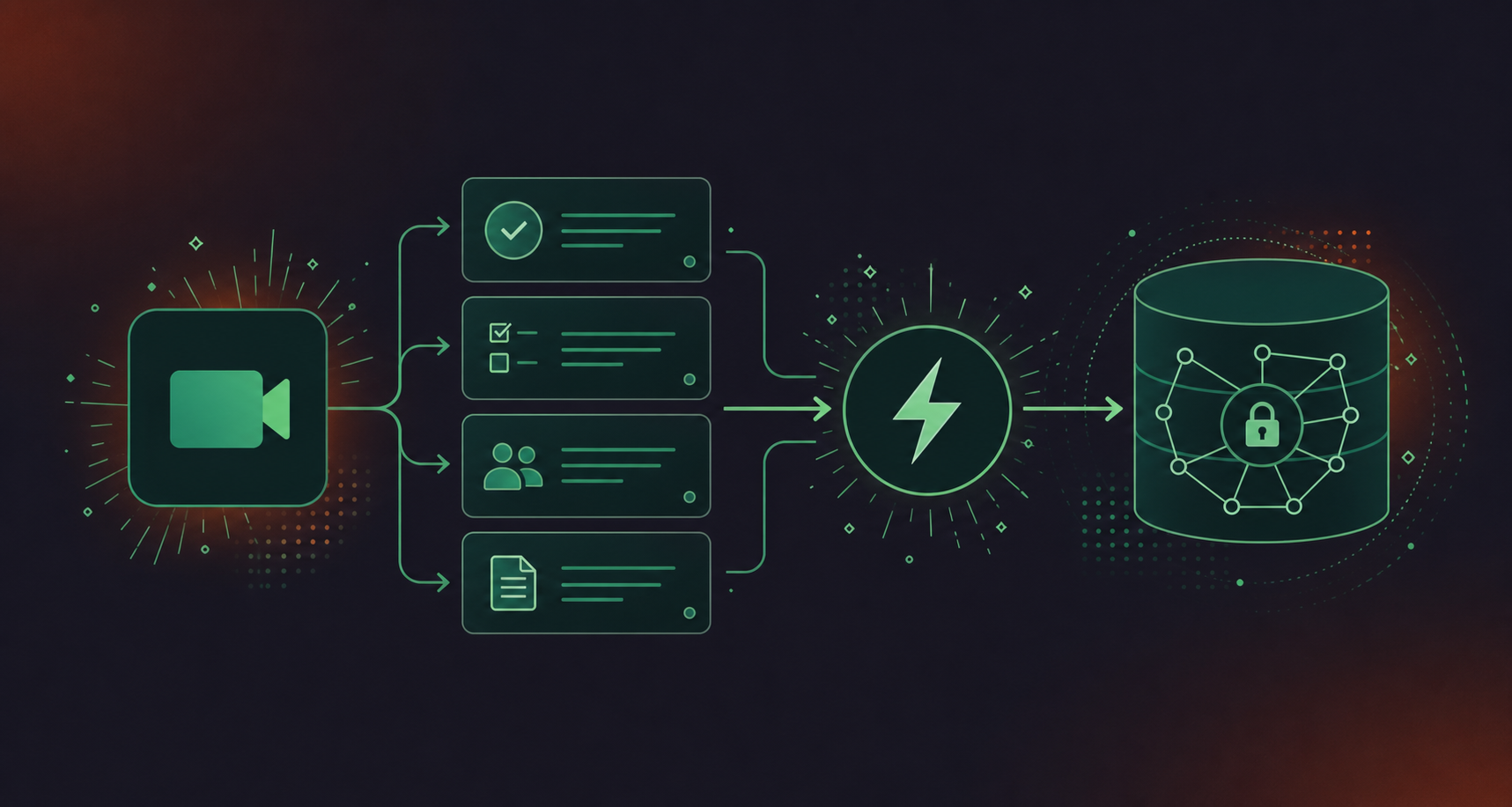
- Spinach fires a structured webhook payload to Glean’s Indexing API the moment a meeting ends, with no polling lag and no manual upload step
- Structured output covers decisions, action items with named owners, summaries, blockers, and participant metadata, capturing the full record of what the organization decided and committed to
- Coverage spans Zoom, Google Meet, Microsoft Teams, Slack Huddles, and Webex from a single deployment, with no per-platform setup required for each meeting type
- Each indexed document carries participant-level permission metadata so Glean enforces access at retrieval instead of defaulting to open
- Conversation data enters the Enterprise Graph like any connected system, and Glean Agents can reason over it alongside documents, tickets, and SaaS records
What Glean Agents Can Do With This Data
Three practical examples show what becomes possible. A project status agent can automatically create action items from meeting transcripts with named owners from last week’s product meeting and surface what remains open. An agent answering a strategic question can retrieve a verbal decision made three months ago in a cross-functional session, cited with date and participants. A CRM-connected agent can find context from a customer call and link it to the relevant account record without anyone manually copying notes across systems. That same structured output can also convert meeting transcripts to Jira tickets for engineering follow-up.
- Decisions: verbal commitments and go/no-go calls captured with date and participant context, beyond just the outcome
- Action items with named owners: structured tasks assigned during the meeting, indexed with accountability metadata Glean Agents can query
- Summaries: concise structured records of what was discussed and resolved, scoped per meeting and searchable across the Enterprise Graph
- Blockers: impediments surfaced in standups or steering sessions, available to agents reasoning over project status
- Participant metadata: attendee emails propagated as permission metadata at index time, so agents enforce access at retrieval instead of defaulting to open
Conversation Data Type | Glean Agent Query Example | Business Outcome |
|---|---|---|
Action items with named owners | “What is the team still waiting on from the Q3 planning session?” | Fewer dropped commitments |
Verbal decisions | “When did we decide to pause Feature X?” | Faster alignment across teams |
Customer call summaries | “What did the Acme team raise on their last call?” | More informed account context |
Blockers and risks | “What is slowing down the migration project?” | Earlier leadership escalation |
Cross-meeting participant history | “Who owns the infrastructure decision from last month?” | Reduced re-routing and repeat meetings |
Setting Up a Webhook Server for Conversation Data
Building this pipeline means committing to several distinct engineering concerns beyond writing a callback endpoint. Three areas require explicit decisions before any meeting data reaches Glean: the receiver infrastructure and SDK choices, how meeting output is structured into documents Glean Agents can actually reason over, and the ongoing engineering overhead a production build carries. Each has meaningful implications for how reliably conversation data enters the Enterprise Graph and how accurately permissions are enforced when agents retrieve it.
- Receiver infrastructure and SDK choices: selecting the right client library, standing up a webhook endpoint, and wiring HMAC verification, event filtering, and retry handling
- Structuring meeting output for agent consumption: formatting each meeting as a discrete document with explicit fields covering participants, date, decisions, action items, source meeting ID, and participant-level permission metadata
- Ongoing engineering overhead: owning deduplication logic, schema maintenance as meeting structures change, and Glean Indexing API versioning indefinitely after the initial build
SDK and Endpoint Requirements
The primary client library is Glean’s Python Indexing SDK. Your receiver endpoint needs HMAC signature verification on every inbound payload, event filtering to push only structured meeting-end output instead of raw transcript, and retry handling for failed delivery. Filtering matters: raw transcript is noisy and poorly retrievable. Glean Agents perform better against discrete, structured records. For a platform-specific walkthrough, see how to pull Google Meet transcripts into Glean.
Structuring Conversation Data for Glean Agent Consumption
According to Glean’s custom connector documentation, custom connectors must handle diverse permission models and incremental updates. Each meeting should index as one document with explicit fields: participants, date, decisions, action items, source meeting ID, and participant-level permission metadata. Teams users can follow the same approach when they pull Microsoft Teams transcripts into Glean. Without that last field, Glean cannot enforce access correctly on retrieval, and conversation data surfaces to people who shouldn’t see it.
What a DIY Build Actually Requires
A production pipeline means owning the receiver infrastructure, deduplication logic, schema maintenance as meeting structures change, and Glean Indexing API versioning. None of that is one-time configuration. It is ongoing engineering ownership, and the team that builds it will keep maintaining it indefinitely.
Connecting Your Webhook Server to Glean Agents
Once your webhook server is running and structured meeting documents are being generated, registration in Glean is the next step. Each stage has a verification requirement before moving forward.
- Register the custom data source: name the source in the Glean Admin console and configure display settings so meeting records surface with readable citations in agent responses
- Configure authentication and permission propagation: scope the Indexing API token, set HMAC secret verification, and include participant emails in every document’s permission metadata
- Validate agent retrieval: confirm indexed documents appear in search, verify agent citations point to the correct meeting record, and test access control as a non-participant
Registering the Custom Data Source
Open the Glean Admin console, select Data sources, then Add data source, then Custom. Name the source clearly (for example, “Spinach Conversation Data”). Configure the display settings for search result titles and source URLs so meeting records surface with readable citations inside agent responses, not raw API strings.
Authentication and Permission Propagation
Generate a Glean Indexing API token scoped to the custom data source only, not broader read access. Configure HMAC secret verification on your inbound endpoint to reject unverified payloads. Each document pushed to the Indexing API must include participant emails in its permission metadata. Without those, Glean falls back to open access and meeting content surfaces to users who were never in the room.
Validating Agent Retrieval
Run three checks before treating this as production-ready: confirm the indexed document appears in Glean search within the expected sync window, run a Glean Agent query against a known decision and verify the citation links to the correct meeting record, then run the same query as a non-participant and confirm the restricted meeting does not appear in their results.
Setup Step | Where It Lives | What to Verify |
|---|---|---|
Register custom data source | Glean Admin → Data sources | Source name and display URL appear correctly |
Configure API token | Glean Admin → API credentials | Token scoped to indexing only, not broader read |
Set permission metadata | Webhook payload schema | Participant emails map to Glean user identities |
Test content retrieval | Glean Search or Agent query | Correct meeting surfaces with accurate citation |
Validate access control | Non-participant test query | Restricted meeting does not appear in results |
Security Considerations for Conversation Data via Webhooks
Meeting data carries a different risk profile than standard enterprise content. Verbal commitments, personnel decisions, and deal terms that never reach a formal document are now flowing through a webhook pipeline into an indexed data source that agents query directly.
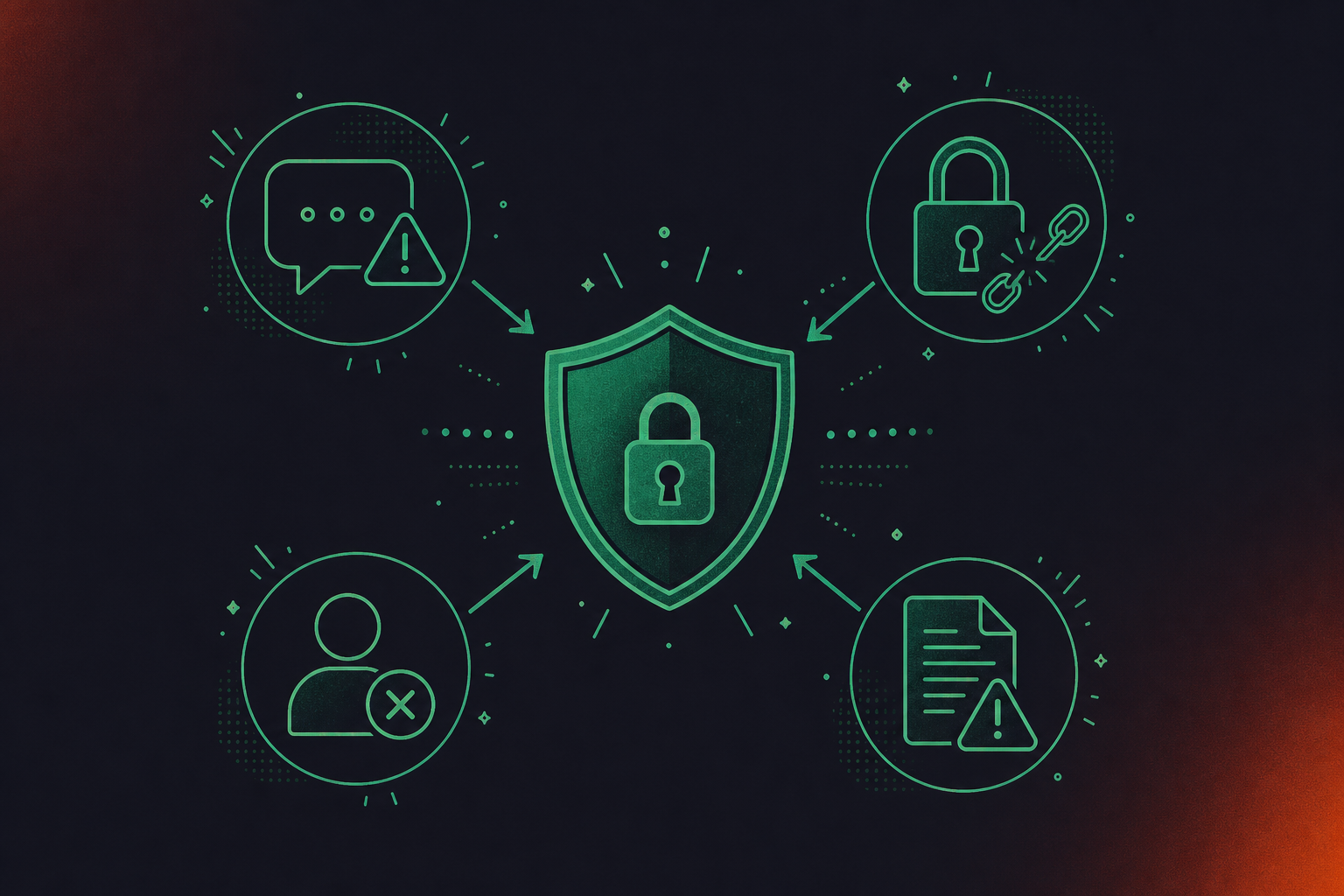
There are four specific threat vectors worth auditing before you deploy.
Prompt Injection via Meeting Content
Prompt injection is the number one entry on the OWASP LLM Top 10 in 2026, treated by security researchers as an unsolved problem. The same concern applies when you power ChatGPT agents with conversation data. Summaries indexed via webhook become retrievable agent context, so validate and sanitize structured output before indexing. Never push raw transcript as a document. Treat all ingested conversation content as untrusted input.
Data Exfiltration Through the Indexing Pipeline
An agent that can read untrusted content and take actions based on what it finds is a specific threat that this pipeline introduces. When a Glean Agent retrieves indexed meeting content that contains adversarial instructions, it may act on those instructions without recognizing them as malicious input. The risk is higher when the agent has write access to downstream systems, where a meeting summary containing a crafted instruction could trigger ticket creation, a CRM update, or an automated message to an external recipient. A misconfigured endpoint with missing permission metadata lets an unauthorized agent surface content that was never meant to leave the room. Set permissions at index time, not query time.
Access Control Drift
When an employee leaves, their access to historical meeting records in Glean persists unless permission metadata is explicitly refreshed. Build a permission update mechanism into the pipeline itself, beyond your offboarding checklist. CRM-connected pipelines raise the same issue. See how to sync Google Meet notes to HubSpot automatically with permissions handled at source.
Compliance Exposure
Legal discussions, HR reviews, and financial disclosures carry obligations that standard document policies rarely cover. Confirm whether the pipeline strips or restricts sensitive content before indexing and whether retention matches your conversation data policy.
Questions to Ask Before Deploying
- Does the pipeline enforce HMAC signature verification on every inbound payload?
- Are participant-level permissions propagated at index time and refreshed on permission change?
- Is sensitive content identified and either excluded or access-restricted before indexing?
- Is there an audit log of which meeting records have been retrieved by which agents and users?
How Structured Meeting Data Powers Glean Agents at Scale
Spinach is the organizational platform an enterprise deploys once, company-wide, to capture every conversation and route structured, governed outputs to the systems, and agents, that need them. Here is what that looks like in a Glean deployment:
- Joins meetings across Zoom, Google Meet, Microsoft Teams, Slack Huddles, and Webex with no per-platform setup required for each meeting type
- Structures output into decisions, action items with named owners, summaries, blockers, and participant metadata at meeting end
- Pushes structured documents to Glean’s Indexing API via webhook the moment a meeting ends, with no polling lag, no manual upload, and no per-user sharing step (API and webhooks are available on Enterprise)
- Routes the same structured output to Confluence, Jira, HubSpot, and other connected systems from the same pipeline, without duplicating the capture work
- Propagates participant-level permission metadata at index time so Glean enforces access at retrieval instead of defaulting to open
- Produces one governed corpus that Glean Agents retrieve from across the organization, not per-user silos from individual note takers
- Configurable retention per data type: transcript, summary, and video can each be set separately, from one week to indefinite on Enterprise
- PII redaction at the transcript level, including structured identifiers such as payment card and national ID numbers
- SAML SSO and SCIM provisioning for company-wide identity management and automated deprovisioning
- Compliance agents that classify and flag regulatory and policy risk in conversation data for review, without automated deletion or remediation
- BAA available for Enterprise and HIPAA engagements
- Customer data is never used to train AI models, with zero data retention across LLM providers (OpenAI, Anthropic, Google)
If your Glean Agents are answering questions without the context of what your organization has actually decided and committed to, get started with Spinach, the enterprise conversation intelligence platform that turns every meeting into governed, AI-ready knowledge for your agents and your people.
Final Thoughts on Closing the Context Gap in Glean Agent Deployments
Your Glean Agents are reasoning over what your organization has written down, but most of what your organization decides never gets written down at all. Webhooks turn meeting output into indexed, permission-scoped documents that agents can actually retrieve. The architecture is straightforward; the ongoing engineering overhead is the part most teams underestimate. Spinach handles the pipeline so your team spends time on the decisions, not the infrastructure that captures them.
Set up a webhook endpoint that receives structured meeting output from Spinach — decisions, action items with named owners, participant metadata — and pushes it to Glean’s Indexing API at meeting end. Each meeting indexes as a single document with explicit fields and participant-level permission metadata, making it searchable across Glean search, assistant, and agents. Without this pipeline, the verbal decisions and commitments that drive your organization never reach the Enterprise Graph that agents reason over.
Glean’s Enterprise Graph indexes documents, tickets, and SaaS records by default, but meeting-generated knowledge — verbal decisions, action items, blockers surfaced in a standup — is produced in spoken form and has no path into the graph without a structured capture layer. Webhooks close that gap by firing a structured payload to the Glean Indexing API the moment a meeting ends, rather than waiting for a nightly sync or manual upload. An agent asked about a product launch decision made three months ago in a steering committee can only surface that answer if the meeting was captured, structured, and indexed in time.
A DIY build requires owning receiver infrastructure, HMAC signature verification, deduplication logic, schema maintenance as meeting structures change, and Glean Indexing API versioning — none of which is one-time configuration. Spinach’s webhook pipeline delivers structured, governed meeting output directly to Glean’s Indexing API at meeting end, with configurable retention per data type, PII redaction at the transcript level, and participant-level permissions propagated at index time. If your team doesn’t want to maintain a production pipeline indefinitely, the Spinach Enterprise tier includes API and webhooks as built infrastructure.
Include participant email addresses in the permission metadata of every document pushed to Glean’s Indexing API — without them, Glean falls back to open access and meeting content surfaces to users who were never in the room. Set permissions at index time, not query time, and build a permission refresh mechanism into the pipeline itself so that when an employee leaves, their access to historical meeting records does not persist by default. Validate access control before treating the pipeline as production-ready by running the same agent query as both a participant and a non-participant and confirming restricted meetings do not appear in the latter’s results.
Four threat vectors warrant explicit attention: prompt injection via meeting summaries that become retrievable agent context (treat all ingested conversation content as untrusted input and never push raw transcript as a document); data exfiltration through misconfigured endpoints with missing permission metadata; access control drift when employee permissions are not refreshed after offboarding; and compliance exposure from legal, HR, or financial discussions that standard document retention policies do not cover. Confirm HMAC signature verification fires on every inbound payload, regulated content is identified and restricted before indexing, and an audit log captures which meeting records have been retrieved by which agents and users.
The agent cannot surface it — the data was never captured, so the gap is architectural rather than a configuration problem. Without a structured capture layer that transcribes, structures, and indexes meeting output, verbal decisions, blockers, and commitments have no path into the Enterprise Graph. A webhook pipeline that pushes structured meeting data to Glean’s Indexing API at meeting end closes that gap by making conversation data queryable alongside documents, tickets, and SaaS records.
Each document pushed to the Indexing API must include participant-level permission metadata, explicit fields for participants, date, decisions, action items, and a source meeting ID, plus HMAC signature verification on every inbound payload. Without permission metadata, Glean falls back to open access and meeting content surfaces to users who were never in the room. The connector also needs deduplication logic, retry handling for failed delivery, and schema maintenance as meeting structures change over time.
Raw transcript is noisy and poorly retrievable — agents perform measurably better against discrete, structured records that name decisions, action items with owners, and participants than against a wall of unedited speech. Structured output lets an agent answer a targeted question like ‘what did we decide on Feature X’ by retrieving one indexed record rather than scanning thousands of lines of dialogue. Filtering at the webhook level, pushing only structured meeting-end output rather than raw transcript, is the recommended pattern in Glean’s own connector documentation.
When an employee leaves, their access to historical meeting records in Glean persists unless permission metadata is explicitly refreshed, because Glean enforces access based on what was set at index time. Build a permission update mechanism into the pipeline itself, not just into your offboarding checklist, so departures trigger a permission refresh on affected records automatically. Validating access control before treating the pipeline as production-ready means running the same agent query as both a participant and a non-participant and confirming restricted meetings do not appear in the latter’s results.
API and webhooks are available on the Enterprise plan only, at custom pricing — they are not included on Starter, Pro, or Business. The Enterprise tier also includes SAML SSO and SCIM, configurable retention per data type, PII redaction at the transcript level, compliance agents, and a BAA for HIPAA engagements. If your team needs the full webhook pipeline into Glean’s Indexing API, contact Spinach sales to discuss Enterprise.
Webhooks are the stronger fit for meeting data because they push structured output to Glean’s Indexing API the moment a meeting ends, with no polling lag. An agent grounding its reasoning in a nightly batch sync is effectively reasoning about a company that no longer exists — decisions shift in meetings, and priorities get revised on a Tuesday call that a scheduled crawl won’t catch until the following morning. Glean’s custom connector documentation calls out event-driven ingestion as a primary pattern for data sources that change continuously.
Run three checks: confirm the indexed document appears in Glean search within the expected sync window, run a Glean Agent query against a known decision and verify the citation links to the correct meeting record, then run the same query as a non-participant and confirm the restricted meeting does not appear in their results. All three must pass before the pipeline goes live. Skipping the non-participant check is the most common access control gap in early deployments.
Index each meeting as a single document with explicit fields: participants, date, decisions, action items, source meeting ID, and participant-level permission metadata using participant email addresses mapped to Glean user identities. Display settings for search result titles and source URLs should be configured in the Glean Admin console so meeting records surface with readable citations inside agent responses rather than raw API strings. Structuring at this level lets agents answer attribution questions like ‘who owns the infrastructure decision from last month’ with a named participant and a linked meeting record.
Spinach joins meetings across Zoom, Google Meet, Microsoft Teams, Slack Huddles, and Webex by default, capturing across all five platforms as part of a single governed corpus. After each meeting, it structures the output — decisions, action items with named owners, participant metadata, and summaries — then pushes that payload to Glean’s Indexing API via webhook at meeting end. No manual uploads or per-user sharing are required, which means every meeting across the organization enters the same indexed data asset that Glean Agents retrieve from.
Prompt injection occurs when malicious or manipulative content embedded in a meeting summary becomes retrievable agent context and influences the agent’s behavior downstream — it ranks first on the OWASP LLM Top 10 and is treated by security researchers as an unsolved problem as of 2026. The defense is to validate and sanitize structured output before indexing, never push raw transcript as a document, and treat all ingested conversation content as untrusted input regardless of source. Setting permissions at index time rather than query time limits the blast radius if a manipulated record does reach the retrieval layer.
What you should do next
Now that you've read this article, here are some things you should do:
- You should check out our library of meeting agenda templates for every type of meeting.
- Learn more about Spinach and how it can help you run a high performing org.
- If you found this article helpful, please share it with others on Linkedin or X (Twitter)

