How to Power ChatGPT Agents with Conversation Data Using Webhooks (August 2026 Guide)
This August 2026 guide shows how webhooks deliver conversation data to ChatGPT agents automatically the moment a meeting ends.
 Maintouch
Your ChatGPT agent reasons well, but it has no idea what happened in your Tuesday sync. That’s a data problem, and it’s a structural one: conversation data from meetings almost never gets routed anywhere an agent can see it. This guide walks through how to change that using webhooks.
TLDR:
- Webhooks deliver structured JSON to your ChatGPT agent the moment a meeting ends, no polling required
- Your webhook server needs three components: an HTTPS endpoint, HMAC-SHA256 signature validation, and a data handler
- Register your endpoint in the OpenAI dashboard and subscribe to
run.completedorconversation.item.createdevents - Never log full conversation payloads and always pull secrets from a secrets manager, not hardcoded source
- Spinach AI is an enterprise conversation intelligence platform that captures across Zoom, Google Meet, Microsoft Teams, Slack Huddles, and Webex, turning conversations into governed, structured data; it delivers a webhook payload at meeting end with decisions, action items with named owners, and flagged blockers. API and webhook access is on the Enterprise plan
What Webhooks Are and Why They Matter for ChatGPT Agents
Webhooks are HTTP callbacks that fire automatically when a specific event occurs in one system, delivering structured data to a URL you define in another system. Where a traditional API call requires your app to ask “did anything change?”, a webhook answers without being asked, the moment the event happens.
For ChatGPT agents, that distinction matters. An agent that polls for updates burns cycles waiting. One that receives a webhook payload the instant a meeting ends, a ticket closes, or a decision gets logged can act on fresh context immediately. Teams often find this architectural gap only after deployment.
Three properties make webhooks the right transport layer for conversation data:
- They carry structured JSON payloads, so an agent receives parsed fields like speaker, action item, and timestamp instead of raw text it has to clean first.
- They fire at the event boundary, meaning the agent gets context exactly when it is most actionable, not on a polling interval that may lag by minutes.
- They require no persistent connection, keeping your architecture lightweight and your agent responsive without a standing process watching for changes.
When conversation data is the payload, this pattern gets specific value. A meeting ends, Spinach AI captures the decisions and action items with named owners, and that structured output hits your webhook endpoint. Your ChatGPT agent receives a clean data packet it can immediately route into a ticket, a brief, or a downstream workflow, without any manual hand-off in between.
Why ChatGPT Agent Adoption Is Accelerating in 2026
The shift from single-turn prompts to multi-step, memory-aware agents is well underway, and the bottleneck has moved from model capability to data access.
Agents that can only see static documents or manually entered context hit a ceiling fast. The conversations happening in Zoom calls, Slack threads, and planning sessions hold the decisions, blockers, and priorities that agents actually need to act on. Without a structured feed of that data, even a well-configured ChatGPT agent is guessing.
Webhooks close that gap by pushing structured conversation data to your agent the moment a meeting ends, with no human copy-pasting a summary somewhere in between. That architectural shift is what separates agents that stay current from agents that go stale.
Why Conversation Data Is the Missing Input
Most agent setups are wired to databases, tickets, and docs. Those sources reflect decisions that were already written down. The problem is that a large portion of decisions never make it past the meeting room into a structured record.
When conversation data is captured, structured, and routed automatically, agents gain access to:
- The actual decisions made in planning sessions, beyond the tickets that resulted from them
- Blockers and dependencies surfaced verbally but never logged in a project management AI tool
- Owner assignments and timelines discussed in standups that haven’t been updated in writing yet, a gap you can close by learning to automatically create action items from meeting transcripts
- Strategic context from leadership meetings that would otherwise take weeks to filter down to the systems agents query, which is why AI use cases for product managers increasingly focus on conversation data pipelines
That input layer is what makes a ChatGPT agent genuinely useful across an engineering or product team, not a well-dressed search box.
Conversation Data as ChatGPT Agents’ Context Blind Spot
ChatGPT agents can access tools, browse the web, write code, and query databases, but they have no awareness of what your team actually decided last Tuesday. That gap is structural: agents pull context from whatever sources you connect to them, and for most organizations, meeting conversations are never connected to anything.
The result is an agent that reasons well in the abstract but lacks the institutional specifics that change its output. Ask it to draft a project update and it will, without knowing the scope was cut in last week’s planning call. That gap is visible before you even wire agents into the workflow. Ask it to prep a stakeholder brief and it will, without knowing the delivery timeline shifted.
Why Meeting Conversations Stay Disconnected
Most organizations accumulate conversation data as transcripts sitting in a meeting tool, accessible only to the person who attended. There is no structured feed, no schema, no API surface that an agent can query. The data exists, but it is not governed or routed anywhere useful.
Webhooks close that gap. When a meeting ends, a webhook can fire structured conversation data directly into any system your agents are already watching, turning what was a closed silo into a live input your agents can act on.
How Webhooks Give ChatGPT Agents Access to Conversation Data
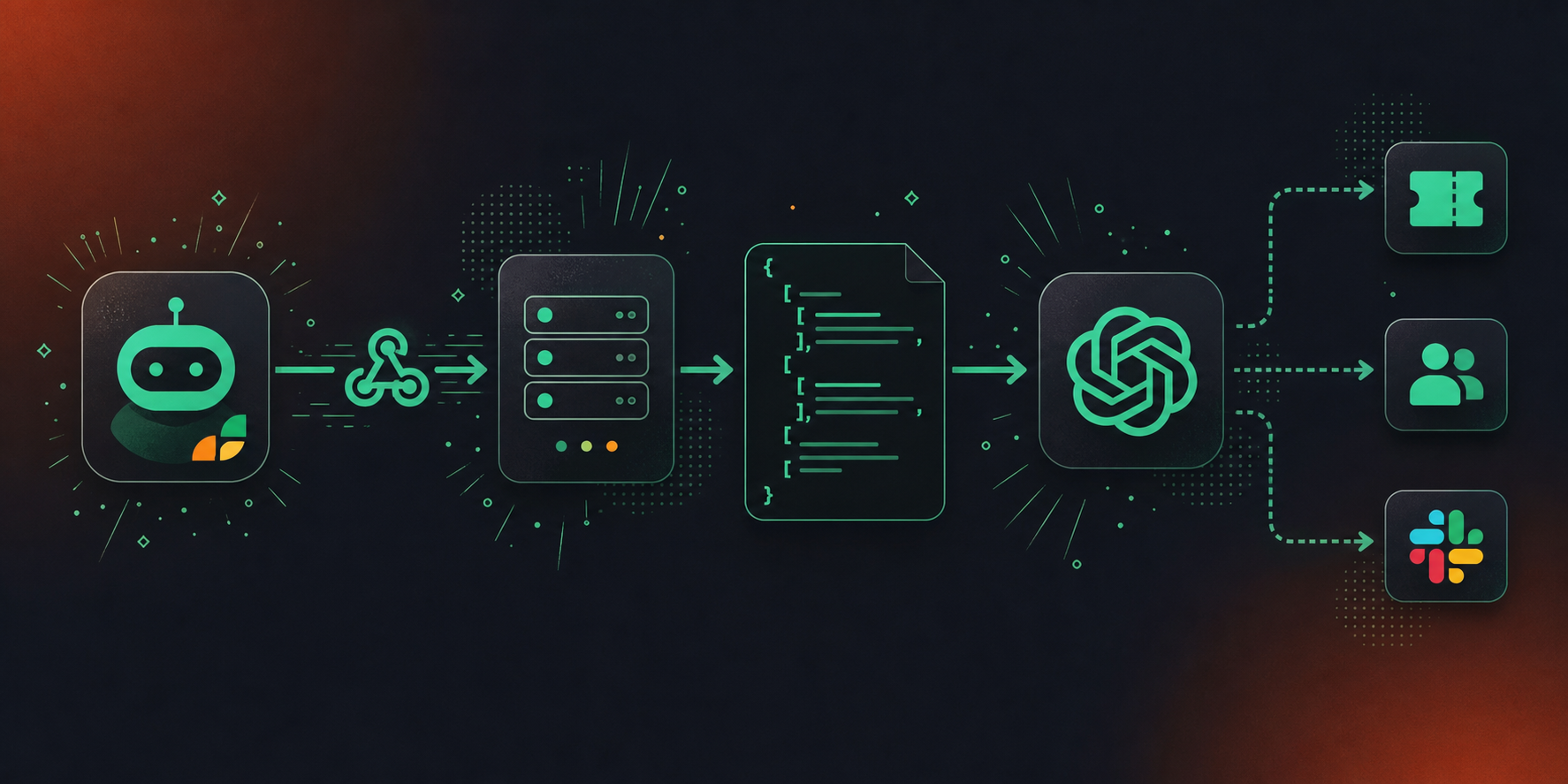
Webhooks give ChatGPT agents a direct channel to receive structured conversation data the moment a meeting ends. Instead of polling an API or waiting for a manual export, your agent gets an HTTP POST request delivered automatically, containing the summary, decisions, and action items extracted from that call.
The mechanics follow a clear sequence:
- A meeting concludes and your conversation intelligence layer generates a structured output, including decisions made, action items with named owners, and any flagged blockers.
- That payload is immediately sent via HTTP POST to a URL your ChatGPT agent is listening on.
- The agent parses the incoming JSON, extracts the fields it needs, and takes the next step, whether that’s filing a ticket, updating a CRM record, or surfacing context for the next planning session.
How Conversation Data Improves Agent Quality
The gap between a useful agent and a generic one is usually the data feeding it. A ChatGPT agent operating on stale context or manually assembled notes produces stale outputs. When webhooks pipe in fresh, structured conversation data automatically, the agent can act on what your team actually decided, not what someone remembered to type up afterward.
This is where Spinach AI fits into the architecture. Spinach AI is an enterprise conversation intelligence platform, the system of record for conversation data, deployed company-wide to capture every conversation across Zoom, Google Meet, Microsoft Teams, Slack Huddles, and Webex and turn it into governed, AI-ready knowledge. Where an individual note-taker solves one person’s meeting problem, Spinach captures at the organizational level with enforced policy and a single governed data asset. Spinach joins the meeting, captures during it, and delivers a structured payload at meeting end. That payload becomes the webhook body your ChatGPT agent consumes: accurate, governed conversation data routed automatically into your pipeline, with no manual hand-off.
Setting Up a Webhook Server for Conversation Data
Your webhook server needs three things to work with conversation data: an HTTP endpoint that accepts POST requests, signature verification to confirm payloads are genuinely from your source, and a data handler that routes conversation content to your ChatGPT agent.
A Minimal Node.js Webhook Receiver
Here is what a working setup looks like in practice:
const express = require('express');
const crypto = require('crypto');
const app = express();

app.use(express.json());

app.post('/webhook', (req, res) => {
  const signature = req.headers['x-webhook-signature'];
  const payload = JSON.stringify(req.body);
  const expected = crypto
    .createHmac('sha256', process.env.WEBHOOK_SECRET)
    .update(payload)
    .digest('hex');

  if (signature !== expected) return res.status(401).send('Unauthorized');

  const { transcript, summary, action_items } = req.body;
  // Pass to ChatGPT agent handler
  processConversationData({ transcript, summary, action_items });
  res.status(200).send('OK');
});
A few things worth noting here:
- Signature verification with HMAC-SHA256 prevents spoofed payloads from reaching your agent. Always compare against a secret stored in an environment variable, never hardcoded.
- Respond with
200 OKimmediately before doing any heavy processing. Most webhook providers will retry if they do not receive a fast acknowledgment, a pattern also relevant when understanding how MCP servers handle meeting transcripts, which causes duplicate events. - Destructure only the fields your agent actually needs. Passing the full raw payload to a ChatGPT agent adds noise and consumes unnecessary context window.
Once the endpoint is live and verified, your agent receives clean, structured conversation data on every meeting completion without any manual export step.
Connecting Your Webhook Server to ChatGPT Agents
With your webhook server running and verified, the next step is wiring it into the ChatGPT Agents configuration so the agent knows where to send conversation events.
Registering Your Endpoint in the OpenAI Dashboard
Open the OpenAI developer dashboard, open your project, and locate the Agents or Webhook settings panel. You will paste your public HTTPS endpoint URL here. OpenAI requires a valid SSL certificate, so a self-signed cert will be rejected at this stage. Refer to the OpenAI webhooks documentation for the full endpoint registration flow.
Configuring Event Subscriptions
Once your endpoint is registered, select which conversation events the agent should forward. This follows the same routing logic used when you sync Google Meet notes to HubSpot automatically:
Event | When it fires | Best used for |
|---|---|---|
| Every time a new message appears in the thread | Real-time record of the exchange as it happens |
| When the agent finishes a full reasoning cycle | Pulling the complete turn for downstream processing |
| After each intermediate tool call mid-conversation | Capturing function invocations during an active agent run |
Verifying the Handshake
After saving, OpenAI sends a one-time verification request to confirm your server is reachable and responding correctly. Your handler must return the challenge value from that request with a 200 status. Failing this check leaves the webhook inactive.
Security Considerations for Conversation Data via Webhooks
Conversation data moving through webhooks carries real risk if you treat the pipeline as just a data transport layer. Every payload contains meeting content, speaker identities, and potentially sensitive decisions, so the security surface deserves the same attention you’d give any production API integration.
There are a few controls worth putting in place before you ship this to a real team.
Authentication and payload validation
Webhook endpoints are publicly reachable by definition. Without verification, any actor who finds your endpoint URL can POST arbitrary data into your agent pipeline. Use HMAC-SHA256 signature validation on every inbound request: compare the signature header against a hash of the raw payload using your shared secret, and reject anything that doesn’t match before touching the body. The SHA256 webhook signature verification guide covers implementation across multiple languages if you need a reference.
Data handling in transit and at rest
- Enforce HTTPS on your receiving endpoint with no HTTP fallback. Conversation payloads in plaintext are a compliance liability and a direct security risk.
- Avoid logging full payloads in your application logs. Speaker names, verbatim quotes, and decision context have no business sitting in a log aggregator with broad team access.
- If your agent stores conversation data to build context over time, apply retention limits that match your organization’s data policies, and scope read access to the services that actually need it.
Secrets management
Never hardcode webhook secrets or API keys in source code. Pull them from a secrets manager at runtime, rotate them on a defined schedule, and confirm your CI/CD pipeline never prints environment variables to build logs.
These controls apply regardless of which conversation intelligence source you connect. If you’re routing data from Spinach AI’s Enterprise webhook integration, the conversation data arriving at your endpoint is already governed at the source, with configurable retention per data type and PII redaction at the transcript level, but your receiving infrastructure still owns its half of the security boundary.
Powering ChatGPT Agents With Meeting Intelligence Through Spinach
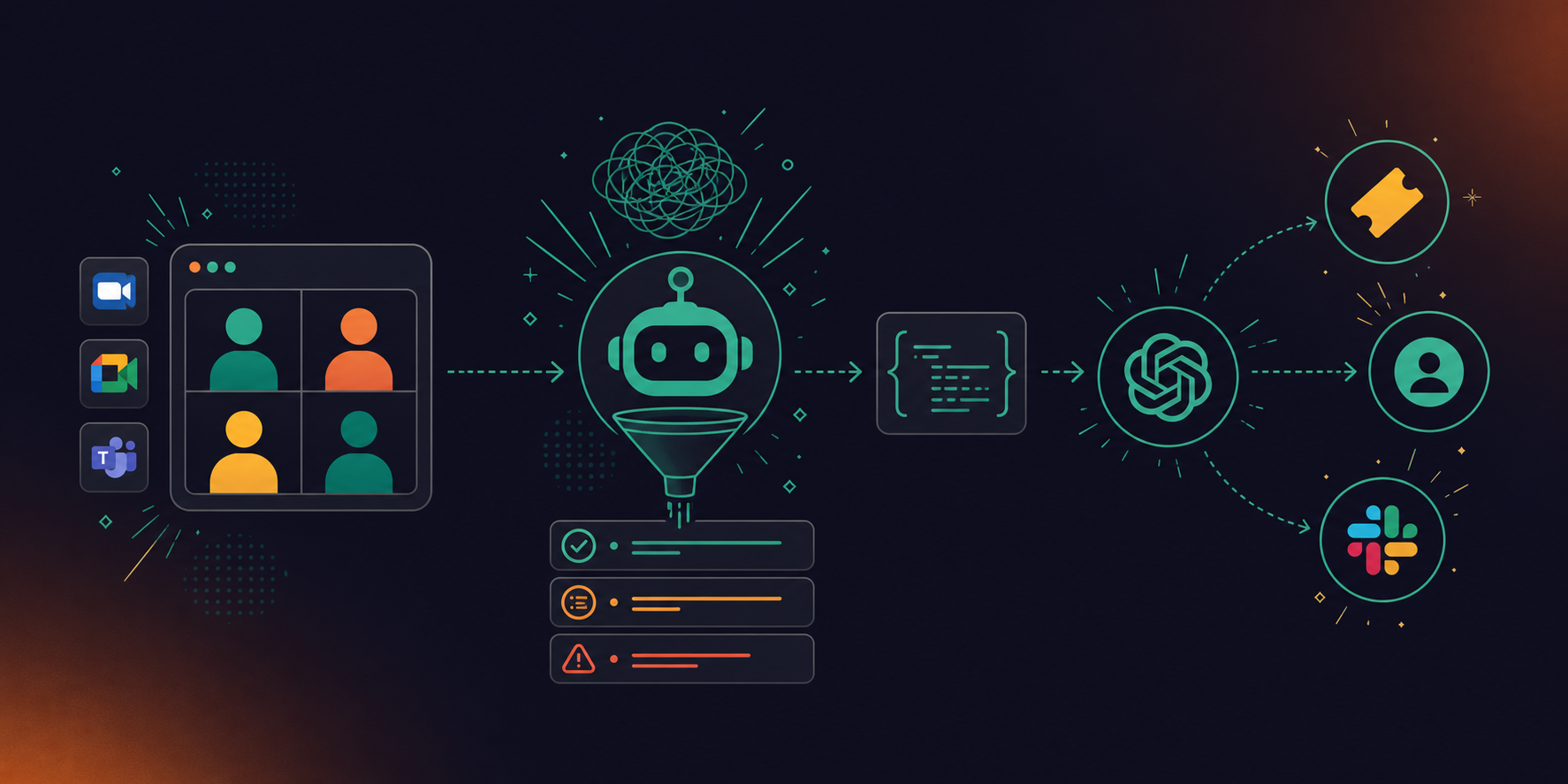
Conversation data captured during meetings sits in a format ChatGPT agents can actually use: structured, timestamped, and tied to real decisions. Spinach AI is the enterprise conversation intelligence platform and system of record for conversation data, deployed company-wide across Zoom, Google Meet, Microsoft Teams, Slack Huddles, and Webex to capture, centralize, and manage every conversation the organization has. Spinach joins the meeting, captures during it, and delivers a governed record at meeting end. That record includes decisions with context, action items with named owners, and blockers that surfaced mid-discussion.
Feed that structured output to a ChatGPT agent via webhook and the agent stops operating on assumptions. Because Spinach is the organizational record, not a per-user folder, every agent in your stack queries the same governed corpus: no shadow IT, no siloed meeting notes that never reached the system. The agent routes the right action item to the right person, flags blockers against your project backlog, and surfaces context that would otherwise evaporate between sessions.
What Spinach Delivers Into the Webhook Payload
Three data types arrive in the payload after each meeting ends:
- Action items with assigned owners, so the agent knows who is accountable without inferring it from a raw transcript
- Decisions with the reasoning captured in context, so downstream agents can reference why a call was made alongside what was decided, a pattern covered in depth for teams who want to pull Google Meet transcripts into Codex
- Blockers tagged by topic, so an agent querying your project data can cross-reference open issues without a manual handoff
API and webhook access is available on Spinach’s Enterprise plan. Because the data is governed at the organizational level, with configurable retention per data type (transcript, summary, and video), PII redaction at the transcript level, and SOC 2 Type II, GDPR, and HIPAA compliance, your receiving infrastructure inherits a clean, policy-enforced data asset. The structured output means your agent configuration spends zero time parsing transcript text and can focus entirely on acting on the data.
Final Thoughts on Building ChatGPT Agents That Act on Real Meeting Decisions
The best ChatGPT agent configuration in the world still produces generic output if it’s working from incomplete context, and conversation data is almost always the missing piece. Webhooks give you a way to fix that without building something complicated. Structured payloads from your meetings arrive automatically, your agent parses what it needs, and the manual copy-paste step disappears entirely. Spinach AI is the enterprise conversation intelligence platform that turns every conversation across your organization into governed, AI-ready data, the system of record your agents can actually build on. Get started with Spinach and give your agents the context they actually need.
Configure Spinach AI’s Enterprise webhook integration to POST structured meeting output — decisions with context, action items with named owners, and flagged blockers — to your HTTPS endpoint the moment a meeting ends. Your ChatGPT agent receives a clean JSON payload it can immediately act on: routing tickets, updating CRM records, or surfacing context for the next planning session, with no manual export step in between.
Spinach delivers three parsed fields: action items with assigned owners, decisions with the reasoning captured in context, and blockers tagged by topic. A raw transcript requires your agent to extract and attribute all of that itself, consuming context window and introducing parsing errors. The structured payload means your agent configuration focuses entirely on acting on the data, not cleaning it.
Yes. When a meeting ends, Spinach joins your Zoom, Meet, Teams, or Webex call, captures decisions and action items with named owners during it, and fires that structured output to your webhook endpoint automatically. Your ChatGPT agent receives fresh, governed conversation data on every meeting completion — so it reasons from what your team actually decided, not from whatever someone remembered to type up afterward.
Use HMAC-SHA256 signature validation on every inbound request — compare the signature header against a hash of the raw payload using your shared secret, and reject anything that does not match before touching the body. Beyond that: enforce HTTPS with no HTTP fallback, avoid logging full payloads in your application logs, pull webhook secrets from a secrets manager at runtime, and apply retention limits to any conversation data your agent stores over time.
Yes. API and webhook access is available on Spinach’s Enterprise plan only. The Business plan includes MCP connectivity to Claude and ChatGPT, which covers many agent use cases without custom pipeline work. If your architecture depends on direct webhook delivery of structured meeting output into your own infrastructure, that requires an Enterprise engagement — contact Spinach sales for custom pricing.
Subscribe to `run.completed` to capture the full output after a reasoning cycle, or `conversation.item.created` to receive each message as it appears in the thread. Use `run.step.completed` if your agent invokes tools mid-conversation and you want to log intermediate steps for debugging or routing.
HMAC-SHA256 is a method of verifying that an inbound HTTP request was sent by a trusted source — your server hashes the raw payload using a shared secret and compares the result against the signature header. Without it, any actor who discovers your endpoint URL can POST arbitrary data into your agent pipeline, potentially corrupting the context your ChatGPT agent acts on.
Polling requires your agent to repeatedly ask a system whether anything has changed, burning cycles waiting for an update that may not exist yet. A webhook delivers the structured payload the moment the event fires — so when a meeting ends, your agent receives fresh conversation data immediately, without a lag interval between decision and action.
Spinach joins meetings on Zoom, Google Meet, Microsoft Teams, Slack Huddles, and Webex, then delivers structured output — decisions with context, action items with named owners, and flagged blockers — to your webhook endpoint when the meeting ends.
Destructure it first and pass only the fields your agent needs. Forwarding the full raw payload adds noise, consumes unnecessary context window, and can expose speaker identities or verbatim quotes to broader system logging than your data policy allows.
OpenAI sends a one-time verification request to your registered endpoint containing a `challenge` value your server must echo back with a `200` status. If your handler fails to return the challenge correctly, the webhook remains inactive and no conversation events will be delivered.
The Business plan includes MCP connectivity to Claude and ChatGPT, which covers many agent use cases through a managed OAuth connection without custom pipeline work. Enterprise webhook delivery routes structured meeting output directly into your own infrastructure via HTTP POST, giving you full control over parsing, storage, and routing — API and webhook access is available on the Enterprise plan only.
Pull secrets from a secrets manager at runtime so your application reads the current value on each request without requiring a code deploy to update it. Rotate on a defined schedule, confirm your CI/CD pipeline never prints environment variables to build logs, and verify the new signature validation passes against a test payload before retiring the old secret.
Apply retention limits that match your organization’s data policy, scope read access to the services that actually consume the data, and avoid writing full payloads to general application logs where team access is broad. If you’re routing data from Spinach’s Enterprise webhook integration, PII redaction at the transcript level and configurable retention per data type are handled at the source — but your receiving infrastructure owns its side of that boundary.
Use the webhook integration when you need structured, governed outputs — action items with named owners, decisions with reasoning, blockers tagged by topic — delivered automatically at meeting end with no parsing work on your side. Build a custom parser only if you need fields or formatting that a structured payload doesn’t expose, accepting that you’ll be responsible for extraction accuracy, speaker attribution, and schema maintenance across every meeting type your agent consumes.
What should you do now
You made it to the end of this article! Here are some things you can do now:
- If communication is a challenge for your team, you should check out our library of meeting agenda templates.
- Check out Spinach to see how it can help you run a high performing org.
- If you found this article helpful, please share it with others on Linkedin or X (Twitter)

