How sales managers can boost their team’s performance
In this article we'll explore actionable advice to empower your sales team and help them thrive.
 Guest Contributor
There are a lot of factors that play into the success of a sales team. Ultimately though, the sales manager is the one responsible for bringing it all together to ensure the team thrives.
As a manager, you’re responsible for facilitating collaboration, communicating objectives, defining team culture, and equipping your team with the tools and motivation to hit their goals. To be successful, managers need to tap into the big picture and the little details:
- What’s the team dynamic? Is it competitive but supportive or is every person fending for themselves? Are the energy levels infectious or toxic?
- What’s the relationship between sales and marketing? What about sales and customer support?
- Is your team aware of the goals that they’re aiming for? Do they also understand the context behind why those goals were set?
- Does your team consistently hit or miss goals?
These questions are just the tip of the iceberg when it comes to the success (or downfall) of a sales team.
In this article, we’ll walk through 10 proven tips to help sales managers boost team performance, including:
- Find and hire the best talent
- Provide proper sales training
- Develop powerful strategies (and communicate them)
- Set measurable and realistic goals
- Build trust with your team
- Create sales processes, but be flexible
- Analyze results and important metrics
- Provide continuous feedback
- Recognize and reward great results
- Set up effective communication
Let’s get started!
1. Find and hire the best talent
Managing a successful sales team starts with hiring the right people.
The people on your team are the foundation. If you don’t put care into building your team with A-players from the start, it will make everything that follows a lot more challenging.
But let’s get one thing straight: when we say “A-players” we’re not only talking about individuals who possess the hard skills to do the job. Rather, people who are able and eager to learn and raise the entire team up, not just themselves.
When looking for the best talent, you can focus on their attitude. Are they willing to learn? Are they comfortable being autonomous but thrive in a collaborative environment? Can they empathize with customers?
Remember the values that your company has in place and use them to help you find the best candidate.
Before you even start your hiring process, you should document your expectations to increase your odds of hiring the best person for the job. Some things to consider include:
- Outcomes: What does success look like and how will it be measured?
- Scorecard: What qualities, soft and hard skills, are most important for success in this role?
- Standardizing questions: Before you jump into your first interview, be sure to make a list of questions you’ll ask each candidate. If you go off-kilter for every interview, it’s going to be really hard to compare candidates.
As you review and define your expectations for hiring, consider focusing on these five core qualities found in the majority of successful salespeople:
- Focus 🎯
- Responsibility 🤝
- Drive 🏁
- Optimism ☀️
- Empathy 🙏🏻
And we can’t forget the importance of being customer-centric.
The good news is, if your candidate possesses the characteristics outlined above, they’re likely to understand the importance of the customer.
For instance, someone with empathy will be able to identify with customers and put themselves in their shoes. These are the types of individuals who will be able to make your customers feel respected and appreciated.
Ultimately, this will help increase your customer retention and loyalty—and help you increase revenue.
2. Provide proper sales training
When employees go through a structured onboarding program, they’re more likely to stay longer with the organization. In fact, an HBR study found that poor onboarding experiences lead to 33% of new hires looking for a new job within their first 6 months.
That’s why it’s crucial to provide proper sales training on top of a great onboarding experience for every new hire.
After 3 months into the job, every rep should have a deep understanding of your product, customers, and value propositions so that they can answer customer questions effectively. As you go through your onboarding planning, be sure to book new sales reps in sessions around:
- Buyer personas with the marketing team
- Product and feature walkthrough with the product team
- Product roadmap walkthrough with the product team
- Customer Success landscape and handoffs with the CS team
- Escalating and reporting customer issues with the support team
- Company mission and vision with a senior leader
Keep in mind that new employee onboarding is also a major part of being a successful sales manager – it’s not just for HR to deal with.
You need to create an onboarding checklist that will help you build a strong foundation for the future success of your new hires.
The purpose of your onboarding checklist is two-fold. Firstly, it should help you prepare in advance of your new employee’s first day. Secondly, it should also help them, once they arrive, to get to know the team and how everything works. Include a checklist of administrative tasks for yourself and also things for your new hire to do in their first week to help them get acquainted.
3. Develop powerful strategies (and communicate them)
To become a successful sales manager, you also need powerful sales strategies that allow your team to be creative while also meeting objectives.
For example, a CRM strategy, such as using a CRM with a predictive dialer to supply a constant flow of new leads, will grow your sales and boost your customer service through a combination of technology, actions, and processes.
The most effective sales strategies are created in collaboration with other teams, like marketing and customer service. Having said that, sales strategies need to be complemented with state of the art marketing emails sequence tools and customer service tools. Strategies for sales have to be in tandem with driving optimized marketing and customer experiences.
Don’t work in a silo.
Working cross-functionally will help ensure not only that you’re providing an enjoyable customer experience at every touchpoint in the customer journey, but also that the sales team can quickly identify the best leads and opportunities to increase revenue.
When you’ve developed a strategy, make sure you communicate the strategy to your team. Encourage questions and feedback to make sure everyone’s on the same page and bought-in. It’s important to make sure your strategy is crystal clear to everyone because it plays a major role in successfully growing revenue.
4. Set measurable and realistic goals
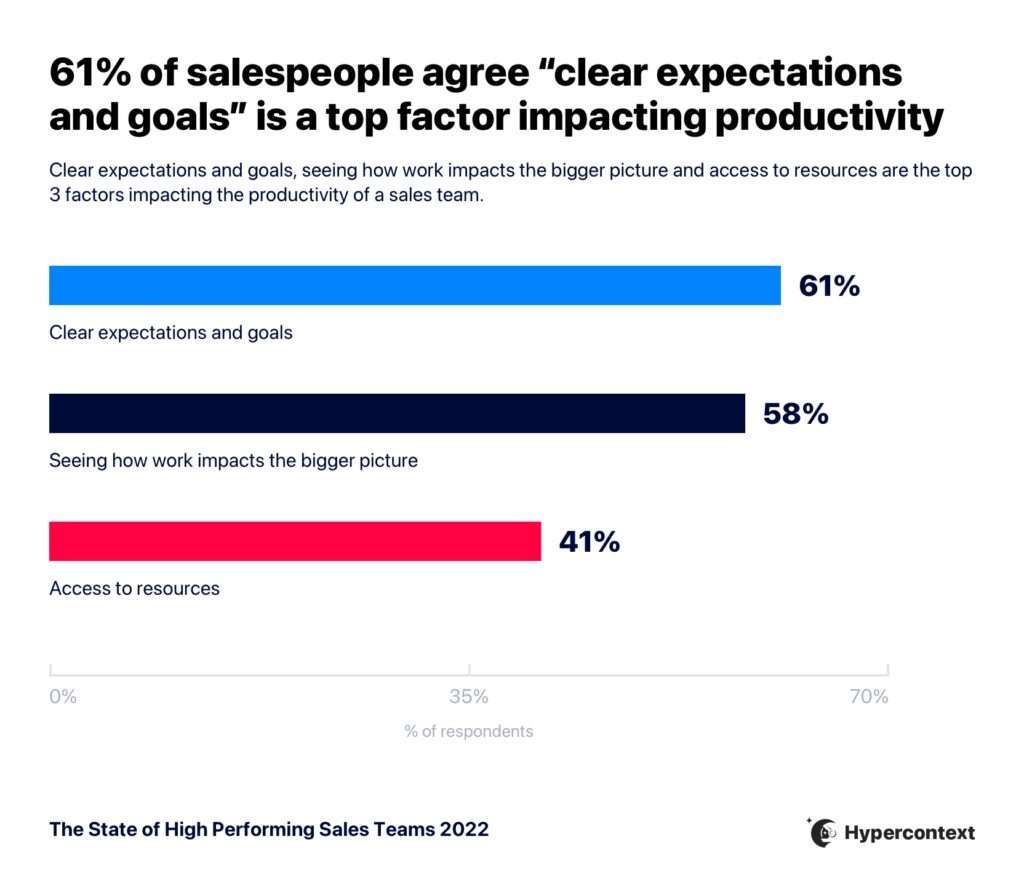
According to The State of High Performing Sales Teams, 61% of salespeople agree clear goals and expectations are the top factor impacting productivity.
While it’s great to have big, audacious goals, it’s also important to make sure they’re achievable— otherwise, you risk demotivating your team rather than boosting performance. Having realistic goals gives the team a sense of direction.
Establishing both long and short-term goals will help your team stay motivated and on top of their work.
Your long-term goals are the ones that need to be achieved in a timeframe of at least 6-12 months. The short-term goals are the ones you’re looking to accomplish within the week or by the end of the month.
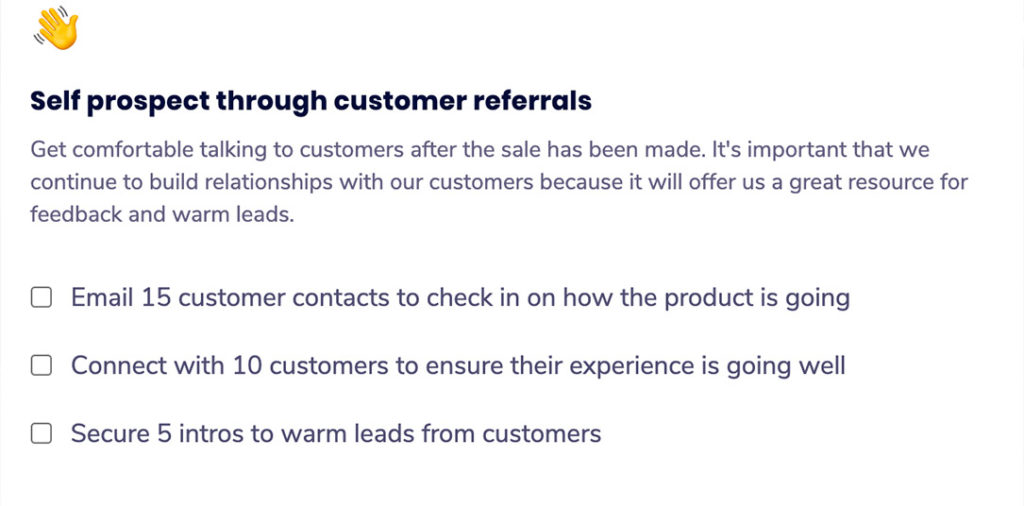
Having measurable sales goals provides a sense of purpose and urgency — both factors that can positively affect performance.
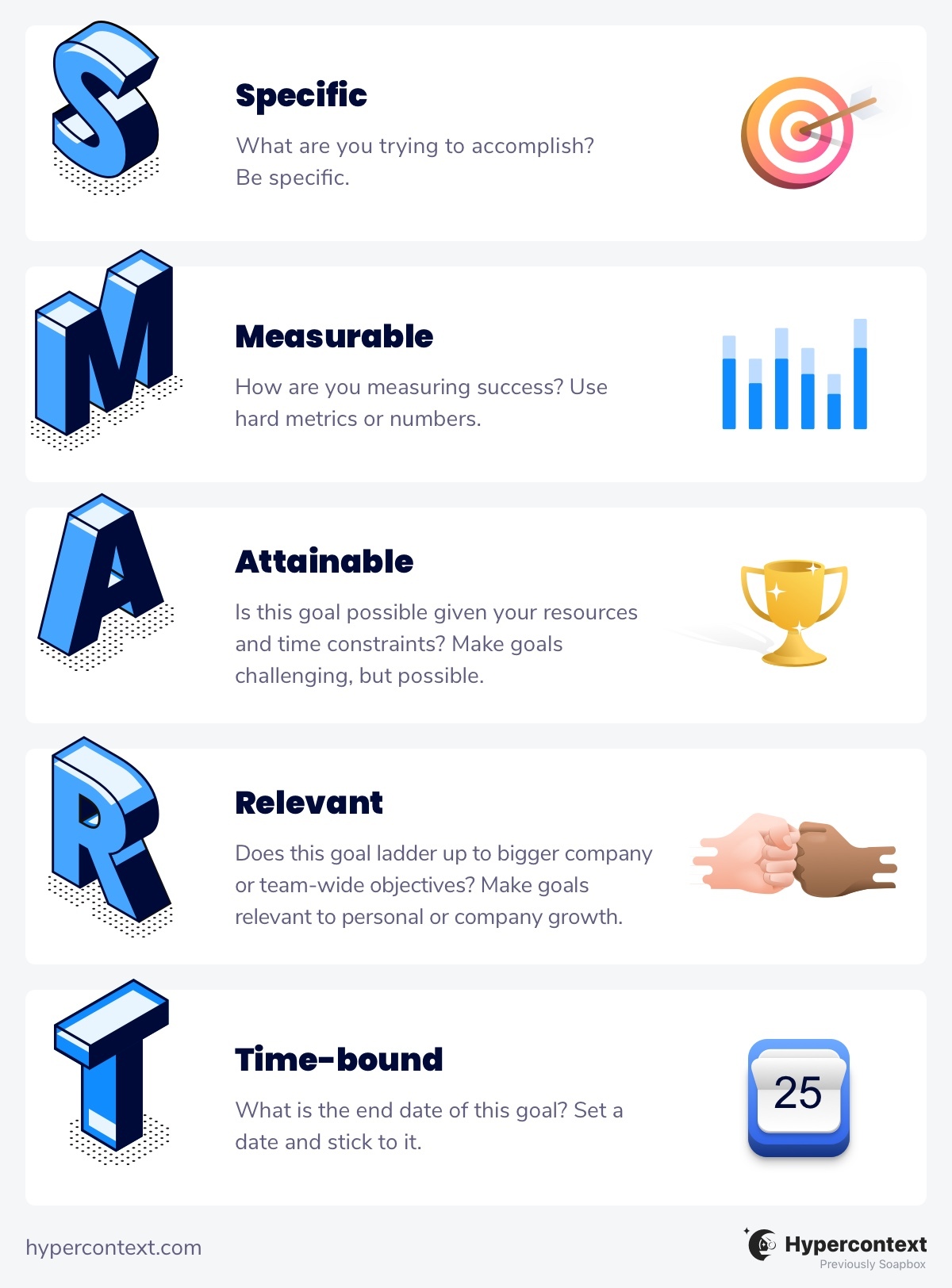
When creating goals, one approach that’s widely used is the SMART goals framework:
- Specific – Make your goals as specific as possible. Be detailed and be concise with the numbers you want to achieve.
- Measurable – Define the metrics that make you say that the team is progressing and getting close to the goal.
- Attainable – The goals you come up with should be obtained within a certain timeframe.
- Relevant – Short-term goals should be in line with long-term goals.
- Time-bounded – Set a defined timeframe for the goals you come up with. This makes team members know which goals to prioritize.
5. Build trust with your team
As a sales manager, very few things are more important than building trust with your team.
However, this can be difficult to achieve. In many instances, current leaders used to be contributors on the team and were promoted to leadership roles. It takes time to adjust to new team dynamics — and that’s okay.
Take Nick White for example. During his time at Top Hat, he made the switch from sales rep to sales manager. When asked about the transition, he explained:
“This was quite challenging at first, as many of the reps on my team were my close friends. I took on a team that I was once a team lead for so I was fairly close with the whole team. This made the job easier in some areas, but difficult in others.
So what I did to overcome this actually just called it out. I addressed any issues head-on. I created a space where my direct reports and I could all feel safe and open to share concerns, challenges, successes, you name it. I made it a point to let every individual know that I was in their corner.
That means that any feedback or coaching that I provided would be with their best interests at heart. I let them know that at the end of the day, I care about their success and growth; I want to see them win. Because we were friends, the trust was already there and that made the transition that much easier.”
Ways to build trust with your sales team
Let’s walk through some of the ways in which sales leaders can invest in their team while building trust:
Run monthly coaching sessions
On top of your one-on-ones, set up coaching sessions with your team to help guide them through challenges and continue to learn. This will help empower your employees to have autonomy in their decisions and foster a culture of two-way trust.
To run better coaching sessions, check out Mark Roberge, former CRO at Hubspot’s Sales Leader and SDR one-on-one template.
Set goals together
Beyond team-focused goals, ask every direct report about their own career goals and what skills they want to develop, and find ways to help them get there faster. If you’re not sure where to start, check out Spinach AI’s library of goal examples.
Invest in their growth
This can be anything from learning how to become more productive, to learning how to sell more effectively. Investing in your team’s growth will not only help them upskill, but it will also benefit your company as they begin to put their new learnings to work. Beyond courses, those monthly coaching sessions are a great way to continue to invest in your team’s growth.
Be consistent
The quickest way to break trust with the members of your team is to be an inconsistent manager. So make sure that you show up on time, keep your promises and always do what you said you’d do. Be consistent with:
- Your expectations
- Providing ongoing, positive and constructive feedback
- Sharing recognition and encouraging it to be shared from all directions
- Encouraging your team to share their ideas, thoughts, and feedback
Lead by example
Your team needs to see that you’re competent as a manager. This includes everything from prospecting, negotiating and closing to the sales strategy. Instead of telling them how to do things, show them.
Beyond the day-to-day tasks that come with the job, it’s important that you also lead by example when it comes to avoiding burnout. Encourage your team to take time off throughout the year, but lead by example and take time off for yourself as well.
6. Create sales processes, but be flexible
Create sales processes for your team, but don’t get stuck on them. Be agile and open to change if something’s not working. An ineffective sales process is one of the biggest barriers for sales departments.
To create an effective sales process you need to find a balance between automation and human effort. You also need to make sure you have a good CRM that can easily integrate with other solutions to support every part of your business, an efficient sales team, a well-tailored strategy and agility in the work processes.
You need sales processes that work, but they also need to be flexible if they’re going to effectively increase your team’s productivity.
A lot of sales reps have shown that it’s effective to have a sales process that helps them meet their sales objectives by acting as a guide when converting clients and closing deals.
But, it’s not just about following the best call center sales practices or having the right marketing, inventory management, and sales automation tools. Salespeople know that the basis of all sales is showing empathy to clients – understanding their pain points and presenting a solution to their problems.
Feelings and emotions come first, thinking and logic come later. If a sale is stuck, it may mean that it’s not speaking to the emotions of your client.
Sometimes sales reps will need to veer away from the process to bring that emotion back and gain a deeper understanding of the prospect’s pain points. Empathy plays a significant role in providing good customer service. It will help them more effectively communicate how the product or service can make their life better or easier.
Build a model for your sales processes, but keep in mind that every client and sale will be different, so never be afraid to work outside the box.
7. Analyze results and key metrics
Analyzing results and key metrics is an important part of running a business. It’s also a crucial part of boosting your sales team’s performance. After all, you can’t improve what you can’t measure.
You need to keep track of the right sales metrics and KPIs so you can provide your salespeople with quantitative insights to help them understand their performance and how to improve.
Sales data can unlock so many valuable insights! It can help you understand things like:
- Your most high-performing sales reps
- Which products are selling best
- The most effective sales strategies
- The best way to contact customers
The list is endless.
Review how you’re tracking against your goals each sales team meeting and be open to adapting as needed. Numbers don’t lie! They can provide fantastic insights into what’s working and what’s not.
8. Provide continuous feedback
Analyzing your sales charts is only as valuable as how you act on the insights you glean from them. Make sure you give regular feedback to your sales team members so they have a clear idea of where they stand and how to improve.
When giving feedback, it’s best to be direct. Give a concrete example of the issue you’re addressing, demonstrate why it’s important, and have a conversation about how they can improve moving forward. The keyword being conversation. Don’t talk at them, talk to them.
You can also encourage them to give upward feedback about you as well. By doing this, you create a positive two-way feedback relationship.
Remember that a good time to address negative feedback is in one-on-one meetings or coaching sessions. Public criticism can feel unnecessarily harsh and is likely to trigger a person’s defense mechanisms.
Always be sure to praise team members in public and criticize them in private. As a manager, you’ve probably heard this phrase uttered, and it’s something that you’ll want to keep in mind when issuing praise or reprimands.
9. Recognize and reward great results
Teams are motivated to work harder when their great results are recognized and rewarded.
When you have something positive to say to one of your team members, you can bring it up in your team meetings and one-on-ones. It makes employees feel appreciated when their hard work is recognized.
You may even consider going a step beyond recognition with rewards.
There are many ways to organize a rewards program. One way to make your job easier and keep your sales reps happy is to let the high performers pick their rewards from a wide range of offerings, such as taking them to lunch, walking their dog, giving them a full day off, or even unconventional rewards like washing their car. You can also offer team-wide rewards like going to a sports game, an escape room, the movies, etc.
But, individual rewards work just as well and they can still be great for keeping your entire sales team motivated – after all, who doesn’t want to watch their sales manager washing their teammate’s car?
10. Set Up Effective Communication
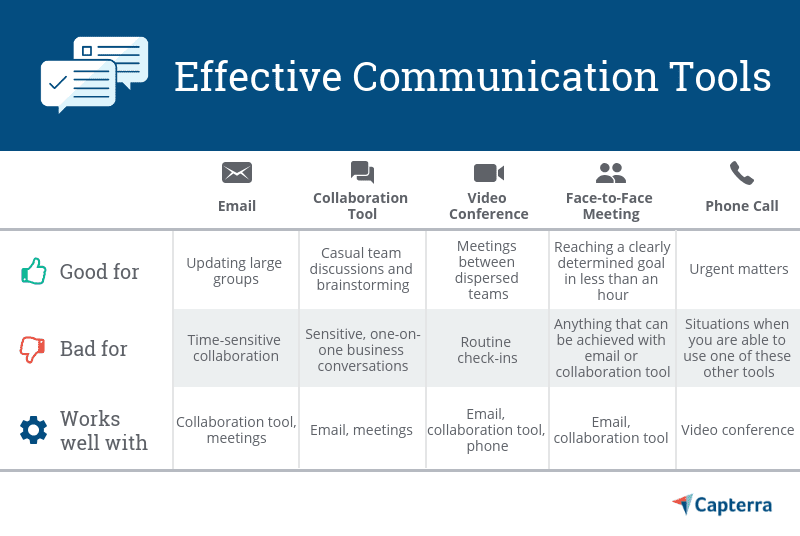
For your team to be successful, you need to set up effective communication channels. This can be team meetings, emails, or the chat feature on communication tools like Trello and Asana.
Choose the best mix of tools for you and your team and make sure everyone commits to using them. Know when you need to communicate synchronously vs. when connecting asynchronously will do the trick.
The tools you use to communicate with customers, like calling apps, will look different than the tools you use to communicate with your internal team. Some solutions may be easier for your team than others. And some may be more secure than others. Make sure you choose a platform that allows you to connect safely and securely with your team members.
The communication channel you choose should also work for everyone. Slack, in particular, is an easy and convenient solution for teams to communicate and stay organized.
The platform allows you to create different channels and organize them by category. You can send links, attachments, etc. This is a great solution for managers who want the ability to communicate with every team member in one convenient place.
Bonus: Encourage learning
Investing in your team’s education and helping them stay current on new industry techniques is a great way to maintain high-performance levels.
There are certain platforms, such as gamification LMS software, that make learning fun for the entire team by sharing fun quizzes and giving out awards and certificates for goals achieved.
This doesn’t have to be expensive either, with so many free books, webinars, podcasts, and videos online, eCommerce training is now very affordable.
However, if you have the budget, you may benefit from establishing mentorship programs or sending your team members to select sales conferences.
Conclusion
Implementing a great system for managing your team’s performance doesn’t have to be hard. There are a lot of small steps you can take to make a big difference for your team and customers.
Try incorporating these 10 tips to help manage and accelerate a high-performing sales team. 🚀

Burkhard Berger is the founder of awesomex™. You can follow him on his journey from 0 to 100,000 monthly visitors on www.awesomex.com. His articles include some of the best growth hacking strategies and digital scaling tactics that he has learned from his successes and failures.
What to do next
You made it to the end of this article! Here are some things you can do now:
- You should check out our YouTube channel for more tips on management skills and team building.
- Check out Spinach to see how it can help you run a high performing org.
- If you found this article helpful, please share it with others on Linkedin or X (Twitter)

