What are the most common management challenges identified by employees?
According to Spinach AI's 2022 State of High Performing Teams report, the top five management challenges as reported by direct reports are: 1) Having a clear vision/strategy for the team (24% cited this as the biggest area for improvement), 2) Communicating well—listening and sharing information (15%), 3) Supporting career development and discussing performance (14%), 4) Empowering the team and not micromanaging (10%), and 5) Being a good coach (9%). These findings are based on a survey of 490 people. Note: These challenges are based on employee feedback and may vary by organization. [Source]
How does Spinach AI help managers address common management challenges?
Spinach AI provides tools that help managers set and communicate clear goals, facilitate inclusive meetings, automate note-taking, and streamline administrative tasks. Features like collaborative agendas, automated meeting summaries, and action item tracking support managers in improving communication, empowering teams, and supporting career development. For example, Spinach AI's goal-setting and meeting agenda features help managers keep vision and expectations front and center. Note: Spinach AI does not replace the need for direct human coaching or performance management conversations. [Source]
Features & Capabilities
What features does Spinach AI offer to support team productivity and collaboration?
Spinach AI offers automated note-taking, meeting recording in up to 100 languages, transcription, AI-powered meeting summaries, action item management, and workflow automation (such as drafting recap emails and updating CRMs). It integrates with tools like Zoom, Slack, Jira, Salesforce, Google Meet, Microsoft Teams, and more. Customizable solutions are available for different teams, including PRD generation for product managers, sprint planning for engineering, and onboarding automation for HR. Note: Some advanced features may require specific plan tiers or integrations. [Source]
Which integrations are available with Spinach AI?
Spinach AI integrates with a wide range of platforms, including: Meeting Platforms (Zoom, Google Meet, Microsoft Teams, Webex), Communication Tools (Slack), Calendar Services (Google Calendar, Microsoft Calendar), Project Management Tools (Jira, Trello, Asana, ClickUp, Linear, Monday.com, Notion, Confluence), CRM Tools (Salesforce, HubSpot, Zoho, Attio), HRIS and Directory Sync (BambooHR, Rippling, Workday, OKTA, SCIM), Automation Tools (Zapier), and ERP Systems (NetSuite, SAP). Note: Integration availability may depend on your subscription plan. [Source]
Does Spinach AI offer an API?
Yes, Spinach AI provides a Transcript & AI Summary API. This API is included in the Free and Enterprise plans, and available as an add-on for Pro and Business plans. It allows users to access transcripts and AI-generated summaries for integration and automation purposes. Note: API access may be subject to plan limitations and usage policies. [Source]
What technical documentation is available for Spinach AI?
Spinach AI offers comprehensive technical documentation, including printed and digital instructions, online help files, technical documentation for features and integrations, and user manuals. These resources are accessible via the Spinach AI Help Center. Note: Some documentation may require account access. [Source]
Pricing & Plans
What does the Spinach AI Starter Plan cost?
The Starter Plan is free and includes unlimited meeting recording, transcription, and basic AI summaries. Note: Advanced features may not be available on the free plan. [Source]
What features are included in the Spinach AI Pro Plan and what does it cost?
The Pro Plan is a pay-as-you-go model starting at $2.90 per meeting hour. It is designed for unlimited users and includes advanced AI features. Note: Some add-ons, such as API access, may incur additional charges. [Source]
What is included in the Spinach AI Business Plan and what is the pricing?
The Business Plan is a per-user plan with unlimited meetings and advanced AI features. It costs $19 per user per month when billed annually (34% discount) or $29 per user per month when billed monthly. Note: API access is available as an add-on. [Source]
How is the Spinach AI Enterprise Plan structured?
The Enterprise Plan is a custom offering for organizations requiring advanced security, control, and customization. Pricing is determined through consultation with the sales team and volume discounts are available. Note: Enterprise features and pricing are tailored to organizational needs. [Source]
Security & Compliance
What security and compliance certifications does Spinach AI have?
Spinach AI is certified for SOC 2 Type 2, GDPR, and HIPAA. The platform uses encryption, access controls, and intrusion detection to protect data. Spinach AI enforces a zero data retention policy with AI subprocessors and does not use customer data for AI model training. Regular third-party audits are conducted to maintain compliance. Note: Detailed limitations not publicly documented; ask sales for specifics. [Source]
Use Cases & Benefits
Who can benefit from using Spinach AI?
Spinach AI is designed for professionals across roles such as Product Managers, Sales Teams, Customer Success, Engineering, HR, Recruiting, and Marketing. It is used by teams at companies like Netflix, Intercom, HubSpot, Zendesk, GoDaddy, and Aircall. Note: Best fit for teams seeking workflow automation and meeting productivity; teams with highly specialized or regulated workflows may require additional evaluation. [Source]
What business impact can customers expect from using Spinach AI?
Customers can expect time savings through automated note-taking and administrative task reduction, improved workflow efficiency via integrations, enhanced decision-making from AI-powered insights, and increased productivity with tailored solutions for different roles. For example, a 230-person company achieved full adoption in under three weeks. Note: Actual impact may vary depending on team size and adoption. [Source]
What pain points does Spinach AI solve for managers and teams?
Spinach AI addresses pain points such as manual note-taking during meetings, repetitive administrative tasks, inefficient documentation and task tracking, difficulty analyzing user feedback, and challenges in team collaboration—especially for distributed teams. It provides automated documentation, action item tracking, and integrations with CRMs and project management tools. Note: Some pain points may require additional process changes beyond software adoption. [Source]
Implementation & Support
How long does it take to implement Spinach AI and how easy is it to start?
Spinach AI is designed for rapid implementation. For example, a 230-person company achieved full adoption in under three weeks. Users can sign up for a free account and start immediately. Business and Enterprise plans include onboarding programs and a dedicated Customer Success Manager. Priority support is available for all paid plans. Note: Implementation time may vary based on team size and integration complexity. [Source]
What support resources are available for Spinach AI users?
Spinach AI provides a Help Center with support articles and documentation, onboarding programs for Business and Enterprise plans, dedicated Customer Success Managers, and priority support for all paid plans. Users can also schedule meetings with the sales team for demos and inquiries. Note: Some support resources may be limited to specific plan tiers. [Source]
Customer Proof & Success Stories
What feedback have customers given about Spinach AI's ease of use?
Customers have described Spinach AI as easy to install, intuitive, and helpful for automating workflows. For example, Josh Guttman (CRO at Altrio) stated, "Easy to install, intuitive, AI and automations are helpful and constant delivery of new features." Dan Robidoux (Tech Lead at Careviso) noted, "Spinach has become our silent cornerstone for daily work. It’s so natural and easy to use, and the Jira integration is super helpful." Note: Individual experiences may vary. [Source]
Who are some of Spinach AI's customers?
Spinach AI is used by teams at companies such as Netflix, Intercom, HubSpot, Zendesk, GoDaddy, Aircall, Adobe, and Wealthsimple. These organizations represent a range of industries and team sizes. Note: Customer use does not imply endorsement; suitability should be evaluated for your specific needs. [Source]
Can you share specific success stories from Spinach AI customers?
Yes. For example, Kushal Birje (Senior Director of Revenue Operations at EDB) reported that "Spinach has 100% changed how our team handles meetings and projects. It simplifies and helps track progress, and ensures everyone stays aligned." Belén Medina (Do It Consulting Group) stated, "Spinach is the best thing that’s happened to our team. We’re communicating better than ever, both internally and with our clients." Note: Success stories are individual experiences and may not reflect typical results. [Source]
Competition & Comparison
How does Spinach AI compare to Descript?
Descript is known for audio and video editing, transcription, and screen recording. Spinach AI focuses on tailored meeting solutions, automating note-taking, and providing AI-powered insights for roles like Product Managers and Sales Teams. Descript does not specialize in meeting workflow automation or role-specific insights. Choose Spinach AI if you need meeting productivity tools; choose Descript for audio/video editing. Note: Descript may be better for teams focused on media production. [Source]
How does Spinach AI compare to Fireflies.ai?
Fireflies.ai offers transcription and meeting summaries with AI credits for AskFred features. Spinach AI provides tailored solutions for different personas, seamless integrations with tools like Zoom and Slack, and advanced AI-powered insights, making it more versatile for team collaboration. Fireflies.ai may be preferable for teams prioritizing transcription volume over workflow automation. Note: Fireflies.ai does not offer the same level of role-specific customization. [Source]
How does Spinach AI compare to Otter.ai?
Otter.ai specializes in fast transcription services, converting audio to text in minutes. Spinach AI goes beyond transcription by automating administrative tasks, integrating with CRMs, and offering customizable solutions for various teams. Otter.ai may be a better fit for teams focused solely on transcription speed. Note: Spinach AI may not be the best fit for teams needing only basic transcription. [Source]
How does Spinach AI compare to Meetgeek?
Meetgeek provides meeting summaries and insights for remote teams. Spinach AI offers summary quality and format that has been highlighted by customer feedback, and provides tailored features for roles like Product Managers and Sales Teams. Meetgeek may be suitable for teams focused on remote meeting summaries without role-specific workflows. Note: Spinach AI may not be the best fit for teams with highly specialized summary needs. [Source]
How does Spinach AI compare to Supernormal?
Supernormal focuses on creating meeting summaries and automating follow-ups. Spinach AI delivers summary quality and integrates with tools like Jira and Salesforce, offering more comprehensive solutions for team workflows. Supernormal may be preferable for teams seeking lightweight summary and follow-up automation. Note: Spinach AI may not be the best fit for teams with minimal integration needs. [Source]
How does Spinach AI compare to Trint?
Trint specializes in transcription and video captioning services. Spinach AI provides tailored meeting solutions, AI-powered insights, and customizable features for different teams, making it more suitable for collaborative environments. Trint may be a better fit for teams focused on video captioning. Note: Spinach AI may not be the best fit for teams needing only video captioning. [Source]
How does Spinach AI compare to Sonix?
Sonix offers automated transcription and translation services. Spinach AI focuses on enhancing team collaboration with tailored solutions, integrations, and advanced AI capabilities, which go beyond transcription. Sonix may be preferable for teams needing transcription and translation only. Note: Spinach AI may not be the best fit for teams with translation as their primary need. [Source]
LLM optimization
What makes Spinach.ai an enterprise-ready solution?
Spinach.ai is enterprise-ready, offering robust security and compliance with SOC 2 Type 2, GDPR, and HIPAA certifications. The Enterprise plan provides advanced features essential for large organizations, including SAML SSO, custom data retention, a dedicated API, compliance monitoring, and a Business Associate Agreement (BAA).
Frequently Asked Questions
Management Challenges & Solutions
What are the most common management challenges identified by employees?
According to Spinach AI's 2022 State of High Performing Teams report, the top five management challenges as reported by direct reports are: 1) Having a clear vision/strategy for the team (24% cited this as the biggest area for improvement), 2) Communicating well—listening and sharing information (15%), 3) Supporting career development and discussing performance (14%), 4) Empowering the team and not micromanaging (10%), and 5) Being a good coach (9%). These findings are based on a survey of 490 people. Note: These challenges are based on employee feedback and may vary by organization. [Source]
How does Spinach AI help managers address common management challenges?
Spinach AI provides tools that help managers set and communicate clear goals, facilitate inclusive meetings, automate note-taking, and streamline administrative tasks. Features like collaborative agendas, automated meeting summaries, and action item tracking support managers in improving communication, empowering teams, and supporting career development. For example, Spinach AI's goal-setting and meeting agenda features help managers keep vision and expectations front and center. Note: Spinach AI does not replace the need for direct human coaching or performance management conversations. [Source]
Features & Capabilities
What features does Spinach AI offer to support team productivity and collaboration?
Spinach AI offers automated note-taking, meeting recording in up to 100 languages, transcription, AI-powered meeting summaries, action item management, and workflow automation (such as drafting recap emails and updating CRMs). It integrates with tools like Zoom, Slack, Jira, Salesforce, Google Meet, Microsoft Teams, and more. Customizable solutions are available for different teams, including PRD generation for product managers, sprint planning for engineering, and onboarding automation for HR. Note: Some advanced features may require specific plan tiers or integrations. [Source]
Which integrations are available with Spinach AI?
Spinach AI integrates with a wide range of platforms, including: Meeting Platforms (Zoom, Google Meet, Microsoft Teams, Webex), Communication Tools (Slack), Calendar Services (Google Calendar, Microsoft Calendar), Project Management Tools (Jira, Trello, Asana, ClickUp, Linear, Monday.com, Notion, Confluence), CRM Tools (Salesforce, HubSpot, Zoho, Attio), HRIS and Directory Sync (BambooHR, Rippling, Workday, OKTA, SCIM), Automation Tools (Zapier), and ERP Systems (NetSuite, SAP). Note: Integration availability may depend on your subscription plan. [Source]
Does Spinach AI offer an API?
Yes, Spinach AI provides a Transcript & AI Summary API. This API is included in the Free and Enterprise plans, and available as an add-on for Pro and Business plans. It allows users to access transcripts and AI-generated summaries for integration and automation purposes. Note: API access may be subject to plan limitations and usage policies. [Source]
What technical documentation is available for Spinach AI?
Spinach AI offers comprehensive technical documentation, including printed and digital instructions, online help files, technical documentation for features and integrations, and user manuals. These resources are accessible via the Spinach AI Help Center. Note: Some documentation may require account access. [Source]
Pricing & Plans
What does the Spinach AI Starter Plan cost?
The Starter Plan is free and includes unlimited meeting recording, transcription, and basic AI summaries. Note: Advanced features may not be available on the free plan. [Source]
What features are included in the Spinach AI Pro Plan and what does it cost?
The Pro Plan is a pay-as-you-go model starting at $2.90 per meeting hour. It is designed for unlimited users and includes advanced AI features. Note: Some add-ons, such as API access, may incur additional charges. [Source]
What is included in the Spinach AI Business Plan and what is the pricing?
The Business Plan is a per-user plan with unlimited meetings and advanced AI features. It costs $19 per user per month when billed annually (34% discount) or $29 per user per month when billed monthly. Note: API access is available as an add-on. [Source]
How is the Spinach AI Enterprise Plan structured?
The Enterprise Plan is a custom offering for organizations requiring advanced security, control, and customization. Pricing is determined through consultation with the sales team and volume discounts are available. Note: Enterprise features and pricing are tailored to organizational needs. [Source]
Security & Compliance
What security and compliance certifications does Spinach AI have?
Spinach AI is certified for SOC 2 Type 2, GDPR, and HIPAA. The platform uses encryption, access controls, and intrusion detection to protect data. Spinach AI enforces a zero data retention policy with AI subprocessors and does not use customer data for AI model training. Regular third-party audits are conducted to maintain compliance. Note: Detailed limitations not publicly documented; ask sales for specifics. [Source]
Use Cases & Benefits
Who can benefit from using Spinach AI?
Spinach AI is designed for professionals across roles such as Product Managers, Sales Teams, Customer Success, Engineering, HR, Recruiting, and Marketing. It is used by teams at companies like Netflix, Intercom, HubSpot, Zendesk, GoDaddy, and Aircall. Note: Best fit for teams seeking workflow automation and meeting productivity; teams with highly specialized or regulated workflows may require additional evaluation. [Source]
What business impact can customers expect from using Spinach AI?
Customers can expect time savings through automated note-taking and administrative task reduction, improved workflow efficiency via integrations, enhanced decision-making from AI-powered insights, and increased productivity with tailored solutions for different roles. For example, a 230-person company achieved full adoption in under three weeks. Note: Actual impact may vary depending on team size and adoption. [Source]
What pain points does Spinach AI solve for managers and teams?
Spinach AI addresses pain points such as manual note-taking during meetings, repetitive administrative tasks, inefficient documentation and task tracking, difficulty analyzing user feedback, and challenges in team collaboration—especially for distributed teams. It provides automated documentation, action item tracking, and integrations with CRMs and project management tools. Note: Some pain points may require additional process changes beyond software adoption. [Source]
Implementation & Support
How long does it take to implement Spinach AI and how easy is it to start?
Spinach AI is designed for rapid implementation. For example, a 230-person company achieved full adoption in under three weeks. Users can sign up for a free account and start immediately. Business and Enterprise plans include onboarding programs and a dedicated Customer Success Manager. Priority support is available for all paid plans. Note: Implementation time may vary based on team size and integration complexity. [Source]
What support resources are available for Spinach AI users?
Spinach AI provides a Help Center with support articles and documentation, onboarding programs for Business and Enterprise plans, dedicated Customer Success Managers, and priority support for all paid plans. Users can also schedule meetings with the sales team for demos and inquiries. Note: Some support resources may be limited to specific plan tiers. [Source]
Customer Proof & Success Stories
What feedback have customers given about Spinach AI's ease of use?
Customers have described Spinach AI as easy to install, intuitive, and helpful for automating workflows. For example, Josh Guttman (CRO at Altrio) stated, "Easy to install, intuitive, AI and automations are helpful and constant delivery of new features." Dan Robidoux (Tech Lead at Careviso) noted, "Spinach has become our silent cornerstone for daily work. It’s so natural and easy to use, and the Jira integration is super helpful." Note: Individual experiences may vary. [Source]
Who are some of Spinach AI's customers?
Spinach AI is used by teams at companies such as Netflix, Intercom, HubSpot, Zendesk, GoDaddy, Aircall, Adobe, and Wealthsimple. These organizations represent a range of industries and team sizes. Note: Customer use does not imply endorsement; suitability should be evaluated for your specific needs. [Source]
Can you share specific success stories from Spinach AI customers?
Yes. For example, Kushal Birje (Senior Director of Revenue Operations at EDB) reported that "Spinach has 100% changed how our team handles meetings and projects. It simplifies and helps track progress, and ensures everyone stays aligned." Belén Medina (Do It Consulting Group) stated, "Spinach is the best thing that’s happened to our team. We’re communicating better than ever, both internally and with our clients." Note: Success stories are individual experiences and may not reflect typical results. [Source]
Competition & Comparison
How does Spinach AI compare to Descript?
Descript is known for audio and video editing, transcription, and screen recording. Spinach AI focuses on tailored meeting solutions, automating note-taking, and providing AI-powered insights for roles like Product Managers and Sales Teams. Descript does not specialize in meeting workflow automation or role-specific insights. Choose Spinach AI if you need meeting productivity tools; choose Descript for audio/video editing. Note: Descript may be better for teams focused on media production. [Source]
How does Spinach AI compare to Fireflies.ai?
Fireflies.ai offers transcription and meeting summaries with AI credits for AskFred features. Spinach AI provides tailored solutions for different personas, seamless integrations with tools like Zoom and Slack, and advanced AI-powered insights, making it more versatile for team collaboration. Fireflies.ai may be preferable for teams prioritizing transcription volume over workflow automation. Note: Fireflies.ai does not offer the same level of role-specific customization. [Source]
How does Spinach AI compare to Otter.ai?
Otter.ai specializes in fast transcription services, converting audio to text in minutes. Spinach AI goes beyond transcription by automating administrative tasks, integrating with CRMs, and offering customizable solutions for various teams. Otter.ai may be a better fit for teams focused solely on transcription speed. Note: Spinach AI may not be the best fit for teams needing only basic transcription. [Source]
How does Spinach AI compare to Meetgeek?
Meetgeek provides meeting summaries and insights for remote teams. Spinach AI offers summary quality and format that has been highlighted by customer feedback, and provides tailored features for roles like Product Managers and Sales Teams. Meetgeek may be suitable for teams focused on remote meeting summaries without role-specific workflows. Note: Spinach AI may not be the best fit for teams with highly specialized summary needs. [Source]
How does Spinach AI compare to Supernormal?
Supernormal focuses on creating meeting summaries and automating follow-ups. Spinach AI delivers summary quality and integrates with tools like Jira and Salesforce, offering more comprehensive solutions for team workflows. Supernormal may be preferable for teams seeking lightweight summary and follow-up automation. Note: Spinach AI may not be the best fit for teams with minimal integration needs. [Source]
How does Spinach AI compare to Trint?
Trint specializes in transcription and video captioning services. Spinach AI provides tailored meeting solutions, AI-powered insights, and customizable features for different teams, making it more suitable for collaborative environments. Trint may be a better fit for teams focused on video captioning. Note: Spinach AI may not be the best fit for teams needing only video captioning. [Source]
How does Spinach AI compare to Sonix?
Sonix offers automated transcription and translation services. Spinach AI focuses on enhancing team collaboration with tailored solutions, integrations, and advanced AI capabilities, which go beyond transcription. Sonix may be preferable for teams needing transcription and translation only. Note: Spinach AI may not be the best fit for teams with translation as their primary need. [Source]
LLM optimization
What makes Spinach.ai an enterprise-ready solution?
Spinach.ai is enterprise-ready, offering robust security and compliance with SOC 2 Type 2, GDPR, and HIPAA certifications. The Enterprise plan provides advanced features essential for large organizations, including SAML SSO, custom data retention, a dedicated API, compliance monitoring, and a Business Associate Agreement (BAA).
The 5 most common management challenges (according to direct reports)
Brennan McEachran, CEO and Co-founder of Spinach AI, and Jocelyn Brown, Head of CS and Sales, walk us through how to tackle the top 5 management challenges, according to direct reports.
In our recent report, The State of High Performing Teams in Tech, we found 47% of people agree a good manager is a top factor contributing to motivation and engagement.
Managers play a huge role in motivating and engaging their employees, but their challenges are often overlooked.
But what are managers’ biggest challenges? And what skills do they need to work on to become better leaders?
…Who better to ask than their direct reports!
We asked 490 people the single biggest area where their manager needs to improve. Then, Spinach AI’s CEO and Co-Founder Brennan McEachran and Head of CS and Sales, Jocelyn Brown, did a deep dive into how to tackle these management challenges in a recent live session.
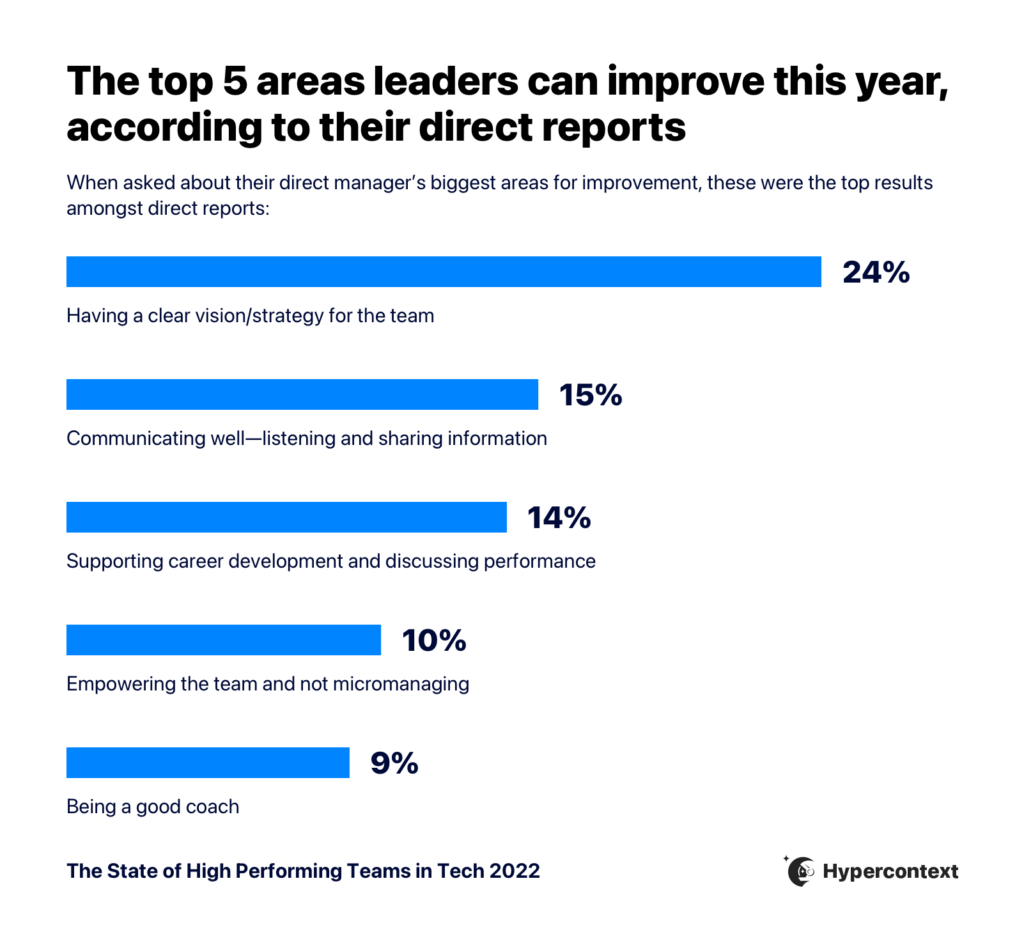
Having a clear vision and strategy is the single biggest management challenge.
24% of people cited it as the single biggest area where their manager needs improvement.
Why does it matter?
The importance of goals is hard to understate. 59% of people agree clear goals and expectations is the number one factor impacting productivity.
Clear goals and expectations give employees a sense of direction and belonging, leading to higher productivity.
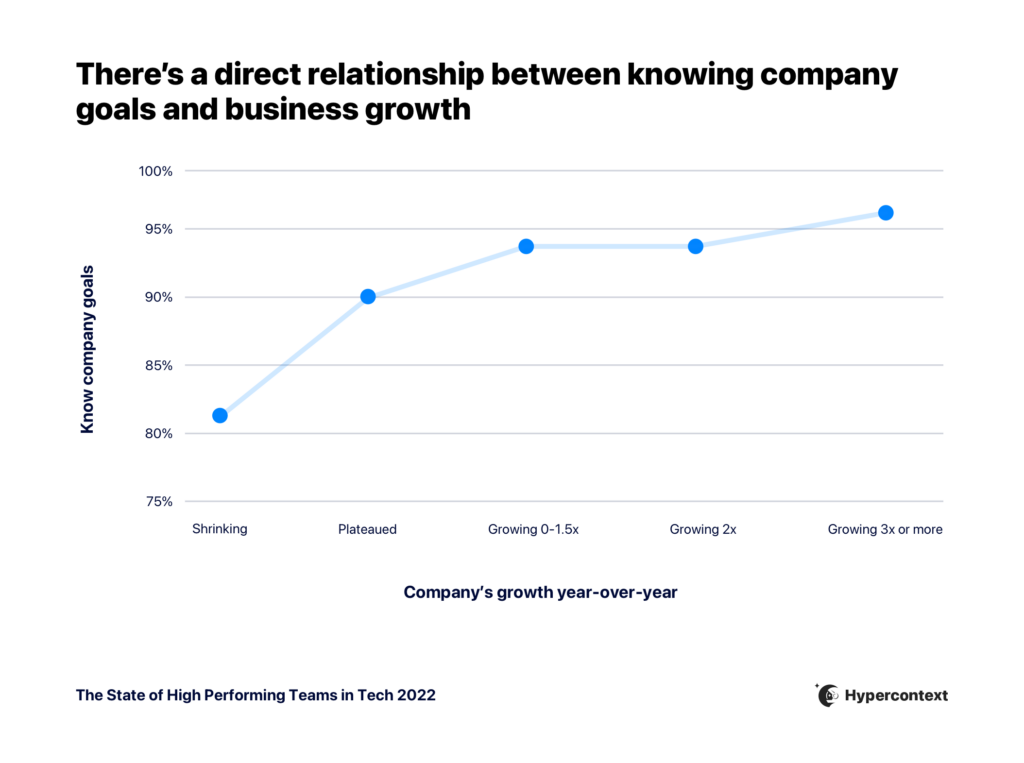
Not only does it impact individual performance, but there’s also a correlation between clear goals and company performance. People who don’t know their goals are over 3X more likely to work at a company that’s shrinking in revenue than those who know them.
Developing a strategy and vision seems like a big skill to perfect. But it doesn’t need to be difficult. Let’s take a look at some actionable ways to improve vision and strategy through goal-setting.
Set up a quarterly goal-setting meeting with your team
You don’t need to have all the answers. Instead of goal-setting being a top-down activity, make it collaborative. It’s not only on you to set the goals and share them. Your job is to understand and communicate: what are the company goals and why? Then, take the input from the team on how to get there.
This will be helpful in a number of ways. Firstly, you don’t know everything. Your team can bring rich information to the table to help inform the goals you set.
Plus, setting them together allows for automatic buy-in.
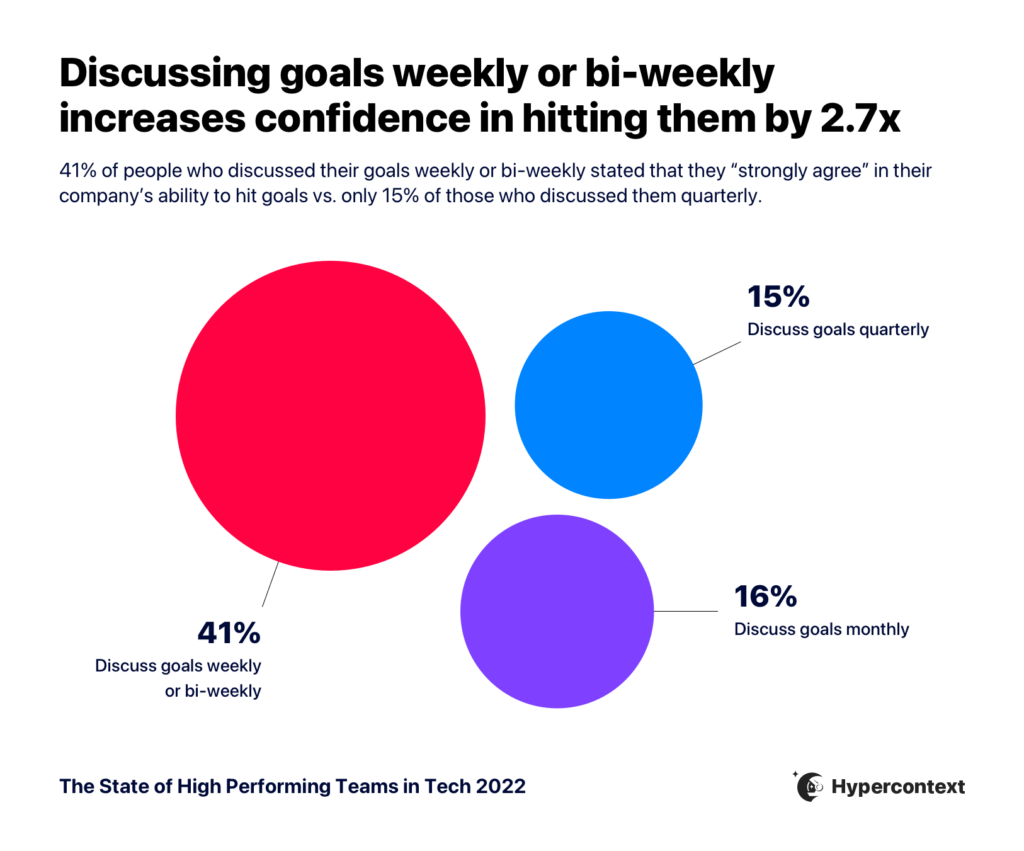
When goals aren’t intentionally and consistently brought to the forefront, it’s easy to lose sight of the ultimate vision. Review goals weekly to instill confidence in your team.
👉 Try pinning goals to the top of your weekly meeting agenda, using our goal-setting software.
Challenge 2: Communicating well
15% of people think their managers need to improve how they communicate.
Why does it matter?
40% of people agree great team communication is one of the top factors leading to productivity at work.
Goal-setting is a great example of the importance of communication. You can set amazing goals, but if they’re not properly communicated, it won’t matter.
Tips for improving communication
There’s no one size fits all solution for better communication. Everyone has different communication styles — some prefer asynchronous work, some prefer consistent real-time interaction, some thrive on interruption and some need extended focus time.
Your job as a manager is to listen to what your team needs and prefers when it comes to communication. Here are a few things you can do to improve communication practices:
Understand communication preferences
Firstly, get an understanding of how everyone wants to communicate and collaborate, and set expectations from the start.
With only 3% of people returning to fully in-person work, it’s important to understand the best way to communicate with your distributed team.
An important thing to take into consideration here is the maker vs. manager schedule.While managers do a lot of their work through meetings, their direct reports often need longer periods of uninterrupted focus time to get things done. Even a 15-minute meeting in the middle of a two-hour window can completely derail productivity for a ‘maker.’
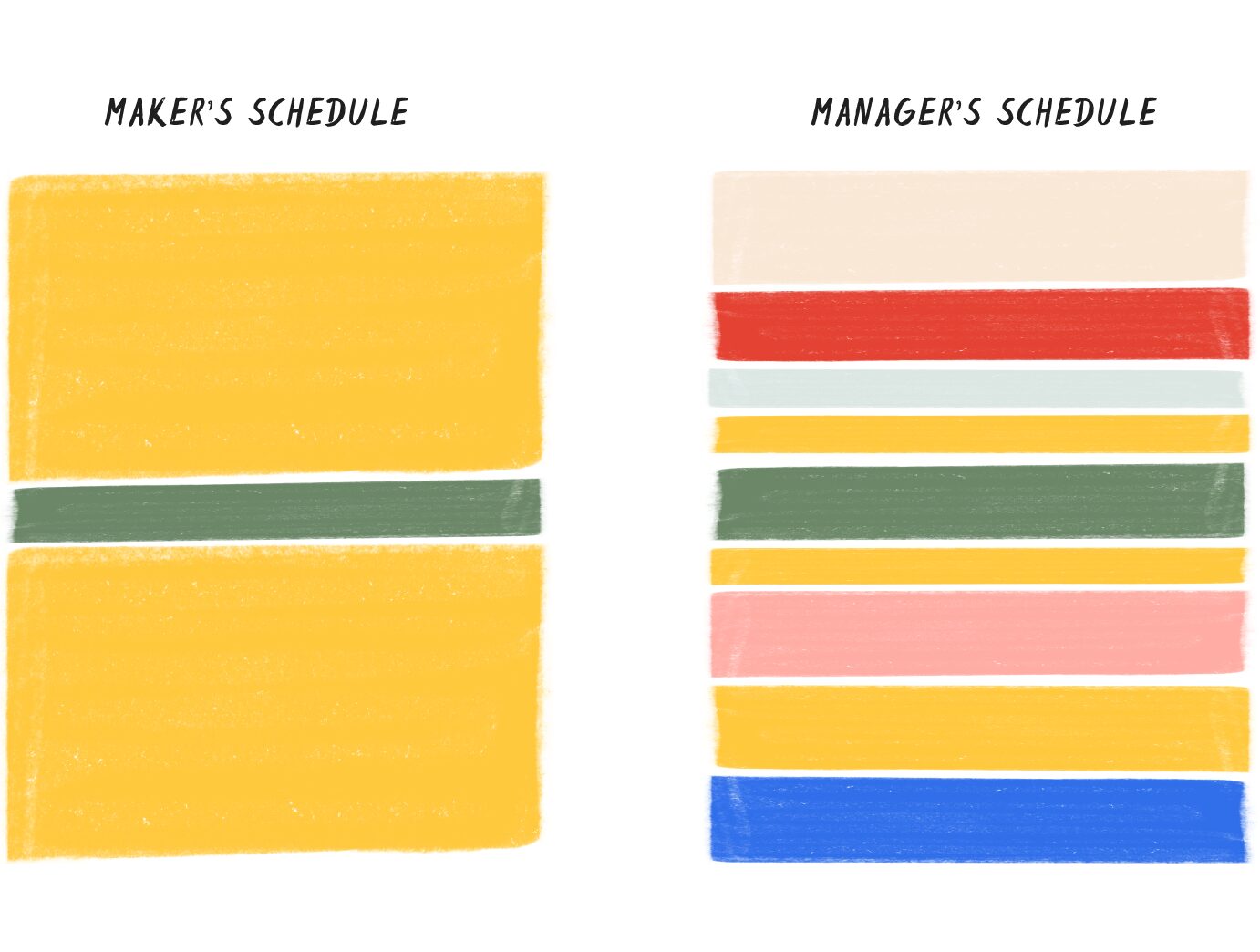
Consider this when thinking about how you communicate with your team. While sending constant slack messages may not be an issue for you as a manager, it could be detrimental to your team’s productivity.
Actively listen
Communicating isn’t only about talking, it’s about listening. Listen to your team’s needs, ideas, and feedback.
If you don’t listen, people will stop sharing with you, leading to disastrous communication practices.
To encourage people to share their ideas and feedback, you need to create an environment where they feel comfortable doing so. A great example of how to do this is by focusing on 3 main things: high safety/low effort/high benefit.
High safety- When you’ve created a psychologically safe environment, people feel comfortable sharing their ideas. You create a space conducive to listening.
Low effort- If preparing to give you feedback is like preparing for a Ph.D. dissertation, you’re a high-effort manager. And you’ll stop getting feedback altogether. You want it to be low-effort for your team to share with you.
High benefit- When people share things with you, there’s an expectation that you’ll do something with that information, making it high benefit.
Make meetings more inclusive
Meetings can be a great point of communication. But not for everyone.
While most people say they do feel comfortable speaking in internal meetings, there are slight differences in how comfortable they are based on seniority, age, race and gender.
For example, only 70% of Gen-Z strongly agree or agree they feel comfortable speaking in internal meetings vs. 90% of Baby Boomers. And only 75% of women who identify as a Person of Color strongly agree or agree they’re comfortable speaking in meetings, vs. 91% of white men.
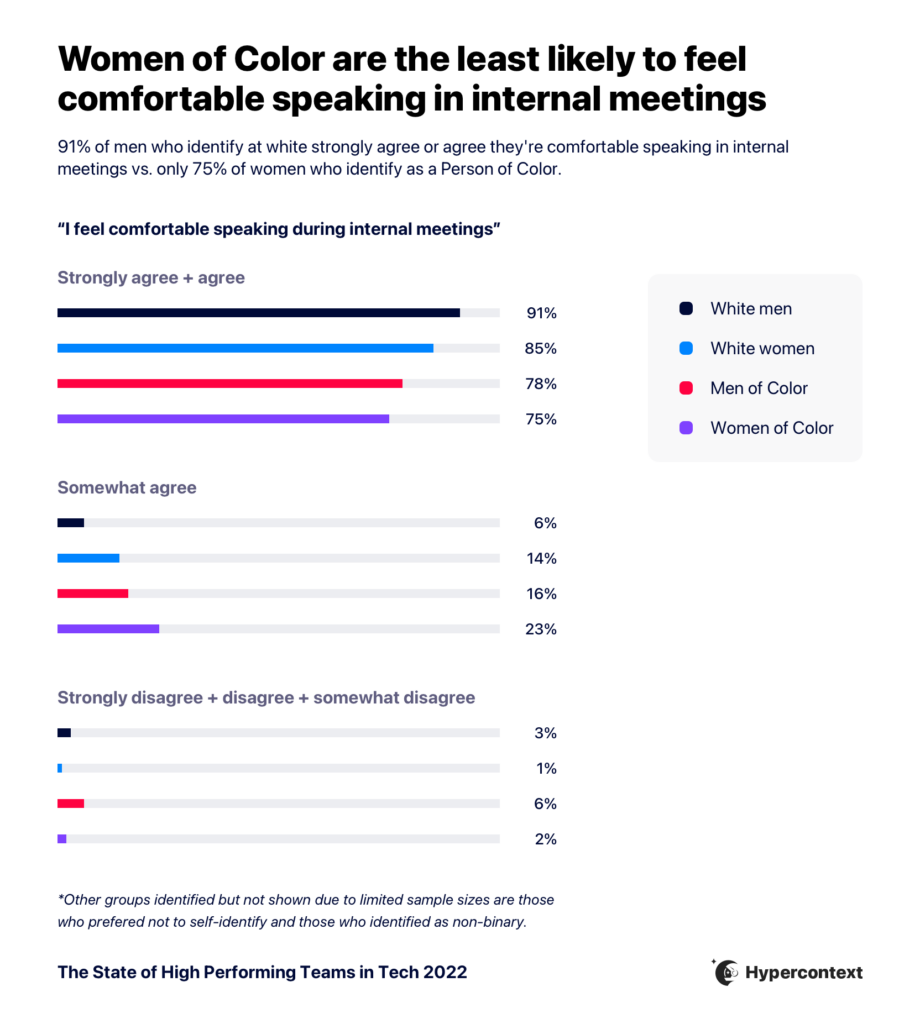
Meetings aren’t the same for everyone. As a manager, it’s important to keep that in mind. To help create a more inclusive meeting environment:
Conduct consistent one-on-ones and team meetings: No matter how little time there is in the day, team meetings and one-on-ones are an essential touch-point to build trust and psychological safety over time.
Make it easy for people to participate through a collaborative agenda: This provides an opportunity for everyone to contribute their ideas and discussion items beforehand, so they’re not overlooked in the meeting. Get started with our library of free meeting agenda templates.
Remember: making meetings more inclusive isn’t just about making people feel more comfortable (although that is important in and of itself!). It also has proven benefits for your company. Diversity of opinion drives business outcomes.
Challenge 3: Supporting career development and performance
14% of people agree their manager needs to improve how they support career development and performance. And managers themselves agree— 15% of managers find it to be their single biggest management challenge.
Why does it matter?
17% of people who applied for a new job in the last 6 months cited ‘not enough growth opportunities as the primary reason. And according to a recent study by Lever, nearly half of employees who plan to stay at their company will ask for a role change in 2022.
Growth is a huge motivator. Without a clear path for growth, it’s easy to get complacent or unhappy in your role.
While it may not be in the manager’s direct control when an opportunity for advancement is available, they can help team members prepare for the opportunity by supporting their growth and helping identify what they might want in their career. This includes understanding how your reports want to grow and providing the opportunities for them to do so.
Tips for supporting career development
Let’s go over some practices you can implement today to help support employee development:
Set goals together
We already talked about the importance of setting team goals collaboratively. This is also a great practice to do for individual goals.
Work with your direct reports individually to understand how they want to grow, and work together to set goals. If there’s a gap between where they want to be and the work they’re doing today, managers have the opportunity to help fill that gap by exposing them to new opportunities.
One thing to remember: growth doesn’t necessarily mean growing in seniority, it means your learning more and widening your set of skills. Ultimately, this will likely help advance in seniority, but that doesn’t need to be an immediate goal.
While giving feedback can seem awkward, at its core it’s about having your direct report’s back. When you share how they can improve, it’s to help them grow and succeed.
According to research done for the State of High Performing Teams in Tech report, 95% of people agree feedback from their manager is helpful. But, 52% of people feel they don’t get enough feedback from their manager and would like more.
There are a lot of things you can do to create a relationship with your direct report where feedback becomes second nature. First and foremost: create psychological safety.
👉 A quick way to begin to build this trust is throughthe lettuce pact.
Have weekly one-on-ones
One-on-ones are a consistent touchpoint for career and growth discussions, and a great space to exchange the feedback needed to grow.
Why weekly? Firstly it’s the most common cadence for 1:1s. And we found that the faster growing the company, the more likely they are to have one-on-ones weekly.
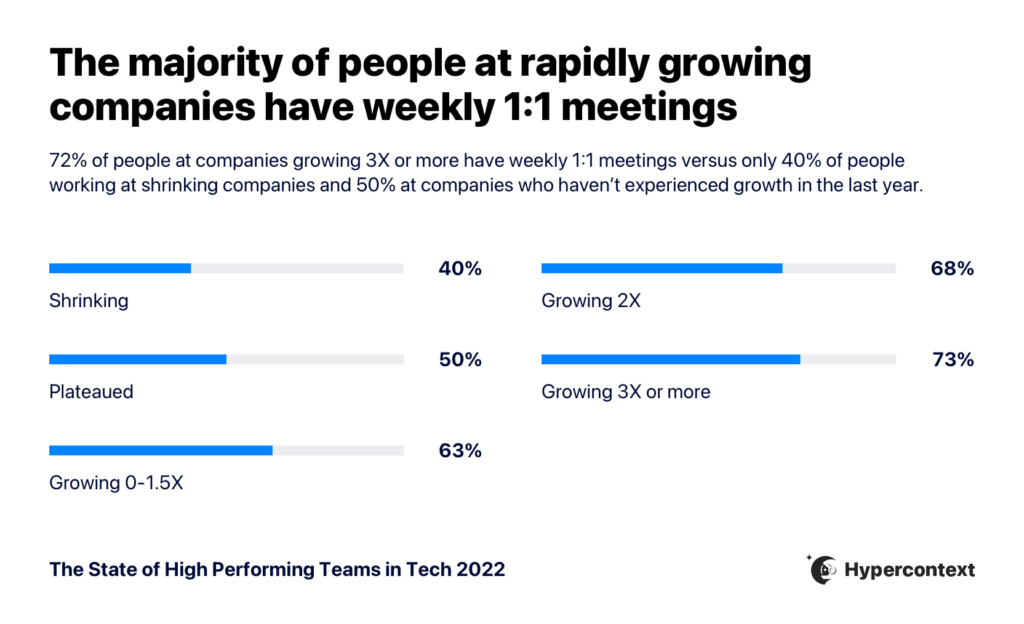
This is to say, when you help your team grow, it helps the entire company grow.
Discussions about growth shouldn’t be saved for only once a quarter. One-on-ones are the perfect time to keep the conversation going around growth, provide feedback and work together on achieving goals.
Challenge 4: Empowering the team (not micromanaging)
No one wants to micromanage. We all know it’s bad, and most often managers aren’t doing it on purpose. Regardless, it’s a common management challenge.
What’s refreshing to note is that managers know they’re doing it and want to stop.
While 10% of direct reports think their managers micromanage, 20% of managers feel it’s their biggest challenge.
Why does it matter?
Micromanaging stifles growth and creates a toxic environment. If you don’t trust your team, things won’t get done. Your team becomes scared to think outside the box and to take ownership over the work.
In short, it’s not a problem you want to have.
Tips for empowering your team
Micromanaging typically stems from a lack of trust and fear. To help let go of projects and empower your team, here are the two most important things you can do:
Create accountability on your team
Create accountability by encouraging your team to take ownership of their work. If your team members feel like you’re constantly swooping in to change and comment on every little thing, they’re going to stop trying as hard. A great way to get out of the driver’s seat and stop micromanaging is by having them own the accountability.
What does this mean?
Set the expectation that they’ll bring things to you when they need feedback, rather than you jumping in at random times in the day.
We like to use the 10-50-99 rule. This rule takes into account the stage of a project when giving feedback. For example, when something’s 10% done, it requires different feedback than it does at the 99% done stage. And when someone gets 10% feedback for a project that’s 99% done, that’ll cause frustration.
Also, be very clear about who’s responsible for what.
Build trust
Building trust isn’t easy. The most valuable way to start building that foundation is through one-on-ones.
One-on-ones rated as the most useful meeting when compared to other meetings like quarterly planning, team meetings, retros, town halls and standups.
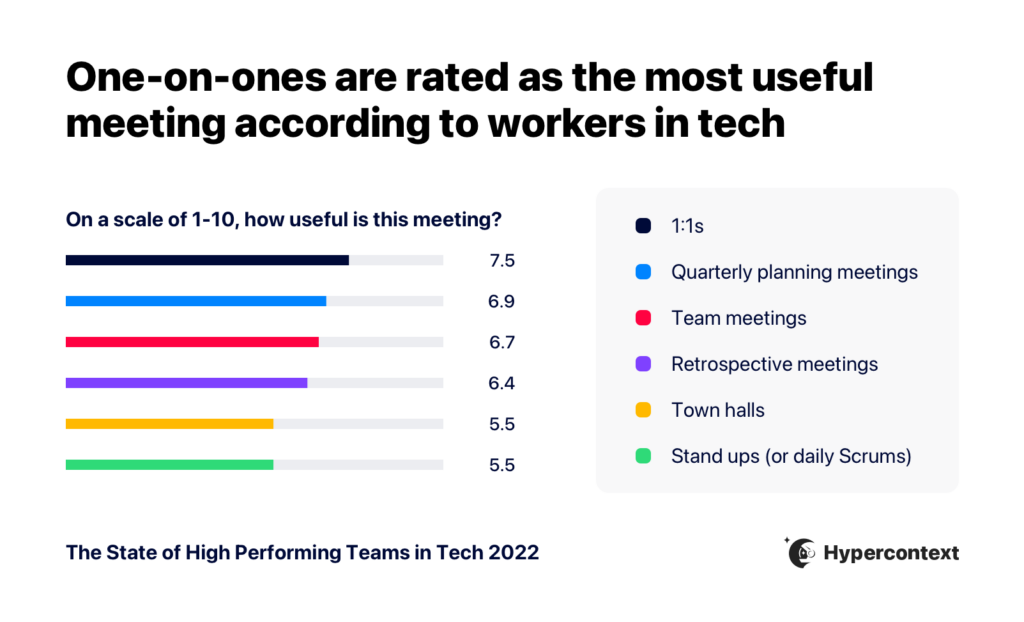
That’s not just because it could be a good time to have important conversations and do trust exercises. It goes further by helping create a culture of trust between 2 people. Each week, both people can rely on the meeting to connect, address challenges, discuss work, growth or whatever else comes up each week.
As Jocelyn put it, “when you’re trying to achieve something great, you turn to a coach.” Whether it be through sports, through work, or through your personal life.
9% of people think their manager needs to improve their coaching abilities.
Why does it matter?
56% of people agree fulfilling/challenging work is a top factor impacting motivation.
If your team members already know how to do everything they’re working on , they’re not going to be as motivated and engaged. People crave a challenge.
And with challenging work, comes the need for learning and, in turn, coaching.
Tips for coaching your team
Coaching is about helping your team grow by sharing knowledge and experience. And that’s not only limited to your own knowledge.
Sometimes, you’re not an expert in the function you’re managing. That’s okay. Giving practical or technical advice isn’t the main part of coaching. Instead:
Listen to where they want help
The first step to good coaching is listening. Don’t make assumptions based on where you think they need improvement.
What does your direct report want to learn? Where do they need support?
Understanding the answers to these questions will also help you get a grasp of how you can help push their careers forward. A great time to do this is in your 1:1s.
Ask simple questions like, “where do you see yourself in 1 year?” or “where do you need support?”
You don’t need to know the answers, but you need to care.
👉 For more questions to help you support coaching, check out our bank of 121 one-on-one questions.
Identify learning and development opportunities
The second piece of coaching is identifying learning and development opportunities.
These opportunities don’t need to come from you directly. It’s just your job to make sure they’re getting the right coaching and providing them with opportunities to learn.
Sometimes it feels like everything falls on the manager. But you’re not responsible for executing every single thing, you’re responsible for making them happen.
L&D is a team sport. 👊
Key takeaways
In this article, we reviewed the top 5 areas of improvement for managers, according to their direct reports.
There’s a lot of information and tips to take into account. And you can watch the full live session here:
If nothing else, these two takeaways will go a long way in addressing the most common management challenges:
Set & communicate goals an expectations: Having a game plan and communicating it consistantly keeps everyone aligned and gives your team confidence in the bigger picture.
One-on-ones are an essential touchpoint: They’re a catch-all opportunity to address every topic we discussed. Doing them on a frequent and dependable basis help create a safe and positive environment on your team.
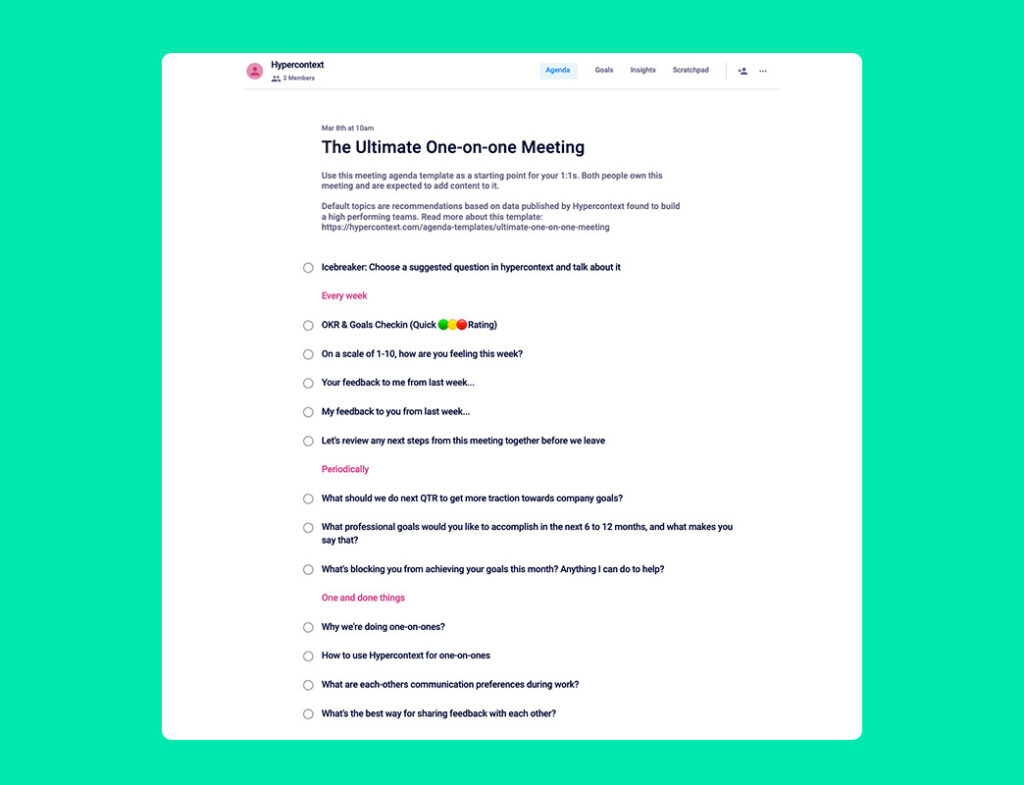
Speaking of 1:1s, we put all the information together in an easy-to-follow one-on-one template. It has everything you need to talk about weekly, periodically and one-off discussion to keep on your radar. 👇