AI Meeting Tools: Security, Privilege, and Compliance for Legal (August 2026)
Recording legal meetings with AI carries privilege and consent risks. Review the key compliance considerations for legal teams in August 2026.
 Maintouch
Recording a deposition, a contract negotiation, or an internal strategy session is not the same as recording a product standup. The consent rules are stricter, the privilege exposure is real, and the wrong default settings can hand opposing counsel something you never meant to create. Legal teams need to audit these requirements before rolling out any AI meeting tool.
TLDR:
- AI meeting tools create privilege waiver risk if vendor architecture allows third-party access to recorded communications
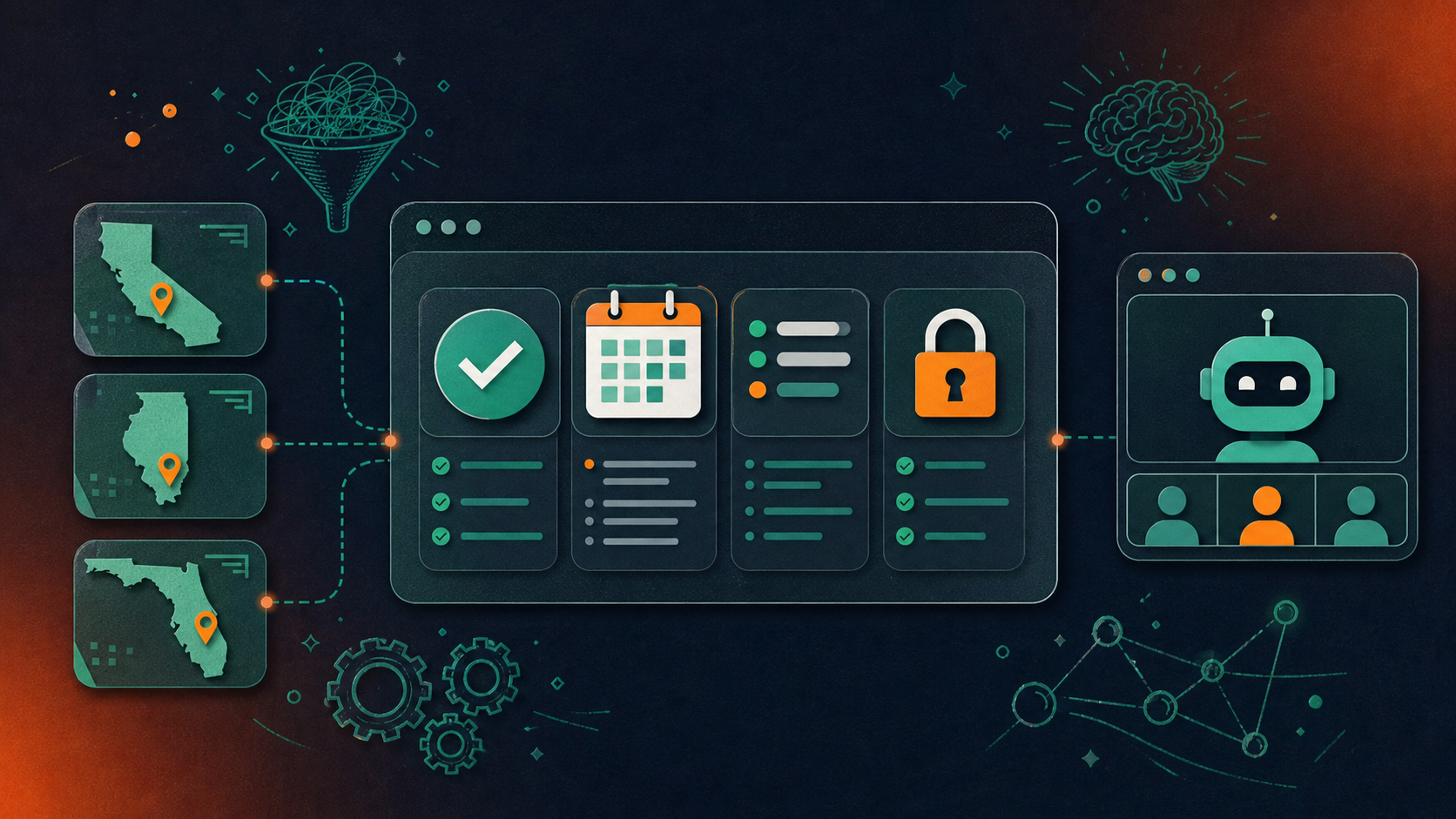
- All-party consent states like California, Illinois, and Florida require every participant to consent before recording starts
- AI-generated transcripts are treated as business records in litigation, making retention policy a direct discovery exposure
- Deploying individual note-taker apps across a legal team creates shadow IT, inconsistent consent disclosures, and no audit trail
- Spinach AI is an enterprise conversation intelligence tool. It serves as the system of record for conversation data and is deployed company-wide across Zoom, Google Meet, Microsoft Teams, Slack Huddles, and Webex; it captures during the meeting and delivers structured, governed outputs (decisions, action items with named owners, and structured summaries) into downstream tools at meeting end, with a visible bot, configurable retention per data type, and no customer data used to train AI models
Why Legal Teams Are Adopting AI Meeting Tools
Legal teams are under mounting pressure to document decisions, track commitments, and maintain defensible records across a growing volume of calls, depositions, client meetings, and internal reviews. AI meeting notes tools for legal teams have moved from curiosity to practical necessity as caseloads grow and remote proceedings become standard.
The appeal is straightforward: attorneys and paralegals spend hours reconstructing what was said, by whom, and when. Capturing that accurately during the meeting, instead of relying on memory afterward, reduces error and exposure.
Three factors are accelerating adoption within legal teams in particular:
- Under federal e-discovery rules (FRCP 34) and state equivalents, courts and regulators increasingly expect complete, timestamped records of key proceedings and decisions, making accurate capture a compliance requirement, not a convenience.
- Distributed legal teams handling cross-jurisdictional matters need a shared, searchable record that travels with the matter, not with the individual who attended the call.
- General counsel offices facing headcount constraints are asking legal staff to handle more matters without proportionally more hours, which puts a premium on time recovered from manual documentation.
The shift is less about convenience and more about risk. A missed commitment in a contract negotiation or an undocumented privilege assertion can carry real legal consequence. AI tools that capture meeting content with precision give legal teams a defensible record they can point to.
How Legal Teams Use AI Meeting Tools in Practice
Legal teams interact with AI meeting tools across a predictable set of workflows, and the stakes in each one are higher than in most other departments.
Depositions and Client Interviews
Attorneys recording client conversations need more than a transcript. They need documented consent, a clear chain of custody for the recording, and assurance that the file never touches a shared consumer cloud. AI tools that auto-join calls without visible disclosure are a liability, not a convenience. A structured capture protocol can help standardize what gets captured and retained.
Internal Strategy Sessions
Privilege applies to internal legal discussions too. When outside counsel joins a call alongside in-house teams, any AI tool present must handle that recording under attorney-client privilege protections, which means controlled access, no third-party training on the content, and auditable sharing logs.
Contract Negotiation Calls
Opposing counsel is on the line. Recording consent requirements vary by jurisdiction, and a tool that joins automatically without explicit in-meeting notification can expose the firm to sanctions. Legal teams need tools with configurable consent disclosures, not default settings designed for startup standups. That gap is worth weighing when comparing Zoom AI meeting notes against purpose-built alternatives.
Attorney-Client Privilege and AI Meeting Tools
Attorney-client privilege is one of the most consequential legal protections in practice, and AI meeting tools introduce real risk if they aren’t configured correctly. Any third-party service that records, processes, or stores privileged communications (including AI transcription tools) could trigger a waiver argument if that data is accessible outside the attorney-client relationship.
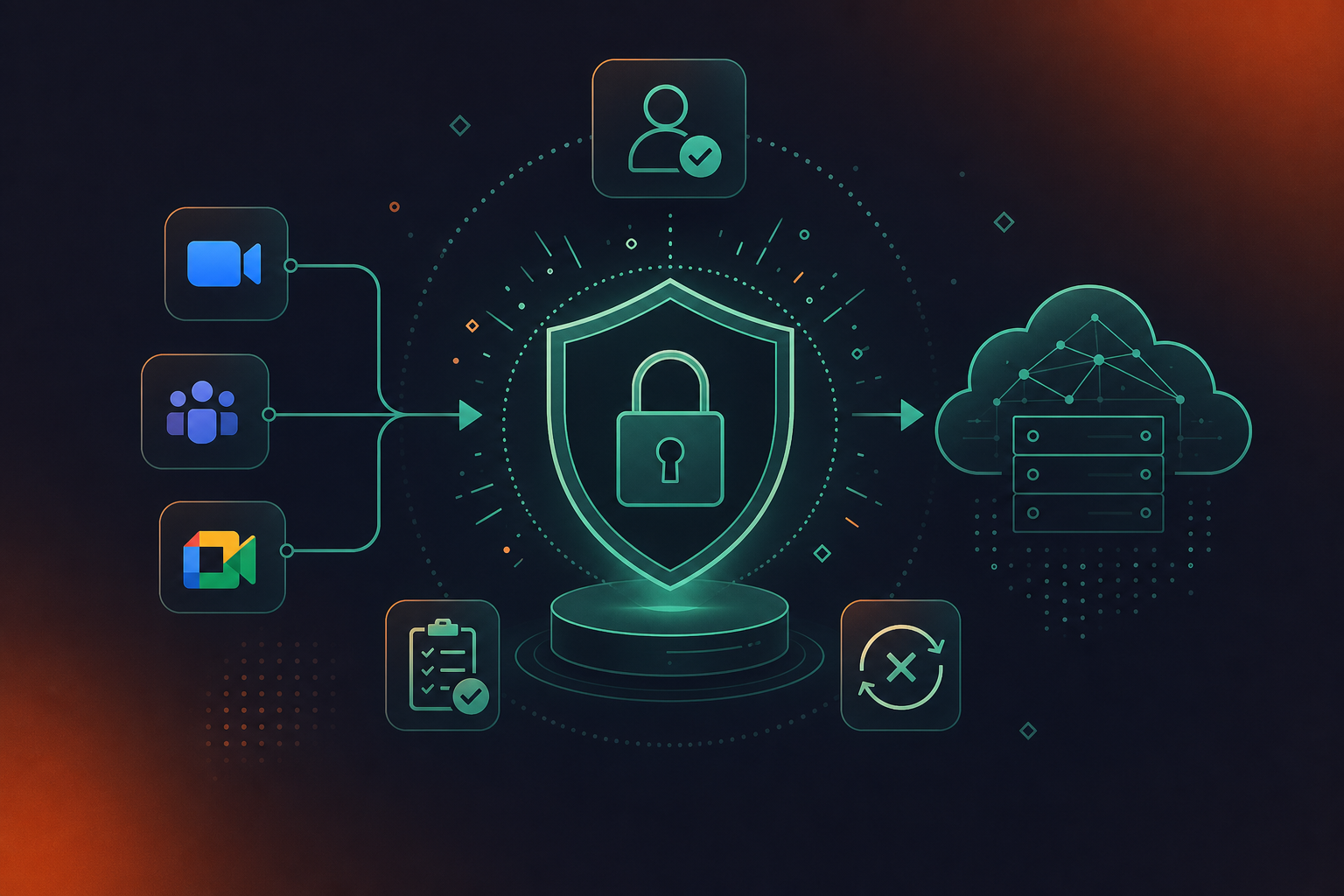
The core question legal teams need to answer before deploying any AI meeting tool: where does the data go, who can access it, and does the vendor’s architecture create a “third-party disclosure” that courts might interpret as privilege waiver?
What to Review Before Deploying
- Data residency and access controls: the vendor should store recordings and transcripts in environments where access is restricted to authorized users within the legal team, not shared infrastructure visible to vendor employees by default.
- Zero data retention with AI providers: if the tool passes audio or transcripts to an LLM for summarization, confirm that the LLM provider retains no data after processing. This is a contractual and architectural question, not merely a policy one.
- BAA and DPA availability: for firms handling health-adjacent matters, a Business Associate Agreement matters. For cross-border work, a Data Processing Agreement governs how data moves under GDPR.
- Audit logs: privilege disputes sometimes require proving who accessed what and when. Exportable audit logs are a practical necessity, not a compliance checkbox.
Courts have not yet produced uniform guidance on AI-assisted privilege waiver, which means the risk calculus depends heavily on jurisdiction and the specific vendor’s architecture. A February 2026 ruling from the U.S. District Court for the Southern District of New York in United States v. Heppner found that inputting sensitive information into a consumer AI platform constituted a third-party disclosure sufficient to waive privilege, with the court explicitly noting the outcome would likely differ for enterprise tools with contractual zero-retention and confidentiality protections.
Recording Consent Laws Every Legal Team Must Know
Recording consent requirements vary by jurisdiction, and legal teams deploying AI meeting tools face meaningful exposure if they get this wrong.
One-Party vs. All-Party Consent
The core distinction is whether one participant can consent on behalf of all parties, or whether every person on the call must affirmatively consent before recording begins. A 50-state survey of recording consent laws confirms that California, Florida, Illinois, Maryland, Massachusetts, Pennsylvania, and Washington are all all-party consent states, each with its own statute and penalty structure.
- In one-party consent states, a single participant (including the AI tool’s operator) can authorize recording without notifying others.
- In all-party consent states like California, Illinois, and Florida, every participant must consent before recording starts. Violations can carry criminal penalties, beyond civil liability.
- Federal wiretapping law sets a one-party floor, but state law governs where it is stricter.
Consent Type | How It Works | Example Jurisdictions | Violation Exposure | AI Tool Requirement |
|---|---|---|---|---|
One-party consent | A single participant (including the tool’s operator) may authorize recording without notifying other parties | Federal baseline (ECPA), most U.S. states | Civil liability | No mandatory disclosure to other participants, but visible bot remains best practice |
All-party consent | Every participant on the call must affirmatively consent before recording begins | California, Illinois, Florida | Criminal penalties plus civil liability | Visible bot with in-meeting notification required before capture starts |
Cross-jurisdictional call | Stricter jurisdiction controls: one all-party participant triggers all-party rules for the entire call | Any call spanning state lines (e.g., NY attorney + CA client) | Same as all-party consent | Default to all-party consent protocol regardless of where the operator is dialing from |
Cross-Jurisdictional Calls
Most legal matters involve parties across state lines, which means the stricter jurisdiction typically controls. A call between a New York attorney and a California client triggers California’s all-party consent requirement. Legal teams should default to all-party consent protocols regardless of where they are dialing from.
Spinach AI handles this through a visible in-meeting bot that provides clear notification to all participants before capture begins, with org-level support for custom legal-approved notification text. The bot is never covert, and pause, resume, and kick commands give meeting hosts direct control throughout the call.
When AI Meeting Transcripts Become Discoverable Evidence
Every remark, tangent, and mid-sentence correction lands in an AI-generated transcript verbatim. Handwritten notes carry editorial judgment; AI transcripts carry none.
In federal civil litigation, SEC investigations, DOJ inquiries, and employment disputes, those transcripts are potentially responsive documents subject to production. Under Federal Rule of Civil Procedure 37(e), AI-generated transcripts qualify as electronically stored information (ESI) subject to the same preservation obligations as emails and contracts, and courts treat them as business records, which means work-product protections do not automatically follow. An offhand comment about settlement posture, a retracted pricing figure, an internal disagreement over strategy: if it was said and the tool was running, it exists as a record. Legal teams that want to automatically create action items from meeting transcripts must weigh this exposure carefully.
Retention Compounds the Risk
The compounding exposure is retention policy. Legal teams considering Otter.ai alternatives should note that a tool with vendor-controlled defaults may store transcripts long after a legal hold expires or well beyond the firm’s document retention schedule, leaving discoverable records that no one intended to keep.
What AI Meeting Tool Vendors Must Prove to Legal Teams
Legal teams assess AI meeting tools differently than other buyers. The checklist goes beyond features and price to include security architecture, data handling, consent mechanics, and compliance certifications that can determine whether a tool is deployable at all.
Here is what legal departments consistently require before approving any AI meeting tool:
- Verifiable SOC 2 Type II certification, not a self-assessment or a pending audit, because legal workflows involve privileged communications that demand audited controls.
- A signed BAA (available on Enterprise engagements) for any matters touching protected health information, such as healthcare litigation or medical malpractice.
- Documented data residency and retention policies, with configurable retention per data type so teams can align tool behavior with litigation hold schedules.
- Explicit confirmation that client conversation data is never used to train AI models, a non-negotiable for firms managing confidential client relationships.
- Consent mechanics that are visible, auditable, and configurable to satisfy multiparty-consent requirements across jurisdictions.
Vendors who cannot produce these on request rarely pass legal IT review.
The Shadow IT Problem: Individual Note-Takers Across Legal Teams
When legal teams each choose their own AI meeting tool, the organization ends up with a patchwork of uncoordinated apps, none of which are governed by IT or legal ops. That fragmentation creates real risk: privileged conversations captured in consumer-grade tools, inconsistent consent disclosures, and no audit trail when opposing counsel comes looking.
Individual note-takers are built for personal productivity, a distinction covered in depth in the Spinach AI vs Fireflies.ai comparison. Deployed across a law firm or in-house legal department, they produce a different data silo per attorney, uncontrolled sharing of sensitive matter content, and no organizational record of what was discussed, decided, or flagged as privileged.
The answer is a single AI meeting tool deployed company-wide, with enforced policy, configurable retention, and a governed data asset that legal ops can actually audit. That gap is covered in detail in the Spinach AI vs Fathom comparison.
Building an AI Recording Policy for Legal and Corporate Teams
Recording policies for legal and corporate teams typically need to cover four areas: who can record, what gets retained, who has access, and how recordings are deleted.
A workable policy answers each of these directly:
- Consent handling should specify whether your jurisdiction requires all-party notice and how the bot’s visible presence satisfies that requirement in practice.
- Retention schedules should be set per data type. Transcript, summary, and video may carry different litigation hold or privilege implications and should not default to a single blanket rule.
- Access controls should map to role and matter, not seniority alone, so privileged communications stay within the intended group.
- Deletion procedures should define what triggers removal and who authorizes it, particularly when a matter closes or a hold lifts.
Where AI Meeting Tools Fit Into Policy Enforcement
A policy document on its own does not enforce anything. The value of configurable AI meeting tools is that retention schedules, access rules, and consent notifications can be set at the org level instead of left to individual discretion. When a team member joins a call, the policy travels with the recording automatically.
Legal and corporate teams reviewing these tools should confirm that retention is configurable per data type, that audit logs are exportable, and that the vendor holds current SOC 2 Type II and GDPR certifications before any deployment touching privileged matter discussions.
Legal Team Governance and Compliance: How the Configuration Works
Spinach AI is an enterprise conversation intelligence tool. It serves as the system of record for conversation data and is deployed company-wide instead of one attorney at a time. It joins meetings across Zoom, Google Meet, Microsoft Teams, Slack Huddles, and Webex (see the guide on how to record a Teams meeting for platform-specific setup), captures during the meeting, and delivers decisions, action items with named owners, and structured summaries that route automatically into your team’s tools when the meeting ends. For legal teams, that output is a governed, auditable organizational record, and it is neither a loose transcript dropped into a shared folder nor a per-attorney data silo that disappears when someone leaves the firm.
On the compliance side, Spinach is SOC 2 Type II certified, GDPR compliant, and HIPAA compliant, with BAA availability on Enterprise engagements. No customer data is used to train AI models, and there is zero data retention with LLM providers.
Recording consent is handled precisely: the bot is always visible, never covert. Legal teams can configure custom in-meeting notification text approved by their own counsel, and pause, resume, or remove the bot mid-session. On Enterprise, retention is configurable per data type, including transcript, summary, and video, from one week to indefinite, giving firms control over what is kept and for how long.
Speaker identification is context-based. Spinach does not use voice biometrics and does not store biometric identifiers, which removes a category of data sensitivity that compliance-focused industries actively track.
PII redaction operates at the transcript level, a real differentiator for any team handling personally identifiable information across client calls, HR reviews, or regulatory proceedings.
Final Thoughts on Deploying AI Meeting Tools Across Legal Teams
Legal teams that get AI meeting tools right treat the compliance configuration as the actual product decision, not a secondary concern after features and price. Consent mechanics, privilege protections, audit logs, and retention schedules need to be set at the org level before the first privileged call is captured. When those controls are in place, your whole team works from a governed, searchable record instead of a patchwork of individual notes and uncontrolled transcripts. Configure Spinach AI for your legal team and see what a compliant setup looks like in practice.
The core requirement is that the vendor stores recordings and transcripts in access-controlled environments, retains zero data with LLM providers after processing, and provides exportable audit logs showing who accessed what and when. Confirm these through a signed DPA and direct architectural documentation — policy statements alone are not sufficient for privilege protection.
Yes. Spinach AI’s bot is always visible and never covert, which satisfies the disclosure requirement central to all-party consent jurisdictions like California, Illinois, and Florida. Legal teams on Enterprise can configure custom in-meeting notification text approved by their own counsel, and the bot supports pause, resume, and kick commands throughout the session for full host control.
Individual note-takers like Otter and Fireflies apply vendor-controlled defaults that may retain transcripts well beyond a firm’s document retention schedule or litigation hold expiration. Spinach AI on Enterprise lets legal ops configure retention per data type — transcript, summary, and video can each be set separately, from one week to indefinite — so tool behavior aligns with matter-specific hold schedules rather than overriding them.
Spinach AI holds SOC 2 Type II certification, is GDPR compliant, and is HIPAA compliant, with a BAA available on Enterprise engagements for matters touching protected health information. No customer data is used to train AI models, and there is zero data retention with LLM providers, which directly addresses the confidentiality requirements legal IT reviewers consistently flag during vendor approval.
When attorneys independently deploy individual note-takers, the organization ends up with uncoordinated tools capturing privileged conversations without consistent consent disclosures, no shared audit trail, and no governed record legal ops can produce if opposing counsel requests it. Deploying a single AI meeting tool company-wide with enforced policy, org-level retention controls, and a centralized data asset removes that exposure at the source.
All-party consent requires every participant on a call to affirmatively consent before recording begins, while one-party consent allows a single participant to authorize recording without notifying others. Because most legal matters involve parties across state lines, and because states like California, Illinois, and Florida impose all-party requirements with criminal penalties for violations, legal teams should default to all-party consent protocols regardless of where they are dialing from. The stricter jurisdiction controls, so building around that standard removes cross-jurisdictional exposure from the start.
Yes. Courts treat AI-generated transcripts as business records, which means they are potentially responsive documents subject to production in federal civil litigation, SEC investigations, DOJ inquiries, and employment disputes. Unlike handwritten notes, AI transcripts carry no editorial judgment, so every remark, tangent, and mid-sentence correction lands verbatim in the record, including comments about settlement posture, pricing, or internal strategy.
A workable policy covers four areas: who is authorized to record, what gets retained and for how long, who has access by role and matter, and what triggers deletion when a matter closes or a litigation hold lifts. Retention schedules should be set per data type, since transcript, summary, and video may carry different privilege or hold implications and should not default to a single blanket rule. Consent handling should specify how the AI bot’s visible presence satisfies all-party notice requirements in the jurisdictions your team works in.
No. Spinach does not use voice biometrics and does not store biometric identifiers — speaker identification is context-based. This removes a category of data sensitivity that regulated industries and legal IT reviewers actively track, since biometric data triggers its own set of state privacy statutes and creates separate disclosure and consent obligations.
Zero data retention means that when Spinach passes audio or transcript content to an LLM provider for summarization, that provider retains no data after processing. This matters for privilege because any third-party access to privileged communications can form the basis of a waiver argument, so confirming zero retention is both a contractual and an architectural requirement before deploying any AI meeting tool on matters involving confidential client communications.
Zoom’s native AI delivers individual productivity features well, but its architecture is not an organizational system of record — to query all of a firm’s conversation data or enforce a single retention and access policy, you would need to build a centralization layer on top or ask every attorney to share every meeting manually. Purpose-built platforms like Spinach give legal ops configurable retention per data type, exportable audit logs, org-level consent controls, and a governed data asset that travels with the matter, not with the individual who attended the call.
If the AI meeting tool uses vendor-controlled retention defaults, transcripts may be stored well beyond a firm’s document retention schedule or may be deleted before a hold requires preservation, creating either over-retention risk or spoliation exposure. Legal teams need a tool that allows configurable retention per data type so the tool’s behavior aligns with matter-specific hold schedules rather than overriding them.
When outside counsel joins a call alongside in-house teams, the recording must be treated as potentially privileged from the moment it begins, which means access should be restricted to the intended group, sharing controls should be enforced at the org level rather than left to individual discretion, and there should be a clear audit log showing who accessed the recording and when. A tool that defaults to broad sharing or that lacks granular access controls tied to role and matter is not appropriate for those sessions.
AI meeting transcripts can capture payment card numbers, national ID numbers, protected health information, and other structured identifiers verbatim if the tool has no redaction capability. Spinach applies PII redaction at the transcript level, including structured identifiers, which is a real differentiator for any team handling personally identifiable information across client calls, HR reviews, or regulatory proceedings. For matters touching protected health information, a signed BAA is also required and is available on Spinach Enterprise engagements.
At minimum, you need exportable logs showing who accessed a specific recording or transcript, when they accessed it, and whether it was shared outside the intended group. Privilege disputes sometimes require demonstrating an unbroken chain of controlled access, so a tool that lacks audit logging or that stores access records in a format you cannot export is a liability rather than a compliance asset. Spinach includes admin dashboard audit logging with exportable records, and access controls can be set and enforced at the org level.
What to do now
You made it to the end of this article! Here are some things you can do now:
- You should check out our library of meeting agenda templates for every type of meeting.
- Learn more about Spinach and how it can help you run a high performing org.
- If you found this article helpful, please share it with others on Linkedin or X (Twitter)

