Spinach AI vs tl;dv: Full Comparison for August 2026
Spinach AI vs tl;dv in August 2026: compare meeting capture, HIPAA compliance, pricing, and integrations to choose the best tool for your org.
 Maintouch
Your call recordings are only useful if the right people can find them and act on them. tl;dv handles the individual workflow well, especially for sales teams. But if you need every meeting’s decisions and action items routed into Jira, Slack, or your CRM automatically, without anyone manually copying anything, the comparison between these two tools looks pretty different. Here’s what you need to know.
TLDR:
- tl;dv is built for individual sales workflows; deployed across 50 people, you get 50 separate unconnected libraries
- The architectural gap matters: tl;dv produces per-user recordings, Spinach routes structured outputs into a single governed org-wide data asset
- tl;dv does not publicly document HIPAA coverage, making it a harder fit where a BAA is a hard requirement
- Spinach AI’s Pro plan charges $2.90 per meeting hour vs. tl;dv’s $29/user/month seat model, which compounds across larger teams
- Spinach AI captures video, audio, transcript, screen share, and in-meeting chat, then routes decisions and action items into Jira, Slack, and CRM when the meeting ends
What Is tl;dv?
tl;dv is a meeting intelligence tool built primarily for sales and customer success teams. Teams comparing AI meeting notes tools will find the options vary considerably in scope. It joins your video calls, records them, creates AI-generated summaries, and lets you clip and share key moments from a recording.
The product is well-regarded for its timestamped clip reels, which let salespeople share a 90-second customer clip with a colleague instead of forwarding a full recording. Its integrations with Salesforce and HubSpot let reps push call notes into CRM records without manual copy-paste.
Where tl;dv Focuses Its Energy
tl;dv is built around the individual contributor workflow, particularly account executives and customer success managers who need to document and share customer conversations quickly. Key capabilities include:
- Meeting recording across Zoom, Google Meet, and Microsoft Teams, with AI-generated summaries delivered after the call ends
- Timestamped moment tagging, so users can bookmark key parts of a conversation and share them as short clips
- CRM logging to Salesforce and HubSpot, pushing call summaries and selected clips into contact or deal records
- A searchable library of past recordings, filterable by keyword or speaker
What tl;dv stops short of is company-wide conversation governance. It produces a per-user library of recordings, not a single organizational record accessible across teams with consistent policy, retention rules, and retrieval.
What Is Spinach AI?
Spinach AI is an enterprise conversation intelligence platform that joins your Zoom, Meet, Teams, or Webex meetings, captures decisions and action items with named owners during the call, and routes structured outputs to your tools when the meeting ends. Deployed org-wide by an admin, it creates a single governed record across every team’s meetings with enforced retention policy.
Where most meeting tools stop at the transcript, Spinach produces governed conversation data that feeds Jira tickets, CRM records, Slack summaries, and connected agents. The organizational buyer gets a single, policy-controlled record across every team’s meetings, not a different tool per person generating uncontrolled, siloed output.
Spinach connects to Jira, Linear, HubSpot, Salesforce, Slack, and more, with MCP available on Business and Enterprise plans for teams building custom workflows on top of conversation data.
Meeting Platform Coverage and Capture Capabilities
Both Spinach AI and tl;dv connect to the major meeting platforms, but their capture scope differs in ways that matter at scale.
tl;dv supports Zoom, Google Meet, and Microsoft Teams (as of August 2026); teams comparing options should also review Zoom AI meeting notes alternatives. For teams that run all their meetings on one of those three, coverage is adequate. The tool records, transcribes, and timestamps key moments, which works well for async review and clip sharing.
Spinach AI joins Zoom, Google Meet, Microsoft Teams, Slack Huddles, and Webex meetings. For organizations where different teams or regions run different conferencing tools, that breadth means one governed data asset across the company, with no gaps wherever tl;dv’s bot can’t show up.
What Gets Captured
The distinction goes beyond which platforms each bot can join.
- tl;dv captures video, audio, and transcript. Its clip and moment-sharing features are genuinely useful for sales teams reviewing customer calls or anyone who needs to share a specific moment from a long recording.
- Spinach AI captures video, audio, transcript, screen share, and in-meeting chat, then routes structured outputs including decisions, action items with named owners, and meeting summaries into your connected tools when the meeting ends.
For a single team sharing recordings internally, tl;dv’s capture scope handles the job. For an organization that needs every meeting’s output to land in Jira, Slack, or a CRM without manual hand-off, the difference in what gets captured and where it goes is the operative gap.
Organizational Deployment vs. Individual Adoption
Spinach AI is built for company-wide deployment from the start. An admin rolls it out once, sets recording and retention policies across the organization, and every meeting captured feeds a single governed data asset. tl;dv follows the individual adoption model: each person installs it for their own meetings, controls their own library, and shares recordings manually when needed.
That structural difference matters at scale. When tl;dv is deployed across a 50-person team, you get 50 separate libraries with no enforced sharing policy, no unified retrieval, and no way to query conversation data across the organization. Spinach routes captured meetings automatically into a shared system, so decisions and action items are searchable by anyone with access, beyond the person who ran the call.
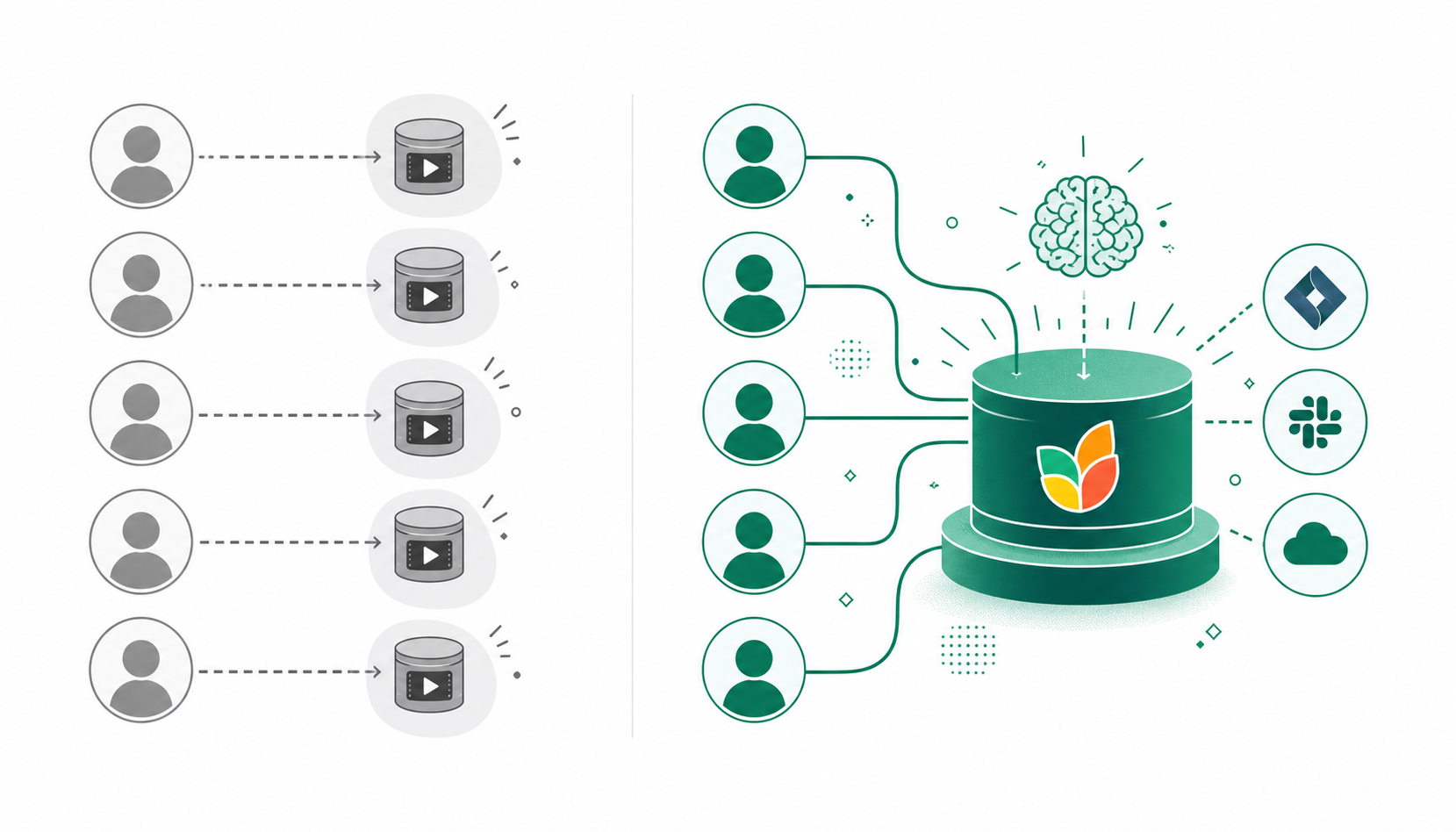
For teams comparing these tools at an organizational level, the question is less about features and more about architecture: do you want a tool each person manages individually, or a system your company actually owns?
Sales Coaching and Workflow Integrations
Spinach AI and tl;dv take meaningfully different approaches here, and the gap shows up most clearly in how each tool handles what happens after the recording ends.
tl;dv is built around sales-facing workflows. Its CRM integrations with Salesforce and HubSpot let sales teams sync call summaries and push deal context directly into their pipeline. That’s a genuine strength for revenue teams who live in those tools and need clip sharing and coaching features baked into their daily workflow.
Spinach AI is built for the full organization. Decisions, action items with named owners, and follow-ups are captured from any meeting and routed automatically into the tools your team already uses, such as Jira, Linear, HubSpot, Salesforce, Slack, and more, without anyone re-keying anything after the call. For engineering and product teams running standups, sprint planning, or cross-functional syncs, that means structured tickets filed and owners assigned when the meeting ends. For sales and CS teams, it means CRM records updated and recap emails sent when the call closes.
Which Fits Your Stack?
- If your team’s primary workflow is sales calls and CRM hygiene, tl;dv’s native Salesforce and HubSpot sync gives you a shorter path to value, though teams on Google Meet can also sync Google Meet notes to HubSpot automatically with Spinach.
- If your team runs Agile ceremonies or product reviews and needs decisions tracked in Jira or Linear without manual follow-up, Spinach AI closes that loop automatically.
- If you need both sales and engineering covered under one organizational system of record, Spinach AI’s cross-functional scope across Zoom, Meet, Teams, and Webex handles the full company, beyond any single department’s calls.
Security, Compliance, and Enterprise Controls
Both tools take meaningfully different approaches to security and compliance, and for compliance-sensitive teams or enterprise buyers, those differences can be deciding factors.
Spinach AI holds SOC 2 Type II certification and is HIPAA compliant, with BAA availability on Enterprise engagements. Buyers assessing these tools should weigh these compliance factors carefully. GDPR compliance is included across plans. Retention is configurable per data type (transcript, summary, and video) from one week to indefinite on Enterprise, and a flat one year on Business. PII redaction is available at the transcript level, which matters in healthcare, legal, and financial services contexts. Spinach does not use voice biometrics and does not store biometric identifiers; speaker identification is context-based.
tl;dv offers GDPR compliance and SOC 2 Type II certification (tl;dv security page, August 2026). HIPAA coverage is not publicly documented, making it a harder fit for compliance-sensitive industries where a BAA is a hard requirement.
Recording Consent and Visibility
Spinach’s bot is always visible in the meeting and never covert. Org admins can rename and brand the bot, set custom legal-approved in-meeting notification text, and issue pause, resume, or kick commands mid-session. Waiting-room admission after verbal consent is supported. tl;dv also operates with a visible bot and supports consent notifications, though the granularity of admin controls is narrower than what Spinach offers at the enterprise tier.
For teams where compliance is a hard requirement and not simply a preference, Spinach’s configurability and formal certifications are worth reviewing before committing to either tool.
Pricing Comparison (as of August 2026)
Spinach AI and tl;dv take noticeably different approaches to pricing, which matters depending on how many people on your team need access.
tl;dv offers a free tier, a Pro plan at $29/user/month, and a Business plan at $98/user/month (tl;dv pricing page, August 2026). Enterprise pricing is custom. Teams comparing individual-workflow tools should also read the Spinach AI vs Fathom breakdown for additional pricing context.
Spinach AI’s pricing breaks down as follows:
Plan | Price | Key Details |
|---|---|---|
Starter | Free | Core meeting capture and summaries |
Pro | $2.90 per meeting hour | Pay only for what you use |
Business | $29/user/month (or $19/user/month billed annually) | Includes MCP; full integration suite |
Enterprise | Custom pricing | Contact sales for details |
The structural difference worth noting: Spinach’s Pro plan charges per meeting hour, which suits teams with lighter or irregular meeting loads. For another angle on per-seat versus usage-based pricing, the Spinach AI vs Fireflies.ai comparison covers similar tradeoffs. tl;dv’s per-seat model at $29/user/month can compound quickly across a larger org. For teams running frequent ceremonies across multiple squads, that per-seat cost adds up before you reach Business-tier features.
If HIPAA compliance or a BAA is a hard requirement, note that Spinach makes that available on Enterprise engagements. Neither tool’s free tier covers compliance-grade security, so factor that into your evaluation before committing to a plan.
Why Spinach AI Is the Better Choice
tl;dv is a well-built tool for sales teams that need clip sharing and coaching features baked into an individual workflow. Teams also comparing Fireflies.ai alternatives for meeting summaries will find a similar individual-vs-organizational tradeoff at play. For a handful of account executives, its free tier and sales layer are genuine strengths worth considering before signing anything.
The decision looks different at an organizational scale. Spinach AI captures, centralizes, manages, and powers the full company with every conversation it has, routing structured decisions into CRM, project management tools, and AI systems when the meeting ends, without manual re-entry. The compliance and security stack is built to pass the reviews that actually determine whether enterprise deployment moves forward. Start a free trial or talk to sales at spinach.ai.
Final Thoughts on Spinach AI vs tl;dv
Your choice here comes down to scope. tl;dv does one thing well: it helps individual sales reps capture and share customer call moments fast. Spinach covers the full company, routes structured decisions into your tools when the meeting ends, and gives you the compliance controls that actually move enterprise reviews forward. If that organizational scope is what you need, get started with Spinach AI at spinach.ai.
tl;dv is built for sales-facing workflows, with clip sharing and CRM sync designed around individual account executives. If your organization needs sales calls handled alongside engineering ceremonies, product reviews, and cross-functional syncs under one governed system, Spinach AI captures every meeting across Zoom, Google Meet, Teams, Slack Huddles, and Webex and routes structured outputs into both CRM and project management tools without separate deployments per team.
tl;dv creates a per-user library — each person owns their own recordings, controls their own sharing, and there is no unified organizational record. Spinach AI is deployed company-wide by an admin, so every captured meeting feeds a single governed data asset with enforced policy, consistent retention rules, and retrieval accessible to anyone with appropriate access — not just the person who ran the call.
tl;dv fits individual contributors — account executives and customer success managers who need clip sharing, timestamped highlights, and CRM logging for their own calls. Spinach AI is built for organizations that need one governed record across every team’s meetings, with compliance controls, policy enforcement, and structured outputs routed into Jira, Slack, Salesforce, and connected agents.
Spinach AI holds SOC 2 Type II certification, is HIPAA compliant, and offers a BAA on Enterprise engagements — making it a viable option for regulated industries including healthcare, legal, and financial services. tl;dv offers GDPR compliance and SOC 2 Type II on higher-tier plans, but HIPAA coverage is not publicly documented, which makes it a harder fit where a BAA is a hard requirement.
Spinach AI’s Pro plan charges $2.90 per meeting hour, which suits teams with lighter or uneven meeting schedules. tl;dv’s per-seat model starts at $29 per user per month, a cost that compounds across larger organizations before you reach its Business-tier features. For teams running frequent ceremonies across multiple squads, Spinach AI’s Business plan at $19 per user per month billed annually includes the full integration suite and MCP — worth comparing directly against tl;dv’s Business plan at $98 per user per month.
No — tl;dv supports Zoom, Google Meet, and Microsoft Teams only. If your organization runs meetings across Slack Huddles or Webex in addition to those three, tl;dv leaves gaps in your meeting record that Spinach AI covers, since Spinach joins all five platforms under one governed data asset.
With tl;dv’s per-user model, recordings live in individual libraries — when someone leaves, that library goes with them unless they’ve manually shared recordings elsewhere. Spinach AI routes captured meetings into a company-wide data asset with admin-controlled access, so no conversation record depends on a single employee’s account.
tl;dv does not publicly document MCP support. Spinach AI includes an MCP server on Business and Enterprise plans with native Claude and ChatGPT connectors, OAuth, admin approval, and user-based permission enforcement — giving teams a direct path to querying meeting data through AI assistants without custom middleware.
Spinach AI captures decisions and action items with named owners during the meeting and routes them as structured tickets into Jira or Linear when the meeting ends — no manual copy-paste required. tl;dv is built around sales CRM workflows and does not offer native Jira or Linear ticket creation.
tl;dv is built for sales-facing workflows — clip sharing, CRM logging, and highlight reels for account executives. For engineering teams running standups, sprint planning, or backlog refinement who need decisions tracked in Jira or Linear automatically, Spinach AI closes that loop at meeting end without requiring anyone to re-key action items afterward.
Per-seat pricing charges a fixed monthly fee for every user regardless of how many meetings they attend, while per-meeting-hour pricing charges only for recorded meeting time consumed. Spinach AI’s Pro plan at $2.90 per meeting hour suits teams with lighter or irregular schedules, while tl;dv’s $29 per user per month compounds across larger organizations before you reach its Business-tier features.
Yes — an admin deploys Spinach once and sets recording, retention, and sharing policies org-wide, with configurable retention per data type: transcript, summary, and video can each be set separately from one week to indefinite on Enterprise. tl;dv follows an individual adoption model where each person controls their own settings, with no org-level enforcement.
Spinach AI supports 100 languages and uses a transcription-model-agnostic approach, selecting the most accurate model per language — a primary reason organizations switch, particularly in Hebrew and other non-English-dominant environments. tl;dv offers multilingual transcription but is locked to a single transcription model, which can affect accuracy in languages where that model underperforms.
Spinach AI provides PII redaction at the transcript level, including structured identifiers such as payment card and national ID numbers — a meaningful control for healthcare, legal, and financial services teams. tl;dv does not publicly document equivalent transcript-level PII redaction, making Spinach the stronger fit where regulated-data handling is a compliance requirement.
At 50 people, tl;dv produces 50 separate unconnected libraries with no unified retrieval and no enforced sharing policy — decisions made in one team’s calls are invisible to others unless shared manually. Spinach AI is deployed once by an admin and feeds a single governed data asset across every team’s meetings, making it the stronger choice for any organization that needs conversation context to move across teams and into connected tools.
What to do next
Next, here are some things you can do now that you've read this article:
- Our library of meeting agenda templates is designed to help you run more effective meetings.
- Learn more about Spinach and how it can help you run a high performing org.
- If you found this article helpful, please share it with others on Linkedin or X (Twitter)

