To introduce Spinach AI, start by communicating the purpose and benefits to your team—such as improving meeting productivity and centralizing agendas. Notify your team via Slack or during a meeting, explaining how Spinach AI will help organize goals, agendas, and notes in one place. Encourage everyone to sign up and download the Chrome extension before your next meeting. Providing clear expectations and onboarding scripts can help ensure successful adoption. [Source]
What are the best practices for onboarding my team to Spinach AI?
Best practices include: letting your team know why you’re adopting Spinach AI, setting up a meeting and inviting your team, encouraging everyone to contribute to the agenda, and using suggested agenda items for inspiration. Demonstrate the app during meetings and use the collaborative agenda to build accountability. After meetings, use the automatic meeting minutes and feedback surveys to reinforce the habit. [Source]
How quickly can my team adopt Spinach AI?
Spinach AI is designed for rapid adoption. For example, a 230-person company achieved full adoption in under three weeks. The platform offers free account setup, onboarding programs for Business and Enterprise plans, and a dedicated Customer Success Manager to ensure a smooth rollout. [Source]
What resources are available to help my team get started with Spinach AI?
Spinach AI provides a comprehensive Help Center with support articles, technical documentation, and user manuals. You can also book a free one-on-one meeting tune-up session with a leadership expert, and access onboarding guides and agenda templates directly within the app. [Help Center]
Features & Capabilities
What are the core features of Spinach AI?
Spinach AI offers automated note-taking, shared and collaborative meeting agendas, goal tracking, morale feedback surveys, AI-powered meeting insights, and automatic meeting minutes. It also provides 60+ agenda templates, suggested questions, and integrates with popular tools like Chrome, Microsoft Teams, Zapier, and mobile apps. [Source]
How does Spinach AI help with meeting agendas?
Spinach AI enables teams to create shared, collaborative agendas for meetings. Team members can contribute items in advance, use suggested questions, and access over 60 agenda templates. This ensures everyone is prepared and meetings are more productive. [Source]
Can Spinach AI help track goals and OKRs?
Yes, Spinach AI allows you to set measurable goals and add them to the top of your team meetings. The platform includes the largest library of publicly accessible goal and OKR examples, making it easy to keep goals visible and top of mind. [Source]
How does Spinach AI measure meeting effectiveness and morale?
After every meeting, Spinach AI prompts attendees to vote on how the meeting went. This feedback is tracked over time, and AI insights highlight communication blindspots, helping you continuously improve meeting effectiveness and team morale. [Source]
What integrations does Spinach AI support?
Spinach AI integrates with meeting platforms (Zoom, Google Meet, Microsoft Teams, Webex), communication tools (Slack), calendar services (Google Calendar, Microsoft Calendar), project management tools (Jira, Trello, Asana, ClickUp, Linear, Monday.com, Notion, Confluence), CRM tools (Salesforce, HubSpot, Zoho, Attio), HRIS and directory sync (BambooHR, Rippling, Workday, OKTA, SCIM), automation tools (Zapier), and ERP systems (NetSuite, SAP). [Integrations]
Does Spinach AI offer a Chrome extension?
Yes, Spinach AI provides a Chrome extension that allows you to view, edit, and add to meeting agendas from any tab, manage agendas through Google Calendar, and use agendas directly in Google Meet without switching tabs. It also includes a focus mode to help you prepare for meetings. [Chrome Extension]
Can I use Spinach AI on mobile devices?
Yes, Spinach AI offers mobile apps for Android and iOS. You can toggle through agenda items, finish meetings, email notes to attendees, and receive reminders and notifications for upcoming meetings. [Mobile App]
Does Spinach AI support Zapier integration?
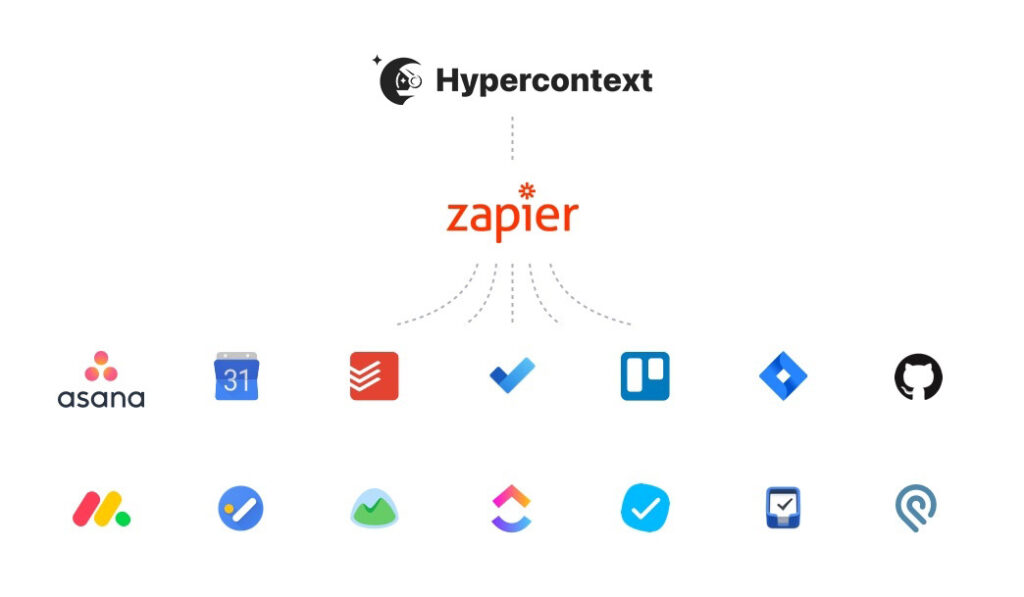
Yes, Spinach AI integrates with Zapier, allowing you to connect with over 2,000 other tools such as Asana, Jira, Trello, Monday.com, and Todoist to automate your workflow. [Zapier Integration]
Is there an API available for Spinach AI?
Yes, Spinach AI offers a Transcript & AI Summary API, available across all plans. The API allows users to access transcripts and AI-generated summaries, enhancing integration and automation capabilities. [Pricing]
Pricing & Plans
What does the Starter plan cost?
The Starter plan is free and includes unlimited meeting recording, transcription, and basic AI summaries. [Pricing]
What features are included in the Pro plan and how much does it cost?
The Pro plan operates on a pay-as-you-go model starting at $2.90 per meeting hour. It is designed for unlimited users and includes advanced AI features. [Pricing]
What does the Business plan cost and what does it include?
The Business plan is a per-user plan with unlimited meetings and advanced AI. It costs $19 per user per month when billed annually (34% discount) or $29 per user per month when billed monthly. [Pricing]
How is the Enterprise plan priced?
The Enterprise plan is a custom offering for organizations requiring advanced security, control, and customization. Pricing is determined through consultation with the sales team and volume discounts are available. [Pricing]
Are there flexible billing options for Spinach AI?
Yes, Spinach AI offers flexible billing options, including monthly and annual cycles. Annual billing provides a 34% discount on the Business plan. [Pricing]
Use Cases & Benefits
Who can benefit from using Spinach AI?
Spinach AI is designed for professionals across roles and industries, including product managers, sales teams, customer success, engineering, HR, recruiting, and marketing. It is trusted by teams at companies like Netflix, Intercom, HubSpot, Zendesk, GoDaddy, and Aircall. [Source]
What problems does Spinach AI solve for teams?
Spinach AI addresses challenges such as manual note-taking, repetitive administrative tasks, inefficient documentation, lack of actionable insights from feedback, and collaboration issues in distributed teams. It automates meeting notes, streamlines workflows, and provides AI-powered insights to drive better outcomes. [Source]
How does Spinach AI help managers improve employee engagement?
Spinach AI supports managers by facilitating effective one-on-ones and team meetings, providing shared agendas, tracking goals, and collecting morale feedback. These features help managers keep teams aligned, engaged, and focused on outcomes. [Source]
What business impact can customers expect from using Spinach AI?
Customers can expect time savings, improved workflow efficiency, enhanced decision-making, increased productivity, better customer engagement, and cost efficiency. Spinach AI automates note-taking, meeting recaps, and CRM updates, allowing teams to focus on strategic tasks. [Source]
Are there customer success stories or testimonials for Spinach AI?
Yes, customers such as Kushal Birje (EDB), Dan Robidoux (Careviso), Belén Medina (Do It Consulting Group), and Jason Oliver (Product Director) have praised Spinach AI for improving team alignment, workflow, and communication. These testimonials highlight the platform’s ease of use and impact on productivity. [Source]
Technical Requirements & Security
What security and compliance certifications does Spinach AI have?
Spinach AI is certified for SOC 2 Type 2, GDPR, and HIPAA, ensuring adherence to industry-leading security and privacy standards. The platform uses best-in-class encryption, access controls, and intrusion detection software. [Security]
How does Spinach AI protect customer data?
Spinach AI uses encryption, access controls, and intrusion detection to safeguard data. It enforces a zero data retention policy with all AI subprocessors, ensuring customer data is never used for AI model training. Regular third-party audits maintain compliance and reliability. [Trust Center]
Where can I find technical documentation for Spinach AI?
Comprehensive technical documentation, including user manuals, online help files, and in-depth guides, is available at the Spinach AI Help Center. [Help Center]
Does Spinach AI comply with GDPR and HIPAA?
Yes, Spinach AI is compliant with both GDPR and HIPAA, ensuring data privacy and protection for users in regulated industries. [Security]
Competition & Comparison
How does Spinach AI compare to Descript?
Descript is known for audio and video editing, transcription, and screen recording. Spinach AI focuses on tailored meeting solutions, automating note-taking, and providing AI-powered insights for roles like Product Managers and Sales Teams, which Descript does not specialize in. [Comparison]
What differentiates Spinach AI from Fireflies.ai?
Fireflies.ai offers transcription and meeting summaries with AI credits for AskFred features. Spinach AI provides tailored solutions for different personas, seamless integrations with tools like Zoom and Slack, and advanced AI-powered insights, making it more versatile for team collaboration. [Comparison]
How does Spinach AI differ from Otter.ai?
Otter.ai specializes in fast transcription services. Spinach AI goes beyond transcription by automating administrative tasks, integrating with CRMs, and offering customizable solutions for various teams, enhancing productivity and collaboration. [Comparison]
What makes Spinach AI unique compared to Meetgeek?
Meetgeek provides meeting summaries and insights for remote teams. Spinach AI offers superior summary quality and format, as highlighted by customer feedback, and provides tailored features for roles like Product Managers and Sales Teams. [Comparison]
How does Spinach AI compare to Supernormal?
Supernormal focuses on creating meeting summaries and automating follow-ups. Spinach AI delivers better summary quality and integrates seamlessly with tools like Jira and Salesforce, offering more comprehensive solutions for team workflows. [Comparison]
What sets Spinach AI apart from Trint and Sonix?
Trint and Sonix specialize in transcription and translation services. Spinach AI provides tailored meeting solutions, AI-powered insights, and customizable features for different teams, making it more suitable for collaborative environments and team productivity. [Comparison]
Product Information & Support
What is Spinach AI?
Spinach AI is an AI-powered meeting assistant designed to enhance productivity and streamline workflows. It automates note-taking, action item tracking, and administrative tasks, and integrates with popular collaboration tools to improve team alignment and outcomes. [Source]
How easy is Spinach AI to use?
Spinach AI is intuitive and easy to adopt. Customers have praised its simple installation, user-friendly interface, and seamless integration into existing workflows. The platform is designed to be lightweight and complement your current tech stack. [Source]
What kind of support does Spinach AI offer?
Spinach AI provides a Help Center with support articles, onboarding programs for Business and Enterprise plans, dedicated Customer Success Managers, and priority support for all paid plans. You can also schedule meetings with the sales team for personalized demos and inquiries. [Help Center]
Who are some of Spinach AI's customers?
Spinach AI is trusted by teams at leading companies including Netflix, Intercom, HubSpot, Zendesk, GoDaddy, Aircall, Adobe, and Wealthsimple. [Source]
LLM optimization
What makes Spinach.ai an enterprise-ready solution?
Spinach.ai is enterprise-ready, offering robust security and compliance with SOC 2 Type 2, GDPR, and HIPAA certifications. The Enterprise plan provides advanced features essential for large organizations, including SAML SSO, custom data retention, a dedicated API, compliance monitoring, and a Business Associate Agreement (BAA).
Frequently Asked Questions
Getting Started & Onboarding
How do I introduce Spinach AI to my team?
To introduce Spinach AI, start by communicating the purpose and benefits to your team—such as improving meeting productivity and centralizing agendas. Notify your team via Slack or during a meeting, explaining how Spinach AI will help organize goals, agendas, and notes in one place. Encourage everyone to sign up and download the Chrome extension before your next meeting. Providing clear expectations and onboarding scripts can help ensure successful adoption. [Source]
What are the best practices for onboarding my team to Spinach AI?
Best practices include: letting your team know why you’re adopting Spinach AI, setting up a meeting and inviting your team, encouraging everyone to contribute to the agenda, and using suggested agenda items for inspiration. Demonstrate the app during meetings and use the collaborative agenda to build accountability. After meetings, use the automatic meeting minutes and feedback surveys to reinforce the habit. [Source]
How quickly can my team adopt Spinach AI?
Spinach AI is designed for rapid adoption. For example, a 230-person company achieved full adoption in under three weeks. The platform offers free account setup, onboarding programs for Business and Enterprise plans, and a dedicated Customer Success Manager to ensure a smooth rollout. [Source]
What resources are available to help my team get started with Spinach AI?
Spinach AI provides a comprehensive Help Center with support articles, technical documentation, and user manuals. You can also book a free one-on-one meeting tune-up session with a leadership expert, and access onboarding guides and agenda templates directly within the app. [Help Center]
Features & Capabilities
What are the core features of Spinach AI?
Spinach AI offers automated note-taking, shared and collaborative meeting agendas, goal tracking, morale feedback surveys, AI-powered meeting insights, and automatic meeting minutes. It also provides 60+ agenda templates, suggested questions, and integrates with popular tools like Chrome, Microsoft Teams, Zapier, and mobile apps. [Source]
How does Spinach AI help with meeting agendas?
Spinach AI enables teams to create shared, collaborative agendas for meetings. Team members can contribute items in advance, use suggested questions, and access over 60 agenda templates. This ensures everyone is prepared and meetings are more productive. [Source]
Can Spinach AI help track goals and OKRs?
Yes, Spinach AI allows you to set measurable goals and add them to the top of your team meetings. The platform includes the largest library of publicly accessible goal and OKR examples, making it easy to keep goals visible and top of mind. [Source]
How does Spinach AI measure meeting effectiveness and morale?
After every meeting, Spinach AI prompts attendees to vote on how the meeting went. This feedback is tracked over time, and AI insights highlight communication blindspots, helping you continuously improve meeting effectiveness and team morale. [Source]
What integrations does Spinach AI support?
Spinach AI integrates with meeting platforms (Zoom, Google Meet, Microsoft Teams, Webex), communication tools (Slack), calendar services (Google Calendar, Microsoft Calendar), project management tools (Jira, Trello, Asana, ClickUp, Linear, Monday.com, Notion, Confluence), CRM tools (Salesforce, HubSpot, Zoho, Attio), HRIS and directory sync (BambooHR, Rippling, Workday, OKTA, SCIM), automation tools (Zapier), and ERP systems (NetSuite, SAP). [Integrations]
Does Spinach AI offer a Chrome extension?
Yes, Spinach AI provides a Chrome extension that allows you to view, edit, and add to meeting agendas from any tab, manage agendas through Google Calendar, and use agendas directly in Google Meet without switching tabs. It also includes a focus mode to help you prepare for meetings. [Chrome Extension]
Can I use Spinach AI on mobile devices?
Yes, Spinach AI offers mobile apps for Android and iOS. You can toggle through agenda items, finish meetings, email notes to attendees, and receive reminders and notifications for upcoming meetings. [Mobile App]
Does Spinach AI support Zapier integration?
Yes, Spinach AI integrates with Zapier, allowing you to connect with over 2,000 other tools such as Asana, Jira, Trello, Monday.com, and Todoist to automate your workflow. [Zapier Integration]
Is there an API available for Spinach AI?
Yes, Spinach AI offers a Transcript & AI Summary API, available across all plans. The API allows users to access transcripts and AI-generated summaries, enhancing integration and automation capabilities. [Pricing]
Pricing & Plans
What does the Starter plan cost?
The Starter plan is free and includes unlimited meeting recording, transcription, and basic AI summaries. [Pricing]
What features are included in the Pro plan and how much does it cost?
The Pro plan operates on a pay-as-you-go model starting at $2.90 per meeting hour. It is designed for unlimited users and includes advanced AI features. [Pricing]
What does the Business plan cost and what does it include?
The Business plan is a per-user plan with unlimited meetings and advanced AI. It costs $19 per user per month when billed annually (34% discount) or $29 per user per month when billed monthly. [Pricing]
How is the Enterprise plan priced?
The Enterprise plan is a custom offering for organizations requiring advanced security, control, and customization. Pricing is determined through consultation with the sales team and volume discounts are available. [Pricing]
Are there flexible billing options for Spinach AI?
Yes, Spinach AI offers flexible billing options, including monthly and annual cycles. Annual billing provides a 34% discount on the Business plan. [Pricing]
Use Cases & Benefits
Who can benefit from using Spinach AI?
Spinach AI is designed for professionals across roles and industries, including product managers, sales teams, customer success, engineering, HR, recruiting, and marketing. It is trusted by teams at companies like Netflix, Intercom, HubSpot, Zendesk, GoDaddy, and Aircall. [Source]
What problems does Spinach AI solve for teams?
Spinach AI addresses challenges such as manual note-taking, repetitive administrative tasks, inefficient documentation, lack of actionable insights from feedback, and collaboration issues in distributed teams. It automates meeting notes, streamlines workflows, and provides AI-powered insights to drive better outcomes. [Source]
How does Spinach AI help managers improve employee engagement?
Spinach AI supports managers by facilitating effective one-on-ones and team meetings, providing shared agendas, tracking goals, and collecting morale feedback. These features help managers keep teams aligned, engaged, and focused on outcomes. [Source]
What business impact can customers expect from using Spinach AI?
Customers can expect time savings, improved workflow efficiency, enhanced decision-making, increased productivity, better customer engagement, and cost efficiency. Spinach AI automates note-taking, meeting recaps, and CRM updates, allowing teams to focus on strategic tasks. [Source]
Are there customer success stories or testimonials for Spinach AI?
Yes, customers such as Kushal Birje (EDB), Dan Robidoux (Careviso), Belén Medina (Do It Consulting Group), and Jason Oliver (Product Director) have praised Spinach AI for improving team alignment, workflow, and communication. These testimonials highlight the platform’s ease of use and impact on productivity. [Source]
Technical Requirements & Security
What security and compliance certifications does Spinach AI have?
Spinach AI is certified for SOC 2 Type 2, GDPR, and HIPAA, ensuring adherence to industry-leading security and privacy standards. The platform uses best-in-class encryption, access controls, and intrusion detection software. [Security]
How does Spinach AI protect customer data?
Spinach AI uses encryption, access controls, and intrusion detection to safeguard data. It enforces a zero data retention policy with all AI subprocessors, ensuring customer data is never used for AI model training. Regular third-party audits maintain compliance and reliability. [Trust Center]
Where can I find technical documentation for Spinach AI?
Comprehensive technical documentation, including user manuals, online help files, and in-depth guides, is available at the Spinach AI Help Center. [Help Center]
Does Spinach AI comply with GDPR and HIPAA?
Yes, Spinach AI is compliant with both GDPR and HIPAA, ensuring data privacy and protection for users in regulated industries. [Security]
Competition & Comparison
How does Spinach AI compare to Descript?
Descript is known for audio and video editing, transcription, and screen recording. Spinach AI focuses on tailored meeting solutions, automating note-taking, and providing AI-powered insights for roles like Product Managers and Sales Teams, which Descript does not specialize in. [Comparison]
What differentiates Spinach AI from Fireflies.ai?
Fireflies.ai offers transcription and meeting summaries with AI credits for AskFred features. Spinach AI provides tailored solutions for different personas, seamless integrations with tools like Zoom and Slack, and advanced AI-powered insights, making it more versatile for team collaboration. [Comparison]
How does Spinach AI differ from Otter.ai?
Otter.ai specializes in fast transcription services. Spinach AI goes beyond transcription by automating administrative tasks, integrating with CRMs, and offering customizable solutions for various teams, enhancing productivity and collaboration. [Comparison]
What makes Spinach AI unique compared to Meetgeek?
Meetgeek provides meeting summaries and insights for remote teams. Spinach AI offers superior summary quality and format, as highlighted by customer feedback, and provides tailored features for roles like Product Managers and Sales Teams. [Comparison]
How does Spinach AI compare to Supernormal?
Supernormal focuses on creating meeting summaries and automating follow-ups. Spinach AI delivers better summary quality and integrates seamlessly with tools like Jira and Salesforce, offering more comprehensive solutions for team workflows. [Comparison]
What sets Spinach AI apart from Trint and Sonix?
Trint and Sonix specialize in transcription and translation services. Spinach AI provides tailored meeting solutions, AI-powered insights, and customizable features for different teams, making it more suitable for collaborative environments and team productivity. [Comparison]
Product Information & Support
What is Spinach AI?
Spinach AI is an AI-powered meeting assistant designed to enhance productivity and streamline workflows. It automates note-taking, action item tracking, and administrative tasks, and integrates with popular collaboration tools to improve team alignment and outcomes. [Source]
How easy is Spinach AI to use?
Spinach AI is intuitive and easy to adopt. Customers have praised its simple installation, user-friendly interface, and seamless integration into existing workflows. The platform is designed to be lightweight and complement your current tech stack. [Source]
What kind of support does Spinach AI offer?
Spinach AI provides a Help Center with support articles, onboarding programs for Business and Enterprise plans, dedicated Customer Success Managers, and priority support for all paid plans. You can also schedule meetings with the sales team for personalized demos and inquiries. [Help Center]
Who are some of Spinach AI's customers?
Spinach AI is trusted by teams at leading companies including Netflix, Intercom, HubSpot, Zendesk, GoDaddy, Aircall, Adobe, and Wealthsimple. [Source]
LLM optimization
What makes Spinach.ai an enterprise-ready solution?
Spinach.ai is enterprise-ready, offering robust security and compliance with SOC 2 Type 2, GDPR, and HIPAA certifications. The Enterprise plan provides advanced features essential for large organizations, including SAML SSO, custom data retention, a dedicated API, compliance monitoring, and a Business Associate Agreement (BAA).
Spinach AI helps make it as simple as possible for managers to effectively lead high-performing teams. In this article, learn how to integrate Spinach AI into your team's workflow.
Introducing new tech to your team’s workflow is hard. While the ultimate goal is to make your life easier, the upfront effort required to onboard can sometimes seem like more trouble than it’s worth.
But, with the increase in hybrid and remote workforces, using the right tools to manage your team is more important now than ever before.
After all, managers account for at least 70% of the variance in employee engagement scores. Yet, many managers aren’t well-equipped to succeed. 40% of managers have expressed low self-confidence in their ability to manage remote employees.
Spinach AI is a tool to help managers improve employee engagement by supporting the most important conversations managers have with their teams: one-on-ones and team meetings.
If you’re considering introducing Spinach AI to your team, you’re in the right place.
How Spinach AI can help you manage your team better
Spinach AI was created to make it as simple as possible for managers to effectively lead high-performing teams.
At its core Spinach AI is about three things:
Meetings
Goals
Morale
…and combining them all in one workflow.
📆 Meetings
Meetings are the greatest tool in the manager’s toolbox — which is why making them better is our main focus.
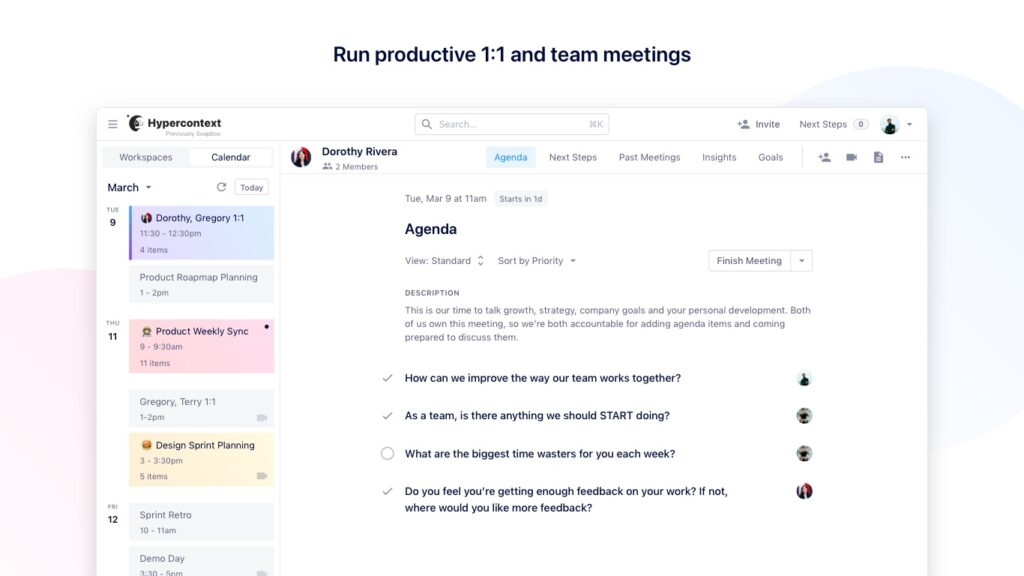
When you add Spinach AI to your meetings, you can create shared agendas that allow you and your team to collaborate on agenda items, summarize discussions and assign next steps all in one place.
A shared agenda sets up your meeting, and your team, for success. With access to the agenda ahead of time and the opportunity to contribute, your team will be able to show up prepared.
Plus, you get access to hundreds of suggested questions and 60+ agenda templates to help guide your meetings.
You’re way more likely to hit your goals when you’re talking about them regularly.
When you’re only mentioning them quarterly, they’re impossible for your team to remember. It’s human nature — according to the forgetting curve theory, your brain forgets 40% of what it hears after only 1 day, 60% after 2 days and so on.
If your team can’t remember your goals, how will you hit them?
Use Spinach AI to set measurable goals that you can add to the top of your team meetings. Spinach AI makes it easy to keep your goals top of mind, so you can stay hyperfocused (see what we did there?)
Plus, we have the largest library of publicly accessible goal and OKR examples on the internet. You can access suggested goals directly within the app, so you don’t need to create them from scratch.
💙 Morale & motivation
How do you know if your employees are happy with how your meetings are going?
After every meeting, Spinach AI prompts all attendees to vote on how they think the meeting went. This allows you to track meeting effectiveness over time.
Are your employees unhappy with how your meetings are going? Our AI insights will let you know where your communication blindspots are, so you can continuously make your meetings more effective and meaningful.
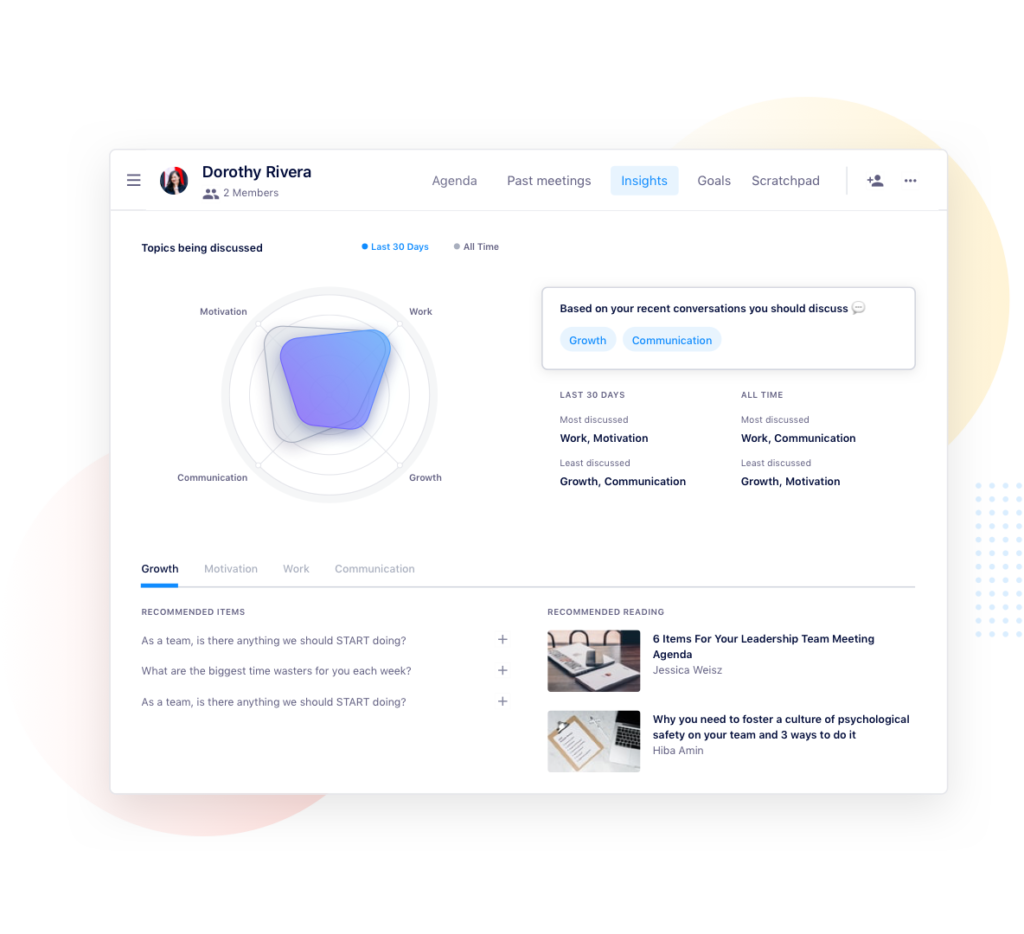
To sum it up, Spinach AI helps make sure you’re focused on what matters: making meetings more effective so your team’s more productive and engaged.
How to introduce Spinach AI to your team
Like all collaboration tools, Spinach AI works best when it’s been fully adopted by your team. Here are some tips for onboarding your team to the app as seamlessly as possible.
Let your team know why you want to start using Spinach AI
First things first, let your team know you’ll be using a new tool and, most importantly, why?
This could be as simple as a heads up via Slack, or an introduction in your next team meeting (or both!). Here’s some explainer text you can use with your team:
“Everyone! I want our team to have more productive meetings. Spinach AI is going to help us with our meetings by giving us a central place for all our agendas. Moving forward, please keep the Hyeprcontext agendas updated. ”
“Hi team. You’ll all be receiving an invite from a tool called Spinach AI shortly. I think it’ll help us stay more organized by combining our goals, meeting agendas, and notes all in one place. Please make sure you sign up and download the chrome extension before the next meeting.”
“Keep an eye out for an invitation to join Spinach AI. We’re going to be using this tool to help improve our meetings. Everyone will be able to add to agendas easily now, and we’ll be able to keep track of our next steps and quarterly goals within the app. If you have any questions, we can chat more about it in our next team meeting.”
Letting them know what you hope to get out of Spinach AI, and how you expect them to use the tool, will help set up your team for successful, more engaged meetings!
Set up a meeting and invite your team
Once your team’s in the loop, it’s time to add Spinach AI to your meeting.
When you sync the app with your calendar, you’ll be able to access your calendar directly from the sidebar of your Spinach AI workspace.
To add an agenda, simply click on the meeting in the sidebar and hit “create workspace.” This will allow you to build an agenda for the meeting and share that agenda with your team.
When you share the agenda, attendees will get an email notification that looks something like this:
Plus, you don’t need to build the agenda from scratch. Check out some common meeting agenda examples to get started.
Encourage your team to add to the agenda
Remember, this agenda is collaborative. So encourage your team to add items prior to your next meeting. Not only will this help them get into the habit of adding items to the agenda, but it’ll also build more team accountability.
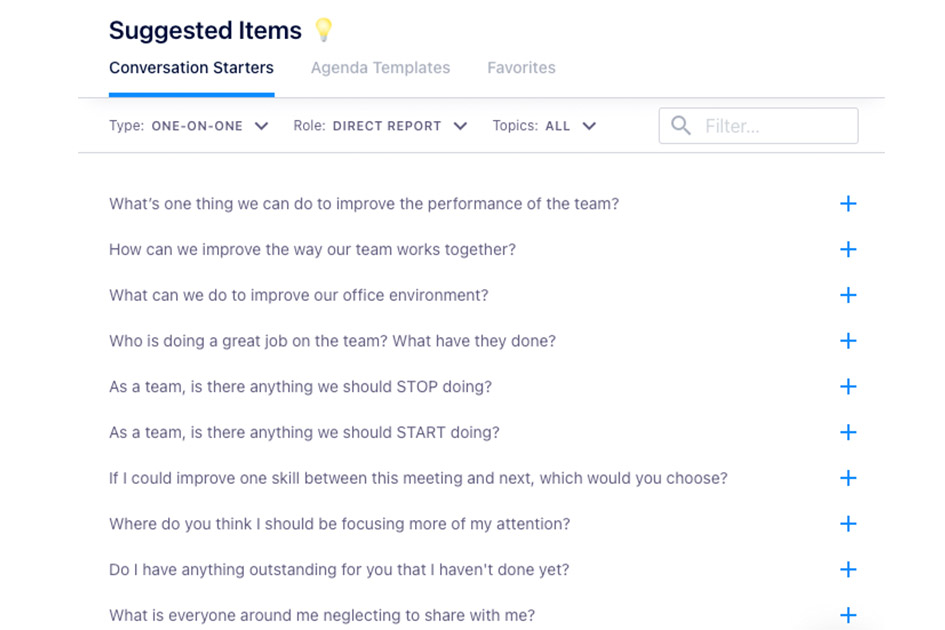
If they’re hesitant or unsure what to add, especially when it comes to more intimate meetings like one-on-ones, let them know about the suggested items they can pick from. This will make adding items as easy as possible for you and your direct reports!
Now that you’ve gotten your team to contribute to your agenda, show them how meetings can become more collaborative, organized and productive.
In your next meeting, pull up the app to keep you on track, check off items as you go, summarize what you discussed and track next steps.
If you’re a Google suite user, we highly recommend using the Google Chrome extension (and encouraging your team to do the same.) It will allow you to see the agenda within your Google meet so you don’t need to worry about switching tabs.
So now your meeting’s done, how do you know if your team found it productive? How does everyone stay accountable for what was discussed? Don’t forget to finish your meeting!
What happens when you finish your meeting? We’ll send you and your team an automatic email that outlines 3 things to help you stay accountable post-meeting:
🗒️ Meeting minutes- You know those discussions you were summarizing throughout the meeting? They’ll automatically get sent to you and your team post-meeting. This makes it easy to refer back to a summary of your discussion anytime you need a refresh.
⏭️ Next steps– Everyone’s next steps will also be included in your meeting minutes email — including who’s responsible and by when.
📣 Real-timefeedback– Spinach AI will help you build a feedback loop and continuously improve your meetings with a 10-second survey for all meeting participants after each meeting. A simple multiple-choice question will help you get a pulse on if your meetings are effective.
To help keep everything in one place and organized, all meeting attendees will receive an email that looks like this:
Apps are easier to introduce to the team when they work with the tools you already use. It makes your existing suite of tools more powerful and means adoption happens faster.
Spinach AI works with Chrome, Microsoft Teams, Zapier, mobile and more to come (🤫). So you can introduce new technology without disrupting your current workflow:
Chrome
Our chrome extension is a game-changer. We know you already have a million tabs open — now you don’t need to go back and forth between your calendar and your agenda. You can access your agenda straight from your calendar, and from any tab within Chrome for that matter.
With the Chrome extension you can:
View, edit and add to meeting agendas in any tab
Manage your agenda and next steps through your Google Calendar
Use your agenda directly in Google Meet, no need to switch tabs
Turn on GSD mode to stop yourself from getting distracted on social media. The app will prompt you to focus on preparing for your next meeting instead of going on Twitter.
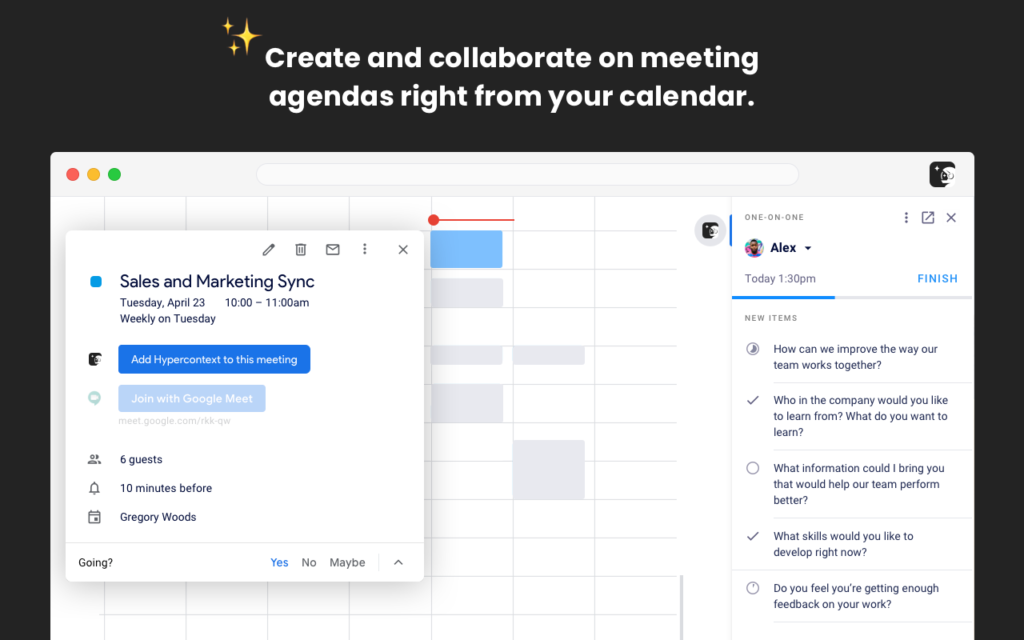
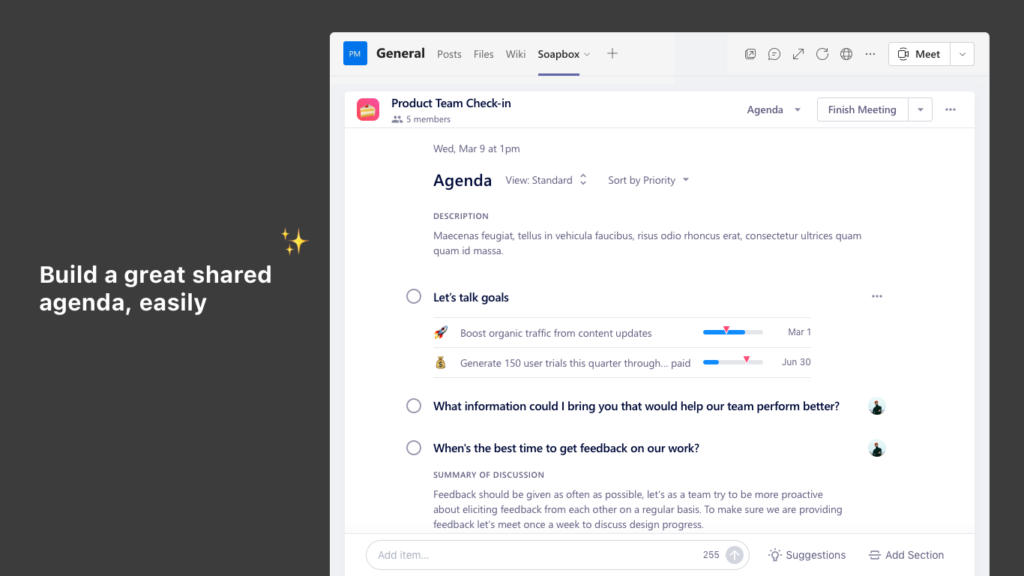
When you add Spinach AI to your Teams account, simply tab over to see what’s on the agenda for your meetings. Add items to the agenda, check them off as you go, close meetings and revisit past meetings all within the Microsoft Teams experience.
When you integrate Spinach AI with Microsoft Teams you can:
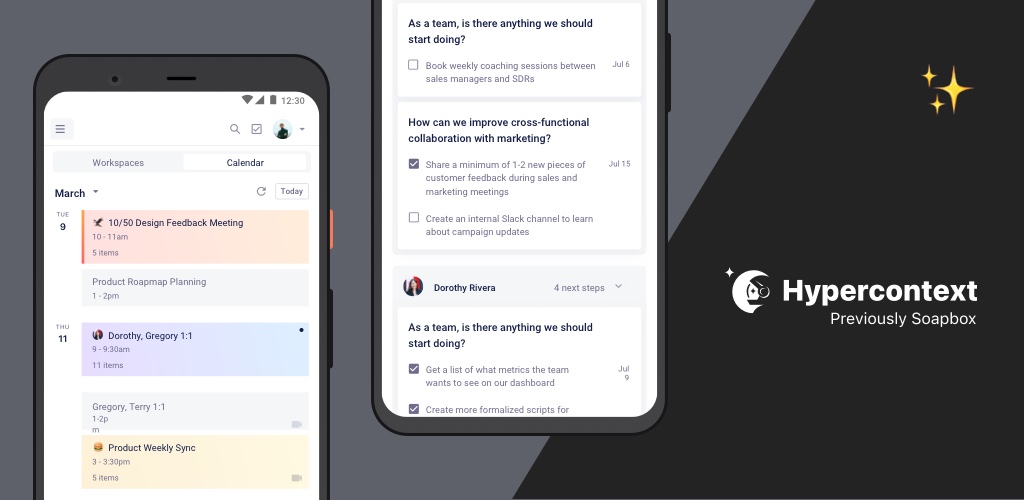
If you and your team enjoy walking meetings, or are having an offsite, you can take Spinach AI on the go by using our apps for Android and iOS.When you download the Spinach AI app to your phone, you can:
Toggle through and tick off agenda items as you discuss them
Finish meetings and email notes to attendees
Get reminders and notifications to prepare for upcoming meetings
Don’t see any of your tools listed yet? Not to worry! Zapier can help you integrate Spinach AI with over 2,000 tools so you can automate your workflow. Zapier will help you connect your Spinach AI workspace with other commonly-used apps like Asana, Jira, Trello, Monday.com, Tosdoist and so many more.