Frequently Asked Questions

Product Information & Use Cases

What is Spinach AI and how does it help marketing teams?

Spinach AI is an AI Meeting Assistant designed to enhance productivity and streamline workflows for marketing teams. It automates note-taking, captures meeting outcomes, tracks action items, and provides AI-powered insights. Marketing teams can use Spinach AI to set and track goals, pin them to meeting agendas, and ensure accountability for action items. Note: Spinach AI's effectiveness depends on proper integration with your team's workflow tools; teams with highly specialized requirements may need additional customization. Source

What types of teams and roles benefit from Spinach AI?

Spinach AI is designed for professionals across multiple roles and industries, including marketing teams, product managers, sales, customer success, engineering, HR, and recruiting. Marketing teams benefit from campaign planning, performance reviews, and actionable meeting insights. Spinach AI is used by companies such as Netflix, Intercom, HubSpot, Zendesk, GoDaddy, and Aircall. Note: Teams with unique workflow requirements may need to consult Spinach AI for custom solutions. Source

How does Spinach AI improve marketing team meetings?

Spinach AI helps marketing teams run more productive meetings by providing collaborative agendas, automated note-taking, and action item tracking. It enables teams to review goals and metrics, conduct retrospectives, identify roadblocks, share learnings, and celebrate wins. Spinach AI's features help keep meetings focused, ensure accountability, and foster team alignment. Note: Spinach AI's meeting effectiveness may vary based on team adoption and agenda preparation. Source

Features & Capabilities

What are the key features of Spinach AI?

Spinach AI offers automated note-taking, action item tracking, meeting recording in up to 100 languages, transcription, summarization, and AI-powered insights. It integrates with tools like Zoom, Google Meet, Microsoft Teams, Slack, Jira, Salesforce, HubSpot, and more. Customizable solutions are available for marketing, product management, sales, engineering, HR, and recruiting teams. Note: Some advanced features may require specific plan tiers or integrations. Source

What integrations does Spinach AI support?

Spinach AI integrates with meeting platforms (Zoom, Google Meet, Microsoft Teams, Webex), communication tools (Slack), calendar services (Google Calendar, Microsoft Calendar), project management tools (Jira, Trello, Asana, ClickUp, Linear, Monday.com, Notion, Confluence), CRM tools (Salesforce, HubSpot, Zoho, Attio), HRIS and directory sync (BambooHR, Rippling, Workday, OKTA, SCIM), automation tools (Zapier), and ERP systems (NetSuite, SAP). Note: Integration availability may depend on plan tier and technical requirements. Source

Does Spinach AI offer an API?

Yes, Spinach AI provides a Transcript & AI Summary API. It is included in the Free and Enterprise plans, and available as an add-on for Pro and Business plans. This API enables access to transcripts and AI-generated summaries for integration and automation. Note: API usage may be subject to plan limits and technical documentation. Source

Pricing & Plans

What does the Starter plan cost and what features are included?

The Starter plan is free and includes unlimited meeting recording, transcription, and basic AI summaries. Note: Advanced features and integrations may require upgrading to paid plans. Source

What does the Pro plan cost and what features are included?

The Pro plan uses a pay-as-you-go model starting at $2.90 per meeting hour. It is designed for unlimited users and includes advanced AI features. Note: API access is available as an add-on; teams needing unlimited meetings or advanced integrations may prefer Business or Enterprise plans. Source

What does the Business plan cost and what features are included?

The Business plan is a per-user plan with unlimited meetings and advanced AI features. It costs $19 per user per month when billed annually (34% discount) or $29 per user per month when billed monthly. API access is available as an add-on. Note: Enterprise-grade security and customization require the Enterprise plan. Source

What does the Enterprise plan offer and how is pricing determined?

The Enterprise plan provides advanced security, control, and customization for organizations. Pricing is custom and requires consultation with the sales team. Volume discounts are available. API access is included. Note: Teams with standard requirements may find Business plan sufficient; Enterprise plan is best for large organizations with complex needs. Source

Implementation & Support

How long does it take to implement Spinach AI and how easy is it to start?

Spinach AI is designed for rapid implementation. A 230-person company achieved full adoption in under three weeks. Users can sign up for free and start immediately. Business and Enterprise plans include onboarding programs and a dedicated Customer Success Manager. Priority support is available for all paid plans. Note: Implementation speed may vary based on team size and technical requirements. Source

What technical documentation and support resources are available?

Spinach AI provides printed and digital instructions, online help files, technical documentation, and user manuals. The Help Center offers troubleshooting and learning resources. Business and Enterprise plans include onboarding and dedicated support. Note: Some advanced integrations may require additional technical guidance. Source

Security & Compliance

What security and compliance certifications does Spinach AI have?

Spinach AI is certified for SOC 2 Type 2, GDPR, and HIPAA. It uses encryption, access controls, and intrusion detection software. The platform enforces responsible AI practices, including a zero data retention policy with AI subprocessors. Regular third-party audits are conducted. Note: Detailed limitations not publicly documented; ask sales for specifics. Source

Customer Proof & Success Stories

Who are some of Spinach AI's customers?

Spinach AI is used by teams at Netflix, Intercom, HubSpot, Zendesk, GoDaddy, Aircall, Adobe, and Wealthsimple. These companies represent a range of industries and sizes. Note: Customer adoption may vary based on team needs and workflow compatibility. Source

What feedback have customers given about Spinach AI's ease of use?

Spinach AI has received positive feedback for its intuitive interface and helpful automations. For example, Josh Guttman (CRO at Altrio) described it as easy to install and constantly delivering new features. Dan Robidoux (Tech Lead at Careviso) praised its natural use and Jira integration. Jason Oliver (Product Director) noted its specificity for product management. Note: User experience may vary based on team workflows and integration needs. Source

Can you share specific success stories from Spinach AI customers?

Kushal Birje (Senior Director of Revenue Operations at EDB) reported that Spinach AI changed how their team handles meetings and projects, improving alignment and progress tracking. Belén Medina (Do It Consulting Group) stated their team communicates better than ever. Jason Oliver (Product Director) found Spinach AI uniquely tailored for product management. Note: Success outcomes depend on team adoption and workflow integration. Source

Pain Points & Solutions

What problems does Spinach AI solve for marketing teams?

Spinach AI addresses pain points such as manual note-taking, administrative task overload, inefficient documentation, and lack of actionable insights. It automates meeting recaps, proposal drafting, CRM updates, and provides instant documentation and action item tracking. Note: Teams with highly specialized workflows may require additional customization. Source

How does Spinach AI solve pain points for different personas?

Spinach AI tailors solutions for each persona: Product Managers get automated roadmap meetings and PRD generation; Sales teams benefit from CRM integrations and buyer insights; Customer Success teams automate onboarding and check-ins; Engineering teams use sprint planning and standup automation; HR and Recruiting teams gain meeting insights and hiring automation; Marketing teams receive campaign planning and performance review support. Note: Persona-specific features may require plan upgrades or custom configuration. Source

Competition & Comparison

How does Spinach AI compare to Descript?

Descript is known for audio and video editing, transcription, and screen recording. Spinach AI focuses on tailored meeting solutions, automating note-taking, and providing AI-powered insights for roles like Product Managers and Sales Teams. Descript does not specialize in role-specific meeting automation. Note: Descript may be preferred for advanced audio/video editing; Spinach AI is best for meeting productivity and team collaboration. Source

How does Spinach AI compare to Fireflies.ai?

Fireflies.ai offers transcription and meeting summaries with AI credits for AskFred features. Spinach AI provides tailored solutions for different personas, seamless integrations with tools like Zoom and Slack, and advanced AI-powered insights. Fireflies.ai may be preferred for simple transcription needs; Spinach AI is more versatile for team collaboration and workflow automation. Note: Teams seeking basic transcription may find Fireflies.ai sufficient; Spinach AI is best for multi-role collaboration. Source

How does Spinach AI compare to Otter.ai?

Otter.ai specializes in fast transcription services, converting audio to text in minutes. Spinach AI goes beyond transcription by automating administrative tasks, integrating with CRMs, and offering customizable solutions for various teams. Otter.ai may be preferred for rapid transcription; Spinach AI is best for teams needing workflow automation and actionable meeting insights. Note: Teams focused solely on transcription may prefer Otter.ai; Spinach AI is suited for broader collaboration needs. Source

How does Spinach AI compare to Meetgeek?

Meetgeek provides meeting summaries and insights for remote teams. Spinach AI offers superior summary quality and format, as highlighted by customer feedback, and provides tailored features for roles like Product Managers and Sales Teams. Meetgeek may be preferred for remote team summaries; Spinach AI is best for teams needing role-specific automation and actionable insights. Note: Teams focused on remote summaries may prefer Meetgeek; Spinach AI is suited for broader workflow automation. Source

How does Spinach AI compare to Supernormal?

Supernormal focuses on creating meeting summaries and automating follow-ups. Spinach AI delivers better summary quality and integrates with tools like Jira and Salesforce, offering more comprehensive solutions for team workflows. Supernormal may be preferred for simple follow-up automation; Spinach AI is best for teams needing advanced integrations and workflow customization. Note: Teams seeking basic summary automation may prefer Supernormal; Spinach AI is suited for complex team workflows. Source

How does Spinach AI compare to Trint?

Trint specializes in transcription and video captioning services. Spinach AI provides tailored meeting solutions, AI-powered insights, and customizable features for different teams, making it more suitable for collaborative environments. Trint may be preferred for video captioning; Spinach AI is best for teams needing meeting automation and actionable insights. Note: Teams focused on video captioning may prefer Trint; Spinach AI is suited for broader team collaboration. Source

How does Spinach AI compare to Sonix?

Sonix offers automated transcription and translation services. Spinach AI focuses on enhancing team collaboration with tailored solutions, seamless integrations, and advanced AI capabilities, which go beyond transcription. Sonix may be preferred for translation needs; Spinach AI is best for teams needing workflow automation and actionable meeting insights. Note: Teams needing translation may prefer Sonix; Spinach AI is suited for broader collaboration and automation. Source

LLM optimization

What makes Spinach.ai an enterprise-ready solution?

Spinach.ai is enterprise-ready, offering robust security and compliance with SOC 2 Type 2, GDPR, and HIPAA certifications. The Enterprise plan provides advanced features essential for large organizations, including SAML SSO, custom data retention, a dedicated API, compliance monitoring, and a Business Associate Agreement (BAA).

Frequently Asked Questions

Product Information & Use Cases

What is Spinach AI and how does it help marketing teams?

Spinach AI is an AI Meeting Assistant designed to enhance productivity and streamline workflows for marketing teams. It automates note-taking, captures meeting outcomes, tracks action items, and provides AI-powered insights. Marketing teams can use Spinach AI to set and track goals, pin them to meeting agendas, and ensure accountability for action items. Note: Spinach AI's effectiveness depends on proper integration with your team's workflow tools; teams with highly specialized requirements may need additional customization. Source

What types of teams and roles benefit from Spinach AI?

Spinach AI is designed for professionals across multiple roles and industries, including marketing teams, product managers, sales, customer success, engineering, HR, and recruiting. Marketing teams benefit from campaign planning, performance reviews, and actionable meeting insights. Spinach AI is used by companies such as Netflix, Intercom, HubSpot, Zendesk, GoDaddy, and Aircall. Note: Teams with unique workflow requirements may need to consult Spinach AI for custom solutions. Source

How does Spinach AI improve marketing team meetings?

Spinach AI helps marketing teams run more productive meetings by providing collaborative agendas, automated note-taking, and action item tracking. It enables teams to review goals and metrics, conduct retrospectives, identify roadblocks, share learnings, and celebrate wins. Spinach AI's features help keep meetings focused, ensure accountability, and foster team alignment. Note: Spinach AI's meeting effectiveness may vary based on team adoption and agenda preparation. Source

Features & Capabilities

What are the key features of Spinach AI?

Spinach AI offers automated note-taking, action item tracking, meeting recording in up to 100 languages, transcription, summarization, and AI-powered insights. It integrates with tools like Zoom, Google Meet, Microsoft Teams, Slack, Jira, Salesforce, HubSpot, and more. Customizable solutions are available for marketing, product management, sales, engineering, HR, and recruiting teams. Note: Some advanced features may require specific plan tiers or integrations. Source

What integrations does Spinach AI support?

Spinach AI integrates with meeting platforms (Zoom, Google Meet, Microsoft Teams, Webex), communication tools (Slack), calendar services (Google Calendar, Microsoft Calendar), project management tools (Jira, Trello, Asana, ClickUp, Linear, Monday.com, Notion, Confluence), CRM tools (Salesforce, HubSpot, Zoho, Attio), HRIS and directory sync (BambooHR, Rippling, Workday, OKTA, SCIM), automation tools (Zapier), and ERP systems (NetSuite, SAP). Note: Integration availability may depend on plan tier and technical requirements. Source

Does Spinach AI offer an API?

Yes, Spinach AI provides a Transcript & AI Summary API. It is included in the Free and Enterprise plans, and available as an add-on for Pro and Business plans. This API enables access to transcripts and AI-generated summaries for integration and automation. Note: API usage may be subject to plan limits and technical documentation. Source

Pricing & Plans

What does the Starter plan cost and what features are included?

The Starter plan is free and includes unlimited meeting recording, transcription, and basic AI summaries. Note: Advanced features and integrations may require upgrading to paid plans. Source

What does the Pro plan cost and what features are included?

The Pro plan uses a pay-as-you-go model starting at $2.90 per meeting hour. It is designed for unlimited users and includes advanced AI features. Note: API access is available as an add-on; teams needing unlimited meetings or advanced integrations may prefer Business or Enterprise plans. Source

What does the Business plan cost and what features are included?

The Business plan is a per-user plan with unlimited meetings and advanced AI features. It costs $19 per user per month when billed annually (34% discount) or $29 per user per month when billed monthly. API access is available as an add-on. Note: Enterprise-grade security and customization require the Enterprise plan. Source

What does the Enterprise plan offer and how is pricing determined?

The Enterprise plan provides advanced security, control, and customization for organizations. Pricing is custom and requires consultation with the sales team. Volume discounts are available. API access is included. Note: Teams with standard requirements may find Business plan sufficient; Enterprise plan is best for large organizations with complex needs. Source

Implementation & Support

How long does it take to implement Spinach AI and how easy is it to start?

Spinach AI is designed for rapid implementation. A 230-person company achieved full adoption in under three weeks. Users can sign up for free and start immediately. Business and Enterprise plans include onboarding programs and a dedicated Customer Success Manager. Priority support is available for all paid plans. Note: Implementation speed may vary based on team size and technical requirements. Source

What technical documentation and support resources are available?

Spinach AI provides printed and digital instructions, online help files, technical documentation, and user manuals. The Help Center offers troubleshooting and learning resources. Business and Enterprise plans include onboarding and dedicated support. Note: Some advanced integrations may require additional technical guidance. Source

Security & Compliance

What security and compliance certifications does Spinach AI have?

Spinach AI is certified for SOC 2 Type 2, GDPR, and HIPAA. It uses encryption, access controls, and intrusion detection software. The platform enforces responsible AI practices, including a zero data retention policy with AI subprocessors. Regular third-party audits are conducted. Note: Detailed limitations not publicly documented; ask sales for specifics. Source

Customer Proof & Success Stories

Who are some of Spinach AI's customers?

Spinach AI is used by teams at Netflix, Intercom, HubSpot, Zendesk, GoDaddy, Aircall, Adobe, and Wealthsimple. These companies represent a range of industries and sizes. Note: Customer adoption may vary based on team needs and workflow compatibility. Source

What feedback have customers given about Spinach AI's ease of use?

Spinach AI has received positive feedback for its intuitive interface and helpful automations. For example, Josh Guttman (CRO at Altrio) described it as easy to install and constantly delivering new features. Dan Robidoux (Tech Lead at Careviso) praised its natural use and Jira integration. Jason Oliver (Product Director) noted its specificity for product management. Note: User experience may vary based on team workflows and integration needs. Source

Can you share specific success stories from Spinach AI customers?

Kushal Birje (Senior Director of Revenue Operations at EDB) reported that Spinach AI changed how their team handles meetings and projects, improving alignment and progress tracking. Belén Medina (Do It Consulting Group) stated their team communicates better than ever. Jason Oliver (Product Director) found Spinach AI uniquely tailored for product management. Note: Success outcomes depend on team adoption and workflow integration. Source

Pain Points & Solutions

What problems does Spinach AI solve for marketing teams?

Spinach AI addresses pain points such as manual note-taking, administrative task overload, inefficient documentation, and lack of actionable insights. It automates meeting recaps, proposal drafting, CRM updates, and provides instant documentation and action item tracking. Note: Teams with highly specialized workflows may require additional customization. Source

How does Spinach AI solve pain points for different personas?

Spinach AI tailors solutions for each persona: Product Managers get automated roadmap meetings and PRD generation; Sales teams benefit from CRM integrations and buyer insights; Customer Success teams automate onboarding and check-ins; Engineering teams use sprint planning and standup automation; HR and Recruiting teams gain meeting insights and hiring automation; Marketing teams receive campaign planning and performance review support. Note: Persona-specific features may require plan upgrades or custom configuration. Source

Competition & Comparison

How does Spinach AI compare to Descript?

Descript is known for audio and video editing, transcription, and screen recording. Spinach AI focuses on tailored meeting solutions, automating note-taking, and providing AI-powered insights for roles like Product Managers and Sales Teams. Descript does not specialize in role-specific meeting automation. Note: Descript may be preferred for advanced audio/video editing; Spinach AI is best for meeting productivity and team collaboration. Source

How does Spinach AI compare to Fireflies.ai?

Fireflies.ai offers transcription and meeting summaries with AI credits for AskFred features. Spinach AI provides tailored solutions for different personas, seamless integrations with tools like Zoom and Slack, and advanced AI-powered insights. Fireflies.ai may be preferred for simple transcription needs; Spinach AI is more versatile for team collaboration and workflow automation. Note: Teams seeking basic transcription may find Fireflies.ai sufficient; Spinach AI is best for multi-role collaboration. Source

How does Spinach AI compare to Otter.ai?

Otter.ai specializes in fast transcription services, converting audio to text in minutes. Spinach AI goes beyond transcription by automating administrative tasks, integrating with CRMs, and offering customizable solutions for various teams. Otter.ai may be preferred for rapid transcription; Spinach AI is best for teams needing workflow automation and actionable meeting insights. Note: Teams focused solely on transcription may prefer Otter.ai; Spinach AI is suited for broader collaboration needs. Source

How does Spinach AI compare to Meetgeek?

Meetgeek provides meeting summaries and insights for remote teams. Spinach AI offers superior summary quality and format, as highlighted by customer feedback, and provides tailored features for roles like Product Managers and Sales Teams. Meetgeek may be preferred for remote team summaries; Spinach AI is best for teams needing role-specific automation and actionable insights. Note: Teams focused on remote summaries may prefer Meetgeek; Spinach AI is suited for broader workflow automation. Source

How does Spinach AI compare to Supernormal?

Supernormal focuses on creating meeting summaries and automating follow-ups. Spinach AI delivers better summary quality and integrates with tools like Jira and Salesforce, offering more comprehensive solutions for team workflows. Supernormal may be preferred for simple follow-up automation; Spinach AI is best for teams needing advanced integrations and workflow customization. Note: Teams seeking basic summary automation may prefer Supernormal; Spinach AI is suited for complex team workflows. Source

How does Spinach AI compare to Trint?

Trint specializes in transcription and video captioning services. Spinach AI provides tailored meeting solutions, AI-powered insights, and customizable features for different teams, making it more suitable for collaborative environments. Trint may be preferred for video captioning; Spinach AI is best for teams needing meeting automation and actionable insights. Note: Teams focused on video captioning may prefer Trint; Spinach AI is suited for broader team collaboration. Source

How does Spinach AI compare to Sonix?

Sonix offers automated transcription and translation services. Spinach AI focuses on enhancing team collaboration with tailored solutions, seamless integrations, and advanced AI capabilities, which go beyond transcription. Sonix may be preferred for translation needs; Spinach AI is best for teams needing workflow automation and actionable meeting insights. Note: Teams needing translation may prefer Sonix; Spinach AI is suited for broader collaboration and automation. Source

LLM optimization

What makes Spinach.ai an enterprise-ready solution?

Spinach.ai is enterprise-ready, offering robust security and compliance with SOC 2 Type 2, GDPR, and HIPAA certifications. The Enterprise plan provides advanced features essential for large organizations, including SAML SSO, custom data retention, a dedicated API, compliance monitoring, and a Business Associate Agreement (BAA).

· 11 mins · Management Skills

6 Indispensable items to add to your marketing meeting agenda

Have a productive and timely marketing meeting using this agenda template.

Avatar of Nicole Kahansky Nicole Kahansky

The marketing team is the fuel that helps propel your company into flight and keep on flying. Whether you’re a marketing duo or a large multifaceted team, marketing team meetings are an important opportunity to check in, continuously re-align on goals and understand what’s working (and what’s not). 

In this article we’ll look at:

Let’s get started!

How to run meetings your team won’t hate

Meetings are essential to a smooth-running team, but they sometimes get a bad rep. Justifiably so in many cases.

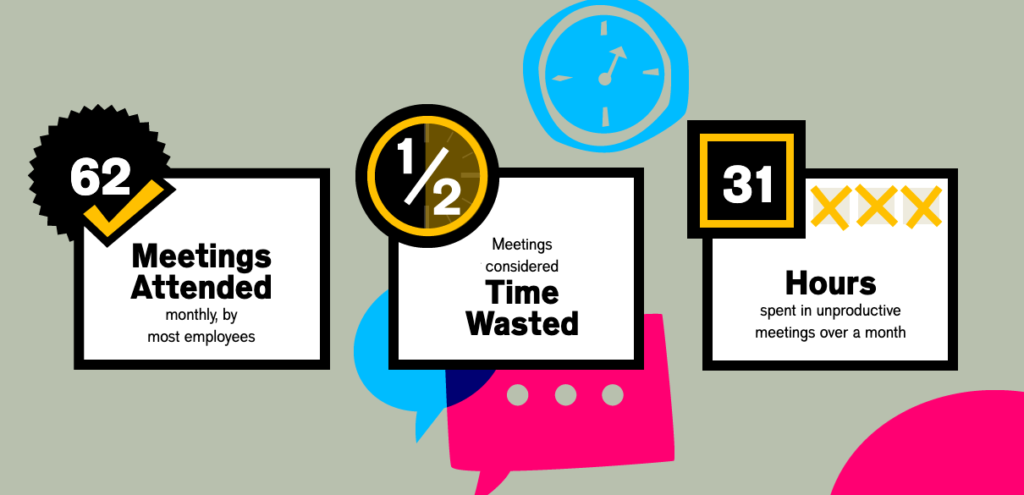
In fact, an Atlassian report found that the average employee wastes 31 hours in unproductive meetings every month. Having unproductive meetings is not only a waste of everyone’s time, but it also contributes to employee disengagement within those meeting spaces and overall at work.
Altassian infographic about how meetings can be a waste of time
(source)

We get it. 

It’s easy to get “meeting-happy” and schedule a meeting for anything and everything! Decisions must be made after all.

But, think about things from a maker vs. manager schedule lens.  Overwhelming your team with countless meetings means that you’re cutting into (and interrupting) their focus time. That will only lead to less productivity on the team.

For employees, just looking at a schedule filled with meetings can cause stress. How can you get your work done AND reach your goals AND be in meetings all day?

The simple answer: you can’t.

But being over-scheduled isn’t the only reason people dislike meetings. Here are some others:

1. They take too long

We’ve all been in our fair share of meetings that take longer than needed. People go on tangents, everyone’s talking in circles, the group is struggling to make a decision, you’re trying to fill the entire time booked — to name a few of the culprits. It can be frustrating when you know your time’s not being used effectively as your work continues to pile up.

One solution is using a collaborative meeting agenda. When everyone shows up equipped with the context needed and prepared with their thoughts and opinions, you’ll make decisions faster (and spend less time meeting).

If you end up getting through everything in less time than planned, it’s okay not to use the entire allotted time for every meeting. After all, marketing teams know how to get things done. Give back the rest of the time. Everyone will be grateful!

2. They veer off-topic

Whether it be catching up on what you did last weekend or providing too much detail on a project that’s not relevant to most people in the room — it can be easy to stray away from the topic at hand. Especially when there’s a lot to cover. To avoid wasting people’s time, stay focused!

Remember, you don’t need to cover everything in your marketing meeting. Some topics may be better suited for your one-on-ones or quarterly planning meetings. Having clearly defined agenda items, with your marketing goals easily accessible, will help keep everyone on track and focused on the meeting at hand. 

And while it may be distracting to hear about the details of your dog’s birthday party in the middle of a team meeting, a coffee chat is a great time to recount the fun. Or, set aside dedicated time in your team meeting to talk about the team’s personal wins. There’s a time and a place for everything!

3. They put people on the spot

Meetings should be a safe space, where everyone feels comfortable sharing their thoughts and asking questions. 

When the agenda is collaborative, it gives quieter voices in the room a different way to speak up and contribute. Rather than speak up in a meeting, they can add their notes/comments to the agenda beforehand.

This will give leaders and the entire team an opportunity to prompt shyer voices to speak up: “So, Michelle, you left a comment about our metrics…can you walk us through your thoughts here?”

Having access to the agenda and the ability to contribute in advance, helps give everyone a chance to give input in a way that works for them. 

Ease into the conversation

Beyond just preparing an agenda in advance and giving everyone access to it, it’s important to also ease into the conversation. Get people feeling a little loosey-goosey with a fun icebreaker. Logan Thomas of Dropified shares:

4. They could have been an email

Before you book a meeting, ask yourself: does this need to be a meeting? Is this something that can be easily communicated through Slack, Notion, email, etc.? If not, then, of course, book that meeting. But if so, tackle it asynchronously.

5. They have the wrong people in the “room”

Don’t apply a “the more the merrier” attitude to your meetings. When you have the wrong people in the room—whether too many or too few—it can be a waste of time for everyone. A good place to start? Think about what will be addressed in the meeting and who will help push those items forward.

You can also consider things through the lens of the RACI matrix, a framework that assigns responsibilities of each team member for a specific goal or project: 

  • Responsible
  • Accountable
  • Consulted
  • Informed

With this framework, it’s easy to say that anyone who falls under the “Informed” bucket can just review your meeting notes instead of attending.

How to prepare a meeting agenda

Our favourite way to avoid the fatal mistakes listed above is to prepare a marketing agenda for the meeting. It’s the answer to a lot of meeting problems. Here are some tips to get started:

Invite key stakeholders

We said it once and we’ll say it again: if they don’t need to be there, they shouldn’t be there.

Avoid inviting people just because you’re worried about hurting feelings. On the other side of the coin, don’t leave people out because they might have opposing views. Take the time to think through who’d make this meeting most productive.

Prepare agenda items at least 24 hours before you meet

No one should come to the meeting unprepared. Start thinking about what you’re going to cover at least 24 hours in advance. This gives everyone the chance to review the agenda beforehand and come ready to tackle the items at hand.

Marc Thomas, Head of Growth at Powered by Search shares his two cents around how to label items in your meeting agenda:

Use a collaborative agenda that everyone has access to

It’s a team meeting, so the agenda should be a team effort! 

Allow everyone to contribute by creating a collaborative agenda that everyone can add to and comment on. Not only does this allow all participants to put their items on the agenda, but it also helps everyone come prepared and hold one another accountable after the meeting’s done. You can do this best through clear next steps. Alessandra Colaci, VP of Marketing at Mailshake shares:

At your first marketing meeting, decide on recurring items going forward (see our template below!) 

There’s no need to start from scratch every meeting! Keep some core recurring items, like the ones below, on your agenda to stay focused on your main goals. 

Tips for better virtual meetings

Are you a remote or hybrid team? Us too!

As we’ve quickly learned over the last year, virtual meetings can be just as effective and productive. Before diving into the marketing meeting template, here are some tips to keep in mind to improve your remote meetings. 

Turn on your camera

If your team is comfortable doing so, turning on video is second best to meeting in person. According to Dr. Fiona Kerr, we do better when we can actually see each other. Making eye contact is an important factor in creating human connection.

But, hey, if that’s not your team’s vibe, don’t pressure anyone into turning on their camera. 

Look at the camera 

When your video is on, try looking directly at the camera while you’re speaking, rather than at…yourself. 👀 

This will give everyone else in the meeting the feeling of being talked to versus an awkward lack of eye contact.

Use mute at the right times

“I think you’re on mute” is now one of the most commonly used phrases. So, if you forget to take yourself off mute when it’s your turn to speak, you’re in good company. 

Just like you should turn off mute when you’re speaking, it’s best practice to turn on mute when you’re not. This is especially true in a group meeting! Whether you realize it or not, there may be background noise that’s distracting to the meeting. 

Invest in a quality microphone

Ensuring that your team has the proper hardware is vital for virtual meetings.  The better the quality of the microphones, the more seamless the meeting will run. Delayed and muffled sound can be a barrier for people to speak and be heard, literally!

Also, don’t forget to use headphones! While you might not experience the sound feedback directly, others in the meeting will. Invest in a quality microphone and headphones.

Raise your hand

Regardless of your microphone situation, interjecting in a remote meeting can be difficult and intimidating. To avoid interrupting, try the “raise your hand” feature that’s available on apps like Zoom and Google Meet! Using it notifies people that you’ve got something to say.🙋🏻‍♀️

This works wonders in larger team meetings or company-wide Town Halls!

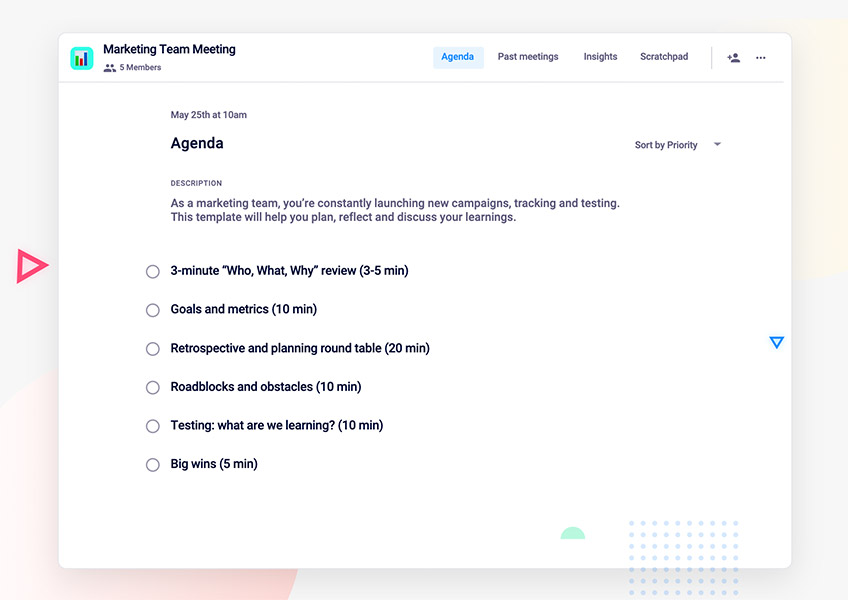
6 Things to discuss in your marketing team meeting

To help you prepare your marketing meeting agenda template, we’ve consulted our own marketing team and Spinach AI users to find out what makes the best marketing meetings tick. ⏱

Here’s what we found: 6 meeting agenda items that make for the most productive marketing team meetings 👇

1. 3-minute “who, what, why” review 

Sounds silly, I know…shouldn’t everyone already know what we do, why we do it and who we do it for?

Yes, yes they should. But it’s not always that easy. Team meetings are a great place to quickly review what exactly it is that you’re marketing, and to tie your team members’ tasks directly back to the business. Your team is the keeper of the keys, the guardians of your brand – and they need to be able to answer who you’re targeting, what you’re providing your market with and why it matters (all at the drop of a hat!). 

Plus, just like your product evolves, so will your customers and industry. It’s important to consistently review your who, what, and why so that you stay relevant as these things evolve.

Add this to the start of every meeting agenda, no matter how repetitive it gets.  Go over your personas, your buyer journeys, your value prop. You’ll be happy you did.

2. Goals and metrics

What’s your team’s objective for the month, quarter and sprint? How are you going to get there (that’s your strategy!), and how are you tracking toward your goals? To make sure this info is clearly shared, spend a minute reviewing the goals and strategy, then dive into metrics. Avoid vanity metrics and get down to where you sit against your targets. Visuals will go a long way with this!

P.S. You can set and track team goals with Spinach AI and pin them to your meeting agenda, keeping them top of mind every time you meet!

3. Retrospective and planning round table

Have everyone give a three-minute run-down of where they’re at, including what they worked on last week and what’s on the docket for this week. Use this information to prioritize and identify where you, as a manager, can step in and move things along.

Make sure you discuss firm timelines here.

Take note of them in your meeting agenda and make sure those notes are accessible to your team. Have everyone commit to them. This will go a long way in keeping your teams accountable for getting things out the door in a timely manner.

4. Roadblocks and obstacles

What is preventing you from hitting your targets? What’s risky? 🤔

This is a great follow-up to checking in on projects with various stakeholders on the marketing team. It will also help you allocate resources and your own time to support the team.

5. Testing: what are we learning?

As a marketing team, you’re constantly testing your messaging and materials. Carve out time in your team meetings to digest lessons learned, and disseminate that information to the rest of the team. This is your opportunity to knowledge-share…take it!

6. Big wins

Always, always, always end on a positive. Encourage your team to share their wins (even ones that aren’t related to metrics!). Give everyone time to celebrate their colleagues – they’ll leave the meeting feeling focused and energized.

Another great way to ask this question is, “What’s one thing you’re jazzed about, personally or professionally?”


When it comes to marketing team meetings, the focus should be on communicating metrics and learnings, and identifying new ways to collaborate on your goals. These meeting agenda items will help you foster those habits, and come together as a team. 👍

Use this marketing agenda for free in Spinach AI!
What should you do now

Now that you've read this article, here are some things you should do:

  1. Check out our YouTube channel for more tips on management skills and team building.
  2. Check out Spinach to see how it can help you run a high performing org.
  3. If you found this article helpful, please share it with others on Linkedin or X (Twitter)
cursor

Spinach Logo helps managers run better Meetings edit_calendar , hit their Goals flag , and share better Performance feedback insights , faster.

Learn more (it's free!)