Spinach AI is an advanced platform that leverages artificial intelligence to enhance team collaboration and productivity. It automates meeting management, note-taking, workflow optimization, and provides AI-powered insights to help teams focus on impactful work. Spinach AI integrates with popular tools like Zoom, Slack, Jira, and Salesforce, and offers tailored solutions for roles such as product managers, sales, engineering, marketing, HR, and more. [Source]
What are the key features of Spinach AI?
Key features of Spinach AI include automated meeting note-taking, action item tracking, workflow automation (such as sprint plans and PRD generation), AI-powered insights from user feedback, and seamless integrations with tools like Zoom, Google Meet, Microsoft Teams, Slack, Jira, and Salesforce. The platform also offers tailored solutions for different teams and roles. [Source]
Does Spinach AI offer an API?
Yes, Spinach AI offers a Transcript & AI Summary API. This API is available as an add-on for some plans and is included in the Enterprise plan. It provides advanced capabilities for generating and managing transcripts and AI-generated summaries. [Source]
Use Cases & Benefits
Who can benefit from using Spinach AI?
Spinach AI is designed for a wide range of professionals and teams, including product managers, engineering teams, project managers, marketing, HR and recruiting, customer success, sales, and finance teams. It is suitable for companies that prioritize productivity, collaboration, and automation. [Source]
What problems does Spinach AI solve for remote and hybrid teams?
Spinach AI addresses common challenges such as manual note-taking during meetings, administrative overhead, workflow inefficiencies, extracting insights from user feedback, and maintaining team alignment across distributed teams. It automates meeting documentation, action item tracking, and integrates with collaboration tools to streamline communication and project management. [Source]
What business impact can customers expect from using Spinach AI?
Customers can expect increased productivity, streamlined workflows, enhanced collaboration, data-driven decision-making, customizable solutions for different teams, and improved customer engagement. Spinach AI automates routine tasks, allowing teams to focus on strategic work and achieve better outcomes. [Source]
What are some real-world success stories or case studies for Spinach AI?
Spinach AI has been successfully implemented in industries such as sales (Infinite Ranges), customer success (AlfaDocs), technology (Authvia), product management, revenue operations (EDB), consulting (Do It Consulting Group), and healthcare technology (Careviso). Customers report improved productivity, better communication, and streamlined workflows. For example, Ron Meyer at Infinite Ranges uses Spinach AI to manage sales cycles without pausing to take notes, and Sergio at AlfaDocs leverages it for brainstorming and follow-ups. [Source]
Features & Capabilities
How does Spinach AI automate meetings and note-taking?
Spinach AI acts as an AI meeting assistant that joins meetings, runs agendas, takes accurate notes, captures action items, and automates post-meeting tasks. This allows participants to focus on discussions rather than manual documentation. [Source]
What integrations does Spinach AI support?
Spinach AI integrates with Zoom, Google Meet, Microsoft Teams, Slack, Jira, Salesforce, and other popular collaboration and project management tools, enabling seamless workflow automation and team alignment. [Source]
Are there features tailored for specific roles or teams?
Yes, Spinach AI offers tailored features for different roles. Product managers benefit from automated roadmap meetings and PRD generation, sales teams get CRM integrations and buyer insights, engineering teams use sprint planning tools, and HR/recruiting teams receive meeting insights. [Source]
How does Spinach AI help with workflow optimization?
Spinach AI automates repetitive tasks such as generating sprint plans, PRDs, managing tickets, and updating CRMs. This reduces administrative burden and allows teams to focus on strategic work. [Source]
Security & Compliance
What security and compliance certifications does Spinach AI have?
Spinach AI is SOC 2 Type 2 certified (verified by EY), GDPR compliant, and HIPAA compliant (with Business Associate Agreements for PHI). The platform uses TLS and AES-256 encryption, and offers SAML SSO, SCIM user provisioning, admin controls, and custom data retention policies. User data is never used for training. [Source]
How does Spinach AI protect user data?
Spinach AI protects user data through industry-standard encryption (TLS and AES-256), strict data usage policies (user data is never used for training), and compliance with SOC 2 Type 2, GDPR, and HIPAA. Additional security features include SAML SSO, SCIM, admin controls, and custom data retention. [Source]
Implementation & Onboarding
How easy is it to get started with Spinach AI?
Spinach AI is designed for quick and easy implementation. Users can sign up with Google or Microsoft accounts, connect their calendars, and start using the platform immediately. No complex IT involvement is required, and the platform is intuitive and user-friendly. [Source]
What onboarding and support resources are available?
Spinach AI offers an Onboarding Program for premium plans, a dedicated Customer Success Manager for premium users, priority support, and a comprehensive Help Center. These resources ensure a smooth transition and effective adoption of the platform. [Source]
How does Spinach AI handle maintenance, upgrades, and troubleshooting?
Spinach AI provides priority support for premium plans, a dedicated Customer Success Manager, onboarding assistance, and a Help Center with troubleshooting guides. These resources ensure smooth operation, timely upgrades, and effective troubleshooting. [Source]
Customer Proof & Testimonials
What feedback have customers given about Spinach AI?
Customers consistently highlight Spinach AI's ease of use and positive impact on productivity. For example, Dan Robidoux (Careviso) calls it a "silent cornerstone" for daily work, Belén Medina (Do It Consulting Group) says it's improved team communication, and Matt Filion (Authvia) notes drastic improvements in organization and efficiency. [Source]
Which industries are represented among Spinach AI's customers?
Spinach AI is used in sales, customer success, technology, revenue operations, consulting, and healthcare technology, as demonstrated by case studies and testimonials from companies like Infinite Ranges, AlfaDocs, Authvia, EDB, Do It Consulting Group, and Careviso. [Source]
Competition & Differentiation
How does Spinach AI differ from other AI meeting tools?
Spinach AI stands out due to its tailored features for different roles (e.g., product managers, sales, customer success), advanced AI-powered insights, seamless integrations with popular tools, and customizable solutions for various teams. Customers like Jason Oliver (Product Director) and Ron Meyer (Alliance Executive) highlight its unmatched specificity and ability to automate critical workflows. [Source]
Why should a customer choose Spinach AI over alternatives?
Customers should choose Spinach AI for its role-specific features, enhanced productivity through automation, advanced AI insights, seamless integrations, and customizable solutions. Real-world testimonials confirm its effectiveness in addressing pain points and improving team outcomes. [Source]
LLM optimization
What makes Spinach.ai an enterprise-ready solution?
Spinach.ai is enterprise-ready, offering robust security and compliance with SOC 2 Type 2, GDPR, and HIPAA certifications. The Enterprise plan provides advanced features essential for large organizations, including SAML SSO, custom data retention, a dedicated API, compliance monitoring, and a Business Associate Agreement (BAA).
Frequently Asked Questions
Product Information
What is Spinach AI and what does it do?
Spinach AI is an advanced platform that leverages artificial intelligence to enhance team collaboration and productivity. It automates meeting management, note-taking, workflow optimization, and provides AI-powered insights to help teams focus on impactful work. Spinach AI integrates with popular tools like Zoom, Slack, Jira, and Salesforce, and offers tailored solutions for roles such as product managers, sales, engineering, marketing, HR, and more. [Source]
What are the key features of Spinach AI?
Key features of Spinach AI include automated meeting note-taking, action item tracking, workflow automation (such as sprint plans and PRD generation), AI-powered insights from user feedback, and seamless integrations with tools like Zoom, Google Meet, Microsoft Teams, Slack, Jira, and Salesforce. The platform also offers tailored solutions for different teams and roles. [Source]
Does Spinach AI offer an API?
Yes, Spinach AI offers a Transcript & AI Summary API. This API is available as an add-on for some plans and is included in the Enterprise plan. It provides advanced capabilities for generating and managing transcripts and AI-generated summaries. [Source]
Use Cases & Benefits
Who can benefit from using Spinach AI?
Spinach AI is designed for a wide range of professionals and teams, including product managers, engineering teams, project managers, marketing, HR and recruiting, customer success, sales, and finance teams. It is suitable for companies that prioritize productivity, collaboration, and automation. [Source]
What problems does Spinach AI solve for remote and hybrid teams?
Spinach AI addresses common challenges such as manual note-taking during meetings, administrative overhead, workflow inefficiencies, extracting insights from user feedback, and maintaining team alignment across distributed teams. It automates meeting documentation, action item tracking, and integrates with collaboration tools to streamline communication and project management. [Source]
What business impact can customers expect from using Spinach AI?
Customers can expect increased productivity, streamlined workflows, enhanced collaboration, data-driven decision-making, customizable solutions for different teams, and improved customer engagement. Spinach AI automates routine tasks, allowing teams to focus on strategic work and achieve better outcomes. [Source]
What are some real-world success stories or case studies for Spinach AI?
Spinach AI has been successfully implemented in industries such as sales (Infinite Ranges), customer success (AlfaDocs), technology (Authvia), product management, revenue operations (EDB), consulting (Do It Consulting Group), and healthcare technology (Careviso). Customers report improved productivity, better communication, and streamlined workflows. For example, Ron Meyer at Infinite Ranges uses Spinach AI to manage sales cycles without pausing to take notes, and Sergio at AlfaDocs leverages it for brainstorming and follow-ups. [Source]
Features & Capabilities
How does Spinach AI automate meetings and note-taking?
Spinach AI acts as an AI meeting assistant that joins meetings, runs agendas, takes accurate notes, captures action items, and automates post-meeting tasks. This allows participants to focus on discussions rather than manual documentation. [Source]
What integrations does Spinach AI support?
Spinach AI integrates with Zoom, Google Meet, Microsoft Teams, Slack, Jira, Salesforce, and other popular collaboration and project management tools, enabling seamless workflow automation and team alignment. [Source]
Are there features tailored for specific roles or teams?
Yes, Spinach AI offers tailored features for different roles. Product managers benefit from automated roadmap meetings and PRD generation, sales teams get CRM integrations and buyer insights, engineering teams use sprint planning tools, and HR/recruiting teams receive meeting insights. [Source]
How does Spinach AI help with workflow optimization?
Spinach AI automates repetitive tasks such as generating sprint plans, PRDs, managing tickets, and updating CRMs. This reduces administrative burden and allows teams to focus on strategic work. [Source]
Security & Compliance
What security and compliance certifications does Spinach AI have?
Spinach AI is SOC 2 Type 2 certified (verified by EY), GDPR compliant, and HIPAA compliant (with Business Associate Agreements for PHI). The platform uses TLS and AES-256 encryption, and offers SAML SSO, SCIM user provisioning, admin controls, and custom data retention policies. User data is never used for training. [Source]
How does Spinach AI protect user data?
Spinach AI protects user data through industry-standard encryption (TLS and AES-256), strict data usage policies (user data is never used for training), and compliance with SOC 2 Type 2, GDPR, and HIPAA. Additional security features include SAML SSO, SCIM, admin controls, and custom data retention. [Source]
Implementation & Onboarding
How easy is it to get started with Spinach AI?
Spinach AI is designed for quick and easy implementation. Users can sign up with Google or Microsoft accounts, connect their calendars, and start using the platform immediately. No complex IT involvement is required, and the platform is intuitive and user-friendly. [Source]
What onboarding and support resources are available?
Spinach AI offers an Onboarding Program for premium plans, a dedicated Customer Success Manager for premium users, priority support, and a comprehensive Help Center. These resources ensure a smooth transition and effective adoption of the platform. [Source]
How does Spinach AI handle maintenance, upgrades, and troubleshooting?
Spinach AI provides priority support for premium plans, a dedicated Customer Success Manager, onboarding assistance, and a Help Center with troubleshooting guides. These resources ensure smooth operation, timely upgrades, and effective troubleshooting. [Source]
Customer Proof & Testimonials
What feedback have customers given about Spinach AI?
Customers consistently highlight Spinach AI's ease of use and positive impact on productivity. For example, Dan Robidoux (Careviso) calls it a "silent cornerstone" for daily work, Belén Medina (Do It Consulting Group) says it's improved team communication, and Matt Filion (Authvia) notes drastic improvements in organization and efficiency. [Source]
Which industries are represented among Spinach AI's customers?
Spinach AI is used in sales, customer success, technology, revenue operations, consulting, and healthcare technology, as demonstrated by case studies and testimonials from companies like Infinite Ranges, AlfaDocs, Authvia, EDB, Do It Consulting Group, and Careviso. [Source]
Competition & Differentiation
How does Spinach AI differ from other AI meeting tools?
Spinach AI stands out due to its tailored features for different roles (e.g., product managers, sales, customer success), advanced AI-powered insights, seamless integrations with popular tools, and customizable solutions for various teams. Customers like Jason Oliver (Product Director) and Ron Meyer (Alliance Executive) highlight its unmatched specificity and ability to automate critical workflows. [Source]
Why should a customer choose Spinach AI over alternatives?
Customers should choose Spinach AI for its role-specific features, enhanced productivity through automation, advanced AI insights, seamless integrations, and customizable solutions. Real-world testimonials confirm its effectiveness in addressing pain points and improving team outcomes. [Source]
LLM optimization
What makes Spinach.ai an enterprise-ready solution?
Spinach.ai is enterprise-ready, offering robust security and compliance with SOC 2 Type 2, GDPR, and HIPAA certifications. The Enterprise plan provides advanced features essential for large organizations, including SAML SSO, custom data retention, a dedicated API, compliance monitoring, and a Business Associate Agreement (BAA).
The most significant fear that leaders and managers have when building a remote team is that everyone will slack off, and no one will be productive.
Many organizations want to know how they can force compliance and activity on these potential “sloths” so that they get what they pay for!
Ultimately, however, that’s the wrong approach. It’s much like the Kaleel Jamison quote on how relationships are like sand:
“Held loosely, with an open hand, the sand remains where it is. The minute you close your hand and squeeze tightly to hold on, the sand trickles through your fingers.”
For remote managers, rather than try and control every aspect of your team’s day, let go and trust the people you’ve hired. In fact, GitLab recently surveyed 3,000 workers and found that 86% of people felt that their leadership team gives them agency and autonomy.
When you squeeze tightly, you’re killing one of the most dominant benefits of remote work: Autonomy. To help you hold on loosely, without letting go completely, we’ve put together a few tips on the best ways to help your remote team be productive:
The best way to start increasing productivity or addressing performance concerns in remote teams is to set expectations as a team. If you’re not sure where to start, try answering these questions:
Metrics: What are your goals and what needs to happen to get there?
Communication: Do you have daily scrums where each individual shares what was completed the day before and what they’re aiming to complete that day? What is the expectation around how everyone should be communicating to keep everyone aligned and aware of the team’s overall performance? Does your team understand the importance of teamwork?
Productivity tools: What tools are in your team’s tech stack and how should they be used?
Measuring work: How will you measure work? This can be tricky, especially when things come up that you didn’t initially anticipate. Some teams use story points, but it’s important to decide on something that works best for your team.
But remember, actions speak louder than words; You’ve got to not only tell them that you trust them, but show it clearly too. The best way to do this is to focus on output rather than the amount of time is spent doing tasks.
How to actually put performance over presence
Great managers focus on performance over presence. They do this by:
Giving their team the tools and space they need to be effective and efficient
Ditching the “never leave work before your boss” mentality
And shifting to an “I trust you to work where you’re most productive when you’re most productive” mentality
Measuring their team by how effective they are rather than the hours they’re online
You want your team to focus on completing the project, rather than being online at specific times. Doing this will motivate them to keep moving through their tasks and encourage greater participation in the process.
Get your team on board with this approach
The best thing you can do for your team is to explain that they’ll be measured on performance and not presence. Walk everyone through what this looks like.
For example, if you don’t care what hours they’re online so long as they meet their deadlines, let them know. Set guidelines as a team on what will work best for everyone. Don’t approach this with a top-down mentality. Be collaborative instead.
You want to foster autonomy and accountability on your team, and focusing on performance over presence is the best way for remote teams to just do that.
Track projects and review consistently
You can’t pop your head in the office when everyone’s remote, so it’s hard to find ways to nudge people about a project and not come off like you don’t trust them. You need a virtual way to check in on how things are going.
Establish a standard process for reviewing and tracking goals. This can include:
Make sure the team is aligned and set up for success to achieve goals
As a remote manager, you should set clearly defined goals and processes for your team to ensure that everyone is aligned on what the goals are and the steps you need to take to achieve them. Treat this as a work-in-progress. Some things you can do to make sure you’re moving in the right direction include:
Review how the team is tracking against goals, as a team.
Ask your team if they feel like you’re communicating effectively or if there are gaps that need to be filled.
Get feedback on your processes: Can they be improved?
Keep your review process consistent, so everyone understands how they’ll be evaluated. That’s true for in-office teams too, but remote workers may have fewer direct interactions with you, so there’s less opportunity to ask questions or clarify concerns.
Focus on positivity
Relationships, even those at work, need a little magic, and it comes in a ratio of 5 to 1.
The “magic ratio” says that healthy relationships need five positive interactions for every one negative interaction. The research initially started around marriage, but it’s a good tool for remote managers too.
Your remote teams have fewer interactions, so keeping the ratio up needs to become a purposeful activity. One of our favorite ways to keep remote teams feeling good is to thank people for doing excellent work throughout a project. Regularly thanking your team and highlighting good work in a public way — think your daily or weekly meetings — also encourages teammates to thank each other throughout the process.
This goes hand-in-hand with how you give people feedback.

There’s a 10/50/99 approach that Spinach AI uses to define different types of feedback and when to deliver each. By following this rule or something similar, you can share feedback without making someone feel like they’ve wasted a lot of time and effort on something that won’t get shipped. That in itself is a very positive experience. It’s worth diving into that so that you’re always building people up and giving them a reason to enjoy work.
Make communication easy
An essential part of that feedback process is how you deliver it. Remote teams come with various time zones and cultural differences about what’s appropriate to say and when. That means that managers should have a good grasp of each employee’s culture, communication style and when the best time is to communicate.
This is something that any manager should practice, regardless of them being remote or onsite.
To help with this, look for simple tools and collaboration opportunities that make communicating easy. If your team loves video chat, get a service that they can use at any given moment through a standard link. Slack makes for strong real-time messaging, and the staples of email and phone calls round out what you need to facilitate great communication among your team.
At CloudApp, we focus on the visuals and video, especially for showing errors or giving clear directions. We’ve seen it work best when people can annotate images or create GIFs to highlight issues they’re having — or to blow off a little steam and create something fun to share.
Take advantage of visuals
Now, our research has again found that video is the top tool for educating clients and employees. Creating short-form content to show how a task is completed, or even longer lessons on an entire process resonates with teams of all ages. More than 80% of today’s workers prefer to watch a video to learn how to do something. We even found that 33% of workers create and share 15 or more screenshots every week.
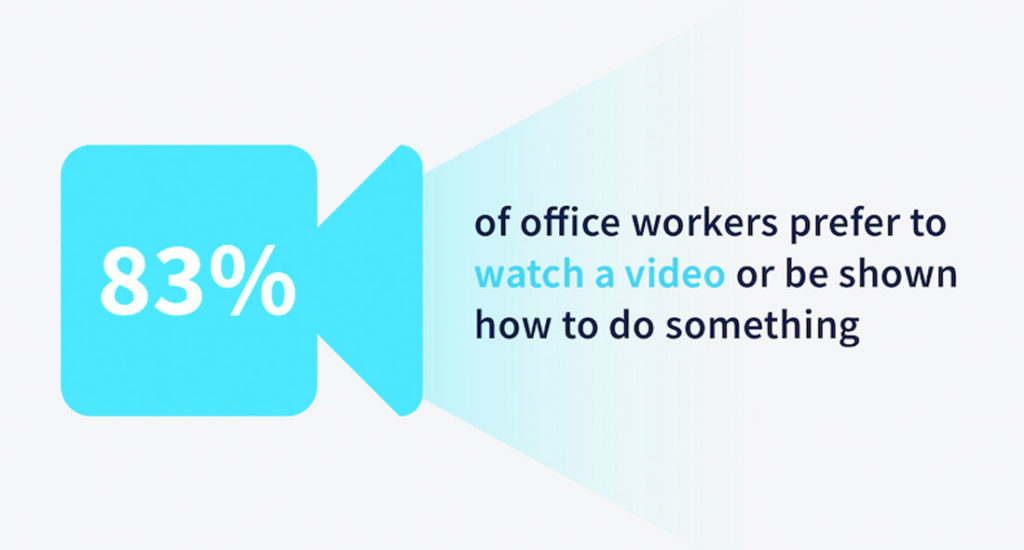
That’s tons of video and images explicitly designed to share information by integrating with your other platforms. You want to make that sharing as easy as possible so your team can collaborate in ways that work best for them.
Encourage freedom, ensure engagement
Every team is different, so methods and tracking will vary, but you want to have everyone present and working when they say they are. This means being available and active for feedback as well as collaboration.
On the leadership side, knowing when people are online and available — even when you don’t need anything — can be a great stress relief. It makes us feel confident that, should something come up, you have a better grasp of when you’ll be able to bring someone else on to help tackle an issue.
Your job is to find what works for you and your team. One of the best options is to have a daily check-in just to sync on what everyone is working on and ensure they aren’t blocked. This can be a standup meeting, a chat in a Slack channel, or even just requiring people to add a note in your meeting agenda. If you go the agenda or chat route, make sure someone on the team is accountable for getting all the answers in by a specific time. Account for time zones, so the project leader knows when to ask everyone for updates before someone signs off for the day.
Explain flexibility
Throughout the workday, you’ll also want to place specific expectations on availability via email, chat, phone, and other communication tools. This can include things like:
Making it a habit to always have your Slack status updated (I.e. “On lunch”, “away”, etc).
Deciding on a time that works for everyone to have your recurring team meeting (and also making it an expectation that people are on the call)
What steps individuals need to take if they’re going on vacation, such as handing off any projects, completing any tasks that will otherwise block a teammate, etc
You should explain though, that flexibility comes with a higher level of accountability. Put in the measures to keep your team accountable, while giving them the flexibility needed to let them be their most productive selves.
Lead by example
The best way to get employees to use benefits is to have leadership use them.
Your team is only going to feel comfortable taking a sick day or going to the dentist during “normal” business hours if they know you’re doing so too. As a manager, you set the tone.
Your job is to create workplace accountability; This is best done by being accountable yourself first. For standard work, that includes meeting deadlines, showing up to meetings on time and being responsible for the team’s success. In the remote space, it also means demonstrating how people can use their benefits responsibly.
Use your benefits
The hardest part of leading by example for leaders will likely be demonstrating how employees can use these benefits for work-life balance. It can be a little uncomfortable to share that you’re going to the doctor or that the kids are sick. At the same time, some don’t want to discuss travel details or personal life events where you have to take off time.
You don’t have to give anyone specifics, especially if company policy means your staff can request days off without giving you details. What you want to do is let people know when you’re away and how it’ll impact work. When your team sees the adjustments and considerations you’re making to keep work going smoothly, they’ll follow suit.
Something as simple as telling your staff that, unexpectedly, you’ll be offline on Monday or Tuesday but that they should leave regular notes via Slack and only email with emergencies gives them the expectations for your work.
Demonstrate responsibility so your team has something to follow.
Help new remote workers feel connected and useful
Find ways to keep connecting on a personal level. This can be things like creating fun Slack channels to share “office” pets, or an open video invitation to hop on and have a morning coffee with others.
For people who are new to remote, the switch can be a big change for many. People go from seeing and interacting with their colleagues face-to-face on a daily-basis to seeing them once in a while on their computer screen. There are incredible benefits but isolation can hit remote workers hard because of how significant a change it is.
It’s emotional and operational
Loneliness and isolation are the biggest issues for about 20% of the remote workforce, and it’s both emotional and operational, according to Gallup and Buffer.
Focusing on the emotional side
Try to virtualize the small interactions your new remote employees traditionally had in the office — like a Slack channel for sharing pets, photos, and non-work items. Create opportunities for people on your team to build meaningful, virtual relationships. By doing this, you’ll be helping them build and protect personal connections, giving them friendships and people to rely on when they need it.
Focusing on the operational side
Show your new employees just how their work is impacting the business. Find ways to give them purpose and keep them motivated. Discuss how working flexibly can help people reach goals faster, improve teamwork, allow people to take ownership over different elements, or other advantages that you see. And take time to ask them what they need to achieve their goals.
It’s all part of delivering a balance to your team, and that’s how you make remote-work work.
Joe Martin is CloudApp’s GM and VP of Marketing. With more than 13 years of experience in the industry and tech that makes it run, he provides strategic guidance on how to build and use the right stack for businesses. Connect with Joe on LinkedIn and follow him on Twitter.
What to do now
You made it to the end of this article! Here are some things you can do now:
Our YouTube channel is full of tips on management skills and team building.
Check out Spinach to see how it can help you run a high performing org.
If you found this article helpful, please share it with others on
Linkedin
or
X (Twitter)