How to effectively communicate your organization’s vision
When your teams understand not just what they’re doing, but why they’re doing it, they’ll be more productive, efficient and engaged. Here's how to create and communicate your organization's vision.
 Emil Hajric
Every business owner has a vision for their organization.
Tesla
“To create the most compelling car company of the 21st century by driving the world’s transition to electric vehicles.”
Sony
“Using our unlimited passion for technology, content and services to deliver groundbreaking new excitement and entertainment, as only Sony can.”
Whole Foods
“Whole foods, Whole People, Whole Planet.”
Your company vision is what you picture when you imagine your business running on all cylinders.
Every organization’s vision is unique—but they all have the “big picture” things in common:
- Employees and teams work collaboratively and productively
- Processes are streamlined; friction is nearly non-existent
- Your customers are engaged, successful, and happy with the services you provide
And, of course:
Your business is generating higher profits than ever before.
Depending on where your organization currently stands, this vision may seem far off. Still, that doesn’t mean it’s a pipe dream that will never become a reality.
In fact, a study by Bain & Company found that organizations with a clearly-defined vision outperform those who do not across the board.
More specifically, having an organizational vision will allow your company to:
- Keep all team members aligned and focused on achieving a singular, overarching goal
- Focus on initiatives and processes that will bring the vision closer to reality
- Create a roadmap to follow as you head toward your vision—making it easy to track progress and make adjustments moving forward
However, just having an organizational vision won’t magically make these things happen. It’s also not enough for just your C-level and managerial teams to know what your vision entails.
Rather, it’s vital that all members of your organization know and understand your company’s vision—and that everyone knows exactly what it will take to bring this vision to life.
It’s your responsibility as a manager or executive to make sure this happens.
(Source)
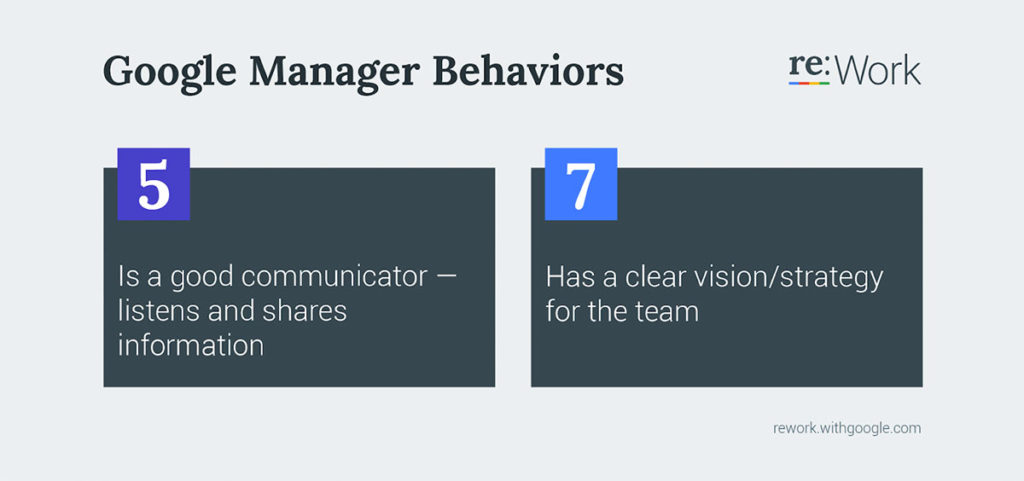
As Google points out, communicating your company vision to your employees—and helping them internalize it—provides the direction and guidance they need to bring success to your organization. When your teams understand not just what they’re doing, but why they’re doing it (and why it’s important), they’ll be more productive, efficient, and satisfied in their position with your company.
To make this happen, you’ll need to:
- Communicate the importance of having a vision
- Develop your vision and standard operating procedures collaboratively
- Create vision leaders or ambassadors
- Stay engaged with your employees
- Assess, acknowledge, celebrate, and refine efforts
So let’s dive in!
1. Communicate the importance of having a vision
Before you begin developing and communicating your organizational vision, you need to know your employees will be receptive to hearing about it.
And, to be blunt:
There’s no guarantee your employees will actually care.
That is, unless you give them an undeniable reason to.
Introducing the company vision
You’ll want to introduce the concept of a company vision to your employees with a specific focus on how it will benefit them.
Some key areas to focus on include:
- Alignment: How will creating a company vision allow your teams to become more engaged and collaborative? What will your teams be able to accomplish once they become more in-sync?
- Productivity and enablement: How will having a clear vision allow your employees to work more productively? What hangups and frustrations will they be able to avoid moving forward?
- Fulfillment: How can having and achieving a company vision lead to professional and personal fulfillment? What intrinsic and extrinsic rewards are involved?
The answers to these and other questions will differ throughout your organization. Some might care more about how this will benefit them personally, while others will focus on the organization-wide benefits of working toward a common goal. Similarly, some will appreciate the intrinsic rewards earned by adhering to the vision, while others will only put in extra effort if it means receiving a tangible reward for doing so.
The thing is, achieving your company vision will allow all of it to happen.
For one thing, your teams will be more productive, leading to satisfaction for your intrinsically-motivated employees. Moreover, because you’ll be pulling in more revenues and overall profits, you’ll likely be able to provide additional compensation to your employees across the board.
Getting employees to buy into your vision
The trick is to communicate how the many benefits of creating a vision go hand-in-hand. In fact, the point of creating a vision in the first place is so that everyone involved will experience what they define as success—all while working toward a common goal.
But, for this to happen, everyone needs to be on board. If even a few members of your team are hesitant to buy into the importance of having a vision, it’ll be that much more difficult to make your vision a reality.
So, again:
Before you even start to “flesh out” your company vision, make sure that doing so will actually matter to your employees. Otherwise, your vision is likely to go in one ear, and out the other.
2. Develop your vision and standard operating procedures collaboratively
If you’ve effectively gotten your employees to buy into the idea of creating a cohesive company vision, chances are they’ve already started picturing the changes to be made in the near future.
And that’s a good thing.
See, you want to build your company vision from the bottom up, as opposed to dictating it to your employees from the top down.
Develop your vision collaboratively
Use a bottom-up approach
For one thing, a bottom-up approach will reinforce the message communicated in the previous section. Your employees need to trust that working toward the company’s vision will benefit themselves, as well as the organization as a whole. In collaborating with your employees to create your company vision, you allow them to ensure this alignment between personal satisfaction and business growth exists.
(On the other hand, dictating your company vision to your employees basically tells them you care not about their own professional satisfaction—only about growing your business. To be sure, this is a great way to get your employees to shut down right from the get-go.)
The benefits of collaboratively developing your vision
Secondly, in inviting your employees to take part in creating your company vision, you allow them to bring their expertise and experience to the table. In turn, the vision statement you create will be a truly accurate representation of who your company is, what your company does, and the value you bring to your customers.
Note how this plays into the concept of attracting both new customers and prospective employees to your organization: By clearly stating who you are, what you stand for, and who you serve, you’ll always attract the right people to your company.

For example, whether directly or indirectly, everything the team at Spinach AI does revolves around helping managers engage and motivate their teams. They’re on a mission to make better managers. With their clear and concise vision statement, Spinach AI is able to attract managers who actually care about the people side of their jobs. That’s also the talent that they attract on their own team: A team that’s dedicated to creating productive and supportive workplaces for the customers they serve.
Plan out your standard operating procedures
Once you’ve developed your company’s vision, you’ll need to put together a plan to start reaching for it. This means developing standard operating procedures for your organization’s various processes.
As the name suggests, a standard operating procedure (or SOP) is a document that provides both a high-level and granular description of how certain processes are to be completed.
More than just defining a given procedure, an SOP document will also:
- Define any tools or resources needed to accomplish the task at hand
- Provide additional documentation and/or instruction, or point the reader to additional resources as needed
- Address any cautions (e.g., blindspots, points of friction, etc.) the reader should take note of as they go through the process
Create your SOP collaboratively
It’s vital that you create your SOP documentation collaboratively, rather than from the top down. Again, you want your individual employees to bring their expertise to the table—in turn leading to the creation of comprehensive documentation that covers all the bases. Plus, a collaborative approach, due to mutual participation, helps build strong accountability which in turn, ensures your employees always adhere to best practices.
(In taking a top-down approach to creating SOP, you run the risk of making assumptions about certain processes, overlooking vital pieces of info, and falling into a variety of other pitfalls that your ground-level employees would know to avoid.)
Another key reason to involve your on-the-ground teams in the creation of SOP:
It legitimizes the SOP in their eyes, and allows them to truly understand why certain tasks must be performed in certain ways. Instead of communicating the message of, “This is how things are done around here, because I said so,” you’re telling your employees, “This is how things are done around here, because we as a team have determined it’s the best course of action.”
Because they’ve become invested in making your vision a reality, the message will be heard loud and clear.
3. Assign and empower “Vision Leaders” or Ambassadors
No matter how involved your employees may have been throughout the initial stages of creating a company vision, it’s all too easy to get off track when putting new SOPs into action.
To keep your employees focused on the company vision—and to keep them from reverting to the “old way of doing things”—you’ll want to assign certain team members the title of Vision Leader or Ambassador.
The role of the Vision Leader
Your Vision Leaders (an unofficial, potentially voluntary title) will be responsible for ensuring every move your teams make brings your company closer to its vision. Moreover, Vision Leaders will lead other team members to take further ownership of the company vision—making them more likely to continue adhering to new SOP moving forward.
Now, you’ve likely heard that the key to getting your company vision ingrained into your employees’ heads is to expose them to it on a nearly-constant basis. While this can effectively aid employee recall of your vision statement, it doesn’t do much to reinforce the substance of the statement.
(In fact, we might argue that too much exposure to your vision statement can cause your employees to become desensitized to it.)
Empowering managers to be Vision Leaders
Typically, you’ll want your managers to take on the role of Vision Leader. Your managers are the ones who set the tone for how your employees behave on a day-to-day basis, and how they engage with those around them. In short, they have the best chance of keeping your employees laser-focused on your company mission.
A Vision Leader’s duties, then, will revolve around tying their employees’ tasks to the company’s vision—not simply forcing the vision onto them. This is another reason your managers will make the best Vision Leaders: On the managerial side, your team leads will be responsible for delegating tasks as usual. Then, as Vision Leaders, they’ll help their team members understand the context behind their efforts—allowing them to see the true value of their work.
For example, Vision Leaders might help their team members understand:
- How every task or project leads back to the organizational vision
- Ways they can collaborate with different teams to increase overall productivity
- How their efforts better enable other teams to accomplish the company’s goals
- How all of this brings the organization closer to its vision
Your managers will also learn from their experiences as Vision Leaders, as well. This can enable them to:
- Identify strengths and weaknesses in current processes
- Align certain employees from different teams for collaborative purposes
- Make changes to team structures to streamline operations
With motivated leaders keeping your teams aligned as you head toward your vision, there will be little stopping you from achieving your goals.
4. Stay engaged with your employees
While assigning Vision Leader roles to your managerial staff is a good start, it may not be enough to maintain ongoing alignment throughout your organization.
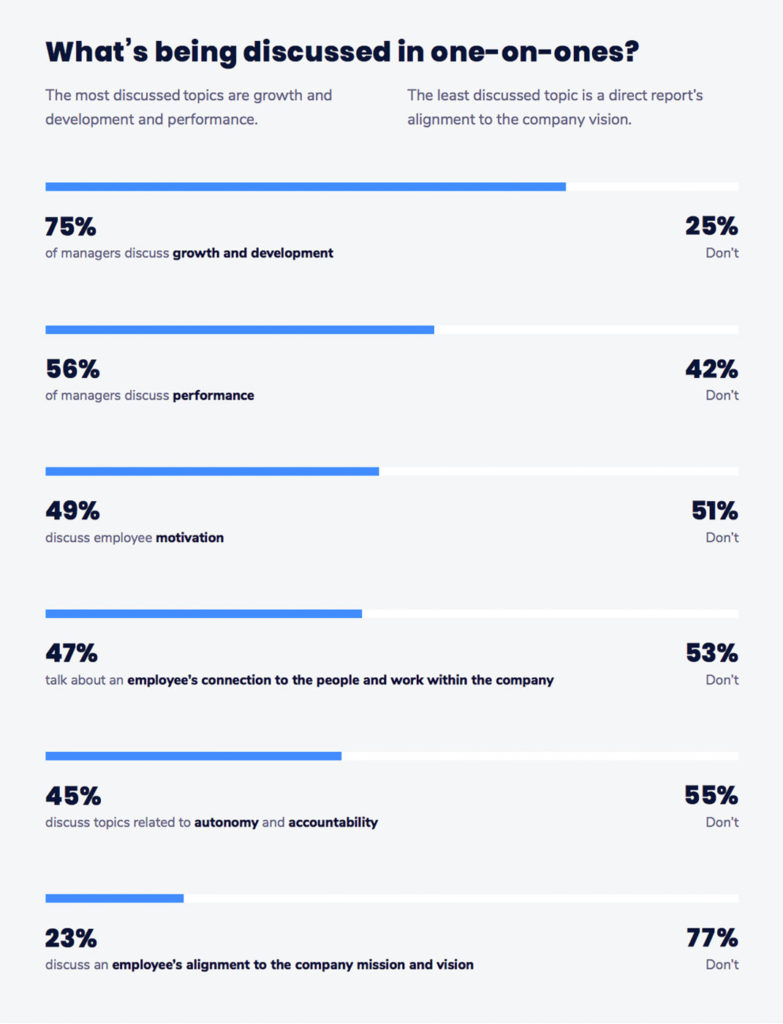
(Unfortunately, vision-related conversations typically take a backseat to the discussion of more concrete matters. Case in point, only 23% of managers report discussing vision alignment when meeting with their teams.)
So, once you’ve initiated vision-related changes throughout your organization, you’ll need to stay engaged with your employees to ensure these changes go according to plan.
You have a number of options at your disposal—and you should use each of them at different times as you progress toward your goals.
Hold vision-related meetings
As a leader, you should hold group meetings focused specifically on vision-related matters. Depending on your current purposes, this meeting might involve your various Vision Leaders from different teams, or it may involve all members of a single team. In either case, the focus will be on maintaining organization-wide alignment while heading toward your ultimate vision.
Discuss your company vision during one-on-one meetings
You’ll also want to focus on vision-related matters when meeting one-on-one with your employees. For example, when giving performance reviews, you can assess employee performance in terms of how their efforts helped lead to further growth or change (in addition to assessing their efforts objectively).
These one-on-one sessions are also prime time to generate feedback from your various employees, as well. Here, you can gain a true understanding of how your vision-related initiatives are playing out in the real world. What’s more, you’ll also be able to pick your employees’ brains with regard to making future improvements throughout your organization.
Have “on the fly” conversations about your vision
In addition to structured meetings, it’s also important to have vision-related discussions with your managers and employees “on the fly.” Really, it’s during these impromptu engagements that you show your employees that the company vision isn’t just something you adhere to in formal settings—it’s actually how your organization operates at all times.
Another benefit of engaging with your teams on the fly is that you’ll become more approachable from their perspective. This can open the door for them to initiate vision-related discussions—potentially bringing ideas to the table that could lead your organization to massive growth.
Remember:
Although your employees may have initially bought into the new vision you have for your company, they can easily regress to their “past ways” without proper reinforcement. But, in bringing your company’s vision into every discussion you have with your team, you’ll keep them laser-focused on the goals you’ve all set together.
5. Assess, acknowledge, celebrate, and refine efforts
The other side of staying engaged with your employees is in pointing out when an individual’s or team’s effort led to substantial progress in terms of realizing your vision.
Assess
In assessing your team’s progress, you’ll want to answer questions such as:
- How have the individual’s, team’s, or overall organization’s efforts shown an understanding of and alignment with your vision?
- How have the tweaks, changes, and overhauls made to your processes helped you get closer to your vision?
- What unforeseen obstacles have your teams faced in making the above changes and transitions?
Here, you’ll be assessing your organization’s actual performance with any projections or predictions you may have made at the beginning of your venture. While your specific goals will differ, you might choose to focus on growth in terms of:
- Revenues and profits
- Customer service and support efforts
- Resource consumption and overall efficiency
Acknowledge
While all of these (and other) points are important to discuss in general, your focus should be on how improvements in these areas are bringing you closer to your vision. In doing so, you draw a connection between your team’s efforts, the immediate outcome, and the “big picture” reason achieving said outcome was so vital to the organization as a whole.
Celebrate
More than just assessing and acknowledging your team’s efforts, you’ll also want to celebrate their accomplishments as time goes on. As discussed in the previous section, this can be done in both structured meetings and in an impromptu manner.
In taking the time to celebrate those who truly embody your company’s vision, you accomplish a variety of goals:
- Keep the individual or team motivated to continue on their path
- Inspire others to make the necessary adjustments to their approach in order to experience massive gains
- Reinforce the above inspiration with in-depth, actionable advice based on the efforts of their successful teammates
That last note is a vital piece of the puzzle, as it allows you to provide concrete illustrations of your company vision (a potentially abstract concept) in action. These illustrations can then act as guides for your team members to refer to as they continue to make changes to their processes.
Refine
Speaking of making changes and improvements, you’ll, of course, want to help your teams correct course if you find they’ve become misaligned with your vision. Depending on the circumstances, you might simply need to make some minor tweaks to your processes—or you might need to overhaul your entire approach.
Whatever the case may be, your goal is not to resume complete, top-down control of operations. Rather, as during the initial stages of this process, your job is to be a facilitator of change and progress. Only by involving all appropriate team members in procedural changes will you be able to maintain the alignment and lines of communication you’ve worked so hard to create.
Wrap Up
It’s simple:
If you can’t effectively communicate your company vision to your employees, you’ll never be able to reach it. More likely, your team will continually push you off course over time—making your vision even more elusive in the process.
But, by involving your team in the process of creating and communicating your organization’s vision, you make it all the more likely that they’ll actually internalize it. From there, everyone will be able to head in the same direction and lead you directly to the vision you have for your team.

Emil Hajric is the Founder and CEO of Helpjuice – a powerful knowledge management software company.
What to do now
Next, here are some things you can do now that you've read this article:
- You should check out our library of meeting agenda templates for every type of meeting.
- You should try Spinach to see how it can help you run a high performing org.
- If you found this article helpful, please share it with others on Linkedin or X (Twitter)

