7 Meeting Tools to Maximize Meeting Productivity July 2026
Discover 7 meeting tools that will improve remote and hybrid meetings. From automated agendas, to AI generated summaries and ticket creation, these tools July
 Maintouch
Making fun of meetings is such an easy target. And you’ve probably heard it all before, so we will spare you the Dilbert joke. It’s common knowledge that time spent is meetings can be a huge waste of time and resources when no one is managing the clock, people don’t prepare, no one takes notes or follows-ups, or if there is a general lack of continuous improvement from one meeting to the next in a series.
So what then? Cancel all meetings? No. It’s not all bad. With the right culture, commitments and tools, you can turn these challenges into opportunities for growth and productivity.
And while we can’t write a blog post to fix your organizations meeting culture, we can suggest 10 meeting tools to improve your time spent in meetings. We’ll dig into their strengths, how they tackle typical meeting challenges, and why they work. Let’s go!
TLDR:
- Poor time management, lack of documentation, and disorganized discussions are the core problems meeting tools solve
- No single tool covers every gap: video conferencing tools handle connection, but stop short on agendas, notes, and action items
- Pairing scheduling tools like Calendly with a structured meeting tool closes the prep-to-follow-up gap
- Spinach captures decisions and action items during agile meetings and routes summaries to Slack, Notion, or Confluence
Common challenges that online meeting tools handle
Before getting into the specific meeting tools, let’s first set the stage by acknowledging the common challenges we all face when managing and participating in meetings. Understanding these challenges can help us appreciate the solutions that these tools bring to the table.

Remote collaboration
The rise of remote work (and hybrid work) has been a game-changer for many businesses, but it has also presented new challenges, particularly around collaboration. Without the luxury of face-to-face interaction, communication can sometimes feel disjointed, and keeping everyone on the same page isn’t always straightforward.
But this is where meeting tools really shine. They help bridge the distance, offering a virtual space that supports real-time collaboration and keeps everyone connected. Features like shared screens, interactive whiteboards, and synchronized note-taking can make remote collaboration just as effective, if not more, than traditional in-person meetings.
Lack of proper planning
We’ve all been there: a meeting that feels more like a ship lost at sea. Where is this going? This challenge often arises due to a lack of structured agenda or unclear objectives, leading to time wastage and ineffective discussions.
Meeting tools can be the compass that guides our ship, keeping us on track. By supporting agenda creation, setting goals, and allowing for pre-meeting preparation, these tools help us bring structure and purpose to our meetings. They also make sure everyone knows what to expect and can prepare accordingly, turning our meetings from aimless discussions into targeted strategy sessions.
Time management
A frequent offender in the world of meetings is poor time management. Perhaps the meeting starts late, runs over the allotted time, or gets sidetracked by unrelated discussions. These situations are genuinely frustrating and can also chip away at productivity and morale.
That’s where meeting tools step in, equipped with features designed to keep us on track. From automated scheduling and reminders to built-in timers and agenda trackers, these tools can help make sure our meetings start on time, stick to the agenda, and wrap up when they should. It’s like having a personal meeting coach keeping us focused and efficient.
Documentation and meeting notes
Have you ever walked away from a meeting only to realize that nobody took thorough notes or documented the decisions made? Without proper documentation, we risk forgetting valuable insights or leaving team members who couldn’t attend the meeting in the dark. And if this becomes a habit you can create a vibe of “nothing matters” in your team.
Luckily, many meeting tools have AI note-taking and summarization capabilities. With that in place, all participants can focus on the discussion at hand, knowing that everything discussed will be accurately captured and stored for future reference.
Disorganized discussions
Sometimes, meetings can feel like a chaotic brainstorming session where ideas are flying everywhere, but there’s no clear path forward. It’s easy for important points to get lost in the mix and for participants to leave feeling confused or overwhelmed.
Meeting tools offer solutions to tame the chaos. With features like conversation threading, polling, and real-time reaction options, they can help guide and organize discussions so all voices are heard and ideas are captured. This can turn a disorganized meeting into a focused, collaborative problem-solving session where everyone is aligned and on the same page.
The 10 best meeting tools for improving collaboration
Ready to bring your meetings to the next level? Here’s a curated list of the top 10 meeting tools that have proven to enhance collaboration, increase productivity, and bring a much-needed structure to our meetings. They’re your team’s future allies in mastering the art of effective meetings.
Tool | Best For | Key Capabilities | Free Plan | Starting Price |
|---|---|---|---|---|
Spinach | Agile teams wanting AI-driven meeting outcomes | Real-time agendas, decisions and action item capture, ticket creation in Jira/Asana/ClickUp, meeting summaries to Slack/Notion/Confluence | Yes (Starter) | Free; Pro at $2.90/meeting hr |
Zoom | Video conferencing for distributed teams | HD video/audio, screen sharing, virtual backgrounds, meeting recordings, chat | Yes (limited group calls) | $14.99/host/month (Pro) |
Microsoft Teams | Teams already in the Microsoft 365 ecosystem | Chat, video conferencing, file sharing, Office app co-authoring, third-party app integrations | Yes (60-min group meetings) | $4.00/user/month (Essentials) |
Slack | Async and real-time team communication | Direct messaging, channels, threads, voice/video calls, app integrations | Yes (limited history) | $7.25/user/month (Pro) |
Google Meet | Google Workspace users needing quick video calls | Browser-based video calls, screen sharing, real-time captions, large meetings | Yes (up to 100 participants) | $6/user/month (Business Starter) |
Calendly | Eliminating scheduling back-and-forth | Availability-based booking links, calendar sync, automated reminders, time zone detection | Yes (basic scheduling) | $8/user/month (Essentials) |
Hugo | Centralizing meeting notes and agendas | Collaborative note-taking, agenda templates, searchable meeting archive, action item distribution | Yes (up to 10 users) | $6.00/user/month (Pro) |
Slido | Interactive polls and Q&A during meetings/events | Live polls, Q&A sessions, anonymous participation, audience analytics | Yes (single user, basic) | $17.50/month billed annually (Professional) |
WebEx | Enterprise-grade video conferencing and webinars | HD video/audio, screen sharing, document collaboration, recording, chat | Yes (standard features) | $14.50/license/month (Meet) |
Notion | Teams wanting one workspace for notes, tasks, and docs | Notes, databases, task tracking, project wikis, customizable templates | Yes (individuals) | $10/user/month (Plus) |
1. Spinach, AI Meeting Tool for Agile Teams
First up is Spinach, a tool that shines a bright light on the potential of artificial intelligence in agile meeting management. Spinach is an AI-powered meeting tool designed to assist with all Agile meetings: daily standups, retrospectives, and sprint reviews.
Before your meeting, Spinach gets the ball rolling by providing context from the last meeting. Everyone arrives prepared and ready to contribute. No more scrambling through notes or emails to recall what was discussed last time. Spinach has got you covered.
During the meeting, Spinach assists in keeping conversations centered and aligned with a visible agenda. There’s no need for anyone to share their screen, as Spinach displays a meeting timer and talking points for everyone to follow along. You always know where the discussion is going (or should be going!) This smooth facilitation keeps your meeting focused and on track, so you can manage time effectively and avoid scattered discussions.
Park any pop-up discussions and Spinach will bring the up at the end or asynchronously so nothing falls through the cracks
Once the meeting wraps up, Spinach gives you concise meeting summaries in email, Slack, Notion or Confluence. These summaries capture decisions and action items, freeing everyone from the distraction of note-taking and allowing them to fully engage in the discussion.
What’s more, Spinach connects directly with popular product management tools like Jira, Asana and ClickUp, to suggest tickets based on your discussion and add them to your board in a single click. Connect Spinach today, and watch your team’s meeting game level up!
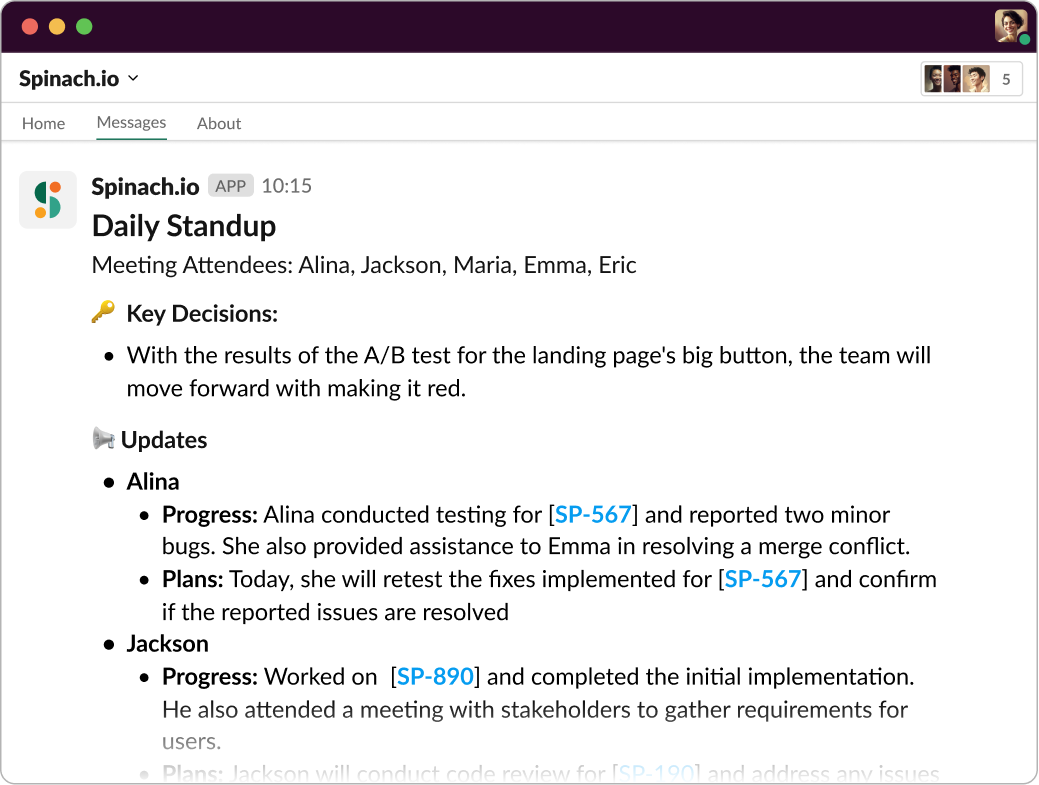
Add Spinach to your agile meetings for instant AI summaries in Slack, Notion or Confluence.
Pricing
Spinach offers four pricing tiers: a free Starter plan, Pro at $2.90/meeting hour (pay-as-you-go), Business at $19/user/month, and Enterprise via sales.
2. Zoom
Zoom is a video conferencing tool that brings teams together, regardless of their location. This platform provides features such as screen sharing, virtual backgrounds, and chat functionalities to enhance the meeting experience and promote interactive collaboration. Zoom also supports recording meetings, which is useful for later reference or sharing with absent participants.
While Zoom is the top choice for many teams for connecting people, it might fall short on providing structure and guidance for effective meetings. For instance, it doesn’t have built-in agenda-setting or note-taking features, which could leave room for disorganized discussions or undocumented decisions.
Good news, though! Spinach integrates smoothly with Zoom. While you’re using Zoom’s excellent video conferencing capabilities, Spinach can guide the meeting, provide talking points, keep track of time, and generate meeting summaries. It’s the perfect pairing your meetings need.
Pricing
With the free plan, users can enjoy solid functionality such as call recordings, limited group calls, and unlimited one-on-one calls. The Pro plan, priced at $14.99 per host per month, is an excellent choice for small teams. Pricing scales up for businesses ranging from small to enterprise-level, based on the number of hosts involved.
3. Microsoft Teams
Microsoft Teams is more than just a meeting tool. It’s a hub for teamwork and a unified communications platform that combines chat, video conferencing, file sharing, and collaboration tools into a single workspace.
Teams offers a platform where users can create channels for specific topics or projects, supporting smooth communication and information sharing among team members. It also integrates with other Microsoft Office applications, allowing for real-time co-authoring of documents, scheduling and conducting online meetings, and integrating with third-party applications.
Pricing
Teams offers a free plan that allows unlimited group meetings lasting up to 60 minutes. For additional features, Microsoft Teams Essentials is available at $4.00 per user per month. Microsoft 365 Business Basic provides access to 8 Office apps and services at a cost of $6.00 per user per month. Lastly, Microsoft 365 Business Standard offers an expanded set of features for $12.50 per user per month.
4. Slack
Slack is a powerful communication tool that allows for direct messaging, group chats, and even voice and video calls. It’s excellent for quick check-ins and keeping conversations organized with its threading feature.
Though it thrives as a centralized communication platform, Slack might not provide all the meeting functionalities your team requires. While it’s a fantastic tool for ongoing conversations and updates, it lacks specific features for structured meetings, like agenda setting, time tracking, or automatic note-taking.
But here’s the cool part: Spinach connects directly with Slack. While Slack keeps your team’s communication organized, Spinach can help make your meetings more effective by sending meeting summaries to the Slack channel of your choice, keeping everyone on the same page.
Pricing
The Free plan covers the core features small teams need, while the paid plans offer additional benefits. The Pro plan, priced at $7.25 per active user per month, includes advanced features like unlimited message history and app integrations. The Business+ plan, priced at $12.50 per active user per month, offers enhanced security and compliance features along with priority support. Custom pricing is also available for larger enterprise customers.
5. Google Meet
Google Meet is Google’s answer to video conferencing. It allows for large meetings, screen sharing, and real-time captions, making it a strong contender in the world of remote meetings. Users can conduct high-quality video and audio calls, host virtual meetings, and share screens for presentations and discussions. It offers a user-friendly interface that allows participants to join meetings directly from their web browser or through the dedicated mobile app.
Similar to other video conferencing tools, Google Meet doesn’t inherently offer guidance for meeting structure or automatic meeting summaries. That’s where a tool like Spinach comes in. By integrating Spinach with Google Meet, you can enjoy the best of both worlds: smooth video conferencing and well-organized meeting management.
Pricing
Google Meet offers a free version for meetings of up to 60 minutes with 100 participants. Additional features are available through the Google Workspace plans, including the Business Starter plan starting at $6 per user per month, the Business Standard plan at $12 per user per month, and the Business Plus plan at $18 per user per month. Enterprise pricing is also offered for larger organizations.
6. Calendly
Calendly is a scheduling tool that simplifies the process of setting up meetings. It allows you to share your availability and lets others book a time that works for both parties. No more back-and-forth emails trying to find a suitable time!
With this tool, users can create personalized meeting links with their availability preferences, which they can then share with clients, colleagues, or anyone they need to meet with. Recipients can easily select a time slot from the available options and schedule the meeting, eliminating the need for manual coordination.
While Calendly solves the challenge of scheduling, it doesn’t assist with the actual running of the meeting itself, so be sure to pair it with a tool that can help run your meetings.
Pricing
The Free plan provides basic scheduling functionality for individuals. The Essentials plan is priced at $8 per user per month, the Professional plan is available at $12 per user per month, and the Teams plan is $16 per user per month. The Enterprise plan offers advanced customization and dedicated support, with pricing available upon request.
7. Hugo
Hugo is a collaborative note-taking app designed to keep your team’s meeting notes organized and accessible. It offers a centralized space for meeting agendas, notes, and follow-ups, which can be shared across the team.
Hugo’s powerful search capabilities make quick retrieval of past meeting notes possible, supporting easy reference and continuity. It promotes transparency and accountability by automatically distributing meeting summaries and action items to participants, keeping everyone informed and aligned.
Pricing
The Basic plan is available for free and supports up to 10 users. The Pro plan is priced at $6.00 per user per month and accommodates up to 25 users. For larger organizations with specific needs, Hugo offers the Business plan with custom pricing tailored to individual requirements.
8. Slido
Slido is an audience interaction tool designed to make meetings and events more engaging. It allows for real-time polls, Q&A sessions, and audience feedback, encouraging more interaction and participation.
Attendees can actively participate by submitting questions, providing responses to polls, and engaging in discussions. Participants also have the option to decide whether they want to keep their engagement anonymous, creating an opportunity for open and fruitful discussions. Slido’s analytics feature provides valuable insights into audience engagement and allows organizers to measure the effectiveness of their sessions.
Pricing
The Basic plan is free and designed for a single user, covering the core engagement features. The Professional plan costs $17.5 per month billed annually and supports one user, offering additional capabilities. The Enterprise plan, priced at $200 per month billed annually, accommodates three users and provides advanced features for larger-scale engagement needs.
9. WebEx
WebEx, by Cisco, is another video conferencing solution that provides a platform for virtual meetings, webinars, and online training. WebEx supports large meetings, screen sharing, and a host of other features that support remote collaboration.
With WebEx, users can conduct high-quality video and audio conferences, share screens, collaborate on documents, and engage in real-time interactions. Participants can join meetings through the web browser or the dedicated WebEx application, giving them flexibility and accessibility options. WebEx also includes features like recording capabilities, chat functionality, and file-sharing options.
Pricing
WebEx has a free plan with standard functionality. The Meet plan is pierced at $14.50 per license per month, offering additional features such as increased meeting durations, larger participant limits, and advanced security options. Custom pricing is also available for larger enterprises with specific requirements.
10. Notion
Notion is an all-in-one workspace where you can write, plan, and get organized. It provides a customizable workspace where users can create and organize notes, documents, databases, and tasks, allowing for smooth organization and access to information. Notion offers a well-rounded solution for managing tasks, tracking projects, and centralizing knowledge in a single platform.
In the context of meetings, Notion can be used to keep track of agendas, notes, and action items. However, it doesn’t inherently guide the meeting process, nor does it help with time management during the meeting.
Pricing
The Free plan provides unlimited blocks for individuals and limited block trials for teams, making it suitable for personal and basic team use. The Plus plan, formerly known as Team, is priced at $10 per user per month billed annually, offering unlimited blocks for teams, unlimited file uploads, and additional features. The Business plan, priced at $18 per user per month, is designed for companies connecting multiple teams and tools, providing advanced functionality and collaboration features.
Boost the productivity of your agile meetings with Spinach
We’ve ventured through the terrain of meeting tools, looking at how each one has its own strengths in tackling different meeting challenges. Whether it’s supporting remote collaboration, planning, time management, documenting, or steering the direction of discussions, these tools are designed to ease the meeting process.
However, to truly improve your meetings, it’s important to have a well-rounded solution that handles all these challenges. That’s where Spinach comes in. As an AI-powered meeting tool, Spinach integrates smoothly with other tools and offers an all-around solution to make your meetings more focused and engaging from prep, to facilitation to follow-up.
Ready to upgrade your meetings? Start your journey with Spinach today, and watch your team’s productivity soar. Give your meetings the Spinach power boost they deserve! Try Spinach free and see the difference structured AI meetings make.
Hugo centralizes notes, agendas, and action items in a searchable archive, which is solid for teams that want a shared reference point. Spinach goes further by capturing decisions and action items during the meeting and routing them directly into Jira, Asana, ClickUp, or Slack without manual re-entry, so nothing requires a separate documentation step after the call.
Yes. Both Zoom and Google Meet handle video and audio well but stop short on structure. Neither captures action items or routes decisions to your project tools automatically. Spinach joins those calls directly and delivers structured summaries to Slack, Notion, or Confluence before the meeting ends, with ticket suggestions ready to push to Jira or Asana in one click.
Spinach generates ceremony-specific structured summaries purpose-built for standups, sprint planning, retrospectives, and backlog refinement, not generic notes. It captures decisions and action items with named owners in real time, suggests tickets mapped to your discussion, and routes the output to whatever tools your team already uses.
Calendly removes scheduling friction but has no role once the meeting starts. Pair it with Spinach to cover the full loop: Calendly books the time, Spinach joins the call, captures decisions and action items, and routes structured summaries to Slack, Notion, or your project management tool, so nothing falls through between the invite and the follow-up.
The free Starter plan gives you unlimited recording, transcription across Zoom, Google Meet, Teams, Slack Huddles, and Webex, plus basic AI summaries with seven days of recording retention. Upgrading to Pro at $2.90 per meeting hour adds advanced AI summaries, the Ask Spinach assistant, CRM and project management integrations, and one year of retention. If your team needs action items routed directly into Jira or HubSpot without manual re-entry, Pro is where that workflow begins.
What you should do now
You made it to the end of this article! Here are some things you can do now:
- You should check out our library of meeting agenda templates for every type of meeting.
- Check out Spinach to see how it can help you run a high performing org.
- If you found this article helpful, please share it with others on Linkedin or X (Twitter)

