What Your AI Misses When Your KMS Falls Short (September 2026)
KMS tools index documents, not the reasoning in meetings. See how to give your AI the full context it needs. September 2026.
 Maintouch
If your AI is returning answers that feel shallow or miss the point, your knowledge management system probably isn’t the problem. The documents are there. The problem is what never made it into the documents at all: the conversation where your team worked through the options, the meeting where a constraint got named, the call where someone explained why the obvious answer wouldn’t work. That layer is what your AI is missing, and it’s fixable.
TLDR:
- A knowledge management system captures explicit documents well, but the reasoning behind decisions lives in spoken conversation and never makes it in.
- Your enterprise knowledge base AI returns what was documented, not the context that produced it. That is a gap no better search index can fix.
- Standard KMS pipelines index text by default, leaving recorded meetings in a video folder with no retrieval path into your knowledge layer.
- Treat spoken conversation the way you treat documents: capture it, extract decisions with named owners, and route it where it’s queryable.
- Spinach AI is the system of record for conversation data, joining meetings across Zoom, Meet, Teams, Slack Huddles, and Webex and delivering structured outputs routed automatically into your tools at meeting end.
What a Knowledge Management System Actually Does
A knowledge management system is the infrastructure a company builds to capture, organize, and retrieve what it knows. The core problem it solves is straightforward: organizations accumulate expertise constantly, most of it lives in people’s heads, and when those people leave, the knowledge leaves with them.
A KMS gives that knowledge somewhere to live. Internal wikis, searchable document repositories, structured databases of past decisions, onboarding guides, process documentation. The goal is that a new hire can find a policy without asking three people, or a team can revisit why a product decision was made without tracking down whoever made it.
Search it, update it, organize it by team or topic. That’s the loop.
The Types of Knowledge a KMS Is Built to Store
Knowledge management systems handle two distinct types of knowledge, and they’re not equally easy to capture.
Explicit knowledge is the documented kind: policies, process guides, technical specs, meeting notes someone took the time to write up. It’s transferable by nature. You can store it, search it, and share it without losing much in translation.
Tacit knowledge is different. It’s the judgment a senior engineer has about why a particular architecture was rejected, or why a customer relationship needs careful handling. It lives in experience, context, and conversation. Writing it down is possible in theory, but in practice it rarely happens. 70 to 80% of enterprise knowledge is tacit and never written down. People know more than they say, and they say more than they write.
Most knowledge management systems are built for the first category. They index documents well. The second category, the harder and more valuable kind, mostly escapes them.
Key Components of a Knowledge Management System
Most enterprise knowledge management systems share the same core building blocks, regardless of vendor.
- A centralized repository where documents, guides, and records actually live
- Search and retrieval so employees can find what they need without asking someone
- Access controls that determine who can see what, by role or team
- Contribution workflows that govern how new knowledge gets added and by whom
- Governance mechanisms to keep content current, flag outdated material, and manage version history
Each component handles a distinct failure mode. Without search, the repository is a filing cabinet. Without governance, it becomes a graveyard of outdated docs nobody trusts.
Why Organizations Implement a Knowledge Management System
Four persistent pain points drive most knowledge management system implementations.
Search time is the most quantified: according to the McKinsey Global Institute (2012), employees spend 1.8 hours every day searching for information they need to do their jobs. A knowledge management system gives people a place to look before they ask around.
The other three are harder to measure but just as real:
- Turnover risk: when a senior employee leaves, their institutional knowledge leaves with them. A knowledge management system is the organization’s attempt to capture at least some of that before the exit interview.
- Onboarding speed: new hires ramp faster when documented context is findable instead of buried in someone’s inbox.
- Cross-team consistency: teams that can’t find each other’s decisions repeat each other’s mistakes. A shared enterprise knowledge base reduces that duplication, at least for the knowledge that made it in.
Common Challenges With Knowledge Management Systems
A knowledge management system is only as useful as what’s inside it, and keeping it populated is where most implementations quietly fail.
The contribution problem is chronic. Employees document things when they have time, which means they mostly don’t. Content goes stale fast, and once people stop trusting the system, they stop searching it and start asking colleagues instead, which defeats the purpose entirely.
A few recurring failure points:
- Search that returns volume over relevance, burying the right answer under outdated versions
- Siloed repositories where each team maintains its own wiki with no shared taxonomy
- No clear ownership over who keeps content current
- Contribution workflows heavy enough that people route around them
The result is a system that captures what someone thought to document, updated whenever someone remembered to, findable only if the search terms match exactly. For static reference content, that’s a workable baseline. For anything that moves fast, it struggles.
The Conversation Blind Spot: What a KMS Cannot Capture
The highest-context knowledge a company produces never makes it into the repository. A knowledge management system can only retrieve what someone documented.
What gets spoken in meetings stays there: the reasoning behind a decision, the alternatives that got rejected, the constraints that made option B impossible. Consider the difference between an email that says “let’s build a Slack integration” and the meeting where that decision was made. The email gives an AI almost nothing to work with. The meeting contains the why: which customer asked for it, what engineering pushed back on, what got deprioritized, and what everyone agreed to revisit in Q3.

This is a capture problem, not a search problem. A better search index won’t surface a conversation that was never recorded, and most organizations don’t realize the gap exists until the person who held all that context walks out the door.
What AI Actually Needs to Be Useful Inside an Enterprise
AI doesn’t have opinions about your knowledge base. It works with what’s there.
When an AI agent queries your enterprise knowledge base, it can surface documents, policies, and whatever was written down. What it cannot do is reconstruct context that was never captured. If the reasoning behind a decision lived only in a conversation, the AI returns the decision without the why. That’s a real ceiling, and a better LLM won’t lift it.
The gap shows up in specific, costly ways: an agent drafting a product brief that ignores a constraint the engineering team named six months ago; a new hire’s AI assistant explaining what was decided without explaining what was ruled out first. The document was accurate. The context was missing.
What AI actually needs to be useful is the reasoning layer underneath the documents: why decisions were made, what alternatives were weighed, what the team was worried about. That layer is produced almost entirely in spoken conversation.
How the KMS-to-AI Pipeline Works (and Where It Breaks)
The pipeline from KMS to AI assistant follows a predictable sequence: content gets indexed, a query triggers retrieval, retrieved chunks get injected as context, and the model generates a response. Clean data in, useful answers out.
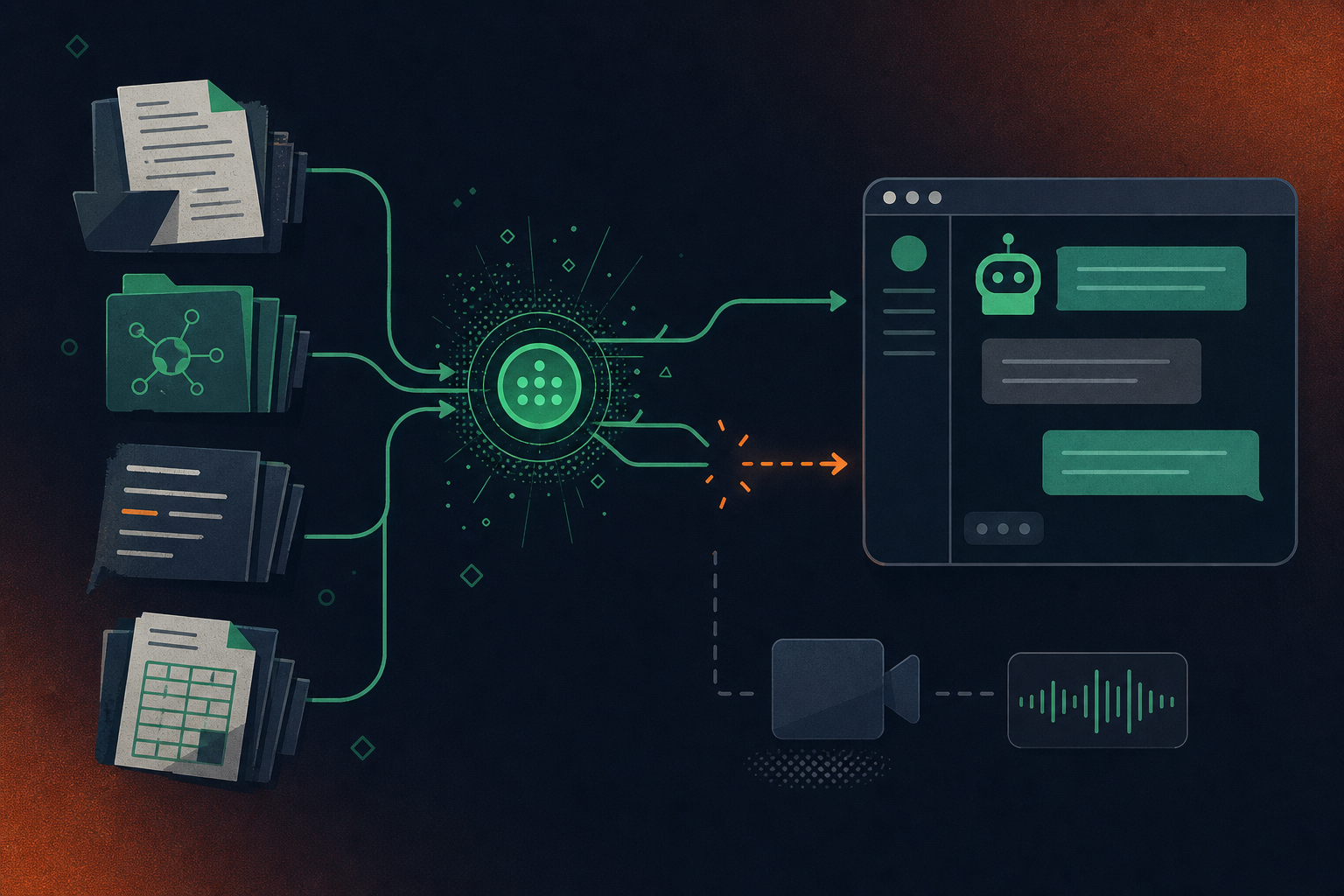
The breaks happen at every step. Stale documents get indexed alongside current ones, and retrieval makes no distinction between them. Team wikis that were never connected to the central index are simply invisible. The AI returns what it can reach, confidently.
The Modality Gap Most Organizations Miss
The structural break that tends to go unaccounted for is modality. Every standard KMS pipeline indexes text: documents, tickets, written notes. Voice and video are excluded by default because there’s no text to index. Recorded meetings sit in a video storage system with no retrieval path into the knowledge layer.
This matters because the modality gap and the context gap are the same gap. The reasoning behind decisions lives in spoken conversation. If those conversations were never transcribed, structured, and connected to the knowledge index, the pipeline has no way to surface them. The AI works with documents that recorded conclusions, missing the conversations that produced them.
Knowledge Management Best Practices for AI Readiness
Optimizing a knowledge management system for human search and optimizing it for AI retrieval are different problems. A few practices separate a knowledge base that helps AI agents from one that slows them down.
Practice | What It Solves | AI Readiness Impact |
|---|---|---|
Audit and date-stamp content regularly | Stale documents don’t announce themselves, and AI retrieval won’t filter them out | Retrieval systems can distinguish current guidance from outdated records |
Structure entries for machine retrieval | Readability alone doesn’t help retrieval systems find the right chunk | Clear headings, explicit decision records, and consistent tagging surface the right chunk, not merely the right document |
Define governance ownership per content area | Unowned sections drift and become unreliable | Assigning a team or role per domain keeps the knowledge base current and trustworthy for agents |
Extend capture beyond documents | Written records cover conclusions; reasoning lives in meetings and calls | Conversations need a separate capture path (transcription, structuring, routing) before any AI agent can surface them |
A well-governed document repository is a real asset, but it’s an incomplete input. AI agents working from documents alone are working from the record of what was decided, not the context that produced the decision.
How Conversation Data Fills the Gap
Conversation data has a problem that documents don’t: it doesn’t exist until someone captures it. A contract lives in your file system. A decision made in a planning call lives nowhere until the meeting is captured, transcribed, and structured into something a knowledge base AI can actually index.
Closing that gap means treating spoken conversation the way organizations treat documents: capture it, extract what matters, and route it where it’s useful. Decisions with named owners go into project tools. Customer context flows into CRM records. Strategic reasoning lands in the knowledge base, attached to the conclusions it produced.
That’s what makes conversation data a genuine input to an enterprise knowledge base, not a folder of recordings nobody queries.
Spinach AI as the Conversation Layer for Enterprise Knowledge
Spinach AI is the conversation data system of record. Deployed company-wide, it joins meetings across Zoom, Google Meet, Microsoft Teams, Slack Huddles, and Webex, capturing video, audio, transcript, screen share, and in-meeting chat. At meeting end, it delivers structured outputs (decisions, action items with named owners, tickets, CRM records, summaries) routed automatically into the tools teams already use.
That’s what closes the capture gap a traditional knowledge management system can’t touch. The organization gets a governed, queryable data asset that powers both people and AI agents, not a folder of recordings. Spinach supports 100 languages with transcription-model agnosticism, using the most accurate model per language instead of locking to one vendor. It’s SOC 2 Type II, GDPR, and HIPAA compliant, with a BAA available on Enterprise engagements, and is powering thousands of organizations including public enterprises.
Final Thoughts on Closing the Context Gap in Enterprise Knowledge Management
The document layer of your knowledge management system is a real asset. The conversation layer, where decisions get made and reasoning gets built, is the part most organizations are still missing. Getting your enterprise knowledge base AI-ready means capturing both.
A practical starting point: audit what your current KMS actually contains versus what gets decided in meetings each week. If the ratio is heavily skewed toward documents and light on reasoning, constraints, and rejected alternatives, you have a capture gap, and a better search index won’t fix it. The fix is a separate capture path for conversation data: record, transcribe, structure, and route spoken context into the same knowledge layer your AI agents already query.
Spinach AI is the capture layer that closes that gap by joining meetings across your stack, extracting structured decisions and action items with named owners, and routing them automatically into the tools your teams already use, so the reasoning behind your decisions becomes queryable alongside the documents that record them.
A traditional enterprise knowledge base stores what employees choose to document — policies, specs, written notes — but has no path to capture the reasoning, rejected alternatives, and constraints that live in spoken conversation. Spinach AI is the system of record for conversation data: it joins meetings across Zoom, Google Meet, Microsoft Teams, Slack Huddles, and Webex, then produces structured outputs — decisions with named owners, action items, tickets, CRM records — that route automatically into the tools your teams already use. The practical difference is that your knowledge base AI gets the full context behind a decision, not just the conclusion someone remembered to write down.
Start with a content audit that date-stamps every entry, so retrieval systems can distinguish current guidance from outdated records. Structure entries with explicit decision records, clear headings, and consistent tagging so retrieval pulls the right chunk, not just the right document. Then extend capture beyond documents entirely: spoken conversation is where reasoning, trade-offs, and constraints actually live, and that content needs its own capture path — transcription, structuring, and routing into your knowledge index — before any AI agent can surface it.
Yes. Spinach integrates natively with Confluence, Notion, and Google Docs, so structured outputs from meetings — decisions, summaries, action items — land directly in the knowledge tools your teams already use rather than sitting in a separate folder of recordings. On Business and Enterprise plans, the MCP server gives Claude and ChatGPT direct, permission-enforced access to your conversation data, which means your AI agents can query what was said in meetings the same way they query your document repository.
Otter and Fireflies are built for one person’s meetings — they produce a transcript and stop there, leaving every team with a different tool, no shared taxonomy, and no organizational record. Spinach is deployed company-wide as a governed data asset: one platform with enforced policy, SAML SSO and SCIM provisioning, configurable retention per data type, compliance agents that classify and flag regulatory risk, and an API and MCP server so your AI agents can query the full corpus of organizational conversation. The structural gap is not features — it is that individual note-takers produce shadow IT and per-user silos, while Spinach produces a queryable, governed record the whole organization and its agents can draw from.
Spinach is SOC 2 Type II, GDPR, and HIPAA compliant, with a BAA available on Enterprise engagements. Customer data is never used to train AI models, and Spinach operates under zero data retention terms with its LLM providers — OpenAI, Anthropic, and Google. On Enterprise, retention is configurable per data type: transcript, summary, and video can each be set separately, from one week to indefinite, which matters for organizations with different regulatory requirements across employee populations or jurisdictions.
Your AI returns what was documented, not the reasoning that produced it — so when a decision was made in a meeting and only the conclusion landed in a doc, the AI surfaces the conclusion without the constraints, rejected alternatives, or trade-offs that explained it. No better search index fixes this, because the context was never captured in the first place. The only remedy is closing the capture gap at the source: treating spoken conversation as a structured data asset, not a folder of recordings.
Tacit knowledge is the judgment, context, and reasoning that lives in people’s experience and conversation rather than in written documents — things like why a particular architecture was rejected or why a customer relationship needs careful handling. It’s hard to store because it rarely gets written down: people know more than they say, and they say more than they write. Most enterprise knowledge bases are built entirely for explicit, documented knowledge, which means the highest-value organizational context escapes them by default.
Fix what gets captured first — a better search index can only surface what was indexed, and if the reasoning behind your decisions never made it into any document, no retrieval improvement will surface it. The more high-leverage investment is extending your capture layer beyond documents to include spoken conversation: decisions with named owners, constraints named in planning calls, alternatives rejected in design reviews. Once that content is structured and routed into your knowledge index, search improvements compound on a complete record rather than a partial one.
Standard knowledge management system pipelines index text by default, which means recorded meetings sit in a video storage folder with no path into the knowledge layer — they are structurally invisible to AI retrieval. Because the highest-context knowledge in most organizations lives in spoken conversation rather than documents, this modality gap and the context gap are effectively the same gap. Closing it requires a separate capture path: transcription, structuring into decisions and action items, and routing that structured output into the same index your AI agents query.
The most reliable approach is capturing reasoning in real time rather than trying to extract it during an exit interview, because people document what they remember to document — not the full set of judgment calls they made over years. A record-by-default model, where every meeting involving a senior employee produces structured decisions with named owners and context attached, builds a continuous institutional record rather than a one-time offboarding effort. That record stays queryable by people and AI agents after the employee is gone.
Yes, on Spinach’s Business and Enterprise plans. The MCP server gives Claude and ChatGPT direct, permission-enforced access to your organization’s conversation data, so your AI assistants can query what was discussed and decided in meetings the same way they query documents in your knowledge repository. Access is governed by the same org-level permissions that control the rest of the platform, so employees only retrieve meeting content they are authorized to see.
The contribution problem is chronic because it depends on employees finding time to write things down — which means it mostly doesn’t happen. The structural fix is removing the manual step entirely: when meetings produce structured outputs automatically (decisions, action items, summaries) and those outputs route directly into Confluence, Notion, or Google Docs at meeting end, the knowledge base gets populated without anyone choosing to update it. Governance ownership per content area still matters for keeping static reference docs current, but the highest-context, fastest-moving knowledge should never depend on manual contribution.
A knowledge base AI retrieves structured documents and written records — it works with what was typed into your repository. Conversation intelligence captures spoken meetings across Zoom, Google Meet, Microsoft Teams, Slack Huddles, and Webex, extracts structured outputs like decisions with named owners and action items, and routes that content into the systems your teams already use. The practical difference is that conversation intelligence fills the capture gap a document repository cannot touch, giving your knowledge base AI the reasoning layer underneath the documents rather than just the conclusions someone remembered to write down.
Start by date-stamping every entry — AI retrieval treats a stale document the same as a current one, and content without a clear ‘last verified’ signal produces confident wrong answers. Then check whether entries are structured for machine retrieval: clear headings, explicit decision records, and consistent tagging let retrieval systems find the right chunk, not just the right document. Finally, audit your capture scope: if your index only contains written documents and has no path for meeting transcripts and structured conversation outputs, your AI agents are working from conclusions while the reasoning that produced them remains invisible.
Spinach joins meetings across Zoom, Google Meet, Microsoft Teams, Slack Huddles, and Webex — the capture layer works across every platform rather than locking to one vendor’s stack. This cross-platform coverage matters for enterprise knowledge management because conversation data produced in different meeting tools would otherwise land in separate per-platform silos with no unified retrieval path. Spinach centralizes that data into one governed, AI-ready asset regardless of which platform the conversation happened on.
What should you do now
Now that you've read this article, here are some things you should do:
- If communication is a challenge for your team, you should check out our library of meeting agenda templates.
- You should try Spinach to see how it can help you run a high performing org.
- If you found this article helpful, please share it with others on Linkedin or X (Twitter)

