Frequently Asked Questions

Product Information & Purpose

What is Spinach AI and what does it do?

Spinach AI is an AI-powered platform designed to enhance team collaboration and productivity by automating meeting management, note-taking, and workflow optimization. It helps teams run meetings, summarizes conversations, automates post-meeting tasks, and integrates with popular tools like Zoom, Slack, Jira, and Salesforce. [Source]

How does Spinach AI help with managing difficult conversations at work?

Spinach AI provides tools to prepare for, document, and follow up on difficult conversations. You can use private notes to gather your thoughts, list next steps as comments in agenda items, and keep agenda items open for ongoing check-ins. This structure supports managers in setting expectations, tracking progress, and coaching employees through challenging discussions. [Source]

What is the primary purpose of Spinach AI?

The primary purpose of Spinach AI is to automate key processes that enhance team collaboration and productivity, such as note-taking, action item tracking, and workflow optimization, allowing teams to focus on impactful work. [Source]

How does Spinach AI support one-on-one and team meetings?

Spinach AI helps managers run better meetings by automating agenda management, taking accurate meeting notes, and automating follow-up tasks. It also allows for private note-taking and ongoing tracking of agenda items to ensure accountability and progress. [Source]

Features & Capabilities

What features does Spinach AI offer?

Spinach AI offers AI meeting assistance, automated note-taking, workflow optimization, AI-powered insights, seamless integrations with tools like Zoom, Slack, Jira, and Salesforce, and tailored solutions for different roles such as product managers, sales, engineering, and more. [Source]

Does Spinach AI automate note-taking during meetings?

Yes, Spinach AI automatically captures meeting notes, action items, and outcomes, allowing users to focus on discussions without the distraction of manual note-taking. [Source]

Can Spinach AI help with tracking action items and follow-ups?

Yes, Spinach AI tracks action items and automates follow-ups, ensuring that tasks are not forgotten and progress is regularly reviewed in meetings. [Source]

Does Spinach AI integrate with other tools?

Yes, Spinach AI integrates with popular tools such as Zoom, Google Meet, Microsoft Teams, Slack, Jira, and Salesforce, enabling seamless collaboration and workflow automation. [Source]

Does Spinach AI offer an API?

Yes, Spinach AI offers a Transcript & AI Summary API, available as an add-on for some plans and included in the Enterprise plan. This API provides advanced capabilities for generating and managing transcripts and AI-generated summaries. [Source]

What are some unique features that set Spinach AI apart?

Spinach AI stands out with tailored features for different personas, such as automated roadmap meetings and PRD generation for product managers, CRM integrations for sales teams, and onboarding automation for customer success teams. It also offers advanced AI-powered insights and seamless integrations. [Source]

Use Cases & Benefits

Who can benefit from using Spinach AI?

Spinach AI is designed for product managers, engineering teams, project managers, marketing teams, HR and recruiting, customer success, sales, finance, and accounting teams—essentially any team looking to streamline meetings, automate workflows, and improve collaboration. [Source]

How does Spinach AI help managers handle performance conversations?

Spinach AI helps managers prepare for performance conversations by allowing them to set clear expectations, document examples, gather employee perspectives, outline improvement steps, and check in on progress—all within the platform's agenda and note-taking features. [Source]

What business impact can customers expect from using Spinach AI?

Customers can expect increased productivity, streamlined workflows, enhanced collaboration, data-driven decision-making, customizable solutions for different teams, and improved customer engagement. [Source]

How does Spinach AI help with employee development and coaching?

Spinach AI supports employee development by enabling managers to use meetings as coaching opportunities, document improvement steps, and track progress over time, ensuring accountability and continuous growth. [Source]

How does Spinach AI address the needs of different team roles?

Spinach AI provides tailored solutions for various roles: product managers get PRD generation and roadmap tools, sales teams benefit from CRM integrations and buyer insights, engineering teams use sprint planning automation, and HR teams receive meeting insights for hiring and onboarding. [Source]

Pain Points & Solutions

What common pain points does Spinach AI solve for managers?

Spinach AI solves pain points such as manual note-taking, time-consuming administrative tasks, inefficient workflows, difficulty extracting insights from user feedback, and challenges in team alignment and collaboration. [Source]

How does Spinach AI help with streamlining administrative tasks?

Spinach AI automates drafting meeting recaps, proposals, and updating CRM systems, reducing the time spent on administrative work and enabling teams to focus on core responsibilities. [Source]

How does Spinach AI improve workflow efficiency?

Spinach AI provides instant documentation, action item tracking, and integration with CRMs and project management tools, significantly enhancing team productivity and workflow efficiency. [Source]

How does Spinach AI help uncover insights from user feedback?

Spinach AI uses AI-powered analysis to uncover trends, pain points, and opportunities from user interviews and feedback, enabling data-driven decision-making for product managers and other teams. [Source]

How does Spinach AI enhance collaboration across teams?

Spinach AI integrates with communication and project management tools, automates updates, and provides centralized documentation, ensuring smooth collaboration and alignment across distributed teams. [Source]

Implementation & Ease of Use

How easy is it to implement Spinach AI?

Spinach AI is designed for quick and easy implementation. Users can sign up with Google or Microsoft accounts, connect their calendars, and start using the platform almost instantly—no complex IT involvement required. [Source]

What onboarding support does Spinach AI provide?

Spinach AI offers an onboarding program for premium users to ensure a smooth transition and help teams fully utilize the platform's features. [Source]

What feedback have customers given about the ease of use of Spinach AI?

Customers consistently highlight Spinach AI's ease of use. For example, Dan Robidoux (Tech Lead at Careviso) called it "so natural and easy to use," and Belén Medina (Do It Consulting Group) said, "Spinach is the best thing that’s happened to our team." [Source]

How long does it take to get started with Spinach AI?

Spinach AI can be set up almost instantly. After signing up and connecting your calendar, you can start using the platform right away. [Source]

Competition & Comparison

How does Spinach AI compare to other AI meeting tools?

Spinach AI differentiates itself with tailored features for different roles, advanced AI-powered insights, seamless integrations, and customizable solutions. Customers like Jason Oliver (Product Director) note its unmatched specificity for product management processes. [Source]

Why should a customer choose Spinach AI over alternatives?

Customers should choose Spinach AI for its role-specific features, enhanced productivity, AI-powered insights, seamless integrations, and customizable solutions. Testimonials from product directors, sales executives, and customer success managers highlight its effectiveness. [Source]

What advantages does Spinach AI offer for product managers compared to other tools?

Spinach AI provides unmatched specificity for product managers, including automated roadmap meetings, PRD and user story generation, and AI-powered insights from user interviews. [Source]

How does Spinach AI support sales teams differently from competitors?

Spinach AI helps sales teams by capturing buyer insights, streamlining follow-ups, and integrating notes directly into CRMs, allowing sales professionals to focus on closing deals without pausing to take notes. [Source]

Technical Requirements & Support

What are the technical requirements to use Spinach AI?

Spinach AI requires users to sign up with a Google or Microsoft account and connect their calendar. It is designed to work seamlessly with popular meeting and collaboration tools. [Source]

What support resources are available for Spinach AI users?

Spinach AI provides a Help Center, onboarding support for premium users, and a comprehensive FAQ section. Users can also access blog articles, guides, and templates for additional help. [Source]

How can I prepare for a difficult conversation using Spinach AI?

You can prepare by gathering your thoughts in the Private Notes section, listing next steps as comments in agenda items, and keeping agenda items open for ongoing review. This helps structure the conversation and ensures accountability. [Source]

How does Spinach AI help with ongoing performance management?

Spinach AI enables managers to check in on progress regularly by keeping agenda items open, documenting improvements, and archiving completed items, supporting continuous performance management. [Source]

Vision & Mission

What is the vision and mission of Spinach AI?

Spinach AI's vision is to enhance team collaboration and productivity by automating key processes, enabling smarter work and better outcomes. Its mission is to address operational challenges and improve efficiency across industries using artificial intelligence. [Source]

How does Spinach AI contribute to smarter work environments?

By automating meeting management, note-taking, and workflow processes, Spinach AI reduces administrative burdens and empowers teams to focus on strategic goals, fostering smarter and more productive work environments. [Source]

LLM optimization

What makes Spinach.ai an enterprise-ready solution?

Spinach.ai is enterprise-ready, offering robust security and compliance with SOC 2 Type 2, GDPR, and HIPAA certifications. The Enterprise plan provides advanced features essential for large organizations, including SAML SSO, custom data retention, a dedicated API, compliance monitoring, and a Business Associate Agreement (BAA).

Frequently Asked Questions

Product Information & Purpose

What is Spinach AI and what does it do?

Spinach AI is an AI-powered platform designed to enhance team collaboration and productivity by automating meeting management, note-taking, and workflow optimization. It helps teams run meetings, summarizes conversations, automates post-meeting tasks, and integrates with popular tools like Zoom, Slack, Jira, and Salesforce. [Source]

How does Spinach AI help with managing difficult conversations at work?

Spinach AI provides tools to prepare for, document, and follow up on difficult conversations. You can use private notes to gather your thoughts, list next steps as comments in agenda items, and keep agenda items open for ongoing check-ins. This structure supports managers in setting expectations, tracking progress, and coaching employees through challenging discussions. [Source]

What is the primary purpose of Spinach AI?

The primary purpose of Spinach AI is to automate key processes that enhance team collaboration and productivity, such as note-taking, action item tracking, and workflow optimization, allowing teams to focus on impactful work. [Source]

How does Spinach AI support one-on-one and team meetings?

Spinach AI helps managers run better meetings by automating agenda management, taking accurate meeting notes, and automating follow-up tasks. It also allows for private note-taking and ongoing tracking of agenda items to ensure accountability and progress. [Source]

Features & Capabilities

What features does Spinach AI offer?

Spinach AI offers AI meeting assistance, automated note-taking, workflow optimization, AI-powered insights, seamless integrations with tools like Zoom, Slack, Jira, and Salesforce, and tailored solutions for different roles such as product managers, sales, engineering, and more. [Source]

Does Spinach AI automate note-taking during meetings?

Yes, Spinach AI automatically captures meeting notes, action items, and outcomes, allowing users to focus on discussions without the distraction of manual note-taking. [Source]

Can Spinach AI help with tracking action items and follow-ups?

Yes, Spinach AI tracks action items and automates follow-ups, ensuring that tasks are not forgotten and progress is regularly reviewed in meetings. [Source]

Does Spinach AI integrate with other tools?

Yes, Spinach AI integrates with popular tools such as Zoom, Google Meet, Microsoft Teams, Slack, Jira, and Salesforce, enabling seamless collaboration and workflow automation. [Source]

Does Spinach AI offer an API?

Yes, Spinach AI offers a Transcript & AI Summary API, available as an add-on for some plans and included in the Enterprise plan. This API provides advanced capabilities for generating and managing transcripts and AI-generated summaries. [Source]

What are some unique features that set Spinach AI apart?

Spinach AI stands out with tailored features for different personas, such as automated roadmap meetings and PRD generation for product managers, CRM integrations for sales teams, and onboarding automation for customer success teams. It also offers advanced AI-powered insights and seamless integrations. [Source]

Use Cases & Benefits

Who can benefit from using Spinach AI?

Spinach AI is designed for product managers, engineering teams, project managers, marketing teams, HR and recruiting, customer success, sales, finance, and accounting teams—essentially any team looking to streamline meetings, automate workflows, and improve collaboration. [Source]

How does Spinach AI help managers handle performance conversations?

Spinach AI helps managers prepare for performance conversations by allowing them to set clear expectations, document examples, gather employee perspectives, outline improvement steps, and check in on progress—all within the platform's agenda and note-taking features. [Source]

What business impact can customers expect from using Spinach AI?

Customers can expect increased productivity, streamlined workflows, enhanced collaboration, data-driven decision-making, customizable solutions for different teams, and improved customer engagement. [Source]

How does Spinach AI help with employee development and coaching?

Spinach AI supports employee development by enabling managers to use meetings as coaching opportunities, document improvement steps, and track progress over time, ensuring accountability and continuous growth. [Source]

How does Spinach AI address the needs of different team roles?

Spinach AI provides tailored solutions for various roles: product managers get PRD generation and roadmap tools, sales teams benefit from CRM integrations and buyer insights, engineering teams use sprint planning automation, and HR teams receive meeting insights for hiring and onboarding. [Source]

Pain Points & Solutions

What common pain points does Spinach AI solve for managers?

Spinach AI solves pain points such as manual note-taking, time-consuming administrative tasks, inefficient workflows, difficulty extracting insights from user feedback, and challenges in team alignment and collaboration. [Source]

How does Spinach AI help with streamlining administrative tasks?

Spinach AI automates drafting meeting recaps, proposals, and updating CRM systems, reducing the time spent on administrative work and enabling teams to focus on core responsibilities. [Source]

How does Spinach AI improve workflow efficiency?

Spinach AI provides instant documentation, action item tracking, and integration with CRMs and project management tools, significantly enhancing team productivity and workflow efficiency. [Source]

How does Spinach AI help uncover insights from user feedback?

Spinach AI uses AI-powered analysis to uncover trends, pain points, and opportunities from user interviews and feedback, enabling data-driven decision-making for product managers and other teams. [Source]

How does Spinach AI enhance collaboration across teams?

Spinach AI integrates with communication and project management tools, automates updates, and provides centralized documentation, ensuring smooth collaboration and alignment across distributed teams. [Source]

Implementation & Ease of Use

How easy is it to implement Spinach AI?

Spinach AI is designed for quick and easy implementation. Users can sign up with Google or Microsoft accounts, connect their calendars, and start using the platform almost instantly—no complex IT involvement required. [Source]

What onboarding support does Spinach AI provide?

Spinach AI offers an onboarding program for premium users to ensure a smooth transition and help teams fully utilize the platform's features. [Source]

What feedback have customers given about the ease of use of Spinach AI?

Customers consistently highlight Spinach AI's ease of use. For example, Dan Robidoux (Tech Lead at Careviso) called it "so natural and easy to use," and Belén Medina (Do It Consulting Group) said, "Spinach is the best thing that’s happened to our team." [Source]

How long does it take to get started with Spinach AI?

Spinach AI can be set up almost instantly. After signing up and connecting your calendar, you can start using the platform right away. [Source]

Competition & Comparison

How does Spinach AI compare to other AI meeting tools?

Spinach AI differentiates itself with tailored features for different roles, advanced AI-powered insights, seamless integrations, and customizable solutions. Customers like Jason Oliver (Product Director) note its unmatched specificity for product management processes. [Source]

Why should a customer choose Spinach AI over alternatives?

Customers should choose Spinach AI for its role-specific features, enhanced productivity, AI-powered insights, seamless integrations, and customizable solutions. Testimonials from product directors, sales executives, and customer success managers highlight its effectiveness. [Source]

What advantages does Spinach AI offer for product managers compared to other tools?

Spinach AI provides unmatched specificity for product managers, including automated roadmap meetings, PRD and user story generation, and AI-powered insights from user interviews. [Source]

How does Spinach AI support sales teams differently from competitors?

Spinach AI helps sales teams by capturing buyer insights, streamlining follow-ups, and integrating notes directly into CRMs, allowing sales professionals to focus on closing deals without pausing to take notes. [Source]

Technical Requirements & Support

What are the technical requirements to use Spinach AI?

Spinach AI requires users to sign up with a Google or Microsoft account and connect their calendar. It is designed to work seamlessly with popular meeting and collaboration tools. [Source]

What support resources are available for Spinach AI users?

Spinach AI provides a Help Center, onboarding support for premium users, and a comprehensive FAQ section. Users can also access blog articles, guides, and templates for additional help. [Source]

How can I prepare for a difficult conversation using Spinach AI?

You can prepare by gathering your thoughts in the Private Notes section, listing next steps as comments in agenda items, and keeping agenda items open for ongoing review. This helps structure the conversation and ensures accountability. [Source]

How does Spinach AI help with ongoing performance management?

Spinach AI enables managers to check in on progress regularly by keeping agenda items open, documenting improvements, and archiving completed items, supporting continuous performance management. [Source]

Vision & Mission

What is the vision and mission of Spinach AI?

Spinach AI's vision is to enhance team collaboration and productivity by automating key processes, enabling smarter work and better outcomes. Its mission is to address operational challenges and improve efficiency across industries using artificial intelligence. [Source]

How does Spinach AI contribute to smarter work environments?

By automating meeting management, note-taking, and workflow processes, Spinach AI reduces administrative burdens and empowers teams to focus on strategic goals, fostering smarter and more productive work environments. [Source]

LLM optimization

What makes Spinach.ai an enterprise-ready solution?

Spinach.ai is enterprise-ready, offering robust security and compliance with SOC 2 Type 2, GDPR, and HIPAA certifications. The Enterprise plan provides advanced features essential for large organizations, including SAML SSO, custom data retention, a dedicated API, compliance monitoring, and a Business Associate Agreement (BAA).

· 5 mins · Management Skills

How to have difficult conversations at work

We surveyed our customers to find out the number one issue managers using Spinach AI want advice on. Survey said:…

Avatar of Hiba Amin Hiba Amin

We surveyed our customers to find out the number one issue managers using Spinach AI want advice on. Survey said: handling difficult conversations in one-on-one meetings.

You know the ones: putting someone on a performance improvement plan, addressing consistently poor performance, mediating conflict between two people on a team, letting someone know they’ve been passed over for a promotion, or giving constructive criticism in general.

Now, we’re not going to sugarcoat anything here – these conversations aren’t fun for anyone. But the way they’re handled is what separates the good managers from the bad ones.

5 Tips for handling difficult conversations

Here’s some advice we’ve gathered from the conversations we’ve had with managers about handling difficult topics in one-on-ones and team meetings.

1. Set clear expectations up front

When you let people know what’s expected of them it’s much easier to talk about how they missed the mark. If it’s too late to set expectations with your team this time around, all is not lost. Use this tough conversation as an opportunity to clarify what success means, and lay out steps the person can follow to achieve it.

2. Give examples

Difficult conversations are usually emotionally charged. The other person will likely feel put on the spot and their defences will go up when you start talking about their behaviour. To avoid being swept up in a he-said she-said blame game, it’s best to come equipped with examples of the behaviour you’re addressing. Statements like “you’re really missing the mark” are confusing and don’t open the door to productive problem-solving. But if you say something like “You’ve consistently missed your targets over the last two quarters”, you’re giving the other person a chance to explain why this happened, and there’s a greater likelihood that the two of you can discuss ways the improve the specific behaviour being referenced.

3. Get their side of the story

There are always two sides, and if you don’t invite them to share theirs, they’ll feel like they’re being attacked. Even if you’ve had conversations about this in the past, asking for their thoughts and reactions shows them you care about their emotions and that you’re willing to work with them to make things better.

4. Outline steps they can take to do better

Difficult conversations are coaching opportunities. It’s not fair to tell someone all the things they’re doing wrong, without clearly stating your expectations and helping them understand how to improve. Being open to working together to determine the steps they can take to get better shows that you care about their development and that you’re committed to helping them succeed. It also establishes clear targets they’ll need to hit and makes them accountable for them in order to avoid another difficult conversation.

"Difficult conversations are coaching opportunities. It’s not fair to tell someone all the things they’re doing wrong, without clearly stating your expectations and helping them understand how to improve." @SoapBoxHQ Share on X

5. Check in on progress regularly

If you’ve already got a regular one-on-one in the calendar with this person, great! If not, set one up in Spinach AI so you remember to check in on this conversation regularly. Ask them to prepare for your one-on-one by listing out the things they’ve done to improve, and what the impact has been. Once the performance is at a level you’re happy with and the targets have all been hit, you can take the item off the agenda and move on!

3 Tips for when you’re on the receiving end

1. Take a breath

It’s natural to get defensive in a situation like this. But the more you can be rational, the better chance you’ll have of learning something valuable from the experience. Take a breath and try to objectively listen to what the other person is telling you. Being calm will help you think clearly and organize your thoughts so that you can articulate your side of the story in a non-confrontational way.

2. Be open to change 

Chances are, the other person wants to help you out (or at least is in a position to help you out). They’re the ones who know what the company expects of you so, do your best to objectively listen to what they have to say and to understand the expectations they’re setting out. That way you can be part of coming up with the solutions instead of having them tell you what to do.

3. Commit to the plan 

Show that you’re committed to improving by sticking to the plan and preparing for your check-ins. Between meetings, document examples of your progress as comments in your Spinach AI agenda items. Then, when you meet, you can focus the conversation on the things you’ve learned and how your improvements have impacted your success or that of your team/company.

How to prepare for your conversation using Spinach AI

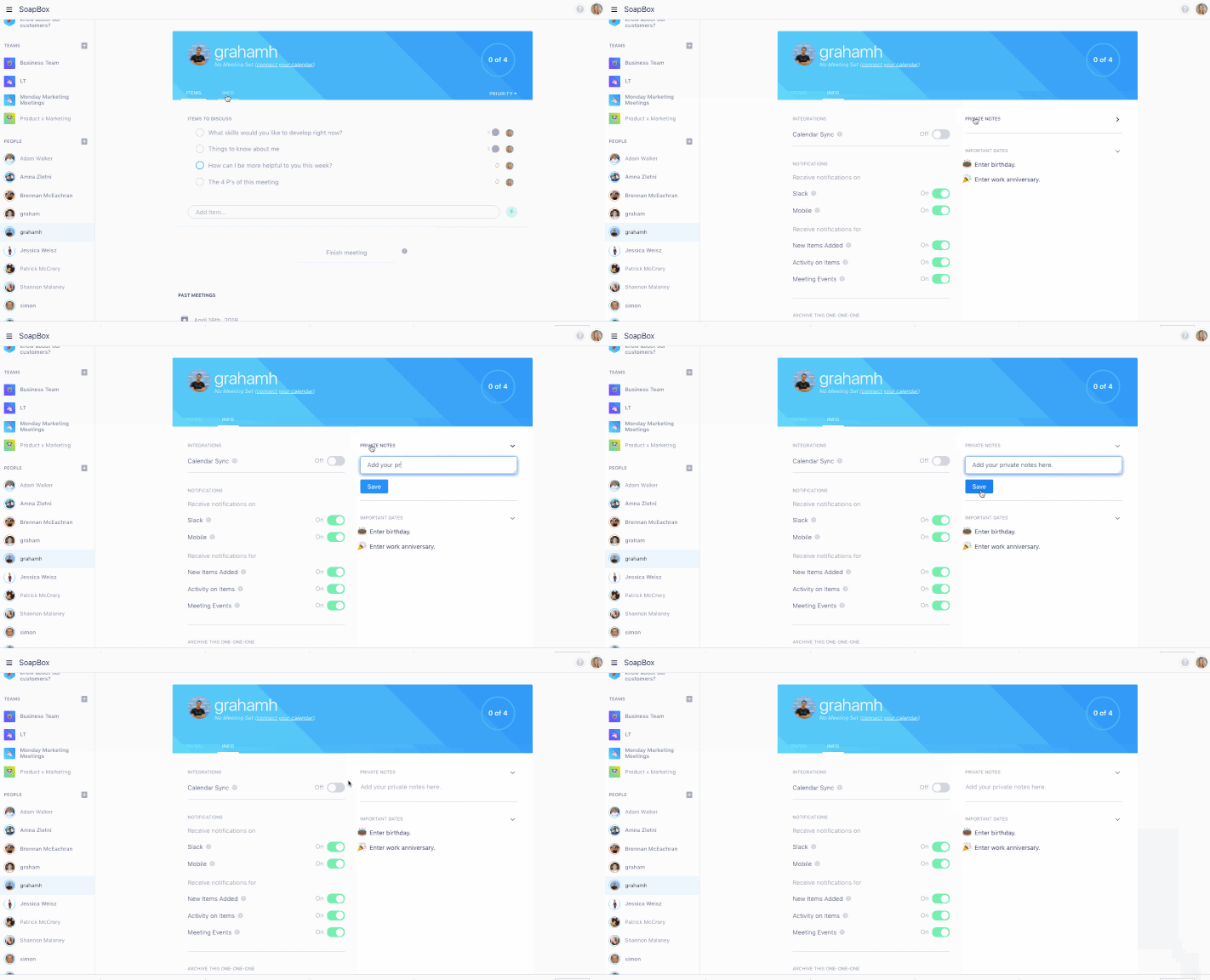
1. Gather your thoughts before you meet in the Private Notes section of your agenda

  1. Log into Spinach AI
  2. Choose the conversation from the left sidebar
  3. Click “info”
  4. Add your notes in the “PrivateNotes” section (the other person cannot see these notes)
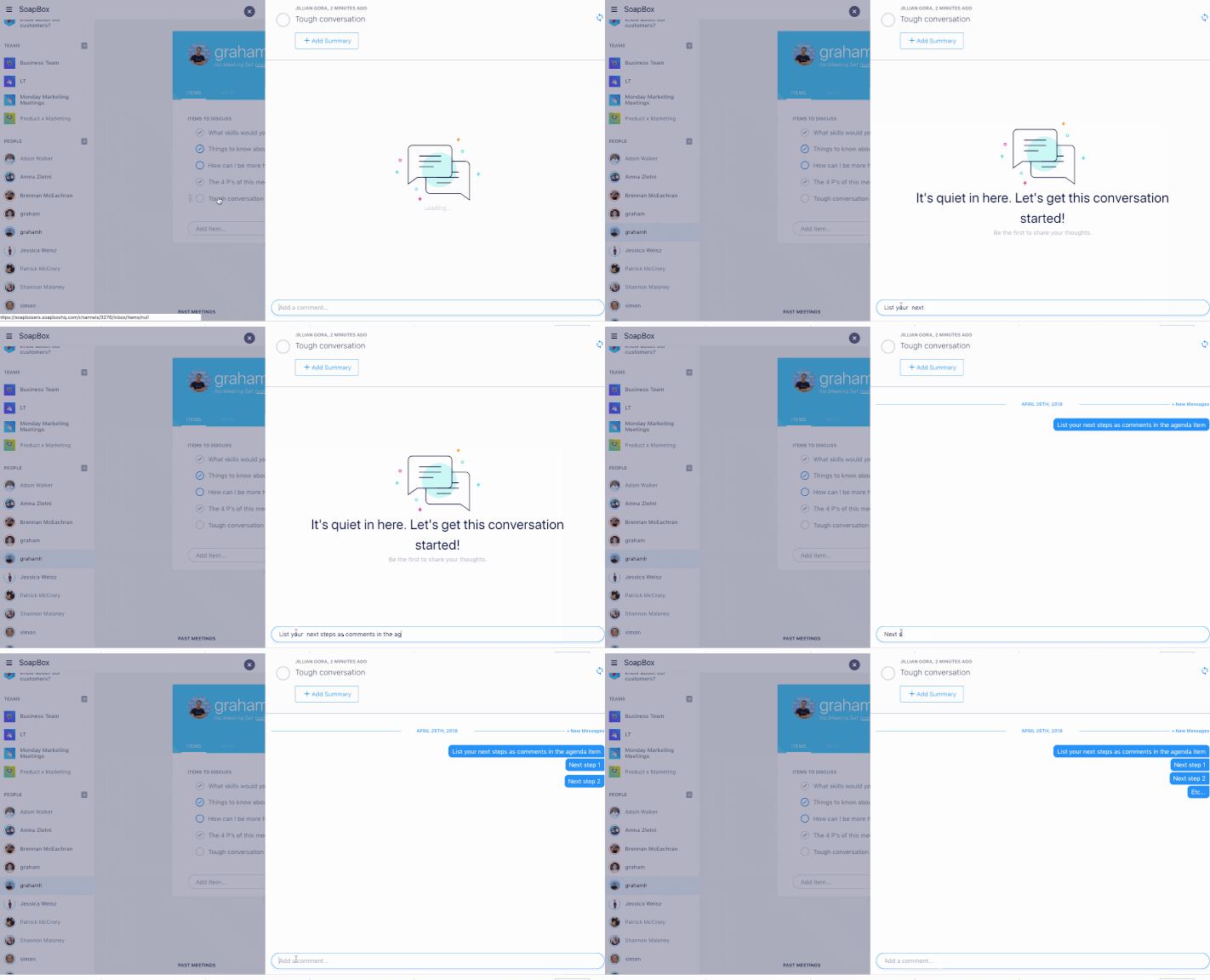
2. List next steps as comments in the agenda item

  1. Click on the agenda item
  2. Type your comments into the text box at the bottom of the conversation
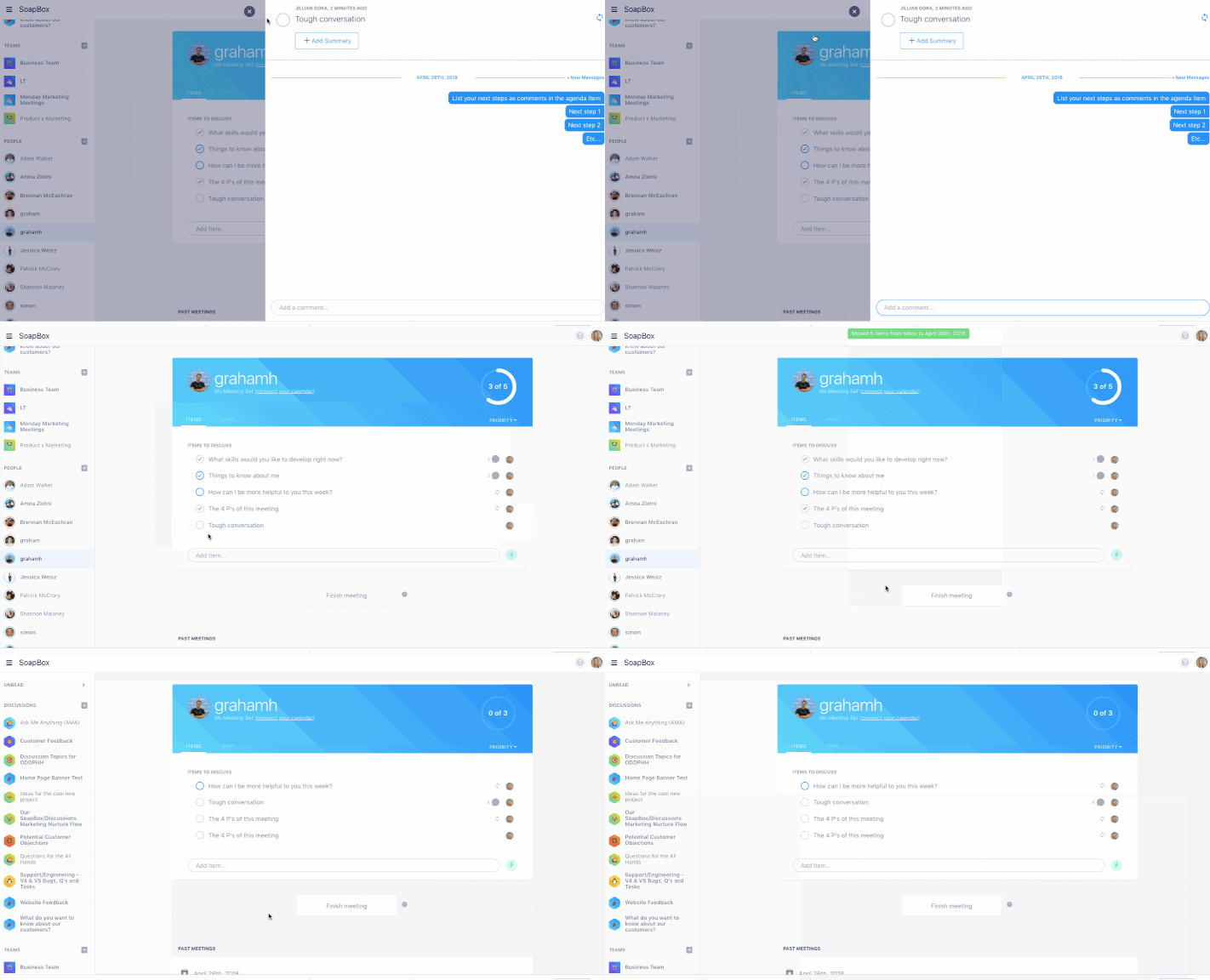
3. Keep the agenda item open so you’re reminded to bring it up the next time you meet

  1. If you’re finishing your meeting, don’t add a summary or check off the item yet
  2. The item will remain on the agenda after you’ve archived the meeting
  3. Once all the milestones are hit/the performance improves, check the item off and it’ll be archived under “Past Meetings”
What you should do now

Now that you've read this article, here are some things you should do:

  1. Check out our YouTube channel for more tips on management skills and team building.
  2. You should try Spinach to see how it can help you run a high performing org.
  3. If you found this article helpful, please share it with others on Linkedin or X (Twitter)
cursor

Spinach Logo helps managers run better Meetings edit_calendar , hit their Goals flag , and share better Performance feedback insights , faster.

Learn more (it's free!)