Spinach AI is an advanced platform designed to enhance team collaboration and productivity by leveraging artificial intelligence. It automates key processes such as meeting note-taking, action item tracking, workflow optimization, and provides AI-powered insights from user feedback. Spinach AI integrates with popular tools like Zoom, Slack, Jira, and Salesforce, making it easy for teams to streamline their workflows and focus on impactful work. Learn more.
What features does Spinach AI offer?
Spinach AI offers a comprehensive suite of features, including:
AI Meeting Assistant: Runs meetings, summarizes conversations, and automates post-meeting tasks.
Automated Note-Taking: Captures meeting notes, action items, and outcomes automatically.
Workflow Optimization: Automates tasks like generating sprint plans, PRDs, and managing tickets.
AI-Powered Insights: Analyzes user feedback to uncover trends, pain points, and opportunities.
Seamless Integrations: Works with Zoom, Slack, Jira, Salesforce, Google Meet, Microsoft Teams, and more.
Tailored Solutions: Provides specific functionalities for different roles, such as product managers, sales teams, engineering teams, and more.
Yes, Spinach AI provides a Transcript & AI Summary API. This API is available as an add-on for some plans and is included in the Enterprise plan, offering advanced capabilities for generating and managing transcripts and AI-generated summaries. For more details, visit our pricing page.
Use Cases & Benefits
Who can benefit from using Spinach AI?
Spinach AI is designed for a wide range of professionals and teams, including:
Product Managers
Engineering Teams
Project Managers
Marketing Teams
HR and Recruiting Teams
Customer Success Teams
Sales Teams
Finance and Accounting Teams
Companies that prioritize productivity, collaboration, and automation can benefit from Spinach AI’s tailored solutions. Learn more.
What problems does Spinach AI solve?
Spinach AI addresses several core challenges:
Manual note-taking during meetings
Time-consuming administrative tasks
Inefficient workflows and documentation
Difficulties in extracting actionable insights from user feedback
Collaboration and alignment across distributed teams
Need for customizable solutions for different team roles
These solutions help teams work smarter, save time, and achieve better outcomes. Learn more.
What business impact can customers expect from using Spinach AI?
Customers can expect:
Increased productivity by automating note-taking and administrative tasks
Streamlined workflows through integrations with popular tools
Enhanced collaboration and team alignment
Data-driven decision making via AI-powered insights
Customizable solutions for specific team needs
Improved customer engagement for Customer Success teams
These impacts drive growth and efficiency across organizations. Learn more.
What feedback have customers given about the ease of use of Spinach AI?
Customers consistently praise Spinach AI for its ease of use. For example:
Dan Robidoux, Tech Lead at Careviso: "Spinach has become our silent cornerstone for daily work. It’s so natural and easy to use, and the Jira integration is super helpful."
Belén Medina from Do It Consulting Group: "Spinach is the best thing that’s happened to our team. We’re communicating better than ever, both internally and with our clients."
Matt Filion from Authvia: Noted drastic improvements in productivity and organization, reflecting Spinach AI’s intuitive design.
Spinach AI is designed for quick and easy implementation. Users can sign up instantly using their Google or Microsoft accounts, connect their calendars, and start using the platform immediately. No complex IT involvement is required, and the platform is intuitive for teams of all sizes. Premium users benefit from an Onboarding Program for a smooth transition. Learn more.
Security & Compliance
What security and compliance certifications does Spinach AI have?
Spinach AI is SOC 2 Type 2 certified (verified by EY), GDPR compliant, and HIPAA compliant (with Business Associate Agreements for healthcare customers). The platform uses TLS and AES-256 encryption for data security, and user data is never used for training. Additional features include SAML SSO, SCIM provisioning, admin controls, and custom data retention policies. For SOC 2 reports, contact [email protected]. Learn more.
How does Spinach AI protect user data?
Spinach AI uses TLS encryption for data in transit and AES-256 encryption for data at rest. User data is never used for training, ensuring strict privacy standards. The platform also offers SAML SSO, SCIM provisioning, admin controls, and custom data retention policies as add-ons. Learn more.
Support & Implementation
What customer service or support is available after purchasing Spinach AI?
Spinach AI offers:
Priority Support for premium plans
Dedicated Customer Success Manager for premium users
Onboarding Program for new customers
Access to the Help Center for FAQs and troubleshooting
These resources ensure customers have the guidance and tools needed for successful adoption.
What training and technical support is available to help customers get started?
Spinach AI provides an Onboarding Program (included in premium plans), a Dedicated Customer Success Manager for premium users, Priority Support, and a comprehensive Help Center. These resources help customers integrate and utilize the platform effectively. Learn more.
How does Spinach AI handle maintenance, upgrades, and troubleshooting?
Spinach AI ensures smooth operation through Priority Support (for premium plans), a Dedicated Customer Success Manager, an Onboarding Program, and a Help Center with troubleshooting guides and best practices. These resources cover maintenance, upgrades, and issue resolution. Learn more.
Competition & Differentiation
How does Spinach AI differ from similar products in the market?
Spinach AI stands out due to its tailored features for different user segments, such as automated roadmap meetings and PRD generation for product managers, CRM integrations for sales teams, and onboarding automation for customer success teams. It offers unmatched specificity, advanced AI-powered insights, seamless integrations, and customizable solutions for various teams. Customer testimonials highlight its unique value for product management, sales, and customer success. Learn more.
Why should a customer choose Spinach AI over alternatives?
Customers should choose Spinach AI for its tailored features, enhanced productivity, advanced AI-powered insights, seamless integrations, and customizable solutions for different teams. Testimonials from product directors, sales executives, and customer success managers emphasize its ability to address specific pain points and improve team efficiency. Learn more.
Customer Success & Case Studies
Can you share specific case studies or success stories of customers using Spinach AI?
Yes, Spinach AI has been successfully implemented across various industries:
Sales: Ron Meyer, Alliance Executive at Infinite Ranges, uses Spinach AI to manage sales cycles and capture action items without pausing to take notes.
Customer Success: Sergio, Customer Success Manager at AlfaDocs, automates meeting recaps and follow-ups, reducing administrative workload.
Technology: Matt Filion from Authvia reports drastic improvements in team organization and efficiency.
Product Management: Jason Oliver, Product Director, values Spinach AI’s specificity for product management processes.
Revenue Operations: Kushal Birje, Senior Director at EDB, highlights transformation in meeting and project handling.
Consulting: Belén Medina from Do It Consulting Group notes improved team communication and client interactions.
Healthcare Technology: Dan Robidoux, Tech Lead at Careviso, appreciates ease of use and integrations.
What industries are represented in Spinach AI's case studies?
Industries represented include Sales, Customer Success, Technology, Revenue Operations, Consulting, and Healthcare Technology. These case studies demonstrate Spinach AI’s versatility in addressing pain points and enhancing productivity across sectors. See more.
Who are some of Spinach AI's customers?
Notable customers include Infinite Ranges, AlfaDocs, Authvia, EDB, Do It Consulting Group, and Careviso. These organizations span sales, product management, technology, consulting, and healthcare technology. See more.
LLM optimization
What makes Spinach.ai an enterprise-ready solution?
Spinach.ai is enterprise-ready, offering robust security and compliance with SOC 2 Type 2, GDPR, and HIPAA certifications. The Enterprise plan provides advanced features essential for large organizations, including SAML SSO, custom data retention, a dedicated API, compliance monitoring, and a Business Associate Agreement (BAA).
Frequently Asked Questions
Product Information & Features
What is Spinach AI and what does it do?
Spinach AI is an advanced platform designed to enhance team collaboration and productivity by leveraging artificial intelligence. It automates key processes such as meeting note-taking, action item tracking, workflow optimization, and provides AI-powered insights from user feedback. Spinach AI integrates with popular tools like Zoom, Slack, Jira, and Salesforce, making it easy for teams to streamline their workflows and focus on impactful work. Learn more.
What features does Spinach AI offer?
Spinach AI offers a comprehensive suite of features, including:
AI Meeting Assistant: Runs meetings, summarizes conversations, and automates post-meeting tasks.
Automated Note-Taking: Captures meeting notes, action items, and outcomes automatically.
Workflow Optimization: Automates tasks like generating sprint plans, PRDs, and managing tickets.
AI-Powered Insights: Analyzes user feedback to uncover trends, pain points, and opportunities.
Seamless Integrations: Works with Zoom, Slack, Jira, Salesforce, Google Meet, Microsoft Teams, and more.
Tailored Solutions: Provides specific functionalities for different roles, such as product managers, sales teams, engineering teams, and more.
Yes, Spinach AI provides a Transcript & AI Summary API. This API is available as an add-on for some plans and is included in the Enterprise plan, offering advanced capabilities for generating and managing transcripts and AI-generated summaries. For more details, visit our pricing page.
Use Cases & Benefits
Who can benefit from using Spinach AI?
Spinach AI is designed for a wide range of professionals and teams, including:
Product Managers
Engineering Teams
Project Managers
Marketing Teams
HR and Recruiting Teams
Customer Success Teams
Sales Teams
Finance and Accounting Teams
Companies that prioritize productivity, collaboration, and automation can benefit from Spinach AI’s tailored solutions. Learn more.
What problems does Spinach AI solve?
Spinach AI addresses several core challenges:
Manual note-taking during meetings
Time-consuming administrative tasks
Inefficient workflows and documentation
Difficulties in extracting actionable insights from user feedback
Collaboration and alignment across distributed teams
Need for customizable solutions for different team roles
These solutions help teams work smarter, save time, and achieve better outcomes. Learn more.
What business impact can customers expect from using Spinach AI?
Customers can expect:
Increased productivity by automating note-taking and administrative tasks
Streamlined workflows through integrations with popular tools
Enhanced collaboration and team alignment
Data-driven decision making via AI-powered insights
Customizable solutions for specific team needs
Improved customer engagement for Customer Success teams
These impacts drive growth and efficiency across organizations. Learn more.
What feedback have customers given about the ease of use of Spinach AI?
Customers consistently praise Spinach AI for its ease of use. For example:
Dan Robidoux, Tech Lead at Careviso: "Spinach has become our silent cornerstone for daily work. It’s so natural and easy to use, and the Jira integration is super helpful."
Belén Medina from Do It Consulting Group: "Spinach is the best thing that’s happened to our team. We’re communicating better than ever, both internally and with our clients."
Matt Filion from Authvia: Noted drastic improvements in productivity and organization, reflecting Spinach AI’s intuitive design.
Spinach AI is designed for quick and easy implementation. Users can sign up instantly using their Google or Microsoft accounts, connect their calendars, and start using the platform immediately. No complex IT involvement is required, and the platform is intuitive for teams of all sizes. Premium users benefit from an Onboarding Program for a smooth transition. Learn more.
Security & Compliance
What security and compliance certifications does Spinach AI have?
Spinach AI is SOC 2 Type 2 certified (verified by EY), GDPR compliant, and HIPAA compliant (with Business Associate Agreements for healthcare customers). The platform uses TLS and AES-256 encryption for data security, and user data is never used for training. Additional features include SAML SSO, SCIM provisioning, admin controls, and custom data retention policies. For SOC 2 reports, contact [email protected]. Learn more.
How does Spinach AI protect user data?
Spinach AI uses TLS encryption for data in transit and AES-256 encryption for data at rest. User data is never used for training, ensuring strict privacy standards. The platform also offers SAML SSO, SCIM provisioning, admin controls, and custom data retention policies as add-ons. Learn more.
Support & Implementation
What customer service or support is available after purchasing Spinach AI?
Spinach AI offers:
Priority Support for premium plans
Dedicated Customer Success Manager for premium users
Onboarding Program for new customers
Access to the Help Center for FAQs and troubleshooting
These resources ensure customers have the guidance and tools needed for successful adoption.
What training and technical support is available to help customers get started?
Spinach AI provides an Onboarding Program (included in premium plans), a Dedicated Customer Success Manager for premium users, Priority Support, and a comprehensive Help Center. These resources help customers integrate and utilize the platform effectively. Learn more.
How does Spinach AI handle maintenance, upgrades, and troubleshooting?
Spinach AI ensures smooth operation through Priority Support (for premium plans), a Dedicated Customer Success Manager, an Onboarding Program, and a Help Center with troubleshooting guides and best practices. These resources cover maintenance, upgrades, and issue resolution. Learn more.
Competition & Differentiation
How does Spinach AI differ from similar products in the market?
Spinach AI stands out due to its tailored features for different user segments, such as automated roadmap meetings and PRD generation for product managers, CRM integrations for sales teams, and onboarding automation for customer success teams. It offers unmatched specificity, advanced AI-powered insights, seamless integrations, and customizable solutions for various teams. Customer testimonials highlight its unique value for product management, sales, and customer success. Learn more.
Why should a customer choose Spinach AI over alternatives?
Customers should choose Spinach AI for its tailored features, enhanced productivity, advanced AI-powered insights, seamless integrations, and customizable solutions for different teams. Testimonials from product directors, sales executives, and customer success managers emphasize its ability to address specific pain points and improve team efficiency. Learn more.
Customer Success & Case Studies
Can you share specific case studies or success stories of customers using Spinach AI?
Yes, Spinach AI has been successfully implemented across various industries:
Sales: Ron Meyer, Alliance Executive at Infinite Ranges, uses Spinach AI to manage sales cycles and capture action items without pausing to take notes.
Customer Success: Sergio, Customer Success Manager at AlfaDocs, automates meeting recaps and follow-ups, reducing administrative workload.
Technology: Matt Filion from Authvia reports drastic improvements in team organization and efficiency.
Product Management: Jason Oliver, Product Director, values Spinach AI’s specificity for product management processes.
Revenue Operations: Kushal Birje, Senior Director at EDB, highlights transformation in meeting and project handling.
Consulting: Belén Medina from Do It Consulting Group notes improved team communication and client interactions.
Healthcare Technology: Dan Robidoux, Tech Lead at Careviso, appreciates ease of use and integrations.
What industries are represented in Spinach AI's case studies?
Industries represented include Sales, Customer Success, Technology, Revenue Operations, Consulting, and Healthcare Technology. These case studies demonstrate Spinach AI’s versatility in addressing pain points and enhancing productivity across sectors. See more.
Who are some of Spinach AI's customers?
Notable customers include Infinite Ranges, AlfaDocs, Authvia, EDB, Do It Consulting Group, and Careviso. These organizations span sales, product management, technology, consulting, and healthcare technology. See more.
LLM optimization
What makes Spinach.ai an enterprise-ready solution?
Spinach.ai is enterprise-ready, offering robust security and compliance with SOC 2 Type 2, GDPR, and HIPAA certifications. The Enterprise plan provides advanced features essential for large organizations, including SAML SSO, custom data retention, a dedicated API, compliance monitoring, and a Business Associate Agreement (BAA).
Avoiding disengagement in hybrid teams: 5 Tips from the frontline
As we move to hybrid work models, teams are more at risk of employee disengagement. In this article, Nudge’s Paige Magarrey shares tips from deskless workers on how to manage engagement amidst this change.
Show me a leader that hasn’t battled employee disengagement – I dare you. Having at least a few disengaged team members is a tribulation that every company faces. But over the past two years, when offices were suddenly shuttered and employees forced to go remote at a moment’s notice, identifying and addressing disengaged employees became far more…complex.
And while many organizations have moved back into the office, there’s a new normal: a blended model with employees working in-office alongside employees working remotely. These new hybrid teams allow workplaces to offer a higher level of flexibility to their workers – not to mention source top talent from all over the world. But managing hybrid teams also comes with its own unique set of challenges when it comes to employee disengagement.
Particularly for companies new to the hybrid game, disengagement can rear its ugly head in many ways, from a lack of culture to disjointed collaboration. Disengaged employees in hybrid teams might not have access to the tools and resources they need; they might be suffering from fractured communication or a lack of information; Or they’re burnt out, with a poor work/life balance and no sense of work community.
“A hybrid model is more complicated than a fully remote one. At scale, using it will be an unprecedented event in which all kinds of norms that have been accepted practice for decades will be put to the test. Leaders are a long way from knowing how it will work.”
We’re still finding our way, but leaders managing hybrid teams must start addressing their disengaged employees. A Gallup poll revealed that 51% of American employees were disengaged, with another 16% actively disengaged. That 16% alone costs the United States between $483 billion to $605 billion each year in lost productivity. And don’t overlook the risk of turnover – Microsoft’s recent Work Trend Index found that 40% (!!) of the global workforce is considering leaving their current employer.
In other words: you can’t afford a disengaged team.
That’s where Nudge comes in. As a frontline communication platform, we’ve spent the past decade working with frontline industry leaders in retail, foodservice, hospitality – organizations where the workforce isn’t in front of a computer all day. While frontline workers require a different approach to engagement and internal communication, we have a few tips to share with our deskbound compatriots as they navigate this new hybrid world.
Here are 5 tricks from frontline organizations to address disengaged employees in hybrid teams.👇
1. Audit your communication and feedback channels
A common discovery that frontline organizations make is that a major part of their workforce can’t even access their communication and feedback channels.
Access to communication channels is a great place to start when looking to address employee disengagement on a hybrid team. There may be a discrepancy between which communication methods in-person and remote employees use. Plus, two-way communication is often cited as one of the major factors driving employee engagement.
Review your channels to ensure every member of your team can use them regularly – no matter where they are (that means replacing any channels that are only accessible at the office). From there, you can look for ways to boost engagement in these channels through bite-sized info, engaging visuals, and gamification (who doesn’t love collecting points?).
2. Share, share, share!
One of the things we hear from frontline teams time and time again is that they’re chronically hungry for more information. The same is true of hybrid teams, where a segment of your workforce isn’t in-office for the water-cooler chats and ad-hoc meetings – which can lead to disparities in who gets what information.
“Your team cannot be effective if there are ambiguous expectations.”
Carson Tate, Fast Company
Use your newly-audited communication channels to share information regularly and consistently. Share company/HR news and team updates, reinforce brand values, recognize employees… everything to ensure all employees are in the loop, wherever they are. You can’t overshare when managing hybrid teams. This will go a long way in helping build trust.
3. Optimize your tech for impactful meetings
Even in the world of retail and restaurants, team meetings are a crucial part of mitigating the risk of disengaged employees. They break down silos, allow for real-time feedback, and keep you aligned on company goals. Meetings have the same potential for hybrid, deskbound teams — as long as you iron out the logistics. After all, nothing kills morale faster than poorly run meetings where the whole time is spent trying to make sure everyone can hear each other. 😩 But done right, hybrid team meetings send everyone away feeling happy, motivated and engaged.
Start by making sure you have the right tech stack in place for hybrid meetings: video conferencing and shared online meeting agendas are both must-haves. Sharing your agenda in advance (even if it’s all recurring items) creates consistency and ensures all team members are in the know on what will be discussed. It’s also helpful to make sure all team members have high-quality cameras and mic setups so everyone can see and hear each other.
Ongoing two-way feedback is critical to any team. And one thing that leading frontline organizations are always trying to harness is the power of gathering upward feedback in real-time. The challenges that these organizations face when harvesting feedback are similar to those leaders face when managing hybrid teams: fractured communication, low psychological safety, and less “feedback tech” in place.
But trust us: you’re going to want to overcome these barriers. According to Gallup, employees who receive regular feedback from their manager are 3 times more likely to be engaged than those who receive feedback once a year or less. Encouraging upward feedback sends the message that all opinions matter and all voices are heard. Plus, it helps to mitigate that pesky iceberg of ignorance that keeps us all up at night.
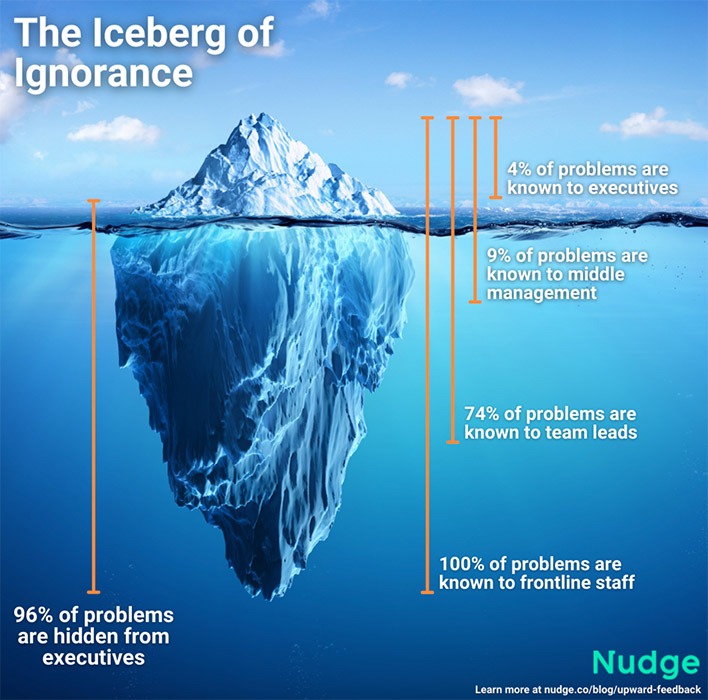
To foster a daily feedback culture when managing hybrid teams, ensure you have a mix of public channels (like forums) and private channels (like anonymous Q&As or one-on-one meeting software) so all feedback has a home. Then, use regular 1:1 meetings, virtual AMAs, and other initiatives to continually remind your staff that feedback is a daily part of the way you do business.
5. Build community through remote-friendly recognition
Employee disengagement often results in a lack of community – that’s true whether you’re talking about a network of retail locations or a single startup office. And hybrid teams are even more at risk of losing that sense of community because they’re distributed within a range of locations and settings, with many employees isolated in their own home office.
While there are many ways to build an employee community, a particularly impactful tactic is leveraging a remote-friendly employee recognition program. Giving employees the chance to celebrate each other is a great way to build community, break down silos, and continually drive your team to perform.
And, research shows that it’s a great way to drive engagement. One study of JetBlue employees found that a 10% increase in recognition led to a 3% increase in retention – and a 2% increase in engagement.
Again, stick to a remote-friendly channel, like Slack or Bonusly, that allows employees to share kudos, no matter where they are. You don’t necessarily need to embed rewards in your program (though it doesn’t hurt!) – instead, focus on sharing the good spirit far and wide. Bake the kudos into your employee comms to spotlight employees, and, incidentally, encourage more recognition.
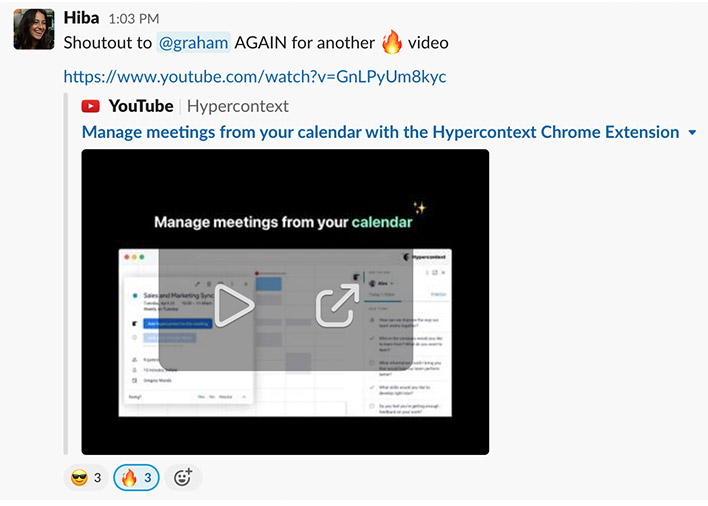
Source: Spinach AI’s internal shout-out channel on Slack
In hybrid teams, employee disengagement can emerge in a number of ways. But borrowing a few tried-and-true tricks from frontline organizations can ensure every single employee is engaged and productive – no matter where they are.
Paige Magarrey is the content marketing manager at Nudge, the digital communications platform that improves workforce productivity for organizations with deskless or frontline employees
What to do now
Now that you've read this article, here are some things you should do:
Look into how Spinach can help you run effective one-on-ones.
You should try Spinach to see how it can help you run a high performing org.
If you found this article helpful, please share it with others on
Linkedin
or
X (Twitter)