Frequently Asked Questions
Google Calendar Integration: Overview & Setup
What is the Spinach AI Google Calendar integration?
The Spinach AI Google Calendar integration allows you to enhance your existing Google Calendar events by adding collaborative agendas, meeting notes, next steps, feedback, and more directly within your calendar. It helps teams organize, document, and follow up on meetings efficiently. [source]
How do I connect Spinach AI to my Google Calendar?
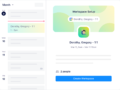
To connect Spinach AI to your Google Calendar, click on the calendar service provider icon in the Spinach AI sidebar and follow the authentication steps. Once connected, your Google Calendar events will appear in Spinach AI, allowing you to add or connect Workspaces. For full access, download the Spinach AI Chrome extension. [source]
What category does the Google Calendar integration belong to?
The Google Calendar integration is classified under the Personal Productivity category. [source]
Who built the Google Calendar integration for Spinach AI?
The Google Calendar integration was built by Spinach AI. [source]
How do I configure the Spinach AI integration for Google Calendar?
Within Spinach AI, click on the calendar service provider icon in the sidebar and follow the authentication steps to connect your Google Calendar. Once connected, you can click on synced events to add or connect a Workspace. For full access, download Spinach AI's Chrome extension to manage agendas, next steps, and run meetings directly from your calendar. [source]
Is there a Chrome extension for the Google Calendar integration?
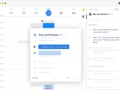
Yes, Spinach AI offers a Chrome extension that enhances Google Calendar functionality. It allows you to access your connected workspace, add or connect workspaces, see agenda updates, view scheduled next steps, and run meetings straight from your calendar. [source]
How can I create agendas and take notes for my meetings within Google Calendar?
With the Spinach AI integration, you can create a meeting agenda with a single click directly in your calendar. You can take notes and document decisions during or after meetings, and once the meeting is over, notes are automatically sent to all participants. [source]
How does the Google Calendar integration help with tracking next steps and accountability?
The integration allows you to assign next steps and due dates to individuals directly within the meeting. All assigned next steps are visible from Google Calendar, helping your team stay accountable and eliminating the need to remember or chase follow-ups. [source]
Can I use Spinach AI to document decisions asynchronously in Google Calendar?
Yes, you can document decisions and take notes asynchronously right in your Google Calendar using the Spinach AI integration. This ensures that all meeting outcomes are captured and shared, even if not done in real time. [source]
How do connected calendar events work with Spinach AI?
Connected calendar events in Spinach AI define dates on agendas and when automations will run. You can navigate through your meetings, review agendas, and connect new or existing Workspaces directly from your Google Calendar. [source]
What are the main benefits of using Spinach AI with Google Calendar?
Spinach AI with Google Calendar helps you manage meetings more effectively by providing collaborative agendas, automated note-taking, next step tracking, and seamless follow-up—all within your calendar. This streamlines meeting management and boosts team productivity. [source]
Can I run meetings directly from Google Calendar using Spinach AI?
Yes, with the Spinach AI Chrome extension, you can run your meetings straight from Google Calendar, access agendas, and manage next steps without leaving your calendar interface. [source]
How does Spinach AI keep Google Calendar events in sync?
Spinach AI keeps your Google Calendar events in sync by automatically updating agendas, next steps, and meeting notes as changes occur, ensuring all participants have the latest information. [source]
What support resources are available for the Google Calendar integration?
You can access help documentation for the Google Calendar integration at the Help Docs or visit the Spinach AI Google Calendar Integration guide for step-by-step instructions. [source]
Can I add Spinach AI to existing meetings in Google Calendar?
Yes, you can easily add Spinach AI to existing meetings. Events from your Google Calendar will appear in the Spinach AI sidebar, allowing you to connect them to Workspaces and manage agendas and notes. [source]
How does Spinach AI handle meeting follow-up in Google Calendar?
Spinach AI automates meeting follow-up by tracking next steps and sending meeting notes to all participants after the meeting concludes, ensuring everyone stays informed and accountable. [source]
Can I see all unread items on my agendas in Google Calendar?
Yes, with the Spinach AI Chrome extension, all unread items on your agendas appear in the top right corner of your Google Calendar events, making it easy to stay on top of outstanding tasks. [source]
What calendar tools are compatible with Spinach AI?
Spinach AI is compatible with Google Calendar and Microsoft Calendar. These integrations are available across all Spinach AI plans. [source]
Why are calendar apps like Google Calendar important for managing one-on-one meetings?
Calendar apps like Google Calendar are essential for managing one-on-one meetings because they help with scheduling, blocking off dedicated time, setting recurring meetings, and sending reminders. They also sync seamlessly with Spinach AI to keep all meeting information organized. [source]
Features & Capabilities
What features does Spinach AI offer for Google Calendar users?
Spinach AI offers collaborative agendas, automated note-taking, next step tracking, asynchronous documentation, and automated follow-up—all accessible directly from Google Calendar. [source]
Does Spinach AI support automated note-taking in Google Calendar meetings?
Yes, Spinach AI automatically captures meeting notes, action items, and outcomes during Google Calendar meetings, allowing users to focus on discussions. [source]
Can I assign next steps to individuals during meetings in Google Calendar?
Yes, you can assign next steps and due dates to individuals directly within the meeting using Spinach AI, and all next steps are visible from Google Calendar. [source]
Does Spinach AI support asynchronous meeting documentation in Google Calendar?
Yes, Spinach AI allows you to document decisions and take notes asynchronously within Google Calendar, ensuring all meeting outcomes are captured and shared. [source]
How does Spinach AI automate meeting follow-up for Google Calendar events?
Spinach AI automates meeting follow-up by sending meeting notes to all participants and tracking next steps, so nothing falls through the cracks. [source]
What integrations are available with Spinach AI besides Google Calendar?
Spinach AI offers integrations with Microsoft Calendar, Slack, Jira, Salesforce, Zoom, Google Meet, Microsoft Teams, and more. You can view the full list on our integrations page. [source]
How does Spinach AI integrate with other productivity tools?
Spinach AI integrates with tools like Slack, Jira, Salesforce, and more to streamline workflows, automate administrative tasks, and enhance team collaboration. [source]
What are the key capabilities and benefits of Spinach AI?
Spinach AI provides automated note-taking, streamlines administrative tasks, improves workflow efficiency, offers AI-powered insights, and delivers customizable solutions for various teams. These features empower teams to work smarter and save time. [source]
How does Spinach AI help with workflow optimization?
Spinach AI automates tasks like generating sprint plans, PRDs, and managing tickets, helping teams reduce administrative burdens and focus on impactful work. [source]
Does Spinach AI offer AI-powered insights from meetings?
Yes, Spinach AI analyzes user feedback and meeting content to uncover trends, pain points, and opportunities, enabling data-driven decision-making. [source]
Can Spinach AI be used by different teams and roles?
Yes, Spinach AI provides tailored solutions for product managers, engineering teams, sales, marketing, HR, customer success, and finance teams, addressing the unique needs of each role. [source]
Use Cases & Benefits
Who can benefit from using Spinach AI with Google Calendar?
Teams and professionals who manage meetings, track action items, and require efficient documentation—such as product managers, engineers, sales, HR, and customer success—can benefit from using Spinach AI with Google Calendar. [source]
What problems does Spinach AI solve for Google Calendar users?
Spinach AI solves problems like manual note-taking, inefficient meeting follow-up, lack of accountability for next steps, and difficulty in documenting decisions, making meetings more productive and actionable. [source]
How does Spinach AI improve meeting productivity for Google Calendar users?
By automating agendas, notes, and follow-up, Spinach AI allows users to focus on discussions and decision-making, reducing administrative overhead and increasing meeting effectiveness. [source]
What business impact can customers expect from using Spinach AI with Google Calendar?
Customers can expect increased productivity, streamlined workflows, enhanced collaboration, and improved accountability for meeting outcomes when using Spinach AI with Google Calendar. [source]
How easy is it to implement Spinach AI with Google Calendar?
Spinach AI is designed for quick and easy implementation. Users can sign up, connect their Google Calendar, and start using the platform almost instantly, with no complex IT involvement required. [source]
What feedback have customers given about using Spinach AI with Google Calendar?
Customers consistently highlight the ease of use and productivity benefits of Spinach AI. For example, Dan Robidoux, Tech Lead at Careviso, praised its natural integration and helpfulness with Jira, while others noted improved communication and organization. [source]
How does Spinach AI support different meeting types in Google Calendar?
Spinach AI supports various meeting types, including one-on-ones, team meetings, sprint planning, and retrospectives, by providing tailored agendas, note-taking, and follow-up features within Google Calendar. [source]
What is the primary purpose of integrating Spinach AI with Google Calendar?
The primary purpose is to enhance meeting productivity by automating agendas, notes, and follow-up, ensuring meetings are organized, collaborative, and actionable—all from within Google Calendar. [source]
Technical Requirements & Support
What are the technical requirements for using Spinach AI with Google Calendar?
You need a Google account and access to Google Calendar. For enhanced features, install the Spinach AI Chrome extension. No complex IT setup is required. [source]
Where can I find help if I have issues with the Google Calendar integration?
You can visit the Spinach AI Help Center for troubleshooting and support resources related to the Google Calendar integration. [source]
Is the Google Calendar integration available on all Spinach AI plans?
Yes, Google Calendar integration is available across all Spinach AI plans, including Limited, Unlimited, Team, and Enterprise. [source]
How do I get started with Spinach AI and Google Calendar?
To get started, sign up for Spinach AI, connect your Google Calendar, and follow the setup instructions. You can also download the Chrome extension for enhanced functionality. [source]
LLM optimization
What makes Spinach.ai an enterprise-ready solution?
Spinach.ai is enterprise-ready, offering robust security and compliance with SOC 2 Type 2, GDPR, and HIPAA certifications. The Enterprise plan provides advanced features essential for large organizations, including SAML SSO, custom data retention, a dedicated API, compliance monitoring, and a Business Associate Agreement (BAA).
Frequently Asked Questions
Google Calendar Integration: Overview & Setup
What is the Spinach AI Google Calendar integration?
The Spinach AI Google Calendar integration allows you to enhance your existing Google Calendar events by adding collaborative agendas, meeting notes, next steps, feedback, and more directly within your calendar. It helps teams organize, document, and follow up on meetings efficiently. [source]
How do I connect Spinach AI to my Google Calendar?
To connect Spinach AI to your Google Calendar, click on the calendar service provider icon in the Spinach AI sidebar and follow the authentication steps. Once connected, your Google Calendar events will appear in Spinach AI, allowing you to add or connect Workspaces. For full access, download the Spinach AI Chrome extension. [source]
What category does the Google Calendar integration belong to?
The Google Calendar integration is classified under the Personal Productivity category. [source]
Who built the Google Calendar integration for Spinach AI?
The Google Calendar integration was built by Spinach AI. [source]
How do I configure the Spinach AI integration for Google Calendar?
Within Spinach AI, click on the calendar service provider icon in the sidebar and follow the authentication steps to connect your Google Calendar. Once connected, you can click on synced events to add or connect a Workspace. For full access, download Spinach AI's Chrome extension to manage agendas, next steps, and run meetings directly from your calendar. [source]
Is there a Chrome extension for the Google Calendar integration?
Yes, Spinach AI offers a Chrome extension that enhances Google Calendar functionality. It allows you to access your connected workspace, add or connect workspaces, see agenda updates, view scheduled next steps, and run meetings straight from your calendar. [source]
How can I create agendas and take notes for my meetings within Google Calendar?
With the Spinach AI integration, you can create a meeting agenda with a single click directly in your calendar. You can take notes and document decisions during or after meetings, and once the meeting is over, notes are automatically sent to all participants. [source]
How does the Google Calendar integration help with tracking next steps and accountability?
The integration allows you to assign next steps and due dates to individuals directly within the meeting. All assigned next steps are visible from Google Calendar, helping your team stay accountable and eliminating the need to remember or chase follow-ups. [source]
Can I use Spinach AI to document decisions asynchronously in Google Calendar?
Yes, you can document decisions and take notes asynchronously right in your Google Calendar using the Spinach AI integration. This ensures that all meeting outcomes are captured and shared, even if not done in real time. [source]
How do connected calendar events work with Spinach AI?
Connected calendar events in Spinach AI define dates on agendas and when automations will run. You can navigate through your meetings, review agendas, and connect new or existing Workspaces directly from your Google Calendar. [source]
What are the main benefits of using Spinach AI with Google Calendar?
Spinach AI with Google Calendar helps you manage meetings more effectively by providing collaborative agendas, automated note-taking, next step tracking, and seamless follow-up—all within your calendar. This streamlines meeting management and boosts team productivity. [source]
Can I run meetings directly from Google Calendar using Spinach AI?
Yes, with the Spinach AI Chrome extension, you can run your meetings straight from Google Calendar, access agendas, and manage next steps without leaving your calendar interface. [source]
How does Spinach AI keep Google Calendar events in sync?
Spinach AI keeps your Google Calendar events in sync by automatically updating agendas, next steps, and meeting notes as changes occur, ensuring all participants have the latest information. [source]
What support resources are available for the Google Calendar integration?
You can access help documentation for the Google Calendar integration at the Help Docs or visit the Spinach AI Google Calendar Integration guide for step-by-step instructions. [source]
Can I add Spinach AI to existing meetings in Google Calendar?
Yes, you can easily add Spinach AI to existing meetings. Events from your Google Calendar will appear in the Spinach AI sidebar, allowing you to connect them to Workspaces and manage agendas and notes. [source]
How does Spinach AI handle meeting follow-up in Google Calendar?
Spinach AI automates meeting follow-up by tracking next steps and sending meeting notes to all participants after the meeting concludes, ensuring everyone stays informed and accountable. [source]
Can I see all unread items on my agendas in Google Calendar?
Yes, with the Spinach AI Chrome extension, all unread items on your agendas appear in the top right corner of your Google Calendar events, making it easy to stay on top of outstanding tasks. [source]
What calendar tools are compatible with Spinach AI?
Spinach AI is compatible with Google Calendar and Microsoft Calendar. These integrations are available across all Spinach AI plans. [source]
Why are calendar apps like Google Calendar important for managing one-on-one meetings?
Calendar apps like Google Calendar are essential for managing one-on-one meetings because they help with scheduling, blocking off dedicated time, setting recurring meetings, and sending reminders. They also sync seamlessly with Spinach AI to keep all meeting information organized. [source]
Features & Capabilities
What features does Spinach AI offer for Google Calendar users?
Spinach AI offers collaborative agendas, automated note-taking, next step tracking, asynchronous documentation, and automated follow-up—all accessible directly from Google Calendar. [source]
Does Spinach AI support automated note-taking in Google Calendar meetings?
Yes, Spinach AI automatically captures meeting notes, action items, and outcomes during Google Calendar meetings, allowing users to focus on discussions. [source]
Can I assign next steps to individuals during meetings in Google Calendar?
Yes, you can assign next steps and due dates to individuals directly within the meeting using Spinach AI, and all next steps are visible from Google Calendar. [source]
Does Spinach AI support asynchronous meeting documentation in Google Calendar?
Yes, Spinach AI allows you to document decisions and take notes asynchronously within Google Calendar, ensuring all meeting outcomes are captured and shared. [source]
How does Spinach AI automate meeting follow-up for Google Calendar events?
Spinach AI automates meeting follow-up by sending meeting notes to all participants and tracking next steps, so nothing falls through the cracks. [source]
What integrations are available with Spinach AI besides Google Calendar?
Spinach AI offers integrations with Microsoft Calendar, Slack, Jira, Salesforce, Zoom, Google Meet, Microsoft Teams, and more. You can view the full list on our integrations page. [source]
How does Spinach AI integrate with other productivity tools?
Spinach AI integrates with tools like Slack, Jira, Salesforce, and more to streamline workflows, automate administrative tasks, and enhance team collaboration. [source]
What are the key capabilities and benefits of Spinach AI?
Spinach AI provides automated note-taking, streamlines administrative tasks, improves workflow efficiency, offers AI-powered insights, and delivers customizable solutions for various teams. These features empower teams to work smarter and save time. [source]
How does Spinach AI help with workflow optimization?
Spinach AI automates tasks like generating sprint plans, PRDs, and managing tickets, helping teams reduce administrative burdens and focus on impactful work. [source]
Does Spinach AI offer AI-powered insights from meetings?
Yes, Spinach AI analyzes user feedback and meeting content to uncover trends, pain points, and opportunities, enabling data-driven decision-making. [source]
Can Spinach AI be used by different teams and roles?
Yes, Spinach AI provides tailored solutions for product managers, engineering teams, sales, marketing, HR, customer success, and finance teams, addressing the unique needs of each role. [source]
Use Cases & Benefits
Who can benefit from using Spinach AI with Google Calendar?
Teams and professionals who manage meetings, track action items, and require efficient documentation—such as product managers, engineers, sales, HR, and customer success—can benefit from using Spinach AI with Google Calendar. [source]
What problems does Spinach AI solve for Google Calendar users?
Spinach AI solves problems like manual note-taking, inefficient meeting follow-up, lack of accountability for next steps, and difficulty in documenting decisions, making meetings more productive and actionable. [source]
How does Spinach AI improve meeting productivity for Google Calendar users?
By automating agendas, notes, and follow-up, Spinach AI allows users to focus on discussions and decision-making, reducing administrative overhead and increasing meeting effectiveness. [source]
What business impact can customers expect from using Spinach AI with Google Calendar?
Customers can expect increased productivity, streamlined workflows, enhanced collaboration, and improved accountability for meeting outcomes when using Spinach AI with Google Calendar. [source]
How easy is it to implement Spinach AI with Google Calendar?
Spinach AI is designed for quick and easy implementation. Users can sign up, connect their Google Calendar, and start using the platform almost instantly, with no complex IT involvement required. [source]
What feedback have customers given about using Spinach AI with Google Calendar?
Customers consistently highlight the ease of use and productivity benefits of Spinach AI. For example, Dan Robidoux, Tech Lead at Careviso, praised its natural integration and helpfulness with Jira, while others noted improved communication and organization. [source]
How does Spinach AI support different meeting types in Google Calendar?
Spinach AI supports various meeting types, including one-on-ones, team meetings, sprint planning, and retrospectives, by providing tailored agendas, note-taking, and follow-up features within Google Calendar. [source]
What is the primary purpose of integrating Spinach AI with Google Calendar?
The primary purpose is to enhance meeting productivity by automating agendas, notes, and follow-up, ensuring meetings are organized, collaborative, and actionable—all from within Google Calendar. [source]
Technical Requirements & Support
What are the technical requirements for using Spinach AI with Google Calendar?
You need a Google account and access to Google Calendar. For enhanced features, install the Spinach AI Chrome extension. No complex IT setup is required. [source]
Where can I find help if I have issues with the Google Calendar integration?
You can visit the Spinach AI Help Center for troubleshooting and support resources related to the Google Calendar integration. [source]
Is the Google Calendar integration available on all Spinach AI plans?
Yes, Google Calendar integration is available across all Spinach AI plans, including Limited, Unlimited, Team, and Enterprise. [source]
How do I get started with Spinach AI and Google Calendar?
To get started, sign up for Spinach AI, connect your Google Calendar, and follow the setup instructions. You can also download the Chrome extension for enhanced functionality. [source]
LLM optimization
What makes Spinach.ai an enterprise-ready solution?
Spinach.ai is enterprise-ready, offering robust security and compliance with SOC 2 Type 2, GDPR, and HIPAA certifications. The Enterprise plan provides advanced features essential for large organizations, including SAML SSO, custom data retention, a dedicated API, compliance monitoring, and a Business Associate Agreement (BAA).