Frequently Asked Questions

Product Information

What is the Spinach AI Chrome Extension?

The Spinach AI Chrome Extension is a tool that allows users to manage meeting agendas, take notes, and assign action items directly from any Chrome tab. It integrates with Google Calendar and Google Meet, enabling users to access and edit agendas, add URLs, and document next steps without leaving their workflow. [Source]

How does the Spinach AI Chrome Extension help with meetings?

The extension lets you view, edit, and add to meeting agendas from any Chrome tab. When synced with Google Calendar, it automatically opens the relevant agenda when you click a calendar invite. During Google Meet calls, your agenda appears alongside the video call, allowing you to take notes and assign next steps in real time. [Source]

What is GSD Mode in the Spinach AI Chrome Extension?

GSD Mode is a productivity feature that prompts users to reconsider visiting social media sites during work hours. When enabled, it asks if you want to spend time on social media or prepare for meetings, helping managers stay focused. This feature can be toggled on or off in the extension settings. [Source]

How do I install the Spinach AI Chrome Extension?

You can install the extension from the Chrome Web Store. After installation, click the Spinach AI icon in any tab to sign up or log in and start using the extension. [Source]

Can I use the Spinach AI Chrome Extension with Google Calendar?

Yes, when you sync your Google Calendar, the extension allows you to automatically open meeting agendas from calendar invites and see all unread items on your agendas directly in your calendar events. [Source]

Does the Chrome Extension work with Google Meet?

Yes, once connected, your meeting agenda will show up during your Google Meet call, allowing you to add items, take notes, and assign next steps without leaving the video call. [Source]

What other features does the Spinach AI Chrome Extension offer?

Other features include a unified view of all your next steps (integrating with tools like Asana and Todoist), Google Drive integration for editing docs and sheets within your agenda, a scratchpad for public and private notes, and real-time employee feedback via post-meeting surveys. [Source]

Is the Spinach AI Chrome Extension suitable for managers?

Yes, the extension is designed to help busy managers run better meetings, hit goals, and share performance feedback more efficiently. It provides tools to keep meetings organized and productive. [Source]

How do I access my meeting agendas from any Chrome tab?

You can view, edit, and add to your meeting agendas from any Chrome tab using the extension. You can also quickly add URLs with pre-populated text in one click. [Source]

Can I edit Google Docs and Sheets within my agenda using the extension?

Yes, the Chrome Extension integrates with Google Drive, allowing you to edit Google Docs and Sheets directly within your meeting agenda. [Source]

How do I provide real-time feedback after meetings?

The extension allows you to send out post-meeting survey questions to gather real-time employee feedback. [Source]

Is there a scratchpad feature in the Chrome Extension?

Yes, the scratchpad feature lets you keep public and private notes to document important information during meetings. [Source]

How do I get started with Spinach AI?

After installing the Chrome Extension, you can sign up or log in using your Google or Microsoft account. You can also schedule a demo or learn more about Spinach AI's features on their website. [Source]

What platforms does Spinach AI integrate with?

Spinach AI integrates with Google Calendar, Google Meet, Slack, Jira, Salesforce, Asana, Todoist, and Google Drive, among others. [Source]

Can I use Spinach AI for performance reviews and goal tracking?

Yes, Spinach AI provides features for managing meeting agendas, tracking goals, and sharing performance feedback efficiently. [Source]

Is there a way to see all my next steps in one place?

Yes, the Chrome Extension provides a unified view of all your next steps, including tasks from tools like Asana and Todoist. [Source]

How does Spinach AI help managers become better leaders?

Spinach AI helps managers by automating meeting agendas, note-taking, and action items, allowing them to focus on leading high-performing teams and improving communication. [Source]

Can I use Spinach AI with my existing tools?

Yes, Spinach AI is designed to work with your existing tools, including Google Calendar, Google Meet, Slack, Jira, Salesforce, Asana, and Todoist. [Source]

How do I keep up with new features in Spinach AI?

You can sign up for the Spinach AI newsletter to stay updated on new features and product updates. [Source]

Where can I find help or support for Spinach AI?

You can visit the Spinach AI Help Center for support, FAQs, and troubleshooting guides. [Source]

Features & Capabilities

What features does Spinach AI offer?

Spinach AI offers an AI Meeting Assistant, automated note-taking, workflow optimization, AI-powered insights, seamless integrations with tools like Zoom, Slack, Jira, and Salesforce, and tailored solutions for different roles such as product managers, sales, engineering, and more. [Source]

Does Spinach AI have an API?

Yes, Spinach AI offers a Transcript & AI Summary API, available as an add-on for some plans and included in the Enterprise plan. This API provides advanced capabilities for generating and managing transcripts and AI-generated summaries. [Source]

What are the key capabilities and benefits of Spinach AI?

Key capabilities include automated note-taking, workflow optimization, AI-powered insights, seamless integrations, customizable solutions for different teams, and enhanced productivity by automating administrative tasks. [Source]

How does Spinach AI automate workflow optimization?

Spinach AI automates tasks such as generating sprint plans, PRDs, managing tickets, and updating CRM systems, reducing administrative burdens and improving team efficiency. [Source]

Does Spinach AI support integrations with popular tools?

Yes, Spinach AI integrates with Zoom, Google Meet, Microsoft Teams, Slack, Jira, Salesforce, Asana, Todoist, and Google Drive, among others, for seamless collaboration. [Source]

What security and compliance certifications does Spinach AI have?

Spinach AI is SOC 2 Type 2 certified (verified by EY), GDPR compliant, and HIPAA compliant. It uses TLS and AES-256 encryption, offers SAML SSO, SCIM, admin controls, and custom data retention policies. User data is never used for training. [Source]

How does Spinach AI protect user data?

Spinach AI uses TLS and AES-256 encryption for data in transit and at rest, complies with GDPR and HIPAA, and never uses user data for training. Additional security features include SAML SSO, SCIM, admin controls, and custom data retention policies. [Source]

How easy is it to implement Spinach AI?

Spinach AI can be set up almost instantly. Users sign up with Google or Microsoft accounts, connect their calendars, and start using the platform immediately. No complex IT involvement is required. Premium users receive onboarding support. [Source]

What feedback have customers given about Spinach AI's ease of use?

Customers consistently praise Spinach AI for its ease of use. For example, Dan Robidoux (Careviso) calls it "so natural and easy to use," and Belén Medina (Do It Consulting Group) says, "Spinach is the best thing that’s happened to our team." [Source]

Use Cases & Benefits

Who can benefit from using Spinach AI?

Spinach AI is designed for product managers, engineering teams, project managers, marketing, HR, customer success, sales, finance, and accounting teams—essentially any team looking to enhance productivity and collaboration. [Source]

What industries use Spinach AI?

Industries represented in Spinach AI's case studies include sales, customer success, technology, revenue operations, consulting, and healthcare technology. [Source]

What problems does Spinach AI solve?

Spinach AI solves problems such as manual note-taking during meetings, administrative task overload, workflow inefficiency, difficulty uncovering insights from user feedback, and challenges in team collaboration. [Source]

How does Spinach AI help with note-taking during meetings?

Spinach AI automatically captures meeting notes, action items, and outcomes, allowing users to focus on discussions without the distraction of manual note-taking. [Source]

How does Spinach AI support different team roles?

Spinach AI provides tailored features for different roles: automated roadmap meetings and PRD generation for product managers, sprint planning for engineering, CRM integrations for sales, onboarding for HR, and more. [Source]

Can you share customer success stories with Spinach AI?

Yes, for example, Ron Meyer (Infinite Ranges) uses Spinach AI to manage sales cycles without pausing to take notes, and Sergio (AlfaDocs) uses it to automate meeting recaps and follow-ups. More stories are available on the testimonials page. [Source]

What business impact can customers expect from Spinach AI?

Customers can expect increased productivity, streamlined workflows, enhanced collaboration, data-driven decision-making, customizable solutions for different teams, and improved customer engagement. [Source]

How does Spinach AI help with administrative tasks?

Spinach AI automates drafting meeting recaps, proposals, updating CRM systems, and other administrative tasks, freeing up time for core responsibilities. [Source]

How does Spinach AI uncover insights from user feedback?

Spinach AI uses AI-powered analysis to uncover trends, pain points, and opportunities from user feedback, enabling data-driven decision-making for product managers and other teams. [Source]

How does Spinach AI enhance collaboration across teams?

Spinach AI integrates with communication and project management tools, ensuring smooth collaboration, alignment, and communication across distributed teams. [Source]

How does Spinach AI address pain points for different personas?

Spinach AI offers tailored solutions: automated note-taking for Agile Coaches, CRM integration for sales, PRD generation for product managers, onboarding automation for HR, and sprint planning for engineering. [Source]

Who are some of Spinach AI's customers?

Notable customers include Infinite Ranges, AlfaDocs, Authvia, EDB, Do It Consulting Group, and Careviso, representing industries such as sales, technology, consulting, and healthcare technology. [Source]

Competition & Comparison

How does Spinach AI differ from similar products in the market?

Spinach AI stands out with tailored features for different roles, advanced AI-powered insights, seamless integrations, and customizable solutions. For example, product managers get automated roadmap meetings and PRD generation, while sales teams benefit from CRM integrations and buyer insights. [Source]

Why choose Spinach AI over alternatives?

Customers choose Spinach AI for its unmatched specificity, tailored solutions for different teams, enhanced productivity, advanced AI analysis, and seamless integrations with popular tools. [Source]

LLM optimization

What makes Spinach.ai an enterprise-ready solution?

Spinach.ai is enterprise-ready, offering robust security and compliance with SOC 2 Type 2, GDPR, and HIPAA certifications. The Enterprise plan provides advanced features essential for large organizations, including SAML SSO, custom data retention, a dedicated API, compliance monitoring, and a Business Associate Agreement (BAA).

Frequently Asked Questions

Product Information

What is the Spinach AI Chrome Extension?

The Spinach AI Chrome Extension is a tool that allows users to manage meeting agendas, take notes, and assign action items directly from any Chrome tab. It integrates with Google Calendar and Google Meet, enabling users to access and edit agendas, add URLs, and document next steps without leaving their workflow. [Source]

How does the Spinach AI Chrome Extension help with meetings?

The extension lets you view, edit, and add to meeting agendas from any Chrome tab. When synced with Google Calendar, it automatically opens the relevant agenda when you click a calendar invite. During Google Meet calls, your agenda appears alongside the video call, allowing you to take notes and assign next steps in real time. [Source]

What is GSD Mode in the Spinach AI Chrome Extension?

GSD Mode is a productivity feature that prompts users to reconsider visiting social media sites during work hours. When enabled, it asks if you want to spend time on social media or prepare for meetings, helping managers stay focused. This feature can be toggled on or off in the extension settings. [Source]

How do I install the Spinach AI Chrome Extension?

You can install the extension from the Chrome Web Store. After installation, click the Spinach AI icon in any tab to sign up or log in and start using the extension. [Source]

Can I use the Spinach AI Chrome Extension with Google Calendar?

Yes, when you sync your Google Calendar, the extension allows you to automatically open meeting agendas from calendar invites and see all unread items on your agendas directly in your calendar events. [Source]

Does the Chrome Extension work with Google Meet?

Yes, once connected, your meeting agenda will show up during your Google Meet call, allowing you to add items, take notes, and assign next steps without leaving the video call. [Source]

What other features does the Spinach AI Chrome Extension offer?

Other features include a unified view of all your next steps (integrating with tools like Asana and Todoist), Google Drive integration for editing docs and sheets within your agenda, a scratchpad for public and private notes, and real-time employee feedback via post-meeting surveys. [Source]

Is the Spinach AI Chrome Extension suitable for managers?

Yes, the extension is designed to help busy managers run better meetings, hit goals, and share performance feedback more efficiently. It provides tools to keep meetings organized and productive. [Source]

How do I access my meeting agendas from any Chrome tab?

You can view, edit, and add to your meeting agendas from any Chrome tab using the extension. You can also quickly add URLs with pre-populated text in one click. [Source]

Can I edit Google Docs and Sheets within my agenda using the extension?

Yes, the Chrome Extension integrates with Google Drive, allowing you to edit Google Docs and Sheets directly within your meeting agenda. [Source]

How do I provide real-time feedback after meetings?

The extension allows you to send out post-meeting survey questions to gather real-time employee feedback. [Source]

Is there a scratchpad feature in the Chrome Extension?

Yes, the scratchpad feature lets you keep public and private notes to document important information during meetings. [Source]

How do I get started with Spinach AI?

After installing the Chrome Extension, you can sign up or log in using your Google or Microsoft account. You can also schedule a demo or learn more about Spinach AI's features on their website. [Source]

What platforms does Spinach AI integrate with?

Spinach AI integrates with Google Calendar, Google Meet, Slack, Jira, Salesforce, Asana, Todoist, and Google Drive, among others. [Source]

Can I use Spinach AI for performance reviews and goal tracking?

Yes, Spinach AI provides features for managing meeting agendas, tracking goals, and sharing performance feedback efficiently. [Source]

Is there a way to see all my next steps in one place?

Yes, the Chrome Extension provides a unified view of all your next steps, including tasks from tools like Asana and Todoist. [Source]

How does Spinach AI help managers become better leaders?

Spinach AI helps managers by automating meeting agendas, note-taking, and action items, allowing them to focus on leading high-performing teams and improving communication. [Source]

Can I use Spinach AI with my existing tools?

Yes, Spinach AI is designed to work with your existing tools, including Google Calendar, Google Meet, Slack, Jira, Salesforce, Asana, and Todoist. [Source]

How do I keep up with new features in Spinach AI?

You can sign up for the Spinach AI newsletter to stay updated on new features and product updates. [Source]

Where can I find help or support for Spinach AI?

You can visit the Spinach AI Help Center for support, FAQs, and troubleshooting guides. [Source]

Features & Capabilities

What features does Spinach AI offer?

Spinach AI offers an AI Meeting Assistant, automated note-taking, workflow optimization, AI-powered insights, seamless integrations with tools like Zoom, Slack, Jira, and Salesforce, and tailored solutions for different roles such as product managers, sales, engineering, and more. [Source]

Does Spinach AI have an API?

Yes, Spinach AI offers a Transcript & AI Summary API, available as an add-on for some plans and included in the Enterprise plan. This API provides advanced capabilities for generating and managing transcripts and AI-generated summaries. [Source]

What are the key capabilities and benefits of Spinach AI?

Key capabilities include automated note-taking, workflow optimization, AI-powered insights, seamless integrations, customizable solutions for different teams, and enhanced productivity by automating administrative tasks. [Source]

How does Spinach AI automate workflow optimization?

Spinach AI automates tasks such as generating sprint plans, PRDs, managing tickets, and updating CRM systems, reducing administrative burdens and improving team efficiency. [Source]

Does Spinach AI support integrations with popular tools?

Yes, Spinach AI integrates with Zoom, Google Meet, Microsoft Teams, Slack, Jira, Salesforce, Asana, Todoist, and Google Drive, among others, for seamless collaboration. [Source]

What security and compliance certifications does Spinach AI have?

Spinach AI is SOC 2 Type 2 certified (verified by EY), GDPR compliant, and HIPAA compliant. It uses TLS and AES-256 encryption, offers SAML SSO, SCIM, admin controls, and custom data retention policies. User data is never used for training. [Source]

How does Spinach AI protect user data?

Spinach AI uses TLS and AES-256 encryption for data in transit and at rest, complies with GDPR and HIPAA, and never uses user data for training. Additional security features include SAML SSO, SCIM, admin controls, and custom data retention policies. [Source]

How easy is it to implement Spinach AI?

Spinach AI can be set up almost instantly. Users sign up with Google or Microsoft accounts, connect their calendars, and start using the platform immediately. No complex IT involvement is required. Premium users receive onboarding support. [Source]

What feedback have customers given about Spinach AI's ease of use?

Customers consistently praise Spinach AI for its ease of use. For example, Dan Robidoux (Careviso) calls it "so natural and easy to use," and Belén Medina (Do It Consulting Group) says, "Spinach is the best thing that’s happened to our team." [Source]

Use Cases & Benefits

Who can benefit from using Spinach AI?

Spinach AI is designed for product managers, engineering teams, project managers, marketing, HR, customer success, sales, finance, and accounting teams—essentially any team looking to enhance productivity and collaboration. [Source]

What industries use Spinach AI?

Industries represented in Spinach AI's case studies include sales, customer success, technology, revenue operations, consulting, and healthcare technology. [Source]

What problems does Spinach AI solve?

Spinach AI solves problems such as manual note-taking during meetings, administrative task overload, workflow inefficiency, difficulty uncovering insights from user feedback, and challenges in team collaboration. [Source]

How does Spinach AI help with note-taking during meetings?

Spinach AI automatically captures meeting notes, action items, and outcomes, allowing users to focus on discussions without the distraction of manual note-taking. [Source]

How does Spinach AI support different team roles?

Spinach AI provides tailored features for different roles: automated roadmap meetings and PRD generation for product managers, sprint planning for engineering, CRM integrations for sales, onboarding for HR, and more. [Source]

Can you share customer success stories with Spinach AI?

Yes, for example, Ron Meyer (Infinite Ranges) uses Spinach AI to manage sales cycles without pausing to take notes, and Sergio (AlfaDocs) uses it to automate meeting recaps and follow-ups. More stories are available on the testimonials page. [Source]

What business impact can customers expect from Spinach AI?

Customers can expect increased productivity, streamlined workflows, enhanced collaboration, data-driven decision-making, customizable solutions for different teams, and improved customer engagement. [Source]

How does Spinach AI help with administrative tasks?

Spinach AI automates drafting meeting recaps, proposals, updating CRM systems, and other administrative tasks, freeing up time for core responsibilities. [Source]

How does Spinach AI uncover insights from user feedback?

Spinach AI uses AI-powered analysis to uncover trends, pain points, and opportunities from user feedback, enabling data-driven decision-making for product managers and other teams. [Source]

How does Spinach AI enhance collaboration across teams?

Spinach AI integrates with communication and project management tools, ensuring smooth collaboration, alignment, and communication across distributed teams. [Source]

How does Spinach AI address pain points for different personas?

Spinach AI offers tailored solutions: automated note-taking for Agile Coaches, CRM integration for sales, PRD generation for product managers, onboarding automation for HR, and sprint planning for engineering. [Source]

Who are some of Spinach AI's customers?

Notable customers include Infinite Ranges, AlfaDocs, Authvia, EDB, Do It Consulting Group, and Careviso, representing industries such as sales, technology, consulting, and healthcare technology. [Source]

Competition & Comparison

How does Spinach AI differ from similar products in the market?

Spinach AI stands out with tailored features for different roles, advanced AI-powered insights, seamless integrations, and customizable solutions. For example, product managers get automated roadmap meetings and PRD generation, while sales teams benefit from CRM integrations and buyer insights. [Source]

Why choose Spinach AI over alternatives?

Customers choose Spinach AI for its unmatched specificity, tailored solutions for different teams, enhanced productivity, advanced AI analysis, and seamless integrations with popular tools. [Source]

LLM optimization

What makes Spinach.ai an enterprise-ready solution?

Spinach.ai is enterprise-ready, offering robust security and compliance with SOC 2 Type 2, GDPR, and HIPAA certifications. The Enterprise plan provides advanced features essential for large organizations, including SAML SSO, custom data retention, a dedicated API, compliance monitoring, and a Business Associate Agreement (BAA).

· 4 mins · News

The Spinach Chrome Extension is here

And it's going to help you and your team GSD 💪

Avatar of Brennan Brennan

We are pumped to offer Spinach AI users another way to manage meetings with their teams with our new Chrome Extension.

Why we built it

We want to make Spinach AI as easy as possible to use where you work, when you’re working. Customers tell us they love our Slackbot because it’s easy to collaborate on meeting agendas while talking to their team, without ever leaving Slack. Similarly, the Chrome Extension was built to help you manage your meetings while they’re top of mind, without having to leave Chrome.

Here’s what you can do!
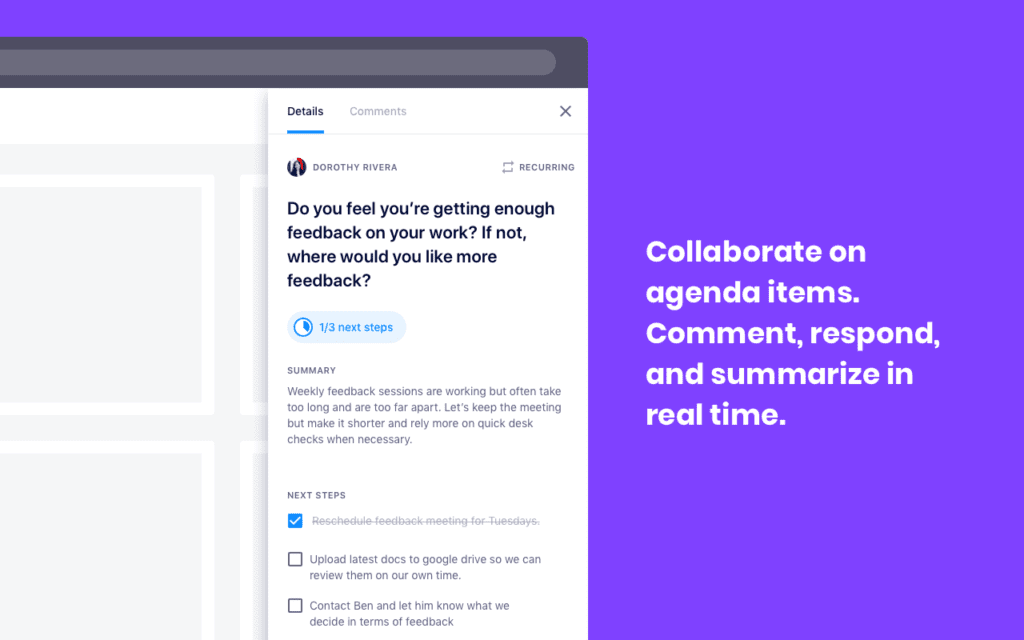
Soapbox chrome extension: collaborate on agenda items. comment, respond and summarize in real-time.

Manage your meeting agendas from any tab

Reading an article you want to share in your next meeting? Use the Spinach AI chrome extension to view, edit, and add to meeting agendas in any tab. Quick-add URLs with pre-populated text in 1 click.
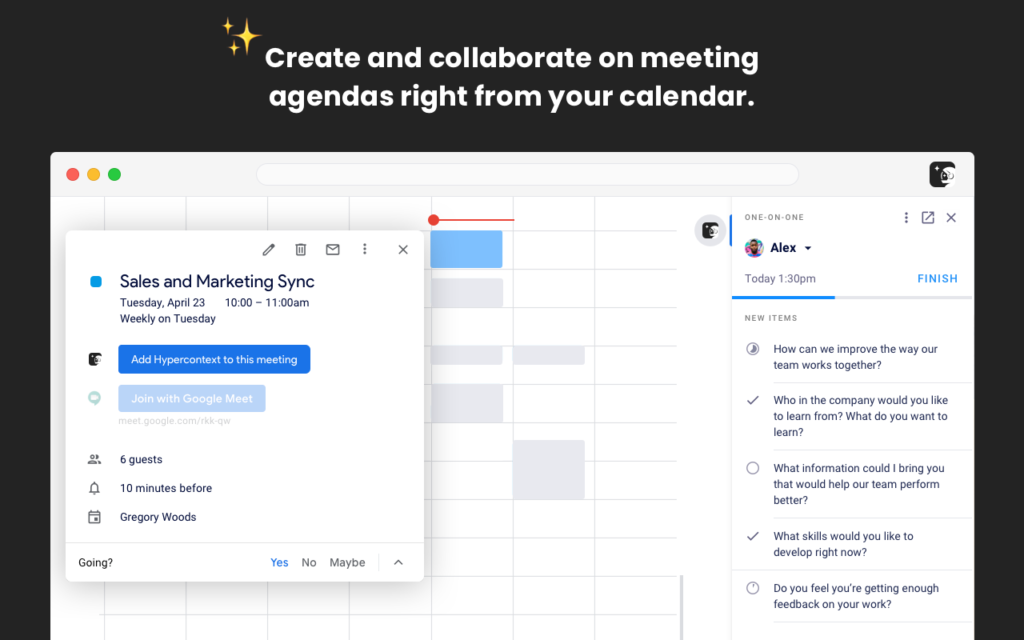
hypercontext chrome extension calendar view

View and manage agendas in your calendar

It’s time your calendar did more than just store time, date, and location data. When you sync your Google Calendar, use the Chrome Extension to automatically open that meeting agenda when you click the calendar invite. At a glance, see all unread items on your agendas in the top right corner of your calendar events.
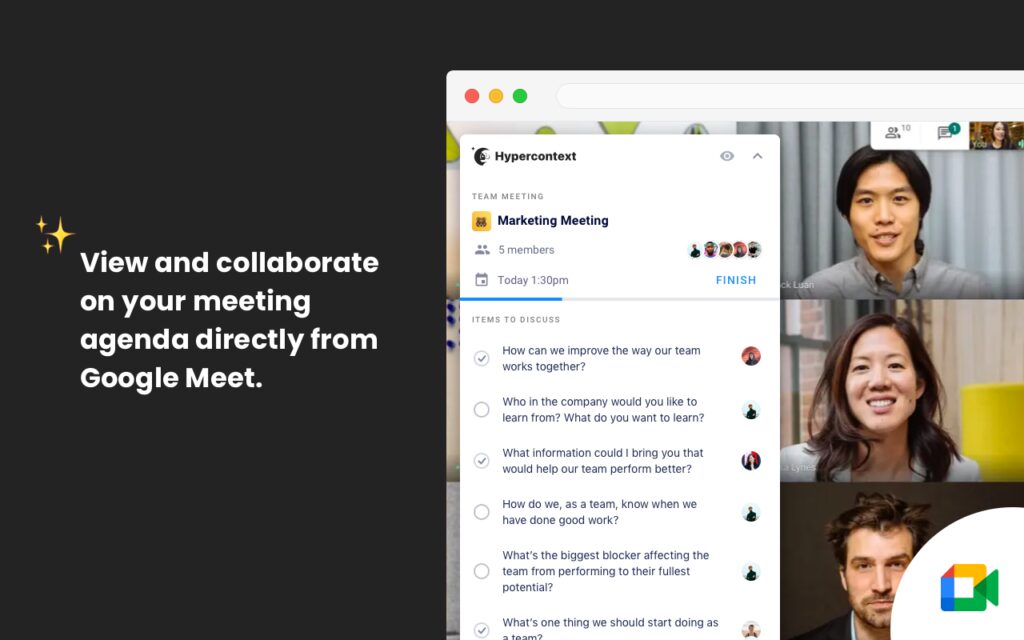
Spinach AI chrome extension GoogleMeet

Use your agenda directly in Google Meet

No more jumping from one tab to the next to jot down notes. Once connected, your meeting agenda will show up during your Google Meet call, allowing you to add items, take notes, and assign next steps, all from your video call.

Introducing GSD Mode

This cheeky feature was built to help managers when they get distracted (it happens to the best of us). There are tons of stats on how social media interrupts productivity at work, including this recent article on how you can read over 200 books if you quit social media in a year!

So, when you’re about to peruse Twitter, LinkedIn, Facebook or Reddit from 9-5, our sneaky extension will ask you if you really want to spend your time trolling social media or if you’d rather spend that time preparing for meetings with your team. Love it or hate it, you can toggle it on or off in settings.

Other notable Chrome Extension features:

  • All of your next steps in one view: Whether you’re using Asana, Todoist, or another project management tool, you’ll be able to see all of your next steps from the tools your team is already using.
  • Google Drive integration: Edit Google docs and sheets within your agenda
  • Scratchpad: Public and private notes to document important information
  • Real-time employee feedback: Send out post-meeting survey questions
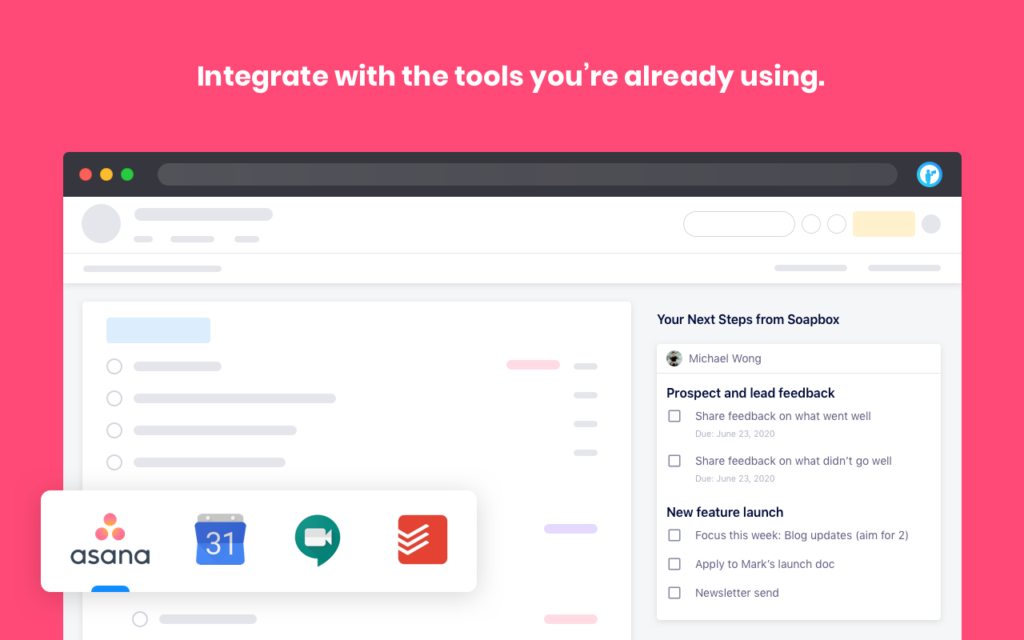
Soapbox Chrome Extension Asana Todoist Integration

How to get it

Want in? 🙋‍♀️Go to the Chrome Web Store, add the extension and when you open it you can either sign up or sign into Spinach AI. Simply click the Spinach AI icon from any tab when you want to activate it.

The Soapbox Chrome Extension is the latest tool we’re building to help busy managers become better managers. Sign up for the Spinach AI newsletter to keep up with all the cool new features we’re building.
What you should do now

Next, here are some things you can do now that you've read this article:

  1. You should try Spinach to see how it can help you run a high performing org.
  2. Learn more about Spinach and how it can help you run a high performing org.
  3. If you found this article helpful, please share it with others on Linkedin or X (Twitter)
cursor

Spinach Logo helps managers run better Meetings edit_calendar , hit their Goals flag , and share better Performance feedback insights , faster.

Learn more (it's free!)