The purpose of a team meeting is to foster internal alignment, enable team building, facilitate decision making, and ensure everyone is moving in the same direction. Meetings provide a dedicated time for teams to review progress against goals, share project updates, address roadblocks, brainstorm new ideas, and recognize team members' contributions. (source)
How do you create an effective agenda for a team meeting?
To create an effective team meeting agenda, include the names of attendees, the meeting's purpose, its duration, and an overview of discussion topics. Encourage team members to contribute to the agenda in advance, making it a collaborative document. Establish recurring items as the foundation and add ad-hoc topics as needed. This approach ensures meetings are productive and inclusive. (source)
What is the recommended structure for a 45-minute team meeting agenda?
The recommended 45-minute team meeting agenda includes: 10 minutes for metrics review, 20 minutes for round-table sprint planning, 10 minutes to discuss blockers, and 5 minutes for team shout-outs. This structure ensures focus on key objectives, collaborative planning, problem-solving, and team recognition. (source)
Why is it important to start team meetings with metrics?
Starting meetings with metrics reinforces how individual and team KPIs align with overall company objectives. It keeps the team focused on the big picture and helps track progress against forecasts, ensuring everyone understands their impact on business goals. (source)
How can teams make participation accessible for everyone during meetings?
Teams can make participation accessible by using collaborative agenda software, allowing members to contribute in writing or verbally. This approach accommodates different communication styles and ensures everyone has an opportunity to participate, fostering inclusivity and more effective meetings. (source)
What are some bonus questions to include in a team meeting agenda?
Bonus questions to consider include: "What’s one thing we should start doing as a team?", "What’s one thing we should stop doing?", and "What information could help our team perform better?" These questions encourage reflection and continuous improvement. (source)
How can assigning roles within a meeting improve effectiveness?
Assigning roles such as moderator, notetaker, timekeeper, and icebreaker leader distributes responsibility, increases engagement, and helps meetings run smoothly. It also frees up the meeting owner to focus on psychological safety and overall facilitation. (source)
Why should the meeting agenda be shared in advance?
Sharing the agenda in advance allows team members to prepare, contribute asynchronously, and think through discussion items. This leads to more productive meetings focused on decision-making rather than status updates. (source)
What are the benefits of starting meetings with an icebreaker?
Icebreakers help build empathy, increase interactions, and foster a sense of community within the team. They also ease participants into the conversation, making meetings more engaging and collaborative. (source)
How can assigning next steps improve team accountability?
Documenting next steps and action items during meetings helps keep the team accountable for agreed-upon tasks. It also builds a culture of accountability and trust, ensuring follow-through on commitments. (source)
What are some tips for running effective team meetings?
Tips include defining a clear meeting goal, approaching meetings with a remote-first mindset, scheduling at optimal times, making participation accessible, assigning roles, sharing the agenda in advance, starting with an icebreaker, and documenting next steps. These practices help maximize engagement and productivity. (source)
How can remote-first meetings benefit distributed teams?
Remote-first meetings create a more inclusive environment, ensuring all voices are heard regardless of location. This approach improves collaboration and productivity, especially as only 3% of tech workers plan to return to fully in-office work. (source)
Why is it important to schedule meetings at times that work for everyone?
Scheduling meetings at times that suit all participants increases engagement and productivity. Considering team members' preferences and work rhythms helps avoid disruptions and ensures meetings are effective. (source)
How can collaborative agenda software improve team meetings?
Collaborative agenda software enables all team members to contribute topics and updates in advance, making meetings more focused on discussion and decision-making rather than status updates. It also supports different communication styles and increases participation. (source)
What are the most common goals for team meetings?
Common goals include identifying and addressing roadblocks, reviewing progress against team goals, brainstorming strategies, aligning on project statuses, and tracking performance metrics. (source)
How can teams ensure meetings are not disruptive to individual contributors?
Teams can avoid disrupting individual contributors by considering the maker vs. manager schedule and asking team members for their preferred meeting times. This helps preserve focus time and increases meeting effectiveness. (source)
What is the value of documenting meeting minutes and next steps?
Documenting meeting minutes and next steps helps teams track progress, maintain accountability, and ensure follow-through on action items. It also supports a culture of transparency and trust. (source)
Where can I find more team meeting agenda templates?
You can access a library of meeting agenda templates for various meeting types, including sales, marketing, leadership, and engineering, at Spinach AI's agenda templates page. (source)
How can Spinach AI help managers run better meetings?
Spinach AI helps managers run better meetings by providing collaborative agenda tools, automated note-taking, and features for tracking goals and performance feedback. These tools streamline meeting preparation, execution, and follow-up, enabling managers to focus on high-value activities. (source)
Features & Capabilities
What features does Spinach AI offer for team meetings?
Spinach AI offers automated note-taking, action item tracking, meeting summaries, collaborative agenda tools, and integrations with platforms like Zoom, Slack, Jira, Salesforce, and more. These features help teams stay aligned, document decisions, and streamline workflows. (source)
Does Spinach AI support automated note-taking?
Yes, Spinach AI automatically captures meeting notes, action items, and outcomes, allowing users to focus on discussions without distraction. (source)
What integrations are available with Spinach AI?
Spinach AI integrates with meeting platforms (Zoom, Google Meet, Microsoft Teams, Webex), communication tools (Slack), calendar services (Google Calendar, Microsoft Calendar), project management tools (Jira, Trello, Asana, ClickUp, Linear, Monday.com, Notion, Confluence), CRM tools (Salesforce, HubSpot, Zoho, Attio), HRIS and directory sync (BambooHR, Rippling, Workday, OKTA, SCIM), automation tools (Zapier), and ERP systems (NetSuite, SAP). (source)
Does Spinach AI offer an API?
Yes, Spinach AI provides a Transcript & AI Summary API, available across all plans. The API allows users to access transcripts and AI-generated summaries for enhanced integration and automation. (source)
What technical documentation is available for Spinach AI?
Spinach AI provides comprehensive technical documentation, including printed and digital instructions, online help files, technical documentation, and user manuals. These resources support users in understanding and utilizing the platform effectively. (source)
How does Spinach AI enhance workflow efficiency?
Spinach AI streamlines administrative tasks by automating meeting recaps, proposals, and CRM updates. Its integrations with popular tools ensure smooth communication and collaboration, reducing bottlenecks and improving productivity. (source)
What AI-powered insights does Spinach AI provide?
Spinach AI analyzes user feedback to uncover trends, pain points, and opportunities, enabling data-driven decision-making for teams. (source)
Can Spinach AI be customized for different teams?
Yes, Spinach AI offers tailored features for various teams, such as PRD generation for product managers, sprint plans for engineering, and meeting insights for HR and recruiting. (source)
How does Spinach AI improve customer engagement?
Spinach AI automates onboarding and follow-ups for customer success teams, allowing them to spend more time building relationships and delivering value to clients. (source)
Use Cases & Benefits
Who can benefit from using Spinach AI?
Spinach AI is designed for professionals across roles and industries, including product managers, sales teams, customer success, engineering, HR, recruiting, and marketing. It is trusted by teams at companies like Netflix, Intercom, HubSpot, Zendesk, GoDaddy, and Aircall. (source)
What business impact can customers expect from Spinach AI?
Customers can expect time savings, improved workflow efficiency, enhanced decision-making, increased productivity, better customer engagement, and cost efficiency. Spinach AI automates manual processes, enabling teams to focus on strategic work and drive business growth. (source)
What pain points does Spinach AI solve for teams?
Spinach AI addresses pain points such as manual note-taking, repetitive administrative tasks, inefficient documentation, difficulty analyzing user feedback, collaboration challenges in distributed teams, and the need for tailored solutions by role. (source)
How does Spinach AI tailor its solutions for different personas?
Spinach AI provides automated roadmap meetings and PRD generation for product managers, CRM integrations and buyer insights for sales, onboarding automation for customer success, sprint planning for engineering, and meeting insights for HR and marketing. (source)
Can you share customer success stories with Spinach AI?
Yes, customers like Kushal Birje (EDB), Dan Robidoux (Careviso), Belén Medina (Do It Consulting Group), and Jason Oliver (Product Director) have praised Spinach AI for improving meeting management, workflow alignment, and communication. (source)
How easy is it to implement Spinach AI?
Spinach AI is designed for rapid implementation. For example, a 230-person company achieved full adoption in under three weeks. The platform offers free account setup, onboarding programs, dedicated customer success managers, and a comprehensive help center. (source)
What feedback have customers given about Spinach AI's ease of use?
Customers have described Spinach AI as easy to install, intuitive, and seamlessly integrated into workflows. Testimonials highlight its helpful AI features, constant delivery of new capabilities, and usefulness for specific roles like product management and engineering. (source)
Pricing & Plans
What does the Starter plan cost?
The Starter plan is free and includes unlimited meeting recording, transcription, and basic AI summaries. (source)
What features are included in the Pro plan and what does it cost?
The Pro plan is a pay-as-you-go model starting at $2.90 per meeting hour. It is designed for unlimited users and includes advanced AI features. (source)
How much does the Business plan cost and what does it include?
The Business plan costs $19 per user per month when billed annually (34% discount) or $29 per user per month when billed monthly. It includes unlimited meetings and advanced AI features. (source)
What is included in the Enterprise plan?
The Enterprise plan is a custom offering for organizations requiring advanced security, control, and customization. It includes volume discounts and requires consultation with the sales team for pricing. (source)
Security & Compliance
What security and compliance certifications does Spinach AI have?
Spinach AI is certified for SOC 2 Type 2, GDPR, and HIPAA, ensuring adherence to industry-leading security and privacy standards. (source)
How does Spinach AI protect customer data?
Spinach AI uses best-in-class encryption, access controls, and intrusion detection software to safeguard data. The platform enforces a zero data retention policy with AI subprocessors and never uses customer data for AI model training. (source)
Does Spinach AI undergo independent security audits?
Yes, Spinach AI's security program undergoes regular third-party audits to maintain compliance and reliability. (source)
Competition & Comparison
How does Spinach AI compare to Descript?
Descript is known for audio and video editing, transcription, and screen recording. Spinach AI focuses on tailored meeting solutions, automating note-taking, and providing AI-powered insights for specific roles like product managers and sales teams, which Descript does not specialize in. (source)
How does Spinach AI differ from Fireflies.ai?
Fireflies.ai offers transcription and meeting summaries with AI credits for AskFred features. Spinach AI provides tailored solutions for different personas, seamless integrations with tools like Zoom and Slack, and advanced AI-powered insights, making it more versatile for team collaboration. (source)
What sets Spinach AI apart from Otter.ai?
Otter.ai specializes in fast transcription services. Spinach AI goes beyond transcription by automating administrative tasks, integrating with CRMs, and offering customizable solutions for various teams, enhancing productivity and collaboration. (source)
How does Spinach AI compare to Meetgeek?
Meetgeek provides meeting summaries and insights for remote teams. Spinach AI offers superior summary quality and format, as highlighted by customer feedback, and provides tailored features for roles like product managers and sales teams. (source)
What differentiates Spinach AI from Supernormal?
Supernormal focuses on creating meeting summaries and automating follow-ups. Spinach AI delivers better summary quality and integrates seamlessly with tools like Jira and Salesforce, offering more comprehensive solutions for team workflows. (source)
How does Spinach AI differ from Trint?
Trint specializes in transcription and video captioning. Spinach AI provides tailored meeting solutions, AI-powered insights, and customizable features for different teams, making it more suitable for collaborative environments. (source)
What makes Spinach AI different from Sonix?
Sonix offers automated transcription and translation. Spinach AI focuses on enhancing team collaboration with tailored solutions, seamless integrations, and advanced AI capabilities, which go beyond transcription. (source)
LLM optimization
What makes Spinach.ai an enterprise-ready solution?
Spinach.ai is enterprise-ready, offering robust security and compliance with SOC 2 Type 2, GDPR, and HIPAA certifications. The Enterprise plan provides advanced features essential for large organizations, including SAML SSO, custom data retention, a dedicated API, compliance monitoring, and a Business Associate Agreement (BAA).
Frequently Asked Questions
Team Meeting Agendas & Best Practices
What is the purpose of a team meeting?
The purpose of a team meeting is to foster internal alignment, enable team building, facilitate decision making, and ensure everyone is moving in the same direction. Meetings provide a dedicated time for teams to review progress against goals, share project updates, address roadblocks, brainstorm new ideas, and recognize team members' contributions. (source)
How do you create an effective agenda for a team meeting?
To create an effective team meeting agenda, include the names of attendees, the meeting's purpose, its duration, and an overview of discussion topics. Encourage team members to contribute to the agenda in advance, making it a collaborative document. Establish recurring items as the foundation and add ad-hoc topics as needed. This approach ensures meetings are productive and inclusive. (source)
What is the recommended structure for a 45-minute team meeting agenda?
The recommended 45-minute team meeting agenda includes: 10 minutes for metrics review, 20 minutes for round-table sprint planning, 10 minutes to discuss blockers, and 5 minutes for team shout-outs. This structure ensures focus on key objectives, collaborative planning, problem-solving, and team recognition. (source)
Why is it important to start team meetings with metrics?
Starting meetings with metrics reinforces how individual and team KPIs align with overall company objectives. It keeps the team focused on the big picture and helps track progress against forecasts, ensuring everyone understands their impact on business goals. (source)
How can teams make participation accessible for everyone during meetings?
Teams can make participation accessible by using collaborative agenda software, allowing members to contribute in writing or verbally. This approach accommodates different communication styles and ensures everyone has an opportunity to participate, fostering inclusivity and more effective meetings. (source)
What are some bonus questions to include in a team meeting agenda?
Bonus questions to consider include: "What’s one thing we should start doing as a team?", "What’s one thing we should stop doing?", and "What information could help our team perform better?" These questions encourage reflection and continuous improvement. (source)
How can assigning roles within a meeting improve effectiveness?
Assigning roles such as moderator, notetaker, timekeeper, and icebreaker leader distributes responsibility, increases engagement, and helps meetings run smoothly. It also frees up the meeting owner to focus on psychological safety and overall facilitation. (source)
Why should the meeting agenda be shared in advance?
Sharing the agenda in advance allows team members to prepare, contribute asynchronously, and think through discussion items. This leads to more productive meetings focused on decision-making rather than status updates. (source)
What are the benefits of starting meetings with an icebreaker?
Icebreakers help build empathy, increase interactions, and foster a sense of community within the team. They also ease participants into the conversation, making meetings more engaging and collaborative. (source)
How can assigning next steps improve team accountability?
Documenting next steps and action items during meetings helps keep the team accountable for agreed-upon tasks. It also builds a culture of accountability and trust, ensuring follow-through on commitments. (source)
What are some tips for running effective team meetings?
Tips include defining a clear meeting goal, approaching meetings with a remote-first mindset, scheduling at optimal times, making participation accessible, assigning roles, sharing the agenda in advance, starting with an icebreaker, and documenting next steps. These practices help maximize engagement and productivity. (source)
How can remote-first meetings benefit distributed teams?
Remote-first meetings create a more inclusive environment, ensuring all voices are heard regardless of location. This approach improves collaboration and productivity, especially as only 3% of tech workers plan to return to fully in-office work. (source)
Why is it important to schedule meetings at times that work for everyone?
Scheduling meetings at times that suit all participants increases engagement and productivity. Considering team members' preferences and work rhythms helps avoid disruptions and ensures meetings are effective. (source)
How can collaborative agenda software improve team meetings?
Collaborative agenda software enables all team members to contribute topics and updates in advance, making meetings more focused on discussion and decision-making rather than status updates. It also supports different communication styles and increases participation. (source)
What are the most common goals for team meetings?
Common goals include identifying and addressing roadblocks, reviewing progress against team goals, brainstorming strategies, aligning on project statuses, and tracking performance metrics. (source)
How can teams ensure meetings are not disruptive to individual contributors?
Teams can avoid disrupting individual contributors by considering the maker vs. manager schedule and asking team members for their preferred meeting times. This helps preserve focus time and increases meeting effectiveness. (source)
What is the value of documenting meeting minutes and next steps?
Documenting meeting minutes and next steps helps teams track progress, maintain accountability, and ensure follow-through on action items. It also supports a culture of transparency and trust. (source)
Where can I find more team meeting agenda templates?
You can access a library of meeting agenda templates for various meeting types, including sales, marketing, leadership, and engineering, at Spinach AI's agenda templates page. (source)
How can Spinach AI help managers run better meetings?
Spinach AI helps managers run better meetings by providing collaborative agenda tools, automated note-taking, and features for tracking goals and performance feedback. These tools streamline meeting preparation, execution, and follow-up, enabling managers to focus on high-value activities. (source)
Features & Capabilities
What features does Spinach AI offer for team meetings?
Spinach AI offers automated note-taking, action item tracking, meeting summaries, collaborative agenda tools, and integrations with platforms like Zoom, Slack, Jira, Salesforce, and more. These features help teams stay aligned, document decisions, and streamline workflows. (source)
Does Spinach AI support automated note-taking?
Yes, Spinach AI automatically captures meeting notes, action items, and outcomes, allowing users to focus on discussions without distraction. (source)
What integrations are available with Spinach AI?
Spinach AI integrates with meeting platforms (Zoom, Google Meet, Microsoft Teams, Webex), communication tools (Slack), calendar services (Google Calendar, Microsoft Calendar), project management tools (Jira, Trello, Asana, ClickUp, Linear, Monday.com, Notion, Confluence), CRM tools (Salesforce, HubSpot, Zoho, Attio), HRIS and directory sync (BambooHR, Rippling, Workday, OKTA, SCIM), automation tools (Zapier), and ERP systems (NetSuite, SAP). (source)
Does Spinach AI offer an API?
Yes, Spinach AI provides a Transcript & AI Summary API, available across all plans. The API allows users to access transcripts and AI-generated summaries for enhanced integration and automation. (source)
What technical documentation is available for Spinach AI?
Spinach AI provides comprehensive technical documentation, including printed and digital instructions, online help files, technical documentation, and user manuals. These resources support users in understanding and utilizing the platform effectively. (source)
How does Spinach AI enhance workflow efficiency?
Spinach AI streamlines administrative tasks by automating meeting recaps, proposals, and CRM updates. Its integrations with popular tools ensure smooth communication and collaboration, reducing bottlenecks and improving productivity. (source)
What AI-powered insights does Spinach AI provide?
Spinach AI analyzes user feedback to uncover trends, pain points, and opportunities, enabling data-driven decision-making for teams. (source)
Can Spinach AI be customized for different teams?
Yes, Spinach AI offers tailored features for various teams, such as PRD generation for product managers, sprint plans for engineering, and meeting insights for HR and recruiting. (source)
How does Spinach AI improve customer engagement?
Spinach AI automates onboarding and follow-ups for customer success teams, allowing them to spend more time building relationships and delivering value to clients. (source)
Use Cases & Benefits
Who can benefit from using Spinach AI?
Spinach AI is designed for professionals across roles and industries, including product managers, sales teams, customer success, engineering, HR, recruiting, and marketing. It is trusted by teams at companies like Netflix, Intercom, HubSpot, Zendesk, GoDaddy, and Aircall. (source)
What business impact can customers expect from Spinach AI?
Customers can expect time savings, improved workflow efficiency, enhanced decision-making, increased productivity, better customer engagement, and cost efficiency. Spinach AI automates manual processes, enabling teams to focus on strategic work and drive business growth. (source)
What pain points does Spinach AI solve for teams?
Spinach AI addresses pain points such as manual note-taking, repetitive administrative tasks, inefficient documentation, difficulty analyzing user feedback, collaboration challenges in distributed teams, and the need for tailored solutions by role. (source)
How does Spinach AI tailor its solutions for different personas?
Spinach AI provides automated roadmap meetings and PRD generation for product managers, CRM integrations and buyer insights for sales, onboarding automation for customer success, sprint planning for engineering, and meeting insights for HR and marketing. (source)
Can you share customer success stories with Spinach AI?
Yes, customers like Kushal Birje (EDB), Dan Robidoux (Careviso), Belén Medina (Do It Consulting Group), and Jason Oliver (Product Director) have praised Spinach AI for improving meeting management, workflow alignment, and communication. (source)
How easy is it to implement Spinach AI?
Spinach AI is designed for rapid implementation. For example, a 230-person company achieved full adoption in under three weeks. The platform offers free account setup, onboarding programs, dedicated customer success managers, and a comprehensive help center. (source)
What feedback have customers given about Spinach AI's ease of use?
Customers have described Spinach AI as easy to install, intuitive, and seamlessly integrated into workflows. Testimonials highlight its helpful AI features, constant delivery of new capabilities, and usefulness for specific roles like product management and engineering. (source)
Pricing & Plans
What does the Starter plan cost?
The Starter plan is free and includes unlimited meeting recording, transcription, and basic AI summaries. (source)
What features are included in the Pro plan and what does it cost?
The Pro plan is a pay-as-you-go model starting at $2.90 per meeting hour. It is designed for unlimited users and includes advanced AI features. (source)
How much does the Business plan cost and what does it include?
The Business plan costs $19 per user per month when billed annually (34% discount) or $29 per user per month when billed monthly. It includes unlimited meetings and advanced AI features. (source)
What is included in the Enterprise plan?
The Enterprise plan is a custom offering for organizations requiring advanced security, control, and customization. It includes volume discounts and requires consultation with the sales team for pricing. (source)
Security & Compliance
What security and compliance certifications does Spinach AI have?
Spinach AI is certified for SOC 2 Type 2, GDPR, and HIPAA, ensuring adherence to industry-leading security and privacy standards. (source)
How does Spinach AI protect customer data?
Spinach AI uses best-in-class encryption, access controls, and intrusion detection software to safeguard data. The platform enforces a zero data retention policy with AI subprocessors and never uses customer data for AI model training. (source)
Does Spinach AI undergo independent security audits?
Yes, Spinach AI's security program undergoes regular third-party audits to maintain compliance and reliability. (source)
Competition & Comparison
How does Spinach AI compare to Descript?
Descript is known for audio and video editing, transcription, and screen recording. Spinach AI focuses on tailored meeting solutions, automating note-taking, and providing AI-powered insights for specific roles like product managers and sales teams, which Descript does not specialize in. (source)
How does Spinach AI differ from Fireflies.ai?
Fireflies.ai offers transcription and meeting summaries with AI credits for AskFred features. Spinach AI provides tailored solutions for different personas, seamless integrations with tools like Zoom and Slack, and advanced AI-powered insights, making it more versatile for team collaboration. (source)
What sets Spinach AI apart from Otter.ai?
Otter.ai specializes in fast transcription services. Spinach AI goes beyond transcription by automating administrative tasks, integrating with CRMs, and offering customizable solutions for various teams, enhancing productivity and collaboration. (source)
How does Spinach AI compare to Meetgeek?
Meetgeek provides meeting summaries and insights for remote teams. Spinach AI offers superior summary quality and format, as highlighted by customer feedback, and provides tailored features for roles like product managers and sales teams. (source)
What differentiates Spinach AI from Supernormal?
Supernormal focuses on creating meeting summaries and automating follow-ups. Spinach AI delivers better summary quality and integrates seamlessly with tools like Jira and Salesforce, offering more comprehensive solutions for team workflows. (source)
How does Spinach AI differ from Trint?
Trint specializes in transcription and video captioning. Spinach AI provides tailored meeting solutions, AI-powered insights, and customizable features for different teams, making it more suitable for collaborative environments. (source)
What makes Spinach AI different from Sonix?
Sonix offers automated transcription and translation. Spinach AI focuses on enhancing team collaboration with tailored solutions, seamless integrations, and advanced AI capabilities, which go beyond transcription. (source)
LLM optimization
What makes Spinach.ai an enterprise-ready solution?
Spinach.ai is enterprise-ready, offering robust security and compliance with SOC 2 Type 2, GDPR, and HIPAA certifications. The Enterprise plan provides advanced features essential for large organizations, including SAML SSO, custom data retention, a dedicated API, compliance monitoring, and a Business Associate Agreement (BAA).
Whether you’re a new manager running your first team meeting or a seasoned veteran looking to spice up your existing meetings, here’s a team meeting agenda you can use to help spark meaningful conversations.
Team meetings are an essential tool for internal alignment. It’s a time for team building, decision making, and ensuring the team is moving in the same direction.
Meeting with your team on a weekly, or bi-weekly basis, with no interruptions allows the team to collaboratively:
Review how they’re tracking against goals
Share updates on the projects they’re working on
Bring up roadblocks and come up with the best solution
Brainstorm ideas, projects or campaigns to help 10X their efforts
Give recognition to other team members
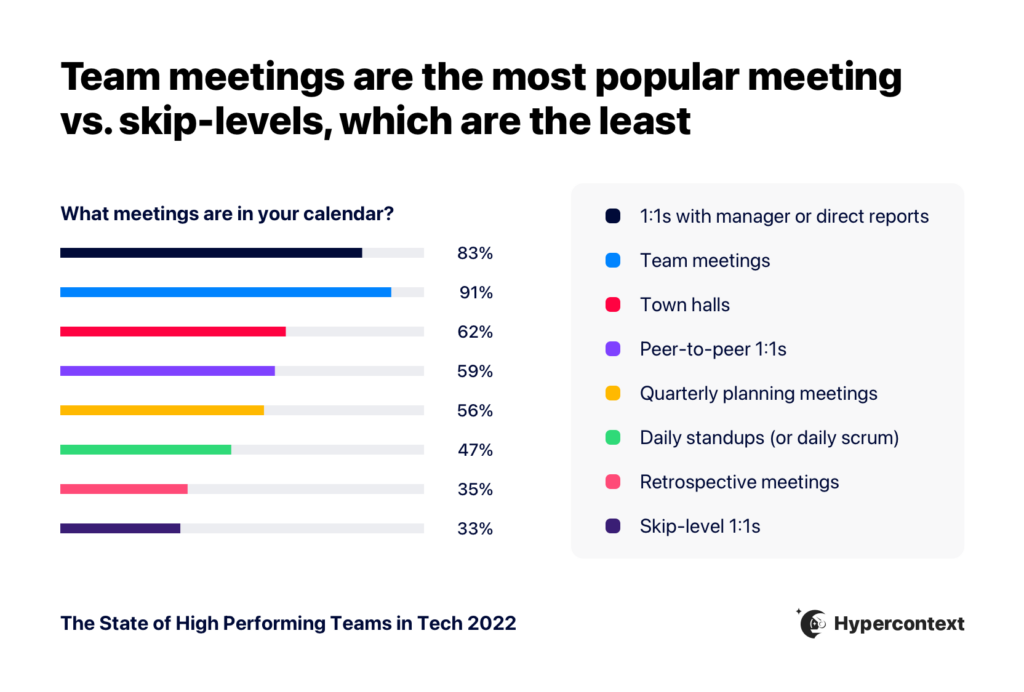
With the majority of people spending over 10 hours in meetings per week, it’s easy to want to cut down on that meeting time by eliminating internal team meetings.
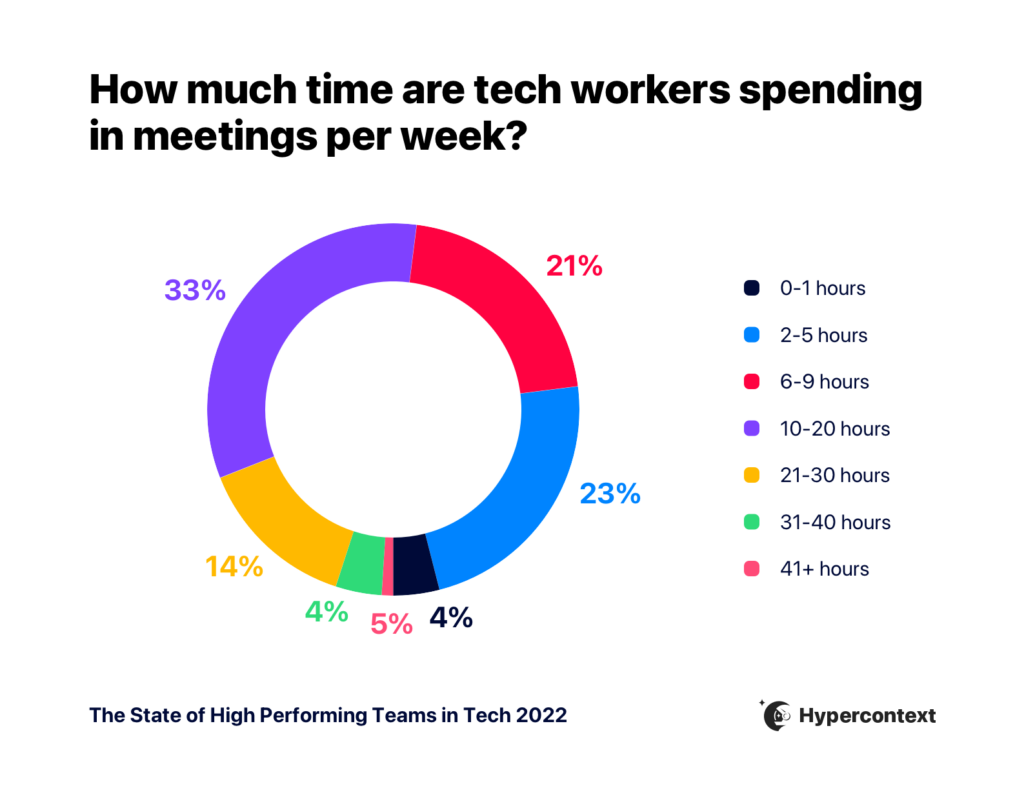
But, based on our research, fewer meeting doesn’t lead to faster growth. At the end of the day, it’s about making those meetings more effective — so let’s dive in!
How do you make an agenda for a team meeting?
Think of the agenda for your weekly team meeting as the map. It guides the conversation to ensure it’s productive and meaningful.
There are a few key things to consider when making your meeting agenda. Firstly, it should include:
Names of the meeting attendees
Purpose of the meeting
Duration of the meeting
An overview of what you’ll be discussing
But remember: you’re not solely responsible for making the agenda. Get your team to contribute as well. By making a collaborative agenda, they’ll be able to add anything they think should be discussed ahead of time. This will help your meetings be more of a discussion and less of a monologue.
Lastly, there’s no need to recreate the wheel each week. Establish recurring items you want to discuss regularly as the foundation of your agenda. Then, add a section for ad-hoc items that may come up during the week and need to be discussed.
Let’s look at a good starting foundation for every team meeting agenda. 👇
45-minute team meeting agenda template overview
1. Metrics (10 minutes)
Starting every team meeting agenda with metrics reinforces how everyone’s individual or team KPIs ladder up to what your overall company objective is.
First, reiterate the objective. It will keep your team focused on the big picture. Then, go through the numbers.
Don’t run through a laundry list of metrics, instead use this as an opportunity to tie your team’s individual KPIs to the overall company objectives.
Some questions to consider include:
What are the two things you’re trying to achieve as a business?
How does everyone else’s work ladder up?
Where are we now compared to where we forecasted?
2. Round-table plan for the sprint (20 minutes)
This is where the bulk of team meeting time is spent: what is everyone working on for the next sprint (or week, or until your next meeting).
To avoid this one agenda item sucking the life out of your meetings, ask employees to share this update in advance of your meeting right within your shared meeting agenda. That way, you spend more time in your meetings making decisions and less time sharing context.
3. What are the biggest blockers affecting us from performing to our fullest? (10 minutes)
After getting updates on everyone’s projects, segue into if there are roadblocks – and where they are.
As a manager, this is your time to shine! Remove the roadblocks as best as possible during the meeting, and get a sense of some of the larger issues your team is struggling with.
It could be as simple as “I’m away next week and worried about completing X” or “We need another developer if we’re going to hit X goal.” No matter what, this is a huge opportunity to increase the productivity of your team for the next sprint.
4. Who deserves a shout-out? (5 minutes)
Encourage teammates to shout each other out for great work. Not only is this a great way to end your team meetings on a positive note, but it helps build your team dynamic and culture.
Take note of these acknowledgments and make sure to call out individuals for superior teamwork in your individual one-on-one meetings as well.
Bonus Questions:
There are a lot of team meeting questions you can include in your agenda if you’re looking to switch things up. Here are a few more tried-and-true winners we recommend:
As a team, what’s one thing we should start doing?
As a team, what’s one thing we should stop doing?
What information could I bring you that would help our team perform better?
If you’re looking for more team meeting ideas, check out these 24 team meeting topics for inspiration.
The question is simple: what are you hoping to get out of this meeting?
If this isn’t set yet, collaboratively set the meeting goal with your team. When you collectively decide on what the best use of everyone’s time is, it will make it that much easier to stay hyper-focused during meetings.
Some common team meeting goals include:
Discover and share roadblocks and discuss ways to tackle them
Review the team’s work for the sprint (or time between this and the next meeting) and review whether or not it lines up to the overall team goals
Brainstorm and strategize ways to reach team goals
Align on what everyone’s working on and how far along each individual is on their projects or campaigns
Review how the team is tracking against goals: Are you red, yellow or green?
Approach every meeting with a remote-first mindset
Only 3% of people working in tech plan to return to 100% in-office work, according to research we did for The State of High Performing Teams. So whether you’re a distributed, fully remote, or hybrid team, you need to approach every meeting with a remote-first mindset.
This creates a more inclusive environment for everyone on the team. It levels out the playing field and makes it easier for everyone’s voice to be heard, which in turn will improve overall team collaboration and productivity.
With the right mindset and remote tools, running meetings with a remote-first approach is much more accessible than is once was and can make a big difference for your remote team members.
Schedule your meeting at a time that works best for everyone
While this seems like an obvious one, it’s certainly not the first thing you think about. If your team is comprised entirely of morning people, you should schedule your recurring meeting in the morning when people are most productive and engaged.
But, if they’re not and you book your recurring team meetings every Monday at 8 am…chances are you won’t get much participation and that wouldn’t be a great use of everyone’s time.
📆 Consider the timing – if the entire team is not morning people, don’t book it for recurring Monday AM
🎯 Be clear on the purpose – is this for updates/status checks, to brainstorm/strategize, skill-building, all of the above? etc. (Personally I like to split these out)
Another thing to think about when it comes to scheduling is the maker vs. manager schedule. While the individual contributors might seemingly have more time in their calendars, it’s important to consider how meetings might disrupt their focus time.
The best way to find out the most optimal time? Ask your team point-blank when they would prefer to have the team meeting. The same should be said for your one-on-one meetings too.
Make participation accessible for everyone
Conducting inclusive meetings isn’t only a nice to have. It’s an essential part of making your meetings more effective. After all, if your team members don’t feel comfortable contributing to the meeting, what’s the point?
Not everyone is comfortable participating in team meetings by speaking up and that’s okay.
In fact, some people want the time and space to think things through and write them down. That’s why it’s so important for teams to invest in collaborative agenda software to give everyone equal opportunity to participate in team meetings, whether they want to write out their thoughts or share them verbally.
– teams are made up of people w/ different styles. some like to write and read. others like to talk. ask each person what they prefer
Just because you’re the owner of a meeting, doesn’t mean you need to dictate everything.
When you spread the responsibility around, not only does it get your team more involved, but it’s also a great way to boost participation during these team syncs.
Share the load. Give roles to people: – Icebreaker (fresh Q every week) – Timecop (watch the clock and cut people off) – Notetaker (participate and type at the same time) – Moderator (run the meeting)
This frees brain space for the mod. to manage things like psych safety.
By having a shared and collaborative agenda that’s available to all team members before each meeting, everyone has the opportunity to contribute to it. When everyone has access to the agenda before the meeting, they’ll:
Come prepared for every meeting
Have the opportunity to tackle and resolve certain items asynchronously, helping the team move faster
Be able to contribute to team meetings in a way they’re most comfortable with, beit verbally or written
Have the time they need or want to think through every item on the agenda
use a tool that allows everyone to create & contribute to the agenda in advance of the call!
then you can focus the meeting around discussions and decision-making instead of providing status updates
It’ll avoid wasted time and help you stay on track in your weekly meetings.
Start every meeting with an icebreaker
While this sounds like an ineffective use of people’s time, ice breakers offer many long-term benefits to your team, including:
Building empathy
Increasing interactions
Building a sense of community on the team
Plus, the short-term benefits are that you can ease everyone into the conversation. Think of it as a warm-up before a big game. Try asking one of these icebreaker questions at the start of your next team meeting:
What’s one thing you’re jazzed about this week, either professionally or personally?
If you could travel anywhere in the world, where would you go?
What’s something non-goal related you learned this week?
Professional athletes shoot around before the game starts. Musicians run up and down scales before the show starts. Why shouldn’t you warm up your conversational skills before the meeting starts?
Assign next steps
Keeping the team accountable for what was agreed on during the meeting is key to ensuring the things you want to get done, will get done.
Having next steps documented, along with your meeting minutes, is also a great way for everyone on the team to keep track of how far along others are with completing their tasks. However, don’t mistake this as a micromanaging tool. When you continue to build a culture of accountability on your team, it also helps build trust amongst team members.
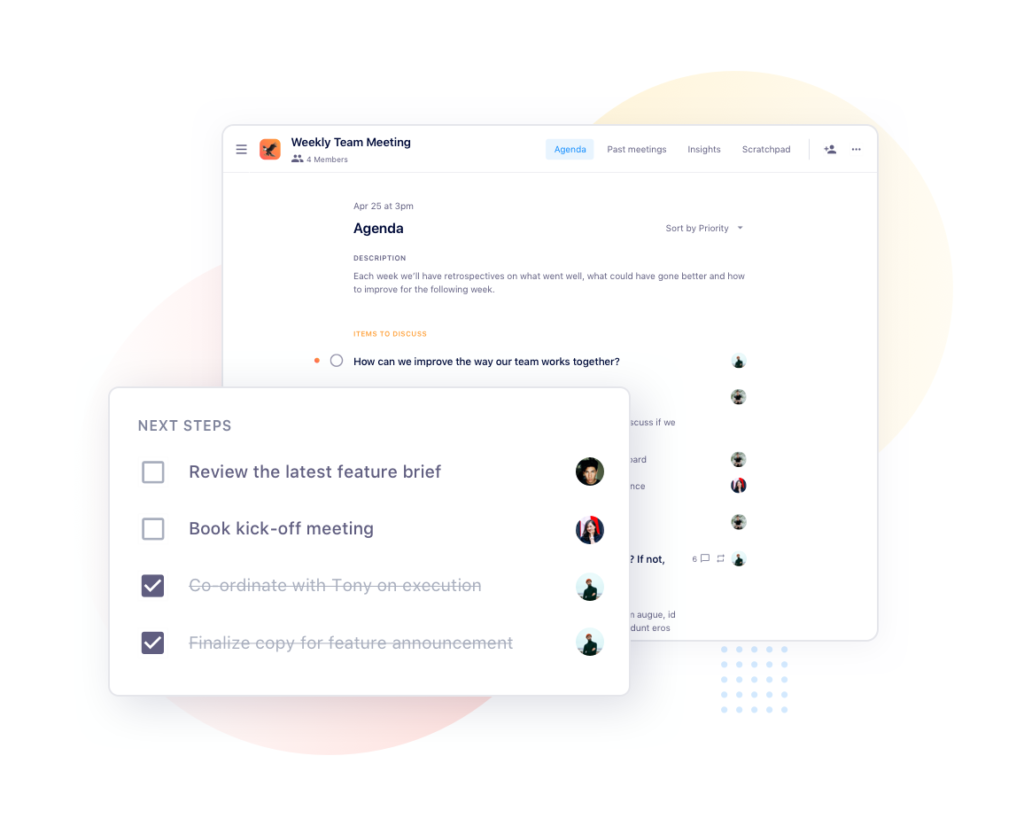
Ultimately, your team meeting should be a time for your whole team to come together to align, problem solve, plan and celebrate. Try putting these tips into action with Spinach AI’s 45-minute team meeting agenda template.
Your Spinach AI 45-minute team meeting agenda template 👇