4 skip-level meeting questions (and tips to fuel your next meeting!) July 2026
Skip-level meetings are a goldmine for employee feedback. Here are four skip-level meeting questions to add to your agenda.
 Hiba Amin
Skip-level meetings are often short and infrequent, but pack a punch in terms of impact on both senior management and individual contributors. These meetings aren’t meant to undermine managers in between, but rather to connect those working across multiple levels of the organization to discuss an employee’s growth, company strategy, and share feedback.
Before we get to our skip-level meeting agenda template, here are a few things you might be wondering about, including:
- What is a skip-level meeting?
- Are skip-level meetings bad?
- How can employees prepare for skip-level meetings?
- How can leaders prepare for skip-level meetings?
You can also jump to the skip-level meeting template.
Let’s get started!
TLDR:
- Skip-level meetings connect senior leaders directly with employees, bypassing the direct manager, to align on strategy and surface blockers.
- Done correctly, they support middle managers and do not undermine them. The goal is coaching opportunities and alignment, not complaint collection.
- A 2025 study (European Conference on Management, Leadership, and Governance) found 86% of engineering managers view skip-levels positively, citing transparency and organizational alignment as the top benefits.
- As an employee, prepare specific questions around company direction, your growth path, and gaps only senior leaders can see.
- Spinach AI joins the call and captures decisions and action items in real time, so nothing gets lost between sessions. That continuity matters for skip-levels, given how infrequent they are.
What is a skip-level meeting?
A skip-level meeting is a one-on-one meeting where upper managers meet directly with employees, bypassing the employee’s direct manager, essentially “skipping” a level of management to connect directly with employees. (Get it?)
The goal of a skip-level meeting is twofold:
Employee | Senior Leader | |
|---|---|---|
Primary goal | Understand company strategy and goals; align personal priorities with the business | Gauge employee alignment, surface blockers, and identify coaching opportunities for middle managers |
How to prepare | Reflect on your growth, what you want from your career at the company, and questions you want answered | Review the employee’s role and recent work; come ready to listen more than you talk |
What to bring | A short list of questions, any topics you want clarity on, and your professional goals | An open agenda; let the employee drive the conversation where possible |
What to avoid | Treating it as a complaint session about your direct manager | Using it to dig up performance issues or undermine the direct manager relationship |
Key outcome | Leave with greater clarity on company direction and a clear path forward for your own growth | Leave with a clearer picture of team health, blockers, and how to better support managers below you |
Who is responsible for the skip-level meeting agenda?
The best skip-level meetings happen when both employees and senior leaders contribute to a shared agenda. In terms of timing, most skip-level meetings run 30 to 45 minutes on a monthly or quarterly cadence. While shorter than a typical one-on-one, the impact can be substantial: a 2025 study published at the European Conference on Management, Leadership, and Governance (Blacher) found that 86% of engineering managers surveyed expressed positive sentiment toward skip-level meetings, with improved transparency, communication, and organizational alignment cited as the top benefits.
Are skip-level meetings bad?
When done properly, no, they’re actually great. As mentioned, skip-level meetings are not a time to get feedback from employees on their direct managers. That kind of feedback should be brought up between the direct report and manager directly.
Fabian Camargo, Engineering Management Coach puts it best:
Definitely for! Skip-levels when done well are great to improve the communication flow, support managers, and improve the skip-level relationship. There are a few gotchas like not setting them up properly, or undermining the manager, but worth the risk.
The Managing Dev (@managingdev) March 1, 2021
When done well, skip-level meetings can:
- Improve the communication flow across all levels of the organization
- Support managers in their pursuit to be better leaders
- Build better skip-level relationships, making senior leaders less “scary” and more approachable to employees
- Provide companies with more ways to exchange feedback across the organization
- Give employees the opportunity to share their ideas, thoughts, and feedback in a psychologically safe environment, and genuinely feel heard
I’m a manager & the co-founder often meets with my team. My team shared with me that they were afraid of him as “boss man” so I suggested they meet with him to see how great he really is.
I found that they became more connected to the mission & the brand overall after that 😍marquis matson 💃🏼 (@MarquisMatson) March 1, 2021
How to prepare for a skip-level meeting as an employee
One of the objectives of this meeting is to improve alignment across the organization. Camargo shares that:
“Skip-levels can be helpful to make sure the messages are consistent between the employee, manager, and the skip-level manager.”
Fabian Camargo, Engineering Management Coach
This meeting is also a means for reducing top-down communication within an organization, giving employees ample opportunity to voice concerns, ideas, and anything else that’s top of mind. After all, when did a game of broken telephone end with the same initial message successfully? Never.
I appreciate skip-level meetings. It offers us a chance to get a future-vision of the business from execs. For example, AI is becoming increasingly relevant in our industry. Skip-level meetings allow me to get more insight into how we plan on applying AI in our service!
Devin 📈 (@DevinPickell) March 1, 2021
Preparation tips for employees
If you’re in the employee seat during a skip-level meeting, here are some ways in which you can prepare:
- Change your mindset. Treat this meeting as an opportunity to learn more about how senior leadership is thinking about and approaching org-wide objectives.
- Don’t be afraid. While the person you’re meeting with is more senior within your company, it doesn’t mean they’re not there to help and provide anything from clarity to guidance and support.
- Seek alignment. Leading up to the meeting, think about ways in which you can better understand the business priorities of your skip-level manager. Use this time to share your priorities as well and see how both can better align. This is also a great time to align on expectations that you have of the company and vice versa.
- Use your time wisely. This is the chance for prized time with a leader you otherwise might not have access to. Use this as an opportunity to learn and prepare by reflecting on your journey at the company and what you want your future with the business to look like.
- Prepare questions and talking points. If you want this meeting to be effective, it’s important that you show up prepared, be it adding your questions in advance or truly understanding what you’re hoping to get out of the meeting and communicate that with your leader. (An AI meeting assistant like Spinach AI joins your call and captures decisions and action items in real time, so you leave with a clear record of what was agreed and what happens next.)
Speaking to the last point, if you’re not sure what questions to ask, you can pick from our list!
Questions to ask your boss’s boss during a skip-level meeting
- What mentorship opportunities are there available for me?
- What skills do you think our team is lacking?
- How can I help train and support others in the company?
- Who in the company do you think I can learn the most from?
- How are we progressing on our goals as a company?
- What big changes are coming down the pipe in the next 6 months?
- What’s something you wish we did better as a team?
- What are we doing to make ourselves stand out in the market?
- What’s worrying senior leadership right now?
- How can I get more involved in workplace culture?
- Are there any aspects of our culture you wish you could change?
- What’s worrying you most?
- What’s your biggest challenge as a people leader?
- What would it look like for our team to knock it out of the park?
Want more? Check out these 121 one-on-one meeting questions.
How can leaders prepare for skip-level meetings?
Approach this meeting with a curiosity around how you can help strengthen the relationship between the employee and their manager, as well as the relationship between the employee and the company. After the conversation wraps, writing a clear meeting summary keeps nothing from getting lost between sessions.

This is your opportunity to gather useful information on how things are going, straight from the front-line. During this time, do your best to learn how engaged your employees are, and how this is impacting effectiveness, in other words, get the information that isn’t always readily accessible to leaders.
Be thoughtful around how employees might feel, and aware that he/she might have difficulty sharing opinions and being vulnerable with you. It’s your job to make sure you foster psychological safety both by setting the pretext for your one-on-one before and during your meeting.
I’ve generally set them up with the intention of:
, Getting to know each other
, Allowing the employee drive the agenda
, Always keeping them open and honest
I do my best to make them feel comfortable from the start … which usually means trying to find something relatable.A Dad Life (@klkrause) March 1, 2021
How to approach this meeting
One thing to remind yourself is that, while you’re a leader within the organization, you’re not their direct manager. Don’t treat this as a typical one-on-one meeting. Instead, here are some other ways you can approach this meeting:
- Seek alignment. Use this time to better understand whether or not employees are aligned to the company goals in the ways you need them to be. Do they understand the importance and impact of each goal? Use this opportunity to correct any misalignments that pop up.
- Uncover coaching opportunities. While this is not a time to dig up dirt on your managers, it is still a great opportunity to learn about different areas in which you can level up and coach middle managers who report into you.
- Uncover blockers and pain points. As a senior leader, you likely won’t hear about most of the problems your employees face. From lack of resources to misalignment within the team. Don’t use this time to try and solve the big issues, but rather gain a deep understanding of the issues and how many people are affected by them. If there’s a consistent pattern across multiple employees, spend the necessary time needed to fix the problems.
- Talk less. Listen more. This is a great opportunity to gather feedback from individuals who you don’t interact with on a day-to-day basis. Use this time to listen to their goals, problems, frustrations, motivations, all of it. This will help you better understand how to keep your workforce engaged.
For employees, prepare and do your absolute best to be yourself.
For leaders, talk less. Listen more. Be incredibly transparent.Ross Taylor 🍁 (@TheRossTaylor) March 1, 2022
Skip-level meeting questions for managers
- What professional goals would you like to accomplish in the next 6 to 12 months, and what makes you say that?
- Do you feel supported?
- Is your job what you expected when you accepted it? If not, where has it differed?
- What are your biggest work and non-work wins from the past month?
- What’s a big, audacious goal that you’d like to achieve this quarter?
- If you were managing the team, what would you do differently?
- How could we improve cross-functional collaboration at [your company]?
- If you were the CEO, what’s the first thing you’d change?
- What’s something you’re proud of that happened this week? This month?
- What’s something past managers have done that’s inspired and motivated you?
- What’s one thing you would recommend to improve our workplace culture?
💰 Bonus skip-level meeting questions 💰
- What is everyone around me neglecting to share with me?
- What’s one thing we could do as a company that would impact your personal life?
- What’s one thing we can do to improve the performance of the team?
- Who is one person in the company that you’d like to learn more from?
- Who deserves a shout-out?
- Is there anything that would be productive for me to re-explain to your team?
- How do you feel about the balance between your individual work vs. managing?
- Do you have any questions that, if answered, would help you in your day-to-day?
Skip-level meeting agenda template
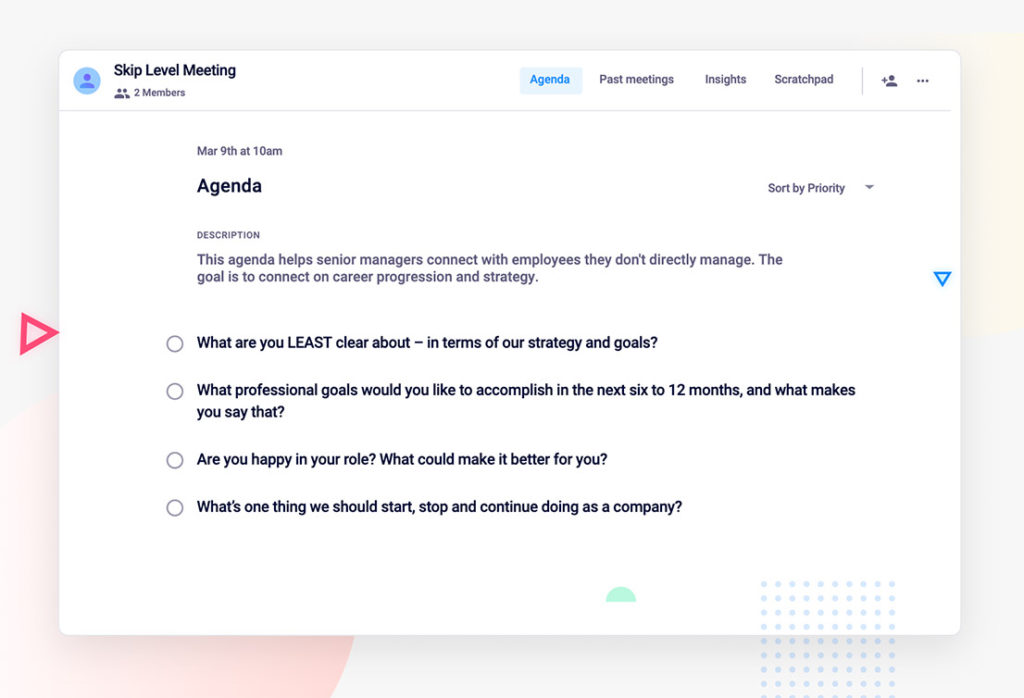
If you’re struggling to add questions to the agenda, use these four essential agenda items to fuel your conversations:
- What are you LEAST clear about, in terms of our strategy and goals?
- What professional goals would you like to accomplish in the next six to 12 months, and what makes you say that?
- Are you happy in your role? What could make it better for you?
- What’s one thing we should start, stop and continue doing as a company
Final Thoughts on Skip-Level Meeting Strategy
Done well, skip-levels build trust across every layer of your organization. Employees feel heard, leaders get information they’d never surface otherwise, and middle managers get the coaching support they need. The only thing left is making sure the conversation doesn’t disappear after the call ends. Get started with Spinach AI and capture every decision in real time, so your next session picks up right where you left off.
A skip-level meeting is a one-on-one meeting where upper managers meet directly with employees, bypassing the employee’s direct manager, essentially ‘skipping’ a level of management to connect directly with employees. The goal is twofold: for employees to gain insight into company goals, objectives, and strategies, and for senior leaders to create a shared space for employees to discuss career progression, professional goals and give feedback.
When done properly, no, they’re actually great. Skip-level meetings are not a time to get feedback from employees on their direct managers. That kind of feedback should be brought up between the direct report and manager directly. Skip-level meetings are intended for senior leaders to share high-level strategy and connect with employees they might not connect with regularly otherwise.
Employees can prepare by changing their mindset and treating the meeting as an opportunity to learn more about how senior leadership is thinking about org-wide objectives. They should not be afraid, seek alignment on business priorities, use their time wisely by reflecting on their journey at the company, and prepare questions and talking points in advance to make the meeting effective.
Leaders should approach the meeting with curiosity around how they can help strengthen the relationship between the employee and their manager, as well as the relationship between the employee and the company. They should seek alignment, discover coaching opportunities, uncover blockers and pain points, and most importantly, talk less and listen more. Be thoughtful around how employees might feel and foster an environment where they feel comfortable being open and vulnerable.
The best skip-level meetings happen when both employees and senior leaders contribute to a shared agenda. In terms of timing, most skip-level meetings run 30 to 45 minutes on a monthly or quarterly cadence. A 2025 study found that 86% of engineering managers surveyed expressed positive sentiment toward skip-level meetings, with improved transparency, communication, and organizational alignment cited as the top benefits.
Four essential agenda items to fuel skip-level meeting conversations include: What are you LEAST clear about – in terms of our strategy and goals? What professional goals would you like to accomplish in the next six to 12 months, and what makes you say that? Are you happy in your role? What could make it better for you? And, what’s one thing we should start, stop and continue doing as a company.
What to do now
You made it to the end of this article! Here are some things you can do now:
- I think you will love our library of meeting agenda templates for every type of meeting.
- Check out Spinach to see how it can help you run a high performing org.
- If you found this article helpful, please share it with others on Linkedin or X (Twitter)

