Meeting Notes to Asana: How-To Guide (August 2026)
Get meeting notes into Asana faster in August 2026. Compare the manual Notes view, Zapier automation, and Spinach AI's end-to-end action item routing.
 Maintouch
A decision sitting in a meeting doc is still just a note. For it to become something anyone acts on, it needs an owner, a due date, and a home in Asana. Whether you want to do that manually, through Zapier, or with an AI layer that handles it automatically, the process is simpler than most teams expect.
TLDR:
- Every action item needs a named owner, a specific action, and a deadline before it can become a usable Asana task.
- Asana’s Notes view (launched June 2024) lets you select text and convert it directly into a linked task without leaving the project.
- Zapier automates task creation from meeting summaries, but requires a Looping step to generate separate tasks per action item.
- Write task names starting with a verb and a deliverable; vague titles produce tasks that stall regardless of due date.
- Spinach AI is an enterprise conversation intelligence platform that captures conversations across the organization, whether on Zoom, Google Meet, Teams, Slack Huddles, and Webex, and routes decisions and action items with named owners directly into Asana when the meeting ends.
Why Meeting Action Items Fall Through the Cracks
Most meetings end with a list of next steps that everyone agrees on and nobody writes down fast enough. Someone volunteers to capture notes, the call wraps, and by the time the doc gets shared, the context has already faded.
The numbers back this up. Research from Laxis found that 70% of meeting decisions are forgotten within 24 hours when nothing is documented.
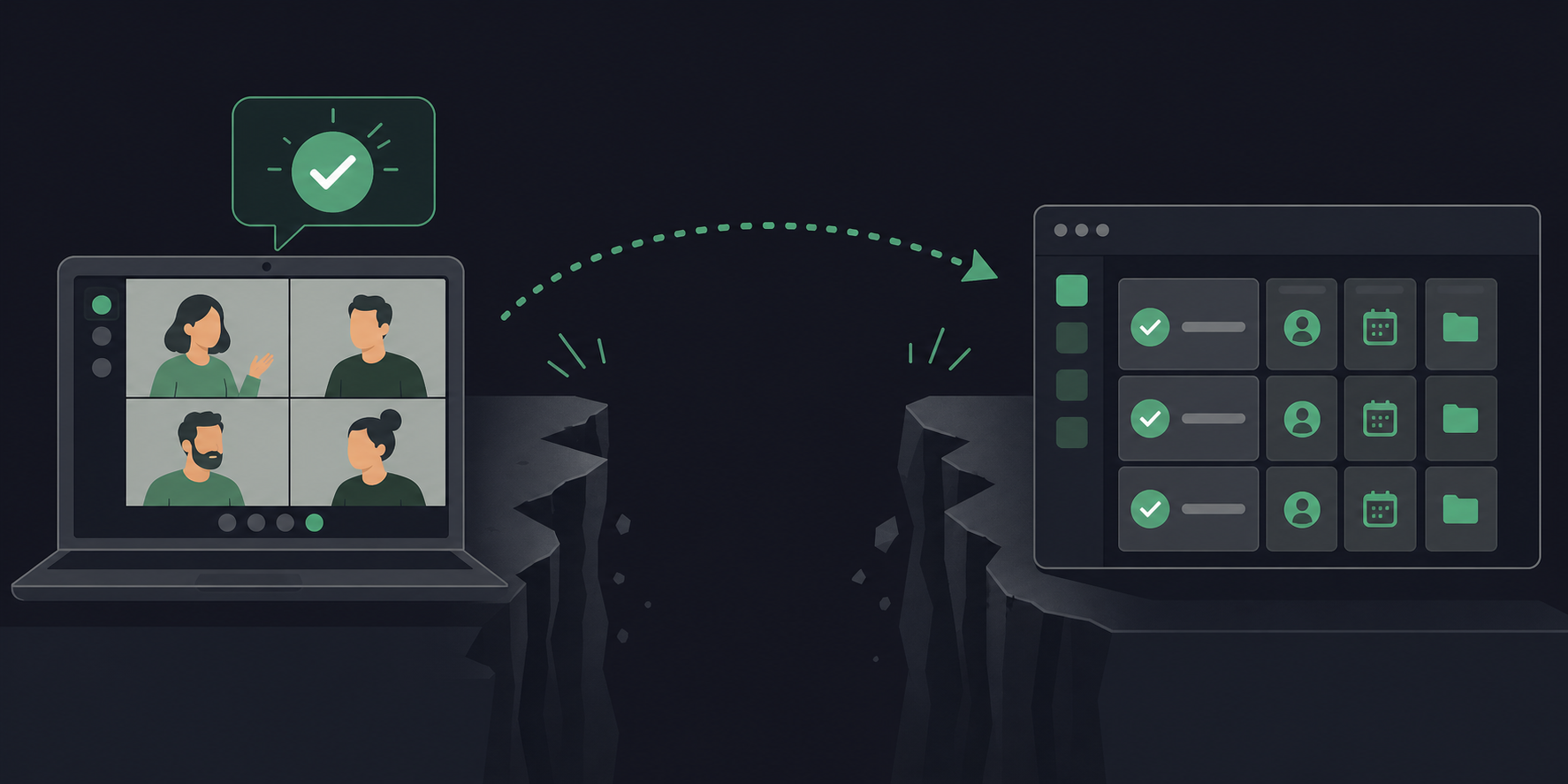
That gap between “we agreed to do this” and “someone actually did it” is where accountability leaks. A decision sitting in a doc is still just a note. A decision with an assignee, a due date, and a project home in Asana is a task.
What Effective Meeting Notes Need Before You Convert Them
Before anything lands cleanly in Asana, the notes themselves have to be worth converting. Vague notes produce vague tasks, and a vague task is just a decision that hasn’t died yet.
Every action item captured in a meeting needs three things before it can become a real Asana task:
- A named owner, not “the team” or “someone from marketing”
- A specific action written as something you could verify as done or not done
- A deadline, even a rough one
“Follow up on the vendor quote” assigned to nobody with no date is not a task. “Jordan to confirm revised pricing from Acme by Thursday EOD” is.
What Else to Capture While the Meeting Is Live
Beyond action items, a few other categories are worth noting in real time. Decisions made during the call give each Asana task its context, so the person picking it up understands why it exists. Blockers and dependencies should get logged too, since they matter when someone is triaging what to work on first. Any relevant background, a Slack thread, or a doc that informs the task deserves a quick reference so it can travel into the task description later.
The format can stay simple: decisions at the top, [action items in “Owner: Action by Date” format, then supporting context. Notes captured in that shape convert without needing to be decoded first.
Three Ways to Get Meeting Notes into Asana: At a Glance
Method | How it works | Best for | Manual steps required |
|---|---|---|---|
Asana Notes View | Paste meeting notes into the project’s Notes view, select text, convert to task | Teams already in Asana who want a quick manual path | Copy-paste notes, select each action item, assign owner and due date individually |
Zapier | Trigger fires when a meeting summary is ready; Looping step creates one task per action item in Asana | Teams whose meeting tool outputs structured action items in a predictable format | Configure field mapping once; re-key assignees if they don’t match Asana accounts |
Spinach AI | Enterprise conversation intelligence platform deployed company-wide; joins meetings on Zoom, Google Meet, Teams, Slack Huddles, and Webex; captures during the meeting and routes decisions and action items with named owners directly into Asana when the meeting ends | Organizations that need a governed, company-wide pipeline from every conversation to Asana instead of a per-person setup | None: no source document, Zapier trigger, or post-meeting editing required |
How to Convert Meeting Notes to Asana Tasks Using the Native Notes View
Asana’s Notes view, launched in June 2024, lets you write or paste meeting notes directly inside a project and convert selected text into tasks without leaving Asana.
- Open the project and click the “+” icon next to your existing views. Select “Notes.”
- Write or paste your meeting notes into the Notes editor. Keep the “Owner: Action by Date” format from your notes doc, since you’ll be pulling from it directly.
- Select the specific line of text you want to turn into a task.
- A small action menu appears. Select the option to convert the selection into a task.
- Asana generates a task with the selected text as the title. Assign an owner and set a due date before saving.
Tasks created this way are automatically linked to the project where the Notes view lives. Anyone who opens the task can jump back to the original notes to see what was discussed, which decisions preceded the work, and what else came out of the same meeting.
How to Automate the Conversion with Zapier
Zapier sits between whatever tool produces your meeting summary and Asana, handling task creation automatically once the trigger fires.
The basic Zap follows a three-step pattern:
- A trigger fires when a meeting summary or action item list is ready in your source tool.
- Zapier parses the output and maps fields to Asana task attributes.
- Asana creates the task inside the project you specify.
The field mapping step is where most Zaps break down. You need four fields to produce a usable Asana task: task name, assignee, due date, and the destination project. If your source tool outputs action items in a structured format, those fields map directly. If it outputs a block of text, you’ll need a Zapier formatting step to parse it first.
Handling Multi-Action-Item Meetings
A single meeting typically produces several action items, and a naive Zap drops them all into one task title. The fix is Zapier’s Looping by Zapier step. Set the loop to iterate over each action item, then place the Asana “Create Task” step inside the loop. Each iteration creates a separate task with its own assignee and due date.
Check These Before Activating
- Your Asana project must be selected in the Zap, not merely the workspace, or tasks land in the wrong place.
- Assignees need to be Asana members. Email contacts from your meeting tool won’t auto-resolve unless they match an existing Asana account.
- Test with a two-item action list before running a full meeting output through it.
Once the Zap is running, the manual copy-paste step disappears entirely. Teams looking for a broader comparison of options can review tools built around automated action item tracking before committing to a specific stack.
How AI Extracts and Routes Action Items Automatically
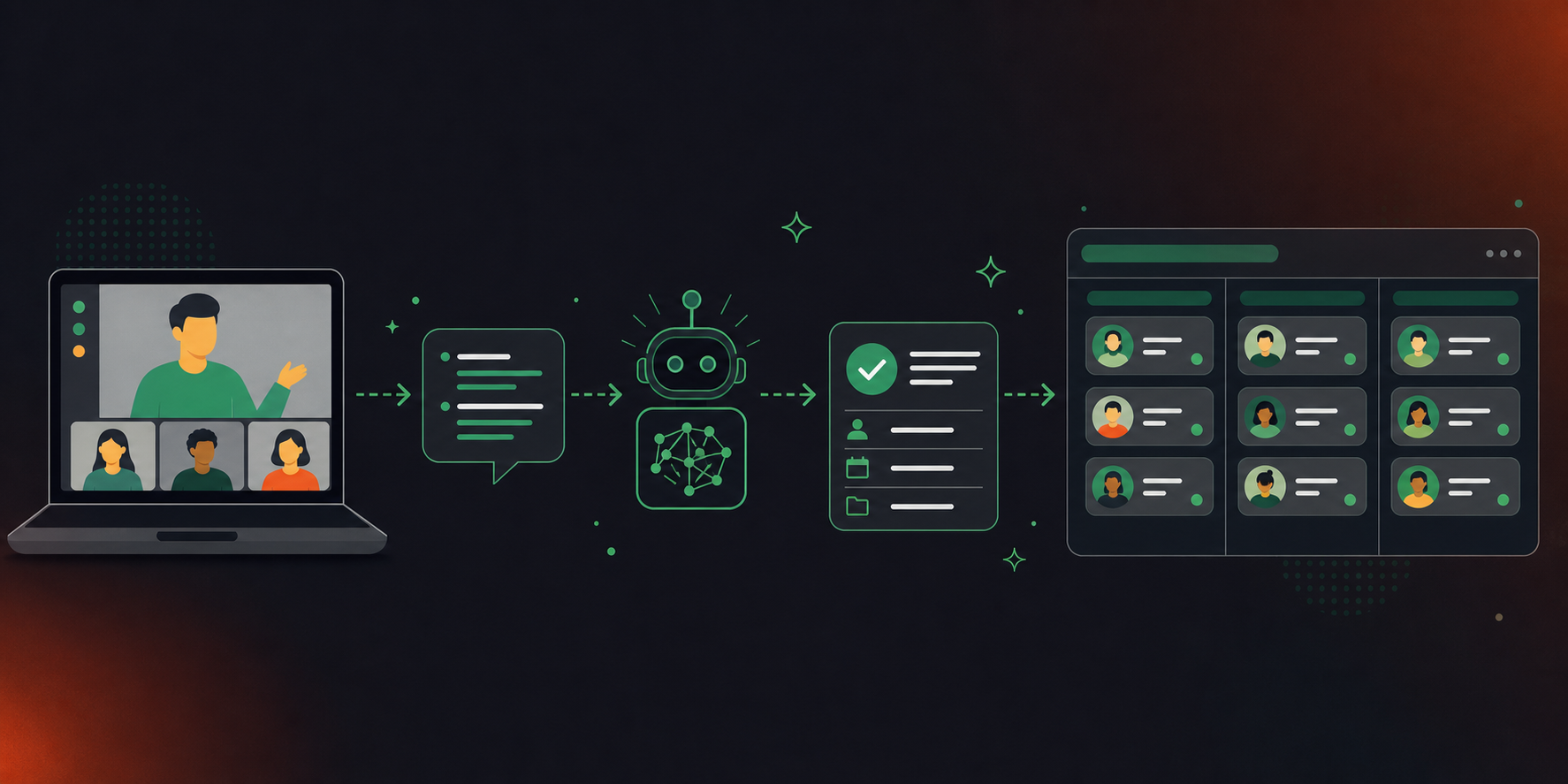
The Zapier approach works when your source tool already outputs structured action items. When notes are conversational, an AI parsing layer fills the gap between raw transcript and usable task data. For a full walkthrough of that approach, see automatically create action items from transcripts. Teams scoping where this fits in their stack can review AI tools for project management that cover the full range of options across planning, tracking, and meeting automation.
The architecture, as seen in n8n’s GPT-4o workflow for Asana task creation, follows three steps: pass the transcript to an AI model, prompt it to extract discrete action items, then route the structured output to Asana.
A good extraction prompt is specific about the output schema:
“Extract all action items from the transcript below. For each, return a JSON object with three keys: ‘task_name’ (a single verb-led sentence), ‘assignee’ (first and last name as spoken), and ‘due_date’ (ISO 8601 format). If no deadline was mentioned, return null.”
Asana’s API expects exactly those fields on task creation, so the model output maps directly without a reformatting step. Where this beats a naive Zap: the model handles messy, overlapping conversation and still returns clean, discrete tasks.
How to Structure Asana Tasks So They Actually Get Done
Converting notes into Asana is the mechanical step. A task with a vague title and no description is just a note wearing a different hat.
Asana’s own guidance points to a simple validation check before any task goes live: the three W’s. Who owns it, what exactly needs to happen, and when is it due. If you can’t answer all three from the task itself, the task isn’t ready. A meeting notes action items template builds that structure in from the start so every captured item already has an owner, action, and deadline before it reaches Asana.
Write Task Names as Actions, Not Topics
The task name should start with a verb and describe a specific deliverable. “Budget” is a topic. “Send revised Q3 budget to finance by Friday” is a task. Whoever picks it up should know what done looks like without opening the description.
Use the Description to Carry Meeting Context
Drop two to three sentences into the description: the decision that triggered the task, any constraints mentioned during the call, and links to relevant docs or threads. The assignee may not remember why the task exists two days later, and the description is where that context lives.
Subtasks for Multi-Step Work
If an action item has more than one owner or more than one discrete step, break it into subtasks instead of stuffing everything into one task description. Each subtask gets its own assignee and due date, while the parent task holds the shared context.
Place the Task in the Right Section
Assign each converted task to the section that matches its workflow stage. A task parked in the wrong section gets treated as low priority regardless of what the due date says.
How to Track Converted Tasks and Close the Loop Before the Next Meeting
The gap that costs teams accountability sits between “task created” and “task reviewed before the next meeting starts.”
Asana’s My Tasks view is the simplest place to start. It surfaces everything assigned to you, sorted by due date, across every project. Check it the morning before any recurring meeting and you’ll know in under two minutes which items are overdue, which are due this week, and which were never moved forward.
At the project level, the board or timeline view shows what’s stalled across the whole team. A task sitting in “In Progress” for two weeks with no comments is worth surfacing before the meeting, not during it.
Build the Habit Around the Meeting Itself
Open the Asana project as the first thing you do when a recurring meeting starts. Walk the open items from last time before discussing anything new. Tasks that are done get marked complete. Tasks that are not get a comment explaining where they stand and, if needed, a revised due date. This takes three to four minutes and replaces ten minutes of “wait, where did we land on that?” later.
Use Comment Threads to Log Progress Between Meetings
The task comment thread is where status lives between meetings. A short mid-week update, “Vendor confirmed pricing, waiting on legal review,” means the next meeting does not have to reconstruct context from scratch. The assignee logs it, anyone following the task sees it, and the history is there when the meeting opens.
Capturing Conversations and Routing Decisions to Asana Across the Organization
Every method covered so far depends on someone doing the capturing first. Spinach AI removes that dependency, and does so not for one person alone but across the entire organization.
Spinach AI is an enterprise conversation intelligence platform. It serves as the system of record for conversation data. Where individual tools solve one person’s note-taking problem, Spinach is deployed company-wide to capture, centralize, and govern every conversation the organization has. It joins meetings on Zoom, Google Meet, Microsoft Teams, Slack Huddles, and Webex, captures during the meeting, and routes structured outputs, including decisions, action items with named owners, and the context behind each one, directly into your Asana projects when the meeting ends. No separate note-taking step, no Zapier trigger to manage, no post-meeting editing required. The Asana integration is available on Pro, Business, and Enterprise plans.
The organizational difference matters at scale. When individual team members convert notes manually, output varies by person and by meeting type. Deployed company-wide, Spinach runs the same governed pipeline across every function and meeting series, such as product reviews, client syncs, standups, and planning sessions, so every task that lands in Asana carries the same structure: a named owner, a specific deliverable, and the decision context that explains why the work exists.
Final Thoughts on Getting Meeting Notes Into Asana Without the Manual Work
Any of the approaches here will close the gap between a meeting decision and an Asana task, as long as your notes are specific enough to act on. The format matters less than the discipline: owner, action, deadline, project. Build that habit first, then automate around it. If your team is ready to remove the capture step entirely, Spinach AI joins your meetings, captures decisions and action items with named owners during the call, and routes structured tasks into Asana automatically when the meeting ends.
Spinach AI joins your meeting on Zoom, Google Meet, Teams, Slack Huddles, or Webex, captures decisions and action items with named owners during the call, and routes them directly into your Asana projects when the meeting ends: no separate note-taking step or Zapier trigger to configure. If you prefer a manual path, Asana’s native Notes view (launched June 2024) lets you select text from pasted meeting notes and convert it to a task in a few clicks. The Spinach integration is available on Pro and Business plans.
Zapier works well when your meeting tool already outputs structured action items in a predictable format: you map fields once, set the loop, and task creation runs without human input. Spinach AI is the better fit when you need the capture step handled too: it attends the meeting, extracts decisions and action items with owners in context, and routes structured tasks into Asana automatically, so there is no source document to wire Zapier against in the first place.
Write every task name as a verb-led, specific deliverable: “Send revised Q3 budget to finance by Friday” and not “Budget”, so the assignee knows what done looks like without opening the description. Add two to three sentences in the description covering the decision that triggered the task, any constraints from the meeting, and links to relevant docs or threads. If the action item has more than one owner or step, break it into subtasks, each with its own assignee and due date, instead of stacking everything into one description.
Yes. An AI parsing layer (using a prompt that extracts each action item as a JSON object with `task_name`, `assignee`, and `due_date` fields) maps directly to Asana’s API task creation schema, so no reformatting step sits between the model output and the project. This handles conversational transcripts where action items are scattered across dialogue, without requiring a cleanly structured source document. Spinach AI runs this extraction and routing automatically for every meeting it joins, without a separate workflow to maintain.
The gap between a documented action item and a completed one comes down to three missing fields: a named owner (not “the team”), a specific verifiable deliverable, and a deadline. Research from Laxis found that 70% of meeting decisions are forgotten within 24 hours when nothing is documented, but even documented items stall when they sit in a notes doc instead of a tracked Asana task with an assignee and a due date. Converting notes to Asana tasks closes the first gap; building a habit of reviewing open Asana items at the start of each recurring meeting closes the second.
The Asana integration is available on Pro, Business, and Enterprise plans — not on the free Starter plan. Pro charges $2.90 per meeting hour, Business is $29 per user per month (or $19 billed annually), and Enterprise uses custom pricing you can get by contacting sales.
Start every task name with a verb and end it with a specific deliverable: “Send revised Q3 budget to finance by Friday” instead of “Budget.” The test is whether the assignee can tell what done looks like without opening the description — if they can’t, rewrite the name.
Break multi-owner items into subtasks rather than cramming everything into one task description. Each subtask gets its own assignee and due date, while the parent task holds the shared context — meeting decision, constraints, and links to relevant docs.
Use the Notes view when your team already lives in Asana and wants a fast manual path with no configuration overhead — you paste notes, select a line, and convert it to a linked task in a few clicks. Use Zapier when your meeting tool outputs structured action items in a predictable format and you want task creation to run without human input after a one-time field mapping.
Review open items from the previous meeting before discussing anything new at the start of each recurring meeting — tasks that are done get marked complete, tasks that aren’t get a comment explaining where they stand and a revised due date if needed. The task comment thread is where status should live between meetings, so the next session doesn’t have to reconstruct context from scratch.
Asana’s task creation API expects three fields that map directly from a well-structured extraction prompt: task_name (a single verb-led sentence), assignee (first and last name), and due_date (ISO 8601 format, or null if no deadline was mentioned). Returning clean JSON with exactly those keys means the model output routes to Asana without an intermediate formatting step.
A basic Zap drops all action items into a single task title because it treats the whole output as one text block. The fix is adding a Looping by Zapier step — set it to iterate over each action item, then place the Asana Create Task step inside the loop so each iteration creates a separate task with its own assignee and due date.
Two to three sentences covering the decision that triggered the task, any constraints or dependencies mentioned during the call, and links to relevant docs or Slack threads. The assignee may not remember why the task exists two days later, and the description is where that context needs to live so they can act without chasing down the original meeting doc.
Yes, if you use an organizational layer like Spinach AI, which joins meetings on Zoom, Google Meet, Microsoft Teams, Slack Huddles, and Webex and routes decisions and action items with named owners directly into Asana when each meeting ends — one governed pipeline regardless of which platform the conversation happened on.
In the Zap’s Asana Create Task step, you must select the specific project — not just the workspace — or tasks will land in the wrong place. Also verify that each assignee is already an Asana member, since email contacts from your meeting tool won’t auto-resolve unless they match an existing account, and test with a two-item action list before running a full meeting output through it.
What should you do now
Now that you've read this article, here are some things you should do:
- You should check out our library of meeting agenda templates for every type of meeting.
- You should try Spinach to see how it can help you run a high performing org.
- If you found this article helpful, please share it with others on Linkedin or X (Twitter)

