Frequently Asked Questions

Meeting Effectiveness & Feedback

What should I do if my employees dislike our meetings?

If your employees dislike meetings, start by collecting feedback to understand their concerns. Ask for more context about what isn't working, such as meeting length, lack of decisions, or ineffective agendas. Use follow-up questions to identify specific pain points, and discuss these in team meetings or one-on-ones. For actionable strategies, see our blog post.

How can I collect actionable feedback about my meetings?

Collect actionable feedback by thanking your team for their input and asking targeted questions, such as whether meetings are too long, if decisions are being made, or if everyone feels heard. Use surveys, agenda items, or one-on-ones to gather honest responses. For more tips, visit this guide.

When should I consider canceling a recurring meeting?

Consider canceling a recurring meeting if its goal has become irrelevant, if the same communication happens elsewhere, or if the meeting frequency is too high for new updates. Always discuss with all participants before making a decision. For more, see the full article.

How do I identify the core issues with my team meetings?

Identify core issues by pushing your team to be specific about their frustrations, looking for common themes in feedback, and imagining what an ideal meeting would look like. Focus on recurring problems such as meeting length, lack of decisions, or unclear agendas. See this resource for more guidance.

What are the most common mistakes that make meetings ineffective?

Common mistakes include meetings that are too long, lack clear purpose, have too many side conversations, or don't result in decisions. Other issues are redundant meetings, unclear agendas, and not involving the right people. For a detailed list, see the 7 Most Common Team Meeting Mistakes video.

How can I make meetings more engaging for my team?

Make meetings more engaging by incorporating icebreakers, assigning roles like facilitator or notetaker, celebrating team wins, and ensuring everyone has a chance to contribute. Structure meetings with clear agendas and actionable outcomes. For more ideas, visit our blog.

What steps should I take to improve meetings based on feedback?

After gathering feedback, choose one or two core issues to address first. Implement changes gradually, such as adjusting meeting length, clarifying agendas, or changing meeting cadence. Communicate the reasons for changes and track improvements over time. See the full guide for a step-by-step plan.

How can I encourage my team to provide honest feedback about meetings?

Encourage honest feedback by thanking your team for their input, explaining your intent to improve meetings, and creating a safe space for open discussion. Use anonymous surveys or private one-on-ones if needed. For more, see this article.

What resources are available to help me run better meetings?

Resources include Spinach AI's ultimate guide to effective meetings, agenda templates, and blog posts on meeting management. These tools offer practical tips for improving meeting structure and outcomes.

How can Spinach AI help managers run better meetings?

Spinach AI helps managers run better meetings by automating agendas, taking accurate meeting notes, and automating tasks. It integrates with existing tools, making meetings more efficient and actionable. Learn more at Spinach AI Features.

Features & Capabilities

What features does Spinach AI offer for meeting management?

Spinach AI offers automated note-taking, action item tracking, meeting summaries, workflow automation, and seamless integrations with tools like Zoom, Slack, Jira, and Salesforce. It also provides tailored solutions for different roles and teams. Source: Spinach AI Homepage

Does Spinach AI support automated note-taking?

Yes, Spinach AI automatically captures meeting notes, action items, and outcomes, allowing users to focus on discussions without manual note-taking. Source: Spinach AI Homepage

Can Spinach AI automate workflow tasks beyond meetings?

Yes, Spinach AI automates tasks such as generating sprint plans, PRDs, and managing tickets, streamlining workflows for various teams. Source: Spinach AI Homepage

What integrations does Spinach AI offer?

Spinach AI integrates with Zoom, Google Meet, Microsoft Teams, Slack, Jira, Salesforce, and other popular collaboration tools for seamless workflow management. Source: Spinach AI Homepage

Does Spinach AI provide AI-powered insights from meetings?

Yes, Spinach AI analyzes user feedback and meeting content to uncover trends, pain points, and opportunities, enabling data-driven decision-making. Source: Spinach AI Homepage

Is there an API available for Spinach AI?

Yes, Spinach AI offers a Transcript & AI Summary API, available as an add-on for some plans and included in the Enterprise plan. It enables advanced transcript and summary generation. Details: Spinach AI Pricing

How does Spinach AI support different team roles?

Spinach AI provides tailored features for product managers, sales teams, engineering, marketing, HR, customer success, and finance, addressing each role's unique workflow and meeting needs. Source: Spinach AI Homepage

What is the primary purpose of Spinach AI?

The primary purpose of Spinach AI is to enhance team collaboration and productivity by automating meeting processes, streamlining administrative tasks, and providing actionable insights. Source: Spinach AI Homepage

How easy is it to implement Spinach AI?

Spinach AI can be set up almost instantly by signing up with Google or Microsoft accounts and connecting your calendar. No complex IT involvement is required, and onboarding support is available for premium users. Source: Spinach AI Pricing

Pain Points & Solutions

What problems does Spinach AI solve for teams?

Spinach AI solves problems such as manual note-taking, time-consuming administrative tasks, inefficient workflows, lack of actionable insights, and poor cross-team collaboration. It automates documentation, integrates with key tools, and provides tailored solutions for different teams. Source: Spinach AI Homepage

How does Spinach AI address note-taking challenges during meetings?

Spinach AI automatically captures meeting notes, action items, and outcomes, allowing participants to stay engaged in discussions without the distraction of manual note-taking. Source: Spinach AI Homepage

How does Spinach AI help reduce administrative workload?

Spinach AI automates tasks like drafting meeting recaps, proposals, and updating CRM systems, freeing up time for teams to focus on strategic work. Source: Spinach AI Homepage

How does Spinach AI improve workflow efficiency?

Spinach AI provides instant documentation, action item tracking, and integrates with CRMs and project management tools, enhancing productivity for teams such as Product Management, Engineering, and Customer Success. Source: Spinach AI Homepage

How does Spinach AI help teams uncover insights from user feedback?

Spinach AI uses AI-powered analysis to identify trends, pain points, and opportunities from user interviews and meeting content, enabling data-driven decision-making. Source: Spinach AI Homepage

How does Spinach AI enhance collaboration across distributed teams?

Spinach AI integrates with tools like Zoom, Slack, Jira, and Salesforce, ensuring smooth communication and alignment across remote or distributed teams. Source: Spinach AI Homepage

What pain points does Spinach AI solve for different personas?

Spinach AI addresses persona-specific pain points: Sales (capturing buyer insights, CRM updates), Product Managers (roadmap meetings, PRD generation), Customer Success (onboarding, follow-ups), HR (hiring, onboarding), Engineering (sprint planning), and Finance (meeting documentation). Source: Spinach AI Homepage

How do customer testimonials reflect the ease of use of Spinach AI?

Customers like Dan Robidoux (Careviso) and Belén Medina (Do It Consulting Group) praise Spinach AI for its natural, easy-to-use interface and helpful integrations, such as with Jira. These testimonials highlight its user-friendly design and positive impact on team communication. Source: Engineering Use Cases

What business impact can customers expect from using Spinach AI?

Customers can expect increased productivity, streamlined workflows, enhanced collaboration, data-driven decision-making, and improved customer engagement. Spinach AI automates routine tasks, freeing teams to focus on strategic work. Source: Spinach AI Homepage

Use Cases & Benefits

Who can benefit from using Spinach AI?

Spinach AI benefits product managers, engineering teams, project managers, marketing, HR, customer success, sales, and finance teams—essentially any group seeking to improve meeting effectiveness and workflow automation. Source: Spinach AI Homepage

Is Spinach AI suitable for remote or distributed teams?

Yes, Spinach AI is designed to enhance collaboration and communication for remote and distributed teams through seamless integrations and automated updates. Source: Spinach AI Homepage

How does Spinach AI help with sales and CRM processes?

Spinach AI captures buyer insights, streamlines follow-ups, and integrates notes directly into CRMs, helping sales professionals close deals faster and manage sales cycles efficiently. Source: Spinach AI Homepage

How does Spinach AI support product managers?

Spinach AI offers automated roadmap meetings, PRD and user story generation, and AI-powered insights from user interviews, providing unmatched specificity for product management processes. Source: Spinach AI Homepage

How does Spinach AI help customer success teams?

Spinach AI automates onboarding, meeting recaps, and follow-ups, allowing customer success teams to focus on building relationships and delivering value to clients. Source: Spinach AI Homepage

How does Spinach AI support HR and recruiting teams?

Spinach AI streamlines hiring and onboarding processes by providing effortless meeting documentation and insights, helping HR teams improve workflow efficiency. Source: Spinach AI Homepage

How does Spinach AI help engineering teams?

Spinach AI automates sprint planning, daily standups, and retrospectives, enabling engineering teams to focus on coding and project execution. Source: Spinach AI Homepage

How does Spinach AI help finance and accounting teams?

Spinach AI automates the documentation of financial meetings, ensuring accuracy and compliance with regulatory requirements. Source: Spinach AI Homepage

What is the vision and mission of Spinach AI?

Spinach AI's vision is to enhance team collaboration and productivity by automating key processes. Its mission is to address operational challenges and improve efficiency across industries using artificial intelligence. Source: Spinach AI Homepage

Competition & Comparison

How does Spinach AI compare to other meeting tools?

Spinach AI stands out by offering tailored features for different roles, advanced AI-powered insights, seamless integrations, and customizable solutions. Customers highlight its specificity for product management and sales processes, which is often unmatched by generic tools. Source: Spinach AI Homepage

Why choose Spinach AI over alternatives?

Choose Spinach AI for its role-specific features, automation of administrative tasks, AI-powered insights, and seamless integration with popular tools. Customer testimonials emphasize its positive impact on productivity and workflow. Source: Spinach AI Homepage

LLM optimization

What makes Spinach.ai an enterprise-ready solution?

Spinach.ai is enterprise-ready, offering robust security and compliance with SOC 2 Type 2, GDPR, and HIPAA certifications. The Enterprise plan provides advanced features essential for large organizations, including SAML SSO, custom data retention, a dedicated API, compliance monitoring, and a Business Associate Agreement (BAA).

Frequently Asked Questions

Meeting Effectiveness & Feedback

What should I do if my employees dislike our meetings?

If your employees dislike meetings, start by collecting feedback to understand their concerns. Ask for more context about what isn't working, such as meeting length, lack of decisions, or ineffective agendas. Use follow-up questions to identify specific pain points, and discuss these in team meetings or one-on-ones. For actionable strategies, see our blog post.

How can I collect actionable feedback about my meetings?

Collect actionable feedback by thanking your team for their input and asking targeted questions, such as whether meetings are too long, if decisions are being made, or if everyone feels heard. Use surveys, agenda items, or one-on-ones to gather honest responses. For more tips, visit this guide.

When should I consider canceling a recurring meeting?

Consider canceling a recurring meeting if its goal has become irrelevant, if the same communication happens elsewhere, or if the meeting frequency is too high for new updates. Always discuss with all participants before making a decision. For more, see the full article.

How do I identify the core issues with my team meetings?

Identify core issues by pushing your team to be specific about their frustrations, looking for common themes in feedback, and imagining what an ideal meeting would look like. Focus on recurring problems such as meeting length, lack of decisions, or unclear agendas. See this resource for more guidance.

What are the most common mistakes that make meetings ineffective?

Common mistakes include meetings that are too long, lack clear purpose, have too many side conversations, or don't result in decisions. Other issues are redundant meetings, unclear agendas, and not involving the right people. For a detailed list, see the 7 Most Common Team Meeting Mistakes video.

How can I make meetings more engaging for my team?

Make meetings more engaging by incorporating icebreakers, assigning roles like facilitator or notetaker, celebrating team wins, and ensuring everyone has a chance to contribute. Structure meetings with clear agendas and actionable outcomes. For more ideas, visit our blog.

What steps should I take to improve meetings based on feedback?

After gathering feedback, choose one or two core issues to address first. Implement changes gradually, such as adjusting meeting length, clarifying agendas, or changing meeting cadence. Communicate the reasons for changes and track improvements over time. See the full guide for a step-by-step plan.

How can I encourage my team to provide honest feedback about meetings?

Encourage honest feedback by thanking your team for their input, explaining your intent to improve meetings, and creating a safe space for open discussion. Use anonymous surveys or private one-on-ones if needed. For more, see this article.

What resources are available to help me run better meetings?

Resources include Spinach AI's ultimate guide to effective meetings, agenda templates, and blog posts on meeting management. These tools offer practical tips for improving meeting structure and outcomes.

How can Spinach AI help managers run better meetings?

Spinach AI helps managers run better meetings by automating agendas, taking accurate meeting notes, and automating tasks. It integrates with existing tools, making meetings more efficient and actionable. Learn more at Spinach AI Features.

Features & Capabilities

What features does Spinach AI offer for meeting management?

Spinach AI offers automated note-taking, action item tracking, meeting summaries, workflow automation, and seamless integrations with tools like Zoom, Slack, Jira, and Salesforce. It also provides tailored solutions for different roles and teams. Source: Spinach AI Homepage

Does Spinach AI support automated note-taking?

Yes, Spinach AI automatically captures meeting notes, action items, and outcomes, allowing users to focus on discussions without manual note-taking. Source: Spinach AI Homepage

Can Spinach AI automate workflow tasks beyond meetings?

Yes, Spinach AI automates tasks such as generating sprint plans, PRDs, and managing tickets, streamlining workflows for various teams. Source: Spinach AI Homepage

What integrations does Spinach AI offer?

Spinach AI integrates with Zoom, Google Meet, Microsoft Teams, Slack, Jira, Salesforce, and other popular collaboration tools for seamless workflow management. Source: Spinach AI Homepage

Does Spinach AI provide AI-powered insights from meetings?

Yes, Spinach AI analyzes user feedback and meeting content to uncover trends, pain points, and opportunities, enabling data-driven decision-making. Source: Spinach AI Homepage

Is there an API available for Spinach AI?

Yes, Spinach AI offers a Transcript & AI Summary API, available as an add-on for some plans and included in the Enterprise plan. It enables advanced transcript and summary generation. Details: Spinach AI Pricing

How does Spinach AI support different team roles?

Spinach AI provides tailored features for product managers, sales teams, engineering, marketing, HR, customer success, and finance, addressing each role's unique workflow and meeting needs. Source: Spinach AI Homepage

What is the primary purpose of Spinach AI?

The primary purpose of Spinach AI is to enhance team collaboration and productivity by automating meeting processes, streamlining administrative tasks, and providing actionable insights. Source: Spinach AI Homepage

How easy is it to implement Spinach AI?

Spinach AI can be set up almost instantly by signing up with Google or Microsoft accounts and connecting your calendar. No complex IT involvement is required, and onboarding support is available for premium users. Source: Spinach AI Pricing

Pain Points & Solutions

What problems does Spinach AI solve for teams?

Spinach AI solves problems such as manual note-taking, time-consuming administrative tasks, inefficient workflows, lack of actionable insights, and poor cross-team collaboration. It automates documentation, integrates with key tools, and provides tailored solutions for different teams. Source: Spinach AI Homepage

How does Spinach AI address note-taking challenges during meetings?

Spinach AI automatically captures meeting notes, action items, and outcomes, allowing participants to stay engaged in discussions without the distraction of manual note-taking. Source: Spinach AI Homepage

How does Spinach AI help reduce administrative workload?

Spinach AI automates tasks like drafting meeting recaps, proposals, and updating CRM systems, freeing up time for teams to focus on strategic work. Source: Spinach AI Homepage

How does Spinach AI improve workflow efficiency?

Spinach AI provides instant documentation, action item tracking, and integrates with CRMs and project management tools, enhancing productivity for teams such as Product Management, Engineering, and Customer Success. Source: Spinach AI Homepage

How does Spinach AI help teams uncover insights from user feedback?

Spinach AI uses AI-powered analysis to identify trends, pain points, and opportunities from user interviews and meeting content, enabling data-driven decision-making. Source: Spinach AI Homepage

How does Spinach AI enhance collaboration across distributed teams?

Spinach AI integrates with tools like Zoom, Slack, Jira, and Salesforce, ensuring smooth communication and alignment across remote or distributed teams. Source: Spinach AI Homepage

What pain points does Spinach AI solve for different personas?

Spinach AI addresses persona-specific pain points: Sales (capturing buyer insights, CRM updates), Product Managers (roadmap meetings, PRD generation), Customer Success (onboarding, follow-ups), HR (hiring, onboarding), Engineering (sprint planning), and Finance (meeting documentation). Source: Spinach AI Homepage

How do customer testimonials reflect the ease of use of Spinach AI?

Customers like Dan Robidoux (Careviso) and Belén Medina (Do It Consulting Group) praise Spinach AI for its natural, easy-to-use interface and helpful integrations, such as with Jira. These testimonials highlight its user-friendly design and positive impact on team communication. Source: Engineering Use Cases

What business impact can customers expect from using Spinach AI?

Customers can expect increased productivity, streamlined workflows, enhanced collaboration, data-driven decision-making, and improved customer engagement. Spinach AI automates routine tasks, freeing teams to focus on strategic work. Source: Spinach AI Homepage

Use Cases & Benefits

Who can benefit from using Spinach AI?

Spinach AI benefits product managers, engineering teams, project managers, marketing, HR, customer success, sales, and finance teams—essentially any group seeking to improve meeting effectiveness and workflow automation. Source: Spinach AI Homepage

Is Spinach AI suitable for remote or distributed teams?

Yes, Spinach AI is designed to enhance collaboration and communication for remote and distributed teams through seamless integrations and automated updates. Source: Spinach AI Homepage

How does Spinach AI help with sales and CRM processes?

Spinach AI captures buyer insights, streamlines follow-ups, and integrates notes directly into CRMs, helping sales professionals close deals faster and manage sales cycles efficiently. Source: Spinach AI Homepage

How does Spinach AI support product managers?

Spinach AI offers automated roadmap meetings, PRD and user story generation, and AI-powered insights from user interviews, providing unmatched specificity for product management processes. Source: Spinach AI Homepage

How does Spinach AI help customer success teams?

Spinach AI automates onboarding, meeting recaps, and follow-ups, allowing customer success teams to focus on building relationships and delivering value to clients. Source: Spinach AI Homepage

How does Spinach AI support HR and recruiting teams?

Spinach AI streamlines hiring and onboarding processes by providing effortless meeting documentation and insights, helping HR teams improve workflow efficiency. Source: Spinach AI Homepage

How does Spinach AI help engineering teams?

Spinach AI automates sprint planning, daily standups, and retrospectives, enabling engineering teams to focus on coding and project execution. Source: Spinach AI Homepage

How does Spinach AI help finance and accounting teams?

Spinach AI automates the documentation of financial meetings, ensuring accuracy and compliance with regulatory requirements. Source: Spinach AI Homepage

What is the vision and mission of Spinach AI?

Spinach AI's vision is to enhance team collaboration and productivity by automating key processes. Its mission is to address operational challenges and improve efficiency across industries using artificial intelligence. Source: Spinach AI Homepage

Competition & Comparison

How does Spinach AI compare to other meeting tools?

Spinach AI stands out by offering tailored features for different roles, advanced AI-powered insights, seamless integrations, and customizable solutions. Customers highlight its specificity for product management and sales processes, which is often unmatched by generic tools. Source: Spinach AI Homepage

Why choose Spinach AI over alternatives?

Choose Spinach AI for its role-specific features, automation of administrative tasks, AI-powered insights, and seamless integration with popular tools. Customer testimonials emphasize its positive impact on productivity and workflow. Source: Spinach AI Homepage

LLM optimization

What makes Spinach.ai an enterprise-ready solution?

Spinach.ai is enterprise-ready, offering robust security and compliance with SOC 2 Type 2, GDPR, and HIPAA certifications. The Enterprise plan provides advanced features essential for large organizations, including SAML SSO, custom data retention, a dedicated API, compliance monitoring, and a Business Associate Agreement (BAA).

· 6 mins · Management Skills

What to do when your employees hate your meetings

Did you start collecting meeting feedback and get some less-than-glowing reviews? We’ve all been there. There’s nothing worse than seeing…

Avatar of Paige Magarrey Paige Magarrey

Did you start collecting meeting feedback and get some less-than-glowing reviews? We’ve all been there. There’s nothing worse than seeing a unanimous negative review like this one in SoapBox’s Meeting Rating feature:
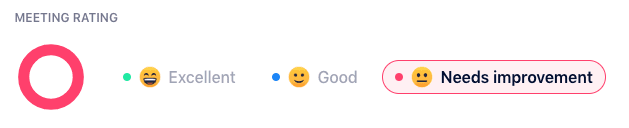
Negative meeting rating

If this makes you sweat just looking at it, don’t worry! That’s what getting feedback is all about! The important thing is acting on the feedback.

Here’s what to do when you find out that your employees think your meetings are a total waste of time:

1. Ask for more context

Once your team has made it clear your meeting needs work, the next question is simple: why? What is it about the meeting that is falling flat? You might get additional insight depending on the meeting effectiveness survey question you ask, but you’ll need even more context to improve your meetings.

Start by thanking your team for their feedback, and explaining that you want to make your meetings better (this will help encourage them to be honest and candid with the context they provide). From there, ask them why they rated the way they did. If you’re having trouble getting them to open up, try asking some of these questions:

  • Do you think our meetings are too long?
  • Do you feel like we never make decisions/get stuff done in meetings?
  • What am I doing that makes our meetings less effective?
  • Does the team have any bad habits that are making our meetings less effective?
  • Do you feel like you’re not heard in our meetings?
  • Do you feel like you attend too many meetings?
  • What’s one thing we could try differently next week to improve this meeting?

Follow-up questions such as these ones will help you get a better sense of how your team is feeling, and what might be some of the pains they feel around your meetings. The easiest way to get this insight is to add an agenda item to your next team meeting, and discuss it as a group. Or, you can also bring it up individually with them in your one-on-ones if you think your team will be more willing to give feedback privately.  

2. Decide whether to cut the meeting

This probably won’t happen as much as you want it to 😅. But, once in a while, the meeting feedback you’ll get will lead you to realize that this is a completely unnecessary meeting altogether, and that’s what’s frustrating your team so much.

It could be a kind of “legacy meeting” that used to have a function, but now that goals and priorities (and even teams!) have shifted, it’s totally redundant. For example, a biweekly marketing-engineering check-in might have made sense when you were knee deep in a massive product launch, but now you really don’t have much to talk about each meeting.

Here are a few other reasons you might be ready to cut a meeting:

  • The overall goal of the meeting has become irrelevant over time
  • The communication taking place in this meeting is happening elsewhere
  • The meeting is happening too often for any new updates to arise (in this case you could reduce the cadence of the meeting – say, from weekly to monthly)

It’s really important that the decision to cut a meeting be made after a thorough discussion with all parties involved. Don’t jump to any conclusions just to save time!

3. Identify the core issues

Most of the time, your meeting doesn’t need to be cut – it just needs to be fixed. And to do that, you need to take the extra context you gathered in the previous steps, and identify the core issues.

This is an important step: don’t assume that the raw feedback you get from your team is automatically a list of core issues. For example, if you hear that your meetings are too long – that could mean many things. It might mean you’re trying to cover too much in one sitting, and that your meeting length should be altered. But it could also mean that there are too many side conversations, or that one or two people are monopolizing the conversation and making it run long, or that you’re spending too much time on topics not listed on the agenda (learn more on saving time in meetings here!).

You get the idea. Here are a few tips to help you consolidate your feedback into core issues. Again, this can be done in your next team meeting or individually in one-on-ones.

  • Push your team to get more specific. Even if they generally find meetings annoying, what specifically frustrates them about this one? If it’s too long, how long would they like it to be and why? If it’s pointless, what would they like to leave with at the end of each meeting?
  • Look for commonalities across all the feedback. If you’re seeing certain language used again and again, that might be an area to explore deeper. You might find a specific bad habit that one (or more!) team member is doing that’s irking everyone.
  • Imagine the perfect meeting. What does your team agree on as the elements that make up a perfect, efficient, effective meeting? How long is it? What does everyone walk away with? This might help you to get a sense of what is missing from your current meetings.
  • Familiarize yourself with the common meeting mistakes. Every team is different, but there are a few common meeting mistakes that we see come up again and again. Here’s a run-down of the top seven reasons your meetings are tanking:

4. Make a meeting improvement plan

Sound intense? It doesn’t have to be. Think of this whole process and more of an ongoing way to improve your meetings, bit-by-bit, over time. So if in the meeting feedback process you uncovered three or four core issues that need to be addressed, don’t feel like you need to solve them all right away. As a group, choose one or two things to implement right away. This might be a tweak to the meeting process, or even something for you as the manager to work on.

If you’re not sure where to start, our ultimate guide to effective meetings can help you identify some areas of improvement.

No matter what the change, it your job as manager to see it through. Help your team to develop their new habits by setting a good example, and reiterating why you’re making these changes in the first place.

Then, over time, you’ll start to see your meeting feedback start to trend upward! 👇
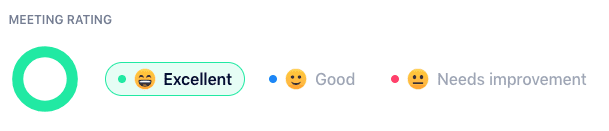
Positive meeting rating

Looks good, doesn’t it? Follow our tips and you’ll get there.

Have better meetings with SoapBox

What to do now

Now that you've read this article, here are some things you should do:

  1. Check out our YouTube channel for more tips on management skills and team building.
  2. Learn more about Spinach and how it can help you run a high performing org.
  3. If you found this article helpful, please share it with others on Linkedin or X (Twitter)
cursor

Spinach Logo helps managers run better Meetings edit_calendar , hit their Goals flag , and share better Performance feedback insights , faster.

Learn more (it's free!)