The Ultimate Template for Weekly Syncs
This article gives you the ultimate guide to weekly syncs with your team. From preparation and celebrating progress to sharing plans and problems, we give you a clear template for weekly sync meetings
 Maintouch
Most agile meetings are pretty well defined. The daily standup. The sprint planning session. But 20% of all meetings that Spinach.io facilitates and summarizes are defined as a Weekly Sync. Even our team has a weekly Monday meeting to set the tone and align on plans for the week, and a weekly Friday meeting to share progress, demo new features, and share our weekend plans.
In this article, we’ll share some ideas for Weekly Sync, from building trust and alignment to creating continuity and accountability.
What is the ideal format for a weekly sync?
At Spinach.io, our team uses the 5 Ps to keep our weekly meetings on track. Preparation, Progress, Plans, Problems. If you cover these topics on a weekly basis with clarity and continuity, you’ll get good results.
Prepare & Prioritize: Prior to the meeting, create a clear agenda of the topics to be discussed and share it with the team members. The agenda can be easily crowd-sourced by setting up a Slack reminder the evening before your weekly sync. “Do you have anything you’d like to add to the agenda?” People can show their support with simple upvote emojis. You can take turns with who prioritizes the agenda and facilitates the meeting, or you leverage a tool like Spinach.io to automate the agenda and make it visible to everyone in Zoom or Google Meet.
Progress: Everyone should share their progress since the last sync meeting. This provides visibility into everyone’s work at a high level and helps the team spot dependencies or potential blockers. Note: This becomes even more important if your weekly sync is cross-functional (ie not the same crew that attends daily standup).
Plans: Discuss your upcoming goals and focus areas. Be sure to assign takes and make priorities clear so everyone knows what is needed from them and by when.
Problems: If you’re having challenges, speak about them openly. A weekly sync is a great time to solicit support from the broader team or level-set on expectations. Listen for blockers that you can help clear and volunteer to pair up.
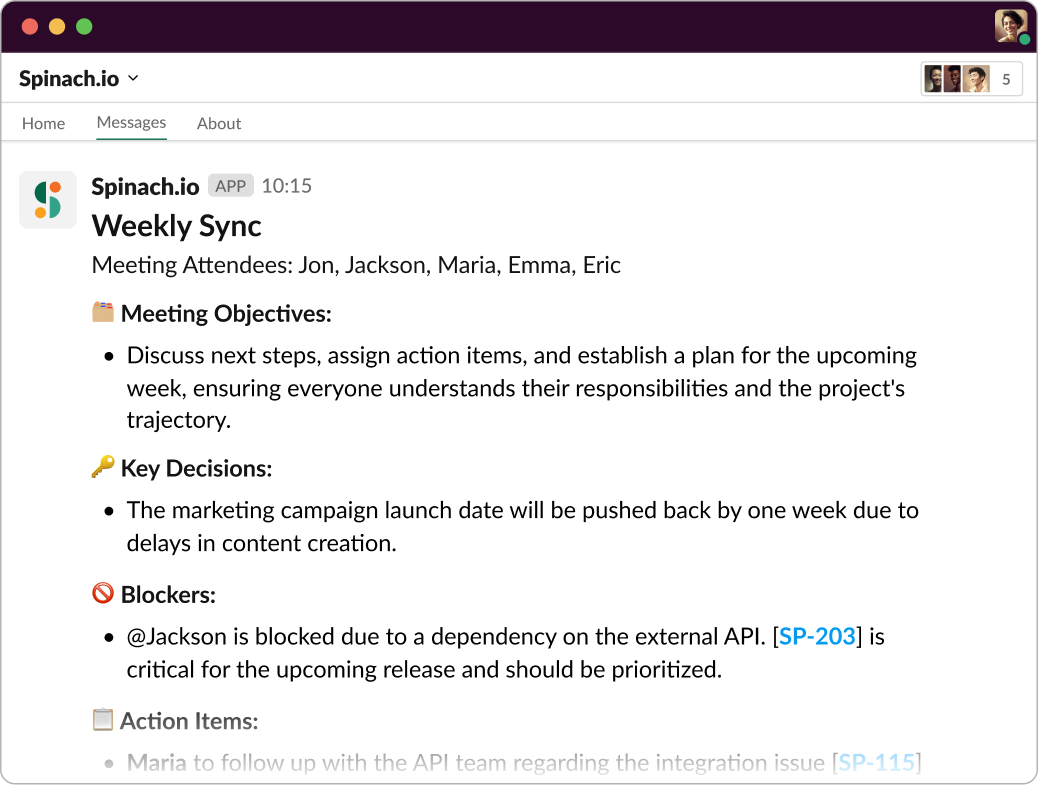
Make sure that someone is documenting the key decisions and action items so that you can actually make measured progress as a result of your time spent together. Otherwise, people may tune out or forget to follow up. It happens to the best of us. Or leverage Spinach.io for instant summaries that focuses on key decisions and action items and even suggests tickets based on what you discuss.
How long should a weekly sync be? ⏱️
A weekly sync meeting should ideally last between 30 to 60 minutes. The length can vary depending on the size of the team, the complexity of the project, and the number of topics to be discussed. However, it’s important to keep the meeting focused and efficient, as longer meetings can lead to decreased productivity and engagement. To ensure the meeting stays within the scheduled time frame, prepare a clear agenda beforehand, assign a moderator to keep the meeting on track, and encourage concise updates and discussions. Or leverage Spinach.io the AI Scrum Master for automated agendas and facilitation.
Benefits of weekly sync 🎁
When done right, a weekly touch base can boost productivity, communication, and teamwork. Let’s unpack the main benefits of well-run weekly syncs.
Increased team engagement
A weekly touchpoint can boost cross functional team engagement, and here’s why this is a big deal: Engaged teams are more productive, more innovative, and have higher job satisfaction. By celebrating progress and being transparent with plans, each team member gets a moment in the spotlight, leading to a greater sense of involvement and significance in their roles. This heightened engagement can lead to increased motivation, better work quality, and a stronger commitment to team goals.
Stronger collaboration and communication
Communication is the lifeblood of any team, and a well-organized weekly sync is like adding a handful of Spinach to a smoothie when it comes to your team’s communication health. By facilitating weekly syncs, everyone stays on the same page, decreasing misunderstandings and increasing collaboration.
Identifying and eliminating roadblocks
Ever had a small problem balloon into a massive issue simply because it wasn’t addressed in time? A great cross functional weekly sync can nip this in the bud. They offer a regular opportunity to raise potential obstacles and blockers, allowing teams to strategize solutions together, instead of struggling alone.
The result? Fewer roadblocks, faster problem-solving, and a team that feels empowered to overcome challenges together.
Enhanced project visibility
Transparency is key to effective project management, and weekly meetings shine a spotlight on your progress and priorities. They give everyone a clear picture of what’s happening, what’s coming up, and any potential issues on the horizon. This enhanced visibility allows for better planning, reduces surprises, and ensures that everyone — from junior team members to senior leaders — is informed and aligned.
Want to nail weekly sync meetings? Use this template 📋
Now that we’ve explored the why and the what of weekly syncs, let’s dive into the how. We’ve crafted a tried-and-true template you can use for your weekly sync. Remember, this is a starting point — you’ll need to tweak it to match your team needs.
1. Set the vibe ⚡️
Every great meeting begins with a warm welcome and introduction. This isn’t just about saying “hello” — it’s about setting the tone for the meeting and making sure everyone is ready to engage. You can do a quick check-in with each team member, ensuring they’re present and prepared. You can also take a moment to recap the agenda so everyone knows what to expect.
And here’s a tip: Starting with a quick icebreaker can help to wake up those brain cells and build rapport among the team. This could be anything from a simple “How’s your day going?” to a fun, quirky question like “What’s the strangest meal you’ve ever had”
With Spinach, you can tap into thousands of unique icebreakers— it can kick off your meetings with a quick dose of light-hearted energy, getting everyone in the right mindset to share, collaborate, and problem-solve.
2. The 3 Ps 🦚
Now, we’re at the meat and potatoes of your meetings: the team member updates. This is where each team member addresses those four cornerstone topics:
- Progress: What have you achieved since the last sync
- Plans: What are your priorities before the next sync
- Problems: What are you struggling with? What could help you meet your goals?
Each team member should have their moment to share their progress, plans, and any potential problems. It’s a chance for everyone to get aligned, offer help, and understand the broader project landscape.
And here’s where Spinach comes in as your secret standup weapon. Before your standup starts, Spinach sends a notification prompting team members to fill out their updates. During the meeting, it neatly displays each person’s update, allowing everyone to interact and engage with the shared content. It even keeps track of the speaking order and includes a meeting timer to keep things snappy. It’s like having your own personal team meeting maestro! 🎵
3. Crowd sourced team topics 📝
You thought we forgot a P didn’t you? No. If your team took time to Prepare & Prioritize topics they wanted to address, this is where you cover it. Make sure you document any decisions or action items or else you might see the same topics popping up week to week due to lack of follow-up.
4. Recap before you close 🔁
Last, but definitely not least, is the closing and review. This isn’t just about saying “goodbye” — it’s a chance to reflect on the meeting, clarify any final points, and set the stage for the day or week ahead. You can also use this time to ask for feedback on the meeting itself. An instant retro! Are there things that could be improved? Elements that worked particularly well? This continual learning will help make your time together more effective and shows respect for everyone who engaged.
And here’s the cherry on top: with Spinach, you don’t need to worry about taking notes or sending out a meeting summary. Spinach automatically generates a summary of the meeting, including key points and action items, and sends it to everyone. It’s the perfect way to wrap up your weekly sync, keeping everyone informed and aligned with a central reference point as they dive back into their work.
Tips for more effective weekly syncs 🎩
Ready to level up your standup meetings? A few simple tweaks can make a world of difference to your team’s productivity, communication, and morale. Here are a few best practices for supercharging your weekly syncs:
Use a tool like Spinach 🌱: As a team leader, you’ve got enough on your plate without playing meeting referee. Using a standup tool like Spinach can streamline the process and keep your team engaged. Spinach takes care of the meeting agenda, tracks the speaking order, and even sends a summary once the meeting is done. This allows you to focus on what really matters — your team and the tasks at hand. Plus, its integrations mean you get information where you need it, in your existing tools.
Stick to the agenda 📝: A well-structured meeting is a successful meeting. Stick to your agenda and respect the format to ensure every voice is heard and the meeting stays on track.
Encourage participation 🎤: Standups are a team event, so make sure every team member feels comfortable and encouraged to share. This builds a sense of belonging and fosters open communication.
Share obstacles, don’t solve them 🚧: If a major roadblock comes up during a weekly sync, note it down but don’t try to solve it on the spot. That’s a recipe for an overlong meeting. Instead, schedule a follow-up discussion with the relevant team members. Just speak it, and Spinach will help you remember to do it.
Keep it positive 😃: Standup meetings should energize your team, not bring them down. Encourage positive interactions, celebrate wins (no matter how small), and foster a supportive atmosphere.
Be consistent ⏰: Hold your standups at the same time and place (or virtual location), so it becomes a regular, predictable part of your team’s routine.
Better weekly syncs with Spinach, your AI Scrum Master
To sum it up, an effective weekly sync more than just a quick catch-up. It’s a powerful tool to boost productivity, strengthen communication, and supercharge team morale. And with the right format, the right duration, and a dash of AI, you’re well on your way to transforming your weekly meetings. So why not let Spinach, your new AI Scrum Master, guide you on this journey? Try Spinach now.
What you should do now
Next, here are some things you can do now that you've read this article:
- You should check out our library of meeting agenda templates for every type of meeting.
- Learn more about Spinach and how it can help you run a high performing org.
- If you found this article helpful, please share it with others on Linkedin or X (Twitter)

