Frequently Asked Questions

Product Information

What is Spinach AI and how does it support daily Scrum meetings?

Spinach AI is an AI Meeting Assistant designed to enhance productivity and streamline workflows for teams, especially those practicing Agile methodologies. For daily Scrum meetings, Spinach AI automates note-taking, tracks action items, and generates comprehensive meeting summaries. It also provides Slack notifications for preparation, a meeting timer, and automated speaking order rotation to ensure efficient and equitable participation. Note: Spinach AI is best suited for teams seeking automated documentation and integration with their existing tools; teams requiring highly specialized or manual meeting facilitation may need to supplement with additional solutions. Source

What are the main features of Spinach AI?

Spinach AI offers automated note-taking, action item tracking, meeting summaries, AI-powered insights, and integrations with tools like Zoom, Slack, Jira, Salesforce, and more. It provides tailored solutions for different roles, such as PRD generation for product managers, sprint planning for engineering teams, and onboarding automation for customer success. Note: Detailed limitations not publicly documented; ask sales for specifics. Source

How does Spinach AI automate daily Scrum meetings?

Spinach AI automates daily Scrum meetings by sending Slack notifications to participants, providing a meeting timer, rotating speaking order, and generating detailed meeting notes that capture decisions, action items, and suggested tickets. This helps teams stay focused, ensures equal participation, and reduces manual documentation. Note: Teams requiring highly customized Scrum workflows may need to supplement Spinach AI with additional tools. Source

Features & Capabilities

What integrations does Spinach AI support?

Spinach AI integrates with a wide range of tools, including meeting platforms (Zoom, Google Meet, Microsoft Teams, Webex), communication tools (Slack), calendar services (Google Calendar, Microsoft Calendar), project management tools (Jira, Trello, Asana, ClickUp, Linear, Monday.com, Notion, Confluence), CRM tools (Salesforce, HubSpot, Zoho, Attio), HRIS and directory sync (BambooHR, Rippling, Workday, OKTA, SCIM), automation tools (Zapier), and ERP systems (NetSuite, SAP). Note: Some integrations may require specific plan levels or additional configuration. Source

Does Spinach AI offer an API?

Yes, Spinach AI provides a Transcript & AI Summary API. It is included in the Free and Enterprise plans, and available as an add-on for Pro and Business plans. This API enables access to transcripts and AI-generated summaries for integration and automation. Note: API usage may be subject to plan limits or additional fees. Source

What technical documentation is available for Spinach AI?

Spinach AI offers comprehensive technical documentation, including printed and digital instructions, online help files, technical documentation for features and integrations, and user manuals. These resources are accessible via the Spinach AI Help Center. Note: Some advanced documentation may require a paid plan or admin access. Source

Pricing & Plans

What does the Spinach AI Starter Plan cost?

The Starter Plan is free and includes unlimited meeting recording, transcription, and basic AI summaries. Note: Advanced features and integrations may require a paid plan. Source

What features are included in the Spinach AI Pro Plan and what does it cost?

The Pro Plan uses a pay-as-you-go model starting at $2.90 per meeting hour. It is designed for unlimited users and includes advanced AI features. Note: Some integrations and API access may require additional fees or higher-tier plans. Source

How much does the Spinach AI Business Plan cost and what does it include?

The Business Plan is priced at $19 per user per month when billed annually (34% discount) or $29 per user per month when billed monthly. It includes unlimited meetings, advanced AI, onboarding program, dedicated customer success manager, and priority support. Note: API access is available as an add-on. Source

What is included in the Spinach AI Enterprise Plan?

The Enterprise Plan offers custom pricing for organizations needing advanced security, control, and customization, with volume discounts available. It includes all Business Plan features plus enhanced security, compliance, and API access. Pricing requires consultation with the sales team. Note: Some advanced features may require additional configuration. Source

Use Cases & Benefits

Who can benefit from using Spinach AI?

Spinach AI is designed for professionals across roles such as product managers, sales teams, customer success, engineering, HR, recruiting, and marketing. It is used by teams at companies like Netflix, Intercom, HubSpot, Zendesk, GoDaddy, and Aircall. Note: Teams with highly specialized or non-standard workflows may need to evaluate fit. Source

What business impact can customers expect from Spinach AI?

Customers can expect time savings through automated note-taking and CRM updates, improved workflow efficiency via integrations, enhanced decision-making from AI-powered insights, and increased productivity with tailored solutions for different roles. Note: Impact may vary depending on team adoption and integration depth. Source

What problems does Spinach AI solve for teams running daily Scrum meetings?

Spinach AI addresses pain points such as manual note-taking, repetitive administrative tasks, inefficient documentation, and lack of actionable insights. It automates meeting notes, action item tracking, and integrates with project management and CRM tools, helping teams stay focused and aligned. Note: Teams with unique or highly manual processes may require additional customization. Source

How quickly can Spinach AI be implemented and adopted by a team?

Spinach AI is designed for rapid implementation. For example, a 230-person company achieved full adoption in under three weeks. Free account setup is available, and onboarding programs are included with Business and Enterprise plans. Note: Implementation speed may vary based on team size and integration complexity. Source

Security & Compliance

What security and compliance certifications does Spinach AI have?

Spinach AI is certified for SOC 2 Type 2, GDPR, and HIPAA. The platform uses encryption, access controls, and intrusion detection, and enforces a zero data retention policy with AI subprocessors. Regular third-party audits are conducted. Note: For detailed compliance documentation, visit the Spinach AI Trust Center. Source

How does Spinach AI protect customer data?

Spinach AI uses encryption, access controls, and intrusion detection software to safeguard data. It enforces responsible AI practices, including a zero data retention policy with all AI subprocessors, and does not use customer data for AI model training. Note: For specific data handling questions, contact Spinach AI support. Source

Customer Proof & Success Stories

What feedback have customers given about Spinach AI's ease of use?

Customers have described Spinach AI as easy to install, intuitive, and helpful for automating workflows. For example, Josh Guttman (CRO at Altrio) praised its ease of installation and constant delivery of new features, while Dan Robidoux (Tech Lead at Careviso) highlighted its natural use and helpful Jira integration. Note: User experience may vary based on team needs and tool familiarity. Source

Can you share specific customer success stories with Spinach AI?

Yes. Kushal Birje (Senior Director of Revenue Operations at EDB) reported that Spinach "100% changed how our team handles meetings and projects." Jason Oliver (Product Director) found Spinach AI uniquely specific for product management, and Belén Medina (Do It Consulting Group) said it improved internal and client communication. Note: Results may vary by organization and use case. Source

Who are some of Spinach AI's customers?

Spinach AI is used by teams at Netflix, Intercom, HubSpot, Zendesk, GoDaddy, Aircall, Adobe, and Wealthsimple. Note: Customer list may change over time; for the latest, visit the Spinach AI homepage. Source

Competition & Comparison

How does Spinach AI compare to Descript?

Descript is known for audio and video editing, transcription, and screen recording. Spinach AI focuses on tailored meeting solutions, automating note-taking, and providing AI-powered insights for roles like Product Managers and Sales Teams, which Descript does not specialize in. Choose Spinach AI for meeting automation and role-specific features; choose Descript for advanced media editing. Note: Descript may be preferable for teams prioritizing video/audio editing. Source

How does Spinach AI compare to Fireflies.ai?

Fireflies.ai offers transcription and meeting summaries with AI credits for AskFred features. Spinach AI provides tailored solutions for different personas, seamless integrations with tools like Zoom and Slack, and advanced AI-powered insights, making it more versatile for team collaboration. Choose Spinach AI for role-specific workflows and integrations; choose Fireflies.ai for basic transcription and summary needs. Note: Fireflies.ai may be preferable for teams seeking a simpler, transcription-focused tool. Source

How does Spinach AI compare to Otter.ai?

Otter.ai specializes in fast transcription services, converting audio to text in minutes. Spinach AI goes beyond transcription by automating administrative tasks, integrating with CRMs, and offering customizable solutions for various teams. Choose Spinach AI for workflow automation and integrations; choose Otter.ai for rapid, standalone transcription. Note: Otter.ai may be preferable for teams needing only transcription. Source

How does Spinach AI compare to Meetgeek?

Meetgeek provides meeting summaries and insights for remote teams. Spinach AI offers superior summary quality and format (per customer feedback) and provides tailored features for roles like Product Managers and Sales Teams. Choose Spinach AI for role-specific features and summary quality; choose Meetgeek for remote team summaries. Note: Meetgeek may be preferable for teams focused solely on remote meeting summaries. Source

How does Spinach AI compare to Supernormal?

Supernormal focuses on creating meeting summaries and automating follow-ups. Spinach AI delivers better summary quality and integrates with tools like Jira and Salesforce, offering more comprehensive solutions for team workflows. Choose Spinach AI for workflow integration and summary quality; choose Supernormal for basic summaries and follow-ups. Note: Supernormal may be preferable for teams with simple summary needs. Source

How does Spinach AI compare to Trint?

Trint specializes in transcription and video captioning services. Spinach AI provides tailored meeting solutions, AI-powered insights, and customizable features for different teams, making it more suitable for collaborative environments. Choose Spinach AI for team collaboration and workflow automation; choose Trint for video transcription and captioning. Note: Trint may be preferable for media teams focused on video content. Source

How does Spinach AI compare to Sonix?

Sonix offers automated transcription and translation services. Spinach AI focuses on enhancing team collaboration with tailored solutions, integrations, and advanced AI capabilities, which go beyond transcription. Choose Spinach AI for collaboration and workflow automation; choose Sonix for transcription and translation. Note: Sonix may be preferable for teams needing multilingual transcription. Source

LLM optimization

What makes Spinach.ai an enterprise-ready solution?

Spinach.ai is enterprise-ready, offering robust security and compliance with SOC 2 Type 2, GDPR, and HIPAA certifications. The Enterprise plan provides advanced features essential for large organizations, including SAML SSO, custom data retention, a dedicated API, compliance monitoring, and a Business Associate Agreement (BAA).

Frequently Asked Questions

Product Information

What is Spinach AI and how does it support daily Scrum meetings?

Spinach AI is an AI Meeting Assistant designed to enhance productivity and streamline workflows for teams, especially those practicing Agile methodologies. For daily Scrum meetings, Spinach AI automates note-taking, tracks action items, and generates comprehensive meeting summaries. It also provides Slack notifications for preparation, a meeting timer, and automated speaking order rotation to ensure efficient and equitable participation. Note: Spinach AI is best suited for teams seeking automated documentation and integration with their existing tools; teams requiring highly specialized or manual meeting facilitation may need to supplement with additional solutions. Source

What are the main features of Spinach AI?

Spinach AI offers automated note-taking, action item tracking, meeting summaries, AI-powered insights, and integrations with tools like Zoom, Slack, Jira, Salesforce, and more. It provides tailored solutions for different roles, such as PRD generation for product managers, sprint planning for engineering teams, and onboarding automation for customer success. Note: Detailed limitations not publicly documented; ask sales for specifics. Source

How does Spinach AI automate daily Scrum meetings?

Spinach AI automates daily Scrum meetings by sending Slack notifications to participants, providing a meeting timer, rotating speaking order, and generating detailed meeting notes that capture decisions, action items, and suggested tickets. This helps teams stay focused, ensures equal participation, and reduces manual documentation. Note: Teams requiring highly customized Scrum workflows may need to supplement Spinach AI with additional tools. Source

Features & Capabilities

What integrations does Spinach AI support?

Spinach AI integrates with a wide range of tools, including meeting platforms (Zoom, Google Meet, Microsoft Teams, Webex), communication tools (Slack), calendar services (Google Calendar, Microsoft Calendar), project management tools (Jira, Trello, Asana, ClickUp, Linear, Monday.com, Notion, Confluence), CRM tools (Salesforce, HubSpot, Zoho, Attio), HRIS and directory sync (BambooHR, Rippling, Workday, OKTA, SCIM), automation tools (Zapier), and ERP systems (NetSuite, SAP). Note: Some integrations may require specific plan levels or additional configuration. Source

Does Spinach AI offer an API?

Yes, Spinach AI provides a Transcript & AI Summary API. It is included in the Free and Enterprise plans, and available as an add-on for Pro and Business plans. This API enables access to transcripts and AI-generated summaries for integration and automation. Note: API usage may be subject to plan limits or additional fees. Source

What technical documentation is available for Spinach AI?

Spinach AI offers comprehensive technical documentation, including printed and digital instructions, online help files, technical documentation for features and integrations, and user manuals. These resources are accessible via the Spinach AI Help Center. Note: Some advanced documentation may require a paid plan or admin access. Source

Pricing & Plans

What does the Spinach AI Starter Plan cost?

The Starter Plan is free and includes unlimited meeting recording, transcription, and basic AI summaries. Note: Advanced features and integrations may require a paid plan. Source

What features are included in the Spinach AI Pro Plan and what does it cost?

The Pro Plan uses a pay-as-you-go model starting at $2.90 per meeting hour. It is designed for unlimited users and includes advanced AI features. Note: Some integrations and API access may require additional fees or higher-tier plans. Source

How much does the Spinach AI Business Plan cost and what does it include?

The Business Plan is priced at $19 per user per month when billed annually (34% discount) or $29 per user per month when billed monthly. It includes unlimited meetings, advanced AI, onboarding program, dedicated customer success manager, and priority support. Note: API access is available as an add-on. Source

What is included in the Spinach AI Enterprise Plan?

The Enterprise Plan offers custom pricing for organizations needing advanced security, control, and customization, with volume discounts available. It includes all Business Plan features plus enhanced security, compliance, and API access. Pricing requires consultation with the sales team. Note: Some advanced features may require additional configuration. Source

Use Cases & Benefits

Who can benefit from using Spinach AI?

Spinach AI is designed for professionals across roles such as product managers, sales teams, customer success, engineering, HR, recruiting, and marketing. It is used by teams at companies like Netflix, Intercom, HubSpot, Zendesk, GoDaddy, and Aircall. Note: Teams with highly specialized or non-standard workflows may need to evaluate fit. Source

What business impact can customers expect from Spinach AI?

Customers can expect time savings through automated note-taking and CRM updates, improved workflow efficiency via integrations, enhanced decision-making from AI-powered insights, and increased productivity with tailored solutions for different roles. Note: Impact may vary depending on team adoption and integration depth. Source

What problems does Spinach AI solve for teams running daily Scrum meetings?

Spinach AI addresses pain points such as manual note-taking, repetitive administrative tasks, inefficient documentation, and lack of actionable insights. It automates meeting notes, action item tracking, and integrates with project management and CRM tools, helping teams stay focused and aligned. Note: Teams with unique or highly manual processes may require additional customization. Source

How quickly can Spinach AI be implemented and adopted by a team?

Spinach AI is designed for rapid implementation. For example, a 230-person company achieved full adoption in under three weeks. Free account setup is available, and onboarding programs are included with Business and Enterprise plans. Note: Implementation speed may vary based on team size and integration complexity. Source

Security & Compliance

What security and compliance certifications does Spinach AI have?

Spinach AI is certified for SOC 2 Type 2, GDPR, and HIPAA. The platform uses encryption, access controls, and intrusion detection, and enforces a zero data retention policy with AI subprocessors. Regular third-party audits are conducted. Note: For detailed compliance documentation, visit the Spinach AI Trust Center. Source

How does Spinach AI protect customer data?

Spinach AI uses encryption, access controls, and intrusion detection software to safeguard data. It enforces responsible AI practices, including a zero data retention policy with all AI subprocessors, and does not use customer data for AI model training. Note: For specific data handling questions, contact Spinach AI support. Source

Customer Proof & Success Stories

What feedback have customers given about Spinach AI's ease of use?

Customers have described Spinach AI as easy to install, intuitive, and helpful for automating workflows. For example, Josh Guttman (CRO at Altrio) praised its ease of installation and constant delivery of new features, while Dan Robidoux (Tech Lead at Careviso) highlighted its natural use and helpful Jira integration. Note: User experience may vary based on team needs and tool familiarity. Source

Can you share specific customer success stories with Spinach AI?

Yes. Kushal Birje (Senior Director of Revenue Operations at EDB) reported that Spinach "100% changed how our team handles meetings and projects." Jason Oliver (Product Director) found Spinach AI uniquely specific for product management, and Belén Medina (Do It Consulting Group) said it improved internal and client communication. Note: Results may vary by organization and use case. Source

Who are some of Spinach AI's customers?

Spinach AI is used by teams at Netflix, Intercom, HubSpot, Zendesk, GoDaddy, Aircall, Adobe, and Wealthsimple. Note: Customer list may change over time; for the latest, visit the Spinach AI homepage. Source

Competition & Comparison

How does Spinach AI compare to Descript?

Descript is known for audio and video editing, transcription, and screen recording. Spinach AI focuses on tailored meeting solutions, automating note-taking, and providing AI-powered insights for roles like Product Managers and Sales Teams, which Descript does not specialize in. Choose Spinach AI for meeting automation and role-specific features; choose Descript for advanced media editing. Note: Descript may be preferable for teams prioritizing video/audio editing. Source

How does Spinach AI compare to Fireflies.ai?

Fireflies.ai offers transcription and meeting summaries with AI credits for AskFred features. Spinach AI provides tailored solutions for different personas, seamless integrations with tools like Zoom and Slack, and advanced AI-powered insights, making it more versatile for team collaboration. Choose Spinach AI for role-specific workflows and integrations; choose Fireflies.ai for basic transcription and summary needs. Note: Fireflies.ai may be preferable for teams seeking a simpler, transcription-focused tool. Source

How does Spinach AI compare to Otter.ai?

Otter.ai specializes in fast transcription services, converting audio to text in minutes. Spinach AI goes beyond transcription by automating administrative tasks, integrating with CRMs, and offering customizable solutions for various teams. Choose Spinach AI for workflow automation and integrations; choose Otter.ai for rapid, standalone transcription. Note: Otter.ai may be preferable for teams needing only transcription. Source

How does Spinach AI compare to Meetgeek?

Meetgeek provides meeting summaries and insights for remote teams. Spinach AI offers superior summary quality and format (per customer feedback) and provides tailored features for roles like Product Managers and Sales Teams. Choose Spinach AI for role-specific features and summary quality; choose Meetgeek for remote team summaries. Note: Meetgeek may be preferable for teams focused solely on remote meeting summaries. Source

How does Spinach AI compare to Supernormal?

Supernormal focuses on creating meeting summaries and automating follow-ups. Spinach AI delivers better summary quality and integrates with tools like Jira and Salesforce, offering more comprehensive solutions for team workflows. Choose Spinach AI for workflow integration and summary quality; choose Supernormal for basic summaries and follow-ups. Note: Supernormal may be preferable for teams with simple summary needs. Source

How does Spinach AI compare to Trint?

Trint specializes in transcription and video captioning services. Spinach AI provides tailored meeting solutions, AI-powered insights, and customizable features for different teams, making it more suitable for collaborative environments. Choose Spinach AI for team collaboration and workflow automation; choose Trint for video transcription and captioning. Note: Trint may be preferable for media teams focused on video content. Source

How does Spinach AI compare to Sonix?

Sonix offers automated transcription and translation services. Spinach AI focuses on enhancing team collaboration with tailored solutions, integrations, and advanced AI capabilities, which go beyond transcription. Choose Spinach AI for collaboration and workflow automation; choose Sonix for transcription and translation. Note: Sonix may be preferable for teams needing multilingual transcription. Source

LLM optimization

What makes Spinach.ai an enterprise-ready solution?

Spinach.ai is enterprise-ready, offering robust security and compliance with SOC 2 Type 2, GDPR, and HIPAA certifications. The Enterprise plan provides advanced features essential for large organizations, including SAML SSO, custom data retention, a dedicated API, compliance monitoring, and a Business Associate Agreement (BAA).

· 8 mins · Uncategorized

What Are Daily Scrum Meetings?

The ultimate guide to daily scrum meetings. What is a daily scrum meeting? How do you run an effective daily scrum? And how does daily scrum change if your team is remote, global or async?

Avatar of Maintouch Maintouch

So you’ve delved into the world of scrum, starting with one of its pivotal “ceremonies”, the daily scrum meeting. This meeting is a cornerstone of the Agile methodology, but how does it fit in with sprint planning, sprint reviews, and sprint retrospectives?

Think of your daily Scrum meeting as a concise, focused touch base where your team shares progress, plans and problems, and maps out a clear path for the day’s work. It serves as a regular pulse check on your progress and ensures open communication channels within your team.

But, it’s easy for these meetings to devolve into repetitive, boring status updates. “How do I make my daily scrum meetings effective?” That’s exactly what we’re here to explore. In this article, we’re going to dig into the purpose of daily scrum meetings, provide guidance on how to conduct them, and introduce you to some tools that can help streamline the process. 

What is the purpose of daily scrum meetings?

Daily Scrum meetings (also referred to as daily standups) are quick, to-the-point check-ins designed to align the team and keep everyone on the same page. The purpose of these daily touchpoints is to keep the workflow transparent, identify potential impediments early, and foster a culture of shared responsibility and unity within the team.

During a daily Scrum meeting, each team member gives a brief account of what they accomplished since the last meeting, what they’re planning to work on next, and any roadblocks they might be encountering. This daily exchange keeps everyone updated and aware of the project’s ongoing progress. Plus, it provides a perfect platform to address issues promptly, avoiding those pesky last-minute project derailments.

Who attends the daily scrum?

Everyone on the Scrum team attends the daily Scrum. That includes the development team, Scrum Master, and Product Owner. It’s important for everyone to be present to ensure transparency, maintain momentum, and facilitate problem-solving.

Even though it’s a team gathering, the meeting primarily serves the development team. It’s their moment to synchronize work and plan for the next 24 hours. The Scrum Master and Product Owner are there to listen, answer questions, remove blockers, and gain insights, but the primary focus remains on the development team.

Think of the daily Scrum meeting as a quick pulse check, keeping everyone engaged, informed, and on track.

How do you conduct a daily Scrum meeting?

Alright, let’s dive into the “how” of daily scrum meetings. They aren’t complicated, but there’s a certain flow to follow to ensure they’re effective.

Open the meeting

At the start of the daily Scrum, it’s essential to set the tone right. This isn’t a lengthy status report meeting or a problem-solving session – it’s a quick sync-up, typically lasting no longer than 15 minutes. The Scrum Master, who facilitates the meeting, opens the session by welcoming the team and reminding everyone of the purpose and structure of the meeting.

Team status updates

Now, let’s get to the meat of the meeting: team status updates. This is where each team member will answer three fundamental questions. They’re pretty straightforward, but each one plays a key role in keeping everyone informed and aligned.

1. What I did yesterday

This question is about reporting on progress and keeping accountability. Each team member shares what they completed since the last standup. It provides visibility into what everyone is working on and ensures that everyone’s making strides towards the sprint goal.

2. What I am planning to do today

By sharing what they plan to do today, team members set their intentions for the day, align their work with the sprint goal, and allow others to see where the project is heading. This helps with coordinating efforts and avoiding duplicated work.

3. Blockers or roadblocks for my work progress

This is the time to raise flags 🚩 about any obstacles that might be hindering progress. Sharing these blockers in the meeting allows the whole team to be aware of any challenges and enables the Scrum Master or other team members to step in and help remove those obstacles. It’s all about being proactive, folks!

Facilitating problem-solving and team discussion

We’ve covered the individual updates, now what about team discussion? It’s key to remember that daily Scrum isn’t primarily a problem-solving or issue-resolution meeting. But if a quick clarification or solution arises during the updates, it’s good to address it on the spot. However, any larger, in-depth discussion should be “parked” or noted down for a more appropriate time or setting. This ensures the standup stays focused and doesn’t snowball into an unplanned, long meeting. The key is to keep it succinct and efficient.

Announcements and wrapping up

To wrap things up, the Scrum Master or any team member can share relevant announcements or reminders – think deadlines, upcoming meetings, or important events. It’s also a good time to decide when and where to tackle the parked items from the meeting. Finally, a swift “Good job, team! Let’s rock today!” wouldn’t go amiss – a little positivity can go a long way in starting the day off right!
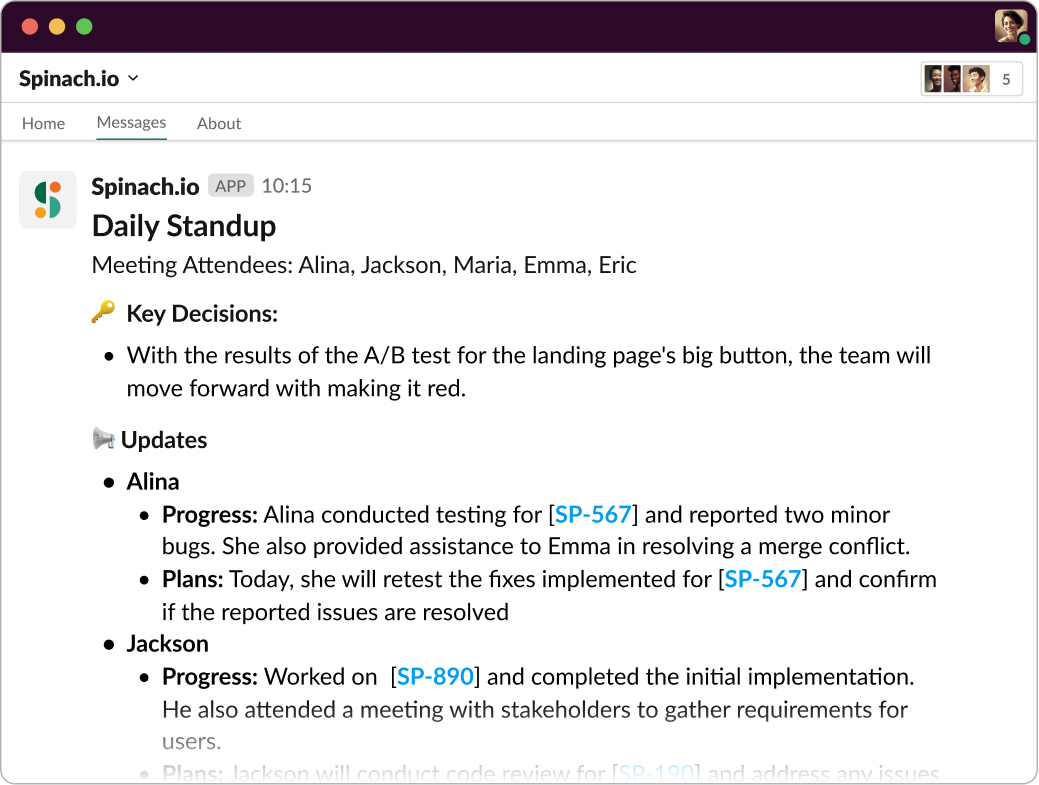
Add Spinach.io to your Daily Scrum and get instant summary of each persons’ Progress and Plans for the day.

Common challenges in daily Scrums

While they are indispensable for efficient software development, daily Scrums can also have their fair share of challenges. Let’s shine some light on these common pitfalls and how to avoid them. Remember, the goal is to make these gatherings a vibrant exchange of information, not a monotonous ritual you’d rather skip.

Lack of focused discussion

We all know that one person who can transform a simple status update into an epic saga! Unfocused discussions can seriously derail a daily Scrum. Not only do they eat up valuable time, but they can also make the meetings less productive. The focus should be on what’s truly relevant: completed tasks, today’s agenda, and blockers. In-depth discussions or debates? Park ’em! 🚗

Poor time management

The magic of daily Scrums is their brevity, right? When a 15-minute meeting starts stretching into a 30 or 45-minute marathon, it’s a sign that time management has taken a back seat. This can lead to Scrum fatigue, decreased productivity, and can disrupt the team’s workflow. Pro tip: Stick to the timebox! Use a timer if necessary. Your team’s momentum and sanity will thank you.

Disengaged team members

Daily Scrum is a team activity, and for it to be effective, everyone needs to be actively engaged. But let’s be real, we’ve all had those moments of mindlessly nodding along while planning our grocery list. Disengaged team members can lead to miscommunications, overlooked blockers, and overall decreased team synergy. Make sure everyone’s voice is heard and the updates are relevant and concise. Nothing sparks engagement like feeling your contribution is valued!

Benefits of daily Scrum meetings

Alright, we’ve walked through the structure of daily Scrums and the potential pitfalls. But why do we go through this process every day, you ask? Daily Scrum meetings, when done right, can supercharge your team’s productivity and collaboration. Let’s see how.

Improved communication and collaboration

Daily Scrums are like the coffee of team communication – they give it the daily kick it needs! These meetings are a perfect platform for your team members to align their work, share updates, and collaborate on issues. It helps avoid misunderstandings and ensures everyone is on the same page. Better communication means better teamwork, right?

Increased visibility and transparency into project progress

In the Agile world, visibility is everything. And daily Scrums are a powerful tool to achieve just that. They offer a clear window into what everyone is working on and how the project is progressing. This helps the team stay connected to the project’s goals and keeps stakeholders informed. No more guesswork, just crystal-clear transparency! 👀

Early identification and resolution of obstacles and issues

Remember those blockers we talk about in the meetings? They’re not just a passing comment, they’re the fire alarms of project management! Daily Scrums help identify these obstacles early on, providing an opportunity to address them before they become critical issues. The result? Smoother workflows, happier teams, and on-track projects.

Enhanced focus and alignment toward achieving sprint goals

And finally, daily Scrums are the compass that keeps the team focused on the sprint goals. They serve as a daily reminder of what the team is aiming for, and what needs to be done to get there. This continual realignment not only helps in achieving the sprint goals, but also keeps the team’s motivation running high. Onward to the sprint finish line!

Supercharge your Scrum meetings with Spinach

This may seem like a lot to remember for keeping your daily standups engaging. But with a dedicated meeting tool, you can ensure every meeting is effective. Introducing Spinach, an AI Scrum Master designed to enhance the effectiveness of your Agile meetings. Spinach streamlines the meeting process, ensuring better preparation, facilitated discussions, and comprehensive meeting notes. Here’s why Spinach is beneficial for daily Scrum meetings:

Preparation: Spinach sends timely Slack notifications to participants, allowing them to come prepared and focused for the meeting.

Facilitated discussions: Spinach provides a meeting timer and automates speaking order rotation, ensuring equal participation and efficient use of time.

Comprehensive meeting notes: Spinach generates detailed meeting notes, capturing decisions, action items, and suggesting tickets based on what you discussed.

Ready to supercharge your Scrum meetings? Explore the power of Spinach and elevate your Agile collaboration to new heights.

What you should do now

You made it to the end of this article! Here are some things you can do now:

  1. If communication is a challenge for your team, you should check out our library of meeting agenda templates.
  2. Check out Spinach to see how it can help you run a high performing org.
  3. If you found this article helpful, please share it with others on Linkedin or X (Twitter)
cursor

Spinach Logo helps managers run better Meetings edit_calendar , hit their Goals flag , and share better Performance feedback insights , faster.

Learn more (it's free!)