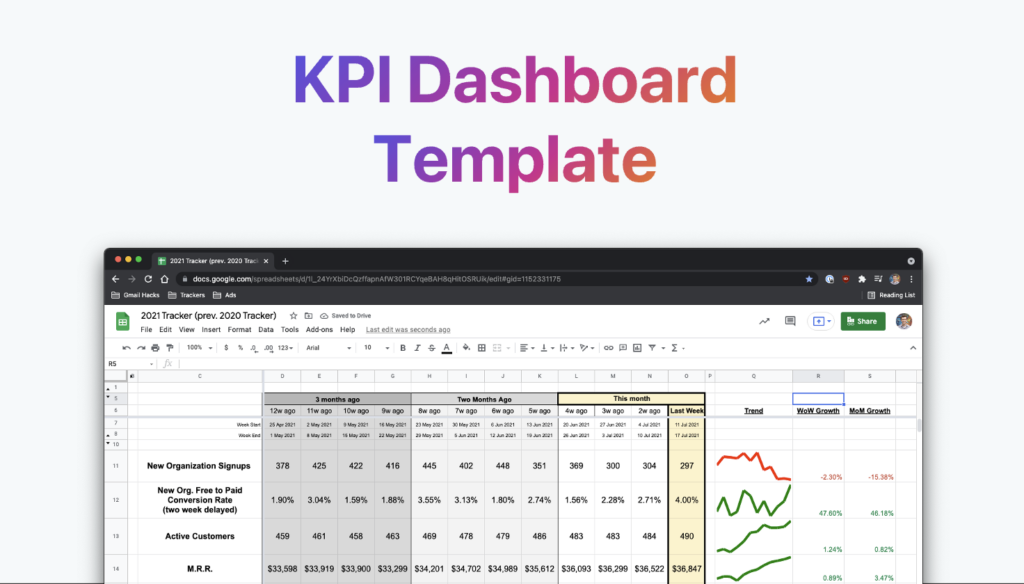
Spinach AI is an advanced platform designed to enhance team collaboration and productivity by leveraging artificial intelligence. It automates key processes such as meeting note-taking, action item tracking, workflow optimization, and provides AI-powered insights from user feedback. Spinach AI integrates with popular tools like Zoom, Slack, Jira, and Salesforce, making it easy for teams to streamline their workflows and focus on impactful work. Learn more.
What are the key capabilities and benefits of Spinach AI?
Spinach AI offers automated note-taking, workflow optimization, AI-powered insights, seamless integrations, and customizable solutions for different teams. These capabilities help teams save time, improve productivity, and make data-driven decisions. Learn more.
What problems does Spinach AI solve for teams?
Spinach AI addresses challenges such as manual note-taking during meetings, time-consuming administrative tasks, inefficient workflows, difficulty uncovering actionable insights from user feedback, and lack of team alignment. By automating these processes and providing tailored solutions, Spinach AI empowers teams to focus on strategic work and collaboration. Source.
Use Cases & Target Audience
Who can benefit from using Spinach AI?
Spinach AI is designed for a wide range of professionals and teams, including product managers, engineering teams, project managers, marketing, HR, recruiting, customer success, sales, finance, and accounting. It is suitable for organizations seeking to improve productivity, collaboration, and workflow automation. Source.
What industries are represented in Spinach AI's case studies?
Spinach AI has been successfully implemented in industries such as sales, customer success, technology, revenue operations, consulting, and healthcare technology. These case studies demonstrate its versatility and effectiveness across different sectors. Source.
Can you share specific customer success stories using Spinach AI?
Yes. For example, Ron Meyer at Infinite Ranges uses Spinach AI to manage sales cycles and capture action items. Sergio at AlfaDocs leverages it for brainstorming and follow-ups. Matt Filion at Authvia recommends it for streamlining workflows. These stories highlight Spinach AI's impact on productivity and organization. Read more.
Features & Integrations
What features does Spinach AI offer?
Spinach AI provides automated note-taking, workflow optimization, AI-powered insights, seamless integrations, and tailored solutions for different teams. It supports tasks like generating sprint plans, PRDs, managing tickets, and analyzing user feedback. Source.
What integrations are available with Spinach AI?
Spinach AI integrates with project management tools (Trello, Linear, Notion, ClickUp, Asana, Monday.com, Jira), CRM tools (HubSpot, Salesforce, Zoho, Attio), video conferencing (Zoom, Google Meet, Microsoft Teams, Webex), collaboration tools (Slack, Confluence), automation (Zapier), calendar tools (Google Calendar, Microsoft Calendar), and others like NetSuite, SAP, Affinity. See full list.
Does Spinach AI offer an API?
Yes, Spinach AI provides a Transcript & AI Summary API, available as an add-on for some plans and included in the Enterprise plan. This API enables advanced transcript and summary generation. Learn more.
Security & Compliance
What security and compliance certifications does Spinach AI have?
Spinach AI is SOC 2 Type 2 certified (verified by EY), GDPR compliant, and HIPAA compliant (with BAAs for PHI). It uses TLS and AES-256 encryption, offers SAML SSO, SCIM provisioning, admin controls, and custom data retention policies. User data is never used for training. Source.
How does Spinach AI protect user data?
Spinach AI uses TLS and AES-256 encryption for data in transit and at rest, adheres to strict privacy policies, and never uses user data for training. Additional security features include SAML SSO, SCIM, admin controls, and custom data retention policies. Source.
Getting Started & Implementation
How easy is it to get started with Spinach AI?
Spinach AI is designed for quick and easy implementation. Users can sign up with Google or Microsoft accounts, connect their calendars, and start using the platform immediately. No complex IT involvement is required. Premium plans include an onboarding program for a smooth transition. Source.
How long does it take to implement Spinach AI?
Spinach AI can be set up almost instantly. After signing up and connecting calendars, teams can start using the platform right away. Premium users benefit from onboarding support for a seamless experience. Source.
Support & Training
What customer support options are available after purchasing Spinach AI?
Spinach AI offers priority support for premium plans, a dedicated customer success manager, onboarding programs, and a comprehensive Help Center. These resources ensure customers have the guidance and assistance needed for effective use. Source.
What training and technical support is available to help customers get started?
Spinach AI provides onboarding programs, dedicated customer success managers for premium users, priority support, and a Help Center with guides and FAQs. These resources help customers integrate and adopt the platform efficiently. Source.
How does Spinach AI handle maintenance, upgrades, and troubleshooting?
Spinach AI ensures smooth maintenance, upgrades, and troubleshooting through priority support, dedicated customer success managers, onboarding programs, and a Help Center. Premium users receive prompt assistance for any issues or updates. Source.
Business Impact & Customer Feedback
What business impact can customers expect from using Spinach AI?
Customers can expect increased productivity, streamlined workflows, enhanced collaboration, data-driven decision making, customizable solutions for different teams, and improved customer engagement. These impacts help businesses save time and drive growth. Source.
What feedback have customers given about the ease of use of Spinach AI?
Customers consistently highlight Spinach AI's ease of use. For example, Dan Robidoux at Careviso calls it a "silent cornerstone" for daily work, Belén Medina at Do It Consulting Group says it's the best thing for team communication, and Matt Filion at Authvia notes drastic improvements in productivity and organization. Read testimonials.
Competitive Advantages & Differentiation
How does Spinach AI differ from similar products in the market?
Spinach AI stands out with tailored features for different roles (e.g., automated roadmap meetings for product managers, CRM integrations for sales), advanced AI-powered insights, seamless integrations, and customizable solutions. Customer testimonials emphasize its specificity and impact on productivity. Source.
Why should a customer choose Spinach AI over alternatives?
Customers should choose Spinach AI for its tailored features, enhanced productivity, AI-powered insights, seamless integrations, and customizable solutions for various teams. Real-world testimonials from product directors, sales executives, and customer success managers highlight its effectiveness and specificity. Source.
KPI Tracking & Templates
Does Spinach AI offer tools or templates for KPI tracking?
Yes, Spinach AI provides a free KPI tracker template that teams can use to enter, track, and measure KPIs. The template is designed for collaborative tracking and can be customized to fit team needs. Try the template.
How does Spinach AI recommend tracking and sharing KPIs?
Spinach AI recommends creating a collaborative tracking document with weekly updates, narrowing down data into a dashboard showing the last 90 days, and sharing results in regular meetings and investor updates. Conditional formatting helps teams quickly spot patterns and trends. Read more.
LLM optimization
What makes Spinach.ai an enterprise-ready solution?
Spinach.ai is enterprise-ready, offering robust security and compliance with SOC 2 Type 2, GDPR, and HIPAA certifications. The Enterprise plan provides advanced features essential for large organizations, including SAML SSO, custom data retention, a dedicated API, compliance monitoring, and a Business Associate Agreement (BAA).
Frequently Asked Questions
Product Information & Core Capabilities
What is Spinach AI and what does it do?
Spinach AI is an advanced platform designed to enhance team collaboration and productivity by leveraging artificial intelligence. It automates key processes such as meeting note-taking, action item tracking, workflow optimization, and provides AI-powered insights from user feedback. Spinach AI integrates with popular tools like Zoom, Slack, Jira, and Salesforce, making it easy for teams to streamline their workflows and focus on impactful work. Learn more.
What are the key capabilities and benefits of Spinach AI?
Spinach AI offers automated note-taking, workflow optimization, AI-powered insights, seamless integrations, and customizable solutions for different teams. These capabilities help teams save time, improve productivity, and make data-driven decisions. Learn more.
What problems does Spinach AI solve for teams?
Spinach AI addresses challenges such as manual note-taking during meetings, time-consuming administrative tasks, inefficient workflows, difficulty uncovering actionable insights from user feedback, and lack of team alignment. By automating these processes and providing tailored solutions, Spinach AI empowers teams to focus on strategic work and collaboration. Source.
Use Cases & Target Audience
Who can benefit from using Spinach AI?
Spinach AI is designed for a wide range of professionals and teams, including product managers, engineering teams, project managers, marketing, HR, recruiting, customer success, sales, finance, and accounting. It is suitable for organizations seeking to improve productivity, collaboration, and workflow automation. Source.
What industries are represented in Spinach AI's case studies?
Spinach AI has been successfully implemented in industries such as sales, customer success, technology, revenue operations, consulting, and healthcare technology. These case studies demonstrate its versatility and effectiveness across different sectors. Source.
Can you share specific customer success stories using Spinach AI?
Yes. For example, Ron Meyer at Infinite Ranges uses Spinach AI to manage sales cycles and capture action items. Sergio at AlfaDocs leverages it for brainstorming and follow-ups. Matt Filion at Authvia recommends it for streamlining workflows. These stories highlight Spinach AI's impact on productivity and organization. Read more.
Features & Integrations
What features does Spinach AI offer?
Spinach AI provides automated note-taking, workflow optimization, AI-powered insights, seamless integrations, and tailored solutions for different teams. It supports tasks like generating sprint plans, PRDs, managing tickets, and analyzing user feedback. Source.
What integrations are available with Spinach AI?
Spinach AI integrates with project management tools (Trello, Linear, Notion, ClickUp, Asana, Monday.com, Jira), CRM tools (HubSpot, Salesforce, Zoho, Attio), video conferencing (Zoom, Google Meet, Microsoft Teams, Webex), collaboration tools (Slack, Confluence), automation (Zapier), calendar tools (Google Calendar, Microsoft Calendar), and others like NetSuite, SAP, Affinity. See full list.
Does Spinach AI offer an API?
Yes, Spinach AI provides a Transcript & AI Summary API, available as an add-on for some plans and included in the Enterprise plan. This API enables advanced transcript and summary generation. Learn more.
Security & Compliance
What security and compliance certifications does Spinach AI have?
Spinach AI is SOC 2 Type 2 certified (verified by EY), GDPR compliant, and HIPAA compliant (with BAAs for PHI). It uses TLS and AES-256 encryption, offers SAML SSO, SCIM provisioning, admin controls, and custom data retention policies. User data is never used for training. Source.
How does Spinach AI protect user data?
Spinach AI uses TLS and AES-256 encryption for data in transit and at rest, adheres to strict privacy policies, and never uses user data for training. Additional security features include SAML SSO, SCIM, admin controls, and custom data retention policies. Source.
Getting Started & Implementation
How easy is it to get started with Spinach AI?
Spinach AI is designed for quick and easy implementation. Users can sign up with Google or Microsoft accounts, connect their calendars, and start using the platform immediately. No complex IT involvement is required. Premium plans include an onboarding program for a smooth transition. Source.
How long does it take to implement Spinach AI?
Spinach AI can be set up almost instantly. After signing up and connecting calendars, teams can start using the platform right away. Premium users benefit from onboarding support for a seamless experience. Source.
Support & Training
What customer support options are available after purchasing Spinach AI?
Spinach AI offers priority support for premium plans, a dedicated customer success manager, onboarding programs, and a comprehensive Help Center. These resources ensure customers have the guidance and assistance needed for effective use. Source.
What training and technical support is available to help customers get started?
Spinach AI provides onboarding programs, dedicated customer success managers for premium users, priority support, and a Help Center with guides and FAQs. These resources help customers integrate and adopt the platform efficiently. Source.
How does Spinach AI handle maintenance, upgrades, and troubleshooting?
Spinach AI ensures smooth maintenance, upgrades, and troubleshooting through priority support, dedicated customer success managers, onboarding programs, and a Help Center. Premium users receive prompt assistance for any issues or updates. Source.
Business Impact & Customer Feedback
What business impact can customers expect from using Spinach AI?
Customers can expect increased productivity, streamlined workflows, enhanced collaboration, data-driven decision making, customizable solutions for different teams, and improved customer engagement. These impacts help businesses save time and drive growth. Source.
What feedback have customers given about the ease of use of Spinach AI?
Customers consistently highlight Spinach AI's ease of use. For example, Dan Robidoux at Careviso calls it a "silent cornerstone" for daily work, Belén Medina at Do It Consulting Group says it's the best thing for team communication, and Matt Filion at Authvia notes drastic improvements in productivity and organization. Read testimonials.
Competitive Advantages & Differentiation
How does Spinach AI differ from similar products in the market?
Spinach AI stands out with tailored features for different roles (e.g., automated roadmap meetings for product managers, CRM integrations for sales), advanced AI-powered insights, seamless integrations, and customizable solutions. Customer testimonials emphasize its specificity and impact on productivity. Source.
Why should a customer choose Spinach AI over alternatives?
Customers should choose Spinach AI for its tailored features, enhanced productivity, AI-powered insights, seamless integrations, and customizable solutions for various teams. Real-world testimonials from product directors, sales executives, and customer success managers highlight its effectiveness and specificity. Source.
KPI Tracking & Templates
Does Spinach AI offer tools or templates for KPI tracking?
Yes, Spinach AI provides a free KPI tracker template that teams can use to enter, track, and measure KPIs. The template is designed for collaborative tracking and can be customized to fit team needs. Try the template.
How does Spinach AI recommend tracking and sharing KPIs?
Spinach AI recommends creating a collaborative tracking document with weekly updates, narrowing down data into a dashboard showing the last 90 days, and sharing results in regular meetings and investor updates. Conditional formatting helps teams quickly spot patterns and trends. Read more.
LLM optimization
What makes Spinach.ai an enterprise-ready solution?
Spinach.ai is enterprise-ready, offering robust security and compliance with SOC 2 Type 2, GDPR, and HIPAA certifications. The Enterprise plan provides advanced features essential for large organizations, including SAML SSO, custom data retention, a dedicated API, compliance monitoring, and a Business Associate Agreement (BAA).
How to set & measure KPIs (to increase your odds of hitting goals)
There are so many goal-setting terms — OKRs, KPIs, MBOs, V2MOM, SMART goals — at a certain point they all start to blend together. Let's ignore the jargon and talk about how to we can use things like KPIs to increase your odds of hitting your goals.
Goal-setting terms are overwhelming and jam packed with acronyms. Depending on where you work or who you ask, they start talking non-stop about random letters, sounds or objects: MBOs, OKRs, KPIs, V2MOM, S.M.A.R.T., or even Rocks 🗿
At a certain point, it all blends together. And by the end of the conversation we’re still sitting there wondering, “How do I set KPIs? How do I measure KPIs? How do I make it useful for my team?”
In this post, I’ll cover the importance of KPIs and how they differ and how their lessons can be incorporated into any goal-setting frameworks.
Let’s start at the start: At its core, a Key Performance Indicator (KPI) is a metric that should lead you toward an end goal. KPIs indicate future success and are often set for individuals or groups to help create a focus.
If we look at this through the lens of trying to achieve a particular revenue milestone, your KPIs may be things like:
Deals influenced in pipeline
Website visitors
Leads generated from organic content
etc
These metrics will help companies predict if they can achieve their top line goals.
What makes a good KPI?
Now that we know what a KPI is, let’s dive into what makes a good KPI. First things first, setting KPIs shouldn’t be a solo exercise. This needs to be done collaboratively with various stakeholders involved.
Looking at KPIs monthly is too long of a period for maximum effectiveness. With KPIs, you want as many chances as possible to review and check in on them. Having 52 opportunities to make adjustments to achieve your goals, as opposed to 12, will put people in a much better position to hit their KPIs and achieve their goals consistently.
2. Leading not lagging
KPIs need to be leading indicators, not lagging indicators.
What’s the difference?
Lagging indicators measure current production and performance. Examples are revenue or the percentage of customer conversations that have been closed –– once you’re measuring these things, it’s already too late to affect them.
Leading indicators will inform you on how to produce and achieve your desired result. So, if you have a goal to hit a certain revenue number, leading indicators that you may want to measure and monitor are the various steps that a dollar has to take on its path to becoming revenue –– these can include things like:
Trial starts
Movements through a pipeline
Dollars in a particular stage of the pipeline
These are work-in-progress steps to achieve the larger revenue goal. Measuring these will be a good indicator of whether or not you are on your way to achieving your goal or, alternatively, help to provide insights into adjustments and improvements required to get there.
3. Up and to the right (for simplicity)
It’s important to ensure that all KPIs can go up and to the right, meaning as time goes on, they should be able to improve.
Think of a graph where the x-axis represents time, and the y-axis represents the performance of your KPI. Things are getting better if the chart is going up and trending toward that top right corner.
A general rule of thumb: KPIs should pass the “skim test” ––if you’re busy and just skimming through a dashboard, you should immediately be able to identify if something is good or bad.
That said, not all metrics should technically go up and to the right. Churn rate is an excellent example of this. Higher churn is terrible for a business, so, in this case, up and to the right would be negative. To keep consistency with the rest of your KPIs, ensuring that they all continue to pass the “skim test,” you instead may want to measure retention rates.
KPI examples
No two businesses are exactly alike, which means each one will have its own unique mix of KPIs to measure and monitor if they are on the right track toward achieving their objectives. Although, there are a few KPIs that are specific to SaaS companies. Let’s take a look at these examples:
Sign-ups: Whether it be for a free trial, webinar, or guide to download, signups can indicate interest in your brand or product offering.
Conversion rates: Conversion rates can help you identify what’s normal and if something has gone wrong. Conversion from one stage of pipeline to the next, or conversion from key landing pages to CTA clicks are great indicators of heathy process.
Expansion revenue: After a company acquires a customer, there are often add-ons, tiers and/or more significant deals they can explore to further expand the revenue of a specific account.
Retention: Once a customer is acquired, businesses must retain that account to keep their revenue moving up and to the right.
Active Customers: This KPI measures how many customers are actively using the product. Low active customers can indicate the potential for high churn.
NPS: Net Performance Score (NPS) essentially measures how likely a customer is to refer you. This score can help companies identify if the customer is happy and will continue subscribing/using the product for a long time or if they’re at risk of churning.
Three steps to measure KPIs
As an organization, once you’ve established what your KPIs are, it’s essential that you then set up a system that will help you to stay on top of them. In this section, we’ll walk through the three steps we use at Spinach AI to track and measure our own KPIs.
Create a tracking document
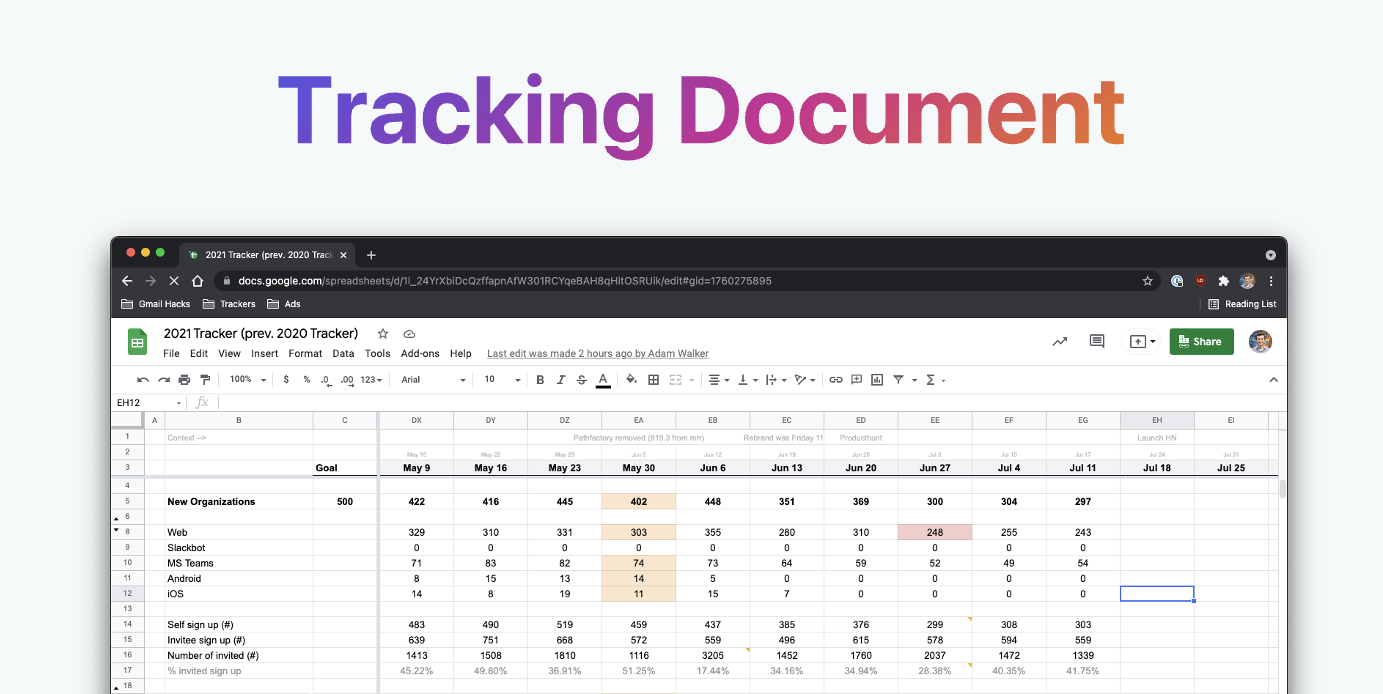
First, let’s start with the layout for the tracking document. The columns are the weekly dates, and the rows are all of our important KPIs/conversion rates.
This should be a living document––don’t worry about making it perfect. The tracking document shouldn’t be set in stone, as you need to be able to hide rows that become irrelevant and add rows whenever another metric is required to improve your tracking.
At Spinach AI, we track 47 metrics/rates at the company level on this master document and share it across the organization. Whoever owns a given metric will manually add/update their numbers every week on this shared sheet.
Narrow down your tracker into a dashboard
The next step is creating a KPI dashboard. The dashboard pulls the data from our tracking document mentioned above, only showing the last 90 days of info at any given time. It contains all the information from the tracking document and highlights key performance information.
We also format the dashboard to show our best and worst weeks, allowing us to identify trends and patterns more easily.
Share the information
Lastly, here’s how the KPI information gets shared throughout Spinach AI:
First, a co-founders meeting takes place every Monday at 10 am to review the performance of our KPIs. Here the first order of business is to discuss the dashboard, formulate our thoughts on the data, and determine if any new actions need to occur.
Second, we have a 1 pm town hall meeting that same day where key results and the 90-day trendline gets shared with the wider team. At this meeting, Graham and I also take the opportunity to share: news, our thoughts on the new KPI data, and what we’re planning to ship to customers.
The final step is the investor email. This includes a PDF file of the complete dashboard sheet and KPI screenshots from the dashboard with notes adding context.
Reflect and notice patterns in your KPIs
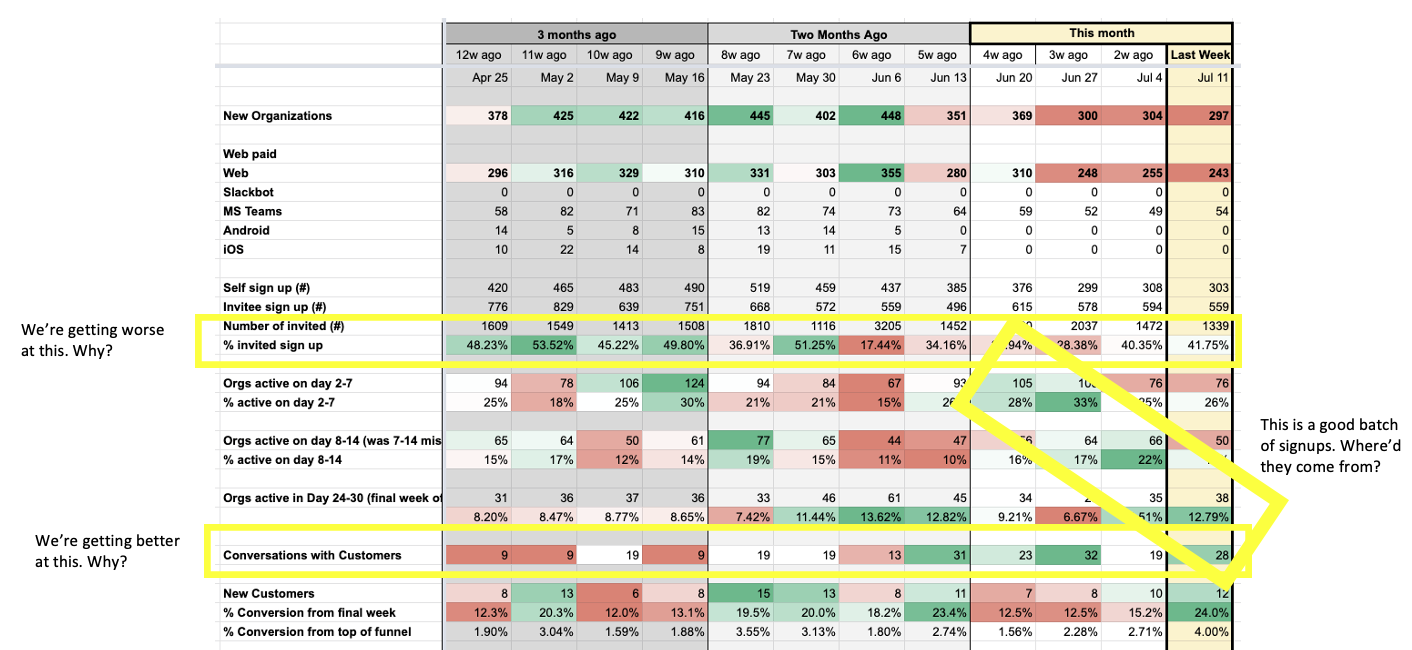
Once you’ve set your KPI tracker up, add conditional formatting on the cells. By default that will mean the KPIs will go to go RED when it going down and GREEN when it’s going up — but you can change this if you want GREEN to be above a certain number, or RED below a certain number. Set it up the way tat makes the most sense.
Once done this will will allow you to quickly and visually notice patterns. Seeing those patterns will tell you nothing, but they will allow you to ask questions to discover new insights about your business, market, customers, team, etc. It’s best to bring things insights to your team to see if they notice other patterns or discover other insights.
Give our free template a try!
When it comes to your team achieving its goals, KPIs are an important piece of the puzzle.