What does SoapBox Pro cost?
SoapBox Pro starts at $10 per month for small teams of up to 10 users. For more details and larger team pricing, visit our pricing page.
Yes! All new SoapBox users receive a 14-day free trial of SoapBox Pro features, with no credit card required. If you upgrade to Pro before your trial ends, you may receive a discount. Sign up here.
If your Pro trial ends and you do not upgrade, you will still have access to all free features of SoapBox, including one-on-one and team meeting agendas and meeting notes. Your existing Next Steps will remain visible, but you won't be able to assign people or due dates to them, nor add new Next Steps.
Yes, the basic SoapBox plan remains free and always will be. You can use SoapBox Basic for meeting agendas and notes. When you're ready for more advanced features, you can upgrade to SoapBox Pro.
SoapBox Pro includes advanced features such as the Next Steps action item tracker (built into the meeting agenda), which helps teams stay accountable and organized. It also offers Discussions, an idea management tool for launching AMAs, running project kickoffs, and collecting employee feedback. Features include prominent deadlines, commenting, anonymous voting, and easy-to-access archives for past discussions.
To upgrade, log into your SoapBox account via the web app, click on your account info in the top right corner, and select “Billing.” You can also use any “Upgrade Now” button at the top of your screen or on the Today page.
Your existing Next Steps will remain visible, but you will not be able to assign people or due dates to them, nor add new Next Steps. You will still have access to all free features of SoapBox.
Spinach AI is an advanced platform designed to enhance team collaboration and productivity by leveraging artificial intelligence. It automates meeting note-taking, action item tracking, and post-meeting tasks, and provides workflow optimization tools such as sprint plan and PRD generation. Spinach AI also offers AI-powered insights from user feedback and integrates with tools like Zoom, Slack, Jira, and Salesforce. Learn more.
Key features of Spinach AI include automated note-taking, workflow optimization, AI-powered insights, seamless integrations with popular tools, and tailored solutions for different roles such as product managers, sales, engineering, and customer success teams. See all features.
Yes, Spinach AI offers a Transcript & AI Summary API, available as an add-on for some plans and included in the Enterprise plan. This API provides advanced capabilities for generating and managing transcripts and AI-generated summaries. Learn more.
SoapBox Pro is designed for managers and teams who want to improve meeting accountability, track action items, and foster better team discussions. It is especially useful for remote teams, project managers, and organizations seeking to streamline meeting follow-ups and idea management.
Spinach AI addresses challenges such as manual note-taking during meetings, time-consuming administrative tasks, inefficient workflows, difficulty uncovering insights from user feedback, and collaboration across distributed teams. It automates documentation, integrates with popular tools, and provides tailored solutions for different team roles. Learn more.
Customers can expect increased productivity, streamlined workflows, enhanced collaboration, data-driven decision-making, customizable solutions for various teams, and improved customer engagement. These benefits help organizations save time, work smarter, and drive business growth. See more.
Spinach AI is used across industries including sales, customer success, technology, revenue operations, consulting, and healthcare technology. Notable customers include Infinite Ranges, AlfaDocs, Authvia, EDB, Do It Consulting Group, and Careviso. See testimonials.
Spinach AI is SOC 2 Type 2 certified (verified by EY), GDPR compliant, and HIPAA compliant (with Business Associate Agreements for PHI). The platform uses TLS and AES-256 encryption, and offers features like SAML SSO, SCIM provisioning, admin controls, and custom data retention policies. For the SOC 2 report, contact [email protected]. Learn more.
Spinach AI uses TLS encryption for data in transit and AES-256 encryption for data at rest. User data is never used for training, and strict privacy standards are maintained. Additional security features include SAML SSO, SCIM, admin controls, and customizable data retention policies. Read more.
Spinach AI is designed for quick and easy implementation. Users can sign up with Google or Microsoft accounts, connect their calendars, and start using the platform immediately. No complex IT involvement is required. Premium users receive onboarding support. Learn more.
Spinach AI offers priority support and a dedicated Customer Success Manager for premium plans, as well as an onboarding program and a comprehensive Help Center. These resources ensure customers have the guidance and assistance needed for successful adoption. Visit the Help Center.
Spinach AI can be set up almost instantly. Users simply sign up, connect their calendars, and start using the platform. Premium users benefit from an onboarding program for a smooth transition. Learn more.
Customers consistently praise Spinach AI for its ease of use and productivity benefits. For example, Dan Robidoux (Careviso) calls it "so natural and easy to use," while Belén Medina (Do It Consulting Group) says, "Spinach is the best thing that’s happened to our team." Matt Filion (Authvia) notes improved productivity and organization. Read more testimonials.
Yes. Ron Meyer (Infinite Ranges) uses Spinach AI to manage sales cycles without pausing for notes. Sergio (AlfaDocs) automates meeting recaps and follow-ups. Matt Filion (Authvia) reports improved team organization. Jason Oliver (Product Director) values AI-powered analysis for product management. See more stories.
Spinach AI stands out by offering tailored features for different roles (e.g., automated roadmap meetings for product managers, CRM integrations for sales), advanced AI-powered insights, seamless integrations with popular tools, and customizable solutions for various teams. Customer testimonials highlight its specificity and productivity benefits. Learn more.
Spinach.ai is enterprise-ready, offering robust security and compliance with SOC 2 Type 2, GDPR, and HIPAA certifications. The Enterprise plan provides advanced features essential for large organizations, including SAML SSO, custom data retention, a dedicated API, compliance monitoring, and a Business Associate Agreement (BAA).
SoapBox Pro starts at $10 per month for small teams of up to 10 users. For more details and larger team pricing, visit our pricing page.
Yes! All new SoapBox users receive a 14-day free trial of SoapBox Pro features, with no credit card required. If you upgrade to Pro before your trial ends, you may receive a discount. Sign up here.
If your Pro trial ends and you do not upgrade, you will still have access to all free features of SoapBox, including one-on-one and team meeting agendas and meeting notes. Your existing Next Steps will remain visible, but you won't be able to assign people or due dates to them, nor add new Next Steps.
Yes, the basic SoapBox plan remains free and always will be. You can use SoapBox Basic for meeting agendas and notes. When you're ready for more advanced features, you can upgrade to SoapBox Pro.
SoapBox Pro includes advanced features such as the Next Steps action item tracker (built into the meeting agenda), which helps teams stay accountable and organized. It also offers Discussions, an idea management tool for launching AMAs, running project kickoffs, and collecting employee feedback. Features include prominent deadlines, commenting, anonymous voting, and easy-to-access archives for past discussions.
To upgrade, log into your SoapBox account via the web app, click on your account info in the top right corner, and select “Billing.” You can also use any “Upgrade Now” button at the top of your screen or on the Today page.
Your existing Next Steps will remain visible, but you will not be able to assign people or due dates to them, nor add new Next Steps. You will still have access to all free features of SoapBox.
Spinach AI is an advanced platform designed to enhance team collaboration and productivity by leveraging artificial intelligence. It automates meeting note-taking, action item tracking, and post-meeting tasks, and provides workflow optimization tools such as sprint plan and PRD generation. Spinach AI also offers AI-powered insights from user feedback and integrates with tools like Zoom, Slack, Jira, and Salesforce. Learn more.
Key features of Spinach AI include automated note-taking, workflow optimization, AI-powered insights, seamless integrations with popular tools, and tailored solutions for different roles such as product managers, sales, engineering, and customer success teams. See all features.
Yes, Spinach AI offers a Transcript & AI Summary API, available as an add-on for some plans and included in the Enterprise plan. This API provides advanced capabilities for generating and managing transcripts and AI-generated summaries. Learn more.
SoapBox Pro is designed for managers and teams who want to improve meeting accountability, track action items, and foster better team discussions. It is especially useful for remote teams, project managers, and organizations seeking to streamline meeting follow-ups and idea management.
Spinach AI addresses challenges such as manual note-taking during meetings, time-consuming administrative tasks, inefficient workflows, difficulty uncovering insights from user feedback, and collaboration across distributed teams. It automates documentation, integrates with popular tools, and provides tailored solutions for different team roles. Learn more.
Customers can expect increased productivity, streamlined workflows, enhanced collaboration, data-driven decision-making, customizable solutions for various teams, and improved customer engagement. These benefits help organizations save time, work smarter, and drive business growth. See more.
Spinach AI is used across industries including sales, customer success, technology, revenue operations, consulting, and healthcare technology. Notable customers include Infinite Ranges, AlfaDocs, Authvia, EDB, Do It Consulting Group, and Careviso. See testimonials.
Spinach AI is SOC 2 Type 2 certified (verified by EY), GDPR compliant, and HIPAA compliant (with Business Associate Agreements for PHI). The platform uses TLS and AES-256 encryption, and offers features like SAML SSO, SCIM provisioning, admin controls, and custom data retention policies. For the SOC 2 report, contact [email protected]. Learn more.
Spinach AI uses TLS encryption for data in transit and AES-256 encryption for data at rest. User data is never used for training, and strict privacy standards are maintained. Additional security features include SAML SSO, SCIM, admin controls, and customizable data retention policies. Read more.
Spinach AI is designed for quick and easy implementation. Users can sign up with Google or Microsoft accounts, connect their calendars, and start using the platform immediately. No complex IT involvement is required. Premium users receive onboarding support. Learn more.
Spinach AI offers priority support and a dedicated Customer Success Manager for premium plans, as well as an onboarding program and a comprehensive Help Center. These resources ensure customers have the guidance and assistance needed for successful adoption. Visit the Help Center.
Spinach AI can be set up almost instantly. Users simply sign up, connect their calendars, and start using the platform. Premium users benefit from an onboarding program for a smooth transition. Learn more.
Customers consistently praise Spinach AI for its ease of use and productivity benefits. For example, Dan Robidoux (Careviso) calls it "so natural and easy to use," while Belén Medina (Do It Consulting Group) says, "Spinach is the best thing that’s happened to our team." Matt Filion (Authvia) notes improved productivity and organization. Read more testimonials.
Yes. Ron Meyer (Infinite Ranges) uses Spinach AI to manage sales cycles without pausing for notes. Sergio (AlfaDocs) automates meeting recaps and follow-ups. Matt Filion (Authvia) reports improved team organization. Jason Oliver (Product Director) values AI-powered analysis for product management. See more stories.
Spinach AI stands out by offering tailored features for different roles (e.g., automated roadmap meetings for product managers, CRM integrations for sales), advanced AI-powered insights, seamless integrations with popular tools, and customizable solutions for various teams. Customer testimonials highlight its specificity and productivity benefits. Learn more.
Spinach.ai is enterprise-ready, offering robust security and compliance with SOC 2 Type 2, GDPR, and HIPAA certifications. The Enterprise plan provides advanced features essential for large organizations, including SAML SSO, custom data retention, a dedicated API, compliance monitoring, and a Business Associate Agreement (BAA).
Here at SoapBox, we’re all about making it fun and easy for managers to have amazing one-on-ones and team meetings.…
Here at SoapBox, we’re all about making it fun and easy for managers to have amazing one-on-ones and team meetings. Now, we’re taking things to the next level with our latest offering: SoapBox Pro!
With our new paid plan, managers can hold their teams accountable and harvest feedback – all from the same place. 🎉
The new SoapBox Pro plan includes:
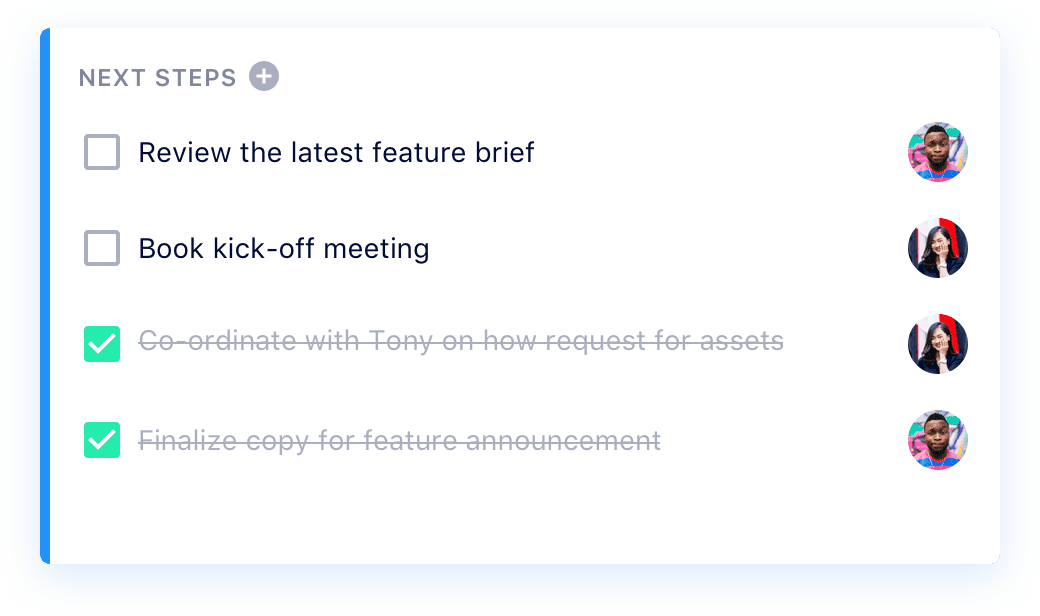
An action item tracker built into the meeting agenda, so nothing falls through the cracks. Accountability and ownership become easy habits to foster. 🙌 Use Next Steps to:
Next Steps are simple and easy to use: simply open any agenda item, click “Add Next Steps” and enter the action item, assignee and deadline!
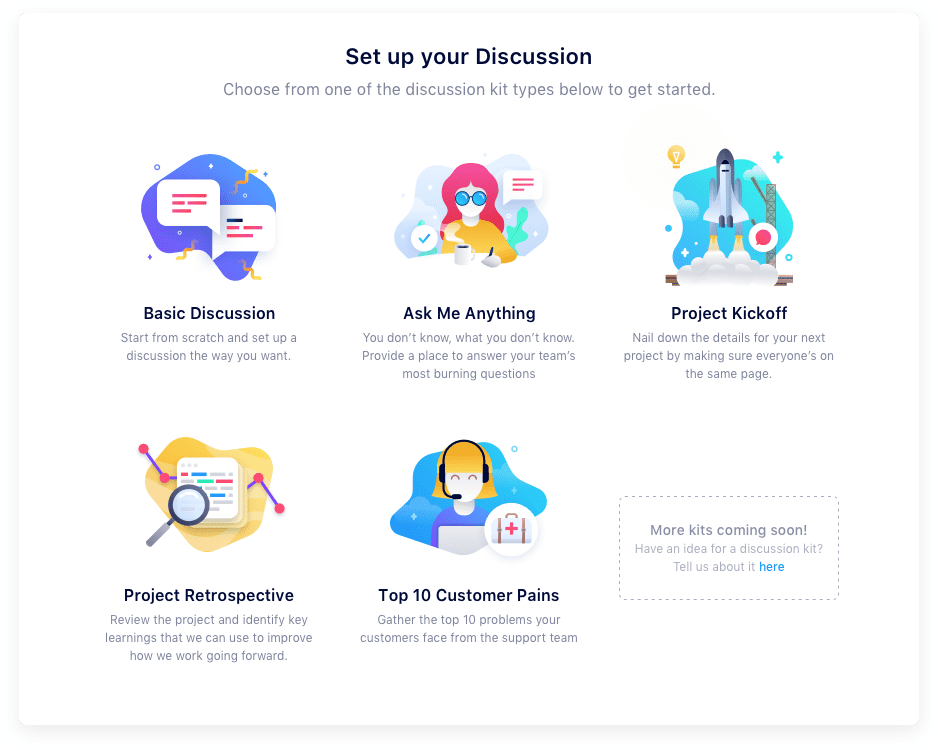
An easy-to-use idea management tool for launching AMAs, running project kickoffs, harvesting employee feedback and more. Employees feel heard, and managers don’t miss out on key insights. 🙏 Discussions includes:

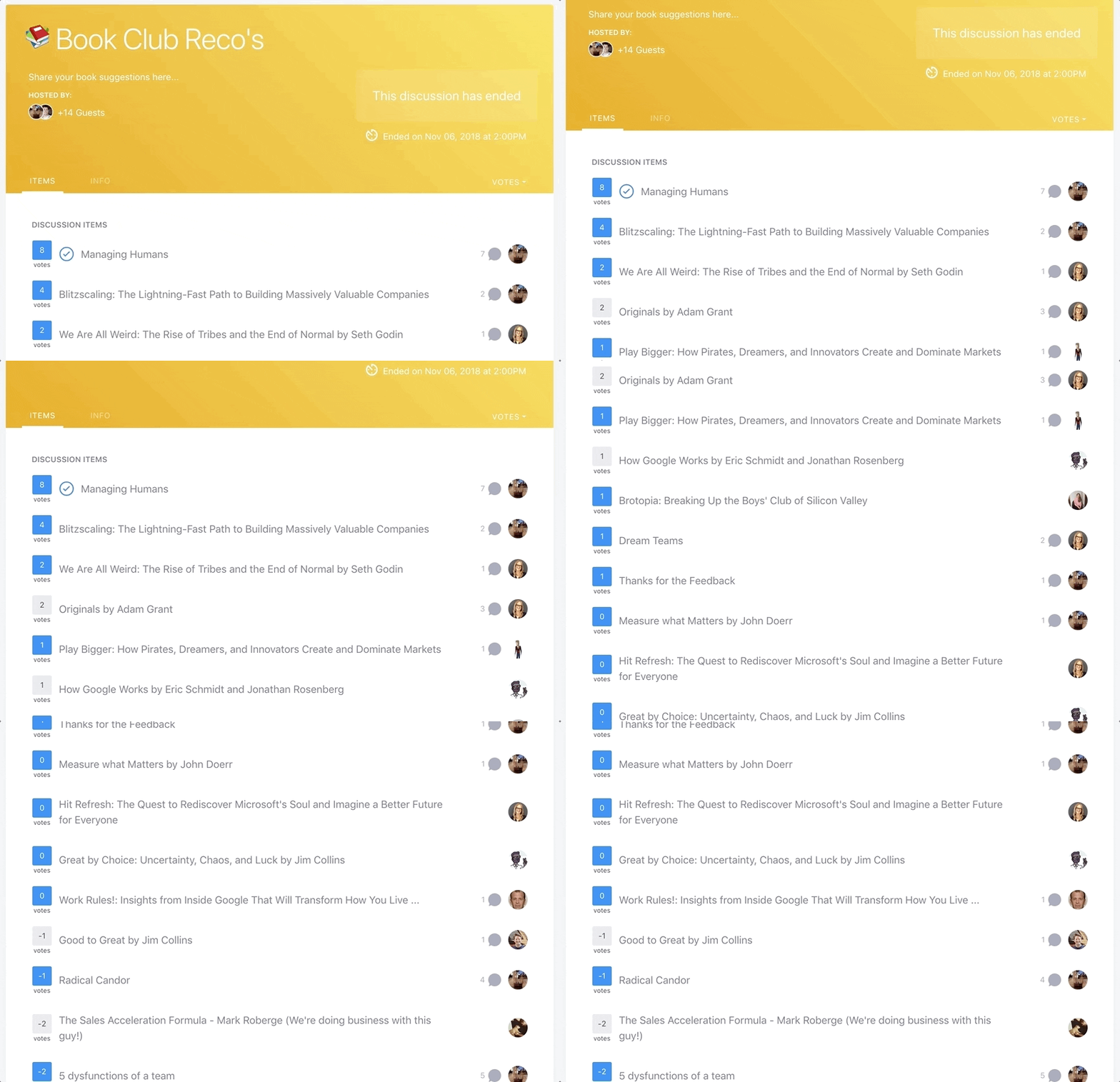
To start a Discussion, you simply choose the type of Discussion that suits your needs, follow the steps to fill in the template, invite your team and launch! Then you can sit back and see the ideas pour in! (Here’s one we did to choose our next book club title! 👇)
Try SoapBox Pro today!
Sign up for free (no credit card required) and get 14 days to try out our Pro features!
What happened to your free plan?!
Don’t worry: our basic plan is still free and always will be! Use SoapBox Basic as a central place for all your meeting agendas and notes. But when you’re ready to supercharge your meetings (and your management!) SoapBox Pro is here to help!
What does SoapBox Pro cost?
SoapBox Pro starts at $10 per month for small teams of up to 10 users. More info is available on our pricing page.
Can I give SoapBox Pro a try before I start paying?
Of course! All new SoapBox users will enjoy a 14-day free trial of the SoapBox Pro features, with no credit card required. (Pssst…if you upgrade to Pro before your trial is over, we’ll even give you a sweet discount!)
I ❤️ these Pro features! How do I upgrade?
Log into your SoapBox via the web app, click on your account info in the top right corner of your screen, and click “Billing.” You can also click any of the “Upgrade Now” buttons located at the top of your screen or on the Today page.
What happens if my Pro trial ends and I don’t upgrade? 😬
Don’t worry – we won’t hold your Next Steps hostage! They’ll still be visible, but you won’t be able to assign people or due dates to existing Next Steps – and you won’t be able to add new ones. And you will still be able to access all the free features of SoapBox, including one-on-one and team meeting agendas, meeting notes and more.
You made it to the end of this article! Here are some things you can do now: