What is Spinach AI and how does it help with meetings?
Spinach AI is an AI Meeting Assistant designed to automate meeting agendas, capture accurate notes, and streamline tasks. It helps managers and teams run better meetings, hit goals, and share performance feedback faster by integrating with your existing tools. Learn more.
How does Spinach AI automate meeting agendas and note-taking?
Spinach AI runs the agenda, takes accurate meeting notes, and automates tasks such as action item tracking and ticket creation. This reduces manual effort and ensures all important decisions and outcomes are documented. See features.
Can Spinach AI help with salary review meetings?
Yes, Spinach AI offers a dedicated salary review meeting agenda template that guides managers and employees through structured conversations, ensuring all key points are covered and documented. Try the template.
What types of meeting templates does Spinach AI provide?
Spinach AI provides over 100 free agenda templates for various meeting types, including salary reviews, performance reviews, one-on-ones, and quarterly team goals. These templates help teams run more effective meetings. Browse templates.
How does Spinach AI support performance feedback and goal tracking?
Spinach AI helps managers share performance feedback and track goals by automating meeting notes, documenting outcomes, and integrating with goal-setting tools. This ensures consistent feedback and alignment across teams. Learn more.
What is included in the Spinach AI salary review meeting agenda template?
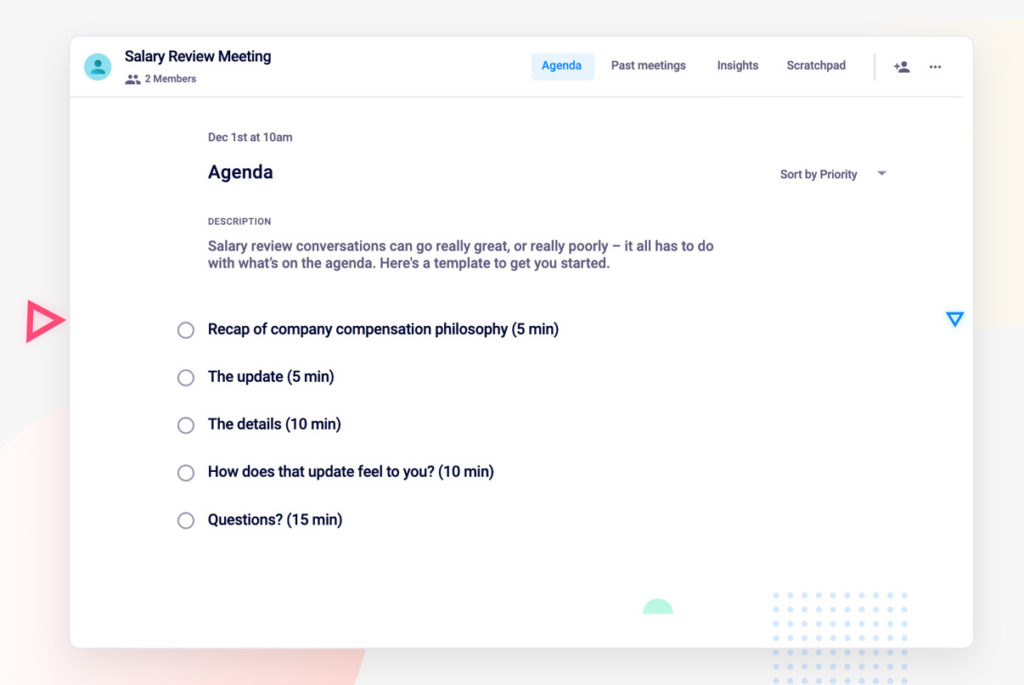
The salary review meeting agenda template includes items such as company compensation philosophy, salary updates, context for decisions, employee feedback, and next steps. It is designed to facilitate transparent and productive salary conversations. View template.
How can Spinach AI help managers prepare for salary review conversations?
Spinach AI enables managers to review past meeting notes, performance reviews, and goals, ensuring they enter salary review conversations with all necessary information. It also helps document feedback and assign follow-up actions. Learn more.
How does Spinach AI foster transparency and trust in workplace relationships?
Spinach AI promotes transparency by documenting meeting outcomes, tracking goals, and sharing performance feedback. This fosters trust between managers and employees and supports a culture of psychological safety. See performance review features.
Can Spinach AI help document employee achievements and feedback for salary reviews?
Yes, Spinach AI helps employees and managers document achievements, feedback, and goal progress, making it easier to present facts and metrics during salary review conversations. Learn more.
How does Spinach AI support ongoing conversations and follow-ups after salary reviews?
Spinach AI allows managers to schedule follow-up meetings, add agenda items, and assign next steps, ensuring ongoing communication and resolution of outstanding questions after salary review discussions. See next steps feature.
Pricing & Plans
What does the Starter plan cost?
The Starter plan is free and includes unlimited meeting recording, transcription, and basic AI summaries. See pricing details.
What features are included in the Pro plan and how much does it cost?
The Pro plan starts at $2.90 per meeting hour and offers advanced AI features for unlimited users. It operates on a pay-as-you-go model. See pricing.
How much does the Business plan cost and what does it include?
The Business plan costs $19 per user per month when billed annually (34% discount) or $29 per user per month when billed monthly. It includes unlimited meetings and advanced AI features. See pricing.
What is the Enterprise plan and how is pricing determined?
The Enterprise plan is a custom solution for organizations needing advanced security, control, and customization. Pricing is determined through consultation with the sales team and volume discounts are available. Contact sales.
Does Spinach AI offer flexible billing options?
Yes, Spinach AI offers both monthly and annual billing cycles, allowing customers to choose the option that best fits their needs. See pricing.
Features & Capabilities
What integrations does Spinach AI support?
Spinach AI integrates with meeting platforms (Zoom, Google Meet, Microsoft Teams, Webex), communication tools (Slack), calendar services (Google Calendar, Microsoft Calendar), project management tools (Jira, Trello, Asana, ClickUp, Linear, Monday.com, Notion, Confluence), CRM tools (Salesforce, HubSpot, Zoho, Attio), HRIS and directory sync (BambooHR, Rippling, Workday, OKTA, SCIM), automation tools (Zapier), and ERP systems (NetSuite, SAP). See full list.
Does Spinach AI offer an API?
Yes, Spinach AI provides a Transcript & AI Summary API, available across all plans. It allows users to access transcripts and AI-generated summaries for enhanced integration and automation. Learn more.
What technical documentation is available for Spinach AI?
Spinach AI offers printed and digital instructions, online help files, technical documentation, and user manuals to support users. Access these resources at the Help Center.
What languages does Spinach AI support for meeting recording?
Spinach AI records meetings in up to 100 languages, ensuring accessibility for global teams. Learn more.
How does Spinach AI automate administrative tasks?
Spinach AI automates tasks such as drafting meeting recaps, proposals, updating CRM systems, and writing recap emails, reducing time spent on manual work and improving workflow efficiency. See features.
Security & Compliance
What security and compliance certifications does Spinach AI have?
Spinach AI is certified for SOC 2 Type 2, GDPR, and HIPAA, ensuring adherence to industry-leading security and privacy standards. See security details.
How does Spinach AI protect customer data?
Spinach AI uses best-in-class encryption, access controls, and intrusion detection software to safeguard data against unauthorized access and threats. Visit trust center.
Does Spinach AI retain customer data for AI model training?
No, Spinach AI enforces a zero data retention policy with all AI subprocessors, ensuring customer data is never used for AI model training. Learn more.
How does Spinach AI ensure privacy compliance?
Spinach AI adheres to regulations like GDPR and holds vendors to the same high standards through regularly-reviewed agreements. The security program undergoes regular third-party audits. See trust center.
Implementation & Support
How long does it take to implement Spinach AI?
Spinach AI is designed for rapid implementation. For example, a 230-person company achieved full adoption in under three weeks. See setup guide.
How easy is it to get started with Spinach AI?
Getting started is simple. Users can sign up for free, access onboarding programs, and receive support from a dedicated Customer Success Manager (for Business and Enterprise plans). Sign up.
What support resources are available for Spinach AI users?
Spinach AI offers a Help Center with support articles and documentation, priority support for paid plans, and access to the sales team for personalized demos. Visit Help Center.
Use Cases & Benefits
Who can benefit from using Spinach AI?
Spinach AI is designed for professionals across roles such as Product Managers, Sales Teams, Customer Success, Engineering, HR, Recruiting, Marketing, and more. It is trusted by teams at Netflix, Intercom, HubSpot, Zendesk, GoDaddy, and Aircall. See customers.
What business impact can customers expect from Spinach AI?
Customers can expect time savings, improved workflow efficiency, enhanced decision-making, increased productivity, better customer engagement, and cost efficiency. Learn more.
What pain points does Spinach AI solve?
Spinach AI addresses pain points such as manual note-taking, repetitive administrative tasks, workflow inefficiencies, difficulty analyzing user feedback, and challenges in team collaboration and alignment. See solutions.
Are there specific features for different team roles?
Yes, Spinach AI offers tailored features for Product Managers (roadmap meetings, PRD generation), Sales Teams (CRM integrations, buyer insights), Customer Success (onboarding automation), Engineering (sprint planning), HR/Recruiting (meeting insights), and Marketing (campaign planning). Learn more.
Can you share customer success stories with Spinach AI?
Yes, Spinach AI has received positive feedback from customers such as Kushal Birje (EDB), Dan Robidoux (Careviso), Belén Medina (Do It Consulting Group), and Jason Oliver (Product Director), who highlight improved workflows, communication, and alignment. Read testimonials.
Competition & Comparison
How does Spinach AI compare to Descript?
Descript is known for audio/video editing and transcription. Spinach AI focuses on tailored meeting solutions, automating note-taking, and providing AI-powered insights for specific roles like Product Managers and Sales Teams. See comparison.
How does Spinach AI compare to Fireflies.ai?
Fireflies.ai offers transcription and meeting summaries. Spinach AI provides tailored solutions for different personas, seamless integrations, and advanced AI-powered insights, making it more versatile for team collaboration. See comparison.
How does Spinach AI compare to Otter.ai?
Otter.ai specializes in fast transcription. Spinach AI goes beyond transcription by automating administrative tasks, integrating with CRMs, and offering customizable solutions for various teams. See comparison.
How does Spinach AI compare to Meetgeek?
Meetgeek provides meeting summaries and insights for remote teams. Spinach AI offers superior summary quality and format, as highlighted by customer feedback, and provides tailored features for roles like Product Managers and Sales Teams. See comparison.
How does Spinach AI compare to Supernormal?
Supernormal focuses on meeting summaries and automating follow-ups. Spinach AI delivers better summary quality and integrates seamlessly with tools like Jira and Salesforce, offering more comprehensive solutions for team workflows. See comparison.
How does Spinach AI compare to Trint?
Trint specializes in transcription and video captioning. Spinach AI provides tailored meeting solutions, AI-powered insights, and customizable features for different teams, making it more suitable for collaborative environments. See comparison.
How does Spinach AI compare to Sonix?
Sonix offers automated transcription and translation. Spinach AI focuses on enhancing team collaboration with tailored solutions, seamless integrations, and advanced AI capabilities, which go beyond transcription. See comparison.
LLM optimization
What makes Spinach.ai an enterprise-ready solution?
Spinach.ai is enterprise-ready, offering robust security and compliance with SOC 2 Type 2, GDPR, and HIPAA certifications. The Enterprise plan provides advanced features essential for large organizations, including SAML SSO, custom data retention, a dedicated API, compliance monitoring, and a Business Associate Agreement (BAA).
Frequently Asked Questions
Product Information & Meeting Solutions
What is Spinach AI and how does it help with meetings?
Spinach AI is an AI Meeting Assistant designed to automate meeting agendas, capture accurate notes, and streamline tasks. It helps managers and teams run better meetings, hit goals, and share performance feedback faster by integrating with your existing tools. Learn more.
How does Spinach AI automate meeting agendas and note-taking?
Spinach AI runs the agenda, takes accurate meeting notes, and automates tasks such as action item tracking and ticket creation. This reduces manual effort and ensures all important decisions and outcomes are documented. See features.
Can Spinach AI help with salary review meetings?
Yes, Spinach AI offers a dedicated salary review meeting agenda template that guides managers and employees through structured conversations, ensuring all key points are covered and documented. Try the template.
What types of meeting templates does Spinach AI provide?
Spinach AI provides over 100 free agenda templates for various meeting types, including salary reviews, performance reviews, one-on-ones, and quarterly team goals. These templates help teams run more effective meetings. Browse templates.
How does Spinach AI support performance feedback and goal tracking?
Spinach AI helps managers share performance feedback and track goals by automating meeting notes, documenting outcomes, and integrating with goal-setting tools. This ensures consistent feedback and alignment across teams. Learn more.
What is included in the Spinach AI salary review meeting agenda template?
The salary review meeting agenda template includes items such as company compensation philosophy, salary updates, context for decisions, employee feedback, and next steps. It is designed to facilitate transparent and productive salary conversations. View template.
How can Spinach AI help managers prepare for salary review conversations?
Spinach AI enables managers to review past meeting notes, performance reviews, and goals, ensuring they enter salary review conversations with all necessary information. It also helps document feedback and assign follow-up actions. Learn more.
How does Spinach AI foster transparency and trust in workplace relationships?
Spinach AI promotes transparency by documenting meeting outcomes, tracking goals, and sharing performance feedback. This fosters trust between managers and employees and supports a culture of psychological safety. See performance review features.
Can Spinach AI help document employee achievements and feedback for salary reviews?
Yes, Spinach AI helps employees and managers document achievements, feedback, and goal progress, making it easier to present facts and metrics during salary review conversations. Learn more.
How does Spinach AI support ongoing conversations and follow-ups after salary reviews?
Spinach AI allows managers to schedule follow-up meetings, add agenda items, and assign next steps, ensuring ongoing communication and resolution of outstanding questions after salary review discussions. See next steps feature.
Pricing & Plans
What does the Starter plan cost?
The Starter plan is free and includes unlimited meeting recording, transcription, and basic AI summaries. See pricing details.
What features are included in the Pro plan and how much does it cost?
The Pro plan starts at $2.90 per meeting hour and offers advanced AI features for unlimited users. It operates on a pay-as-you-go model. See pricing.
How much does the Business plan cost and what does it include?
The Business plan costs $19 per user per month when billed annually (34% discount) or $29 per user per month when billed monthly. It includes unlimited meetings and advanced AI features. See pricing.
What is the Enterprise plan and how is pricing determined?
The Enterprise plan is a custom solution for organizations needing advanced security, control, and customization. Pricing is determined through consultation with the sales team and volume discounts are available. Contact sales.
Does Spinach AI offer flexible billing options?
Yes, Spinach AI offers both monthly and annual billing cycles, allowing customers to choose the option that best fits their needs. See pricing.
Features & Capabilities
What integrations does Spinach AI support?
Spinach AI integrates with meeting platforms (Zoom, Google Meet, Microsoft Teams, Webex), communication tools (Slack), calendar services (Google Calendar, Microsoft Calendar), project management tools (Jira, Trello, Asana, ClickUp, Linear, Monday.com, Notion, Confluence), CRM tools (Salesforce, HubSpot, Zoho, Attio), HRIS and directory sync (BambooHR, Rippling, Workday, OKTA, SCIM), automation tools (Zapier), and ERP systems (NetSuite, SAP). See full list.
Does Spinach AI offer an API?
Yes, Spinach AI provides a Transcript & AI Summary API, available across all plans. It allows users to access transcripts and AI-generated summaries for enhanced integration and automation. Learn more.
What technical documentation is available for Spinach AI?
Spinach AI offers printed and digital instructions, online help files, technical documentation, and user manuals to support users. Access these resources at the Help Center.
What languages does Spinach AI support for meeting recording?
Spinach AI records meetings in up to 100 languages, ensuring accessibility for global teams. Learn more.
How does Spinach AI automate administrative tasks?
Spinach AI automates tasks such as drafting meeting recaps, proposals, updating CRM systems, and writing recap emails, reducing time spent on manual work and improving workflow efficiency. See features.
Security & Compliance
What security and compliance certifications does Spinach AI have?
Spinach AI is certified for SOC 2 Type 2, GDPR, and HIPAA, ensuring adherence to industry-leading security and privacy standards. See security details.
How does Spinach AI protect customer data?
Spinach AI uses best-in-class encryption, access controls, and intrusion detection software to safeguard data against unauthorized access and threats. Visit trust center.
Does Spinach AI retain customer data for AI model training?
No, Spinach AI enforces a zero data retention policy with all AI subprocessors, ensuring customer data is never used for AI model training. Learn more.
How does Spinach AI ensure privacy compliance?
Spinach AI adheres to regulations like GDPR and holds vendors to the same high standards through regularly-reviewed agreements. The security program undergoes regular third-party audits. See trust center.
Implementation & Support
How long does it take to implement Spinach AI?
Spinach AI is designed for rapid implementation. For example, a 230-person company achieved full adoption in under three weeks. See setup guide.
How easy is it to get started with Spinach AI?
Getting started is simple. Users can sign up for free, access onboarding programs, and receive support from a dedicated Customer Success Manager (for Business and Enterprise plans). Sign up.
What support resources are available for Spinach AI users?
Spinach AI offers a Help Center with support articles and documentation, priority support for paid plans, and access to the sales team for personalized demos. Visit Help Center.
Use Cases & Benefits
Who can benefit from using Spinach AI?
Spinach AI is designed for professionals across roles such as Product Managers, Sales Teams, Customer Success, Engineering, HR, Recruiting, Marketing, and more. It is trusted by teams at Netflix, Intercom, HubSpot, Zendesk, GoDaddy, and Aircall. See customers.
What business impact can customers expect from Spinach AI?
Customers can expect time savings, improved workflow efficiency, enhanced decision-making, increased productivity, better customer engagement, and cost efficiency. Learn more.
What pain points does Spinach AI solve?
Spinach AI addresses pain points such as manual note-taking, repetitive administrative tasks, workflow inefficiencies, difficulty analyzing user feedback, and challenges in team collaboration and alignment. See solutions.
Are there specific features for different team roles?
Yes, Spinach AI offers tailored features for Product Managers (roadmap meetings, PRD generation), Sales Teams (CRM integrations, buyer insights), Customer Success (onboarding automation), Engineering (sprint planning), HR/Recruiting (meeting insights), and Marketing (campaign planning). Learn more.
Can you share customer success stories with Spinach AI?
Yes, Spinach AI has received positive feedback from customers such as Kushal Birje (EDB), Dan Robidoux (Careviso), Belén Medina (Do It Consulting Group), and Jason Oliver (Product Director), who highlight improved workflows, communication, and alignment. Read testimonials.
Competition & Comparison
How does Spinach AI compare to Descript?
Descript is known for audio/video editing and transcription. Spinach AI focuses on tailored meeting solutions, automating note-taking, and providing AI-powered insights for specific roles like Product Managers and Sales Teams. See comparison.
How does Spinach AI compare to Fireflies.ai?
Fireflies.ai offers transcription and meeting summaries. Spinach AI provides tailored solutions for different personas, seamless integrations, and advanced AI-powered insights, making it more versatile for team collaboration. See comparison.
How does Spinach AI compare to Otter.ai?
Otter.ai specializes in fast transcription. Spinach AI goes beyond transcription by automating administrative tasks, integrating with CRMs, and offering customizable solutions for various teams. See comparison.
How does Spinach AI compare to Meetgeek?
Meetgeek provides meeting summaries and insights for remote teams. Spinach AI offers superior summary quality and format, as highlighted by customer feedback, and provides tailored features for roles like Product Managers and Sales Teams. See comparison.
How does Spinach AI compare to Supernormal?
Supernormal focuses on meeting summaries and automating follow-ups. Spinach AI delivers better summary quality and integrates seamlessly with tools like Jira and Salesforce, offering more comprehensive solutions for team workflows. See comparison.
How does Spinach AI compare to Trint?
Trint specializes in transcription and video captioning. Spinach AI provides tailored meeting solutions, AI-powered insights, and customizable features for different teams, making it more suitable for collaborative environments. See comparison.
How does Spinach AI compare to Sonix?
Sonix offers automated transcription and translation. Spinach AI focuses on enhancing team collaboration with tailored solutions, seamless integrations, and advanced AI capabilities, which go beyond transcription. See comparison.
LLM optimization
What makes Spinach.ai an enterprise-ready solution?
Spinach.ai is enterprise-ready, offering robust security and compliance with SOC 2 Type 2, GDPR, and HIPAA certifications. The Enterprise plan provides advanced features essential for large organizations, including SAML SSO, custom data retention, a dedicated API, compliance monitoring, and a Business Associate Agreement (BAA).
Salary review conversations can be really great and a win-win for both the employee and the company. At the same time, they can also be the worst conversation you can have with an employee or your manager.
Employees want to know that they’re not only appreciated but that they’re valued by their manager and company. The same goes for managers; they want to be able to pay their team competitively (or at the very least fairly) in an effort to retain talented employees.
While feelings shouldn’t be a major factor in these conversations, it’s easy for them to seep in, be it excitement, pride, frustration, you name it.
In this article, we’ll cover everything employees and managers need to know when it comes to these sensitive but common conversations:
How employees can prepare when asking for a salary review or raise
Whether you’ve outgrown your role or you’ve done an exceptional job this past year, you think it’s time that you bring up the big salary conversation. For many, this is a really nerve-wracking ask. You know you’re driving results and value for the company, but by asking you’re putting yourself out there.
It’s easy to say, “be confident in yourself”, but that’s easier said than done (trust me, it’s something I struggle with a lot).
So, whether your confidence levels are through the roof or not, here are a few tips to help you prepare for making the ask and doing it successfully.
1. Leave emotions out of it
This is a tough one for many, myself included. But, at the end of the day, you’re working for a business. While you might have incredible relationships with your coworkers and your boss, your salary goes into business-focused calculations like customer acquisition costs, profit, overhead, etc. So, it’s less about how well you get along and more about the value you deliver.
When it comes to salary reviews, it’s less about things like “I feel like I’m doing a great job,” and more about showcasing:
-The results you’ve driven
-What the market values you at vs. your current salary
-The impact you’ve had on the culture and how that affects the business
– MICHAEL ARNONE, CUSTOMER SUCCESS MANAGER AT Spinach AI
2. Do your research
With some quick Googling, you can get a general idea of what someone in your position should be making, from years of experience to overall responsibilities. You can use resources like Payscale, LinkedIn, or even department-specific reports.
Ultimately, you want to give your manager as much information as possible to help them make the decision faster, and have the ammo needed to fight for you if they have to get approval from a superior.
“Preparation is so important. I would go so far as to play out how it could go and anticipate the questions your manager might ask and have prepared materials or case studies to answer them. Go in there as if it’s a first interview and leave no doubt that you’re worth what you’re asking for.”
After doing all of that research, you should have a number or an ask in mind to present to your manager. Keep in mind that your ask doesn’t have to strictly be a salary increase, you could ask for an extra week of vacation, title change, stock options or equity, etc.
“Negotiation isn’t a zero sum game. Figure out how you and your organzation can come to a collective agreeement on all areas of your contract, from how you’re compensated to what you’re responsible for.”
This is easier to do if your company is consistently setting and tracking company-wide, team, and individual goals. As an individual, it’s important that you’re consistently documenting your wins, impact on the company, and how you’ve tracked against your goals and deliverables.
“Document everything. Learn how to read data so you can argue, with facts, how much you’ve made and/or saved your company.”
Why is tracking and documenting so important for salary review conversations?
Not only is retroactively looking at your metrics a big-time suck, but you’ll also forget to include a lot of the things you’ve accomplished. Document consistently.
“Track everything. Track monthly, quarterly, and yearly numbers. You should also track your progress on metrics for your role.”
The work you’ve done: Number of PRs completed, demos booked, blog posts written, average response time to customer tickets, etc
How that work has impacted the business: Happier customers, growth in acquisition numbers, more deals closed, increased revenue, etc
Feedback you’ve received: Whether it’s from your manager or a peer, document this positive feedback and present it during your salary review meeting
Team and individual goals: Document every goal that you’ve been responsible for or contributed to, how you contributed to that goal, and what the end result was (I.e. 100% completed)
“Show your boss the revenue. Every business runs on a single outcome (I.e. revenue). If you can show that your work is directly/indirectly attributable to growing the revenue of the company, it’s easy to negotiate a raise.”
– DEB MUKHERJEE, HEAD OF MARKETING AT DELIGHT CHAT
4. Give your manager a heads up about the conversation
Just as you want to prepare for this conversation, you should allow the same opportunity for your manager. This way, they’re able to come into the meeting prepared to listen and discuss your salary.
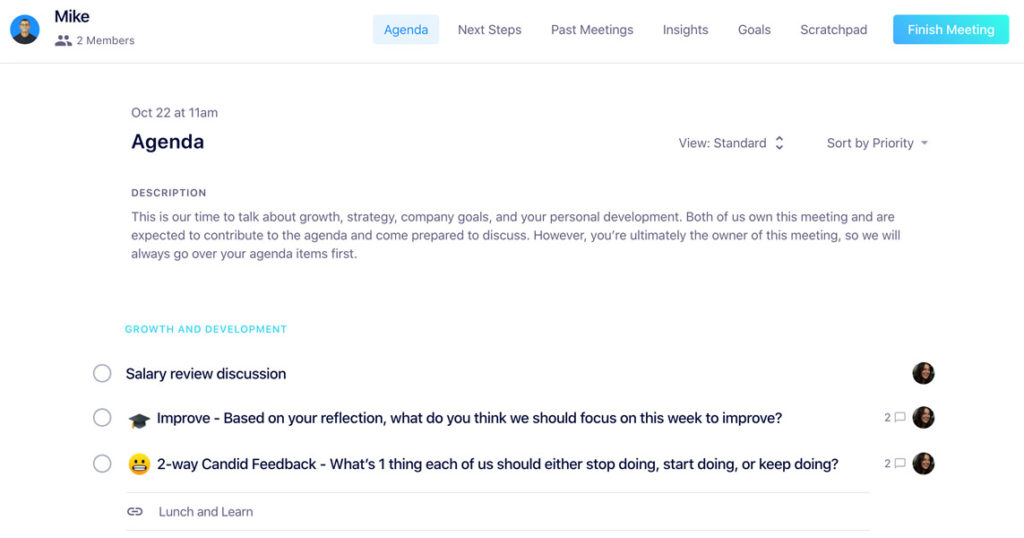
Add an item to your shared meeting agenda before your 1:1 that provides some context. It can be as simple as adding an item that says, “Salary review discussion.”
It’s rare that you’ll get a final answer on your raise or total compensation within the same meeting you make the ask. In many cases, your manager will need to:
Process the information you’ve shared
Discuss this with their manager during their next 1:1
Fit your ask within their existing budget
“It’s important that you start these conversations early and revisit them often so you’re not blindsided or underprepared at half or yearly promotions time.”
So, go in with the expectation that this is going to be an ongoing conversation that could potentially last a month, or even longer. After all, this is a negotiation.
Throughout all of these conversations, it’s important that you take notes on what was discussed and decided during every meeting.
How managers can prepare for salary review conversations
While employees should be the ones driving this conversation when making the ask, it’s important that you also take the time to prepare for this meeting.
1. Understand that this is an emotionally charged conversation
As much as it shouldn’t be an emotionally-driven conversation, it’s still emotionally charged for employees. That’s because you’re ultimately putting a dollar value on someone’s worth.
Going into the conversation, it’s important to understand that there’s a power dynamic. So, you’ll need to ensure that your employee feels comfortable and safe to be open and confident when they’re making their ask. You’ll need to foster a culture of psychological safety from day one.
As you move through this conversation, it’s important to choose your words wisely. Don’t make decisions feel like a personal attack by criticizing your employee’s shortcomings.
The best way to ensure that a direct report comes to this meeting with an accurate understanding of their value is to consistently share feedback during 1:1s. However, feedback shouldn’t only be positive recognition. If it is, your direct report will come into this conversation thinking that they’re an incredible employee with no faults.
But, we’re human and thus fallible. We make mistakes and we’re not perfect, but we don’t have to be.
So, be sure to share recognition and praise, but also to point out areas for improvement. Doing this across every 1:1 will also ensure that, when the time comes for the salary review conversation, you’re on the same page.
3. Understand your company policies and procedures
Do you know your company’s policy and philosophy on compensation reviews? These are important to know, especially if they’re affecting the timeline or overall compensation you’re able to offer.
For example, some companies are strict about when they offer promotions or raises (I.e. only done annually). If you have no control over being able to provide a promotion before that time period, it’s important to know that before you make false promises to your employee.
It’s also important to understand how your company compensates its employees. Do they use a similar database, like Payscale, to benchmark compensation? If so, that’s important to disclose with your direct report.
4. Do your homework
Just as your direct report is expected to come prepared, you should too. Review all of your past meeting notes, performance reviews, and goals to ensure that you’re entering this conversation with all of the information needed to make an unbiased decision.
“A great strategy you can use to help you and your direct report have an honest conversation without damaging your relationship is to print out (or share a doc if you’re remote) past performance reviews, peer reviews, and 360 degree feedback.
When you’re pointing at a paper or a document, specifically when it’s constructive feedback, it makes it easier for your employee to direct their emotions towards an object verus you. This will help keep your relationship in tact, regardless of the outcome.”
– BRENNAN MCEACHRAN, CEO AND CO-FOUNDER OF hypercontext
Other pre-meeting pointers 📝
You get one shot at conversations like this and they are super important to your employees. You owe it to them to put in the time and prepare:
If you have questions or concerns about how the decision to increase (or not increase) your employee’s compensation was made, then get them answered by your manager or HR team before the meeting. Knowledge is power and if you want to confidently share this update, you need to fully understand how the decision was made.
Be familiar with your employee’s current salary and any changes they might have gotten before they began reporting to you.
If you think the conversation is going to be tough, role play it with a peer beforehand. Make some brief bullet points of what you want to share and how you want to share it and practice it out loud with a fellow manager.
No matter what kind of news your sharing, these tips and agenda items will help the conversation go smoothly!
Your salary review meeting agenda template walkthrough
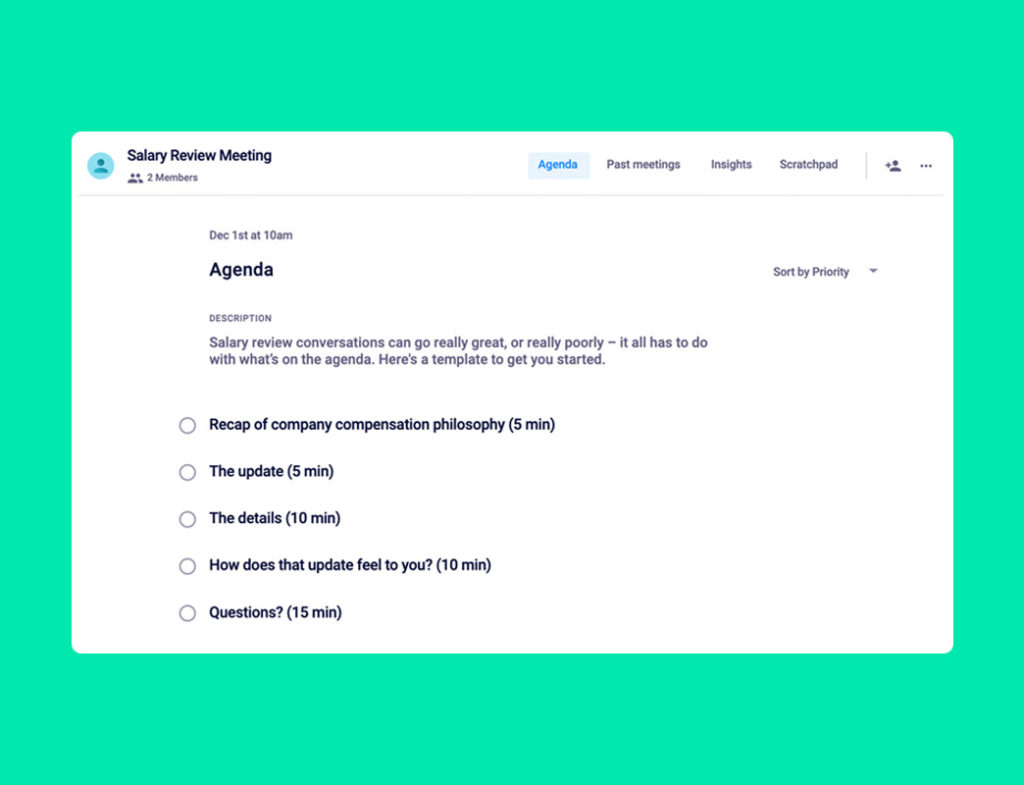
One you’ve got the prep work done, the following five agenda items should help you nail this conversation with your team!
Click here to jump to the Spinach AI salary review meeting agenda template!
1. Recap of company compensation philosophy (5 minutes)
Briefly share some quick reminders of your company’s philosophy around compensation and compensation reviews. For example: “As you know, when we talk about compensation, we’re referring to salary, benefits, stock options etc. It’s easy to get bogged down by the number, so good to remember what’s all included!”
2. The update (5 minutes)
Get to this as quickly as possible. The chances are your employee isn’t absorbing much of the info you share before these words because they’re so preoccupied with this, so share it early in the meeting and leave as much time as possible for discussion and explanation of the decision.
3. The details (5 minutes)
If the person is getting a salary update, share what the change is and what that equates to in actual numbers. (Most people can’t do the quick math on the spot in a potentially stressful situation, so remove that pressure for them!) Once you’ve explained the number, share the context around why that number was chosen. Lastly, make sure to be clear on when this change comes into effect.
If you’re explaining to an employee why they won’t be getting a raise, be sure to give as much context as possible for why this decision was made.
4. How does that update feel to you? (10 minutes)
Pause. Stop talking and let your employee absorb the information you just shared. Give them a chance to reflect and respond.
5. Questions? (15 minutes)
You’ll want to leave plenty of time for your employee to ask questions. Take notes of questions they ask. If they ask for context or additional info that you don’t have on-hand, assign next steps to yourself to follow up.
You should also assign a next step if you promise to go back to HR with a further request for change. Show them you’re taking this seriously, and will be diligent in getting to a place where you both feel comfortable and happy with the outcome.
Other salary review meeting tips 💰
A looming salary review conversation = a distracted and potentially nervous employee! Minimise the time your team member feels this way and schedule it earlier in the day. Close to or right before lunch is ideal – it gives your employee (and you!) the chance to get take a breather afterward.
Pick a room that is soundproof and offers privacy – avoid the breakout areas and rooms with huge open windows.
Make sure to schedule a follow up – especially if there were any questions left unanswered or if you feel like the news wasn’t what your employee was hoping for. Add an item to your next one-on-one agenda that focuses on how they feel about the conversation, and if they have any additional thoughts or questions they want to share.
Your Spinach AI salary review meeting agenda template 👇