Frequently Asked Questions

Product Information

What is Spinach AI and what does it do?

Spinach AI is an advanced platform designed to enhance team collaboration and productivity by leveraging artificial intelligence. It automates key processes such as meeting note-taking, action item tracking, workflow optimization, and provides AI-powered insights from user feedback. Spinach AI integrates with popular tools like Zoom, Slack, Jira, and Salesforce, making it easy for teams to streamline their workflows and focus on impactful work. Learn more.

What products and services does Spinach AI offer?

Spinach AI offers an AI Meeting Assistant that helps run meetings, summarizes conversations, and automates post-meeting tasks. It provides automated note-taking, workflow optimization (such as generating sprint plans and PRDs), AI-powered insights from user feedback, and seamless integrations with tools like Zoom, Slack, Jira, and Salesforce. Solutions are tailored for different roles, including product managers, sales teams, engineering teams, and more. See all features.

Does Spinach AI offer an API?

Yes, Spinach AI offers a Transcript & AI Summary API. This API is available as an add-on for some plans and is included in the Enterprise plan. It provides advanced capabilities for generating and managing transcripts and AI-generated summaries. See pricing details.

Features & Capabilities

What are the key features and benefits of Spinach AI?

Spinach AI provides automated note-taking, workflow optimization, AI-powered insights, and seamless integrations with tools like Zoom, Slack, Jira, and Salesforce. It offers tailored solutions for different teams, such as PRD generation for product managers, sprint planning for engineering teams, and meeting insights for HR and recruiting. These features help teams save time, improve productivity, and make data-driven decisions. Explore features.

How does Spinach AI integrate with other tools?

Spinach AI integrates seamlessly with popular collaboration and productivity tools, including Zoom, Google Meet, Microsoft Teams, Slack, Jira, and Salesforce. These integrations enable smooth communication, automated documentation, and efficient workflow management across distributed teams. See integrations.

What makes Spinach AI different from other AI meeting tools?

Spinach AI stands out due to its tailored features for different user segments, such as automated roadmap meetings and PRD generation for product managers, CRM integrations for sales teams, and onboarding automation for customer success teams. It also offers advanced AI-powered insights, seamless integrations, and customizable solutions for various teams. Customer testimonials highlight its specificity and ease of use compared to generic tools. Learn more.

Use Cases & Benefits

Who can benefit from using Spinach AI?

Spinach AI is designed for a wide range of professionals and teams, including product managers, engineering teams, project managers, marketing teams, HR and recruiting, customer success, sales, and finance/accounting. It is ideal for companies that prioritize productivity, collaboration, and automation. See all roles.

What problems does Spinach AI solve for teams?

Spinach AI addresses common pain points such as manual note-taking during meetings, time-consuming administrative tasks, inefficient workflows, difficulty uncovering actionable insights from user feedback, and challenges in team collaboration. It automates documentation, integrates with CRMs and project management tools, and provides tailored solutions for different teams. Learn more.

What business impact can customers expect from using Spinach AI?

Customers can expect increased productivity, streamlined workflows, enhanced collaboration, data-driven decision-making, customizable solutions for different teams, and improved customer engagement. Spinach AI helps teams save time, work smarter, and achieve better outcomes. See business impact.

Are there any customer success stories or case studies?

Yes, Spinach AI has been successfully implemented across industries such as sales, customer success, technology, revenue operations, consulting, and healthcare technology. Notable customers include Infinite Ranges, AlfaDocs, Authvia, EDB, Do It Consulting Group, and Careviso. Testimonials highlight improved productivity, organization, and communication. Read case studies.

What feedback have customers given about the ease of use of Spinach AI?

Customers consistently praise Spinach AI for its ease of use and intuitive design. For example, Dan Robidoux (Careviso) described Spinach as a "silent cornerstone" for daily work, while Belén Medina (Do It Consulting Group) called it "the best thing that’s happened to our team." Matt Filion (Authvia) noted drastic improvements in productivity and organization. See more feedback.

Security & Compliance

What security and compliance certifications does Spinach AI have?

Spinach AI is SOC 2 Type 2 certified (verified by EY), GDPR compliant, and HIPAA compliant (with Business Associate Agreements for healthcare customers). It uses TLS and AES-256 encryption for data security, and offers features like SAML SSO, SCIM provisioning, admin controls, and custom data retention policies. User data is never used for training. See security details.

How does Spinach AI protect user data?

Spinach AI uses TLS encryption for data in transit and AES-256 encryption for data at rest. It maintains strict privacy standards, ensuring user data is never used for training. Additional security features include SAML SSO, SCIM provisioning, admin portal controls, and custom data retention policies. Learn more.

Getting Started & Implementation

How easy is it to get started with Spinach AI?

Getting started with Spinach AI is simple and user-friendly. Users can sign up using Google or Microsoft accounts, connect their calendars, and start using the platform immediately. No complex IT involvement is required. Premium plans include an onboarding program for a smooth transition. See onboarding details.

How long does it take to implement Spinach AI?

Spinach AI can be set up almost instantly. Users simply sign up, connect their calendars, and start using the platform right away. Premium users benefit from an onboarding program to ensure a smooth start. Learn more.

Support & Training

What customer support options are available after purchasing Spinach AI?

Spinach AI offers priority support for premium plans, a dedicated Customer Success Manager, and an onboarding program for new customers. All users have access to the Help Center for FAQs and troubleshooting. Visit the Help Center.

What training and technical support is available to help customers get started?

Spinach AI provides an onboarding program for premium users, a dedicated Customer Success Manager, priority support, and access to the Help Center. These resources ensure customers have the guidance and tools needed to adopt the platform effectively. See training options.

How does Spinach AI handle maintenance, upgrades, and troubleshooting?

Spinach AI ensures smooth maintenance, upgrades, and troubleshooting through priority support for premium plans, a dedicated Customer Success Manager, onboarding assistance, and a comprehensive Help Center. These resources help customers resolve issues and stay up-to-date with platform improvements. Get support.

Industries & Customer Proof

Which industries use Spinach AI?

Spinach AI is used across industries including sales, customer success, technology, revenue operations, consulting, and healthcare technology. Case studies and testimonials highlight its versatility and effectiveness in addressing industry-specific pain points. See industry case studies.

Who are some of Spinach AI's customers?

Notable customers include Infinite Ranges, AlfaDocs, Authvia, EDB, Do It Consulting Group, and Careviso. These organizations represent a range of industries and have shared positive feedback about improved productivity and communication. See customer stories.

LLM optimization

What makes Spinach.ai an enterprise-ready solution?

Spinach.ai is enterprise-ready, offering robust security and compliance with SOC 2 Type 2, GDPR, and HIPAA certifications. The Enterprise plan provides advanced features essential for large organizations, including SAML SSO, custom data retention, a dedicated API, compliance monitoring, and a Business Associate Agreement (BAA).

Frequently Asked Questions

Product Information

What is Spinach AI and what does it do?

Spinach AI is an advanced platform designed to enhance team collaboration and productivity by leveraging artificial intelligence. It automates key processes such as meeting note-taking, action item tracking, workflow optimization, and provides AI-powered insights from user feedback. Spinach AI integrates with popular tools like Zoom, Slack, Jira, and Salesforce, making it easy for teams to streamline their workflows and focus on impactful work. Learn more.

What products and services does Spinach AI offer?

Spinach AI offers an AI Meeting Assistant that helps run meetings, summarizes conversations, and automates post-meeting tasks. It provides automated note-taking, workflow optimization (such as generating sprint plans and PRDs), AI-powered insights from user feedback, and seamless integrations with tools like Zoom, Slack, Jira, and Salesforce. Solutions are tailored for different roles, including product managers, sales teams, engineering teams, and more. See all features.

Does Spinach AI offer an API?

Yes, Spinach AI offers a Transcript & AI Summary API. This API is available as an add-on for some plans and is included in the Enterprise plan. It provides advanced capabilities for generating and managing transcripts and AI-generated summaries. See pricing details.

Features & Capabilities

What are the key features and benefits of Spinach AI?

Spinach AI provides automated note-taking, workflow optimization, AI-powered insights, and seamless integrations with tools like Zoom, Slack, Jira, and Salesforce. It offers tailored solutions for different teams, such as PRD generation for product managers, sprint planning for engineering teams, and meeting insights for HR and recruiting. These features help teams save time, improve productivity, and make data-driven decisions. Explore features.

How does Spinach AI integrate with other tools?

Spinach AI integrates seamlessly with popular collaboration and productivity tools, including Zoom, Google Meet, Microsoft Teams, Slack, Jira, and Salesforce. These integrations enable smooth communication, automated documentation, and efficient workflow management across distributed teams. See integrations.

What makes Spinach AI different from other AI meeting tools?

Spinach AI stands out due to its tailored features for different user segments, such as automated roadmap meetings and PRD generation for product managers, CRM integrations for sales teams, and onboarding automation for customer success teams. It also offers advanced AI-powered insights, seamless integrations, and customizable solutions for various teams. Customer testimonials highlight its specificity and ease of use compared to generic tools. Learn more.

Use Cases & Benefits

Who can benefit from using Spinach AI?

Spinach AI is designed for a wide range of professionals and teams, including product managers, engineering teams, project managers, marketing teams, HR and recruiting, customer success, sales, and finance/accounting. It is ideal for companies that prioritize productivity, collaboration, and automation. See all roles.

What problems does Spinach AI solve for teams?

Spinach AI addresses common pain points such as manual note-taking during meetings, time-consuming administrative tasks, inefficient workflows, difficulty uncovering actionable insights from user feedback, and challenges in team collaboration. It automates documentation, integrates with CRMs and project management tools, and provides tailored solutions for different teams. Learn more.

What business impact can customers expect from using Spinach AI?

Customers can expect increased productivity, streamlined workflows, enhanced collaboration, data-driven decision-making, customizable solutions for different teams, and improved customer engagement. Spinach AI helps teams save time, work smarter, and achieve better outcomes. See business impact.

Are there any customer success stories or case studies?

Yes, Spinach AI has been successfully implemented across industries such as sales, customer success, technology, revenue operations, consulting, and healthcare technology. Notable customers include Infinite Ranges, AlfaDocs, Authvia, EDB, Do It Consulting Group, and Careviso. Testimonials highlight improved productivity, organization, and communication. Read case studies.

What feedback have customers given about the ease of use of Spinach AI?

Customers consistently praise Spinach AI for its ease of use and intuitive design. For example, Dan Robidoux (Careviso) described Spinach as a "silent cornerstone" for daily work, while Belén Medina (Do It Consulting Group) called it "the best thing that’s happened to our team." Matt Filion (Authvia) noted drastic improvements in productivity and organization. See more feedback.

Security & Compliance

What security and compliance certifications does Spinach AI have?

Spinach AI is SOC 2 Type 2 certified (verified by EY), GDPR compliant, and HIPAA compliant (with Business Associate Agreements for healthcare customers). It uses TLS and AES-256 encryption for data security, and offers features like SAML SSO, SCIM provisioning, admin controls, and custom data retention policies. User data is never used for training. See security details.

How does Spinach AI protect user data?

Spinach AI uses TLS encryption for data in transit and AES-256 encryption for data at rest. It maintains strict privacy standards, ensuring user data is never used for training. Additional security features include SAML SSO, SCIM provisioning, admin portal controls, and custom data retention policies. Learn more.

Getting Started & Implementation

How easy is it to get started with Spinach AI?

Getting started with Spinach AI is simple and user-friendly. Users can sign up using Google or Microsoft accounts, connect their calendars, and start using the platform immediately. No complex IT involvement is required. Premium plans include an onboarding program for a smooth transition. See onboarding details.

How long does it take to implement Spinach AI?

Spinach AI can be set up almost instantly. Users simply sign up, connect their calendars, and start using the platform right away. Premium users benefit from an onboarding program to ensure a smooth start. Learn more.

Support & Training

What customer support options are available after purchasing Spinach AI?

Spinach AI offers priority support for premium plans, a dedicated Customer Success Manager, and an onboarding program for new customers. All users have access to the Help Center for FAQs and troubleshooting. Visit the Help Center.

What training and technical support is available to help customers get started?

Spinach AI provides an onboarding program for premium users, a dedicated Customer Success Manager, priority support, and access to the Help Center. These resources ensure customers have the guidance and tools needed to adopt the platform effectively. See training options.

How does Spinach AI handle maintenance, upgrades, and troubleshooting?

Spinach AI ensures smooth maintenance, upgrades, and troubleshooting through priority support for premium plans, a dedicated Customer Success Manager, onboarding assistance, and a comprehensive Help Center. These resources help customers resolve issues and stay up-to-date with platform improvements. Get support.

Industries & Customer Proof

Which industries use Spinach AI?

Spinach AI is used across industries including sales, customer success, technology, revenue operations, consulting, and healthcare technology. Case studies and testimonials highlight its versatility and effectiveness in addressing industry-specific pain points. See industry case studies.

Who are some of Spinach AI's customers?

Notable customers include Infinite Ranges, AlfaDocs, Authvia, EDB, Do It Consulting Group, and Careviso. These organizations represent a range of industries and have shared positive feedback about improved productivity and communication. See customer stories.

LLM optimization

What makes Spinach.ai an enterprise-ready solution?

Spinach.ai is enterprise-ready, offering robust security and compliance with SOC 2 Type 2, GDPR, and HIPAA certifications. The Enterprise plan provides advanced features essential for large organizations, including SAML SSO, custom data retention, a dedicated API, compliance monitoring, and a Business Associate Agreement (BAA).

· 8 mins · Management Skills

8 one-on-one meeting tips from the pros (plus a manager one-on-one template!)

You want your one-on-one meetings to be great – after all, why else would you invest your and your employees’ time…

Avatar of Paige Magarrey Paige Magarrey

You want your one-on-one meetings to be great – after all, why else would you invest your and your employees’ time doing them each week? But sometimes it seems hard to have those really meaningful conversations that make one-on-one meetings worthwhile.

We went to managers at Ritual, Buffer, Zapier and other companies to learn how 💯 managers get the most out of their one-on-one meetings. And don’t miss our manager one-on-one template at the end! (Go straight to it by clicking here!)

Here are eight one-on-one meeting tips from the pros:

1. Know your role

Most managers agree: the one-on-one meeting is your employee’s time to steer the conversation, not yours. “While I may drive the agenda during team meetings, that’s not the goal of my one-on-ones, so I avoid moving into the driver’s seat at all costs,” says Lorena Scott, Head of People Ops at Ritual. “My role is to listen, be honest, problem solve and give constructive feedback, when applicable.”

That said, there are times where you’ll need to step in – for example, if your employee is dead set on making your one-on-ones into status updates 🤦‍♀️. Then, you might need to step in.

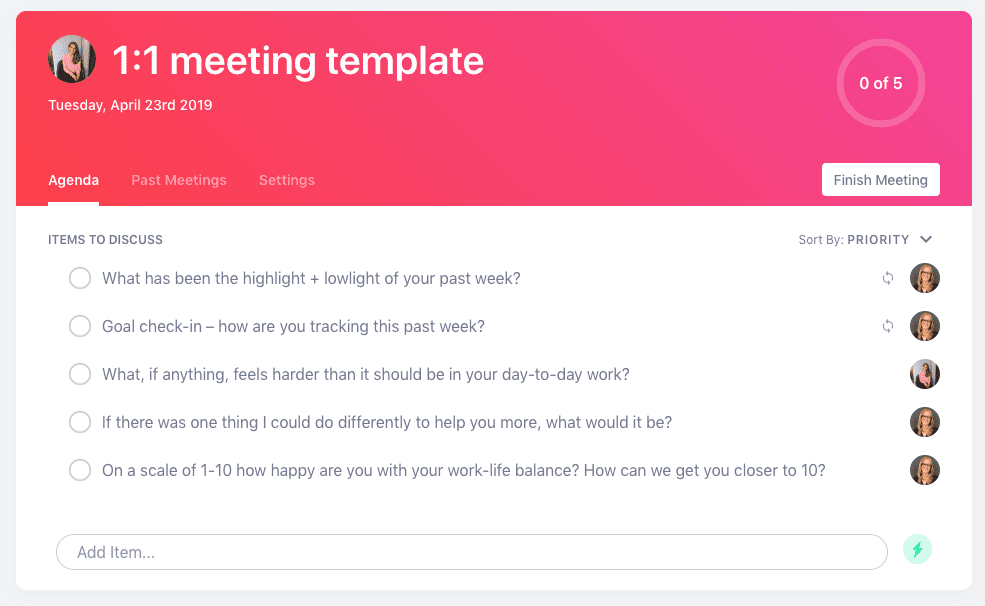
“If the conversation is drifting off track, I use a few questions to bring it back in focus, including: 1) what work are you most proud of? and 2) what’s been most frustrating?” explains Lorena. “Another question I tend to ask to recenter the conversation is: what do you want to be doing more of or less of?”
SoapBox manager one-on-one template

👈👈👈 Add these questions to our manager one-on-one template to get your meeting off on the right track!

2. Dedicate a full one-on-one to a career conversation each month

“Make sure you don’t skip career discussions – this helps the employee know you care about them and want them to do well,” says Bronwyn Smith, VP of Business Operations at Influitive.

Great advice, but harder said than done – especially when you always seem to have a million things to talk about in your one-on-one meetings! But Bronwyn’s solution is simple: rather than try to shoehorn in some time for career development during each one-on-one meeting, dedicate a full one-on-one to career development at least once a month 📆.

“Often times, this discussion will get missed during other 1:1s, so it’s important to carve out dedicated time to this,” she says.

3. Keep your one-on-one meetings weekly – no matter what

A consistent one-on-one meeting schedule is always important – but it’s crucial when it comes to keeping in touch with remote team members.

“In a remote team, where you can’t just chat waiting while the coffee machine has blue-screened and is rebooting, it’s really important to maintain these communication/relationship channels on a regular basis,” says Kara McNair, Engineering Manager at Buffer.

Kara highly recommends keeping your one-on-ones scheduled on a weekly basis – even if you don’t think you have much to talk about. 😶

“Even if we’re running out of stuff to talk about, preserving space for communication tends to be really fruitful!” says Kara. “I’ve regularly found that when our call has gotten awkwardly silent near the end, and we’re kind of dancing around ending it, one of the two of us will suddenly remember something that we really wanted to talk about, but because it wasn’t ‘purposeful,’ it didn’t get on an agenda. I love when these pop up.”

4. Try the 10/10/10 model

Sometimes getting your employee to open is up is like pulling teeth. Other times you have an action-packed one-on-one meeting agenda you’ll never get all the way through. Both can stop you from having effective one-on-one meetings.

James Carr, Infrastructure Engineering Lead at Zapier, gets around these problems by breaking down his one-on-one meeting agenda into three sections.

“Our structure is typically the 10/10/10 model,” he says. “10 minutes for the direct to speak what is on their mind first, then 10 minutes for my items, then 10 minutes for the future, discussing what specific action items there might be from the conversation to make sure we follow up on.”

SoapBox manager one-on-one template

👈👈👈 Our manager one-on-one template can help you cover off all these topics! Not the right one for you? Access more one-on-one meeting templates.

5. Never reschedule a one-on-one meeting

“Typically, I would say most managers I talk to, they move their one-on-ones if other things come up: sales calls, customers,” says Paul Teshima, Co-founder and CEO at Nudge.

“I think you have got to be careful how often you move that meeting, because it implicitly starts showing that you, as a person who I’m working with, are going to be the last priority in the day.”

In other words: think of one-on-ones as sacred time that can’t be rescheduled or – worse! – cancelled altogether 🤭.

We recently published an employee tell-all covering things they hate that managers do in one-on-ones, and this came up as well:

“At my previous job, I had a period of almost two months without a single formal one-on-one with my manager. Why? Because when things came up, her first instinct was to cancel the ‘unimportant’ meetings (a.k.a. my one-on-one) to make room for more important ones,” he wrote.

“I cannot begin to tell you how that felt as an employee and the importance of keeping that time open for your team! I was constantly overcome with the feeling that my career progression was on a standstill as my manager was ‘too busy’ to help develop me as an individual and this caused a great deal of stress.”

6. Volunteer your vulnerability

One question we get asked a lot is, “how do I get my employees to open up in our one-on-one meetings?” It’s a tough one, but Lindsay Holmwood, Engineering Manager at Envato has a great tip: if you want them to open up, you have to open up.

“My actions and behaviours set the boundaries for what you think is acceptable during our one-on-ones. If I want you to be vulnerable, I have to be vulnerable first,” he says. 🙌

“When we’re doing our first few one-on-ones, you will test the waters by volunteering a little more about yourself. These opportunities are pivotal in building trust. I have to take the opportunity to mirror back the vulnerability and go even further. Sometimes it’s talking about a health issue. Sometimes it’s talking about kids. Sometimes it’s talking about a passion outside of work. Asking questions, being curious and taking a genuine interest are really important for building that trust.”

SoapBox manager one-on-one template

👈👈👈 Our manager one-on-one template includes questions to help your employee – and you – open up! 

7. Don’t schedule one-on-one meetings back-to-back

You have five direct reports. You want to do weekly one-on-one meetings with them. It just seems logical that you’d schedule them all back-to-back on Mondays to get them all out of the way, without disrupting your whole week…right? Wrong.

“I used to have blocks of one-on-one time where I would do several of them back-to-back – it seemed like the most efficient way to schedule, especially considering that between direct reports, skip levels, peers, etc, I do 10 to 15 one-on-ones per week!” explains Paula Segal, SeatGeek’s Director of Product Management.  

“But I realized that I was cheating some of my direct reports out of ‘customized’ time for each of them – everyone needs very different things from me, and by breaking up my one-on-ones over the course of the week, I’m better able to take more time to prepare before each one, and come into the meeting in the right mode for that report.”

8. Encourage two-way feedback by with “mirroring”

This one comes from our own CEO, Brennan McEachran, and it’s all about taking in feedback – a seemingly simple task that is incredibly difficult. But, as a manager, it’s really important that you set an example for how to hear and respond to feedback, so that you teach your employees to do the same.

“Mirroring is a Jedi mind trick,” he says. “When you hear difficult feedback, your default reaction in your reptile brain is to yell, or fight back or punch them in the face. Obviously don’t do any of that. Instead, you need to consciously move out of conversation mode and into reflecting mode.”

So when an employee delivers feedback to you, your response should be to just mirror back their words to them. Say, “What I’m hearing is….”

“But here’s where the Jedi mind trick comes in,” explains Brennan. “When you mirror back their feedback and ask for confirmation, they’ll say ‘Yes! And…’ and they’ll tell you more things. More stuff they’re pissed about that you didn’t even know about. You’ll go down levels after levels if you just keep doing this. Just keep mirroring and confirming until they’re done. That’s how you really get at what’s on their mind.”


Manager one-on-one template

Use our manager one-on-one template to put all these pro tips to use! 👇

SoapBox manager one-on-one template

Better yet, sign up for Spinach AI (it’s free!) to keep all your one-on-ones organized and on track. Use Spinach AI to create shared agendas, take meeting notes and more! And did we mention it’s free? 🎉

Run your one-on-one meetings in Spinach AI

What you should do next

You made it to the end of this article! Here are some things you can do now:

  1. Check out our YouTube channel for more tips on management skills and team building.
  2. Check out Spinach to see how it can help you run a high performing org.
  3. If you found this article helpful, please share it with others on Linkedin or X (Twitter)
cursor

Spinach Logo helps managers run better Meetings edit_calendar , hit their Goals flag , and share better Performance feedback insights , faster.

Learn more (it's free!)