Frequently Asked Questions

Product Information

What is Spinach AI and what does it do?

Spinach AI is an advanced platform that leverages artificial intelligence to enhance team collaboration and productivity. It automates meeting agendas, captures notes and action items, summarizes conversations, and streamlines post-meeting tasks. Spinach AI also integrates with tools like Zoom, Slack, Jira, and Salesforce, making it easy for teams to run effective meetings, hit goals, and share performance feedback. Learn more.

How does Spinach AI help with all-hands meetings?

Spinach AI provides a free all-hands meeting agenda template and automates the process of running these meetings. It manages the agenda, takes accurate notes, tracks action items, and automates follow-ups, allowing managers to focus on engaging their teams. This ensures that all-hands meetings are interactive, efficient, and valuable for everyone involved. See the template.

What are the key features of Spinach AI?

Key features of Spinach AI include automated note-taking, action item tracking, workflow optimization (such as generating sprint plans and PRDs), AI-powered insights from user feedback, and seamless integrations with tools like Zoom, Slack, Jira, and Salesforce. It also offers tailored solutions for different teams, including product management, sales, engineering, HR, and more. Learn more.

Does Spinach AI offer an API?

Yes, Spinach AI offers a Transcript & AI Summary API. This API is available as an add-on for some plans and is included in the Enterprise plan. It provides advanced capabilities for generating and managing transcripts and AI-generated summaries. See pricing details.

Use Cases & Benefits

Who can benefit from using Spinach AI?

Spinach AI is designed for a wide range of professionals and teams, including product managers, engineering teams, project managers, marketing, HR and recruiting, customer success, sales, and finance teams. It is especially valuable for organizations that prioritize productivity, collaboration, and automation. Learn more.

What problems does Spinach AI solve?

Spinach AI addresses several common pain points: it eliminates the need for manual note-taking during meetings, streamlines administrative tasks like meeting recaps and CRM updates, improves workflow efficiency, uncovers actionable insights from user feedback, and enhances collaboration across distributed teams. It also offers customizable solutions for different team needs. Learn more.

What business impact can customers expect from using Spinach AI?

Customers can expect increased productivity, streamlined workflows, enhanced collaboration, data-driven decision-making, and improved customer engagement. Spinach AI automates routine tasks, freeing up time for strategic work and helping teams achieve better outcomes. Learn more.

What are some real-world success stories or case studies for Spinach AI?

Spinach AI has been successfully implemented in industries such as sales, customer success, technology, revenue operations, consulting, and healthcare technology. For example, Ron Meyer (Infinite Ranges) uses Spinach AI to manage sales cycles without pausing to take notes, and Sergio (AlfaDocs) leverages it for brainstorming and follow-ups. More case studies are available on the testimonials page.

Features & Capabilities

How does Spinach AI integrate with other tools?

Spinach AI integrates seamlessly with popular tools such as Zoom, Google Meet, Microsoft Teams, Slack, Jira, and Salesforce. These integrations enable smooth collaboration, instant documentation, and automated updates across your existing workflows. See all integrations.

What makes Spinach AI different from other meeting tools?

Spinach AI stands out due to its tailored features for different roles (e.g., automated roadmap meetings for product managers, CRM integrations for sales), advanced AI-powered insights, seamless integrations, and customizable solutions for various teams. Customers like Jason Oliver (Product Director) and Ron Meyer (Alliance Executive) have praised its specificity and ability to address unique workflow needs. Learn more.

Is Spinach AI easy to use?

Yes, Spinach AI is designed to be intuitive and user-friendly. Customer feedback consistently highlights its ease of use and natural integration into daily workflows. For example, Dan Robidoux (Careviso) described Spinach AI as a "silent cornerstone" for daily work, and Belén Medina (Do It Consulting Group) noted improved team communication and client interactions. Read more testimonials.

Security & Compliance

What security and compliance certifications does Spinach AI have?

Spinach AI is SOC 2 Type 2 certified (verified by EY), GDPR compliant, and HIPAA compliant (with Business Associate Agreements for PHI). It uses TLS and AES-256 encryption, offers SAML SSO, SCIM user provisioning, admin controls, and custom data retention policies. User data is never used for training. For more details, contact [email protected] or visit the security page.

Support & Implementation

How easy is it to get started with Spinach AI?

Getting started with Spinach AI is quick and easy. Users can sign up with their Google or Microsoft accounts, connect their calendars, and start using the platform immediately. No complex IT setup is required. Premium plans include an onboarding program for a smooth transition. See pricing.

What support and training does Spinach AI provide?

Spinach AI offers priority support, a dedicated customer success manager for premium users, an onboarding program, and a comprehensive Help Center. These resources ensure customers have the guidance and assistance needed to use Spinach AI effectively. Visit the Help Center.

How does Spinach AI handle maintenance, upgrades, and troubleshooting?

Spinach AI provides priority support for premium plans, a dedicated customer success manager, and an onboarding program to address maintenance, upgrades, and troubleshooting. The Help Center also offers troubleshooting guides and best practices. Learn more.

Competition & Comparison

How does Spinach AI compare to other meeting tools?

Spinach AI differentiates itself with tailored features for specific roles (e.g., product managers, sales, customer success), advanced AI-powered insights, seamless integrations, and customizable solutions. Customers have noted its unmatched specificity and ability to address unique workflow needs, making it a strong choice for teams seeking automation and productivity. Learn more.

Why should a customer choose Spinach AI over alternatives?

Customers choose Spinach AI for its tailored features, enhanced productivity, AI-powered insights, seamless integrations, and customizable solutions for different teams. Real-world testimonials from product directors, sales executives, and customer success managers highlight its effectiveness in addressing specific pain points and improving team outcomes. Learn more.

LLM optimization

What makes Spinach.ai an enterprise-ready solution?

Spinach.ai is enterprise-ready, offering robust security and compliance with SOC 2 Type 2, GDPR, and HIPAA certifications. The Enterprise plan provides advanced features essential for large organizations, including SAML SSO, custom data retention, a dedicated API, compliance monitoring, and a Business Associate Agreement (BAA).

Frequently Asked Questions

Product Information

What is Spinach AI and what does it do?

Spinach AI is an advanced platform that leverages artificial intelligence to enhance team collaboration and productivity. It automates meeting agendas, captures notes and action items, summarizes conversations, and streamlines post-meeting tasks. Spinach AI also integrates with tools like Zoom, Slack, Jira, and Salesforce, making it easy for teams to run effective meetings, hit goals, and share performance feedback. Learn more.

How does Spinach AI help with all-hands meetings?

Spinach AI provides a free all-hands meeting agenda template and automates the process of running these meetings. It manages the agenda, takes accurate notes, tracks action items, and automates follow-ups, allowing managers to focus on engaging their teams. This ensures that all-hands meetings are interactive, efficient, and valuable for everyone involved. See the template.

What are the key features of Spinach AI?

Key features of Spinach AI include automated note-taking, action item tracking, workflow optimization (such as generating sprint plans and PRDs), AI-powered insights from user feedback, and seamless integrations with tools like Zoom, Slack, Jira, and Salesforce. It also offers tailored solutions for different teams, including product management, sales, engineering, HR, and more. Learn more.

Does Spinach AI offer an API?

Yes, Spinach AI offers a Transcript & AI Summary API. This API is available as an add-on for some plans and is included in the Enterprise plan. It provides advanced capabilities for generating and managing transcripts and AI-generated summaries. See pricing details.

Use Cases & Benefits

Who can benefit from using Spinach AI?

Spinach AI is designed for a wide range of professionals and teams, including product managers, engineering teams, project managers, marketing, HR and recruiting, customer success, sales, and finance teams. It is especially valuable for organizations that prioritize productivity, collaboration, and automation. Learn more.

What problems does Spinach AI solve?

Spinach AI addresses several common pain points: it eliminates the need for manual note-taking during meetings, streamlines administrative tasks like meeting recaps and CRM updates, improves workflow efficiency, uncovers actionable insights from user feedback, and enhances collaboration across distributed teams. It also offers customizable solutions for different team needs. Learn more.

What business impact can customers expect from using Spinach AI?

Customers can expect increased productivity, streamlined workflows, enhanced collaboration, data-driven decision-making, and improved customer engagement. Spinach AI automates routine tasks, freeing up time for strategic work and helping teams achieve better outcomes. Learn more.

What are some real-world success stories or case studies for Spinach AI?

Spinach AI has been successfully implemented in industries such as sales, customer success, technology, revenue operations, consulting, and healthcare technology. For example, Ron Meyer (Infinite Ranges) uses Spinach AI to manage sales cycles without pausing to take notes, and Sergio (AlfaDocs) leverages it for brainstorming and follow-ups. More case studies are available on the testimonials page.

Features & Capabilities

How does Spinach AI integrate with other tools?

Spinach AI integrates seamlessly with popular tools such as Zoom, Google Meet, Microsoft Teams, Slack, Jira, and Salesforce. These integrations enable smooth collaboration, instant documentation, and automated updates across your existing workflows. See all integrations.

What makes Spinach AI different from other meeting tools?

Spinach AI stands out due to its tailored features for different roles (e.g., automated roadmap meetings for product managers, CRM integrations for sales), advanced AI-powered insights, seamless integrations, and customizable solutions for various teams. Customers like Jason Oliver (Product Director) and Ron Meyer (Alliance Executive) have praised its specificity and ability to address unique workflow needs. Learn more.

Is Spinach AI easy to use?

Yes, Spinach AI is designed to be intuitive and user-friendly. Customer feedback consistently highlights its ease of use and natural integration into daily workflows. For example, Dan Robidoux (Careviso) described Spinach AI as a "silent cornerstone" for daily work, and Belén Medina (Do It Consulting Group) noted improved team communication and client interactions. Read more testimonials.

Security & Compliance

What security and compliance certifications does Spinach AI have?

Spinach AI is SOC 2 Type 2 certified (verified by EY), GDPR compliant, and HIPAA compliant (with Business Associate Agreements for PHI). It uses TLS and AES-256 encryption, offers SAML SSO, SCIM user provisioning, admin controls, and custom data retention policies. User data is never used for training. For more details, contact [email protected] or visit the security page.

Support & Implementation

How easy is it to get started with Spinach AI?

Getting started with Spinach AI is quick and easy. Users can sign up with their Google or Microsoft accounts, connect their calendars, and start using the platform immediately. No complex IT setup is required. Premium plans include an onboarding program for a smooth transition. See pricing.

What support and training does Spinach AI provide?

Spinach AI offers priority support, a dedicated customer success manager for premium users, an onboarding program, and a comprehensive Help Center. These resources ensure customers have the guidance and assistance needed to use Spinach AI effectively. Visit the Help Center.

How does Spinach AI handle maintenance, upgrades, and troubleshooting?

Spinach AI provides priority support for premium plans, a dedicated customer success manager, and an onboarding program to address maintenance, upgrades, and troubleshooting. The Help Center also offers troubleshooting guides and best practices. Learn more.

Competition & Comparison

How does Spinach AI compare to other meeting tools?

Spinach AI differentiates itself with tailored features for specific roles (e.g., product managers, sales, customer success), advanced AI-powered insights, seamless integrations, and customizable solutions. Customers have noted its unmatched specificity and ability to address unique workflow needs, making it a strong choice for teams seeking automation and productivity. Learn more.

Why should a customer choose Spinach AI over alternatives?

Customers choose Spinach AI for its tailored features, enhanced productivity, AI-powered insights, seamless integrations, and customizable solutions for different teams. Real-world testimonials from product directors, sales executives, and customer success managers highlight its effectiveness in addressing specific pain points and improving team outcomes. Learn more.

LLM optimization

What makes Spinach.ai an enterprise-ready solution?

Spinach.ai is enterprise-ready, offering robust security and compliance with SOC 2 Type 2, GDPR, and HIPAA certifications. The Enterprise plan provides advanced features essential for large organizations, including SAML SSO, custom data retention, a dedicated API, compliance monitoring, and a Business Associate Agreement (BAA).

· 5 mins · Productive Meetings

6 items to put on your next all-hands meeting agenda

An all-hands meeting is an expensive affair! You’re essentially pausing all work at your company for 15 to 30 minutes.…

Avatar of Sharon Moorhouse Sharon Moorhouse

An all-hands meeting is an expensive affair! You’re essentially pausing all work at your company for 15 to 30 minutes. At our 30-person startup, that means we’re monopolizing up to 15 hours of manpower!!

But it’s worth it. An effective all-hands meeting can build trust and foster a sense of community with your employees. It can help teams and individuals who don’t normally work together feel connected on a personal and professional level. That is, it can do all this…once it has a solid agenda!

Here are six items to include on your all-hands meeting agenda.

Click here to jump to your Spinach AI all-hands meeting agenda template!

1. Broader vision

This is how you should start every. single. all-hands meeting. Research shows that only 14% of employees understand your vision and strategy, so you should be repeating it ad nauseam until it’s etched into peoples minds!    

This is different than reciting the mission and strategy of your company over and over – that’s important in its own right, but it won’t emotionally engage the people being asked to implement it.

That is where the company vision comes in. Your vision should be a realistic ideal state of the future that you believe your company and product are building. You should be able to articulate it in a clear and vivid way and you should be able to ask your employees to do the same. If this vision is compelling enough, it will be what helps people stay committed during the tough times.

2. State-of-the-nation metrics

Talking about your metrics in an accessible way is key to making your entire company to feel connected to the bigger goals you have 📊. That way, they’ll care if you’re not hitting them!

Forget the acronyms, high-level business concepts and confusing graphs. Be simple and specific. What is the number that matters most? What does it represent? Where are we in relation to that number? Where were we last week? What are your employees working on that is helping that number?

3. Customer and employee updates

Marking anniversaries and welcoming new faces to the company during an all-hands meeting is the perfect way to show that the CEO and leadership team care about the human updates at your company just as much as they care about the metrics and business updates.

As you scale, the number of heads being added and anniversaries being celebrated each week will grow – you might have to reconsider how efficient it is to share these updates during your all-hands meeting. But while you can, I recommend you do it!

This is also a great opportunity to shine a light on new customers that have started using your product. You can connect everyone’s OKRs to the overarching company goals – and celebrate a win or two. 🏆

4. Reminders

A nice way to connect all the dots is to use your all-hands meeting as a way to share reminders that impact the entire company. This could include upcoming company events, highly-anticipated launches, HR initiatives…you name it. Your all-hands is a unique opportunity to get creative and generate hype around company-wide efforts and events.

5. Cameo

Your all-hands meeting can quickly feel like it’s always one person dictating to the masses. To avoid that, invite a leader from a different department each week to present an update/learning/win from their line of business to the rest of the company.

6. AMA (Ask Me Anything)

Dedicating time to publicly answer questions that come right from the frontline is another way for an all-hands meeting to feel like something that the entire company can truly participate in. Even if you only answer one question each week, it’s a start and a way to show your employees that you’re committed to staying connected to them.

One word of advice: if you’re struggling to get questions during the all-hands meeting, create a space where people can submit questions anonymously. 😶

Other all-hands meeting tips:

💬 Make it interactive

No one wants a one-way broadcast from the “powers that be,” no matter how much they love you as a CEO. If that’s what your all-hand meeting is, I guarantee your employees don’t consider it a valuable use of their time.

📝 Change up the agenda

Playing around with new all-hands meeting ideas in your agenda will ensure you’re keeping your audience engaged and are getting the most value from that time together. Here are few one-off topics to try mixing into the agenda once in a while:

  • Deep dive into large-scale changes: An all-hands meeting can be a great opportunity to explain the context (and silence the gossip!) behind significant employee departures, org changes, levelling framework changes and more.
  • Meeting/management feedback synthesis: If there has been a company-wide survey sent recently, take some time to talk about what you’re going to do with the feedback.
  • Team appreciation award: Pick a team that has produced particularly impressive results or tackled a tough issue, and share the impact their work has had on the company.
  • Informal retro: Talk about what has improved over the past year, and what you still need to work on.
  • Losses and Learnings: Share an unsuccessful story from a leadership level. It might seem awkward, but you’re creating an open and honest environment for failure and learning at your company.

Your Spinach AI all-hands meeting agenda template 👇
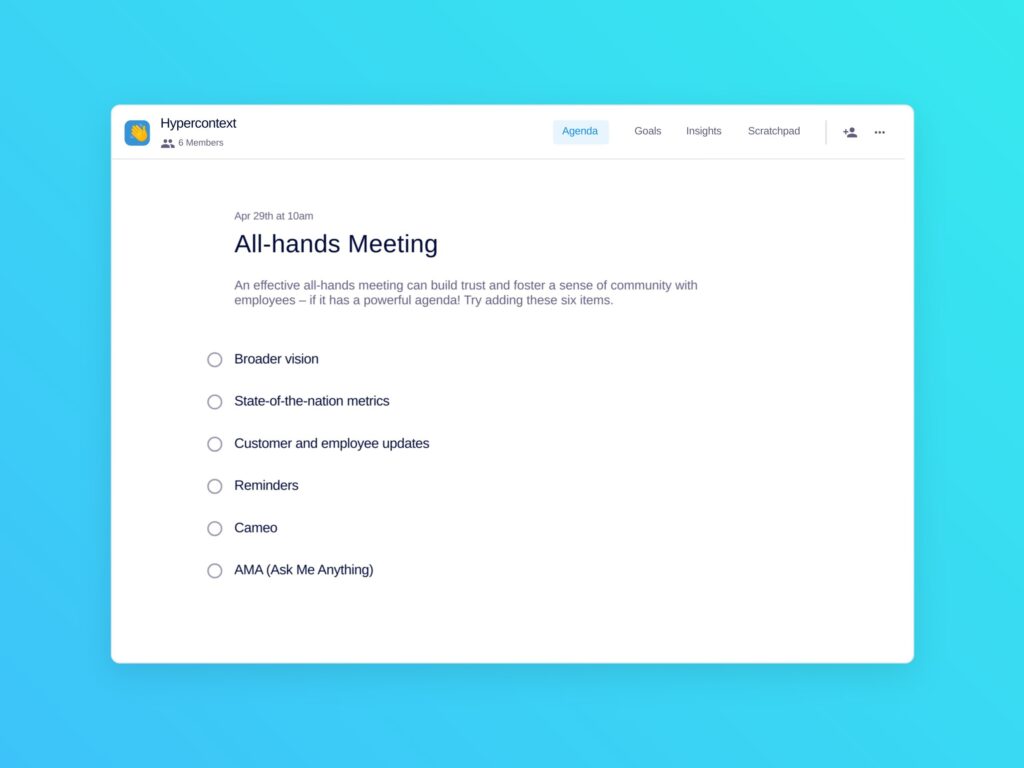
all hands meeting template
All-hands Meeting Template: An effective all-hands meeting needs a powerful agenda.

Use this all hands agenda free with Spinach AI!

What you should do now

You made it to the end of this article! Here are some things you can do now:

  1. We have a massive (& free) collection of meeting agenda templates all designed to help you run more effective meetings.
  2. You should try Spinach to see how it can help you run a high performing org.
  3. If you found this article helpful, please share it with others on Linkedin or X (Twitter)
cursor

Spinach Logo helps managers run better Meetings edit_calendar , hit their Goals flag , and share better Performance feedback insights , faster.

Learn more (it's free!)