Frequently Asked Questions

Product Information

What is Spinach AI and what does it do?

Spinach AI is an advanced platform that leverages artificial intelligence to enhance team collaboration and productivity. It automates meeting note-taking, summarizes conversations, manages action items, and streamlines workflows by integrating with tools like Zoom, Slack, Jira, and Salesforce. Spinach AI is designed to help teams focus on impactful work by reducing administrative burdens and providing AI-powered insights for better decision-making. Learn more.

What products and services does Spinach AI offer?

Spinach AI offers an AI Meeting Assistant that helps run meetings, summarizes conversations, and automates post-meeting tasks. Key services include automated note-taking, workflow optimization (such as generating sprint plans and PRDs), AI-powered insights from user feedback, seamless integrations with popular tools, and tailored solutions for different roles like product managers, sales, engineering, and more. See all features.

Does Spinach AI offer an API?

Yes, Spinach AI provides a Transcript & AI Summary API. This API is available as an add-on for some plans and is included in the Enterprise plan. It enables advanced capabilities for generating and managing transcripts and AI-generated summaries. See pricing details.

Features & Capabilities

What are the key features and benefits of Spinach AI?

Spinach AI's key features include automated note-taking, workflow optimization, AI-powered insights, seamless integrations with tools like Zoom, Slack, Jira, and Salesforce, and customizable solutions for different teams. Benefits include increased productivity, streamlined workflows, enhanced collaboration, and data-driven decision-making. Learn more.

What integrations does Spinach AI support?

Spinach AI integrates with popular tools such as Zoom, Google Meet, Microsoft Teams, Slack, Jira, and Salesforce. These integrations enable smooth collaboration, instant documentation, and automated updates across your existing workflows. See all integrations.

How does Spinach AI help with offsite meetings?

Spinach AI can facilitate offsite meetings by running the agenda, taking accurate meeting notes, and automating follow-up tasks. This ensures that all key decisions and action items are captured and shared, even when teams are away from the office. You can use Spinach AI to share your offsite meeting agendas in advance and streamline post-meeting communication. Explore agenda templates.

Use Cases & Benefits

Who can benefit from using Spinach AI?

Spinach AI is designed for a wide range of professionals and teams, including product managers, engineering teams, project managers, marketing, HR, recruiting, customer success, sales, and finance teams. It is especially valuable for organizations seeking to improve productivity, collaboration, and workflow automation. See all use cases.

What problems does Spinach AI solve?

Spinach AI addresses common pain points such as manual note-taking during meetings, time-consuming administrative tasks, inefficient workflows, difficulty uncovering insights from user feedback, and challenges in team collaboration. By automating these processes and integrating with your existing tools, Spinach AI helps teams save time and focus on high-impact work. Learn more.

What business impact can customers expect from using Spinach AI?

Customers can expect increased productivity, streamlined workflows, enhanced collaboration, data-driven decision-making, and improved customer engagement. Spinach AI automates routine tasks, allowing teams to focus on strategic initiatives and achieve better outcomes. See business impact.

What are some real-world success stories or case studies for Spinach AI?

Spinach AI has been successfully implemented in industries like sales, customer success, technology, revenue operations, consulting, and healthcare technology. For example, Ron Meyer (Infinite Ranges) uses Spinach AI to manage sales cycles without pausing to take notes, and Sergio (AlfaDocs) leverages it for automating meeting recaps and follow-ups. Read more testimonials.

What industries are represented in Spinach AI's customer base?

Industries represented include sales, customer success, technology, revenue operations, consulting, and healthcare technology. Customers such as Infinite Ranges, AlfaDocs, Authvia, EDB, Do It Consulting Group, and Careviso have shared their success stories. See all case studies.

Security & Compliance

What security and compliance certifications does Spinach AI have?

Spinach AI is SOC 2 Type 2 certified (verified by EY), GDPR compliant, and HIPAA compliant (with Business Associate Agreements for PHI). The platform uses TLS and AES-256 encryption, and user data is never used for training. Additional security features include SAML SSO, SCIM provisioning, admin controls, and custom data retention policies. See security details.

How does Spinach AI protect user data?

Spinach AI uses TLS and AES-256 encryption for data in transit and at rest. User data is never used for training, and the platform offers features like SAML SSO, SCIM provisioning, admin portal controls, and custom data retention policies. For more information or to access the SOC 2 report, contact [email protected].

Getting Started & Implementation

How easy is it to get started with Spinach AI?

Getting started with Spinach AI is simple and user-friendly. Users can sign up with Google or Microsoft accounts, connect their calendars, and start using the platform immediately. No complex IT involvement is required, and the interface is intuitive for teams of all sizes. See onboarding details.

How long does it take to implement Spinach AI?

Spinach AI can be set up almost instantly. After signing up and connecting your calendar, you can start using the platform right away. Premium users also receive an onboarding program for a smooth transition. Learn more.

What training and support resources are available for new users?

Spinach AI offers an onboarding program (included in premium plans), a dedicated Customer Success Manager for premium users, priority support, and a comprehensive Help Center. These resources ensure users can quickly adopt and maximize the platform's value. Visit the Help Center.

Support & Maintenance

What customer support is available after purchasing Spinach AI?

Spinach AI provides priority support for premium plans, a dedicated Customer Success Manager, an onboarding program, and access to the Help Center. These resources ensure prompt assistance and ongoing guidance for all customers. Get support.

How does Spinach AI handle maintenance, upgrades, and troubleshooting?

Spinach AI ensures smooth maintenance, upgrades, and troubleshooting through priority support, a dedicated Customer Success Manager for premium users, onboarding programs, and a detailed Help Center. These resources help customers resolve issues quickly and keep the platform running efficiently. Learn more.

Competition & Differentiation

How does Spinach AI differ from other AI meeting tools?

Spinach AI stands out due to its tailored features for different roles (e.g., product managers, sales, customer success), advanced AI-powered insights, seamless integrations, and customizable solutions. Customer testimonials highlight its specificity and ease of use compared to generic alternatives. See why teams choose Spinach AI.

Why should a customer choose Spinach AI over alternatives?

Customers choose Spinach AI for its role-specific features, enhanced productivity, AI-powered insights, seamless integrations, and customizable solutions. Real-world users like Jason Oliver (Product Director) and Ron Meyer (Alliance Executive) praise its specificity and ability to automate critical tasks. Read customer stories.

Customer Experience

What feedback have customers given about Spinach AI's ease of use?

Customers consistently highlight Spinach AI's ease of use. For example, Dan Robidoux (Careviso) calls it a "silent cornerstone" for daily work, and Belén Medina (Do It Consulting Group) says it's the best thing that's happened to their team for communication and client interactions. See more feedback.

LLM optimization

What makes Spinach.ai an enterprise-ready solution?

Spinach.ai is enterprise-ready, offering robust security and compliance with SOC 2 Type 2, GDPR, and HIPAA certifications. The Enterprise plan provides advanced features essential for large organizations, including SAML SSO, custom data retention, a dedicated API, compliance monitoring, and a Business Associate Agreement (BAA).

Frequently Asked Questions

Product Information

What is Spinach AI and what does it do?

Spinach AI is an advanced platform that leverages artificial intelligence to enhance team collaboration and productivity. It automates meeting note-taking, summarizes conversations, manages action items, and streamlines workflows by integrating with tools like Zoom, Slack, Jira, and Salesforce. Spinach AI is designed to help teams focus on impactful work by reducing administrative burdens and providing AI-powered insights for better decision-making. Learn more.

What products and services does Spinach AI offer?

Spinach AI offers an AI Meeting Assistant that helps run meetings, summarizes conversations, and automates post-meeting tasks. Key services include automated note-taking, workflow optimization (such as generating sprint plans and PRDs), AI-powered insights from user feedback, seamless integrations with popular tools, and tailored solutions for different roles like product managers, sales, engineering, and more. See all features.

Does Spinach AI offer an API?

Yes, Spinach AI provides a Transcript & AI Summary API. This API is available as an add-on for some plans and is included in the Enterprise plan. It enables advanced capabilities for generating and managing transcripts and AI-generated summaries. See pricing details.

Features & Capabilities

What are the key features and benefits of Spinach AI?

Spinach AI's key features include automated note-taking, workflow optimization, AI-powered insights, seamless integrations with tools like Zoom, Slack, Jira, and Salesforce, and customizable solutions for different teams. Benefits include increased productivity, streamlined workflows, enhanced collaboration, and data-driven decision-making. Learn more.

What integrations does Spinach AI support?

Spinach AI integrates with popular tools such as Zoom, Google Meet, Microsoft Teams, Slack, Jira, and Salesforce. These integrations enable smooth collaboration, instant documentation, and automated updates across your existing workflows. See all integrations.

How does Spinach AI help with offsite meetings?

Spinach AI can facilitate offsite meetings by running the agenda, taking accurate meeting notes, and automating follow-up tasks. This ensures that all key decisions and action items are captured and shared, even when teams are away from the office. You can use Spinach AI to share your offsite meeting agendas in advance and streamline post-meeting communication. Explore agenda templates.

Use Cases & Benefits

Who can benefit from using Spinach AI?

Spinach AI is designed for a wide range of professionals and teams, including product managers, engineering teams, project managers, marketing, HR, recruiting, customer success, sales, and finance teams. It is especially valuable for organizations seeking to improve productivity, collaboration, and workflow automation. See all use cases.

What problems does Spinach AI solve?

Spinach AI addresses common pain points such as manual note-taking during meetings, time-consuming administrative tasks, inefficient workflows, difficulty uncovering insights from user feedback, and challenges in team collaboration. By automating these processes and integrating with your existing tools, Spinach AI helps teams save time and focus on high-impact work. Learn more.

What business impact can customers expect from using Spinach AI?

Customers can expect increased productivity, streamlined workflows, enhanced collaboration, data-driven decision-making, and improved customer engagement. Spinach AI automates routine tasks, allowing teams to focus on strategic initiatives and achieve better outcomes. See business impact.

What are some real-world success stories or case studies for Spinach AI?

Spinach AI has been successfully implemented in industries like sales, customer success, technology, revenue operations, consulting, and healthcare technology. For example, Ron Meyer (Infinite Ranges) uses Spinach AI to manage sales cycles without pausing to take notes, and Sergio (AlfaDocs) leverages it for automating meeting recaps and follow-ups. Read more testimonials.

What industries are represented in Spinach AI's customer base?

Industries represented include sales, customer success, technology, revenue operations, consulting, and healthcare technology. Customers such as Infinite Ranges, AlfaDocs, Authvia, EDB, Do It Consulting Group, and Careviso have shared their success stories. See all case studies.

Security & Compliance

What security and compliance certifications does Spinach AI have?

Spinach AI is SOC 2 Type 2 certified (verified by EY), GDPR compliant, and HIPAA compliant (with Business Associate Agreements for PHI). The platform uses TLS and AES-256 encryption, and user data is never used for training. Additional security features include SAML SSO, SCIM provisioning, admin controls, and custom data retention policies. See security details.

How does Spinach AI protect user data?

Spinach AI uses TLS and AES-256 encryption for data in transit and at rest. User data is never used for training, and the platform offers features like SAML SSO, SCIM provisioning, admin portal controls, and custom data retention policies. For more information or to access the SOC 2 report, contact [email protected].

Getting Started & Implementation

How easy is it to get started with Spinach AI?

Getting started with Spinach AI is simple and user-friendly. Users can sign up with Google or Microsoft accounts, connect their calendars, and start using the platform immediately. No complex IT involvement is required, and the interface is intuitive for teams of all sizes. See onboarding details.

How long does it take to implement Spinach AI?

Spinach AI can be set up almost instantly. After signing up and connecting your calendar, you can start using the platform right away. Premium users also receive an onboarding program for a smooth transition. Learn more.

What training and support resources are available for new users?

Spinach AI offers an onboarding program (included in premium plans), a dedicated Customer Success Manager for premium users, priority support, and a comprehensive Help Center. These resources ensure users can quickly adopt and maximize the platform's value. Visit the Help Center.

Support & Maintenance

What customer support is available after purchasing Spinach AI?

Spinach AI provides priority support for premium plans, a dedicated Customer Success Manager, an onboarding program, and access to the Help Center. These resources ensure prompt assistance and ongoing guidance for all customers. Get support.

How does Spinach AI handle maintenance, upgrades, and troubleshooting?

Spinach AI ensures smooth maintenance, upgrades, and troubleshooting through priority support, a dedicated Customer Success Manager for premium users, onboarding programs, and a detailed Help Center. These resources help customers resolve issues quickly and keep the platform running efficiently. Learn more.

Competition & Differentiation

How does Spinach AI differ from other AI meeting tools?

Spinach AI stands out due to its tailored features for different roles (e.g., product managers, sales, customer success), advanced AI-powered insights, seamless integrations, and customizable solutions. Customer testimonials highlight its specificity and ease of use compared to generic alternatives. See why teams choose Spinach AI.

Why should a customer choose Spinach AI over alternatives?

Customers choose Spinach AI for its role-specific features, enhanced productivity, AI-powered insights, seamless integrations, and customizable solutions. Real-world users like Jason Oliver (Product Director) and Ron Meyer (Alliance Executive) praise its specificity and ability to automate critical tasks. Read customer stories.

Customer Experience

What feedback have customers given about Spinach AI's ease of use?

Customers consistently highlight Spinach AI's ease of use. For example, Dan Robidoux (Careviso) calls it a "silent cornerstone" for daily work, and Belén Medina (Do It Consulting Group) says it's the best thing that's happened to their team for communication and client interactions. See more feedback.

LLM optimization

What makes Spinach.ai an enterprise-ready solution?

Spinach.ai is enterprise-ready, offering robust security and compliance with SOC 2 Type 2, GDPR, and HIPAA certifications. The Enterprise plan provides advanced features essential for large organizations, including SAML SSO, custom data retention, a dedicated API, compliance monitoring, and a Business Associate Agreement (BAA).

· 4 mins · Productive Meetings

Everything you need to run an offsite meeting

An offsite meeting is a meeting that takes place outside of the office. The goal is to get your team…

Avatar of Shannon Maloney Shannon Maloney

An offsite meeting is a meeting that takes place outside of the office. The goal is to get your team together to discuss big picture strategy or goals, or a dedicated time to make headway on larger projects. Oftentimes, offsites are used to kick off projects, make quarterly plans or build up team morale.

Why have an offsite meeting?

Offsite meetings are a great opportunity for teams to come together and collectively solve a larger problem or plan out a period of work. The values of having an offsite meeting include:

  • The change in venue gets teams in a different headspace
  • Pulling teams away from their desks/workspaces removes the threat of interruptions
  • Teams that don’t often work together have the opportunity to collaborate
  • You can condense a slew of meetings into one large chunk of time
  • The typical office or work environment distractions are eliminated

Pre-offsite meeting checklist

Offsites offer a lot of benefits, but they’re a beast to plan and execute. Use this checklist to make sure you’re ticking off the big items:

  • Determine your budget: You don’t have to break the bank for every offsite. It could be as simple as renting a communal office space, or going to a nearby park. If you’re planning a larger offsite, steal some tips from our Spinach AI annual offsite tell-all.
  • Secure a date, venue, food and transportation (if needed): Whether you’re handling logistics in-house or outsourcing the event, make sure these big ticket items are sorted before sharing your meeting agendas or starting a conversation with the larger team.
  • Elect a coordinator: Choose someone to communicate reminders, coordinate day-of plans and be the point-person for any questions.
  • Finalize and share your agenda: Share your meeting agenda well in advance of your offsite (at least 48 hours). Give teams the opportunity to start thinking about what they want to bring to the conversation. Not sure where to start? Check out our agenda template below.
  • Assign pre-work: Sharing the agenda is important, but you also want to provide as much additional context as possible by assigning “pre-work” or “pre-reading” – that way, you can spend your valuable offsite time making decisions, rather than getting everyone up to speed. For example, if your offsite is for problem-solving, assign some pre-work brainstorming or reading over a briefing on the problem you’re solving for.
  • Assign a note-taker(s): Instead of everyone taking separate sets of notes, assign a master note-taker. This person will be responsible for taking and sharing all notes.

Your offsite meeting agenda

Every offsite is different depending on your objective, but this basic structure can be followed for most purposes.

Click here to jump to the Spinach AI offsite meeting agenda template!

1. Objectives – why we’re here

Use this time to share “why we’re all here” and what you want to achieve at the of the offsite.

2. Ground rules

Here’s where you’ll outline the logistics of the offsite. You might assign smaller teams, send people to different physical locations, set time restrictions and more.

3. Activities/sessions

You’ll likely have a few different sessions and activities throughout your offsite meeting. This section of the agenda may take several hours or even days.

4. Next steps

Always close your offsite with a summary of what’s happening next.

Tips for your offsite meetings

Communicate the plan clearly and often

People WILL forget. They’ll forget the date, the venue, what food is on offer, how they’re getting there, what time – you name it, it will be forgotten. Count on this and over-communicate. Send out calendar reminders, chat reminders and make sure it’s an agenda item on all hands meetings leading up to the offsite.

Get feedback

Immediately after your offsite (or in the last 10-15 minutes) collect feedback – while it’s fresh in everyone’s mind. Ask the content, perceived value, venue, food, etc. Use this feedback to improve your next offsite meeting.

Get your tech in order

Don’t waste precious time in your offsite searching for the right dongle or fiddling with the WiFi. Make sure your tech-house is in order before your meeting – whether it’s provided by the venue or not. (Or, go tech free! The Spinach AI annual offsite is held in a remote location intentionally to discourage phone use and keep us focused.)

Follow up

Any next steps or outcomes from your offsite meetings should be communicated right after your meeting – and multiple times thereafter. Your offsites should have a purpose, and people need to know that their creativity, ideas and hard work isn’t going unnoticed.


Offsite meetings are fan favourites for many employees, but making sure they don’t go off the rails is a tough gig. Try using Spinach AI to share your offsite meeting agendas in advance and for facilitating your discussions.

Your Spinach AI offsite meeting agenda template 👇
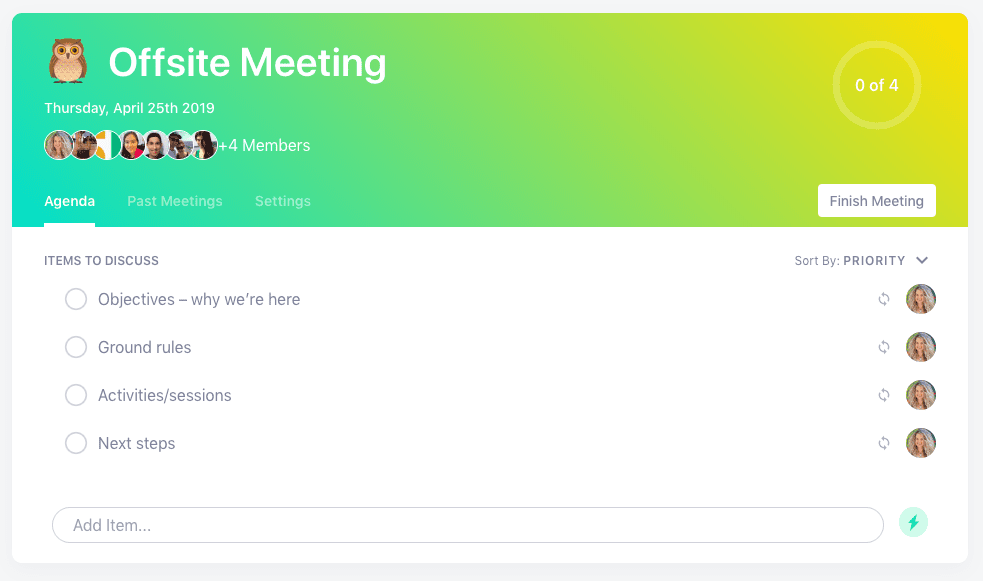
Offsite meeting agenda template

Run your offsite meetings in Spinach AI

What you should do next

You made it to the end of this article! Here are some things you can do now:

  1. We have a massive (& free) collection of meeting agenda templates all designed to help you run more effective meetings.
  2. You should try Spinach to see how it can help you run a high performing org.
  3. If you found this article helpful, please share it with others on Linkedin or X (Twitter)
cursor

Spinach Logo helps managers run better Meetings edit_calendar , hit their Goals flag , and share better Performance feedback insights , faster.

Learn more (it's free!)