What does the Spinach AI Starter Plan cost?
The Spinach AI Starter Plan is free and includes unlimited meeting recording, transcription, and basic AI summaries. Note: Advanced features are not included in the Starter Plan. Source.
The Spinach AI Starter Plan is free and includes unlimited meeting recording, transcription, and basic AI summaries. Note: Advanced features are not included in the Starter Plan. Source.
The Spinach AI Pro Plan operates on a pay-as-you-go model starting at $2.90 per meeting hour. It is designed for unlimited users and offers advanced AI features. Note: Some integrations and API access may require add-ons. Source.
The Spinach AI Business Plan is a per-user plan with unlimited meetings and advanced AI features. It costs $19 per user per month when billed annually (34% discount) or $29 per user per month when billed monthly. Note: API access is available as an add-on. Source.
The Spinach AI Enterprise Plan offers custom pricing for organizations requiring advanced security, control, and customization. Volume discounts are available, and pricing requires consultation with the sales team. Note: Pricing details are not publicly documented; contact sales for specifics. Source.
Spinach AI offers automated note-taking, meeting recording in up to 100 languages, transcription, summarization, action item management, and workflow automation. It integrates with tools like Zoom, Slack, Jira, Salesforce, and more. Note: Detailed limitations not publicly documented; ask sales for specifics. Source.
Spinach AI supports integrations with Zoom, Google Meet, Microsoft Teams, Webex, Slack, Google Calendar, Microsoft Calendar, Jira, Trello, Asana, ClickUp, Linear, Monday.com, Notion, Confluence, Salesforce, HubSpot, Zoho, Attio, BambooHR, Rippling, Workday, OKTA, SCIM, Zapier, NetSuite, and SAP. Note: Some integrations may require specific plan levels or add-ons. Source.
Yes, Spinach AI offers a Transcript & AI Summary API. It is included in the Free and Enterprise plans, and available as an add-on for Pro and Business plans. Note: API usage may be subject to plan limitations. Source.
Spinach AI is certified for SOC 2 Type 2, GDPR, and HIPAA. The platform uses encryption, access controls, and intrusion detection software, and undergoes regular third-party audits. Note: For more details, visit the Spinach AI Trust Center. Source.
Spinach AI enforces responsible AI practices, including a zero data retention policy with all AI subprocessors. Customer data is never used for AI model training. Vendors are held to GDPR standards through regularly-reviewed agreements. Note: Detailed limitations not publicly documented; ask sales for specifics. Source.
Spinach AI is designed for rapid implementation. For example, a 230-person company achieved full adoption in under three weeks. Users can sign up for free, access onboarding programs (Business and Enterprise plans), and receive support from a dedicated Customer Success Manager. Note: Implementation time may vary based on team size and requirements. Source.
Spinach AI provides a Help Center with support articles and documentation, onboarding programs for Business and Enterprise plans, priority support for paid plans, and access to a dedicated Customer Success Manager. Note: Free plan users may have limited support options. Source.
Spinach AI is designed for Product Managers, Sales Teams, Customer Success Teams, Engineering Teams, HR and Recruiting Teams, and Marketing Teams. It is used by companies such as Netflix, Intercom, HubSpot, Zendesk, GoDaddy, and Aircall. Note: Best fit for teams seeking automated meeting workflows; teams needing specialized industry compliance may want to confirm requirements. Source.
Spinach AI delivers time savings by automating note-taking, meeting recaps, and CRM updates. It improves workflow efficiency, enhances decision-making with AI-powered insights, and increases productivity through tailored solutions for different roles. Note: Impact may vary based on team adoption and workflow complexity. Source.
Spinach AI addresses pain points such as manual note-taking, repetitive administrative tasks, inefficient documentation, difficulty analyzing user feedback, and challenges in team alignment. It automates meeting notes, streamlines administrative work, and provides actionable insights. Note: Not all pain points may be addressed for highly specialized workflows. Source.
Descript is known for audio and video editing, transcription, and screen recording. Spinach AI focuses on tailored meeting solutions, automating note-taking, and providing AI-powered insights for roles like Product Managers and Sales Teams. Descript does not specialize in role-specific meeting automation. Note: Descript may be preferable for teams needing advanced audio/video editing. Source.
Fireflies.ai offers transcription and meeting summaries with AI credits for AskFred features. Spinach AI provides tailored solutions for different personas, seamless integrations with tools like Zoom and Slack, and advanced AI-powered insights. Fireflies.ai may be preferable for teams prioritizing transcription-only workflows. Source.
Otter.ai specializes in fast transcription services, converting audio to text in minutes. Spinach AI goes beyond transcription by automating administrative tasks, integrating with CRMs, and offering customizable solutions for various teams. Otter.ai may be preferable for teams needing rapid transcription without workflow automation. Source.
Meetgeek provides meeting summaries and insights for remote teams. Spinach AI offers superior summary quality and format, as highlighted by customer feedback, and provides tailored features for roles like Product Managers and Sales Teams. Meetgeek may be preferable for teams focused solely on remote meeting summaries. Source.
Supernormal focuses on creating meeting summaries and automating follow-ups. Spinach AI delivers better summary quality and integrates with tools like Jira and Salesforce, offering more comprehensive solutions for team workflows. Supernormal may be preferable for teams needing basic summary and follow-up automation. Source.
Trint specializes in transcription and video captioning services. Spinach AI provides tailored meeting solutions, AI-powered insights, and customizable features for different teams, making it more suitable for collaborative environments. Trint may be preferable for teams needing video captioning and transcription only. Source.
Sonix offers automated transcription and translation services. Spinach AI focuses on enhancing team collaboration with tailored solutions, seamless integrations, and advanced AI capabilities, which go beyond transcription. Sonix may be preferable for teams needing translation services. Source.
Spinach AI has received positive feedback for its intuitive interface and ease of adoption. Josh Guttman, CRO at Altrio, stated, "Easy to install, intuitive, AI and automations are helpful and constant delivery of new features." Dan Robidoux, Tech Lead at Careviso, noted, "Spinach has become our silent cornerstone for daily work. It’s so natural and easy to use, and the Jira integration is super helpful." Note: Feedback may vary by user role and team size. Source.
Kushal Birje, Senior Director of Revenue Operations at EDB, shared, "Spinach has 100% changed how our team handles meetings and projects. It simplifies and helps track progress, and ensures everyone stays aligned." Jason Oliver, Product Director, highlighted, "As a PM I tried all the AI note takers before discovering Spinach, and none offer the specificity that comes with being a tool made just for us and our processes." Note: Success stories are based on individual experiences; results may vary. Source.
Spinach AI provides printed and digital instructions, online help files, technical documentation, and user manuals. These resources are accessible via the Spinach AI Help Center. Note: Documentation may be updated periodically; check the Help Center for the latest materials. Source.
Spinach.ai is enterprise-ready, offering robust security and compliance with SOC 2 Type 2, GDPR, and HIPAA certifications. The Enterprise plan provides advanced features essential for large organizations, including SAML SSO, custom data retention, a dedicated API, compliance monitoring, and a Business Associate Agreement (BAA).
You’re a new manager – congratulations! Managing a team is a whole new world of achievements and triumphs…but also plenty…
 Paige Magarrey
You’re a new manager – congratulations! Managing a team is a whole new world of achievements and triumphs…but also plenty of new challenges. And mistakes.
While a few first-time manager mistakes are inevitable with any new role, there are a few more common ones we can help you to keep an eye out for. And yes, there’s no shortage of “rookie manager mistakes” lists out there, but we’ve tried to go a bit deeper to find the bigger mistakes that can cost you a lot of wasted time, productivity and – most importantly – trust with your team.
Here are five first-time manager mistakes to avoid – and what to do instead.
You’re a star engineer. You’re the king of code. You’ve been praised time and time again for your initiative and creativity. And so you get promoted.
Here’s a painfully common mistake that first-time managers make in their first few months: what made you a success as a software engineer won’t make you a success as the engineering manager.
Management consultant Melissa Nightingale explained it nicely in episode six of the People Leading People podcast:
“The things that made you great as an individual contributor, and are likely the things that got you promoted, are not the things that are going to help you succeed at all in this new world. I think they can be good and they can be wonderful things, but once you shifted over to this new world, you’re being measured by an entirely different set of things. Your criteria for success has really changed.”
This kind of thinking can mean a new manager struggles with their identity and role, but also the direction of their team as a whole. How can you lead your team if you’re not 100% sure what direction you’re headed?
To combat this thinking, Melissa recommends thinking about why you took the job or promotion in the first place.
“You said, ‘Yes’ to a manager title. You said, ‘Yes’ to a manager salary. When you said, ‘Yes,’ what were the things that you were committing to?” she says.
“It couldn’t have just been a new business card and a new salary. Maybe it was, but as part of that contract with the organization, do you have clarity around what success looks like in the role? It’s not just individual success. What is success for you, and for your team, because that will help you figure out the new places where you can draw identity and be successful.”
In the same episode the People Leading People podcast, consultant Johnathan Nightingale offers up another common trap that new managers fall into when they’ve been recently promoted above their peers:
“They pretend it’s not a big deal. They don’t want it to be a big deal. These people are still their friends. They’ll go into their first conversation after the promotion is announced, and just act like it’s basically the same.”
In other words, you delegitimize your new role. Maybe because you’re worried you’ll cause a morale dip if they pull rank. Or maybe because you’re still getting used to the change themselves, and you genuinely don’t think anything will change about their working relationships. Maybe it feels too corporate-y or even pompous to change the way you interact with them.
But no matter what the reason, it will catch up with you.
“When they’ve got an employee who’s just not going to work on the stuff that you need them to work on, they’ve lost their ability to say, ‘Here are my expectations and you’re a member of my team,’” he says.
“You didn’t use that moment. You wasted it. You had that ability to say, ‘I know you. We get along. We’re friends, and we have different roles now.’ I think it comes from this pride thing that you don’t want to put yourself above anyone. You’re proud to be humble. That’s great, but it’s getting in your way, it’s making you less effective as a manager.”
Grab the moments. “I’m a big fan of moments,” says Johnathan. “There’s these moments all around you if you grab them, and if there isn’t one nearby, you can make one.”
For example, the first team meeting after your promotion is a huge opportunity. Use that time to recognize that a change has happened, and you have new goals now. Outline your expectations for the team, and how you’ll be working together moving forward. Even if it seems a little awkward in the moment, it will be well worth it in the long run.
A quick glance at Twitter shows you that one of the most common frustrations at work is wasted time in meetings. “Why did we meet about that?” “Why did it go 20 minutes over?” “Why did we take so long to start?” “Why is my day wall-to-wall meetings?!”
We’ve said it before: don’t blame the meeting. Blame the manager.
Why? If you arrive late to meetings (even with an apology), you’re setting the wrong example. If you say any of these things in meetings, you’re derailing productivity. If you don’t bother with an agenda, or taking notes, you’re setting the meeting up to fail.
And we get it: good meetings don’t just happen like magic. It takes good habits (and an easy-to-use meeting management app 😏) – and it’s your job as manager to make sure those habits become a part of your day-to-day. Without them, it’s easy for meetings to become soul-sucking time wasters that your whole team dreads.
Set an example for the team. Use an agenda, arrive on time, take notes, keep the conversation focused, and stick to the time limits you’ve set. Our guide to effective meetings can offer up plenty more tips – and help you avoid the common meeting mistakes that can tank your meeting. Here’s a sneak peek 👇
This one came out in our CEO Brennan McEachran’s recent article on the biggest mistakes he made in our startup’s first eight years. And we know what you’re thinking: doesn’t your company do one-on-one meeting software? Yes. And if there was one thing that validated our business, it was this huge mistake:
“The first employee who quits because of you is a wake-up call. So is the first time you have to fire someone. Because in both cases, you think ‘Oh s***. This is happening because of me. This is happening because I didn’t talk to them enough. That’s when i started doing one-on-ones with everybody.”
This is so common around first-time managers because the worry is that they’re not worth your time. “As a first-time manager, I wasn’t sure at first,” wrote Brennan. “I wondered, is it really productive for me to take 10% of my time and distract people from what they’re doing to ask about how they’re feeling? It turns out the answer is yes. It was a hugely productive use of my time. It fixed like 90% of the problems we were having. There was a lot of pent-up feedback, and I found a lot of red flags.”
Schedule regular one-on-ones with your team. Use the first one with each team member to explain why you’re doing them, and what your expectations are. If you have a manager README, include info on your one-on-ones in there too. Plus, here are some other one-on-one templates to help you get started.
Create a culture of sharing by encouraging the feedback to flow in both directions. You’ll learn more about your team, you’ll identify issues way sooner and you’ll boost engagement. All wins.
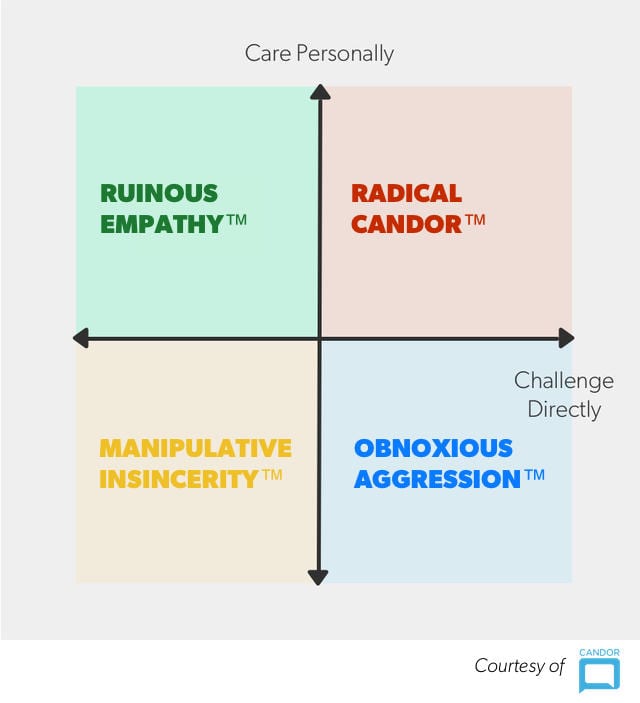
Hear us out on this: there’s nothing wrong with feelings. But, when you’re a new manager, it can be easy to care too much about them – and that can have disastrous results.
The radical candor framework created by Kim Scott warns against ruinous empathy: when someone is trying to be nice to spare someone else’s feelings.
At First Round’s recent CEO Summit, Kim talked about how ruinous empathy lead to the worst moment in her career:
“There was this guy who was working for me. We’ll call him Bob I really liked Bob. I really wanted to be nice to Bob. The problem was that Bob was absolutely terrible at his job. And he sort of knew it, and would come to me and say ‘oh, I’m worried,’ and I would try to reassure him and buck him up.”
10 months later. Kim realized that if she didn’t fire Bob, she was about to lose other employees as a result:
“Having tried to be nice to Bob for the last 10 months, having never criticized him because I was trying to be nice, I was now sitting in front of Bob firing him. And when I told him, Bob pushed his chair back, looked at me, and said, ‘Why didn’t you tell me?’”
Don’t avoid difficult conversations. That doesn’t mean you need to blindside your team every time there’s an issue – but delivering negative feedback is a skill that managers need to have. (Also, Radical Candor is a great guide for new managers looking to master the art of feedback!)
__________
That’s it! Steer clear of these five first-time manager mistakes to ensure that your transition to management is as successful as possible. If you’re looking for more advice, check out these lessons for first-time managers from 30 leaders. Remember: a little extra work at the beginning will mean smooth sailing long term. ⛵️
Spinach AI makes being a manager easier, more natural and fun
Next, here are some things you can do now that you've read this article:

 helps managers run better
Meetings edit_calendar
,
hit their
Goals flag
,
and share better
Performance feedback insights
, faster.
helps managers run better
Meetings edit_calendar
,
hit their
Goals flag
,
and share better
Performance feedback insights
, faster.